seats LINCOLN MKZ 2013 Owner's Manual
[x] Cancel search | Manufacturer: LINCOLN, Model Year: 2013, Model line: MKZ, Model: LINCOLN MKZ 2013Pages: 474, PDF Size: 3.79 MB
Page 52 of 474
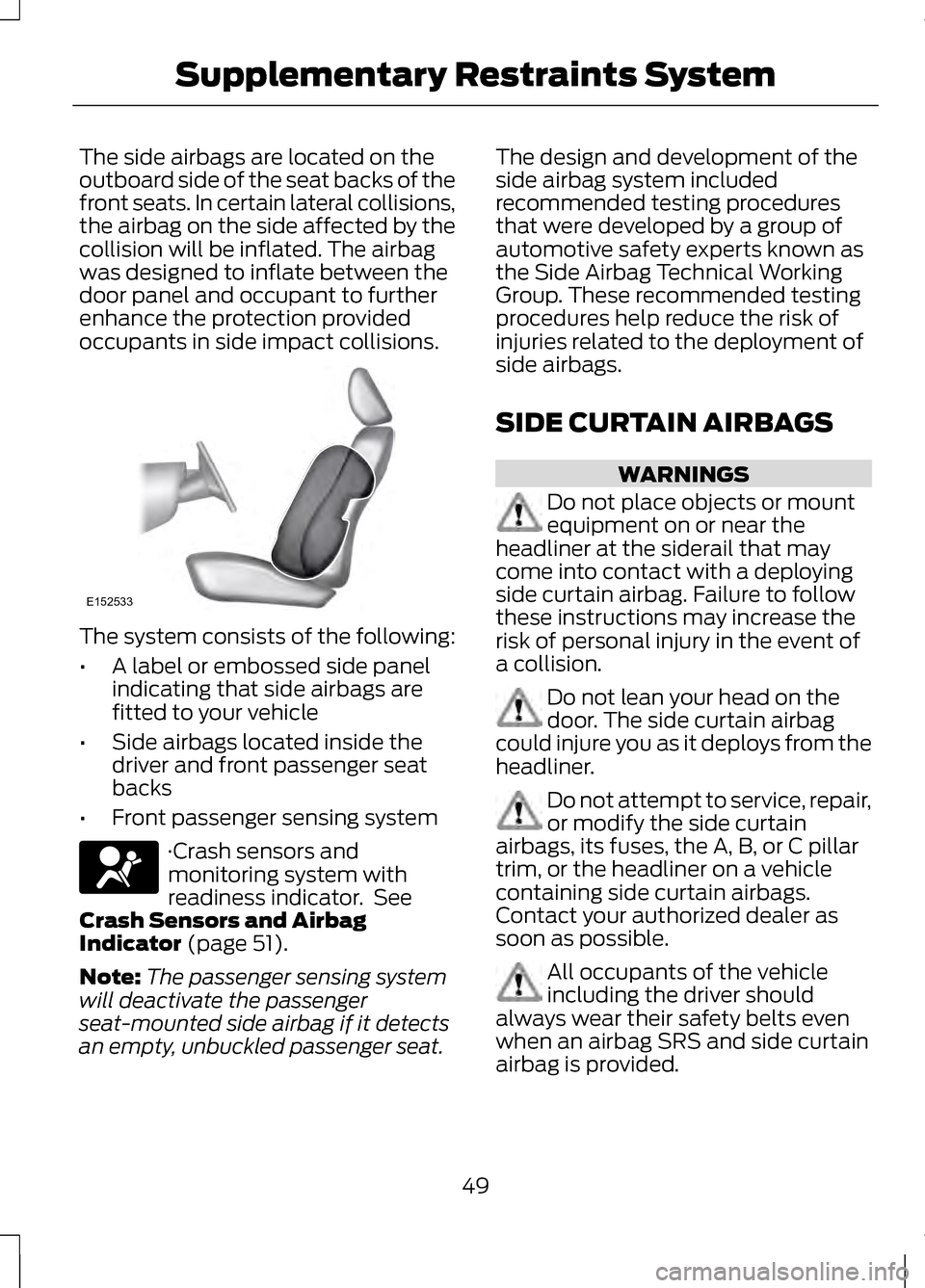
The side airbags are located on the
outboard side of the seat backs of the
front seats. In certain lateral collisions,
the airbag on the side affected by the
collision will be inflated. The airbag
was designed to inflate between the
door panel and occupant to further
enhance the protection provided
occupants in side impact collisions.
The system consists of the following:
•
A label or embossed side panel
indicating that side airbags are
fitted to your vehicle
• Side airbags located inside the
driver and front passenger seat
backs
• Front passenger sensing system ·Crash sensors and
monitoring system with
readiness indicator. See
Crash Sensors and Airbag
Indicator (page 51).
Note: The passenger sensing system
will deactivate the passenger
seat-mounted side airbag if it detects
an empty, unbuckled passenger seat. The design and development of the
side airbag system included
recommended testing procedures
that were developed by a group of
automotive safety experts known as
the Side Airbag Technical Working
Group. These recommended testing
procedures help reduce the risk of
injuries related to the deployment of
side airbags.
SIDE CURTAIN AIRBAGS
WARNINGS
Do not place objects or mount
equipment on or near the
headliner at the siderail that may
come into contact with a deploying
side curtain airbag. Failure to follow
these instructions may increase the
risk of personal injury in the event of
a collision. Do not lean your head on the
door. The side curtain airbag
could injure you as it deploys from the
headliner. Do not attempt to service, repair,
or modify the side curtain
airbags, its fuses, the A, B, or C pillar
trim, or the headliner on a vehicle
containing side curtain airbags.
Contact your authorized dealer as
soon as possible. All occupants of the vehicle
including the driver should
always wear their safety belts even
when an airbag SRS and side curtain
airbag is provided.
49
Supplementary Restraints SystemE152533
Page 53 of 474
WARNINGS
To reduce risk of injury, do not
obstruct or place objects in the
deployment path of the side curtain
airbag. If the side curtain airbags have
deployed, the side curtain
airbags will not function again. The
side curtain airbags (including the A,
B and C pillar trim and headliner)
must be inspected and serviced by an
authorized dealer. If the side curtain
airbag is not replaced, the unrepaired
area will increase the risk of injury in a
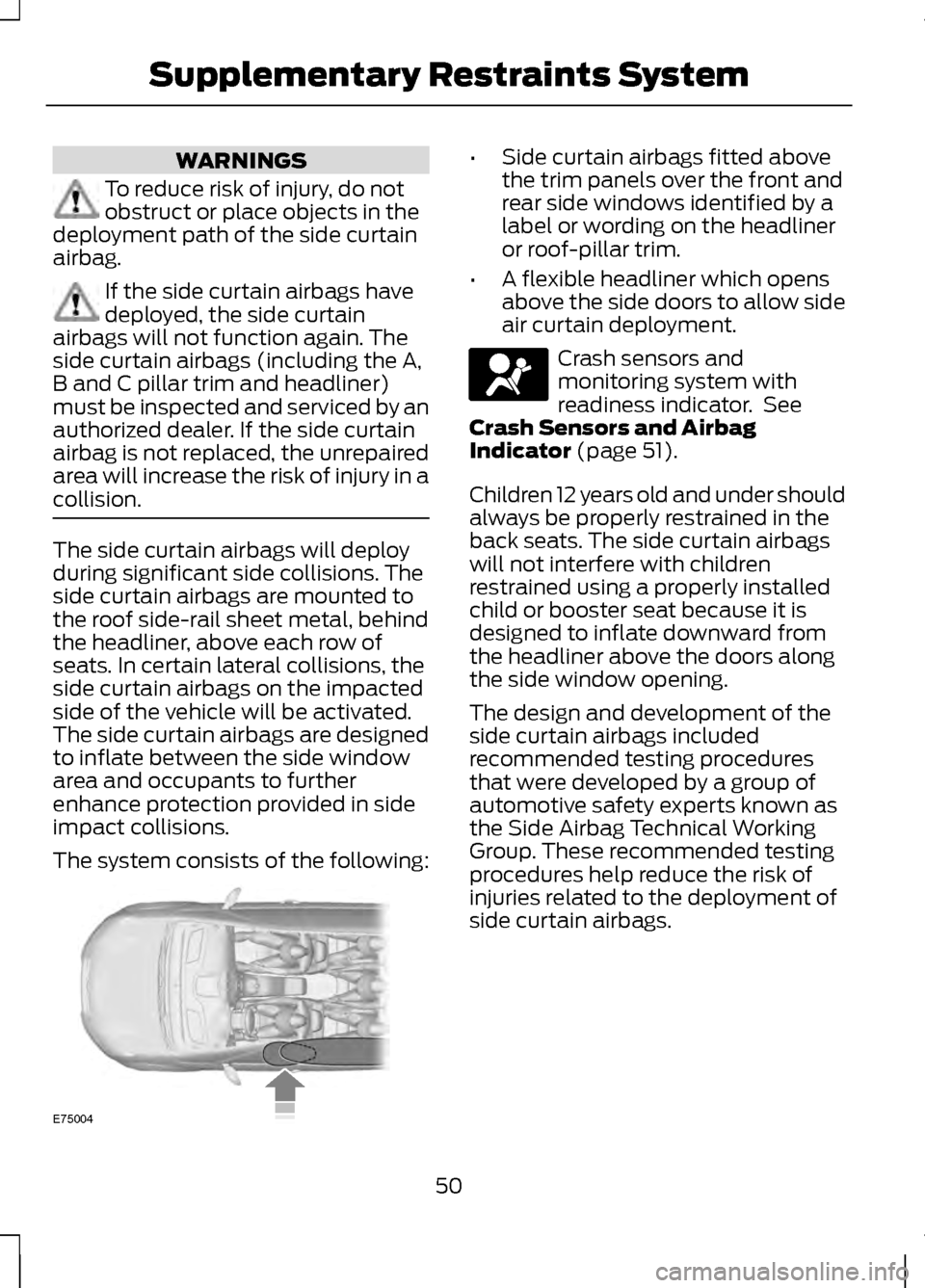
collision. The side curtain airbags will deploy
during significant side collisions. The
side curtain airbags are mounted to
the roof side-rail sheet metal, behind
the headliner, above each row of
seats. In certain lateral collisions, the
side curtain airbags on the impacted
side of the vehicle will be activated.
The side curtain airbags are designed
to inflate between the side window
area and occupants to further
enhance protection provided in side
impact collisions.
The system consists of the following: •
Side curtain airbags fitted above
the trim panels over the front and
rear side windows identified by a
label or wording on the headliner
or roof-pillar trim.
• A flexible headliner which opens
above the side doors to allow side
air curtain deployment. Crash sensors and
monitoring system with
readiness indicator. See
Crash Sensors and Airbag
Indicator (page 51).
Children 12 years old and under should
always be properly restrained in the
back seats. The side curtain airbags
will not interfere with children
restrained using a properly installed
child or booster seat because it is
designed to inflate downward from
the headliner above the doors along
the side window opening.
The design and development of the
side curtain airbags included
recommended testing procedures
that were developed by a group of
automotive safety experts known as
the Side Airbag Technical Working
Group. These recommended testing
procedures help reduce the risk of
injuries related to the deployment of
side curtain airbags.
50
Supplementary Restraints SystemE75004
Page 79 of 474
Memory Feature
The steering column positions are
saved when doing a memory set
function and can be recalled with the
memory feature. Refer to the Seats
chapter.
Pressing the adjustment control
during memory recall will cancel the
operation. The column will respond
to the adjustment control.
The steering column is designed to
set a stopping position just short of
the end of the column position to
prevent damage to the steering
column. A new stopping position will
be set if the steering column
encounters an object while tilting.
To reset the steering column to its
normal stopping position:
1. Press the steering column control
again after encountering the new
stopping position.
2. Continue pressing the control until
it reaches the end of the column
position.
A new stopping position will be set.
The steering column will stop just
short of the end of the column
position the next time it is tilted.
AUDIO CONTROL (IF EQUIPPED)
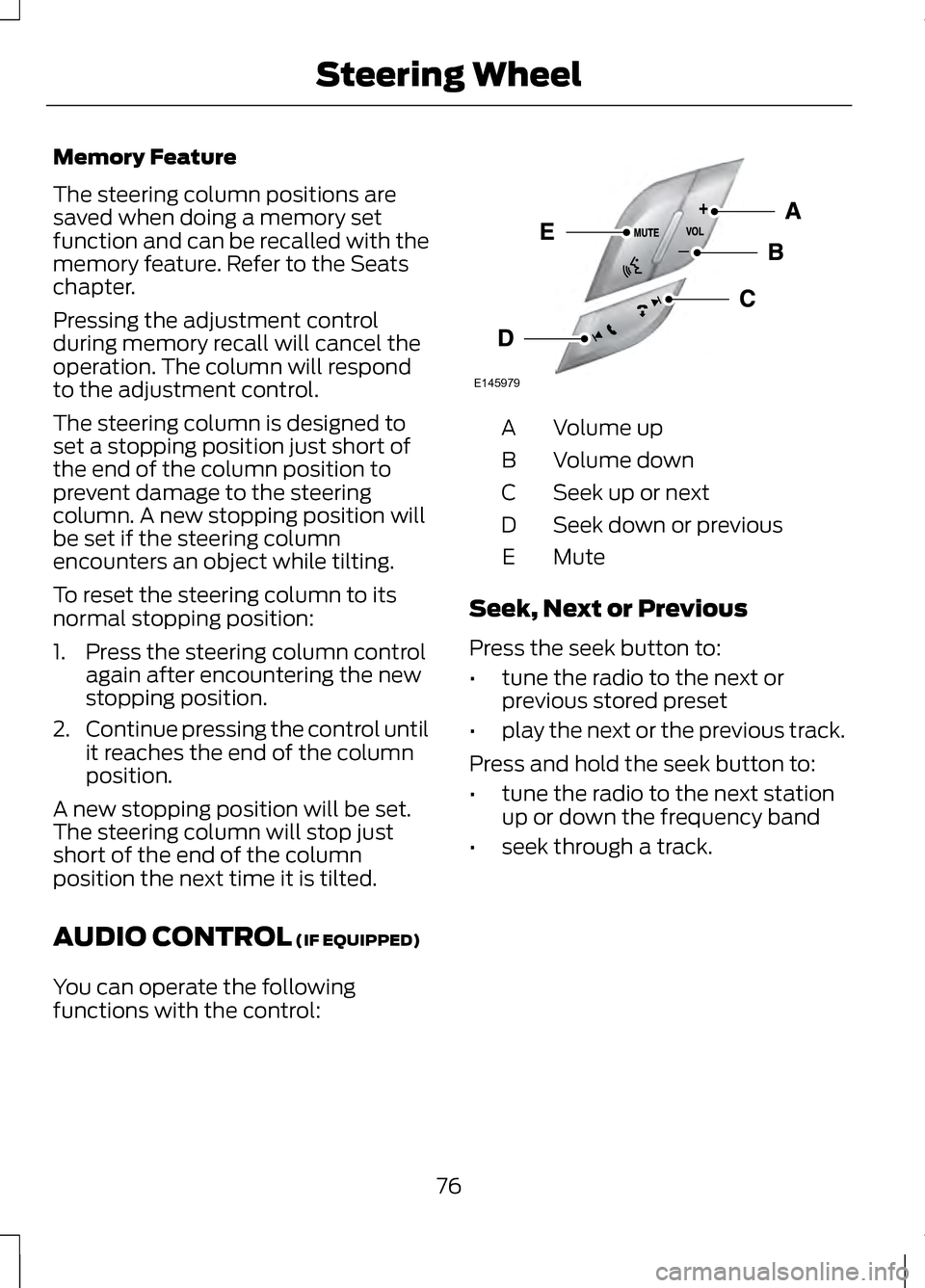
You can operate the following
functions with the control: Volume up
A
Volume down
B
Seek up or next
C
Seek down or previous
D
MuteE
Seek, Next or Previous
Press the seek button to:
• tune the radio to the next or
previous stored preset
• play the next or the previous track.
Press and hold the seek button to:
• tune the radio to the next station
up or down the frequency band
• seek through a track.
76
Steering WheelE145979
Page 107 of 474
Settings (cont’
d)
Auto
Climate Control
Remote Start
Vehicle
(cont’ d)
Last Settings
Auto
Seats and
Steering Wheel
Off
5 / 10 / 15 minutes
Duration
On / Off
System
On / Off
Remote Open
Windows
On / Off
Remote Close
On / Off
Courtesy Wipe
Wipers
On / Off
Rain Sensing
—
Hold OK to
Create MyKey
Create MyKey
MyKey
—
Always On / User
Selectable
911 Assist
—
Always On / User
Selectable
Traction Control
—
Choose desired
speed or off
Max Speed
—
Choose desired
speed or off
Speed Minder
—
On / Off
Volume Limiter
—
On / Off
Do Not Disturb
—
Hold OK to Clear
All MyKeys
Clear MyKeys
—
Choose your
applicable setting
Language
Display
104
Information Displays
Page 130 of 474
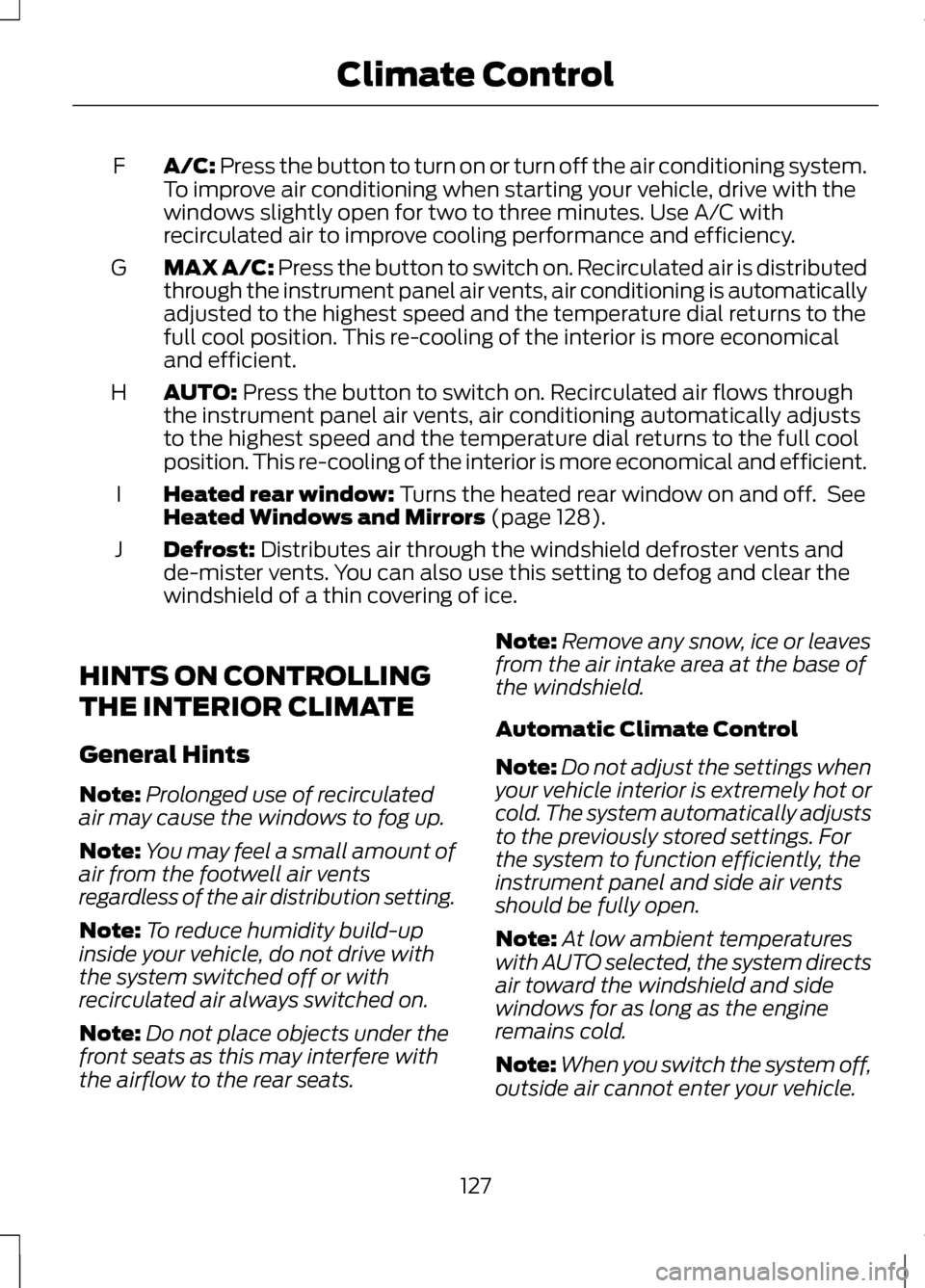
A/C: Press the button to turn on or turn off the air conditioning system.
To improve air conditioning when starting your vehicle, drive with the
windows slightly open for two to three minutes. Use A/C with
recirculated air to improve cooling performance and efficiency.
F
MAX A/C:
Press the button to switch on. Recirculated air is distributed
through the instrument panel air vents, air conditioning is automatically
adjusted to the highest speed and the temperature dial returns to the
full cool position. This re-cooling of the interior is more economical
and efficient.
G
AUTO:
Press the button to switch on. Recirculated air flows through
the instrument panel air vents, air conditioning automatically adjusts
to the highest speed and the temperature dial returns to the full cool
position. This re-cooling of the interior is more economical and efficient.
H
Heated rear window:
Turns the heated rear window on and off. See
Heated Windows and Mirrors (page 128).
I
Defrost:
Distributes air through the windshield defroster vents and
de-mister vents. You can also use this setting to defog and clear the
windshield of a thin covering of ice.
J
HINTS ON CONTROLLING
THE INTERIOR CLIMATE
General Hints
Note: Prolonged use of recirculated
air may cause the windows to fog up.
Note: You may feel a small amount of
air from the footwell air vents
regardless of the air distribution setting.
Note: To reduce humidity build-up
inside your vehicle, do not drive with
the system switched off or with
recirculated air always switched on.
Note: Do not place objects under the
front seats as this may interfere with
the airflow to the rear seats. Note:
Remove any snow, ice or leaves
from the air intake area at the base of
the windshield.
Automatic Climate Control
Note: Do not adjust the settings when
your vehicle interior is extremely hot or
cold. The system automatically adjusts
to the previously stored settings. For
the system to function efficiently, the
instrument panel and side air vents
should be fully open.
Note: At low ambient temperatures
with AUTO selected, the system directs
air toward the windshield and side
windows for as long as the engine
remains cold.
Note: When you switch the system off,
outside air cannot enter your vehicle.
127
Climate Control
Page 132 of 474
Both heated mirrors remove ice, mist
and fog when you switch on the
heated rear window.
CABIN AIR FILTER
Your vehicle is equipped with a cabin
air filter. It is located behind the glove
box.
The particulate filtration system
reduces the concentration of airborne
particles such as dust, spores and
pollen in the air supplied to the interior
of your vehicle.
Note:
To prevent foreign objects from
entering the system, make sure the
cabin air is in place at all times.
Running the system without a filter in
place could result in degradation or
damage to the system.
The particulate filtration system gives
you and your passengers the following
benefits:
• It improves your driving comfort by
reducing particle concentration.
• It improves the interior
compartment cleanliness.
• It protects the climate control
components from particle
deposits.
Replace the filter at regular intervals.
See Scheduled Maintenance (page
440).
For additional cabin air filter
information, or to replace the filter,
see an authorized dealer. REMOTE START
The climate control system adjusts
the cabin temperature during remote
start.
You cannot adjust the system during
remote start operation. Turn the
ignition on to return the system to its
previous settings. You can now make
adjustments. You need to turn certain
vehicle-dependent features back on,
such as:
•
heated seats
• cooled seats
• heated steering wheel
• heated mirrors
• heated rear window.
You can adjust the settings using the
information display controls.
See
Information Displays (page 100).
Automatic Settings
You can set the climate control to
operate in AUTO mode through the
information display setting: Remote
Start > Climate Control > Heater-A/C
> Auto. The climate control system
automatically sets the interior
temperature to 72°F (22°C).
In hot weather, the system is set to
72°F (22°C). Cooled seats are set to
high (if available, and selected to
AUTO in the information display).
In moderate weather, the system
either heats or cools (based on
previous settings). The rear defroster,
heated mirrors and heated/cooled
seats do not automatically turn on.
129
Climate Control
Page 133 of 474
In cold weather, the system is set to
72°F (22°C). The heated seats and
heated steering wheel are set to high
(if available, and selected to AUTO in
the information display). The rear
defroster and heated mirrors
automatically turn on.
Last Settings
You can set the climate control to
operate using the last climate control
settings through the information
display setting: Remote Start >
Climate Control > Heater
–A/C > Last
Settings. The climate control system
automatically uses the settings last
selected before turning off the vehicle.
Heated and Cooled Devices
The climate control system controls
other heated and cooled devices
inside the vehicle. These devices (if
available and selected to AUTO in the
information displays) may switch on
during remote start. Heated devices
typically switch on during cold
weather, and cooled devices during
hot weather.
130
Climate Control
Page 134 of 474
SITTING IN THE CORRECT
POSITION
WARNINGS
Sitting improperly, out of
position or with the seat back
reclined too far can take weight off
the seat cushion and affect the
decision of the passenger sensing
system, resulting in serious injury or
death in the event of a collision.
Always sit upright against your seat
back, with your feet on the floor. Do not recline the seat back as
this can cause the occupant to
slide under the safety belt, resulting
in serious injury in the event of a
collision. Do not place objects higher than
the seat back to reduce the risk
of serious injury in the event of a
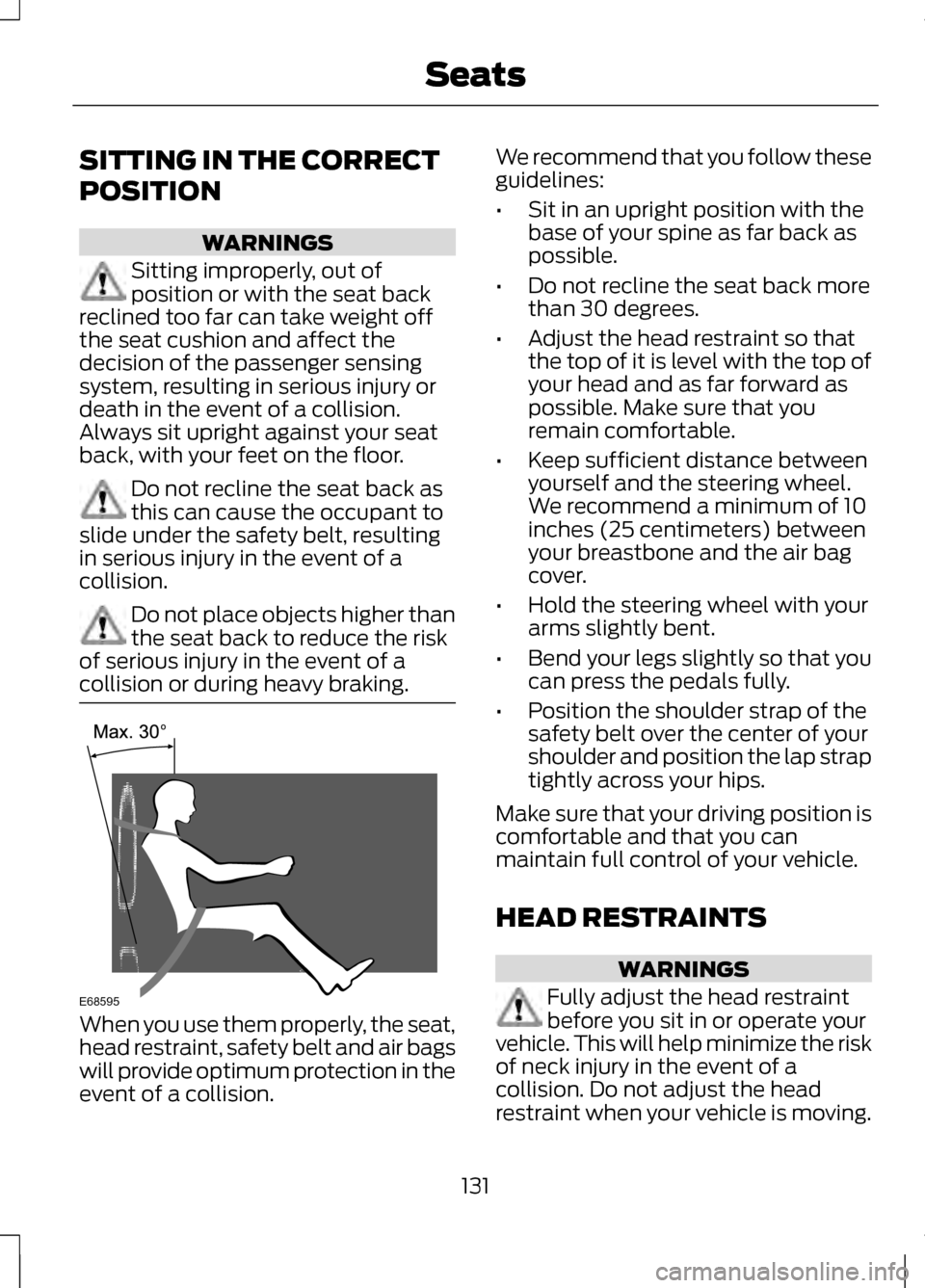
collision or during heavy braking. When you use them properly, the seat,
head restraint, safety belt and air bags
will provide optimum protection in the
event of a collision. We recommend that you follow these
guidelines:
•
Sit in an upright position with the
base of your spine as far back as
possible.
• Do not recline the seat back more
than 30 degrees.
• Adjust the head restraint so that
the top of it is level with the top of
your head and as far forward as
possible. Make sure that you
remain comfortable.
• Keep sufficient distance between
yourself and the steering wheel.
We recommend a minimum of 10
inches (25 centimeters) between
your breastbone and the air bag
cover.
• Hold the steering wheel with your
arms slightly bent.
• Bend your legs slightly so that you
can press the pedals fully.
• Position the shoulder strap of the
safety belt over the center of your
shoulder and position the lap strap
tightly across your hips.
Make sure that your driving position is
comfortable and that you can
maintain full control of your vehicle.
HEAD RESTRAINTS WARNINGS
Fully adjust the head restraint
before you sit in or operate your
vehicle. This will help minimize the risk
of neck injury in the event of a
collision. Do not adjust the head
restraint when your vehicle is moving.
131
SeatsE68595
Page 135 of 474
WARNINGS
The head restraint is a safety
device. Whenever possible it
should be installed and properly
adjusted when the seat is occupied. Install the head restraint properly
to help minimize the risk of neck
injury in the event of a collision. Note:
Adjust the seat back to an
upright driving position before adjusting
the head restraint. Adjust the head
restraint so that the top of it is level
with the top of your head and as far
forward as possible. Make sure that you
remain comfortable. If you are
extremely tall, adjust the head restraint
to its highest position.
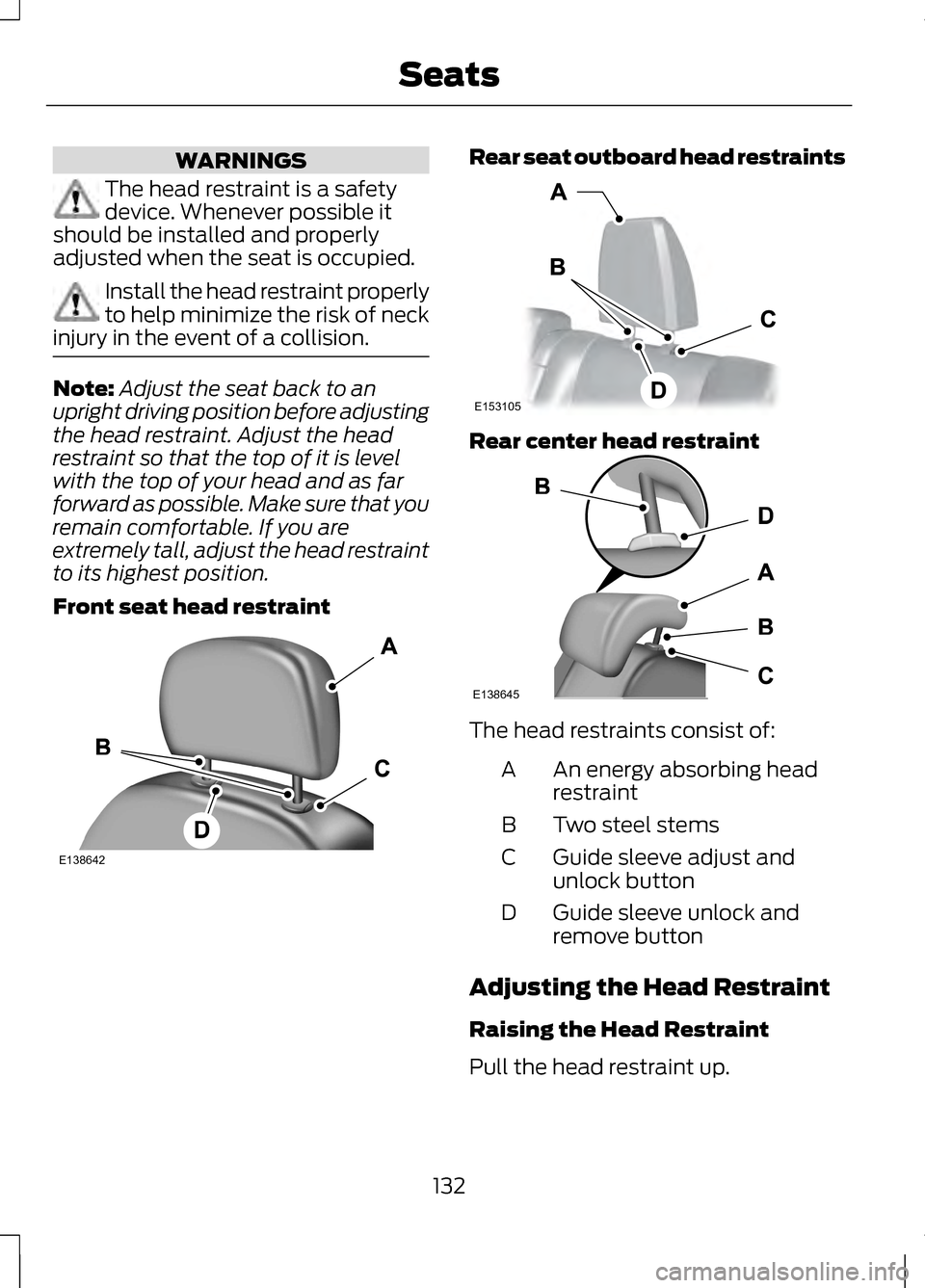
Front seat head restraint Rear seat outboard head restraints
Rear center head restraint
The head restraints consist of:
An energy absorbing head
restraint
A
Two steel stems
B
Guide sleeve adjust and
unlock button
C
Guide sleeve unlock and
remove button
D
Adjusting the Head Restraint
Raising the Head Restraint
Pull the head restraint up.
132
SeatsE138642 E153105 E138645
Page 136 of 474
Lowering the Head Restraint
1. Press and hold button C.
2. Push the head restraint down.
Removing the Head Restraint
1. Pull the head restraint up until it
reaches its highest position.
2. Press and hold buttons C and D.
3. Pull the head restraint up.
Installing the Head Restraint
Align the steel stems into the guide
sleeves and push the head restraint
down until it locks.
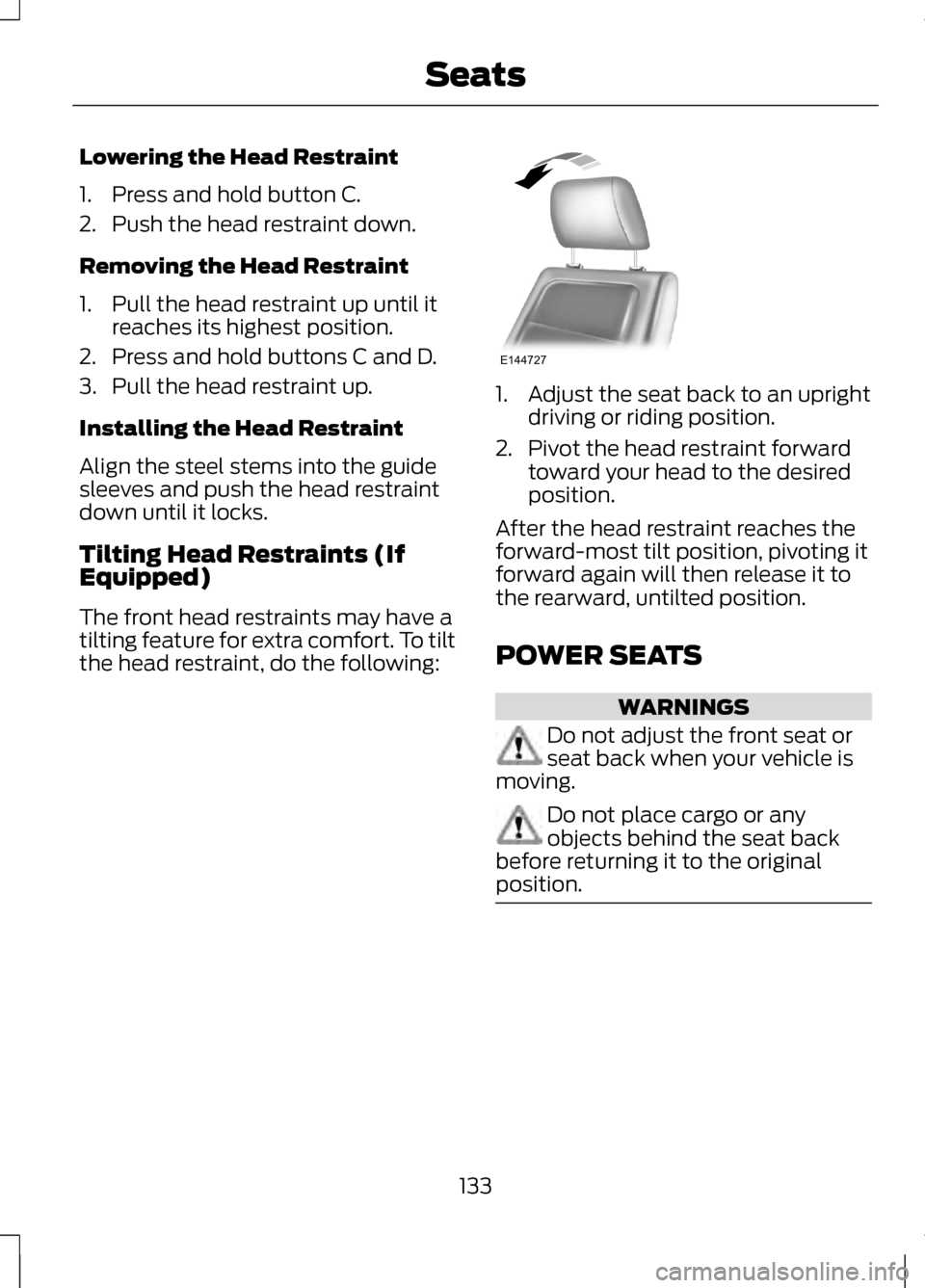
Tilting Head Restraints (If
Equipped)
The front head restraints may have a
tilting feature for extra comfort. To tilt
the head restraint, do the following: 1. Adjust the seat back to an upright
driving or riding position.
2. Pivot the head restraint forward toward your head to the desired
position.
After the head restraint reaches the
forward-most tilt position, pivoting it
forward again will then release it to
the rearward, untilted position.
POWER SEATS WARNINGS
Do not adjust the front seat or
seat back when your vehicle is
moving. Do not place cargo or any
objects behind the seat back
before returning it to the original
position. 133
SeatsE144727