lock LINCOLN MKZ 2013 Service Manual
[x] Cancel search | Manufacturer: LINCOLN, Model Year: 2013, Model line: MKZ, Model: LINCOLN MKZ 2013Pages: 474, PDF Size: 3.79 MB
Page 93 of 474
The image of the approaching vehicle
is small and near the inboard edge of
the main mirror when it is at a
distance. The image becomes larger
and begins to move outboard across
the main mirror as the vehicle
approaches (A). The image will
transition from the main mirror and
begin to appear in the blind spot
mirror as the vehicle approaches (B).
The vehicle will transition to your
peripheral field of view as it leaves the
blind spot mirror (C).
Blind Spot Monitor (If Equipped)
See
Blind Spot Monitor (page 212).
INTERIOR MIRROR WARNING
Do not adjust the mirror when
your vehicle is moving.
Note:
Do not clean the housing or
glass of any mirror with harsh
abrasives, fuel or other petroleum or
ammonia-based cleaning products.
You can adjust the interior mirror to
your preference. Some mirrors also
have a second pivot point. This lets
you move the mirror head up or down
and from side to side. Auto-Dimming Mirror
Note:
Do not block the sensors on the
front and back of the mirror. Mirror
performance may be affected. A rear
center passenger or raised rear center
head restraint may also block light
from reaching the sensor.
The mirror will dim automatically to
reduce glare when bright lights are
detected from behind your vehicle. It
will automatically return to normal
reflection when you select reverse
gear to make sure you have a clear
view when backing up.
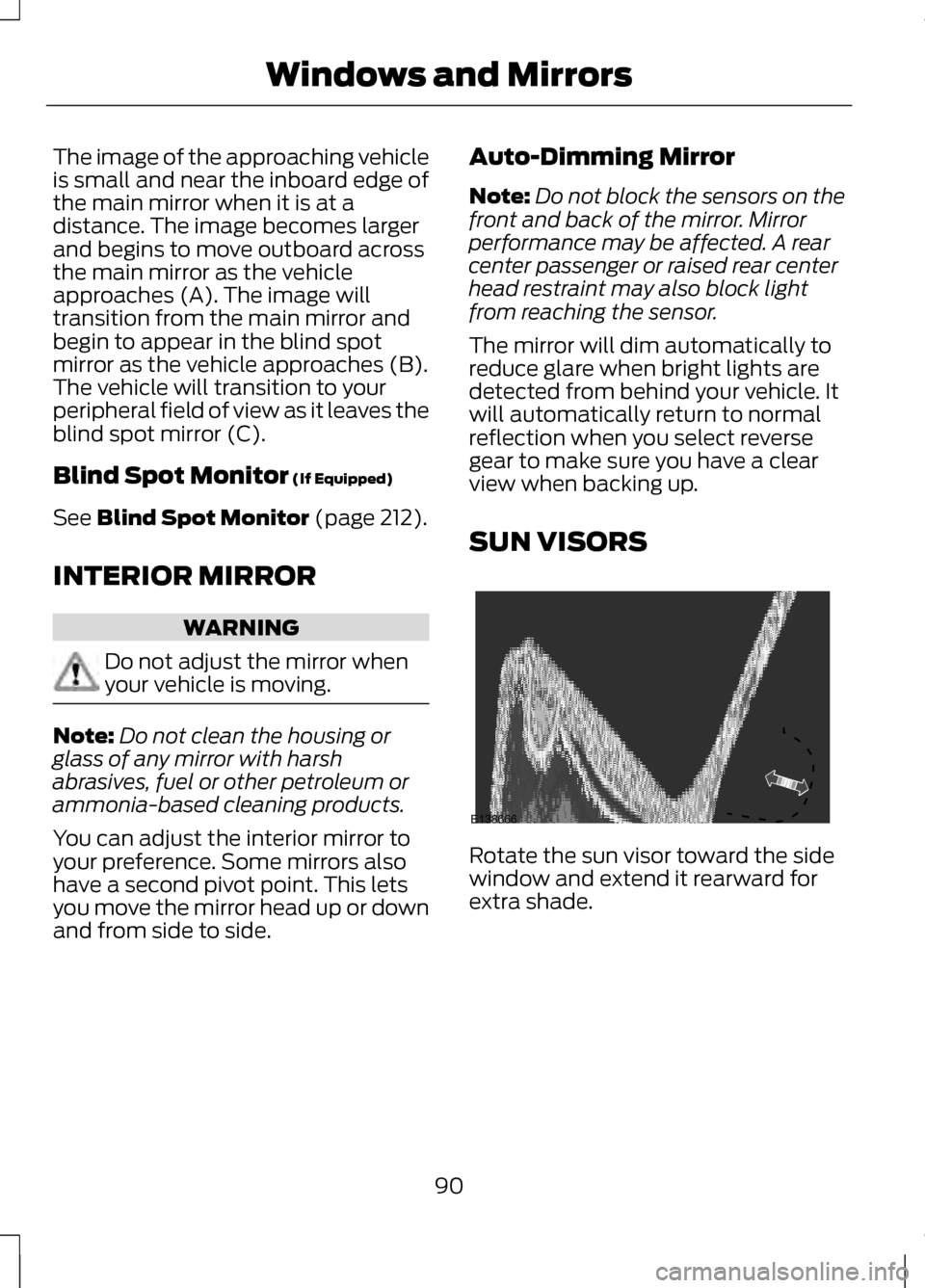
SUN VISORS Rotate the sun visor toward the side
window and extend it rearward for
extra shade.
90
Windows and MirrorsE138666
Page 99 of 474
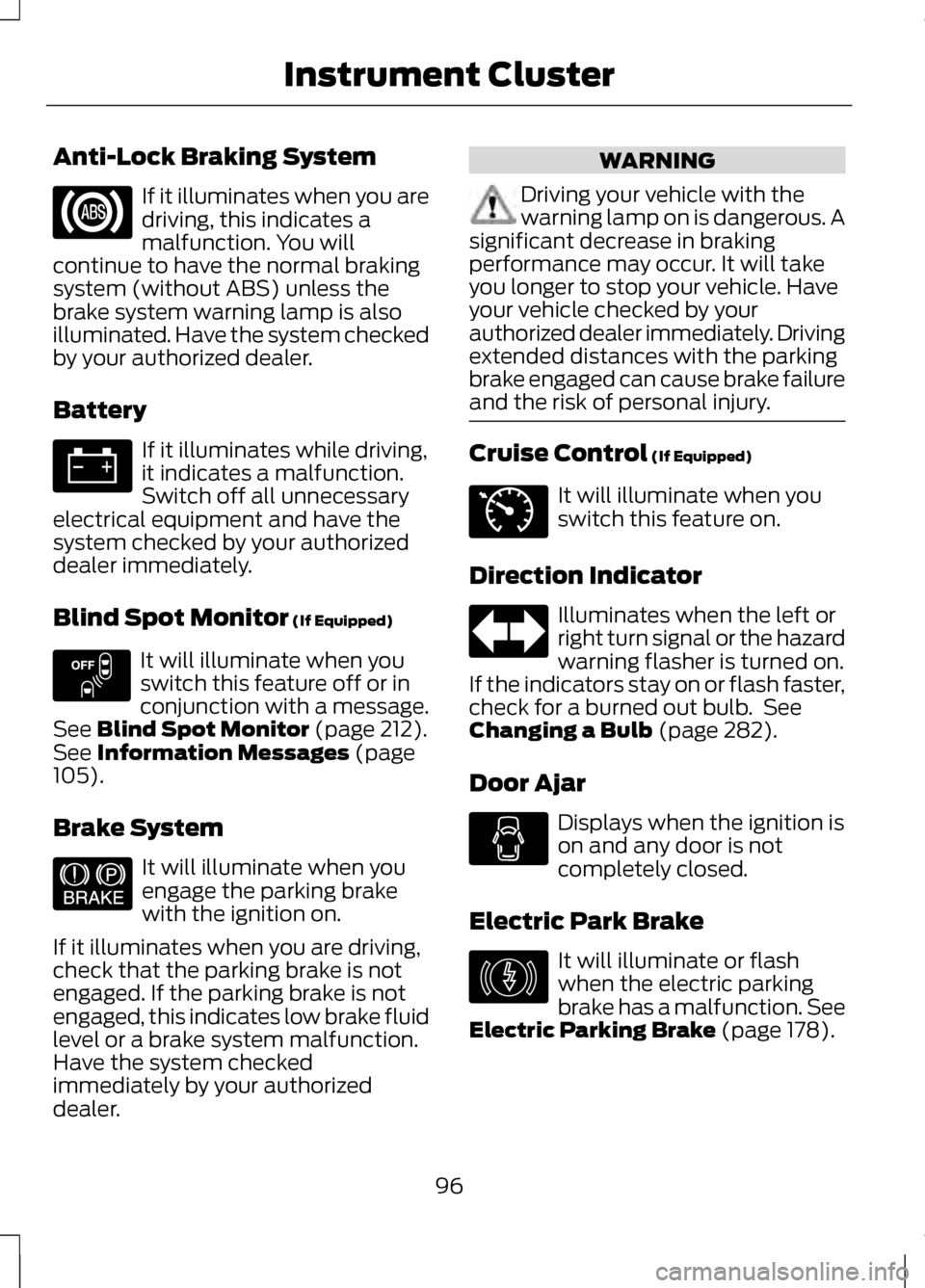
Anti-Lock Braking System
If it illuminates when you are
driving, this indicates a
malfunction. You will
continue to have the normal braking
system (without ABS) unless the
brake system warning lamp is also
illuminated. Have the system checked
by your authorized dealer.
Battery If it illuminates while driving,
it indicates a malfunction.
Switch off all unnecessary
electrical equipment and have the
system checked by your authorized
dealer immediately.
Blind Spot Monitor (If Equipped) It will illuminate when you
switch this feature off or in
conjunction with a message.
See
Blind Spot Monitor (page 212).
See Information Messages (page
105).
Brake System It will illuminate when you
engage the parking brake
with the ignition on.
If it illuminates when you are driving,
check that the parking brake is not
engaged. If the parking brake is not
engaged, this indicates low brake fluid
level or a brake system malfunction.
Have the system checked
immediately by your authorized
dealer. WARNING
Driving your vehicle with the
warning lamp on is dangerous. A
significant decrease in braking
performance may occur. It will take
you longer to stop your vehicle. Have
your vehicle checked by your
authorized dealer immediately. Driving
extended distances with the parking
brake engaged can cause brake failure
and the risk of personal injury. Cruise Control
(If Equipped)
It will illuminate when you
switch this feature on.
Direction Indicator Illuminates when the left or
right turn signal or the hazard
warning flasher is turned on.
If the indicators stay on or flash faster,
check for a burned out bulb. See
Changing a Bulb
(page 282).
Door Ajar Displays when the ignition is
on and any door is not
completely closed.
Electric Park Brake It will illuminate or flash
when the electric parking
brake has a malfunction. See
Electric Parking Brake
(page 178).
96
Instrument Cluster E151262 E144522 E71340 E146190
Page 106 of 474
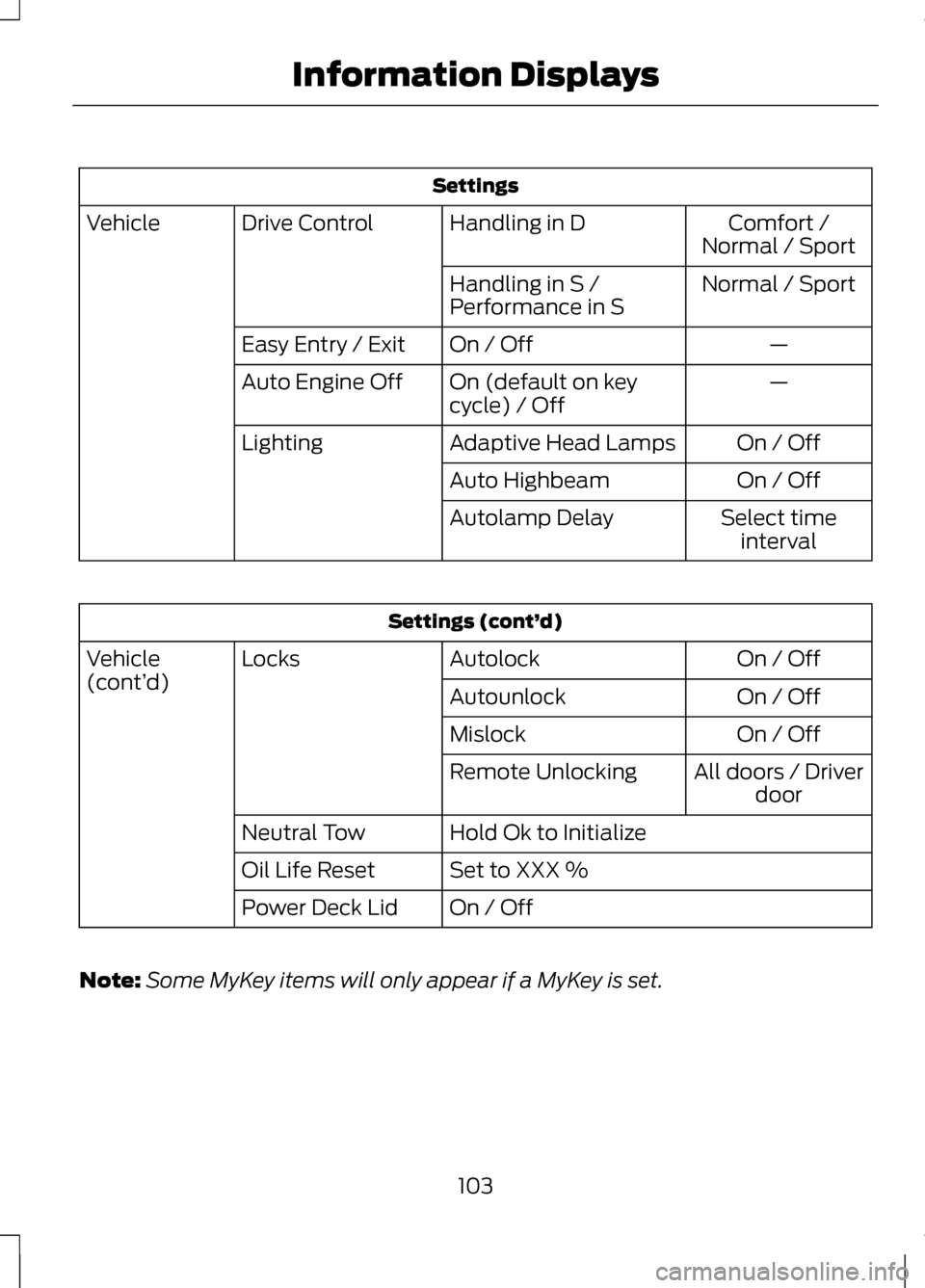
Settings
Comfort /
Normal / Sport
Handling in D
Drive Control
Vehicle
Normal / Sport
Handling in S /
Performance in S
—
On / Off
Easy Entry / Exit
—
On (default on key
cycle) / Off
Auto Engine Off
On / Off
Adaptive Head Lamps
Lighting
On / Off
Auto Highbeam
Select timeinterval
Autolamp Delay Settings (cont’
d)
On / Off
Autolock
Locks
Vehicle
(cont’ d)
On / Off
Autounlock
On / Off
Mislock
All doors / Driverdoor
Remote Unlocking
Hold Ok to Initialize
Neutral Tow
Set to XXX %
Oil Life Reset
On / Off
Power Deck Lid
Note: Some MyKey items will only appear if a MyKey is set.
103
Information Displays
Page 109 of 474
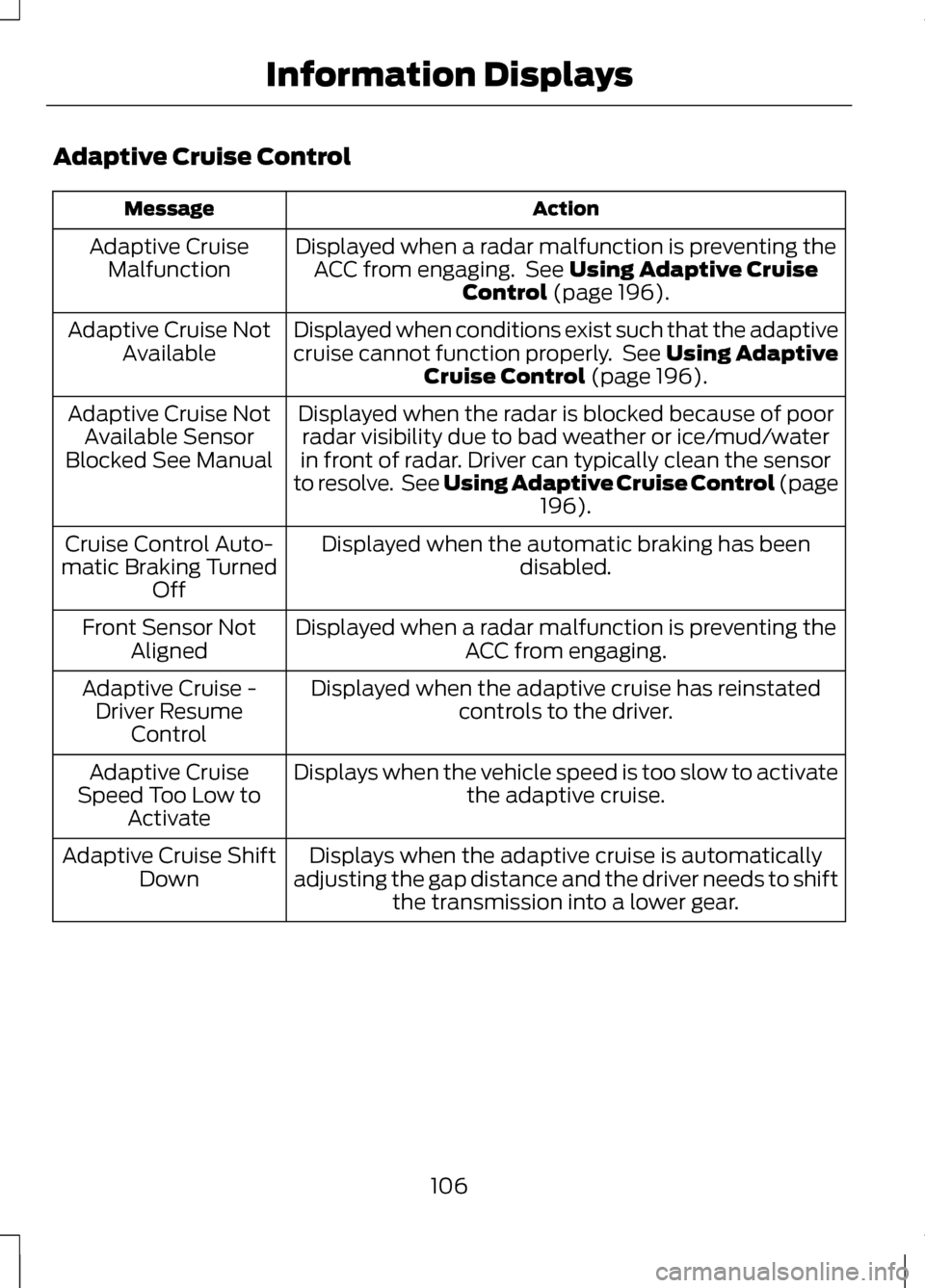
Adaptive Cruise Control
Action
Message
Displayed when a radar malfunction is preventing theACC from engaging. See Using Adaptive Cruise
Control (page 196).
Adaptive Cruise
Malfunction
Displayed when conditions exist such that the adaptive
cruise cannot function properly. See Using AdaptiveCruise Control
(page 196).
Adaptive Cruise Not
Available
Displayed when the radar is blocked because of poorradar visibility due to bad weather or ice/mud/water
in front of radar. Driver can typically clean the sensor
to resolve. See Using Adaptive Cruise Control
(page
196).
Adaptive Cruise Not
Available Sensor
Blocked See Manual
Displayed when the automatic braking has beendisabled.
Cruise Control Auto-
matic Braking Turned Off
Displayed when a radar malfunction is preventing the ACC from engaging.
Front Sensor Not
Aligned
Displayed when the adaptive cruise has reinstatedcontrols to the driver.
Adaptive Cruise -
Driver Resume Control
Displays when the vehicle speed is too slow to activate the adaptive cruise.
Adaptive Cruise
Speed Too Low to Activate
Displays when the adaptive cruise is automatically
adjusting the gap distance and the driver needs to shift the transmission into a lower gear.
Adaptive Cruise Shift
Down
106
Information Displays
Page 110 of 474
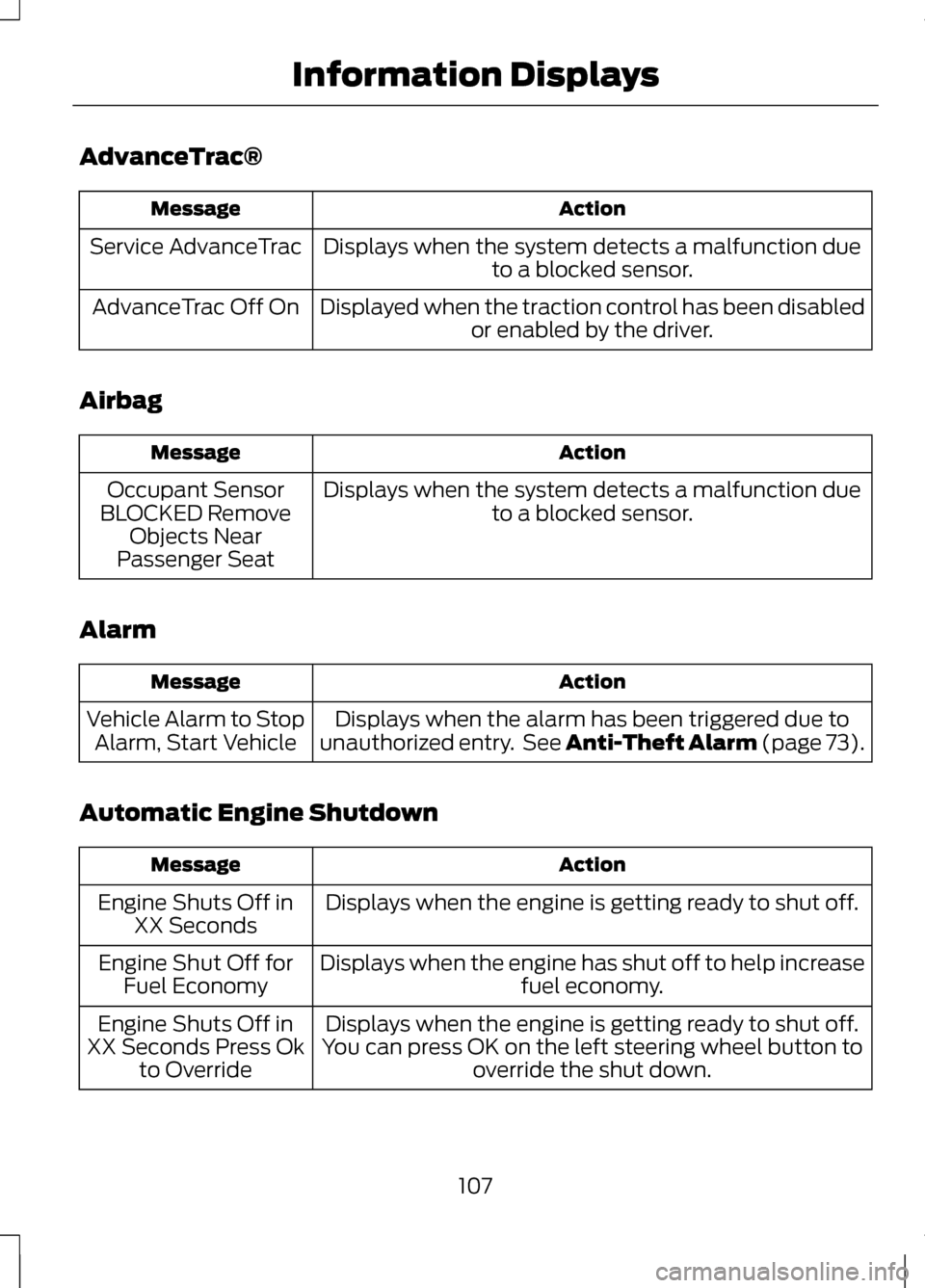
AdvanceTrac®
Action
Message
Displays when the system detects a malfunction dueto a blocked sensor.
Service AdvanceTrac
Displayed when the traction control has been disabledor enabled by the driver.
AdvanceTrac Off On
Airbag Action
Message
Displays when the system detects a malfunction dueto a blocked sensor.
Occupant Sensor
BLOCKED Remove Objects Near
Passenger Seat
Alarm Action
Message
Displays when the alarm has been triggered due to
unauthorized entry. See Anti-Theft Alarm (page 73).
Vehicle Alarm to Stop
Alarm, Start Vehicle
Automatic Engine Shutdown Action
Message
Displays when the engine is getting ready to shut off.
Engine Shuts Off in
XX Seconds
Displays when the engine has shut off to help increase fuel economy.
Engine Shut Off for
Fuel Economy
Displays when the engine is getting ready to shut off.
You can press OK on the left steering wheel button to override the shut down.
Engine Shuts Off in
XX Seconds Press Ok to Override
107
Information Displays
Page 113 of 474
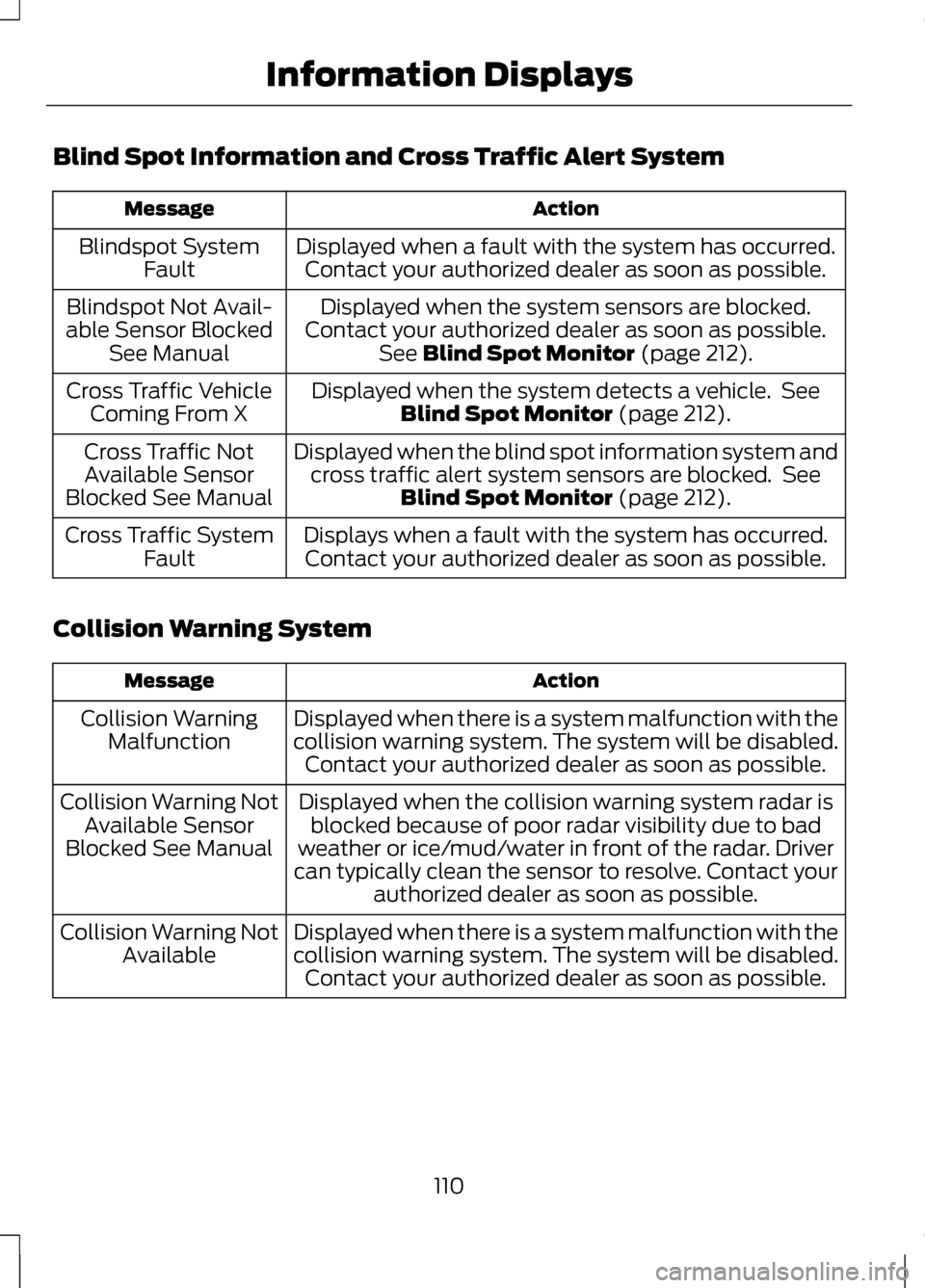
Blind Spot Information and Cross Traffic Alert System
Action
Message
Displayed when a fault with the system has occurred.Contact your authorized dealer as soon as possible.
Blindspot System
Fault
Displayed when the system sensors are blocked.
Contact your authorized dealer as soon as possible. See Blind Spot Monitor (page 212).
Blindspot Not Avail-
able Sensor Blocked See Manual
Displayed when the system detects a vehicle. SeeBlind Spot Monitor
(page 212).
Cross Traffic Vehicle
Coming From X
Displayed when the blind spot information system andcross traffic alert system sensors are blocked. See Blind Spot Monitor
(page 212).
Cross Traffic Not
Available Sensor
Blocked See Manual
Displays when a fault with the system has occurred.Contact your authorized dealer as soon as possible.
Cross Traffic System
Fault
Collision Warning System Action
Message
Displayed when there is a system malfunction with the
collision warning system. The system will be disabled.Contact your authorized dealer as soon as possible.
Collision Warning
Malfunction
Displayed when the collision warning system radar isblocked because of poor radar visibility due to bad
weather or ice/mud/water in front of the radar. Driver
can typically clean the sensor to resolve. Contact your authorized dealer as soon as possible.
Collision Warning Not
Available Sensor
Blocked See Manual
Displayed when there is a system malfunction with the
collision warning system. The system will be disabled.Contact your authorized dealer as soon as possible.
Collision Warning Not
Available
110
Information Displays
Page 114 of 474
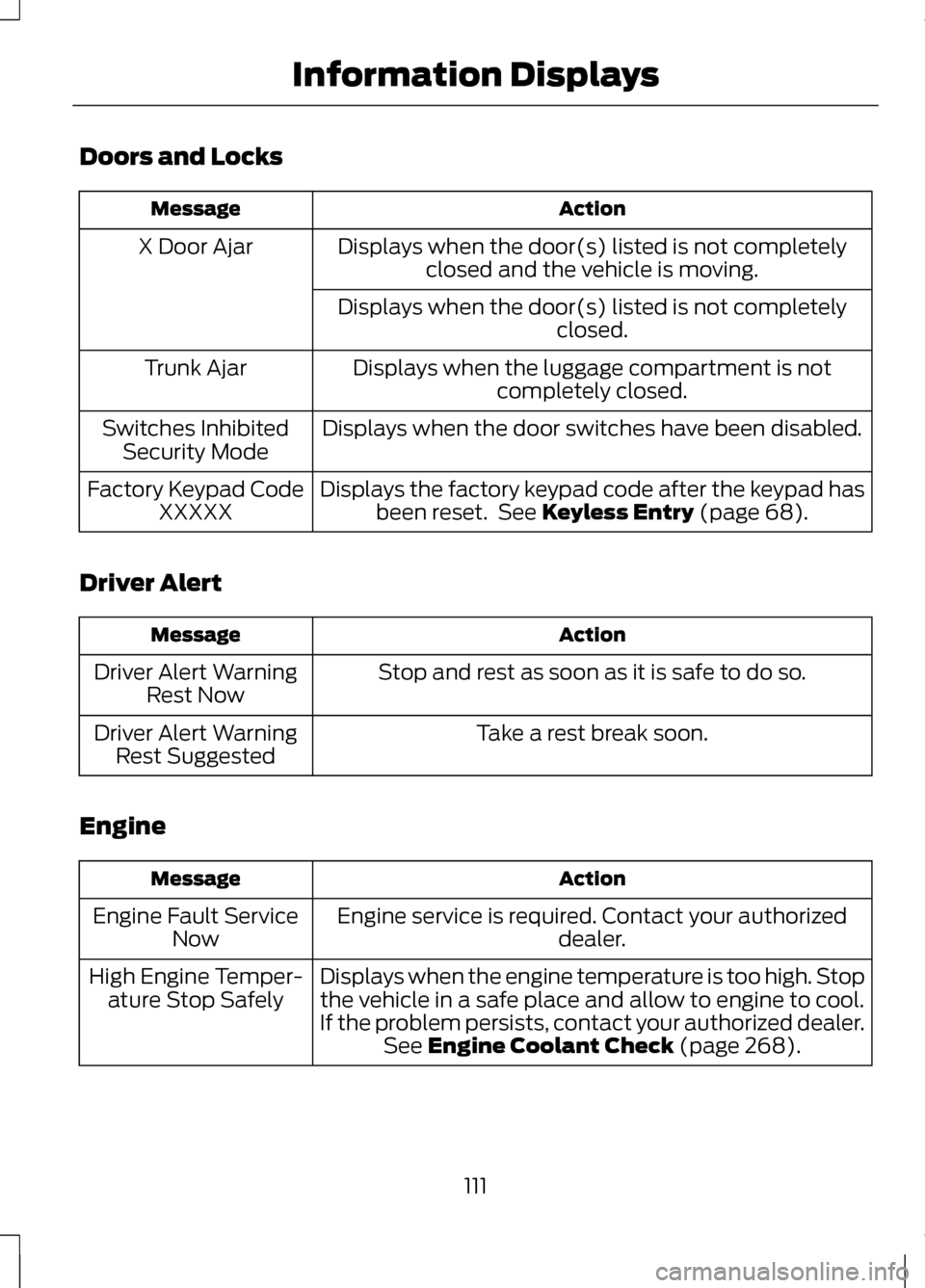
Doors and Locks
Action
Message
Displays when the door(s) listed is not completelyclosed and the vehicle is moving.
X Door Ajar
Displays when the door(s) listed is not completely closed.
Displays when the luggage compartment is not completely closed.
Trunk Ajar
Displays when the door switches have been disabled.
Switches Inhibited
Security Mode
Displays the factory keypad code after the keypad hasbeen reset. See Keyless Entry (page 68).
Factory Keypad Code
XXXXX
Driver Alert Action
Message
Stop and rest as soon as it is safe to do so.
Driver Alert Warning
Rest Now
Take a rest break soon.
Driver Alert Warning
Rest Suggested
Engine Action
Message
Engine service is required. Contact your authorized dealer.
Engine Fault Service
Now
Displays when the engine temperature is too high. Stopthe vehicle in a safe place and allow to engine to cool.
If the problem persists, contact your authorized dealer. See
Engine Coolant Check (page 268).
High Engine Temper-
ature Stop Safely
111
Information Displays
Page 123 of 474
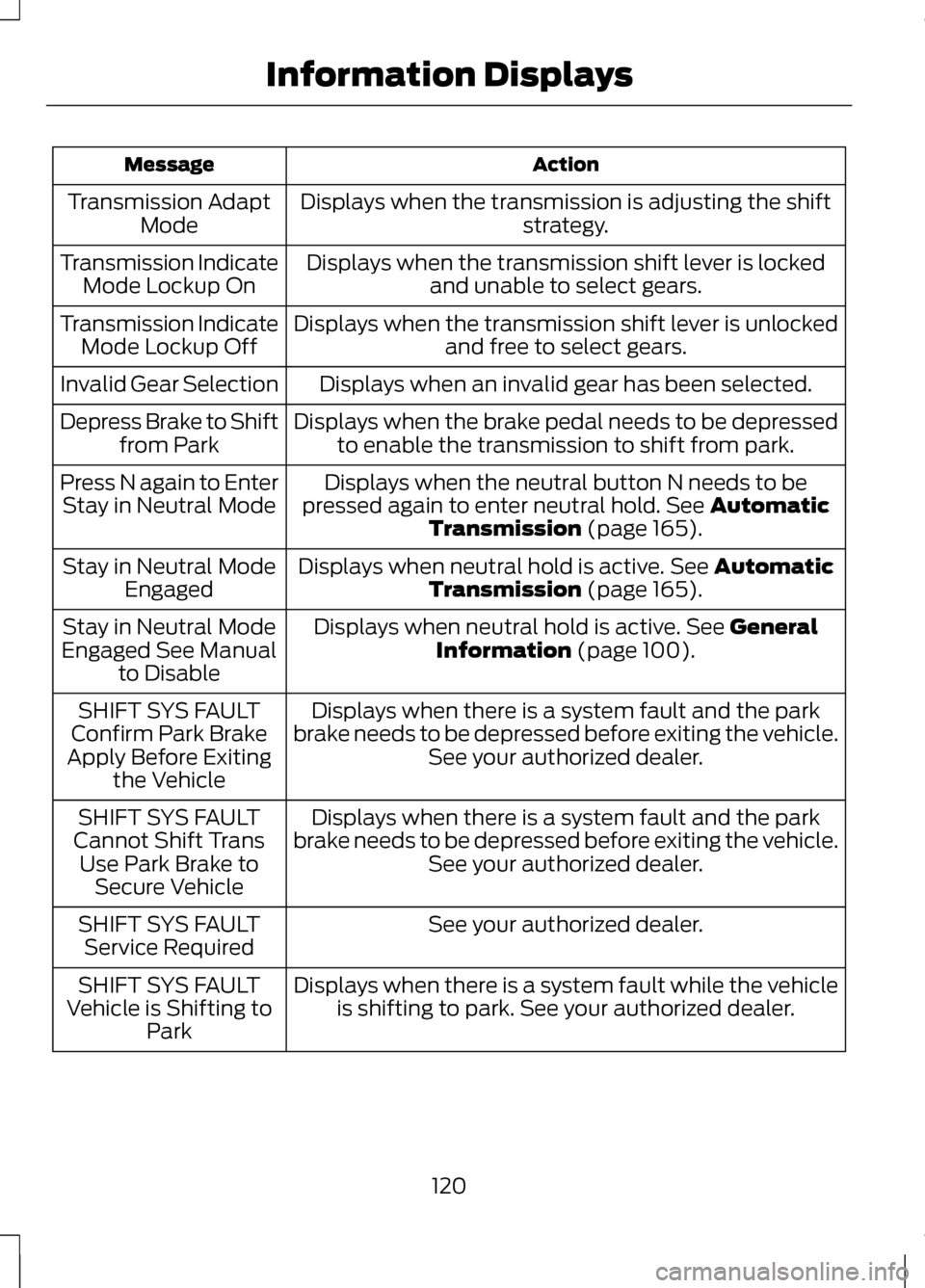
Action
Message
Displays when the transmission is adjusting the shift strategy.
Transmission Adapt
Mode
Displays when the transmission shift lever is lockedand unable to select gears.
Transmission Indicate
Mode Lockup On
Displays when the transmission shift lever is unlockedand free to select gears.
Transmission Indicate
Mode Lockup Off
Displays when an invalid gear has been selected.
Invalid Gear Selection
Displays when the brake pedal needs to be depressedto enable the transmission to shift from park.
Depress Brake to Shift
from Park
Displays when the neutral button N needs to be
pressed again to enter neutral hold. See Automatic
Transmission (page 165).
Press N again to Enter
Stay in Neutral Mode
Displays when neutral hold is active.
See Automatic
Transmission (page 165).
Stay in Neutral Mode
Engaged
Displays when neutral hold is active.
See General
Information (page 100).
Stay in Neutral Mode
Engaged See Manual to Disable
Displays when there is a system fault and the park
brake needs to be depressed before exiting the vehicle. See your authorized dealer.
SHIFT SYS FAULT
Confirm Park Brake
Apply Before Exiting the Vehicle
Displays when there is a system fault and the park
brake needs to be depressed before exiting the vehicle. See your authorized dealer.
SHIFT SYS FAULT
Cannot Shift Trans Use Park Brake to Secure Vehicle
See your authorized dealer.
SHIFT SYS FAULT
Service Required
Displays when there is a system fault while the vehicleis shifting to park. See your authorized dealer.
SHIFT SYS FAULT
Vehicle is Shifting to Park
120
Information Displays
Page 135 of 474
WARNINGS
The head restraint is a safety
device. Whenever possible it
should be installed and properly
adjusted when the seat is occupied. Install the head restraint properly
to help minimize the risk of neck
injury in the event of a collision. Note:
Adjust the seat back to an
upright driving position before adjusting
the head restraint. Adjust the head
restraint so that the top of it is level
with the top of your head and as far
forward as possible. Make sure that you
remain comfortable. If you are
extremely tall, adjust the head restraint
to its highest position.
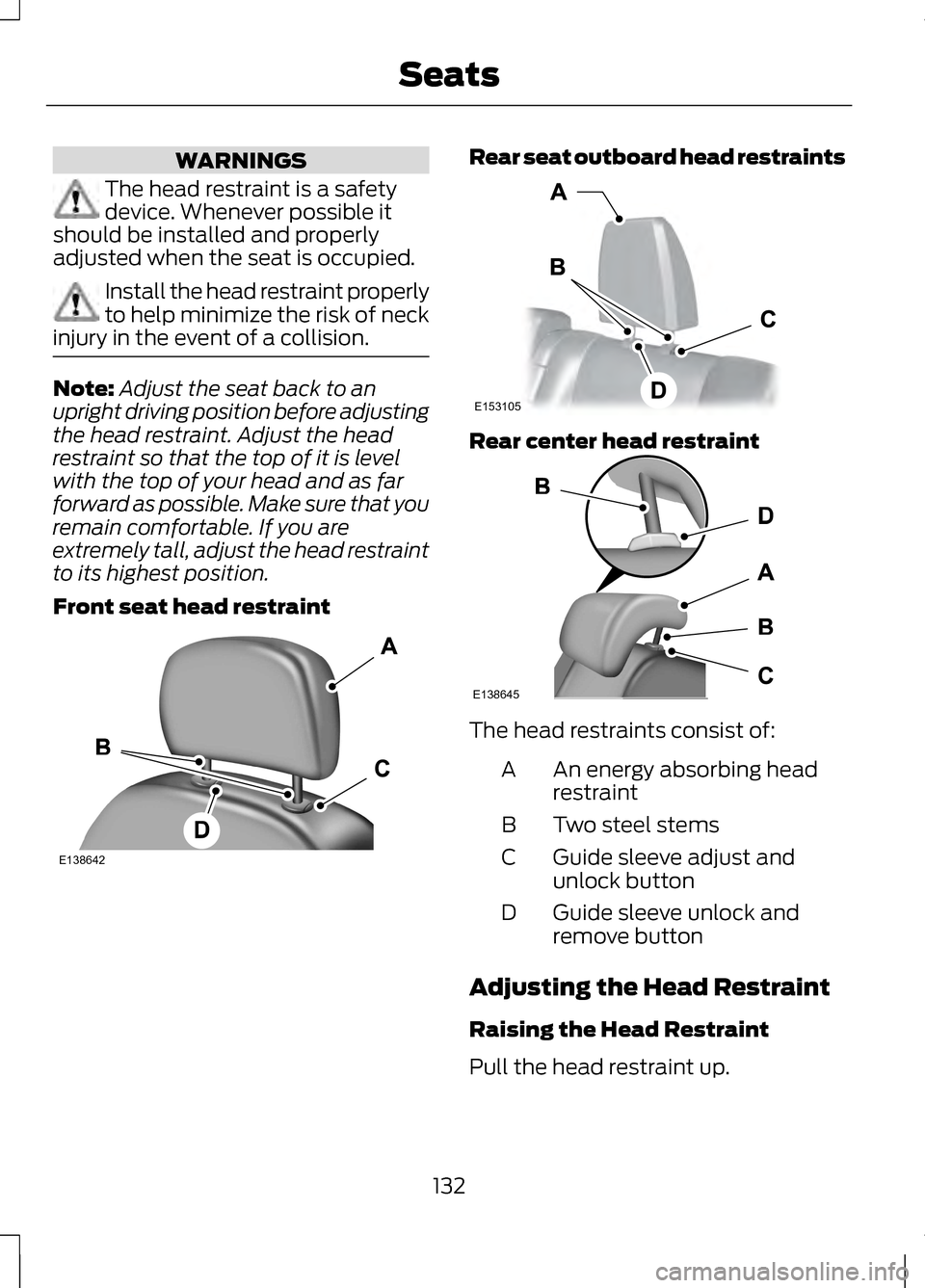
Front seat head restraint Rear seat outboard head restraints
Rear center head restraint
The head restraints consist of:
An energy absorbing head
restraint
A
Two steel stems
B
Guide sleeve adjust and
unlock button
C
Guide sleeve unlock and
remove button
D
Adjusting the Head Restraint
Raising the Head Restraint
Pull the head restraint up.
132
SeatsE138642 E153105 E138645
Page 136 of 474
Lowering the Head Restraint
1. Press and hold button C.
2. Push the head restraint down.
Removing the Head Restraint
1. Pull the head restraint up until it
reaches its highest position.
2. Press and hold buttons C and D.
3. Pull the head restraint up.
Installing the Head Restraint
Align the steel stems into the guide
sleeves and push the head restraint
down until it locks.
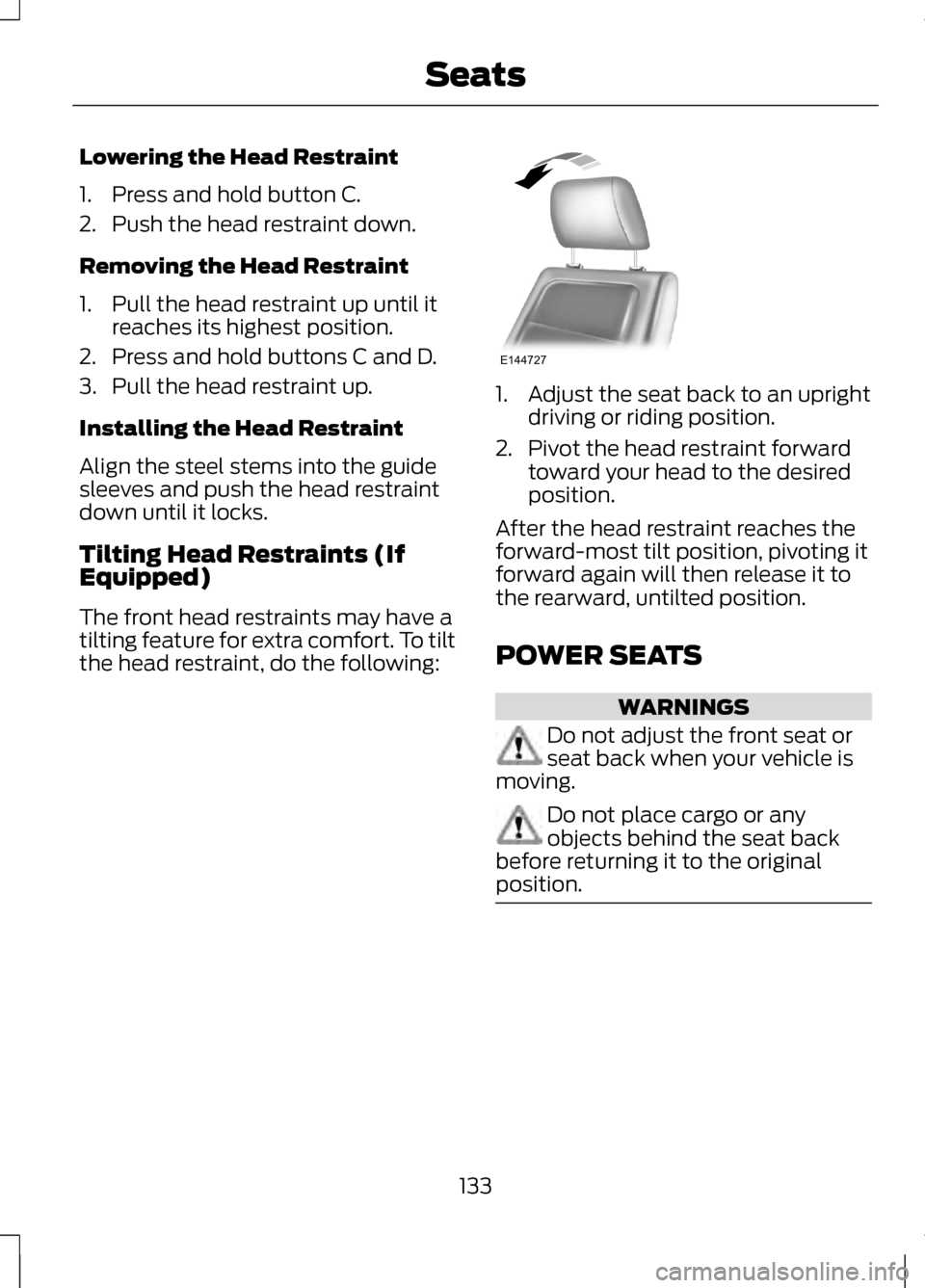
Tilting Head Restraints (If
Equipped)
The front head restraints may have a
tilting feature for extra comfort. To tilt
the head restraint, do the following: 1. Adjust the seat back to an upright
driving or riding position.
2. Pivot the head restraint forward toward your head to the desired
position.
After the head restraint reaches the
forward-most tilt position, pivoting it
forward again will then release it to
the rearward, untilted position.
POWER SEATS WARNINGS
Do not adjust the front seat or
seat back when your vehicle is
moving. Do not place cargo or any
objects behind the seat back
before returning it to the original
position. 133
SeatsE144727