steering LINCOLN MKZ 2013 Repair Manual
[x] Cancel search | Manufacturer: LINCOLN, Model Year: 2013, Model line: MKZ, Model: LINCOLN MKZ 2013Pages: 474, PDF Size: 3.79 MB
Page 394 of 474
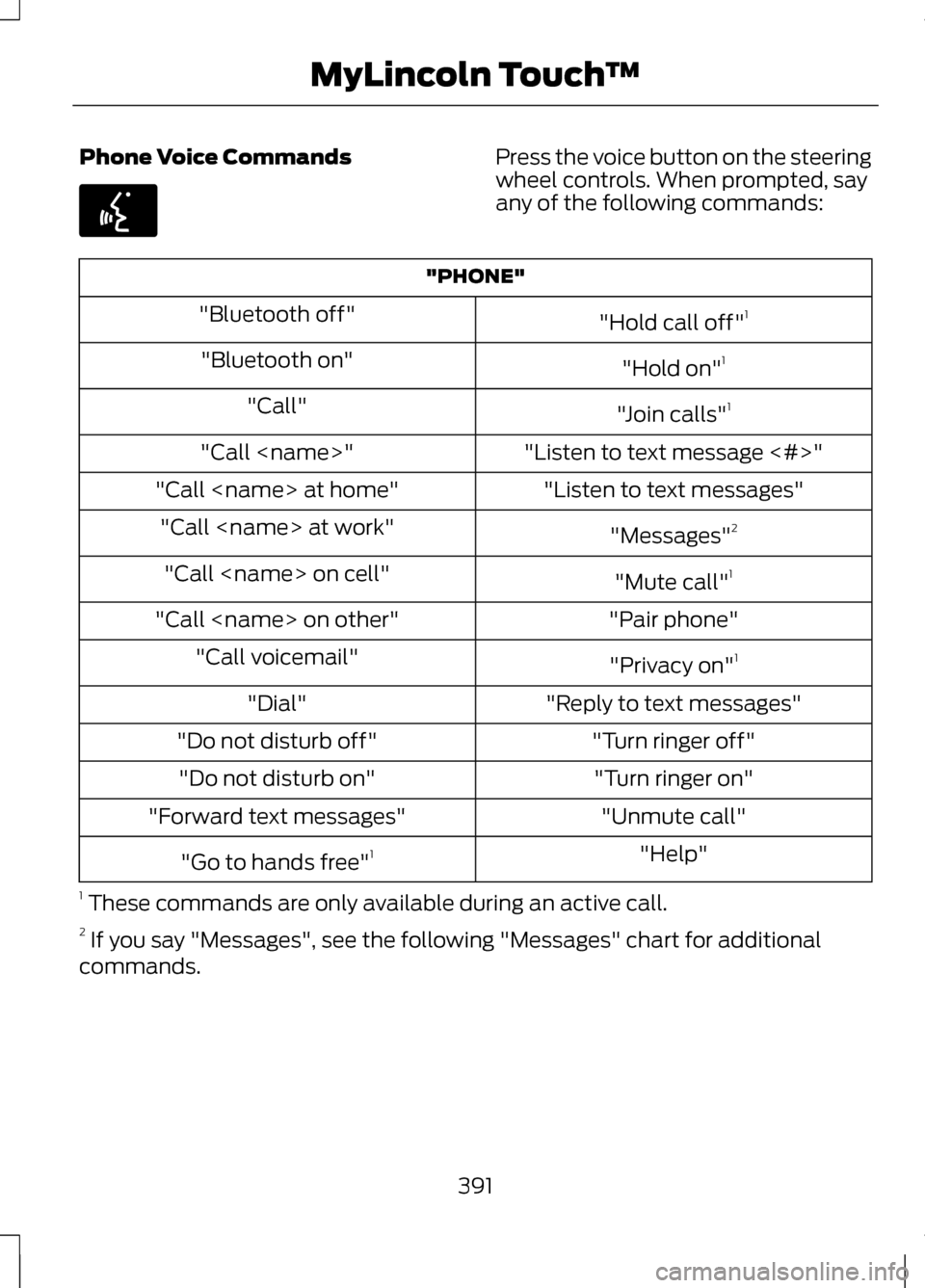
Phone Voice Commands Press the voice button on the steering
wheel controls. When prompted, say
any of the following commands:
"PHONE"
"Hold call off"1
"Bluetooth off"
"Hold on"1
"Bluetooth on"
"Join calls"1
"Call"
"Listen to text message <#>"
"Call
"Listen to text messages"
"Call
"Messages"2
"Call
"Mute call"1
"Call
"Pair phone"
"Call
"Privacy on"1
"Call voicemail"
"Reply to text messages"
"Dial"
"Turn ringer off"
"Do not disturb off"
"Turn ringer on"
"Do not disturb on"
"Unmute call"
"Forward text messages"
"Help"
"Go to hands free" 1
1 These commands are only available during an active call.
2 If you say "Messages", see the following "Messages" chart for additional
commands.
391
MyLincoln Touch
™E142599
Page 397 of 474
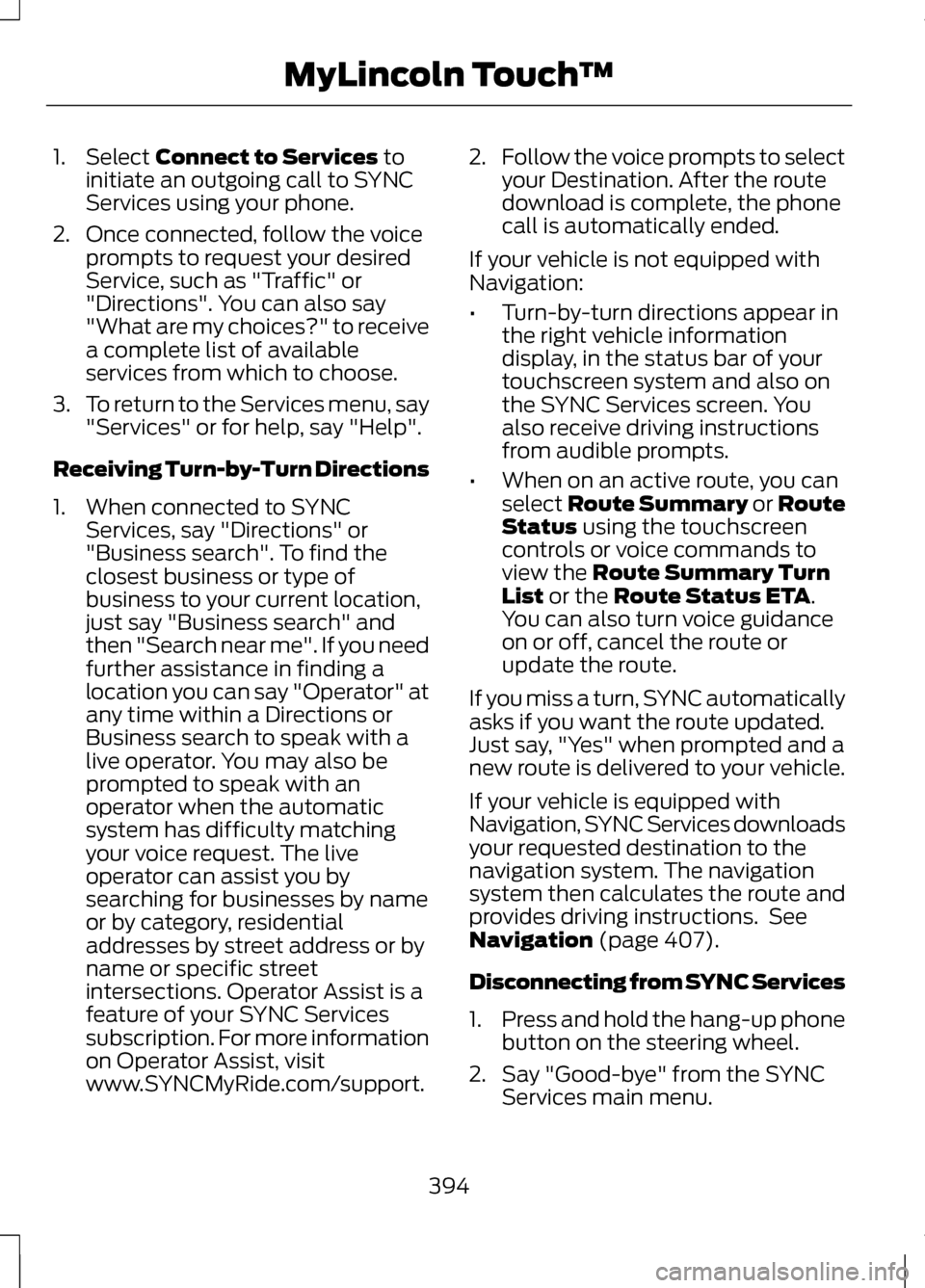
1. Select Connect to Services to
initiate an outgoing call to SYNC
Services using your phone.
2. Once connected, follow the voice prompts to request your desired
Service, such as "Traffic" or
"Directions". You can also say
"What are my choices?" to receive
a complete list of available
services from which to choose.
3. To return to the Services menu, say
"Services" or for help, say "Help".
Receiving Turn-by-Turn Directions
1. When connected to SYNC Services, say "Directions" or
"Business search". To find the
closest business or type of
business to your current location,
just say "Business search" and
then "Search near me". If you need
further assistance in finding a
location you can say "Operator" at
any time within a Directions or
Business search to speak with a
live operator. You may also be
prompted to speak with an
operator when the automatic
system has difficulty matching
your voice request. The live
operator can assist you by
searching for businesses by name
or by category, residential
addresses by street address or by
name or specific street
intersections. Operator Assist is a
feature of your SYNC Services
subscription. For more information
on Operator Assist, visit
www.SYNCMyRide.com/support. 2.
Follow the voice prompts to select
your Destination. After the route
download is complete, the phone
call is automatically ended.
If your vehicle is not equipped with
Navigation:
• Turn-by-turn directions appear in
the right vehicle information
display, in the status bar of your
touchscreen system and also on
the SYNC Services screen. You
also receive driving instructions
from audible prompts.
• When on an active route, you can
select Route Summary or Route
Status
using the touchscreen
controls or voice commands to
view the
Route Summary Turn
List or the Route Status ETA.
You can also turn voice guidance
on or off, cancel the route or
update the route.
If you miss a turn, SYNC automatically
asks if you want the route updated.
Just say, "Yes" when prompted and a
new route is delivered to your vehicle.
If your vehicle is equipped with
Navigation, SYNC Services downloads
your requested destination to the
navigation system. The navigation
system then calculates the route and
provides driving instructions. See
Navigation
(page 407).
Disconnecting from SYNC Services
1. Press and hold the hang-up phone
button on the steering wheel.
2. Say "Good-bye" from the SYNC Services main menu.
394
MyLincoln Touch
™
Page 398 of 474
SYNC Services Quick Tips
You can personalize your Services feature to provide
quicker access to your most used or favorite
information. You can save address points, such as
work or home. You can also save favorite informa-
tion like sports teams, such as Detroit Lions, or a
news category. To learn more, log onto
www.SYNCMyRide.com.
Personalizing
Press the voice button at any time (while you are
connected to SYNC TDI Services) to interrupt a
voice prompt or an audio clip (such as a sports
report) and say your voice command.
Push to interrupt
Your subscription is associated with your Bluetooth-
enabled cellular phone number, not your VIN
(Vehicle Identification Number). You can pair and
connect your phone to any vehicle equipped with
Traffic, Directions and Information and continue
enjoying your personalized services.
Portable
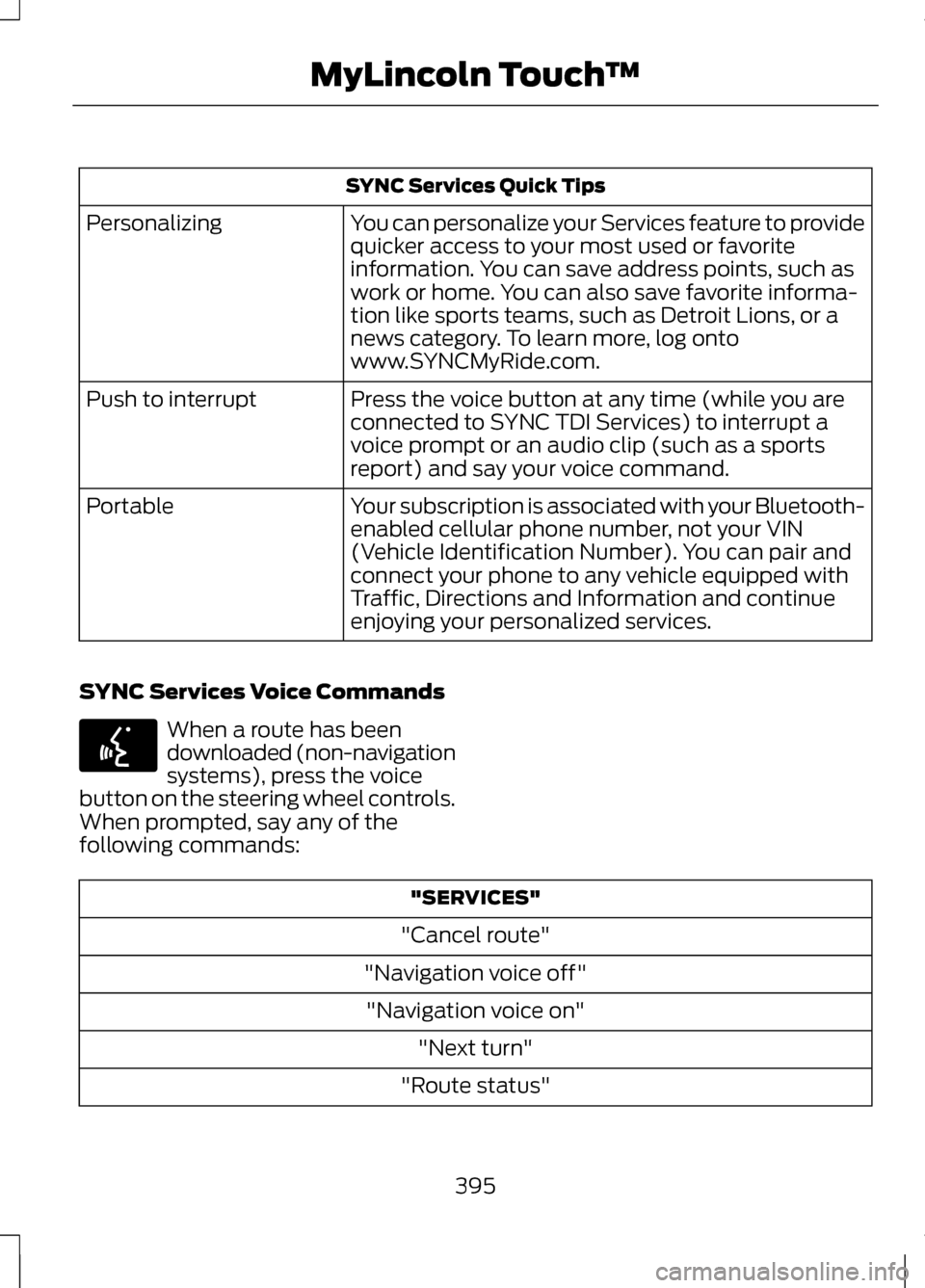
SYNC Services Voice Commands When a route has been
downloaded (non-navigation
systems), press the voice
button on the steering wheel controls.
When prompted, say any of the
following commands: "SERVICES"
"Cancel route"
"Navigation voice off" "Navigation voice on" "Next turn"
"Route status"
395
MyLincoln Touch
™E142599
Page 400 of 474
You Can
When You Select
View the nearby weather, current weather, or the
5-day forecast for the chosen area. Select Map to
see the weather map which can show storms, radar
information, charts and winds. Select Area to select
from a listing of weather locations.
Weather
View scores and schedules from a variety of sports.
You can also save up to 10 favorite teams for easier
access. The score automatically refreshes when a
game is in progress.
Sports Info.
View nearby movie theaters and their show times
(if available).
Movie Listings
View ski conditions for a specific area.
Ski Conditions
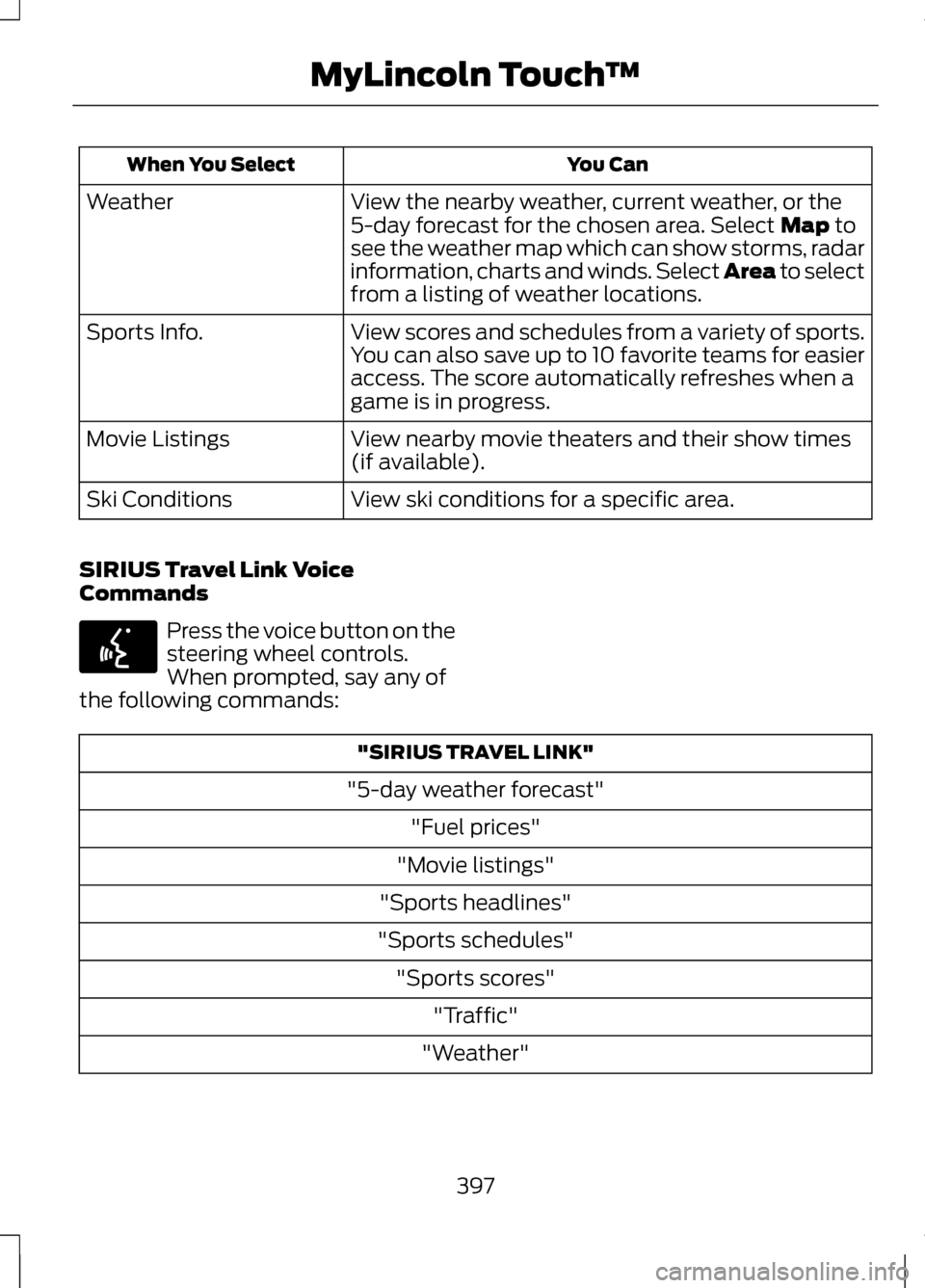
SIRIUS Travel Link Voice
Commands Press the voice button on the
steering wheel controls.
When prompted, say any of
the following commands: "SIRIUS TRAVEL LINK"
"5-day weather forecast" "Fuel prices"
"Movie listings"
"Sports headlines"
"Sports schedules" "Sports scores" "Traffic"
"Weather"
397
MyLincoln Touch
™E142599
Page 404 of 474
•
A connected Bluetooth-enabled
phone must have the ability to
make and maintain an outgoing
call at the time of the incident.
• A connected Bluetooth-enabled
phone must have adequate
network coverage, battery power
and signal strength.
• The vehicle must have battery
power and be located in the U.S.,
Canada or in a territory in which 911
is the emergency number.
In the Event of a Crash
Not all crashes deploy an airbag or
activate the fuel pump shut-off
(which would activate 911 Assist);
however, if 911 Assist is triggered,
SYNC tries to contact emergency
services. If a connected phone is
damaged or loses connection to
SYNC, SYNC searches for, and tries
to connect to, any available previously
paired phone and tries to make the
call to 911.
Before making the call:
• SYNC provides a short window of
time (about 10 seconds) to cancel
the call. Failure to cancel the call
results in SYNC attempting to dial
911.
• SYNC says the following, or a
similar message: "SYNC will
attempt to call 911, to cancel the
call, press Cancel on your screen
or press and hold the phone button
on your steering wheel." If the call is not cancelled and a
successful call is made, a
pre-recorded message is played for
the 911 operator, then the occupant(s)
in the vehicle is able to talk with the
operator. Be prepared to provide your
name, phone number and location
immediately, because not all 911
systems are capable of receiving this
information electronically.
911 Assist May Not Work If
•
Your cellular phone or 911 Assist
hardware was damaged in a crash.
• The vehicle's battery or the SYNC
system has no power.
• The phone(s) paired and
connected to the system was
thrown from the vehicle.
911 Assist Privacy Notice
Once 911 Assist is set on, it may
disclose to emergency services that
the vehicle has been in a crash
involving the deployment of an airbag
or activation of the fuel pump
shut-off. Certain versions or updates
to 911 Assist may also be capable of
electronically or verbally disclosing to
911 operators the vehicle location or
other details about the vehicle or
crash to assist 911 operators to
provide the most appropriate
emergency services. If you do not
want to disclose this information, do
not turn the feature on.
401
MyLincoln Touch
™
Page 405 of 474
Vehicle Health Report (If Equipped)
WARNING
Always follow scheduled
maintenance instructions,
regularly inspect your vehicle, and
seek repair for any damage or problem
you suspect. Vehicle Health Report
supplements, but cannot replace,
normal maintenance and vehicle
inspection. Vehicle Health Report only
monitors certain systems that are
electronically monitored by the
vehicle and will not monitor or report
the status of any other system, (i.e.,
brake lining wear). Failure to perform
scheduled maintenance and regularly
inspect your vehicle may result in
vehicle damage and serious injury. Note:
This feature is only available in
the United States.
Note: Your Vehicle Health Report
feature requires activation prior to use.
Visit www.SYNCMyRide.com to
register. There is no fee or subscription
associated with Vehicle Health Report,
but you must register to use this feature
Note: This feature may not function
properly if you have enabled caller ID
blocking on your cellular phone. Before
running a report, review the Vehicle
Health Report Privacy Notice.
Note: In order to allow a break-in
period for your vehicle, you may not be
able to create a Vehicle Health Report
until your vehicle odometer has
reached 200 miles.
Note: Cellular phone and SMS charges
may apply when making a report. Register for Vehicle Health Report and
set your report preferences at
www.SYNCMyRide.com. After
registering, you can request a Vehicle
Health Report (inside your vehicle).
Return to your account at
www.SYNCMyRide.com to view your
report. You can also choose for SYNC
to automatically remind you to run
reports at specific mileage intervals.
Cellular phone airtime usage may
apply when reporting.
The system allows you to check your
vehicle's overall health in the form of
diagnostic report card. The Vehicle
Health Report contains valuable
information such as:
•
Vehicle diagnostic information
• Scheduled maintenance
• Open recalls and Field Service
Actions
• Unserviced items from vehicle
inspections by your authorized
dealer.
Making a Report
To run a report by touchscreen, touch
the Information button, Apps, then
Vehicle Health Report. To run a report by voice
command, press the voice
button on the steering wheel
and, when prompted, say "Vehicle
health report".
402
MyLincoln Touch
™E142599
Page 408 of 474
Manual airflow distribution controls:Floor/Defrost: Distributes
air through the windshield defroster vents, demister vents, floor vents
and rear seat floor vents, and provides outside air to reduce window
fogging. Panel:
Distributes air through the instrument panel vents.
Panel/Floor: Distributes air through the instrument panel vents,
demister vents, floor vents and rear seat floor vents. Floor: Distributes
air through the demister vents, floor vents and rear seat floor vents.
Defrost:
Touch to clear the windshield of fog and thin ice. Touch again
to return to the previous airflow selection. When switched on, defrost
distributes outside air through the windshield defroster vents and
demister vents to reduce window fogging.
I
Driver settings:
Depending on your vehicle and option package, you
may have the following features: Touch the + and - to adjust the
temperature. Touch the heated seat icon to control the heated seat
(if equipped). Touch the cooled seat icon to control the cooled seat
(if equipped). Touch MyTemp to select your previously pre-set
temperature setpoint. Touch and hold MyTemp store a new pre-set
for temperature setpoint. Touch the heated steering wheel icon (if
equipped) to warm the steering wheel.
J
Note: If your vehicle is equipped with
a wood-trimmed steering wheel, it
does not heat between the 10 o'clock
and 2 o'clock positions. Climate Control Voice
Commands Press the voice button on the
steering wheel controls.
When prompted, say any of
the following commands: Climate Control Commands
"Climate automatic"
"Climate my temperature" "Climate off""Climate on"
"Climate temperature <15.5-29.5> degrees" "Climate temperature <60-85> degrees" "Help"
405
MyLincoln Touch
™E142599
Page 418 of 474
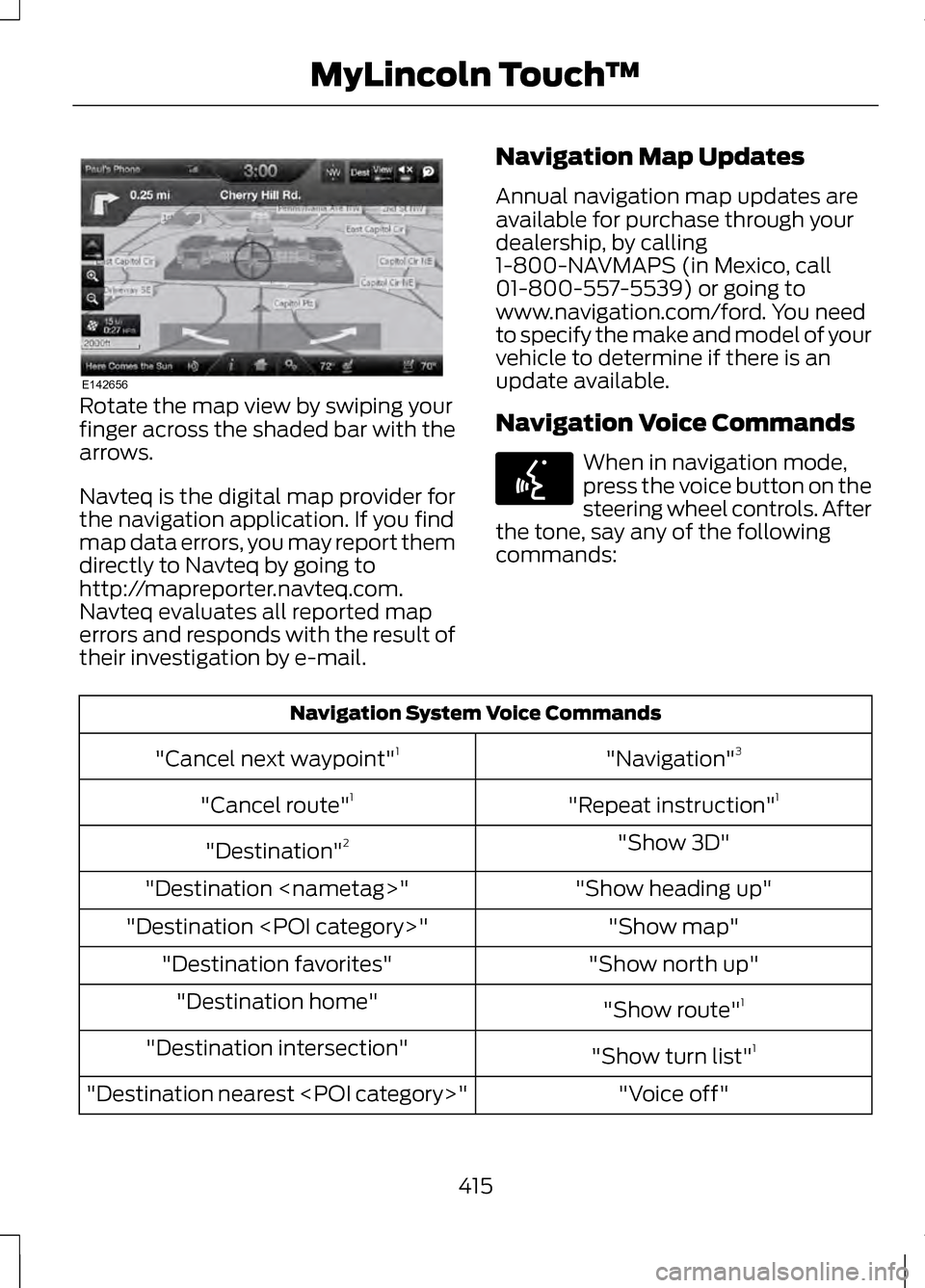
Rotate the map view by swiping your
finger across the shaded bar with the
arrows.
Navteq is the digital map provider for
the navigation application. If you find
map data errors, you may report them
directly to Navteq by going to
http://mapreporter.navteq.com.
Navteq evaluates all reported map
errors and responds with the result of
their investigation by e-mail.
Navigation Map Updates
Annual navigation map updates are
available for purchase through your
dealership, by calling
1-800-NAVMAPS (in Mexico, call
01-800-557-5539) or going to
www.navigation.com/ford. You need
to specify the make and model of your
vehicle to determine if there is an
update available.
Navigation Voice Commands When in navigation mode,
press the voice button on the
steering wheel controls. After
the tone, say any of the following
commands: Navigation System Voice Commands
"Navigation"3
"Cancel next waypoint" 1
"Repeat instruction" 1
"Cancel route" 1
"Show 3D"
"Destination" 2
"Show heading up"
"Destination
"Show map"
"Destination
"Show north up"
"Destination favorites"
"Show route"1
"Destination home"
"Show turn list"1
"Destination intersection"
"Voice off"
"Destination nearest
415
MyLincoln Touch
™E142656 E142599
Page 446 of 474
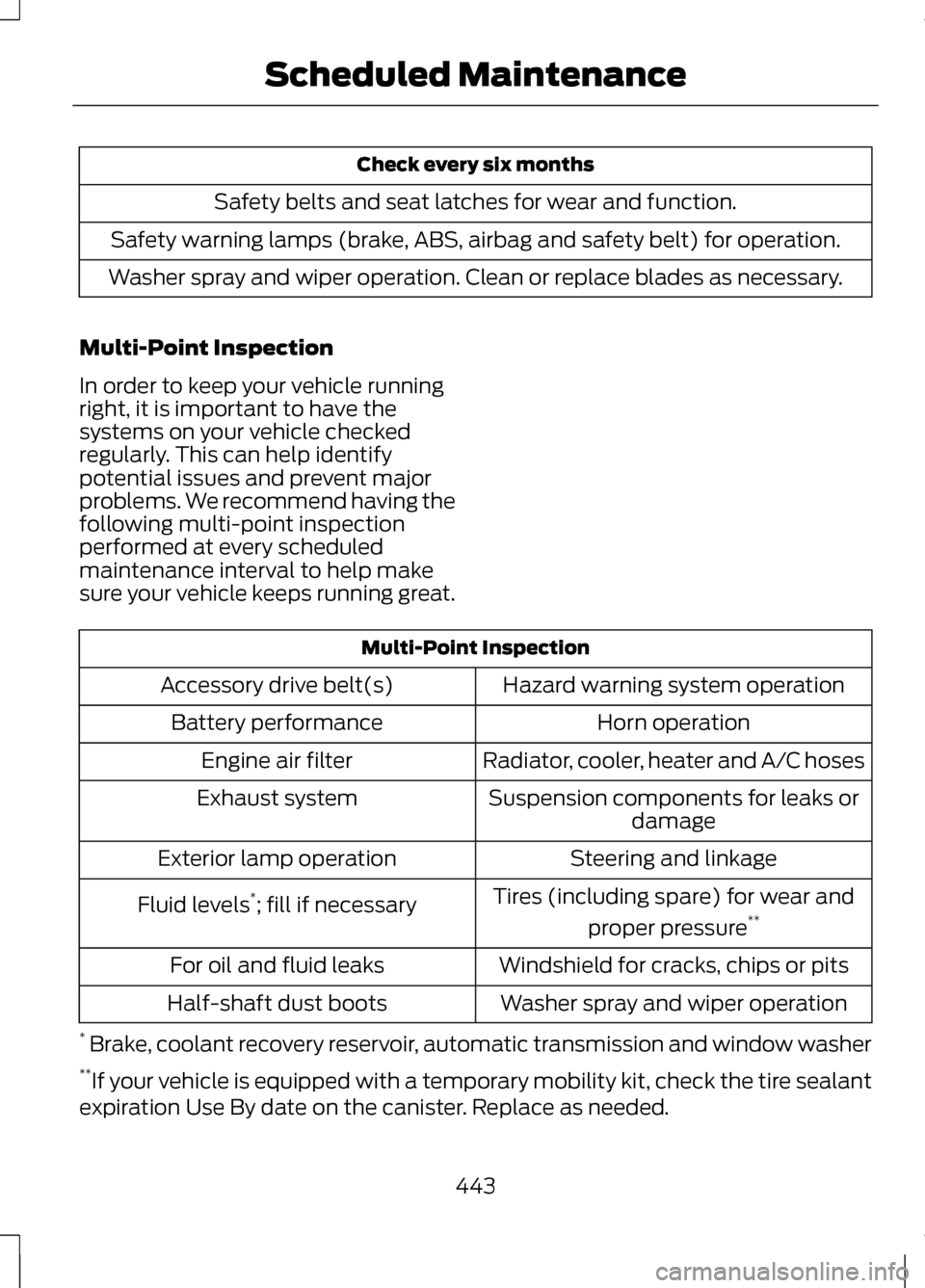
Check every six months
Safety belts and seat latches for wear and function.
Safety warning lamps (brake, ABS, airbag and safety belt) for operation.
Washer spray and wiper operation. Clean or replace blades as necessary.
Multi-Point Inspection
In order to keep your vehicle running
right, it is important to have the
systems on your vehicle checked
regularly. This can help identify
potential issues and prevent major
problems. We recommend having the
following multi-point inspection
performed at every scheduled
maintenance interval to help make
sure your vehicle keeps running great. Multi-Point Inspection
Hazard warning system operation
Accessory drive belt(s)
Horn operation
Battery performance
Radiator, cooler, heater and A/C hoses
Engine air filter
Suspension components for leaks ordamage
Exhaust system
Steering and linkage
Exterior lamp operation
Tires (including spare) for wear andproper pressure **
Fluid levels *
; fill if necessary
Windshield for cracks, chips or pits
For oil and fluid leaks
Washer spray and wiper operation
Half-shaft dust boots
* Brake, coolant recovery reservoir, automatic transmission and window washer
** If your vehicle is equipped with a temporary mobility kit, check the tire sealant
expiration Use By date on the canister. Replace as needed.
443
Scheduled Maintenance
Page 448 of 474
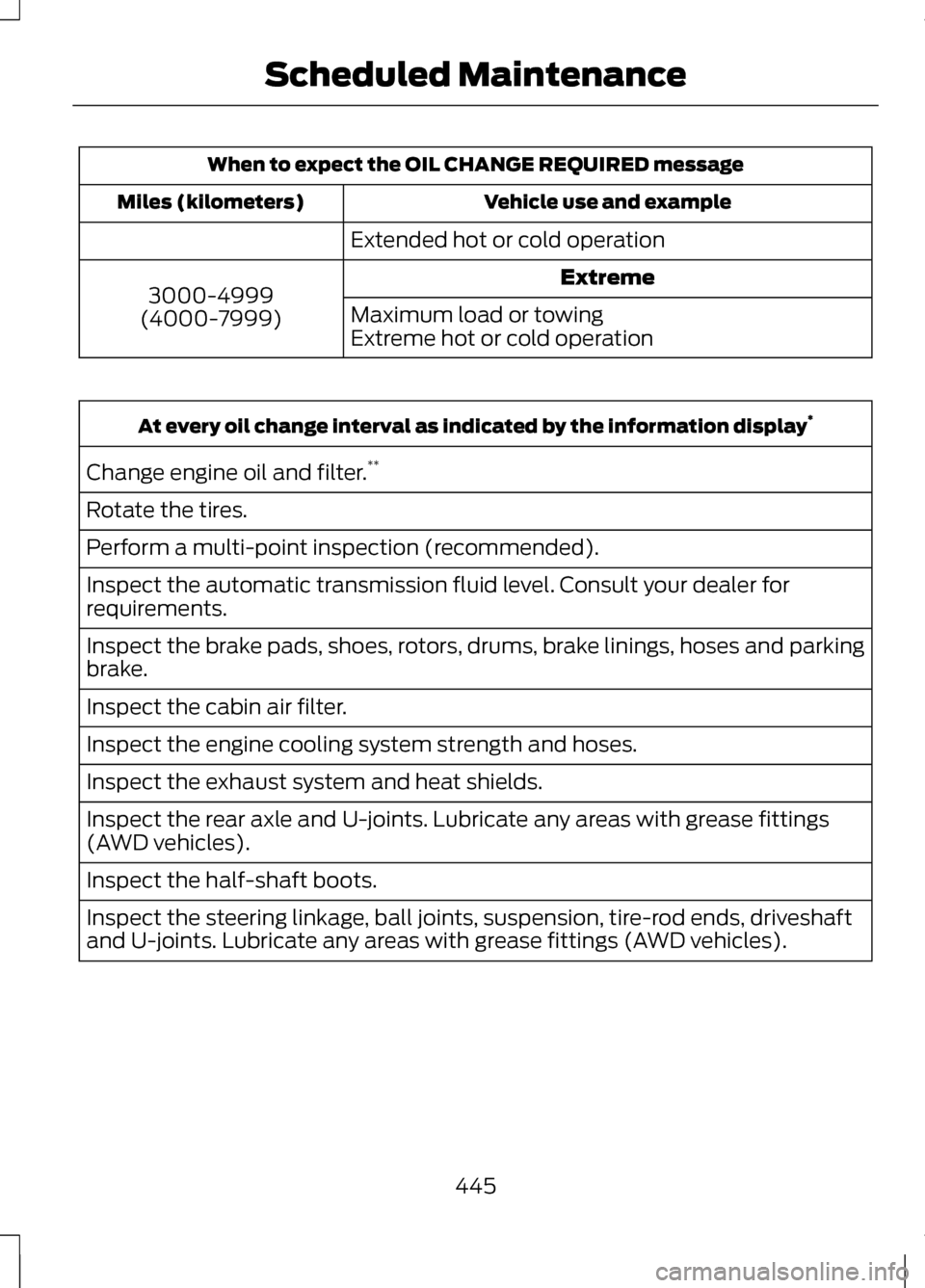
When to expect the OIL CHANGE REQUIRED message
Vehicle use and example
Miles (kilometers)
Extended hot or cold operationExtreme
3000-4999
(4000-7999) Maximum load or towing
Extreme hot or cold operationAt every oil change interval as indicated by the information display
*
Change engine oil and filter. **
Rotate the tires.
Perform a multi-point inspection (recommended).
Inspect the automatic transmission fluid level. Consult your dealer for
requirements.
Inspect the brake pads, shoes, rotors, drums, brake linings, hoses and parking
brake.
Inspect the cabin air filter.
Inspect the engine cooling system strength and hoses.
Inspect the exhaust system and heat shields.
Inspect the rear axle and U-joints. Lubricate any areas with grease fittings
(AWD vehicles).
Inspect the half-shaft boots.
Inspect the steering linkage, ball joints, suspension, tire-rod ends, driveshaft
and U-joints. Lubricate any areas with grease fittings (AWD vehicles).
445
Scheduled Maintenance