brake light LINCOLN MKZ 2014 User Guide
[x] Cancel search | Manufacturer: LINCOLN, Model Year: 2014, Model line: MKZ, Model: LINCOLN MKZ 2014Pages: 468, PDF Size: 4.49 MB
Page 187 of 468
PRINCIPLE OF OPERATION
The traction control system helps
avoid drive wheel spin and loss of
traction.
If your vehicle begins to slide, the
system applies the brakes to
individual wheels and, when needed,
reduces engine power at the same
time. If the wheels spin when
accelerating on slippery or loose
surfaces, the system reduces engine
power in order to increase traction.
USING TRACTION
CONTROL
In certain situations (for example,
stuck in snow or mud), turning the
traction control off may be beneficial
as this allows the wheels to spin with
full engine power. Turn off the traction
control system through the
information display. See General
Information (page 101).
System Indicator Lights and
Messages
WARNING
If a failure has been detected
within the AdvanceTrac system,
the stability control light will
illuminate steadily. Verify that the
AdvanceTrac system was not
manually disabled through the
information display. If the stability
control light still illuminates steadily,
have the system serviced by an
authorized dealer immediately.
Operating your vehicle with
AdvanceTrac disabled could lead to
an increased risk of loss of vehicle
control, vehicle rollover, personal
injury and death.
E138639
The stability control light
temporarily illuminates on
engine start-up and flashes
when a driving condition activates the
stability system.
The stability control off light
temporarily illuminates on
engine start-up and stays on
when you turn the traction control
system off.
When you turn the traction control
system off or on, a message appears
in the information display showing
system status.
184
Traction Control
Page 203 of 468
E164805
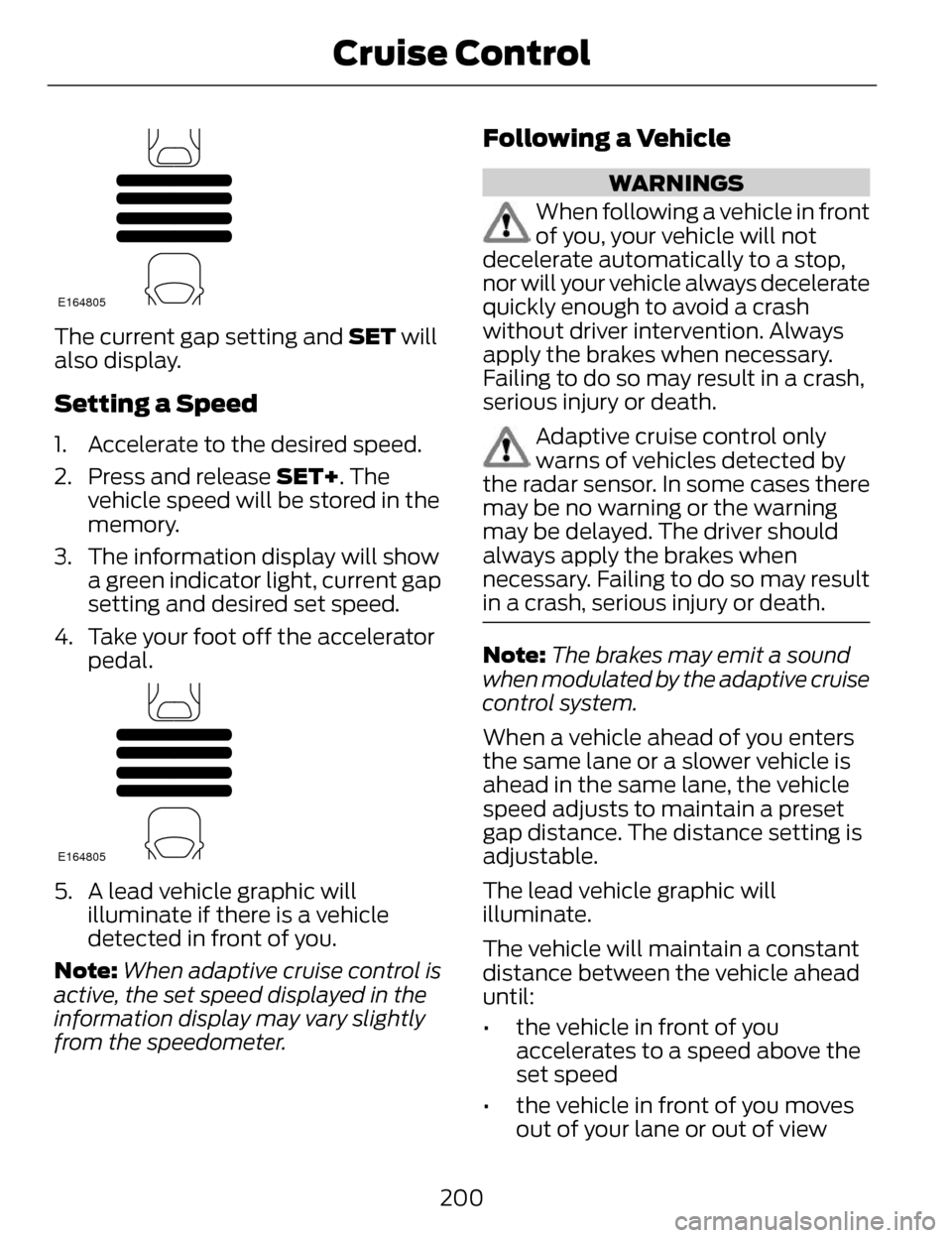
The current gap setting and SET will
also display.
Setting a Speed
1. Accelerate to the desired speed.
2. Press and release SET+. Thevehicle speed will be stored in the
memory.
3. The information display will show a green indicator light, current gap
setting and desired set speed.
4. Take your foot off the accelerator pedal.
E164805
5. A lead vehicle graphic willilluminate if there is a vehicle
detected in front of you.
Note: When adaptive cruise control is
active, the set speed displayed in the
information display may vary slightly
from the speedometer.
Following a Vehicle
WARNINGS
When following a vehicle in front
of you, your vehicle will not
decelerate automatically to a stop,
nor will your vehicle always decelerate
quickly enough to avoid a crash
without driver intervention. Always
apply the brakes when necessary.
Failing to do so may result in a crash,
serious injury or death.
Adaptive cruise control only
warns of vehicles detected by
the radar sensor. In some cases there
may be no warning or the warning
may be delayed. The driver should
always apply the brakes when
necessary. Failing to do so may result
in a crash, serious injury or death.
Note: The brakes may emit a sound
when modulated by the adaptive cruise
control system.
When a vehicle ahead of you enters
the same lane or a slower vehicle is
ahead in the same lane, the vehicle
speed adjusts to maintain a preset
gap distance. The distance setting is
adjustable.
The lead vehicle graphic will
illuminate.
The vehicle will maintain a constant
distance between the vehicle ahead
until:
• the vehicle in front of you accelerates to a speed above the
set speed
• the vehicle in front of you moves out of your lane or out of view
200
Cruise Control
Page 205 of 468
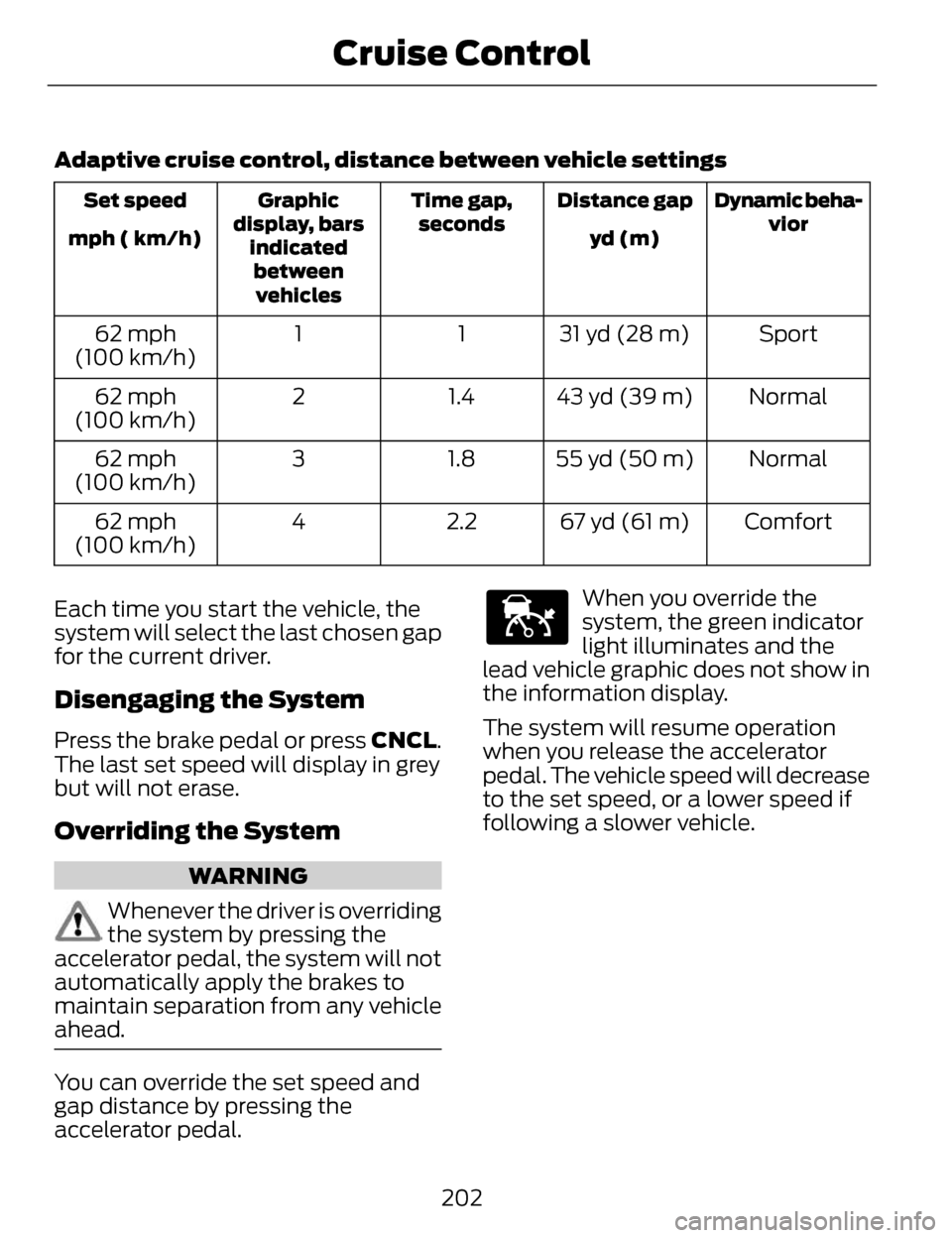
Adaptive cruise control, distance between vehicle settings
Dynamic beha-vior
Distance gap
Time gap,
seconds
Graphic
display, bars indicatedbetweenvehicles
Set speed
yd (m)
mph ( km/h)
Sport
31 yd (28 m)
1
1
62 mph
(100 km/h)
Normal
43 yd (39 m)
1.4
2
62 mph
(100 km/h)
Normal
55 yd (50 m)
1.8
3
62 mph
(100 km/h)
Comfort
67 yd (61 m)
2.2
4
62 mph
(100 km/h)
Each time you start the vehicle, the
system will select the last chosen gap
for the current driver.
Disengaging the System
Press the brake pedal or press CNCL.
The last set speed will display in grey
but will not erase.
Overriding the System
WARNING
Whenever the driver is overriding
the system by pressing the
accelerator pedal, the system will not
automatically apply the brakes to
maintain separation from any vehicle
ahead.
You can override the set speed and
gap distance by pressing the
accelerator pedal.
E144529
When you override the
system, the green indicator
light illuminates and the
lead vehicle graphic does not show in
the information display.
The system will resume operation
when you release the accelerator
pedal. The vehicle speed will decrease
to the set speed, or a lower speed if
following a slower vehicle.
202
Cruise Control
Page 221 of 468
COLLISION WARNING
SYSTEM
PRINCIPLE OF OPERATION (If
Equipped)
WARNINGS
This system is designed to be a
supplementary driving aid. It is
not intended to replace the driver’s
attention, and judgment, or the need
to apply the brakes. This system does
NOT activate the brakes
automatically. Failure to press the
brake pedal to activate the brakes
may result in a collision.
The collision warning system
with brake support cannot help
prevent all collisions. Do not rely on
this system to replace driver judgment
and the need to maintain distance
and speed.
Note: The system does not detect,
warn or respond to potential collisions
with vehicles to the rear or sides of the
vehicle.
Note: The collision warning system is
active at speeds above approximately
5 mph (8 km/h).
E156130
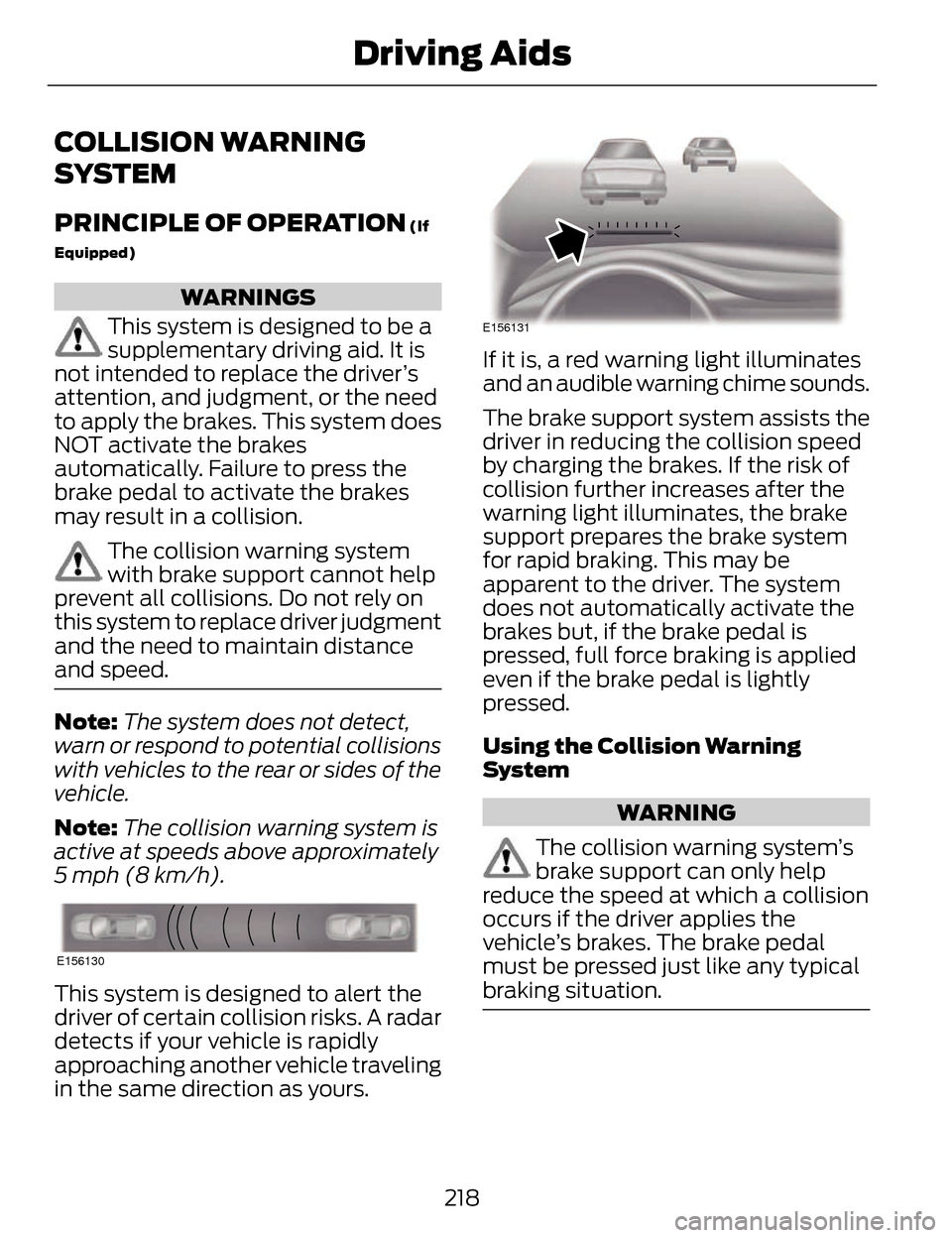
This system is designed to alert the
driver of certain collision risks. A radar
detects if your vehicle is rapidly
approaching another vehicle traveling
in the same direction as yours.
E156131
If it is, a red warning light illuminates
and an audible warning chime sounds.
The brake support system assists the
driver in reducing the collision speed
by charging the brakes. If the risk of
collision further increases after the
warning light illuminates, the brake
support prepares the brake system
for rapid braking. This may be
apparent to the driver. The system
does not automatically activate the
brakes but, if the brake pedal is
pressed, full force braking is applied
even if the brake pedal is lightly
pressed.
Using the Collision Warning
System
WARNING
The collision warning system’s
brake support can only help
reduce the speed at which a collision
occurs if the driver applies the
vehicle’s brakes. The brake pedal
must be pressed just like any typical
braking situation.
218
Driving Aids
Page 235 of 468
TOWING A TRAILER
WARNINGS
Do not exceed the GVWR or
the GAWR specified on the
certification label.
Towing trailers beyond the
maximum recommended
gross trailer weight exceeds the
limit of your vehicle and could
result in engine damage,
transmission damage, structural
damage, loss of vehicle control,
vehicle rollover and personal
injury.
Note: There may be electrical
items such as fuses or relays that
can affect trailer towing operation.
See Fuses (page 255).
Weight, not volume designates
your vehicle's load capacity. You
cannot necessarily use all
available space when loading a
vehicle.
Towing a trailer places an
additional load on your vehicle's
engine, transmission, axle, brakes,
tires and suspension. Inspect
these components periodically
during, and after, any towing
operation. Load Placement
To help minimize how trailer
movement affects the vehicle
when driving:
• Load the heaviest items closest
to the trailer floor.
• Load the heaviest items in the center of the left and right side
trailer tires.
• Load the heaviest items above the trailer axles or just slightly
forward toward the trailer
tongue. Do not allow the final
trailer tongue weight to go
above or below 10-15% of the
loaded trailer weight.
• Select a tow bar with the correct rise or drop. When both
the loaded vehicle and trailer
are connected, the trailer frame
should be level, or slightly
angled down toward the
vehicle, when viewed from the
side.
When driving with a trailer or
payload, a slight takeoff vibration
or shudder may be present due to
the increased payload weight.
Additional information regarding
proper trailer loading and setting
your vehicle up for towing is
located in the Load Carrying
chapter. See Load Limit (page
224). You can also find the
information in the RV & Trailer
Towing Guide, available at an
authorized dealer.
232
Towing
Page 238 of 468
Trailer Lamps
WARNING
Never connect any trailer lamp
wiring to the vehicle's tail lamp
wiring; this may damage the electrical
system resulting in fire. Contact your
authorized dealer as soon as possible
for assistance in proper trailer tow
wiring installation. Additional
electrical equipment may be required.
Trailer lamps are required on most
towed vehicles. Make sure all running
lights, brake lights, turn signals and
hazard lights are working.
Before Towing a Trailer
Practice turning, stopping and backing
up to get the feel of your
vehicle-trailer combination before
starting on a trip. When turning, make
wider turns so the trailer wheels clear
curbs and other obstacles.
When Towing a Trailer
• Do not drive faster than 70 mph (113 km/h) during the first 500
miles (800 kilometers).
• Do not make full-throttle starts.
• Check your hitch, electrical connections and trailer wheel lug
nuts thoroughly after you have
traveled 50 miles (80 kilometers).
• When stopped in congested or heavy traffic during hot weather,
place the gearshift in position P to
aid engine and transmission
cooling and to help A/C
performance. • Turn off the speed control with
heavy loads or in hilly terrain. The
speed control may turn off
automatically when you are towing
on long, steep grades.
• Shift to a lower gear when driving down a long or steep hill. Do not
apply the brakes continuously, as
they may overheat and become
less effective.
• If your transmission is equipped with a Grade Assist or Tow/Haul
feature, use this feature when
towing. This provides engine
braking and helps eliminate
excessive transmission shifting for
optimum fuel economy and
transmission cooling.
• Allow more distance for stopping with a trailer attached. Anticipate
stops and brake gradually.
• Avoid parking on a grade. However, if you must park on a grade:
• Turn the steering wheel to pointyour vehicle tires away from
traffic flow.
• Set your vehicle parking brake.
• Place the automatic transmission in position P.
• Place wheel chocks in front and back of the trailer wheels.
(Chocks not included with
vehicle.)
Launching or Retrieving a Boat
or Personal Watercraft (PWC)
Note: Disconnect the wiring to the
trailer before backing the trailer into
the water.
235
Towing
Page 243 of 468
BREAKING-IN
You need to break in new tires for
approximately 300 miles (480
kilometers). During this time, your
vehicle may exhibit some unusual
driving characteristics.
Avoid driving too fast during the first
1000 miles (1600 kilometers). Vary
your speed frequently and change up
through the gears early. Do not labor
the engine.
Do not tow during the first 1000 miles
(1600 kilometers).
ECONOMICAL DRIVING
Fuel economy is affected by several
things such as how you drive, the
conditions you drive under and how
you maintain your vehicle.
There are some things to keep in mind
that may improve your fuel economy:
• Accelerate and slow down in asmooth, moderate fashion.
• Drive at steady speeds.
• Anticipate stops; slowing down may eliminate the need to stop.
• Combine errands and minimize stop-and-go driving.
• When running errands, go tothe furthest destination first
and then work your way back
home.
• Close the windows for high-speed driving. • Drive at reasonable speeds.
(Traveling at 65 mph/105 kph uses
about 15% less fuel than traveling
at 75 mph/121 kph).
• Keep the tires properly inflated and use only the recommended size.
• Use the recommended engine oil.
• Perform all regularly scheduled maintenance.
There are also some things you may
want to avoid doing because they
reduce your fuel economy:
• Avoid sudden or hard accelerations.
• Avoid revving the engine before turning off the car.
• Avoid long idle periods.
• Do not warm up your vehicle on cold mornings.
• Reduce the use of air conditioning and heat.
• Avoid using speed control in hilly terrain.
• Do not rest your foot on the brake pedal while driving.
• Avoid carrying unnecessary weight (approximately 1 mpg [0.4
kilometers/liter] is lost for every
400 lbs [180 kilograms] of weight
carried).
• Avoid adding particular accessories to your vehicle (e.g.
bug deflectors, rollbars/light bars,
running boards, ski racks).
• Avoid driving with the wheels out of alignment.
240
Driving Hints
Page 244 of 468
DRIVING THROUGH WATER
Note:Driving through deep water
above the recommended levels can
cause vehicle damage.
If driving through deep or standing
water is unavoidable, proceed very
slowly. Never drive through water that
is higher than the bottom of the wheel
rims (for cars) or the bottom of the
hubs (for trucks).
E142667
When driving through water, traction
or brake capability may be limited.
Also, water may enter your engine’s
air intake and severely damage your
engine or your vehicle may stall.
Once through the water, always dry
the brakes by moving your vehicle
slowly while applying light pressure
on the brake pedal. Wet brakes do not
stop the vehicle as quickly as dry
brakes.
FLOOR MATS
E142666
WARNINGS
Always use floor mats that are
designed to fit the foot well of
your vehicle. Only use floor mats that
leave the pedal area unobstructed.
Only use floor mats that are firmly
secured to retention posts so that
they cannot slip out of position and
interfere with the pedals or impair safe
operation of your vehicle in other
ways.
Pedals that cannot move freely
can cause loss of vehicle control
and increase the risk of serious
personal injury.
Always make sure that the floor
mats are properly attached to
the retention posts in the carpet that
are supplied with your vehicle. Floor
mats must be properly secured to
both retention posts to ensure mats
do not shift out of position.
241
Driving Hints
Page 261 of 468
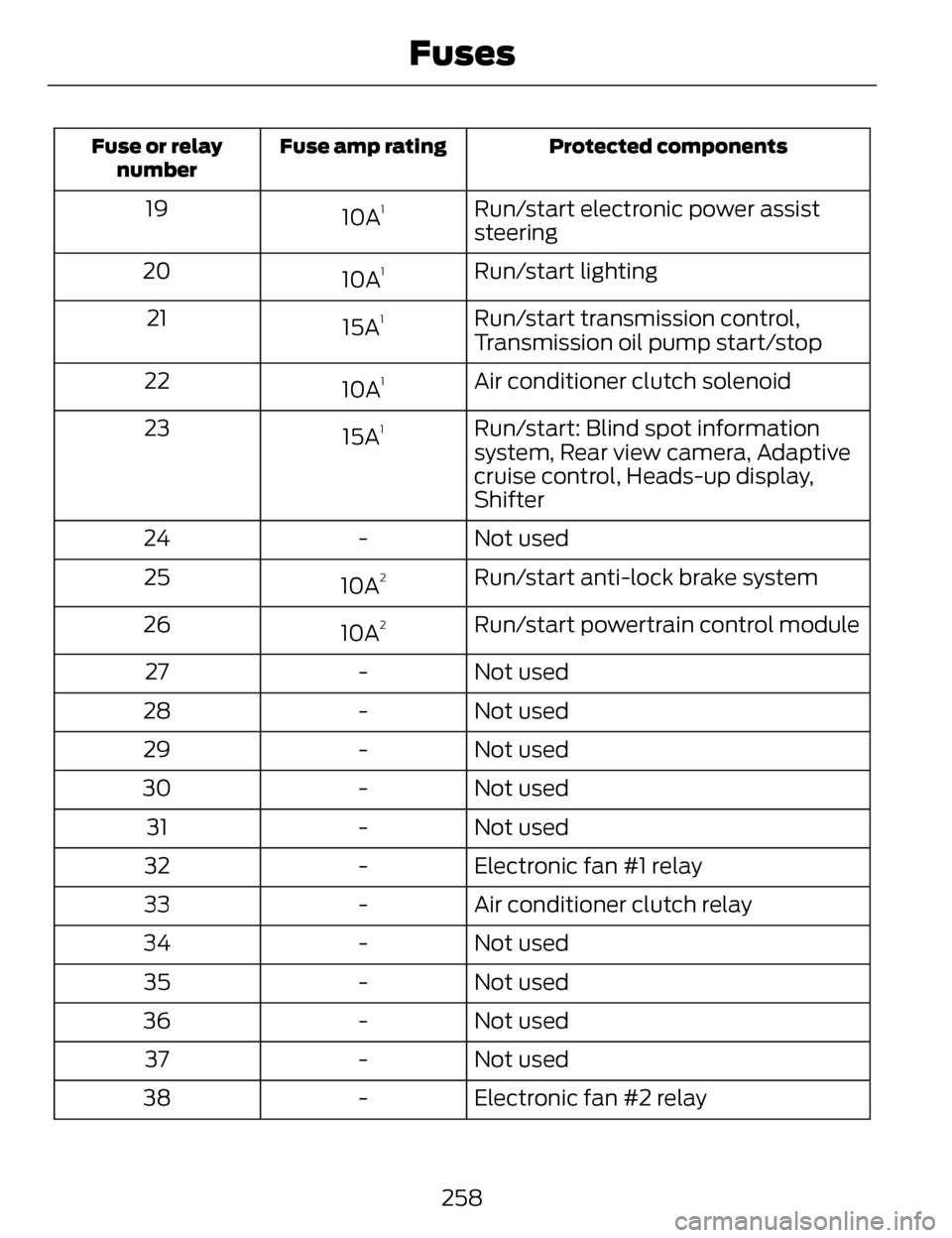
Protected components
Fuse amp rating
Fuse or relay
number
Run/start electronic power assist
steering
10A119
Run/start lighting
10A
120
Run/start transmission control,
Transmission oil pump start/stop
15A
121
Air conditioner clutch solenoid
10A
122
Run/start: Blind spot information
system, Rear view camera, Adaptive
cruise control, Heads-up display,
Shifter
15A
123
Not used
-
24
Run/start anti-lock brake system
10A
225
Run/start powertrain control module
10A
226
Not used
-
27
Not used
-
28
Not used
-
29
Not used
-
30
Not used
-
31
Electronic fan #1 relay
-
32
Air conditioner clutch relay
-
33
Not used
-
34
Not used
-
35
Not used
-
36
Not used
-
37
Electronic fan #2 relay
-
38
258
Fuses
Page 290 of 468
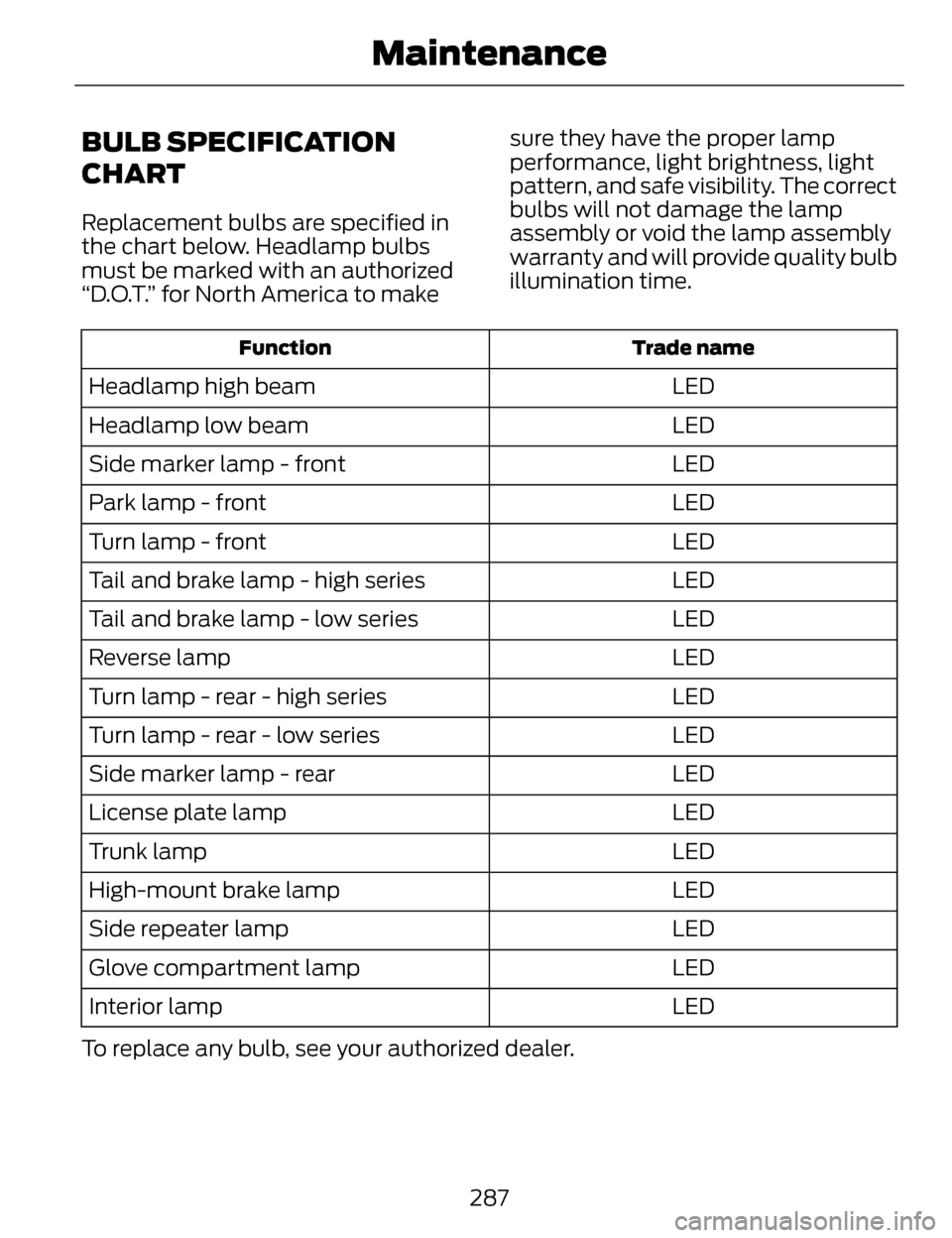
BULB SPECIFICATION
CHART
Replacement bulbs are specified in
the chart below. Headlamp bulbs
must be marked with an authorized
“D.O.T.” for North America to makesure they have the proper lamp
performance, light brightness, light
pattern, and safe visibility. The correct
bulbs will not damage the lamp
assembly or void the lamp assembly
warranty and will provide quality bulb
illumination time.
Trade name
Function
LED
Headlamp high beam
LED
Headlamp low beam
LED
Side marker lamp - front
LED
Park lamp - front
LED
Turn lamp - front
LED
Tail and brake lamp - high series
LED
Tail and brake lamp - low series
LED
Reverse lamp
LED
Turn lamp - rear - high series
LED
Turn lamp - rear - low series
LED
Side marker lamp - rear
LED
License plate lamp
LED
Trunk lamp
LED
High-mount brake lamp
LED
Side repeater lamp
LED
Glove compartment lamp
LED
Interior lamp
To replace any bulb, see your authorized dealer.
287
Maintenance