engine LINCOLN MKZ 2014 User Guide
[x] Cancel search | Manufacturer: LINCOLN, Model Year: 2014, Model line: MKZ, Model: LINCOLN MKZ 2014Pages: 468, PDF Size: 4.49 MB
Page 101 of 468
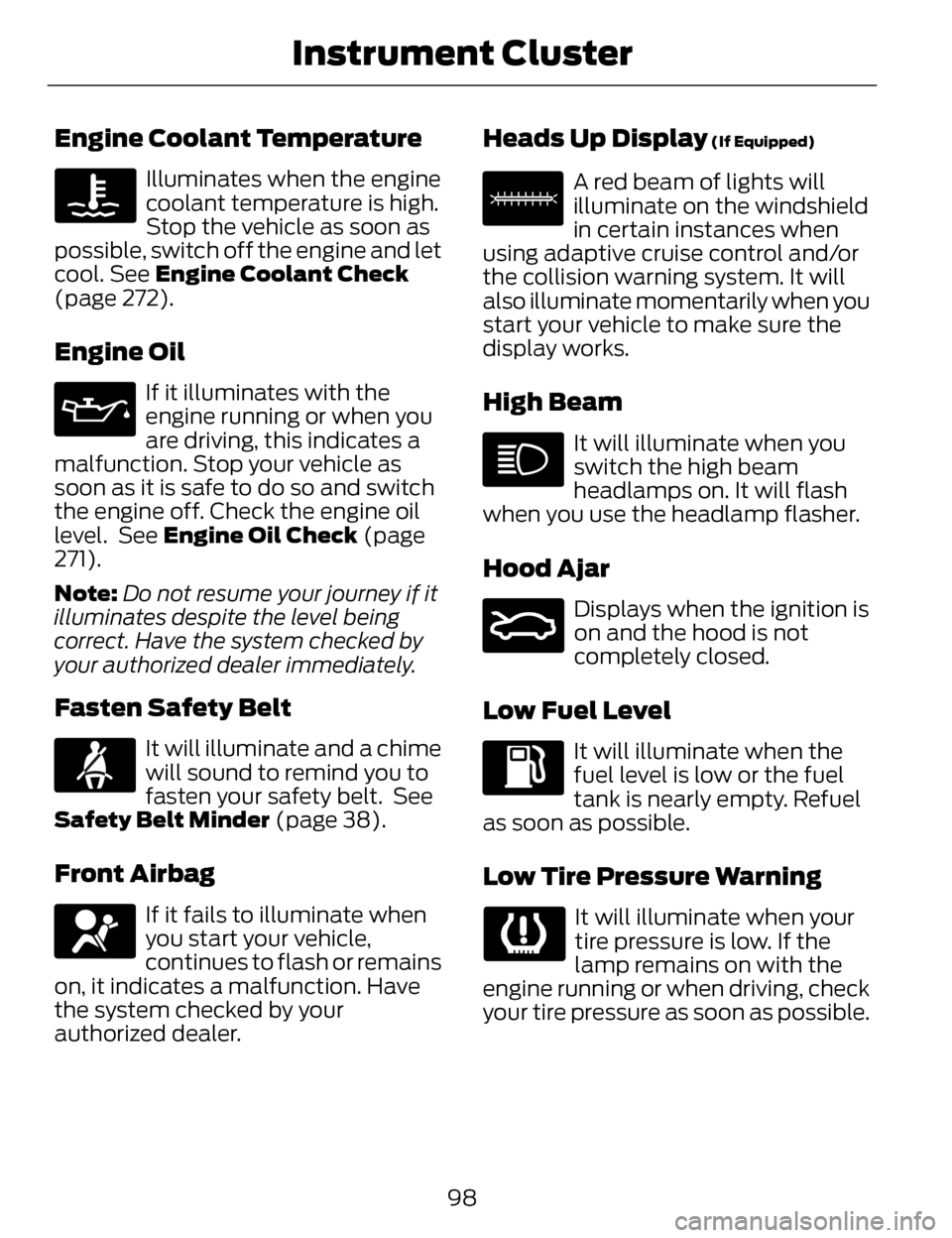
Engine Coolant Temperature
Illuminates when the engine
coolant temperature is high.
Stop the vehicle as soon as
possible, switch off the engine and let
cool. See Engine Coolant Check
(page 272).
Engine Oil
If it illuminates with the
engine running or when you
are driving, this indicates a
malfunction. Stop your vehicle as
soon as it is safe to do so and switch
the engine off. Check the engine oil
level. See Engine Oil Check (page
271).
Note: Do not resume your journey if it
illuminates despite the level being
correct. Have the system checked by
your authorized dealer immediately.
Fasten Safety Belt
It will illuminate and a chime
will sound to remind you to
fasten your safety belt. See
Safety Belt Minder (page 38).
Front Airbag
If it fails to illuminate when
you start your vehicle,
continues to flash or remains
on, it indicates a malfunction. Have
the system checked by your
authorized dealer.
Heads Up Display (If Equipped)
E156133
A red beam of lights will
illuminate on the windshield
in certain instances when
using adaptive cruise control and/or
the collision warning system. It will
also illuminate momentarily when you
start your vehicle to make sure the
display works.
High Beam
It will illuminate when you
switch the high beam
headlamps on. It will flash
when you use the headlamp flasher.
Hood Ajar
E159324
Displays when the ignition is
on and the hood is not
completely closed.
Low Fuel Level
It will illuminate when the
fuel level is low or the fuel
tank is nearly empty. Refuel
as soon as possible.
Low Tire Pressure Warning
It will illuminate when your
tire pressure is low. If the
lamp remains on with the
engine running or when driving, check
your tire pressure as soon as possible.
98
Instrument Cluster
Page 102 of 468
It will also illuminate momentarily
when you switch the ignition on to
confirm the lamp is functional. If it
does not illuminate when you switch
the ignition on, or begins to flash at
any time, have the system checked by
your authorized dealer.
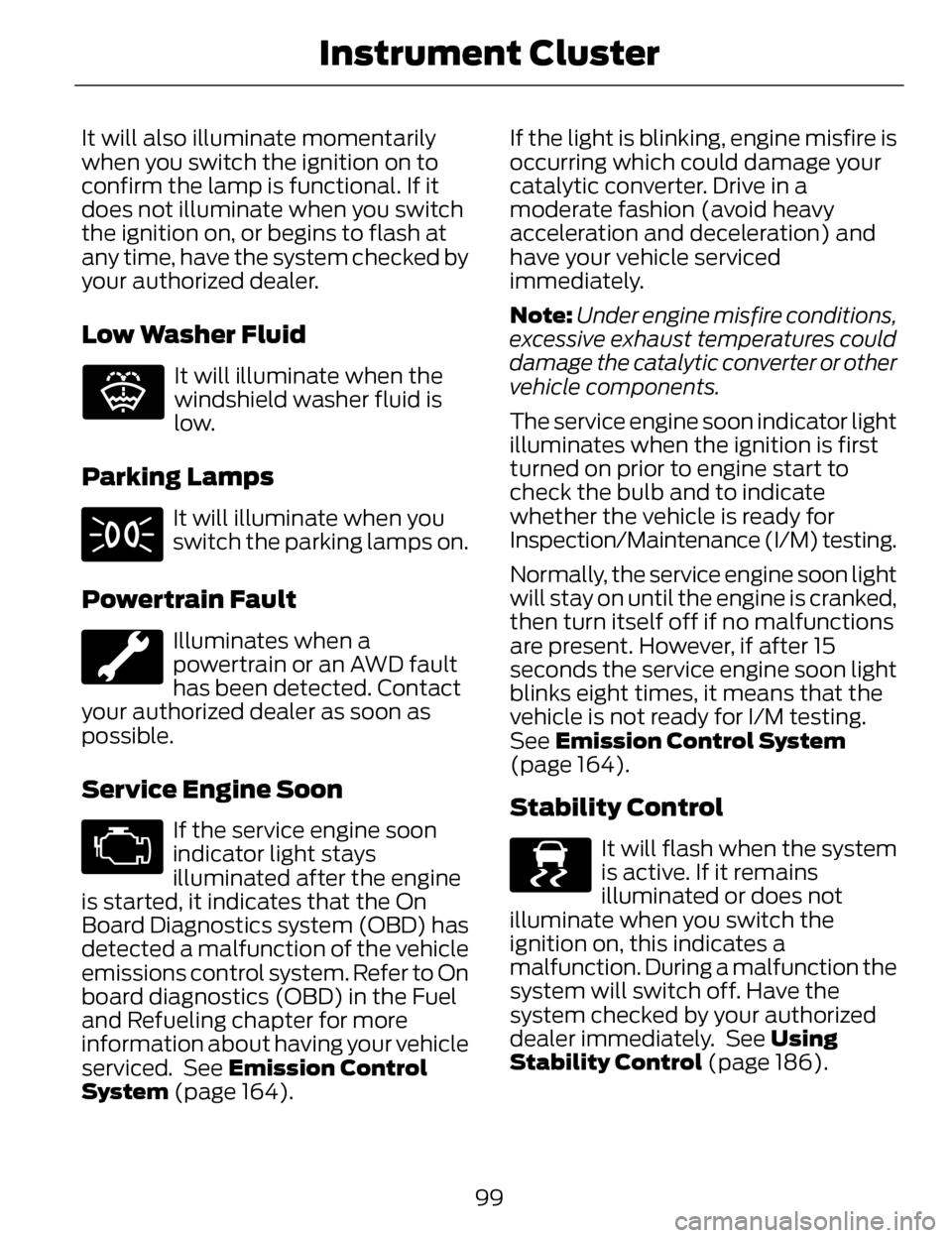
Low Washer Fluid
E132353
It will illuminate when the
windshield washer fluid is
low.
Parking Lamps
It will illuminate when you
switch the parking lamps on.
Powertrain Fault
Illuminates when a
powertrain or an AWD fault
has been detected. Contact
your authorized dealer as soon as
possible.
Service Engine Soon
If the service engine soon
indicator light stays
illuminated after the engine
is started, it indicates that the On
Board Diagnostics system (OBD) has
detected a malfunction of the vehicle
emissions control system. Refer to On
board diagnostics (OBD) in the Fuel
and Refueling chapter for more
information about having your vehicle
serviced. See Emission Control
System (page 164). If the light is blinking, engine misfire is
occurring which could damage your
catalytic converter. Drive in a
moderate fashion (avoid heavy
acceleration and deceleration) and
have your vehicle serviced
immediately.
Note:
Under engine misfire conditions,
excessive exhaust temperatures could
damage the catalytic converter or other
vehicle components.
The service engine soon indicator light
illuminates when the ignition is first
turned on prior to engine start to
check the bulb and to indicate
whether the vehicle is ready for
Inspection/Maintenance (I/M) testing.
Normally, the service engine soon light
will stay on until the engine is cranked,
then turn itself off if no malfunctions
are present. However, if after 15
seconds the service engine soon light
blinks eight times, it means that the
vehicle is not ready for I/M testing.
See Emission Control System
(page 164).Stability Control
E138639
It will flash when the system
is active. If it remains
illuminated or does not
illuminate when you switch the
ignition on, this indicates a
malfunction. During a malfunction the
system will switch off. Have the
system checked by your authorized
dealer immediately. See Using
Stability Control (page 186).
99
Instrument Cluster
Page 106 of 468
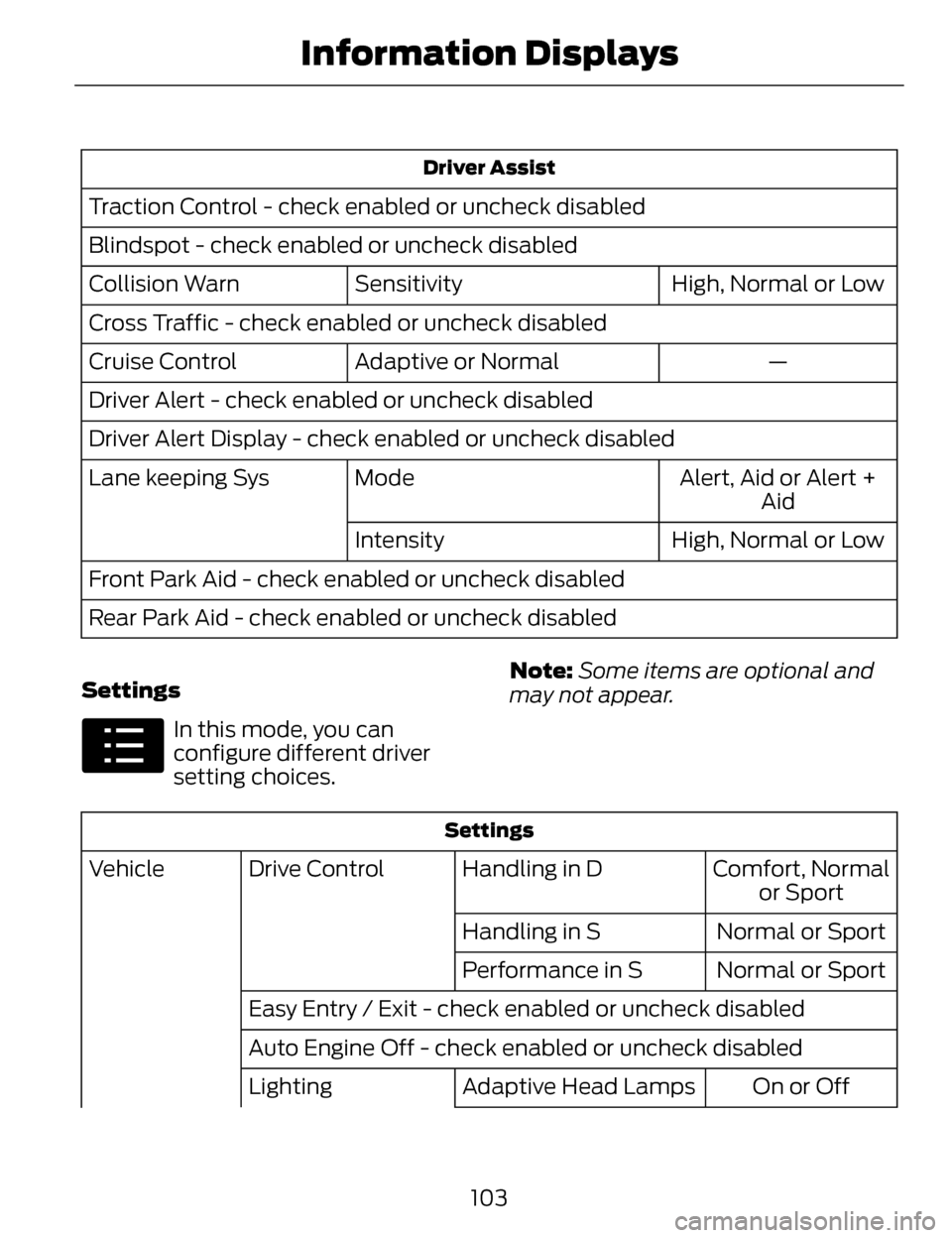
Driver Assist
Traction Control - check enabled or uncheck disabled
Blindspot - check enabled or uncheck disabledHigh, Normal or Low
Sensitivity
Collision Warn
Cross Traffic - check enabled or uncheck disabled
—
Adaptive or Normal
Cruise Control
Driver Alert - check enabled or uncheck disabled
Driver Alert Display - check enabled or uncheck disabled
Alert, Aid or Alert +Aid
Mode
Lane keeping Sys
High, Normal or Low
Intensity
Front Park Aid - check enabled or uncheck disabled
Rear Park Aid - check enabled or uncheck disabled
Settings
E100023
In this mode, you can
configure different driver
setting choices. Note:
Some items are optional and
may not appear.
Settings
Comfort, Normal or Sport
Handling in D
Drive Control
Vehicle
Normal or Sport
Handling in S
Normal or Sport
Performance in S
Easy Entry / Exit - check enabled or uncheck disabled
Auto Engine Off - check enabled or uncheck disabled On or Off
Adaptive Head Lamps
Lighting
103
Information Displays
Page 111 of 468
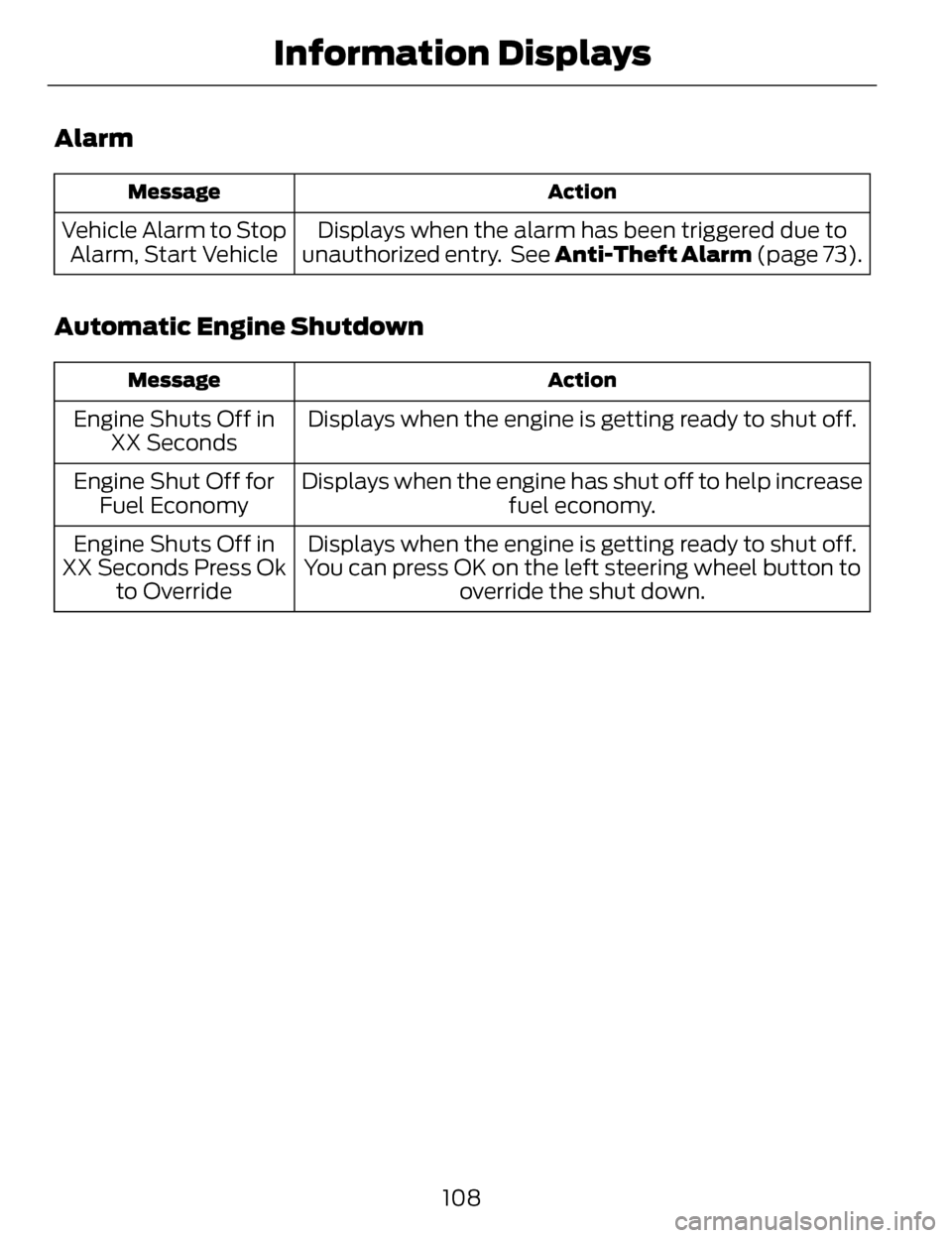
Alarm
Action
Message
Displays when the alarm has been triggered due to
unauthorized entry. See Anti-Theft Alarm (page 73).
Vehicle Alarm to Stop
Alarm, Start Vehicle
Automatic Engine Shutdown
Action
Message
Displays when the engine is getting ready to shut off.
Engine Shuts Off in
XX Seconds
Displays when the engine has shut off to help increase fuel economy.
Engine Shut Off for
Fuel Economy
Displays when the engine is getting ready to shut off.
You can press OK on the left steering wheel button to override the shut down.
Engine Shuts Off in
XX Seconds Press Ok to Override
108
Information Displays
Page 116 of 468
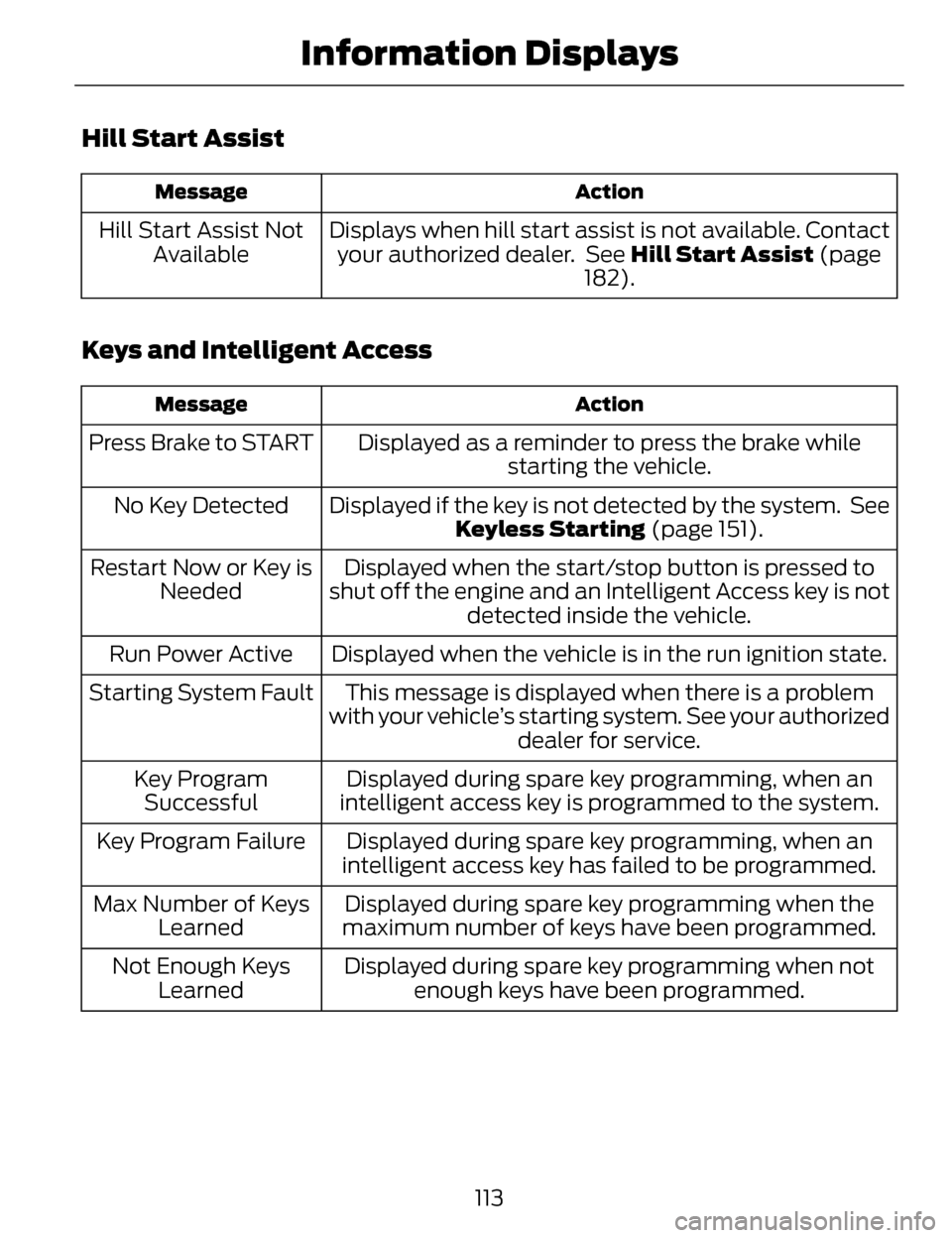
Hill Start Assist
Action
Message
Displays when hill start assist is not available. Contact
your authorized dealer. See Hill Start Assist (page
182).
Hill Start Assist Not
Available
Keys and Intelligent Access
Action
Message
Displayed as a reminder to press the brake while
starting the vehicle.
Press Brake to START
Displayed if the key is not detected by the system. SeeKeyless Starting (page 151).
No Key Detected
Displayed when the start/stop button is pressed to
shut off the engine and an Intelligent Access key is not detected inside the vehicle.
Restart Now or Key is
Needed
Displayed when the vehicle is in the run ignition state.
Run Power Active
This message is displayed when there is a problem
with your vehicle’s starting system. See your authorized dealer for service.
Starting System Fault
Displayed during spare key programming, when an
intelligent access key is programmed to the system.
Key Program
Successful
Displayed during spare key programming, when an
intelligent access key has failed to be programmed.
Key Program Failure
Displayed during spare key programming when the
maximum number of keys have been programmed.
Max Number of Keys
Learned
Displayed during spare key programming when notenough keys have been programmed.
Not Enough Keys
Learned
113
Information Displays
Page 117 of 468
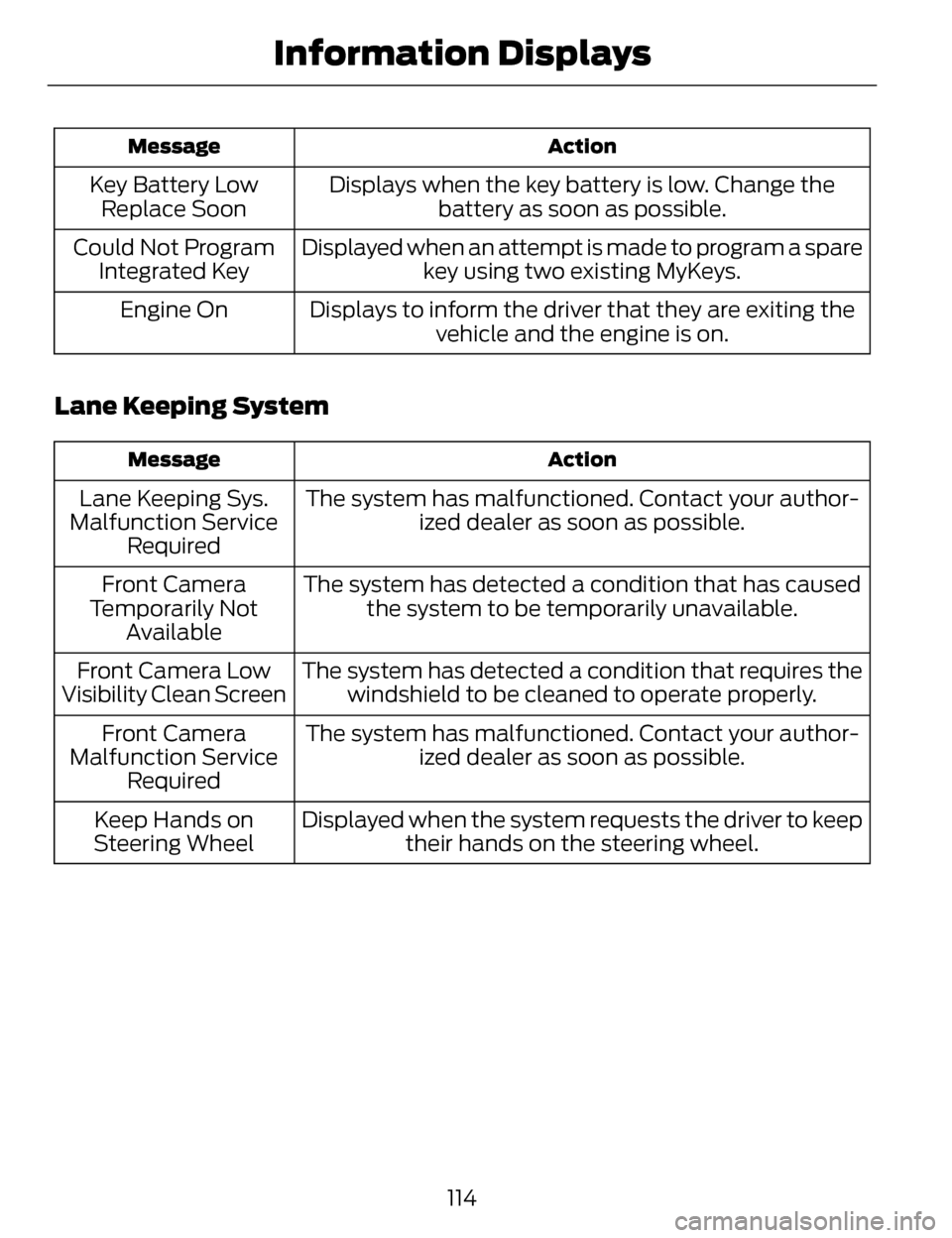
Action
Message
Displays when the key battery is low. Change the
battery as soon as possible.
Key Battery Low
Replace Soon
Displayed when an attempt is made to program a sparekey using two existing MyKeys.
Could Not Program
Integrated Key
Displays to inform the driver that they are exiting thevehicle and the engine is on.
Engine On
Lane Keeping System
Action
Message
The system has malfunctioned. Contact your author-
ized dealer as soon as possible.
Lane Keeping Sys.
Malfunction Service Required
The system has detected a condition that has causedthe system to be temporarily unavailable.
Front Camera
Temporarily Not Available
The system has detected a condition that requires thewindshield to be cleaned to operate properly.
Front Camera Low
Visibility Clean Screen
The system has malfunctioned. Contact your author-ized dealer as soon as possible.
Front Camera
Malfunction Service Required
Displayed when the system requests the driver to keeptheir hands on the steering wheel.
Keep Hands on
Steering Wheel
114
Information Displays
Page 118 of 468
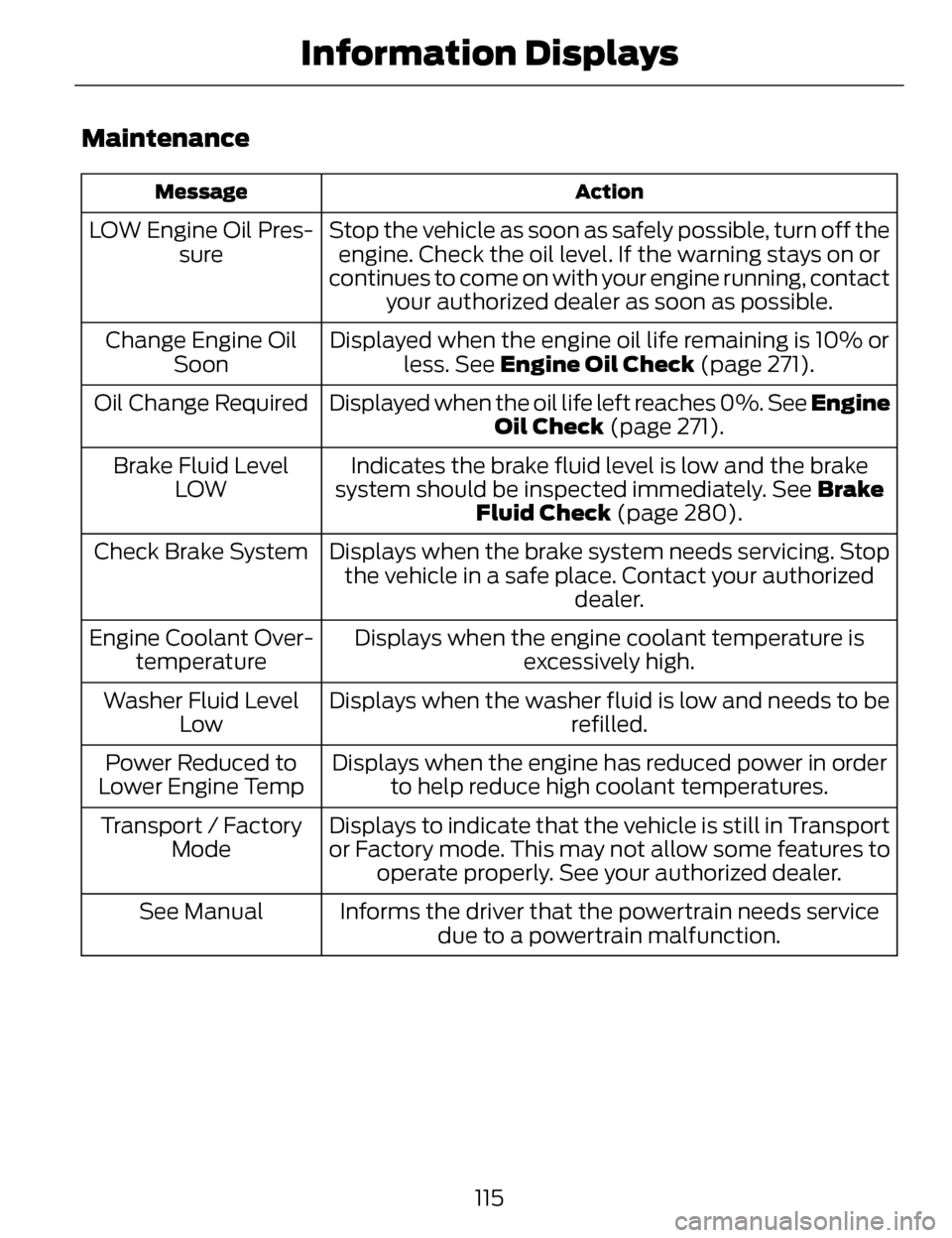
Maintenance
Action
Message
Stop the vehicle as soon as safely possible, turn off the
engine. Check the oil level. If the warning stays on or
continues to come on with your engine running, contact your authorized dealer as soon as possible.
LOW Engine Oil Pres-
sure
Displayed when the engine oil life remaining is 10% orless. See Engine Oil Check (page 271).
Change Engine Oil
Soon
Displayed when the oil life left reaches 0%. See Engine Oil Check (page 271).
Oil Change Required
Indicates the brake fluid level is low and the brake
system should be inspected immediately. See Brake
Fluid Check (page 280).
Brake Fluid Level
LOW
Displays when the brake system needs servicing. Stopthe vehicle in a safe place. Contact your authorized dealer.
Check Brake System
Displays when the engine coolant temperature isexcessively high.
Engine Coolant Over-
temperature
Displays when the washer fluid is low and needs to be refilled.
Washer Fluid Level
Low
Displays when the engine has reduced power in orderto help reduce high coolant temperatures.
Power Reduced to
Lower Engine Temp
Displays to indicate that the vehicle is still in Transport
or Factory mode. This may not allow some features tooperate properly. See your authorized dealer.
Transport / Factory
Mode
Informs the driver that the powertrain needs servicedue to a powertrain malfunction.
See Manual
115
Information Displays
Page 120 of 468
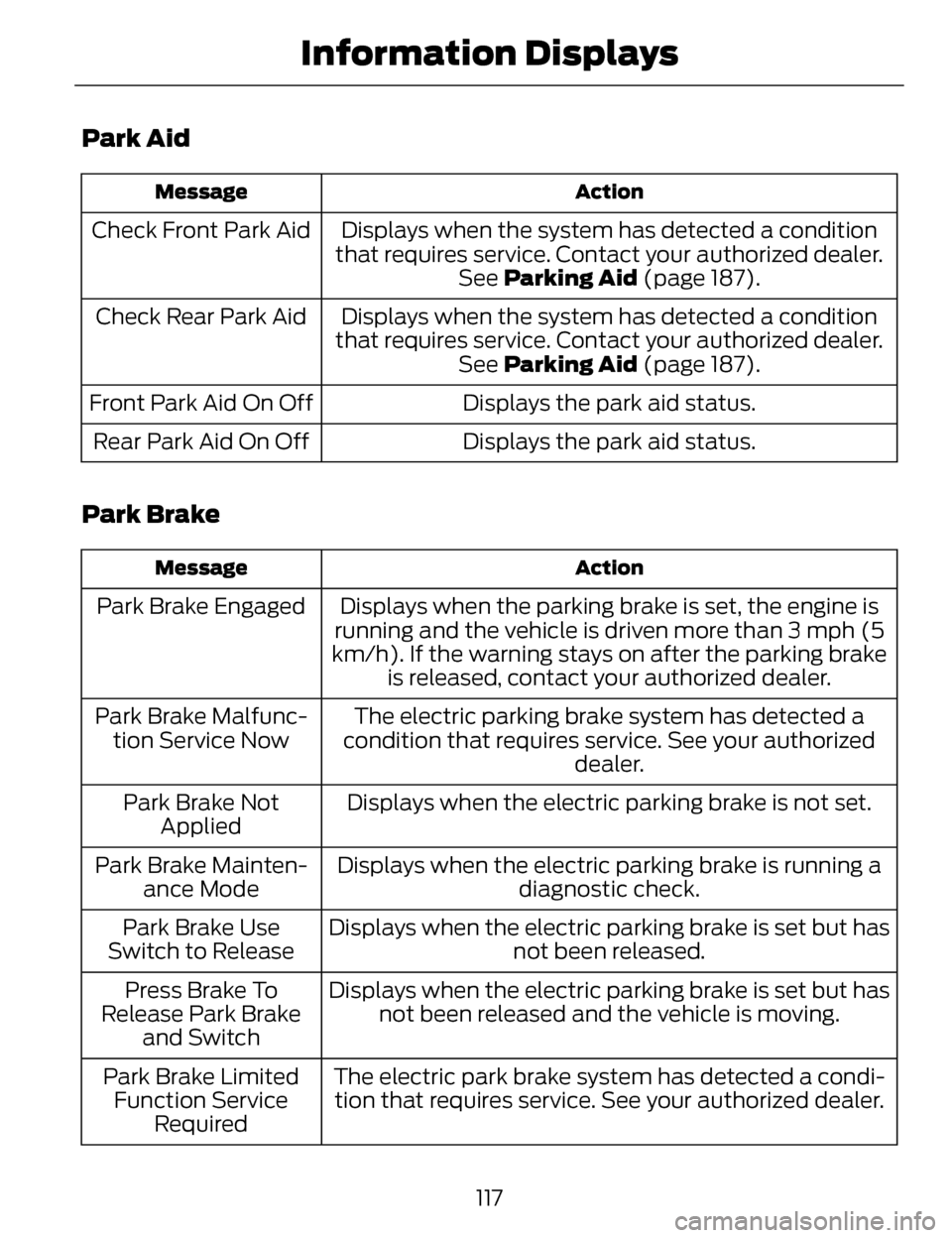
Park Aid
Action
Message
Displays when the system has detected a condition
that requires service. Contact your authorized dealer. See Parking Aid (page 187).
Check Front Park Aid
Displays when the system has detected a condition
that requires service. Contact your authorized dealer. See Parking Aid (page 187).
Check Rear Park Aid
Displays the park aid status.
Front Park Aid On Off
Displays the park aid status.
Rear Park Aid On Off
Park Brake
Action
Message
Displays when the parking brake is set, the engine is
running and the vehicle is driven more than 3 mph (5
km/h). If the warning stays on after the parking brake is released, contact your authorized dealer.
Park Brake Engaged
The electric parking brake system has detected a
condition that requires service. See your authorized dealer.
Park Brake Malfunc-
tion Service Now
Displays when the electric parking brake is not set.
Park Brake Not
Applied
Displays when the electric parking brake is running a diagnostic check.
Park Brake Mainten-
ance Mode
Displays when the electric parking brake is set but hasnot been released.
Park Brake Use
Switch to Release
Displays when the electric parking brake is set but hasnot been released and the vehicle is moving.
Press Brake To
Release Park Brake and Switch
The electric park brake system has detected a condi-tion that requires service. See your authorized dealer.
Park Brake Limited
Function Service Required
117
Information Displays
Page 122 of 468
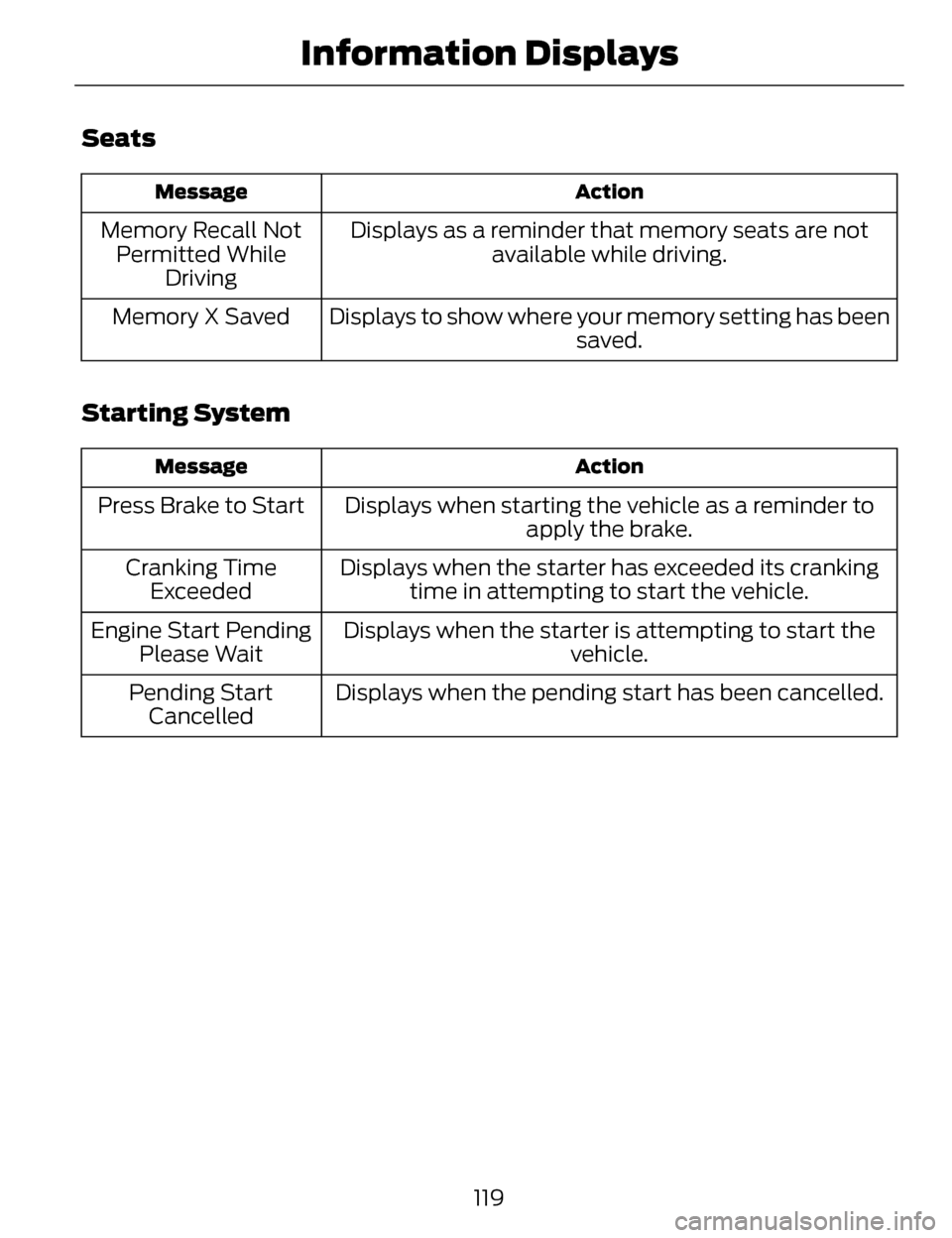
Seats
Action
Message
Displays as a reminder that memory seats are not
available while driving.
Memory Recall Not
Permitted While Driving
Displays to show where your memory setting has been saved.
Memory X Saved
Starting System
Action
Message
Displays when starting the vehicle as a reminder to
apply the brake.
Press Brake to Start
Displays when the starter has exceeded its crankingtime in attempting to start the vehicle.
Cranking Time
Exceeded
Displays when the starter is attempting to start the vehicle.
Engine Start Pending
Please Wait
Displays when the pending start has been cancelled.
Pending Start
Cancelled
119
Information Displays
Page 132 of 468
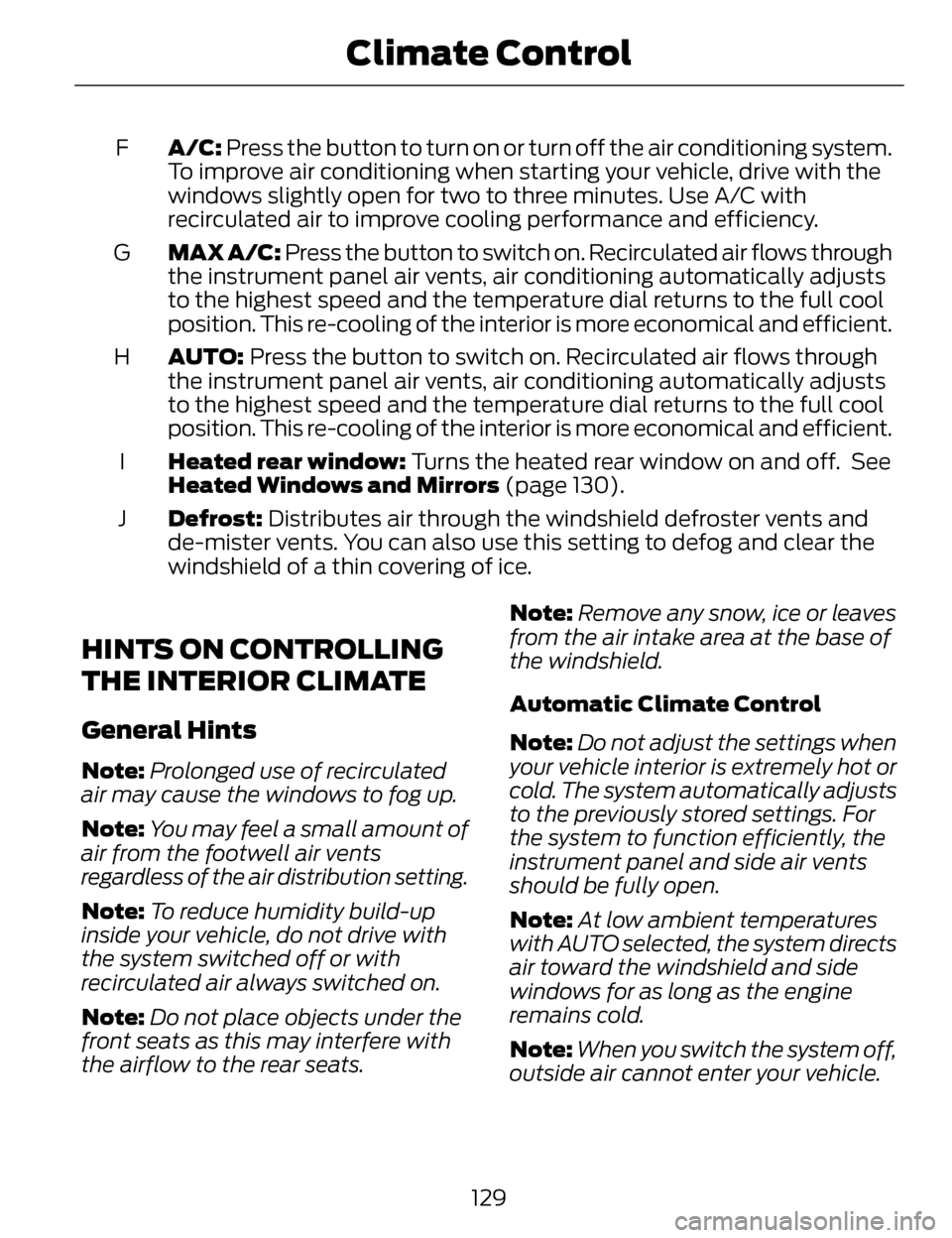
A/C: Press the button to turn on or turn off the air conditioning system.
To improve air conditioning when starting your vehicle, drive with the
windows slightly open for two to three minutes. Use A/C with
recirculated air to improve cooling performance and efficiency.
F
MAX A/C: Press the button to switch on. Recirculated air flows through
the instrument panel air vents, air conditioning automatically adjusts
to the highest speed and the temperature dial returns to the full cool
position. This re-cooling of the interior is more economical and efficient.
G
AUTO: Press the button to switch on. Recirculated air flows through
the instrument panel air vents, air conditioning automatically adjusts
to the highest speed and the temperature dial returns to the full cool
position. This re-cooling of the interior is more economical and efficient.
H
Heated rear window: Turns the heated rear window on and off. See
Heated Windows and Mirrors (page 130).
I
Defrost: Distributes air through the windshield defroster vents and
de-mister vents. You can also use this setting to defog and clear the
windshield of a thin covering of ice.
J
HINTS ON CONTROLLING
THE INTERIOR CLIMATE
General Hints
Note:
Prolonged use of recirculated
air may cause the windows to fog up.
Note: You may feel a small amount of
air from the footwell air vents
regardless of the air distribution setting.
Note: To reduce humidity build-up
inside your vehicle, do not drive with
the system switched off or with
recirculated air always switched on.
Note: Do not place objects under the
front seats as this may interfere with
the airflow to the rear seats. Note:
Remove any snow, ice or leaves
from the air intake area at the base of
the windshield.
Automatic Climate Control
Note: Do not adjust the settings when
your vehicle interior is extremely hot or
cold. The system automatically adjusts
to the previously stored settings. For
the system to function efficiently, the
instrument panel and side air vents
should be fully open.
Note: At low ambient temperatures
with AUTO selected, the system directs
air toward the windshield and side
windows for as long as the engine
remains cold.
Note: When you switch the system off,
outside air cannot enter your vehicle.
129
Climate Control