engine LINCOLN MKZ 2014 Workshop Manual
[x] Cancel search | Manufacturer: LINCOLN, Model Year: 2014, Model line: MKZ, Model: LINCOLN MKZ 2014Pages: 468, PDF Size: 4.49 MB
Page 186 of 468
The system makes it easier to pull
away when your vehicle is on a slope
without the need to use the parking
brake.
When the system is active, your
vehicle will remain stationary on the
slope for two to three seconds after
you release the brake pedal. This
allows you time to move your foot
from the brake to the accelerator
pedal. The brakes are released
automatically once the engine has
developed sufficient drive to prevent
your vehicle from rolling down the
slope. This is an advantage when
pulling away on a slope, (for example
from a car park ramp, traffic lights or
when reversing uphill into a parking
space).
The system will activate
automatically on any slope that will
cause significant vehicle rollback.
Using Hill Start Assist
1. Press the brake pedal to bring yourvehicle to a complete standstill.
Keep the brake pedal pressed.
2. If the sensors detect that your vehicle is on a slope, the system
will activate automatically.
3. When you remove your foot from the brake pedal, your vehicle will
remain on the slope without rolling
away for approximately two or
three seconds. This hold time will
automatically be extended if you
are in the process of driving off.
4. Drive off in the normal manner. The brakes will release
automatically.
183
Brakes
Page 187 of 468
PRINCIPLE OF OPERATION
The traction control system helps
avoid drive wheel spin and loss of
traction.
If your vehicle begins to slide, the
system applies the brakes to
individual wheels and, when needed,
reduces engine power at the same
time. If the wheels spin when
accelerating on slippery or loose
surfaces, the system reduces engine
power in order to increase traction.
USING TRACTION
CONTROL
In certain situations (for example,
stuck in snow or mud), turning the
traction control off may be beneficial
as this allows the wheels to spin with
full engine power. Turn off the traction
control system through the
information display. See General
Information (page 101).
System Indicator Lights and
Messages
WARNING
If a failure has been detected
within the AdvanceTrac system,
the stability control light will
illuminate steadily. Verify that the
AdvanceTrac system was not
manually disabled through the
information display. If the stability
control light still illuminates steadily,
have the system serviced by an
authorized dealer immediately.
Operating your vehicle with
AdvanceTrac disabled could lead to
an increased risk of loss of vehicle
control, vehicle rollover, personal
injury and death.
E138639
The stability control light
temporarily illuminates on
engine start-up and flashes
when a driving condition activates the
stability system.
The stability control off light
temporarily illuminates on
engine start-up and stays on
when you turn the traction control
system off.
When you turn the traction control
system off or on, a message appears
in the information display showing
system status.
184
Traction Control
Page 206 of 468
Changing the Set Speed
• Accelerate or brake to the desiredspeed, then press and release
SET+.
• Press and hold SET+ or SET- until the desired set speed shows on the
information display. The vehicle
speed will gradually change to the
selected speed.
• Press and release SET+ or SET-. The set speed will change in
approximately 1 mph (2 km/h)
increments.
The system may apply the brakes to
slow the vehicle to the new set speed.
The set speed will display
continuously in the information
display while the system is active.
Resuming the Set Speed
Note: Only use resume if you are
aware of the set speed and intend to
return to it.
Press and release RES. The vehicle
will return to the previously set speed.
The set speed will display
continuously in the information
display while the system is active.
Low Speed Automatic
Cancellation
The system is not functional at vehicle
speeds below 12 mph (20 km/h). An
audible alarm will sound and the
automatic braking releases if the
vehicle drops below this speed.
Hilly Condition Usage
Note: An audible alarm will sound and
the system will shut down if it is
applying brakes for an extended period
of time. This allows the brakes to cool
down. The system will function
normally again when the brakes have
cooled down.
You should select a lower gear
position when the system is active in
situations such as prolonged downhill
driving on steep grades, for example
in mountainous areas. The system
needs additional engine braking in
these situations to reduce the load on
the vehicle’s regular brake system to
prevent them from overheating.
Switching the System Off
Note: The set speed memory erases
when you switch off the system.
Press and release OFF or turn off the
ignition.
Detection Issues
The radar sensor has a limited field of
vision. It may not detect vehicles at all
or detect a vehicle later than expected
in some situations. The lead vehicle
graphic will not illuminate if the
system does not detect a vehicle in
front of you.
203
Cruise Control
Page 224 of 468
If the front end of the vehicle is hit or
damaged, the radar sensing zone may
be altered causing missed or false
collision warnings. See your
authorized dealer to have your
collision warning radar checked for
proper coverage and operation.
STEERING
Electric Power Steering
WARNINGS
The electric power steering
system has diagnostic checks
that continuously monitor the system
to ensure proper operation. When a
system error is detected a steering
message will appear in the
information display.
The electric power steering
system has diagnostic checks
that continuously monitor the system
to ensure proper operation of the
electronic system. When an electronic
error is detected, a message will be
displayed in the information display.
If this happens, stop the vehicle in a
safe place, and turn off the engine.
After at least 10 seconds, reset the
system by restarting the engine, and
watch the information display for a
steering message. If a steering
message returns, or returns while
driving, take the vehicle to your dealer
to have it checked.
WARNINGS
Obtain immediate service if a
system error is detected. You
may not notice any difference in the
feel of your steering, but a serious
condition may exist. Failure to do so
may result in loss of steering control.
Your vehicle is equipped with an
electric power-assisted steering
system. There is no fluid reservoir to
check or fill.
If your vehicle loses electrical power
while you are driving (or if the ignition
is turned off), you can steer the
vehicle manually, but it takes more
effort. Extreme continuous steering
may increase the effort it takes for you
to steer. This occurs to prevent
internal overheating and permanent
damage to your steering system. If this
should occur, you will neither lose the
ability to steer the vehicle manually
nor will it cause permanent damage.
Typical steering and driving
maneuvers will allow the system to
cool and steering assist will return to
normal.
Steering Tips
If the steering wanders or pulls, check
for:
• an improperly inflated tire
• uneven tire wear
• loose or worn suspension components
• loose or worn steering components
• improper vehicle alignment
221
Driving Aids
Page 226 of 468
• Comfort – Provides a more relaxeddriving experience, maximizing
comfort. Steering effort is
decreased and suspension
movement is more fluid. Comfort
mode is ideal when enhanced
traveling comfort is desired.
• Normal – Delivers a balanced combination of comfortable,
controlled ride and confident
handling. This mode provides an
engaging drive experience and a
direct connection to the road
without sacrificing any of the
composure demanded from a
luxury vehicle.
• Sport – Provides a sportier driving experience. Suspension stiffens,
with an emphasis on handling and
control. The engine responds more
directly to your inputs and takes
on a more powerful tone. Sport
mode is intended to be used during
more spirited driving.
Using Lincoln Drive Control
You can configure which of the Drive
Control modes are active when the
vehicle is in D (Drive) or in S (Sport).
The configuration is retained until
modified from the main menu on the
information display.
To change the vehicle’s Drive Control
settings from the main menu on the
information display:
1. Choose Settings.
2. Choose Driver Assist.
3. Choose Vehicle. 4. Select the shift position you would
like to configure, either D or S.
5. Choose from Comfort, Normal, or Sport modes as your preferred
setting in D.
6. Choose from Normal or Sport modes as your preferred setting in
S.
Note: Lincoln Drive Control has
diagnostic checks that continuously
monitor the system to ensure proper
operation. Certain types of system
errors will gray out the mode selections
within the information display,
preventing you from changing states
when the gear position is changed.
Other types of errors will produce a
temporary message that states Drive
Control Malfunction. If either condition
persists for multiple key cycles, take
your vehicle to an authorized dealer to
have it checked.
223
Driving Aids
Page 231 of 468
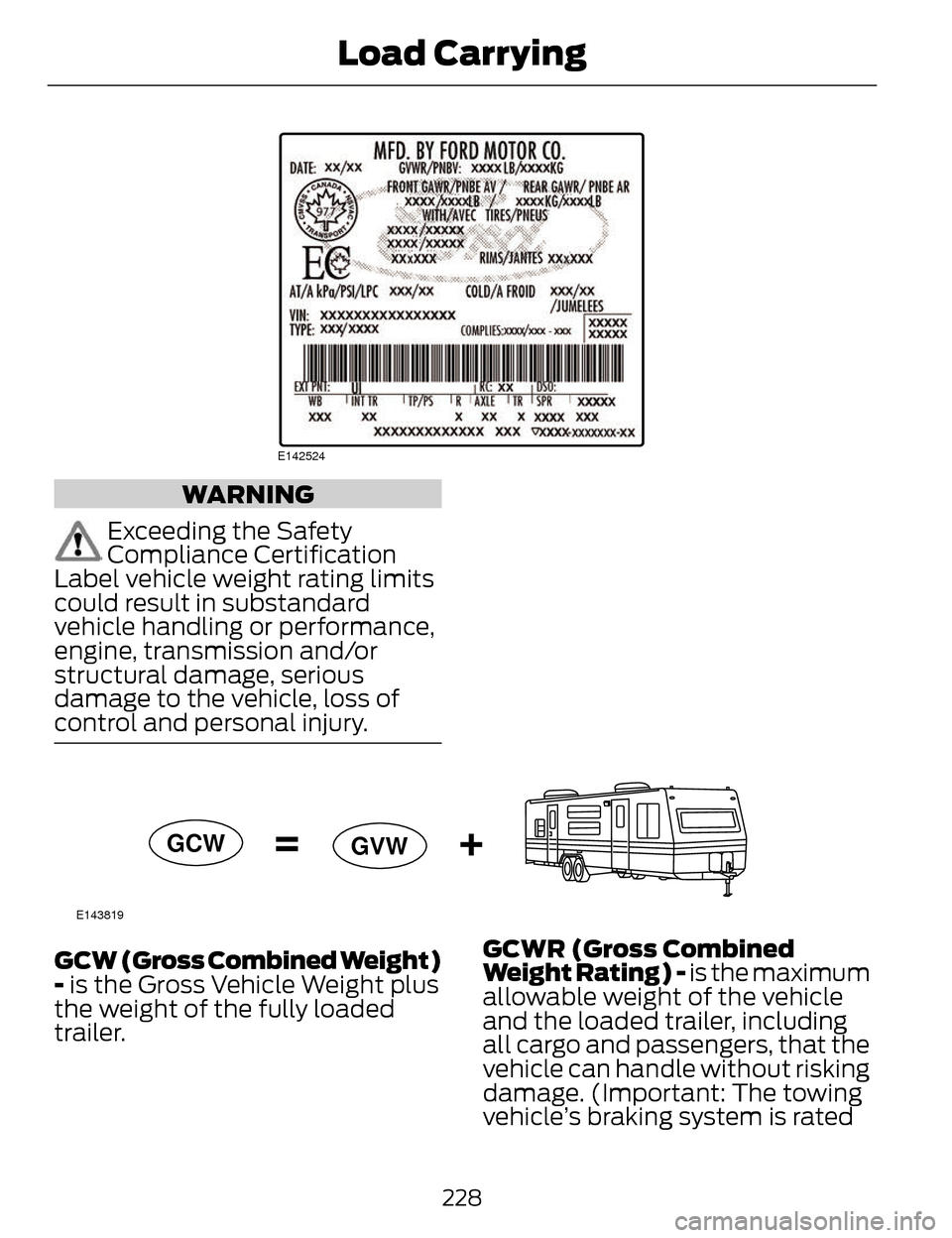
E142524
WARNING
Exceeding the Safety
Compliance Certification
Label vehicle weight rating limits
could result in substandard
vehicle handling or performance,
engine, transmission and/or
structural damage, serious
damage to the vehicle, loss of
control and personal injury.
E143819
GCW GVW
GCW (Gross Combined Weight)
- is the Gross Vehicle Weight plus
the weight of the fully loaded
trailer. GCWR (Gross Combined
Weight Rating) - is the maximum
allowable weight of the vehicle
and the loaded trailer, including
all cargo and passengers, that the
vehicle can handle without risking
damage. (Important: The towing
vehicle’s braking system is rated
228
Load Carrying
Page 235 of 468
TOWING A TRAILER
WARNINGS
Do not exceed the GVWR or
the GAWR specified on the
certification label.
Towing trailers beyond the
maximum recommended
gross trailer weight exceeds the
limit of your vehicle and could
result in engine damage,
transmission damage, structural
damage, loss of vehicle control,
vehicle rollover and personal
injury.
Note: There may be electrical
items such as fuses or relays that
can affect trailer towing operation.
See Fuses (page 255).
Weight, not volume designates
your vehicle's load capacity. You
cannot necessarily use all
available space when loading a
vehicle.
Towing a trailer places an
additional load on your vehicle's
engine, transmission, axle, brakes,
tires and suspension. Inspect
these components periodically
during, and after, any towing
operation. Load Placement
To help minimize how trailer
movement affects the vehicle
when driving:
• Load the heaviest items closest
to the trailer floor.
• Load the heaviest items in the center of the left and right side
trailer tires.
• Load the heaviest items above the trailer axles or just slightly
forward toward the trailer
tongue. Do not allow the final
trailer tongue weight to go
above or below 10-15% of the
loaded trailer weight.
• Select a tow bar with the correct rise or drop. When both
the loaded vehicle and trailer
are connected, the trailer frame
should be level, or slightly
angled down toward the
vehicle, when viewed from the
side.
When driving with a trailer or
payload, a slight takeoff vibration
or shudder may be present due to
the increased payload weight.
Additional information regarding
proper trailer loading and setting
your vehicle up for towing is
located in the Load Carrying
chapter. See Load Limit (page
224). You can also find the
information in the RV & Trailer
Towing Guide, available at an
authorized dealer.
232
Towing
Page 238 of 468
Trailer Lamps
WARNING
Never connect any trailer lamp
wiring to the vehicle's tail lamp
wiring; this may damage the electrical
system resulting in fire. Contact your
authorized dealer as soon as possible
for assistance in proper trailer tow
wiring installation. Additional
electrical equipment may be required.
Trailer lamps are required on most
towed vehicles. Make sure all running
lights, brake lights, turn signals and
hazard lights are working.
Before Towing a Trailer
Practice turning, stopping and backing
up to get the feel of your
vehicle-trailer combination before
starting on a trip. When turning, make
wider turns so the trailer wheels clear
curbs and other obstacles.
When Towing a Trailer
• Do not drive faster than 70 mph (113 km/h) during the first 500
miles (800 kilometers).
• Do not make full-throttle starts.
• Check your hitch, electrical connections and trailer wheel lug
nuts thoroughly after you have
traveled 50 miles (80 kilometers).
• When stopped in congested or heavy traffic during hot weather,
place the gearshift in position P to
aid engine and transmission
cooling and to help A/C
performance. • Turn off the speed control with
heavy loads or in hilly terrain. The
speed control may turn off
automatically when you are towing
on long, steep grades.
• Shift to a lower gear when driving down a long or steep hill. Do not
apply the brakes continuously, as
they may overheat and become
less effective.
• If your transmission is equipped with a Grade Assist or Tow/Haul
feature, use this feature when
towing. This provides engine
braking and helps eliminate
excessive transmission shifting for
optimum fuel economy and
transmission cooling.
• Allow more distance for stopping with a trailer attached. Anticipate
stops and brake gradually.
• Avoid parking on a grade. However, if you must park on a grade:
• Turn the steering wheel to pointyour vehicle tires away from
traffic flow.
• Set your vehicle parking brake.
• Place the automatic transmission in position P.
• Place wheel chocks in front and back of the trailer wheels.
(Chocks not included with
vehicle.)
Launching or Retrieving a Boat
or Personal Watercraft (PWC)
Note: Disconnect the wiring to the
trailer before backing the trailer into
the water.
235
Towing
Page 241 of 468
Vehicles Equipped with a 2.0L
Engine
Front-wheel drive (FWD) vehicles
CANNOT be flat-towed (all wheels
on the ground) as vehicle or
transmission damage may occur. You
must place the front wheels on a
two-wheel tow dolly. If you are using
a tow dolly, follow the instructions
specified by the equipment provider.
All-wheel drive (AWD) vehicles
CANNOT be flat-towed (all wheels
on the ground), as vehicle or
transmission damage may occur. It is
recommended to tow your vehicle
with all four (4) wheels off the ground
such as when using a car-hauling
trailer. Otherwise, you cannot tow your
vehicle.
Vehicles Equipped with a 3.7L
Engine
You can tow your vehicle with all four
wheels on the ground using the
Neutral Tow feature, or with all four
wheels off the ground using a vehicle
transport trailer. If you are using a
vehicle transport trailer, follow the
instruction specified by the equipment
provider.
If you tow your vehicle with all four
wheels on the ground:
• Tow only in the forward direction.
• Release the parking brake.
Neutral Tow
Enter Neutral Tow mode by doing the
following:1. Put the ignition in accessory mode
by pressing the engine START
button without pressing the brake
pedal.
2. Select Neutral Tow under the Vehicle Settings menu in the
information display. See General
Information (page 101).
3. Press and hold the OK button to start the neutral tow process.
4. Press the brake pedal and select N on the push-button
transmission.
5. Turn the ignition off by pressing the engine START button without
pressing the brake pedal.
If the process is completes
successfully:
• the N on the push-button transmission blinks slowly
• Neutral Tow Engaged turn
ignition off for towing appears
in the information display.
Note: If the parking brake is applied,
Neutral Tow remove park brake for
towing appears in the information
display.
Note: Do not exceed 65 mph (105
km/h).
Note: Start the engine and allow it to
run for five minutes at the beginning of
each day and every six hours (or fewer).
Shut the engine off and verify that
Neutral tow engaged appears in the
display before continuing to tow.
238
Towing
Page 242 of 468
Exit Neutral Tow mode, make sure the
ignition is on (engine can be on or off),
press the brake pedal and select P on
the push-button transmission.
If the process is completed
successfully, Neutral Tow
disengaged appears in the
information display and both the
instrument cluster and push-button
transmission display P.
239
Towing