service LINCOLN MKZ 2014 Owner's Manual
[x] Cancel search | Manufacturer: LINCOLN, Model Year: 2014, Model line: MKZ, Model: LINCOLN MKZ 2014Pages: 468, PDF Size: 4.49 MB
Page 118 of 468
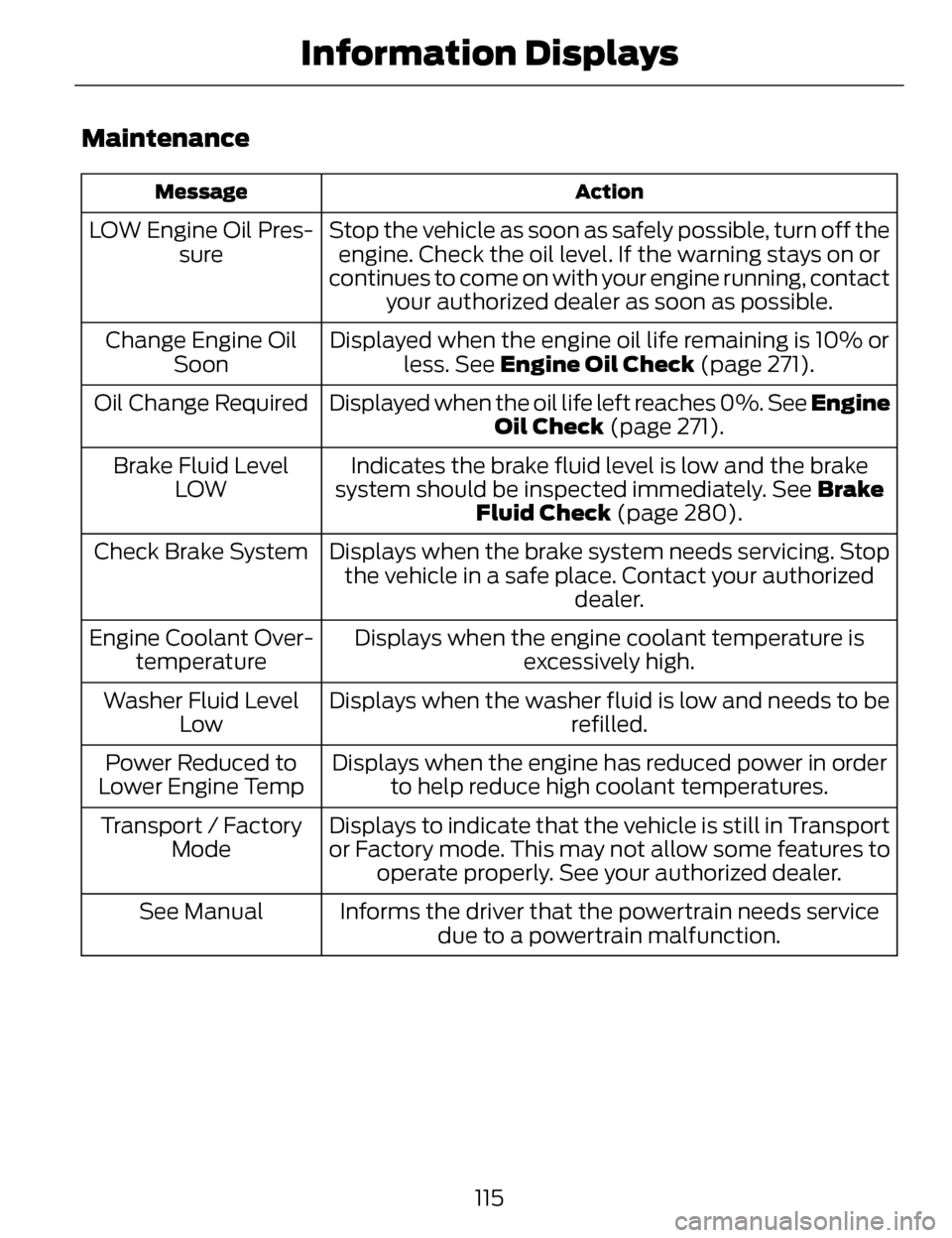
Maintenance
Action
Message
Stop the vehicle as soon as safely possible, turn off the
engine. Check the oil level. If the warning stays on or
continues to come on with your engine running, contact your authorized dealer as soon as possible.
LOW Engine Oil Pres-
sure
Displayed when the engine oil life remaining is 10% orless. See Engine Oil Check (page 271).
Change Engine Oil
Soon
Displayed when the oil life left reaches 0%. See Engine Oil Check (page 271).
Oil Change Required
Indicates the brake fluid level is low and the brake
system should be inspected immediately. See Brake
Fluid Check (page 280).
Brake Fluid Level
LOW
Displays when the brake system needs servicing. Stopthe vehicle in a safe place. Contact your authorized dealer.
Check Brake System
Displays when the engine coolant temperature isexcessively high.
Engine Coolant Over-
temperature
Displays when the washer fluid is low and needs to be refilled.
Washer Fluid Level
Low
Displays when the engine has reduced power in orderto help reduce high coolant temperatures.
Power Reduced to
Lower Engine Temp
Displays to indicate that the vehicle is still in Transport
or Factory mode. This may not allow some features tooperate properly. See your authorized dealer.
Transport / Factory
Mode
Informs the driver that the powertrain needs servicedue to a powertrain malfunction.
See Manual
115
Information Displays
Page 120 of 468
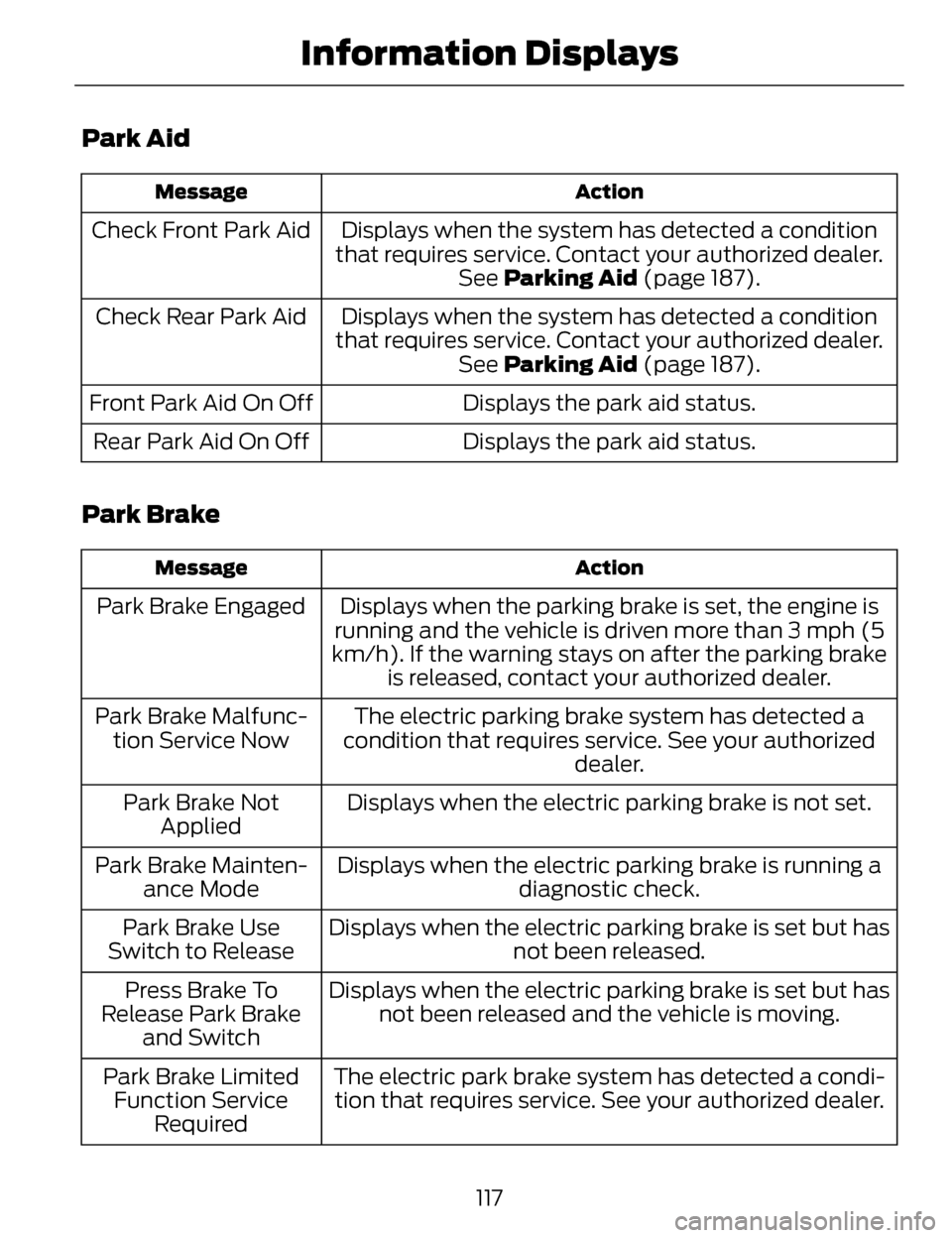
Park Aid
Action
Message
Displays when the system has detected a condition
that requires service. Contact your authorized dealer. See Parking Aid (page 187).
Check Front Park Aid
Displays when the system has detected a condition
that requires service. Contact your authorized dealer. See Parking Aid (page 187).
Check Rear Park Aid
Displays the park aid status.
Front Park Aid On Off
Displays the park aid status.
Rear Park Aid On Off
Park Brake
Action
Message
Displays when the parking brake is set, the engine is
running and the vehicle is driven more than 3 mph (5
km/h). If the warning stays on after the parking brake is released, contact your authorized dealer.
Park Brake Engaged
The electric parking brake system has detected a
condition that requires service. See your authorized dealer.
Park Brake Malfunc-
tion Service Now
Displays when the electric parking brake is not set.
Park Brake Not
Applied
Displays when the electric parking brake is running a diagnostic check.
Park Brake Mainten-
ance Mode
Displays when the electric parking brake is set but hasnot been released.
Park Brake Use
Switch to Release
Displays when the electric parking brake is set but hasnot been released and the vehicle is moving.
Press Brake To
Release Park Brake and Switch
The electric park brake system has detected a condi-tion that requires service. See your authorized dealer.
Park Brake Limited
Function Service Required
117
Information Displays
Page 121 of 468
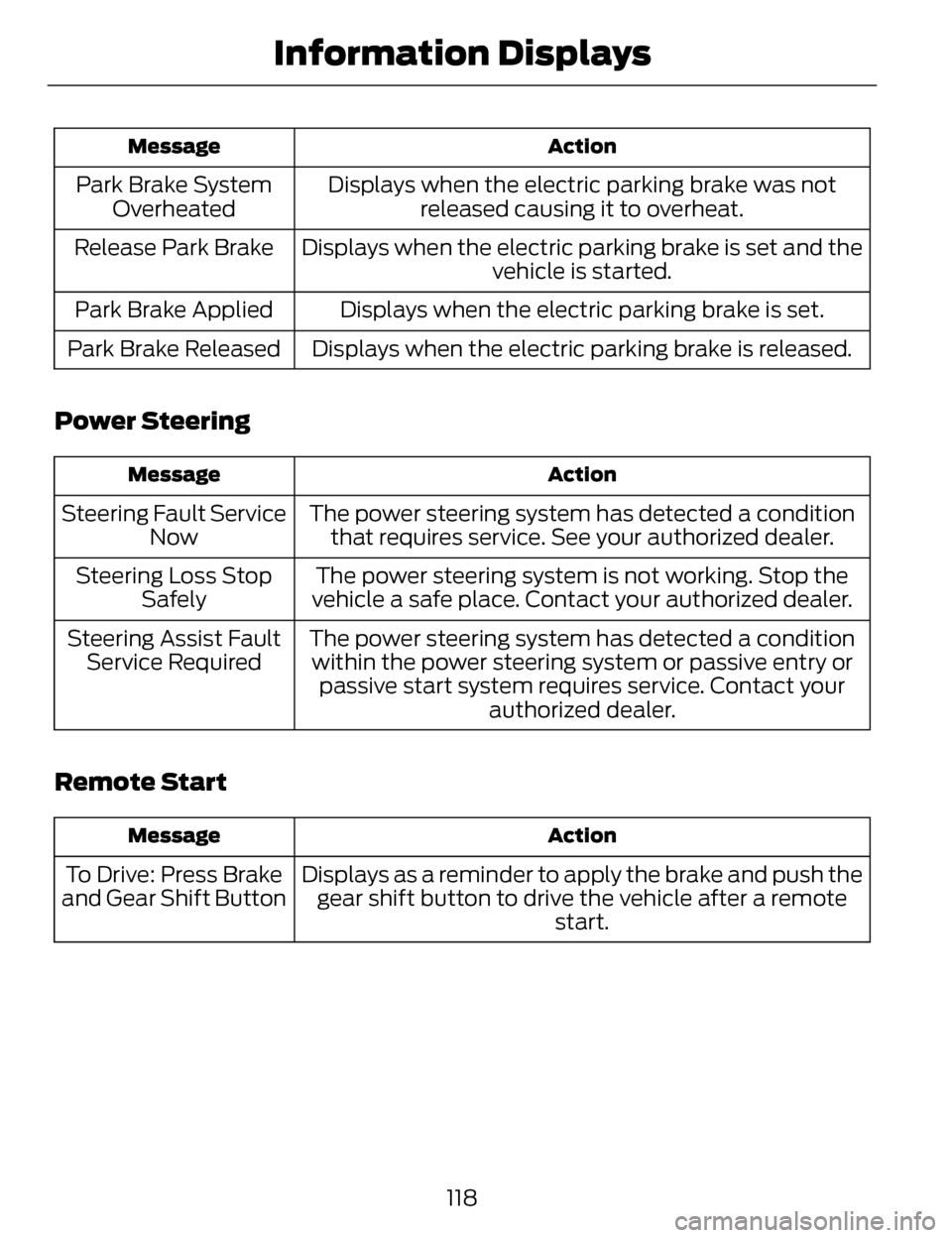
Action
Message
Displays when the electric parking brake was not
released causing it to overheat.
Park Brake System
Overheated
Displays when the electric parking brake is set and the vehicle is started.
Release Park Brake
Displays when the electric parking brake is set.
Park Brake Applied
Displays when the electric parking brake is released.
Park Brake Released
Power Steering
Action
Message
The power steering system has detected a condition
that requires service. See your authorized dealer.
Steering Fault Service
Now
The power steering system is not working. Stop the
vehicle a safe place. Contact your authorized dealer.
Steering Loss Stop
Safely
The power steering system has detected a conditionwithin the power steering system or passive entry or passive start system requires service. Contact your authorized dealer.
Steering Assist Fault
Service Required
Remote Start
Action
Message
Displays as a reminder to apply the brake and push the
gear shift button to drive the vehicle after a remote start.
To Drive: Press Brake
and Gear Shift Button
118
Information Displays
Page 124 of 468
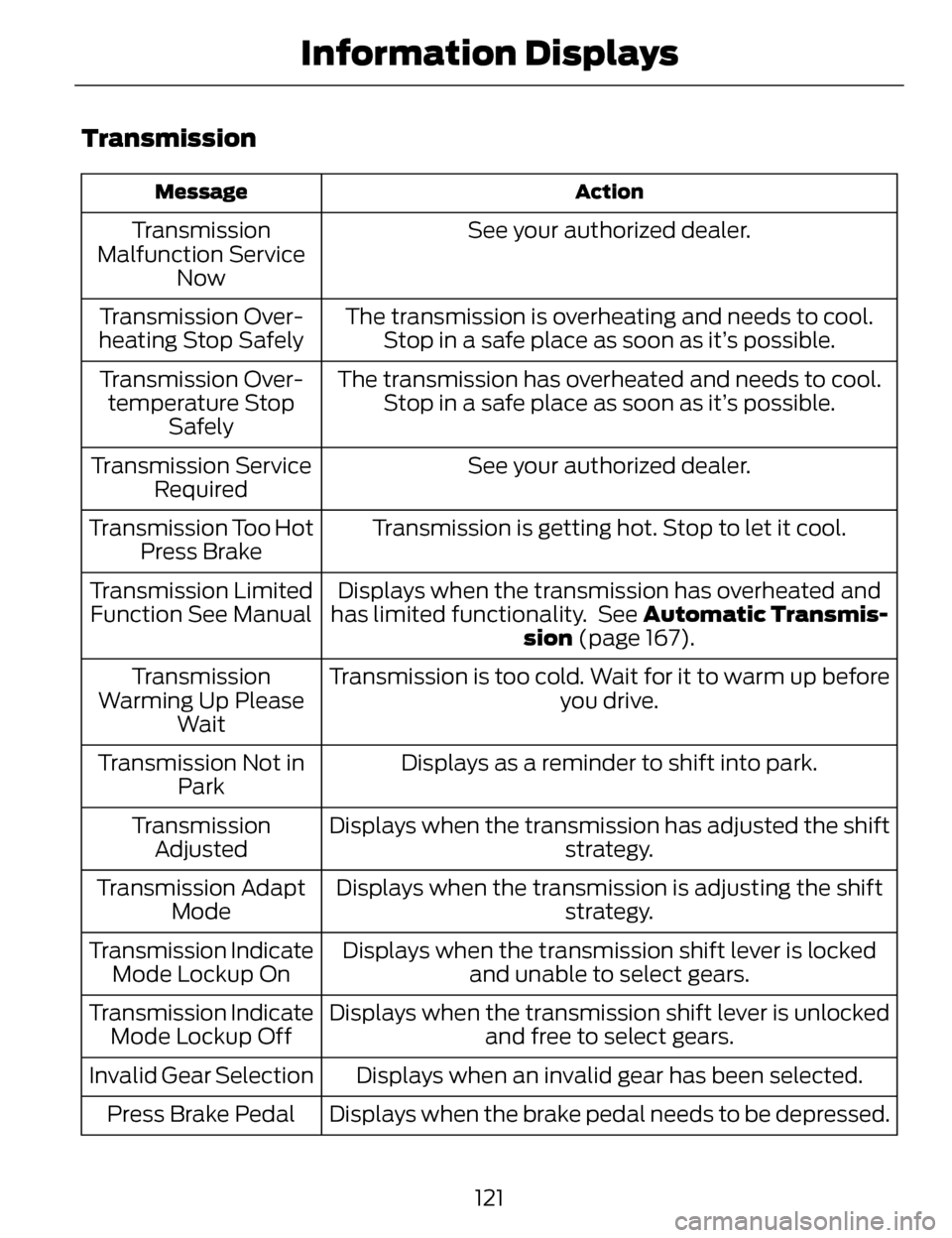
Transmission
Action
Message
See your authorized dealer.
Transmission
Malfunction Service Now
The transmission is overheating and needs to cool.Stop in a safe place as soon as it’s possible.
Transmission Over-
heating Stop Safely
The transmission has overheated and needs to cool.Stop in a safe place as soon as it’s possible.
Transmission Over-
temperature Stop Safely
See your authorized dealer.
Transmission Service
Required
Transmission is getting hot. Stop to let it cool.
Transmission Too Hot
Press Brake
Displays when the transmission has overheated and
has limited functionality. See Automatic Transmis- sion (page 167).
Transmission Limited
Function See Manual
Transmission is too cold. Wait for it to warm up beforeyou drive.
Transmission
Warming Up Please Wait
Displays as a reminder to shift into park.
Transmission Not in
Park
Displays when the transmission has adjusted the shift strategy.
Transmission
Adjusted
Displays when the transmission is adjusting the shift strategy.
Transmission Adapt
Mode
Displays when the transmission shift lever is lockedand unable to select gears.
Transmission Indicate
Mode Lockup On
Displays when the transmission shift lever is unlockedand free to select gears.
Transmission Indicate
Mode Lockup Off
Displays when an invalid gear has been selected.
Invalid Gear Selection
Displays when the brake pedal needs to be depressed.
Press Brake Pedal
121
Information Displays
Page 125 of 468
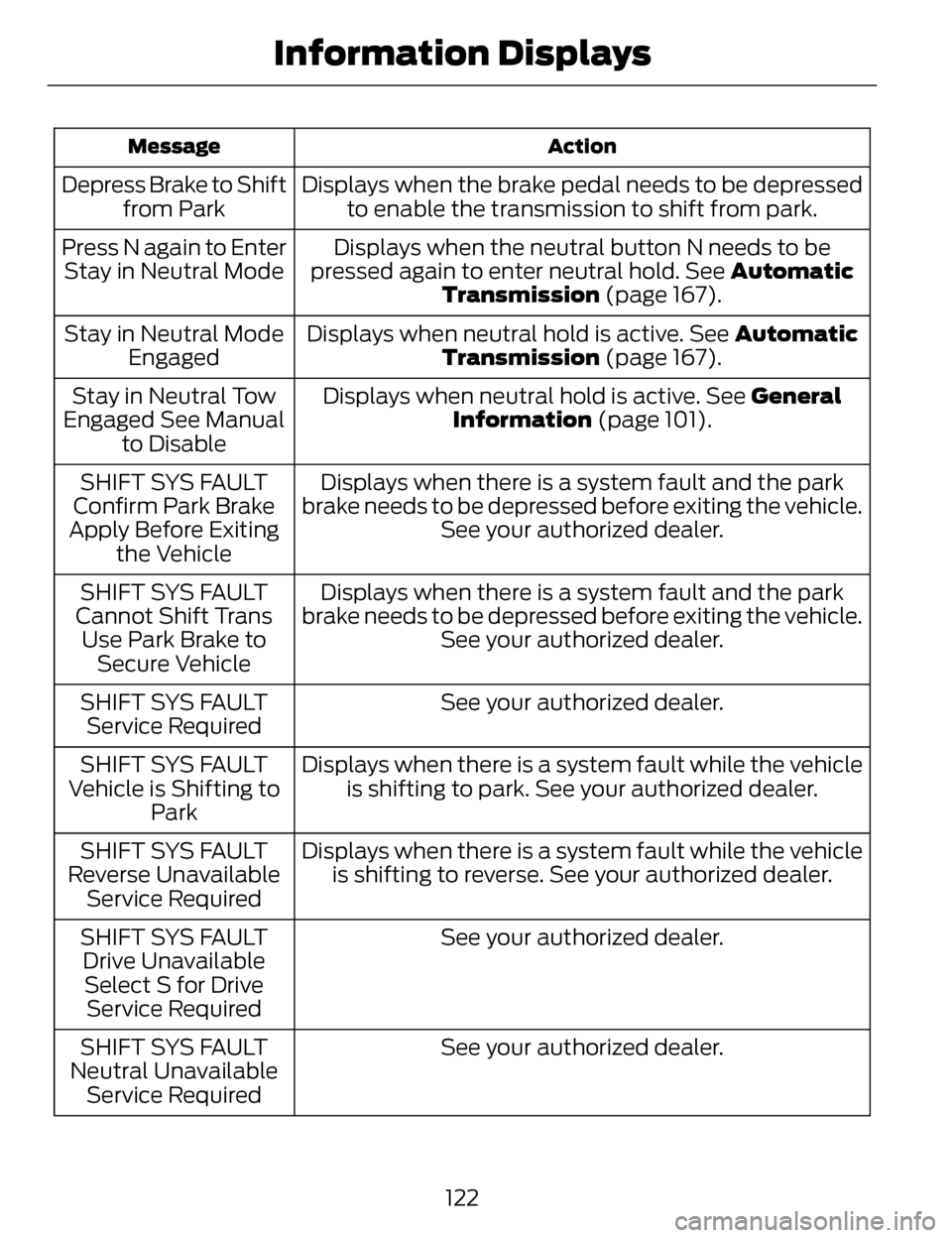
Action
Message
Displays when the brake pedal needs to be depressed
to enable the transmission to shift from park.
Depress Brake to Shift
from Park
Displays when the neutral button N needs to be
pressed again to enter neutral hold. See Automatic Transmission (page 167).
Press N again to Enter
Stay in Neutral Mode
Displays when neutral hold is active. See Automatic
Transmission (page 167).
Stay in Neutral Mode
Engaged
Displays when neutral hold is active. See General
Information (page 101).
Stay in Neutral Tow
Engaged See Manual to Disable
Displays when there is a system fault and the park
brake needs to be depressed before exiting the vehicle. See your authorized dealer.
SHIFT SYS FAULT
Confirm Park Brake
Apply Before Exiting the Vehicle
Displays when there is a system fault and the park
brake needs to be depressed before exiting the vehicle. See your authorized dealer.
SHIFT SYS FAULT
Cannot Shift Trans Use Park Brake to Secure Vehicle
See your authorized dealer.
SHIFT SYS FAULT
Service Required
Displays when there is a system fault while the vehicleis shifting to park. See your authorized dealer.
SHIFT SYS FAULT
Vehicle is Shifting to Park
Displays when there is a system fault while the vehicleis shifting to reverse. See your authorized dealer.
SHIFT SYS FAULT
Reverse Unavailable Service Required
See your authorized dealer.
SHIFT SYS FAULT
Drive UnavailableSelect S for Drive Service Required
See your authorized dealer.
SHIFT SYS FAULT
Neutral Unavailable Service Required
122
Information Displays
Page 126 of 468
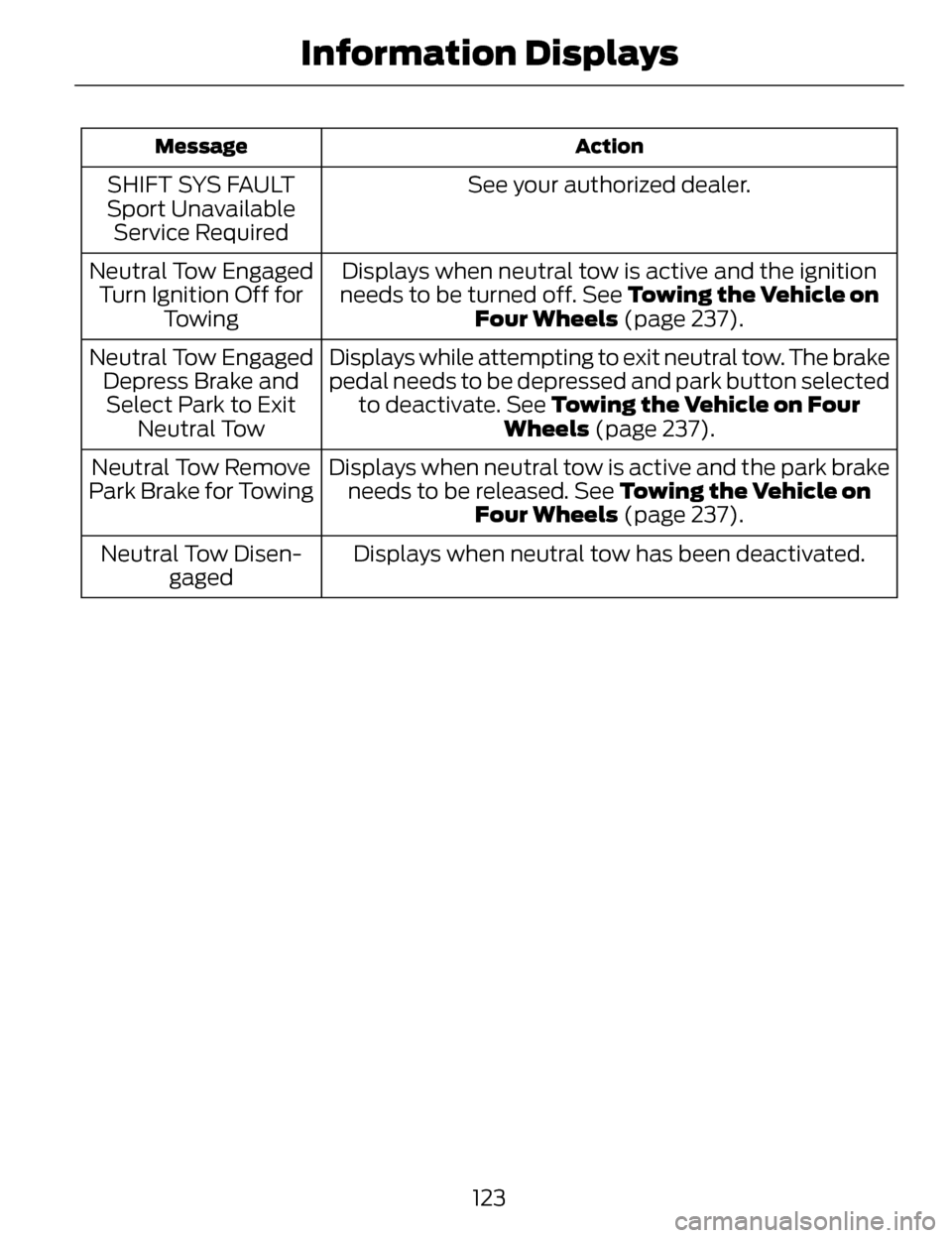
Action
Message
See your authorized dealer.
SHIFT SYS FAULT
Sport Unavailable Service Required
Displays when neutral tow is active and the ignition
needs to be turned off. See Towing the Vehicle on
Four Wheels (page 237).
Neutral Tow Engaged
Turn Ignition Off for Towing
Displays while attempting to exit neutral tow. The brake
pedal needs to be depressed and park button selectedto deactivate. See Towing the Vehicle on Four Wheels (page 237).
Neutral Tow Engaged
Depress Brake andSelect Park to Exit Neutral Tow
Displays when neutral tow is active and the park brakeneeds to be released. See Towing the Vehicle on Four Wheels (page 237).
Neutral Tow Remove
Park Brake for Towing
Displays when neutral tow has been deactivated.
Neutral Tow Disen-
gaged
123
Information Displays
Page 162 of 468
If you have run out of fuel:
• You may need to cycle the ignitionfrom off to on several times after
refueling to allow the fuel system
to pump the fuel from the tank to
the engine. On restarting, cranking
time will take a few seconds longer
than normal. With keyless ignition,
just start the engine. Crank time
will be longer than usual.
• Normally, adding 1 gallon (3.8 liters) of fuel is enough to restart
the engine. If the vehicle is out of
fuel and on a steep grade, more
than 1 gallon (3.8 liters) may be
required.
• The service engine soon indicator may come on. For more
information on the service engine
soon indicator, See Warning
Lamps and Indicators (page 96).Refilling With a Portable Fuel
Container
WARNINGS
Do not insert the nozzle of
portable fuel containers or
aftermarket funnels into the capless
fuel system. This could damage the
fuel system and its seal, and may
cause fuel to run onto the ground
instead of filling the tank, which could
result in serious personal injury.
Do not try to pry open or push
open the capless fuel system
with foreign objects. This could
damage the fuel system and its seal
and cause injury to you or others.
Note: Do not use aftermarket funnels;
they will not work with the capless fuel
system and can damage it. The
included fuel funnel has been specially
designed to work safely with your
vehicle.
When filling the vehicle’s fuel tank
from a portable fuel container, use the
funnel included with the vehicle.
159
Fuel and Refueling
Page 165 of 468
Note:Hold the handle of the fuel filler
nozzle higher while you insert the
nozzle for easier access.
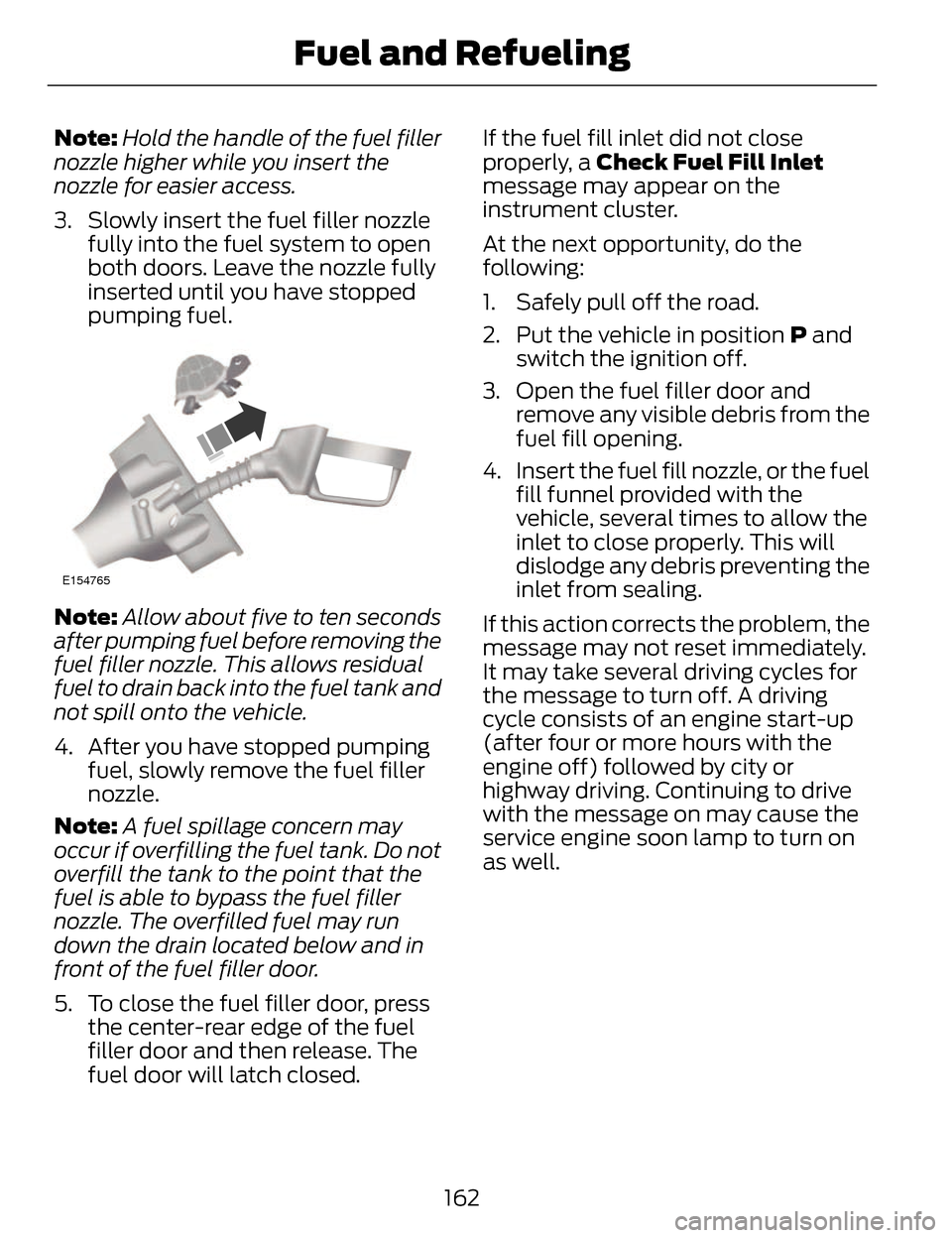
3. Slowly insert the fuel filler nozzle fully into the fuel system to open
both doors. Leave the nozzle fully
inserted until you have stopped
pumping fuel.
E154765
Note: Allow about five to ten seconds
after pumping fuel before removing the
fuel filler nozzle. This allows residual
fuel to drain back into the fuel tank and
not spill onto the vehicle.
4. After you have stopped pumping fuel, slowly remove the fuel filler
nozzle.
Note: A fuel spillage concern may
occur if overfilling the fuel tank. Do not
overfill the tank to the point that the
fuel is able to bypass the fuel filler
nozzle. The overfilled fuel may run
down the drain located below and in
front of the fuel filler door.
5. To close the fuel filler door, press the center-rear edge of the fuel
filler door and then release. The
fuel door will latch closed. If the fuel fill inlet did not close
properly, a Check Fuel Fill Inlet
message may appear on the
instrument cluster.
At the next opportunity, do the
following:
1. Safely pull off the road.
2. Put the vehicle in position
P and
switch the ignition off.
3. Open the fuel filler door and remove any visible debris from the
fuel fill opening.
4. Insert the fuel fill nozzle, or the fuel fill funnel provided with the
vehicle, several times to allow the
inlet to close properly. This will
dislodge any debris preventing the
inlet from sealing.
If this action corrects the problem, the
message may not reset immediately.
It may take several driving cycles for
the message to turn off. A driving
cycle consists of an engine start-up
(after four or more hours with the
engine off) followed by city or
highway driving. Continuing to drive
with the message on may cause the
service engine soon lamp to turn on
as well.
162
Fuel and Refueling
Page 167 of 468
EMISSION CONTROL
SYSTEM
WARNINGS
Do not park, idle, or drive your
vehicle in dry grass or other dry
ground cover. The emission system
heats up the engine compartment and
exhaust system, which can start a fire.
Exhaust leaks may result in entry
of harmful and potentially lethal
fumes into the passenger
compartment. If you smell exhaust
fumes inside your vehicle, have your
dealer inspect your vehicle
immediately. Do not drive if you smell
exhaust fumes.
Your vehicle is equipped with various
emission control components and a
catalytic converter that will enable
your vehicle to comply with applicable
exhaust emission standards. To make
sure that the catalytic converter and
other emission control components
continue to work properly:
To make sure that the catalytic
converter and other emission control
components continue to work
properly:
• Use only the specified fuel listed.
• Avoid running out of fuel.
• Do not turn off the ignition while your vehicle is moving, especially
at high speeds.
• Have the items listed in scheduled maintenance information
performed according to the
specified schedule. The scheduled maintenance items
listed in scheduled maintenance
information are essential to the life
and performance of your vehicle and
to its emissions system.
If you use parts other than Ford,
Motorcraft or Ford-authorized parts
for maintenance replacements, or for
service of components affecting
emission control, such non-Ford parts
should be the equivalent to genuine
Ford Motor Company parts in
performance and durability.
Illumination of the service engine soon
indicator, charging system warning
light or the temperature warning light,
fluid leaks, strange odors, smoke or
loss of engine power could indicate
that the emission control system is
not working properly.
An improperly operating or damaged
exhaust system may allow exhaust to
enter the vehicle. Have a damaged or
improperly operating exhaust system
inspected and repaired immediately.
Do not make any unauthorized
changes to your vehicle or engine. By
law, vehicle owners and anyone who
manufactures, repairs, services, sells,
leases, trades vehicles, or supervises
a fleet of vehicles are not permitted
to intentionally remove an emission
control device or prevent it from
working. Information about your
vehicle’s emission system is on the
Vehicle Emission Control Information
Decal located on or near the engine.
This decal also lists engine
displacement
164
Fuel and Refueling
Page 168 of 468
Please consult your warranty
information for complete details.
On-Board Diagnostics (OBD-II)
Your vehicle is equipped with an
on-board diagnostics system (OBD-II)
that monitors the engine’s emission
control system. This system protects
the environment by ensuring that your
vehicle continues to meet government
emission standards. The OBD-II
system also assists your authorized
dealer in properly servicing your
vehicle.
When the service engine
soon indicator illuminates,
the OBD-II system has
detected a malfunction. Temporary
malfunctions may cause the service
engine soon indicator to illuminate.
Examples of temporary malfunctions
are:
• the vehicle has run out of fuel—the engine may misfire or run poorly
• poor fuel quality or water in the fuel—the engine may misfire or run
poorly
• the fuel fill inlet may not have been properly closed See Refueling
(page 160).
• driving through deep water—the electrical system may be wet.
You can correct these temporary
malfunctions by filling the fuel tank
with good quality fuel, properly closing
the fuel fill inlet or letting the electrical
system dry out. After three driving
cycles without these or any other
temporary malfunctions present, the service engine soon indicator should
stay off the next time you start the
engine. A driving cycle consists of a
cold engine startup followed by mixed
city/highway driving. No additional
vehicle service is required.
If the service engine soon indicator
remains on, have your vehicle serviced
at the first available opportunity.
Although some malfunctions
detected by the OBD-II may not have
symptoms that are apparent,
continued driving with the service
engine soon indicator on can result in
increased emissions, lower fuel
economy, reduced engine and
transmission smoothness, and lead
to more costly repairs.
Readiness for
Inspection/Maintenance (I/M)
Testing
Some state/provincial and local
governments may have
Inspection/Maintenance (I/M)
programs to inspect the emission
control equipment on your vehicle.
Failure to pass this inspection could
prevent you from getting a vehicle
registration.
If the service engine soon
indicator is on or the bulb
does not work, you may need
to have the vehicle serviced. See
On-Board Diagnostics (OBD-II).
165
Fuel and Refueling