service LINCOLN MKZ 2014 Repair Manual
[x] Cancel search | Manufacturer: LINCOLN, Model Year: 2014, Model line: MKZ, Model: LINCOLN MKZ 2014Pages: 468, PDF Size: 4.49 MB
Page 339 of 468
Ford part number /Ford specification
Ford part name or
equivalent
Capacity
Item
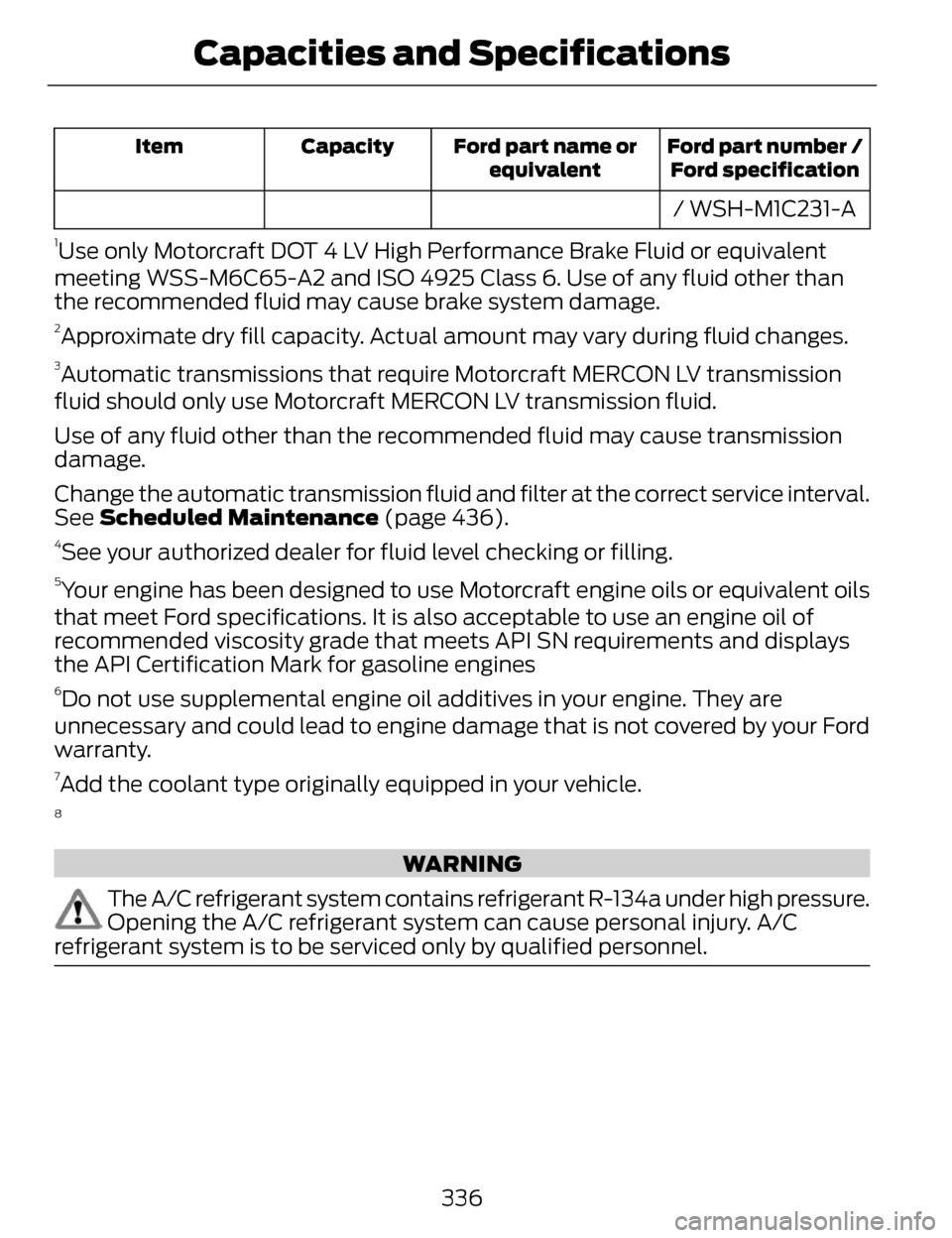
/ WSH-M1C231-A
1Use only Motorcraft DOT 4 LV High Performance Brake Fluid or equivalent
meeting WSS-M6C65-A2 and ISO 4925 Class 6. Use of any fluid other than
the recommended fluid may cause brake system damage.
2Approximate dry fill capacity. Actual amount may vary during fluid changes.
3Automatic transmissions that require Motorcraft MERCON LV transmission
fluid should only use Motorcraft MERCON LV transmission fluid.
Use of any fluid other than the recommended fluid may cause transmission
damage.
Change the automatic transmission fluid and filter at the correct service interval.
See Scheduled Maintenance (page 436).
4See your authorized dealer for fluid level checking or filling.
5Your engine has been designed to use Motorcraft engine oils or equivalent oils
that meet Ford specifications. It is also acceptable to use an engine oil of
recommended viscosity grade that meets API SN requirements and displays
the API Certification Mark for gasoline engines
6Do not use supplemental engine oil additives in your engine. They are
unnecessary and could lead to engine damage that is not covered by your Ford
warranty.
7Add the coolant type originally equipped in your vehicle.
8
WARNING
The A/C refrigerant system contains refrigerant R-134a under high pressure.
Opening the A/C refrigerant system can cause personal injury. A/C
refrigerant system is to be serviced only by qualified personnel.
336
Capacities and Specifications
Page 342 of 468
PROTECT YOURSELF FROM THE
RISING COST OF VEHICLE REPAIRS
WITH A FORD EXTENDED SERVICE
PLAN.
SERVICE PLANS (U.S. Only)
More than 32 million Ford and Lincoln
owners have discovered the powerful
protection of Ford Extended Service
Plan. It is the only extended service
plan backed by Ford Motor Company,
and provides peace of mind
protection beyond the New Vehicle
Limited Warranty coverage.
Ford ESP Can Quickly Pay for Itself
One service bill – the cost of parts and
labor – can easily exceed the price of
your Ford Extended Service Plan. With
Ford ESP, you minimize your risk for
unexpected repair bills and rising
repair costs.
Up to 500+ Covered Vehicle
Components
There are four Extended Service Plans
with different levels of coverage. Ask
your authorized dealer for details.
1. PremiumCARE - Our most comprehensive coverage. With
over 500 covered components,
this plan is so complete that we
generally only discuss what’s not
covered.
2. ExtraCARE - Covers 113 components, and includes many
high-tech items.
3. BaseCARE - Covers 84 components. 4. PowertrainCARE - Covers 29
critical components.
Ford Extended Service Plan is honored
by all authorized Ford and Lincoln
dealers in the U.S. and Canada. It is
the only extended service plan
authorized and backed by Ford Motor
Company.
That means you get:
• Reliable, quality service anywhere you go
• Repairs performed by factory trained technicians, using Genuine
Ford and Lincoln parts
Rental Car Reimbursement
1st day Rental Benefit
You take advantage of replacement
transportation if your vehicle is at your
authorized dealer for same day
covered repairs.
Extended Rental Benefits
If your vehicle is kept overnight for
covered repairs, you are eligible for
rental car coverage, including Bumper
to Bumper warranty repairs, or Field
Service Actions.
Roadside Assistance
Exclusive 24/7 roadside assistance,
including:
• Towing, flat-tire change and battery jump starts
• Out of fuel and lock-out assistance
339
Ford Extended Service Plan (ESP)
Page 343 of 468
• Travel expense reimbursement forlodging, meals and rental car
• Destination assistance for taxi, shuttle, rental car coverage and
emergency transportation
Transferable Coverage
If you sell your vehicle before your
Ford Extended Service Plan coverage
expires, you can transfer any
remaining coverage to the new owner.
Whenever you sell your vehicle,
prospective buyers may have a higher
degree of confidence that vehicle was
properly maintained with Ford ESP,
thereby improving resale value.
Avoid the Rising Cost of Properly
Maintaining Your Vehicle!
Ford Extended Service Plan also
offers a Premium Maintenance Plan
that covers all scheduled
maintenance, and select items that
routinely wear out.
The coverage is prepaid, so you never
have to worry about affording your
vehicle maintenance. It covers regular
checkups, routine inspections,
preventive care and replacement of
select items that require periodic
attention for normal wear:
• Windshield Wiper Blades
• Spark Plugs (except in California) • The Clutch Disc
• Brake Pads and Linings
• Shock Absorbers
• Belts and Hoses
• Diesel Exhaust Fluid
Replenishment
Contact your selling authorized Ford
or Lincoln dealership today so they
can customize a Ford Extended
Service Plan that fits your driving
lifestyle and budget.
Interest Free Finance Options
Available
Take advantage of our interest free
installment payment plan. Just a 10%
down payment will provide you with
an affordable, no interest, no fee
payment program.
To learn more, call our Ford ESP
specialists at 800-367-3377. Don’t
forget to ask about our interest free
payment program, allowing you all
the security and benefits Ford ESP has
to offer while paying over time. You
are pre-approved with no credit
checks, no hassles!
Complete the information below and
mail to:
Ford ESP
P.O. Box 8072
Royal Oak, MI 48068-0039
340
Ford Extended Service Plan (ESP)
Page 344 of 468
Name (PLEASE PRINT)
APT.#
ADDRESS
ZIP
S TAT E
CITY
E-MAIL
SERVICE PLANS (CANADA
ONLY)
You can get more protection for your
vehicle by purchasing a Ford Extended
Service Plan. Ford Extended Service
Plan is the only service contract
backed by Ford Motor Company of
Canada, Limited. Depending on the
plan you purchase, Ford Extended
Service Plan provides benefits such
as:
• Rental reimbursement
• Coverage for cert ain maintenance
and wear items
• Protection against repair costs after your New Vehicle Limited
Warranty Coverage expires
• Roadside Assistance benefits
There are several Ford Extended
Service Plans available in various time,
distance and deductible
combinations. Each plan is tailored to
fit your own driving needs, including
reimbursement for towing and rental. When you purchase Ford Extended
Service Plan, you receive added
peace-of-mind protection throughout
Canada and the United States,
provided by a network of participating
authorized Ford Motor Company
dealers. The Lincoln Maintenance
Protection Plan is honored at
authorized Lincoln dealers.
Note:
Repairs performed outside of
Canada and the United States are not
eligible for Ford Extended Service Plan
coverage.
This information is subject to change.
For more information, visit your local
Ford of Canada dealer or www.ford.ca
to find the Ford Extended Service Plan
that is right for you.
341
Ford Extended Service Plan (ESP)
Page 347 of 468
Press to access your home screen.
Depending on your vehicle’s option
package and software, your screens
may vary in appearance from the
descriptions in this section. Your
features may also be limited
depending on your market. Check with
an authorized dealer for availability.
E142608
INFORMATION
Press to select any of the following:
• Services
• Travel Link
• Alerts
• Calendar
• Apps
ENTERTAINMENT
Press to select any of the following:
•AM
•FM
• SIRIUS
•CD
•USB
• BT Stereo
• SD Card
• A/V In
Using the Touch-Sensitive
Controls on Your System
To turn a feature on and off, just touch
the graphic with your finger. To get the
best performance from the
touch-sensitive controls:
• Do not press hard on the controls. They are sensitive to light touch.
• Use your bare finger to touch the center of a touch-control graphic.
Touching off-center of the graphic
may affect operation of a nearby
control.
• Make sure your hands are clean and dry.
• Since the touchscreen operates based on the touch of a finger, you
may have trouble using it if you are
wearing gloves.
• Keep metal and other conductive material away from the surface of
the touchscreen as this may cause
electronic interference (for
example, inadvertently turning on
a feature other than the one you
meant to turn on).
Depending on your vehicle and option
package, you may also have these
controls on your bezel:
• Power: Switch the media or climate features off and on.
• VOL: Control the volume of
playing media.
• Fan: Control the speed of the climate system fan.
• Seek and Tune buttons: Use as you normally would in media modes.
344
MyLincoln Touch™
Page 348 of 468
• Eject: Eject a CD from theentertainment system.
• SOURCE: Touch the word
repeatedly to see all available
media modes. The screen does not
change, but you see the media
change in the lower left status bar.
• SOUND: Touch the word to
access the Sound menu where you
can adjust settings such as: Bass,
Treble, Midrange, Balance and
Fade, DSP (Digital Signal
Processing), THX Deep Note
Demo, Occupancy Mode and
Speed Compensated Volume.
(Your vehicle may not have all of
these sound options.)
• Hazard flasher: Switch the hazard flashers off and on.
Cleaning the Touchscreen
Display
Use a clean, soft cloth such as one
used for cleaning glasses. If dirt or
fingerprints are still visible, apply a
small amount of alcohol to the cloth.
Do not pour or spray alcohol onto the
display. Do not use detergent or any
type of solvent to clean the display.
Support
The SYNC support team is available
to help you with any questions you are
not able to answer on your own.
Monday-Saturday, 8:30am-9:00pm
EST.
Sunday, 10:30am-7:30pm EST.
In the United States, call:
1-800-392-3673. In Canada, call: 1-800-565-3673.
Times are subject to change due to
holidays.
Safety
Information
WARNING
Driving while distracted can
result in loss of vehicle control,
crash and injury. We strongly
recommend that you use extreme
caution when using any device that
may take your focus off the road. Your
primary responsibility is the safe
operation of your vehicle. We
recommend against the use of any
hand-held device while driving and
encourage the use of voice-operated
systems when possible. Make sure you
are aware of all applicable local laws
that may affect the use of electronic
devices while driving.
• Do not attempt to service or repair the system. See an authorized
dealer.
• Do not operate playing devices if the power cords or cables are
broken, split or damaged. Place
cords and cables out of the way,
so they do not interfere with the
operation of pedals, seats,
compartments or safe driving
abilities.
345
MyLincoln Touch™
Page 373 of 468
Potential station issuesAction
Cause
Issues
No action required. This
is a broadcast issue.
This is poor time align-
ment by the radio broad-
caster.
Echo, stutter, skip or
repeat in audio.
Increase or decrease in
audio volume.
No action required. The
reception issue may clear
up as you continue to
drive.
The radio is shifting
between analog and
digital audio.
Sound fading or blending
in and out.
No action required. This
is normal behavior. Wait
until the audio is avail-
able.
The digital multicast is
not available until the HD
Radio broadcast is
decoded. Once decoded,
the audio is available.
There is an audio mute
delay when selecting
HD2 or HD3, multicast
preset or Direct Tune.
No action required. The
station is not available in
your current location.
The previously stored
multicast preset or direct
tune is not available in
your current reception
area.
Cannot access HD2 or
HD3 multicast channel
when recalling a preset
or from a direct tune.
Fill out the station issue
form at website listed
below.
*
Data service issue by the
radio broadcaster.
Text information does
not match currently
playing audio.
Fill out the station issue
form at website listed
below.
*
Data service issue by the
radio broadcaster.
There is no text informa-
tion shown for currently
selected frequency.
No action required. This
is normal behavior.
Pressing Scan
disables
HD2-HD7 channel
search.
HD2-HD7 stations not
found when Scan
is
pressed.
* http://www.ibiquity.com/automotive/report_radio_station_experiences
370
MyLincoln Touch™
Page 377 of 468
Touch Lock if you do not want anyone
to listen to this channel.
Touch Title or Artist to see song and
artists on other stations.
Sirius Satellite Radio Information
Note: Sirius reserves the unrestricted
right to change, rearrange, add or
delete programming including
canceling, moving or adding particular
channels, and its prices, at any time,
with or without notice to you. Ford
Motor Company shall not be
responsible for any such programming
changes.
E142593
Sirius satellite radio is a
subscription-based satellite radio
service that broadcasts a variety of
music, sports, news, weather, traffic
and entertainment programming.
Your factory-installed Sirius satellite
radio system includes hardware and
a limited subscription term that begins
on the date of sale or lease of your
vehicle. See an authorized dealer for
availability. For more information on extended
subscription terms (a service fee is
required), the online media player and
a list of Sirius satellite radio channels,
and other features, please visit
www.siriusxm.com in the United
States, www.sirius.ca in Canada, or
call Sirius at 1-888-539-7474.
Note:
This receiver includes the eCos
real-time operating system. eCos is
published under the eCos License.
Satellite Radio Electronic Serial
Number (ESN)
You need your ESN to activate, modify
or track your satellite radio account.
The ESN is on the System Information
Screen (SR ESN:XXXXXXXXXXXX).
To access your ESN, touch the bottom
left corner of the touchscreen. Touch
SIRIUS > Options.
374
MyLincoln Touch™
Page 378 of 468
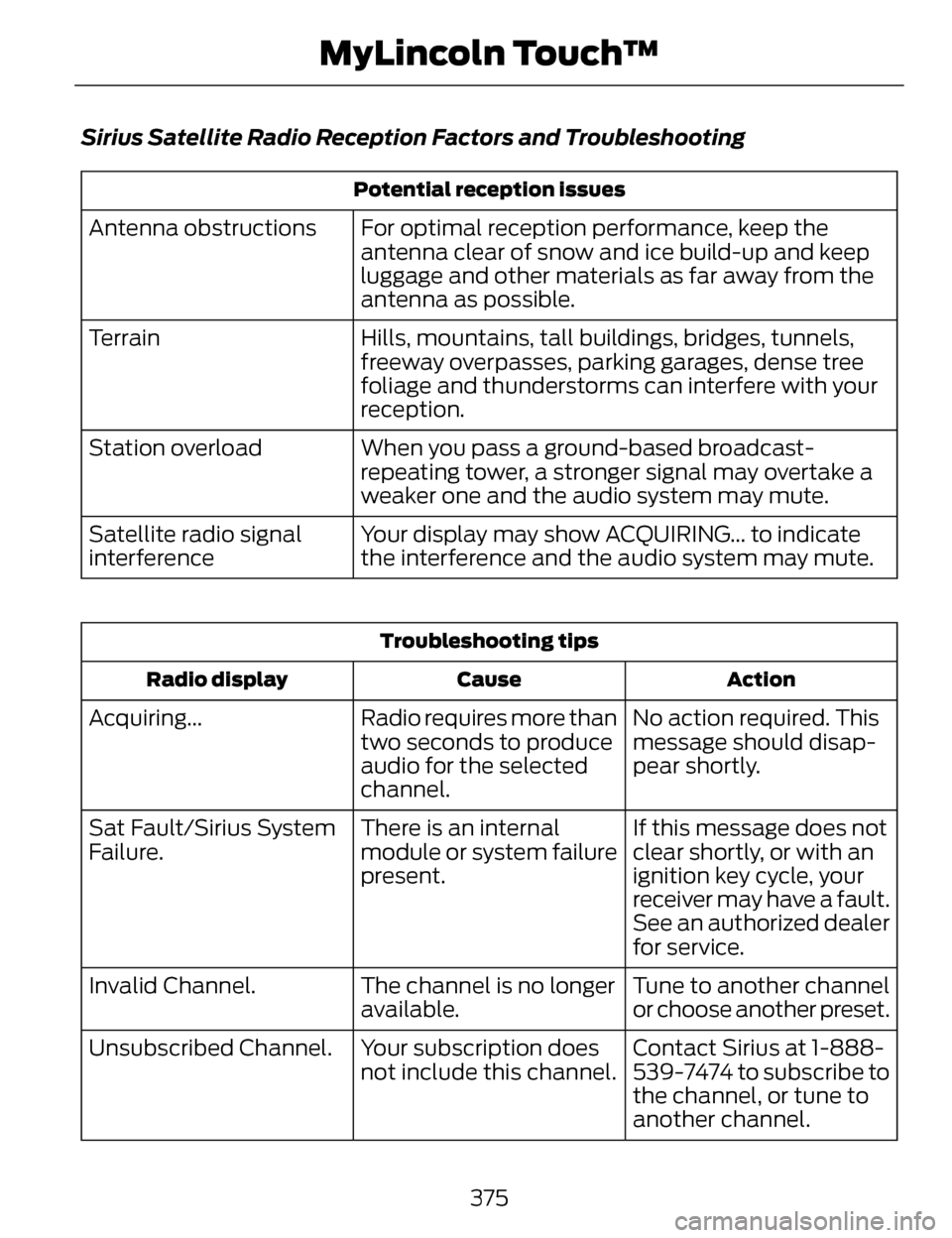
Sirius Satellite Radio Reception Factors and Troubleshooting
Potential reception issues
For optimal reception performance, keep the
antenna clear of snow and ice build-up and keep
luggage and other materials as far away from the
antenna as possible.
Antenna obstructions
Hills, mountains, tall buildings, bridges, tunnels,
freeway overpasses, parking garages, dense tree
foliage and thunderstorms can interfere with your
reception.
Terrain
When you pass a ground-based broadcast-
repeating tower, a stronger signal may overtake a
weaker one and the audio system may mute.
Station overload
Your display may show ACQUIRING... to indicate
the interference and the audio system may mute.
Satellite radio signal
interference
Troubleshooting tips
Action
Cause
Radio display
No action required. This
message should disap-
pear shortly.
Radio requires more than
two seconds to produce
audio for the selected
channel.
Acquiring...
If this message does not
clear shortly, or with an
ignition key cycle, your
receiver may have a fault.
See an authorized dealer
for service.
There is an internal
module or system failure
present.
Sat Fault/Sirius System
Failure.
Tune to another channel
or choose another preset.
The channel is no longer
available.
Invalid Channel.
Contact Sirius at 1-888-
539-7474 to subscribe to
the channel, or tune to
another channel.
Your subscription does
not include this channel.
Unsubscribed Channel.
375
MyLincoln Touch™
Page 379 of 468
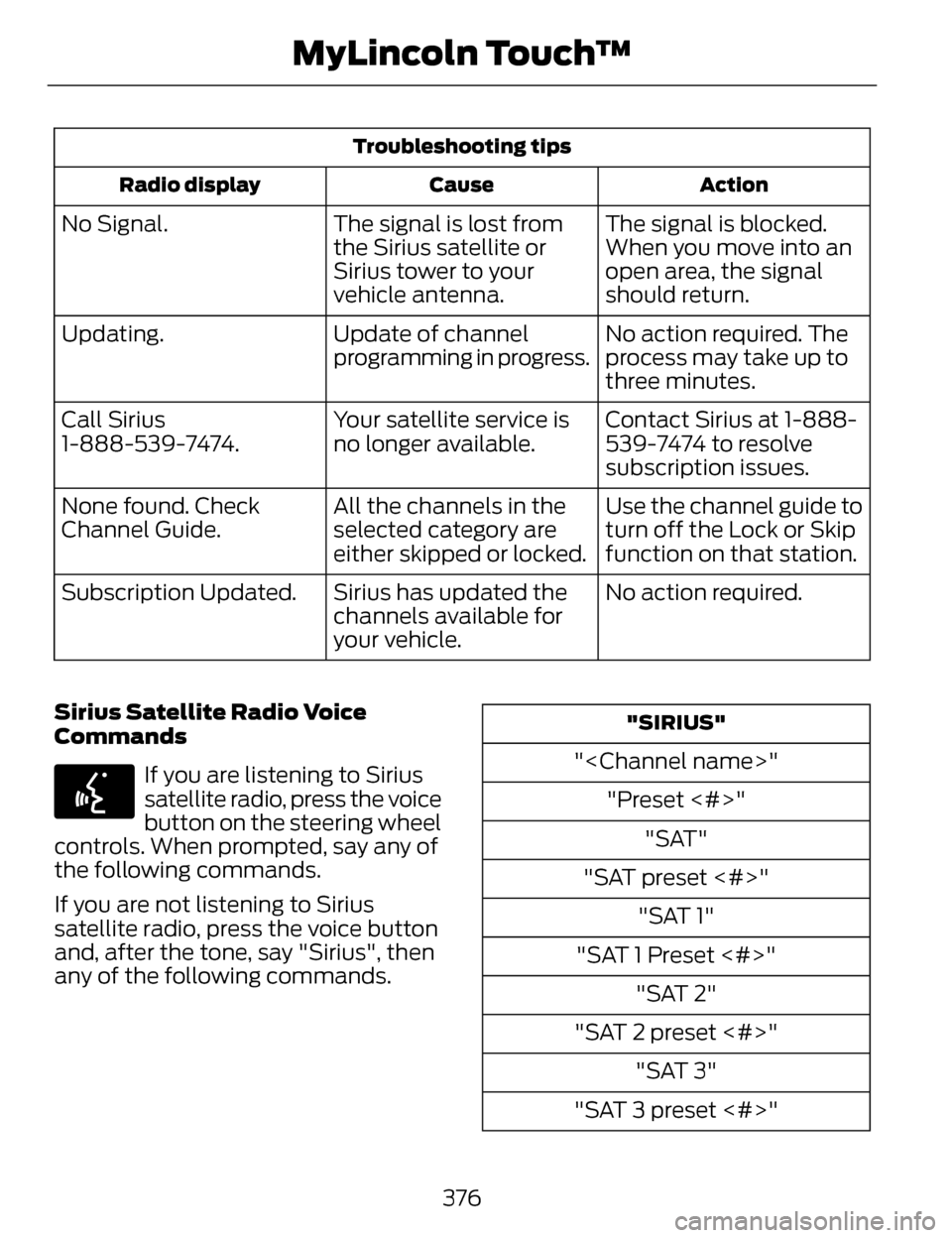
Troubleshooting tipsAction
Cause
Radio display
The signal is blocked.
When you move into an
open area, the signal
should return.
The signal is lost from
the Sirius satellite or
Sirius tower to your
vehicle antenna.
No Signal.
No action required. The
process may take up to
three minutes.
Update of channel
programming in progress.
Updating.
Contact Sirius at 1-888-
539-7474 to resolve
subscription issues.
Your satellite service is
no longer available.
Call Sirius
1-888-539-7474.
Use the channel guide to
turn off the Lock or Skip
function on that station.
All the channels in the
selected category are
either skipped or locked.
None found. Check
Channel Guide.
No action required.
Sirius has updated the
channels available for
your vehicle.
Subscription Updated.
Sirius Satellite Radio Voice
Commands
E142599
If you are listening to Sirius
satellite radio, press the voice
button on the steering wheel
controls. When prompted, say any of
the following commands.
If you are not listening to Sirius
satellite radio, press the voice button
and, after the tone, say "Sirius", then
any of the following commands.
"SIRIUS"
"
"Preset <#>" "SAT"
"SAT preset <#>" "SAT 1"
"SAT 1 Preset <#>" "SAT 2"
"SAT 2 preset <#>" "SAT 3"
"SAT 3 preset <#>"
376
MyLincoln Touch™