ESP LINCOLN MKZ 2014 Workshop Manual
[x] Cancel search | Manufacturer: LINCOLN, Model Year: 2014, Model line: MKZ, Model: LINCOLN MKZ 2014Pages: 468, PDF Size: 4.49 MB
Page 374 of 468
HD Radio Technology manufactured
under license from iBiquity Digital
Corp. U.S. and foreign patents. HD
Radio and the HD and HD Radio logos
are proprietary trademarks of iBiquity
Digital Corp. Ford Motor Company and
iBiquity Digital Corp. are not
responsible for the content sent using
HD Radio technology. Content may
be changed, added or deleted at any
time at the station owner's discretion.
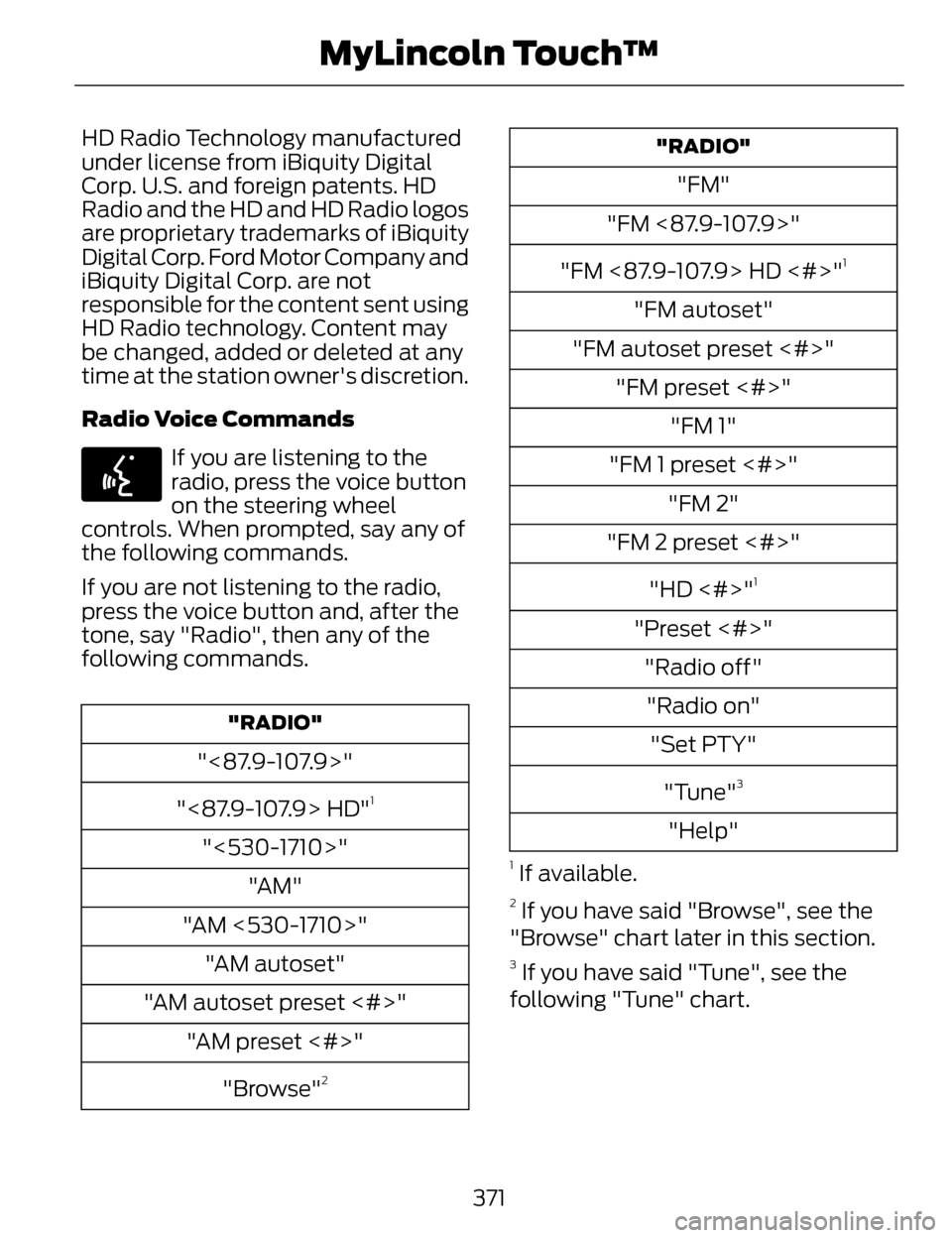
Radio Voice Commands
E142599
If you are listening to the
radio, press the voice button
on the steering wheel
controls. When prompted, say any of
the following commands.
If you are not listening to the radio,
press the voice button and, after the
tone, say "Radio", then any of the
following commands.
"RADIO"
"<87.9-107.9>"
"<87.9-107.9> HD"
1
"<530-1710>" "AM"
"AM <530-1710>" "AM autoset"
"AM autoset preset <#>" "AM preset <#>"
"Browse"
2
"RADIO"
"FM"
"FM <87.9-107.9>"
"FM <87.9-107.9> HD <#>"
1
"FM autoset"
"FM autoset preset <#>" "FM preset <#>" "FM 1"
"FM 1 preset <#>" "FM 2"
"FM 2 preset <#>"
"HD <#>"
1
"Preset <#>""Radio off""Radio on" "Set PTY"
"Tune"
3
"Help"
1 If available.
2 If you have said "Browse", see the
"Browse" chart later in this section.
3 If you have said "Tune", see the
following "Tune" chart.
371
MyLincoln Touch™
Page 376 of 468
Scan
Touch this button to hear a brief
sampling of channels.
Options
Touch this button to view and adjust
various media settings.
Sound Settings
Touch this button to adjust settings
for:
•Bass
• Midrange
• Treble
• Balance and Fade
• THX Deep Note Demo
• DSP (Digital Signal processing)
• Occupancy Mode
• Speed Compensated Volume.
Note:Your vehicle may not have all
these sound settings.
Set Category for Seek/Scan
This allows you to select a category
of music you would like to search for.
You can then choose to either seek or
scan for the stations playing that
category.
Parental Lockout
This allows you to lock and unlock
channels, change or reset your PIN or
unlock all channels. To use this
feature, you need your initial PIN,
which is 1234. Artist/Title/Team Alerts
This feature allows you to select
Artists, Titles and Teams that you
would like the system to alert you to
when they are playing on other
channels. Press Edit Alerts to delete
or turn off alerts. You can also set all
alerts to on or off. When an alert
appears on the screen, you can
choose to Tune to the channel, to
Cancel the alert or to Disable Alerts.
If you are listening to a sporting event,
you can save your favorite teams so
that the system can alert you when
they are playing on a satellite radio
channel.
Note:
Sirius does not support the Alert
feature on all channels. Ford Motor
Company shall not be responsible for
Alert feature variation.
Electronic Serial Number (ESN)
Sirius requires this number when
communicating with you about your
account.
Direct Tune
Touch this button to enter the desired
satellite channel number manually.
Touch Enter when you are done.
Browse
Touch this button to view a list of all
available stations. Scroll to see more
categories. Touch the station you
want to listen to.
Touch Skip if you want to skip this
channel.
373
MyLincoln Touch™
Page 377 of 468
Touch Lock if you do not want anyone
to listen to this channel.
Touch Title or Artist to see song and
artists on other stations.
Sirius Satellite Radio Information
Note: Sirius reserves the unrestricted
right to change, rearrange, add or
delete programming including
canceling, moving or adding particular
channels, and its prices, at any time,
with or without notice to you. Ford
Motor Company shall not be
responsible for any such programming
changes.
E142593
Sirius satellite radio is a
subscription-based satellite radio
service that broadcasts a variety of
music, sports, news, weather, traffic
and entertainment programming.
Your factory-installed Sirius satellite
radio system includes hardware and
a limited subscription term that begins
on the date of sale or lease of your
vehicle. See an authorized dealer for
availability. For more information on extended
subscription terms (a service fee is
required), the online media player and
a list of Sirius satellite radio channels,
and other features, please visit
www.siriusxm.com in the United
States, www.sirius.ca in Canada, or
call Sirius at 1-888-539-7474.
Note:
This receiver includes the eCos
real-time operating system. eCos is
published under the eCos License.
Satellite Radio Electronic Serial
Number (ESN)
You need your ESN to activate, modify
or track your satellite radio account.
The ESN is on the System Information
Screen (SR ESN:XXXXXXXXXXXX).
To access your ESN, touch the bottom
left corner of the touchscreen. Touch
SIRIUS > Options.
374
MyLincoln Touch™
Page 386 of 468
Supported Media Players,
Formats and Metadata
Information
SYNC is capable of hosting nearly any
digital media player, including iPod,
Zune™, plays from device players, and
most USB drives. Supported audio
formats include MP3, WMA, WAV and
AAC.
It is also able to organize your indexed
media from your playing device by
metadata tags. Metadata tags, which
are descriptive software identifiers
embedded in the media files, provide
information about the file.
If your indexed media files contain no
information embedded in these
metadata tags, SYNC may classify
the empty metadata tags as
Unknown.
In order to playback video from your
iPod or iPhone, you must have a
special combination USB/RCA
composite video cable (which you can
buy from Apple). When you connect
the cable to your iPod or iPhone, plug
the other end into both the RCA jacks
and the USB port.
Bluetooth Audio
Your system allows you to stream
audio over your vehicle's speakers
from your connected,
Bluetooth-enabled cellular phone.
E142611
To access, press the lower
left corner on the
touchscreen, then select the
BT Stereo tab. Bluetooth Audio Voice Commands
E142599
If you are listening to a
Bluetooth audio device, press
the voice button on the
steering wheel control. When
prompted, say "Next song", "Pause",
"Play" or "Previous song".
If you are not listening to a Bluetooth
audio device, press the voice button
and, after the tone, say "Next song",
"Pause", "Play" or "Previous song".
A/V Inputs
WARNINGS
Driving while distracted can
result in loss of vehicle control,
crash and injury. We strongly
recommend that you use extreme
caution when using any device that
may take your focus off the road. Your
primary responsibility is the safe
operation of your vehicle. We
recommend against the use of any
handheld device while driving and
encourage the use of voice-operated
systems when possible. Make sure you
are aware of all applicable local laws
that may affect the use of electronic
devices while driving.
For safety reasons, do not
connect or adjust the settings on
your portable music player while your
vehicle is moving.
383
MyLincoln Touch™
Page 389 of 468
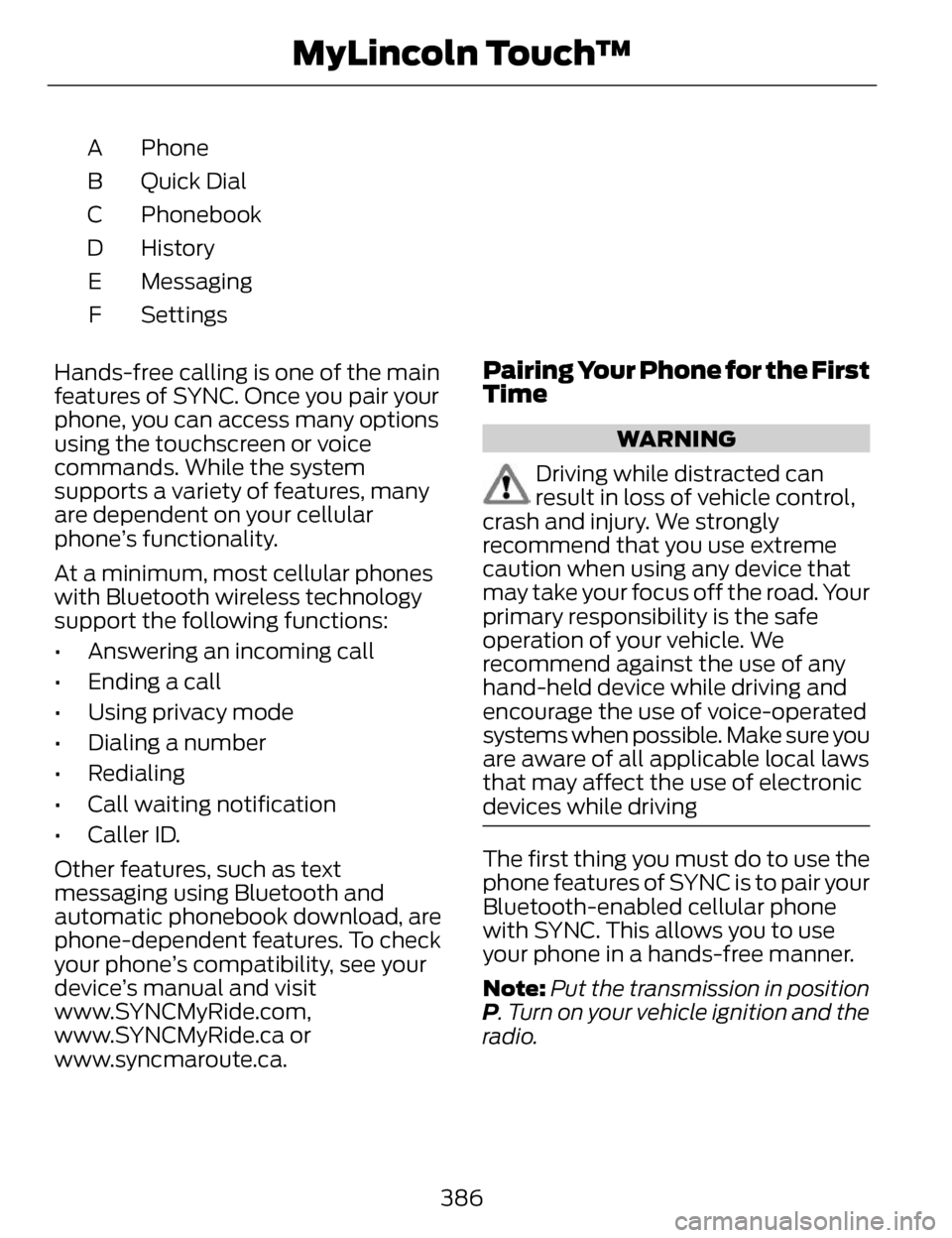
Phone
A
Quick Dial
B
Phonebook
C
History
D
Messaging
E
Settings
F
Hands-free calling is one of the main
features of SYNC. Once you pair your
phone, you can access many options
using the touchscreen or voice
commands. While the system
supports a variety of features, many
are dependent on your cellular
phone’s functionality.
At a minimum, most cellular phones
with Bluetooth wireless technology
support the following functions:
• Answering an incoming call
• Ending a call
• Using privacy mode
• Dialing a number
• Redialing
• Call waiting notification
• Caller ID.
Other features, such as text
messaging using Bluetooth and
automatic phonebook download, are
phone-dependent features. To check
your phone’s compatibility, see your
device’s manual and visit
www.SYNCMyRide.com,
www.SYNCMyRide.ca or
www.syncmaroute.ca.
Pairing Your Phone for the First
Time
WARNING
Driving while distracted can
result in loss of vehicle control,
crash and injury. We strongly
recommend that you use extreme
caution when using any device that
may take your focus off the road. Your
primary responsibility is the safe
operation of your vehicle. We
recommend against the use of any
hand-held device while driving and
encourage the use of voice-operated
systems when possible. Make sure you
are aware of all applicable local laws
that may affect the use of electronic
devices while driving
The first thing you must do to use the
phone features of SYNC is to pair your
Bluetooth-enabled cellular phone
with SYNC. This allows you to use
your phone in a hands-free manner.
Note: Put the transmission in position
P. Turn on your vehicle ignition and the
radio.
386
MyLincoln Touch™
Page 396 of 468
SYNC Services (If Equipped,
United States Only)
Note:SYNC Services requires
activation before use. Visit
www.SYNCMyRide.com to register and
check your eligibility for complimentary
services. Standard phone and message
rates may apply. Subscription may be
required. You must also have the active
SYNC Services Bluetooth-enabled
cellular phone paired and connected
to the system in order to connect to,
and use, SYNC Services. See Phone
(page 385).
Note: This feature does not function
properly if you have enabled caller ID
blocking on your cellular phone. Make
sure your cellular phone is not blocking
caller ID before using SYNC Services.
Note: The driver is ultimately
responsible for the safe operation of
the vehicle, and therefore, must
evaluate whether it is safe to follow
the suggested directions. Any
navigation features provided are only
an aid. Make your driving decisions
based on your observations of local
conditions and existing traffic
regulations. Do not follow the route
suggestions if doing so would result in
an unsafe or illegal maneuver, if you
would be placed in an unsafe situation,
or if you would be directed into an area
that you consider unsafe. Maps used
by this system may be inaccurate
because of errors, changes in roads,
traffic conditions or driving conditions. Note:
When you connect, the service
uses GPS technology and advanced
vehicle sensors to collect your vehicle's
current location, travel direction and
speed to help provide you with the
directions, traffic reports, or business
searches you request. Further, to
provide the services you request, for
continuous improvement, the service
may collect and record call details and
voice communications. For more
information, see SYNC Services Terms
and Conditions at
www.SYNCMyRide.com. If you do not
want Ford or its service providers to
collect your vehicle travel information
or other information identified in the
Terms and Conditions, do not subscribe
or use the service.
SYNC Services uses advanced vehicle
sensors, integrated GPS technology
and comprehensive map and traffic
data, to give you personalized traffic
reports, precise turn-by-turn
directions, business search, news,
sports, weather and more. For a
complete list of services, or to learn
more, please visit
www.SYNCMyRide.com.
Connecting to SYNC Services
Using Voice Commands
E142599
1. Press the voice button.
2. When prompted, say "Services". This initiates an outgoing call to
SYNC Services using your paired
and connected Bluetooth-enabled
cellular phone.
393
MyLincoln Touch™
Page 399 of 468
SYNC Services Voice Commands
E142599
When a route has been
downloaded (non-navigationsystems), press the voice button on
the steering wheel controls. When
prompted, say any of the following
commands:
"SERVICES"
"Cancel route"
"Navigation voice off" "Navigation voice on" "Next turn"
"Route status"
"Route summary" "Services"
"Update route" "Help"
Sirius T ravel Link (If Equipped)
WARNING
Driving while distracted can
result in loss of vehicle control,
crash and injury. We strongly
recommend that you use extreme
caution when using any device that
may take your focus off the road. Your
primary responsibility is the safe
operation of your vehicle. We
recommend against the use of any
handheld device while driving and
encourage the use of voice-operated
systems when possible. Make sure you
are aware of all applicable local laws
that may affect the use of electronic
devices while driving.
Note: In order to use Sirius Travel Link,
your vehicle must be equipped with
navigation and your navigation SD card
must be in the SD card slot.
Note: A paid subscription is required
to access and use these features. Go
to www.siriusxm.com/travellink for
more information.
Note: Visit www.siriusxm.com/traffic#
and click on Coverage map and details
for a complete listing of all traffic areas
covered by Sirius Travel Link.
Note: Neither Sirius nor Ford is
responsible for any errors or
inaccuracies in the Sirius Travel Link
services or its use in vehicles.
396
MyLincoln Touch™
Page 403 of 468
Alerts
E142608
If your vehicle is equipped
with Navigation, touch the i
(Information) button to
access these features. If your vehicle
is not equipped with Navigation, touch
the corner of the touchscreen with the
green tab.
Press Alerts, and then choose from
any of the following services:
• View the complete message
• Delete the message
• Delete All messages
This screen displays any system
messages (such as an SD card fault).
Note: The system alerts you to any
messages by turning the information
icon yellow. After you read or delete
the messages, the icon returns to white.
Calendar
E142608
If your vehicle is equipped
with Navigation, touch the i
(Information) button to
access these features. If your vehicle
is not equipped with Navigation, touch
the corner of the touchscreen with the
green tab.
Press Calendar. You can view the
current calendar by day, week or
month.
911 Assist (If Equipped)
WARNINGS
Unless the 911 Assist setting is
set on before a crash, the system
will not dial for help, which could
delay response time, potentially
increasing the risk of serious injury or
death after a crash.
Do not wait for 911 Assist to
make an emergency call if you
can do it yourself. Dial emergency
services immediately to avoid delayed
response time, which could increase
the risk of serious injury or death after
a crash. If you do not hear 911 Assist
within five seconds of the crash, the
system or phone may be damaged or
non-functional.
Always place your phone in a
secure location in your vehicle so
it does not become a projectile or
damaged in a crash. Failure to do so
may cause serious injury to someone
or damage the phone, which could
prevent 911 Assist from working
properly.
Note: The SYNC 911 Assist feature
must be set on prior to the incident.
Note: Before setting this feature on,
make sure that you read the 911 Assist
Privacy Notice later in this section for
important information.
400
MyLincoln Touch™
Page 418 of 468
POI Icons
Touch this button to select icons to
display on the map. You can select up
to three icons to display on the map
at the same time. Turn these ON or
OFF.
Cancel Route
Touch this button to cancel the active
route.
View/Edit Route
Access these features when a route
is active:
• View Route
• Edit Destination/Waypoints
• Edit Turn List
• Detour
• Edit Route Preferences
• Edit Traffic Preferences
• Cancel Route.
Nokia is the digital map provider for
the navigation application. If you find
map data errors, you may report them
directly to Nokia by going to
http://mapreporter.navteq.com.
Nokia evaluates all reported map
errors and responds with the result of
their investigation by e-mail.Navigation Map Updates
Annual navigation map updates are
available for purchase through your
dealership, by calling
1-800-NAVMAPS (in Mexico, call
01-800-557-5539) or going to
www.navigation.com/ford. You need
to specify the make and model of your
vehicle to determine if there is an
update available.
Navigation Voice Commands
E142599
When in navigation mode,
press the voice button on the
steering wheel controls. After
the tone, say any of the following
commands:
Navigation system voice commands
"Cancel next waypoint" 1
"Cancel route"1
"Destination"2
"Destination
"Destination
"Destination intersection"
"Destination nearest
"Destination nearest POI"
"Destination play nametags"
415
MyLincoln Touch™
Page 424 of 468
to you SOFTWARE updates,
supplements, add-on
components, or Internet-based
services components of the
SOFTWARE after the date you
obtain your initial copy of the
SOFTWARE ("Supplemental
Components").
If FORD MOTOR COMPANY or third
party software and services suppliers
provide or make available to you
Supplemental Components and no
other EULA terms are provided along
with the Supplemental Components,
then the terms of this EULA shall
apply.
If MS, Microsoft Corporation, their
affiliates and/or their designated
agent make available Supplemental
Components, and no other EULA
terms are provided, then the terms of
this EULA shall apply, except that the
MS, Microsoft Corporation or affiliate
entity providing the Supplemental
Component(s) shall be the licensor
of the Supplemental Component(s).
FORD MOTOR COMPANY, MS,
Microsoft Corporation, their affiliates
and/or their designated agent reserve
the right to discontinue without
liability any Internet-based services
provided to you or made available to
you through the use of the
SOFTWARE. •
Links to Third Party Sites: The
MS SOFTWARE may provide you
with the ability to link to third party
sites through the use of the
SOFTWARE. The third party sites
are not under the control of MS,
Microsoft Corporation, their
affiliates and/or their designated
agent. Neither MS nor Microsoft
Corporation nor their affiliates nor
their designated agent are
responsible for (i) the contents of
any third party sites, any links
contained in third party sites, or
any changes or updates to third
party sites, or (ii) webcasting or
any other form of transmission
received from any third party sites.
If the SOFTWARE provides links to
third party sites, those links are
provided to you only as a
convenience, and the inclusion of
any link does not imply an
endorsement of the third party site
by MS, Microsoft Corporation, their
affiliates and/or their designated
agent.
• Obligation to Drive
Responsibly: You recognize your
obligation to drive responsibly and
keep attention on the road. You
will read and abide with the
DEVICE operating instructions
particularly as they pertain to
safety and assumes any risk
associated with the use of the
DEVICE.
421
Appendices