brake LINCOLN MKZ 2014 Manual Online
[x] Cancel search | Manufacturer: LINCOLN, Model Year: 2014, Model line: MKZ, Model: LINCOLN MKZ 2014Pages: 468, PDF Size: 4.49 MB
Page 331 of 468
TECHNICAL SPECIFICATIONS
Wheel Lug Nut Torque Specifications
WARNING
When a wheel is installed, always remove any corrosion, dirt or foreign
materials present on the mounting surfaces of the wheel or the surface
of the wheel hub, brake drum or brake disc that contacts the wheel. Make sure
that any fasteners that attach the rotor to the hub are secured so they do not
interfere with the mounting surfaces of the wheel. Installing wheels without
correct metal-to-metal contact at the wheel mounting surfaces can cause the
wheel nuts to loosen and the wheel to come off while your vehicle is in motion,
resulting in loss of control.
Ib-ft (Nm)*Bolt size
100 (135)
M12 x 1.5
*Torque specifications are for nut and bolt threads free of dirt and rust. Use only
Ford recommended replacement fasteners.
Retighten the lug nuts to the specified torque within 100 miles (160 kilometers)
after any wheel disturbance (such as tire rotation, changing a flat tire, wheel
removal).
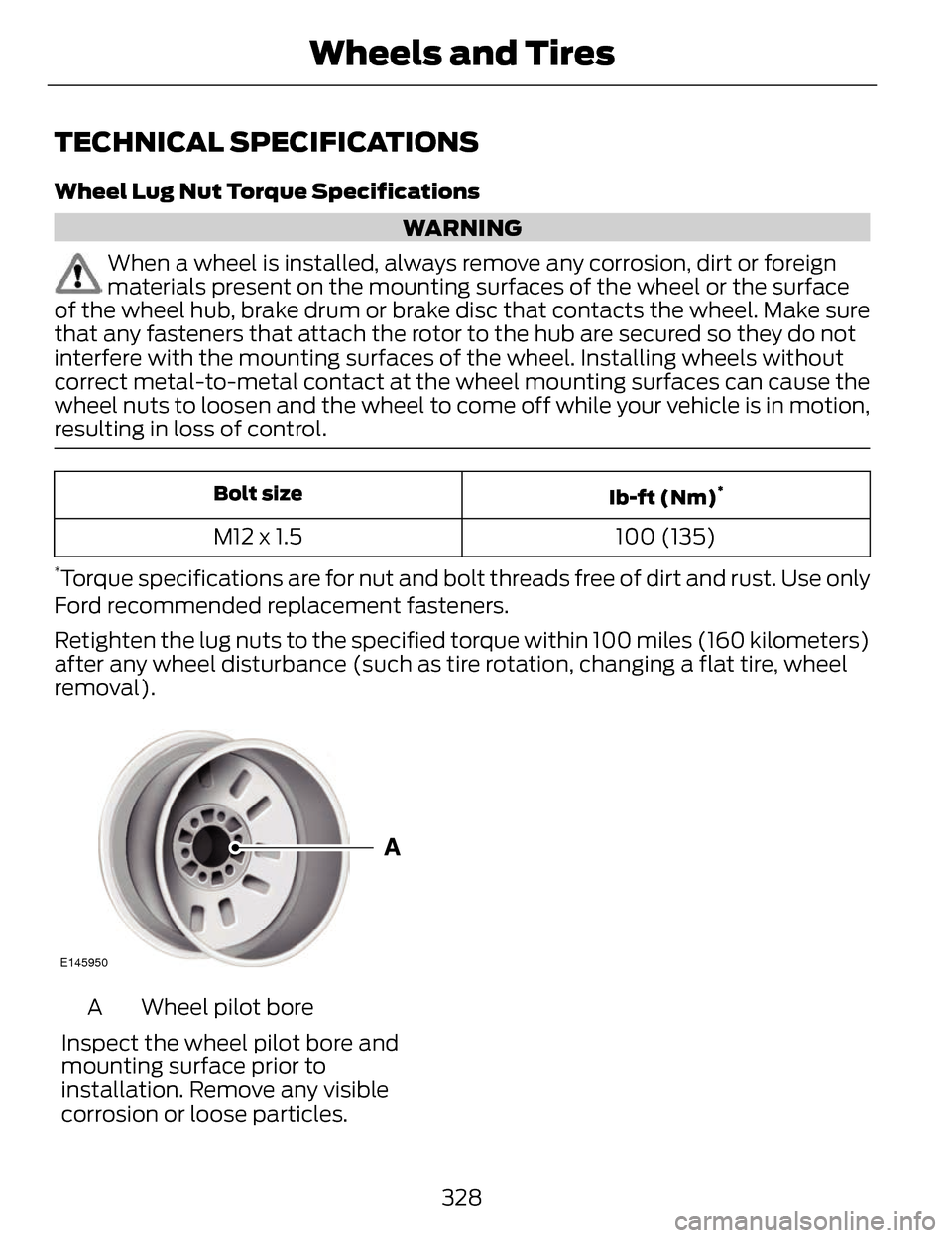
E145950
Wheel pilot bore
A
Inspect the wheel pilot bore and
mounting surface prior to
installation. Remove any visible
corrosion or loose particles.
328
Wheels and Tires
Page 334 of 468
VEHICLE IDENTIFICATION
NUMBER
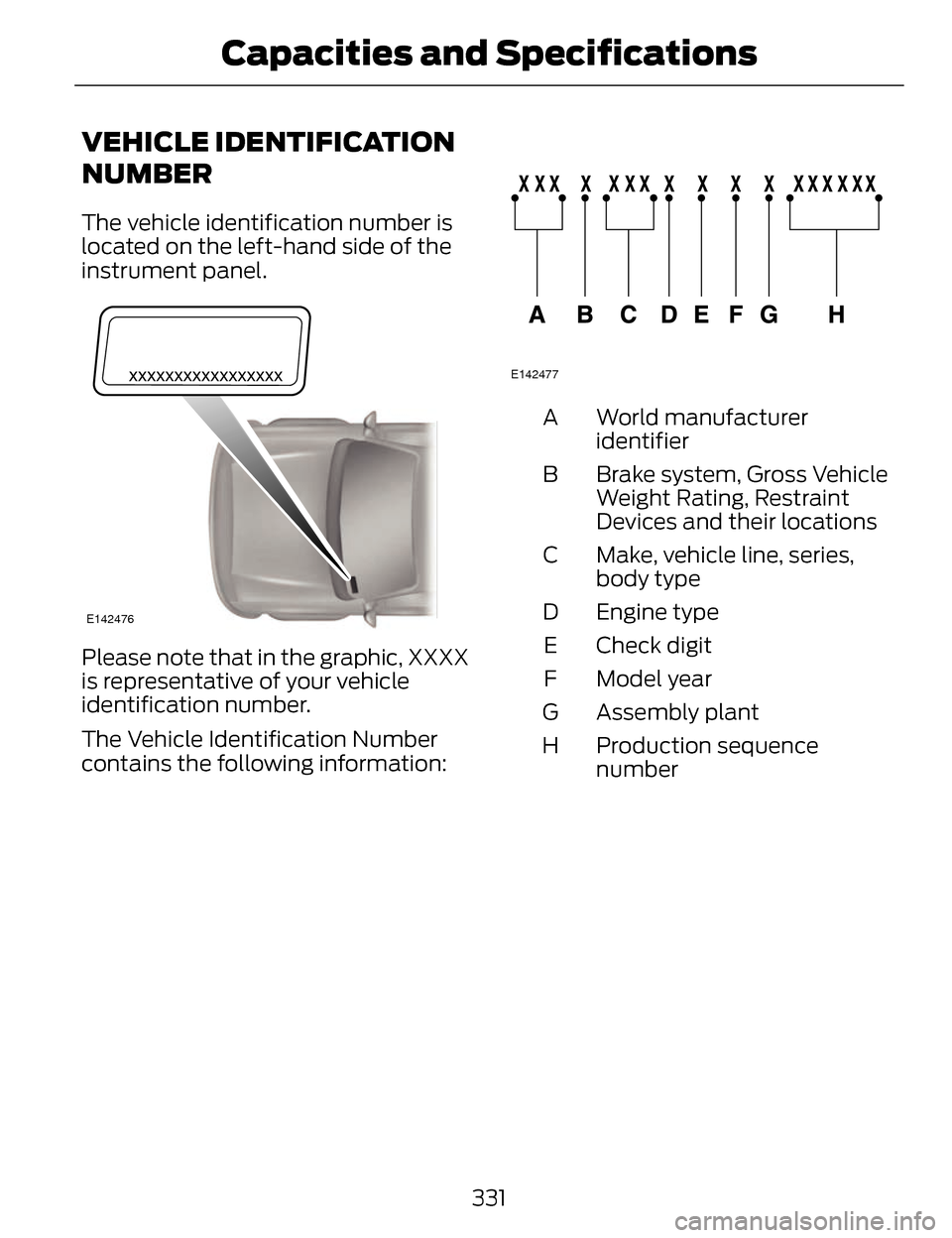
The vehicle identification number is
located on the left-hand side of the
instrument panel.
E142476
Please note that in the graphic, XXXX
is representative of your vehicle
identification number.
The Vehicle Identification Number
contains the following information:
E142477
World manufacturer
identifier
A
Brake system, Gross Vehicle
Weight Rating, Restraint
Devices and their locations
B
Make, vehicle line, series,
body type
C
Engine type
D
Check digit
E
Model year
F
Assembly plant
G
Production sequence
number
H
331
Capacities and Specifications
Page 337 of 468
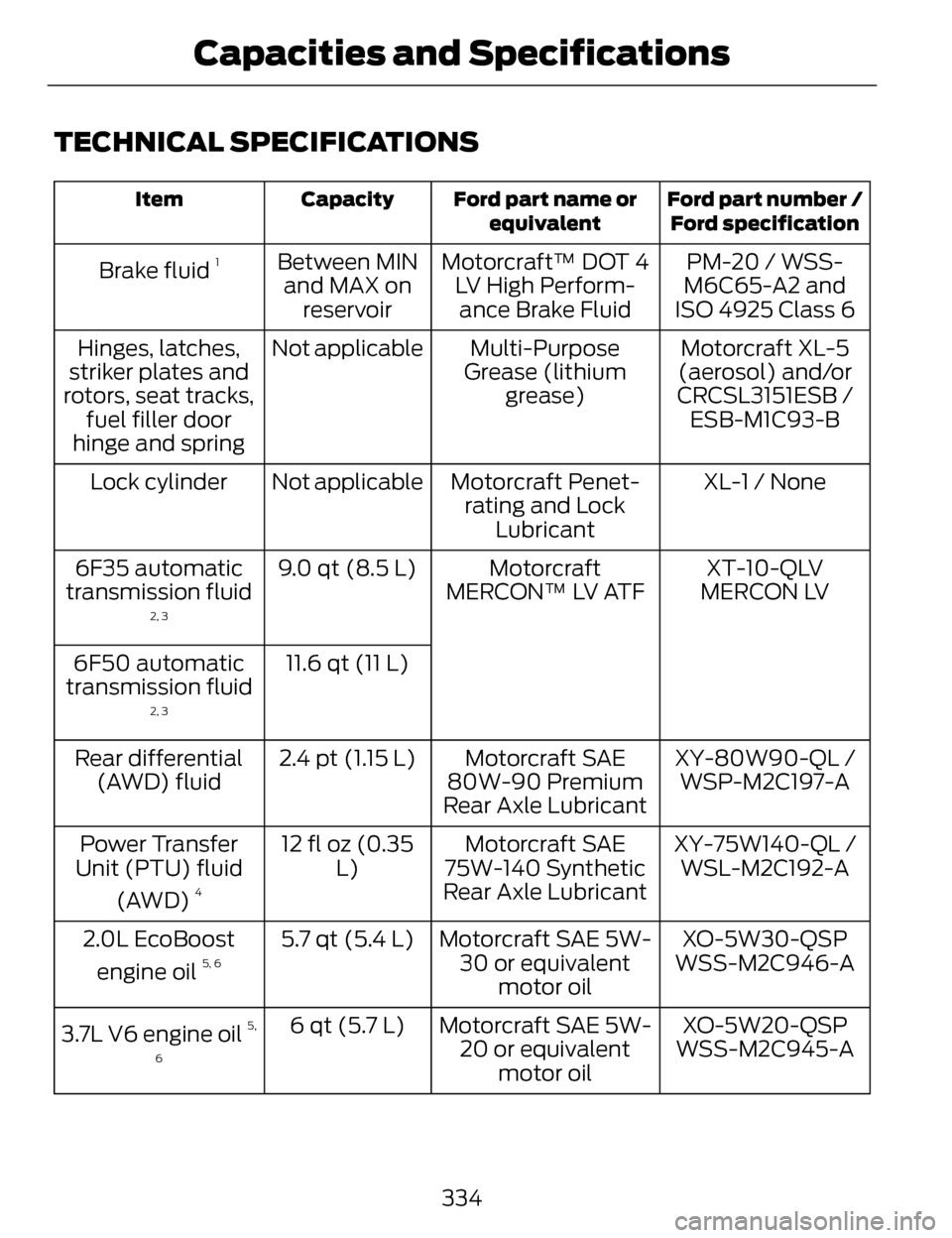
TECHNICAL SPECIFICATIONS
Ford part number /Ford specification
Ford part name or
equivalent
Capacity
Item
PM-20 / WSS-
M6C65-A2 and
ISO 4925 Class 6
Motorcraft™ DOT 4
LV High Perform-ance Brake Fluid
Between MIN
and MAX on reservoir
Brake fluid 1
Motorcraft XL-5
(aerosol) and/or
CRCSL3151ESB / ESB-M1C93-B
Multi-Purpose
Grease (lithium grease)
Not applicable
Hinges, latches,
striker plates and
rotors, seat tracks, fuel filler door
hinge and spring
XL-1 / None
Motorcraft Penet-
rating and Lock Lubricant
Not applicable
Lock cylinder
XT-10-QLV
MERCON LV
Motorcraft
MERCON™ LV ATF
9.0 qt (8.5 L)
6F35 automatic
transmission fluid
2, 3
11.6 qt (11 L)
6F50 automatic
transmission fluid
2, 3
XY-80W90-QL / WSP-M2C197-A
Motorcraft SAE
80W-90 Premium
Rear Axle Lubricant
2.4 pt (1.15 L)
Rear differential
(AWD) fluid
XY-75W140-QL /WSL-M2C192-A
Motorcraft SAE
75W-140 Synthetic
Rear Axle Lubricant
12 fl oz (0.35
L)
Power Transfer
Unit (PTU) fluid
(AWD)
4
XO-5W30-QSP
Motorcraft SAE 5W-
30 or equivalent motor oil
5.7 qt (5.4 L)
2.0L EcoBoost
engine oil 5, 6WSS-M2C946-A
XO-5W20-QSP
Motorcraft SAE 5W-
20 or equivalent motor oil
6 qt (5.7 L)
3.7L V6 engine oil
5,
6
WSS-M2C945-A
334
Capacities and Specifications
Page 339 of 468
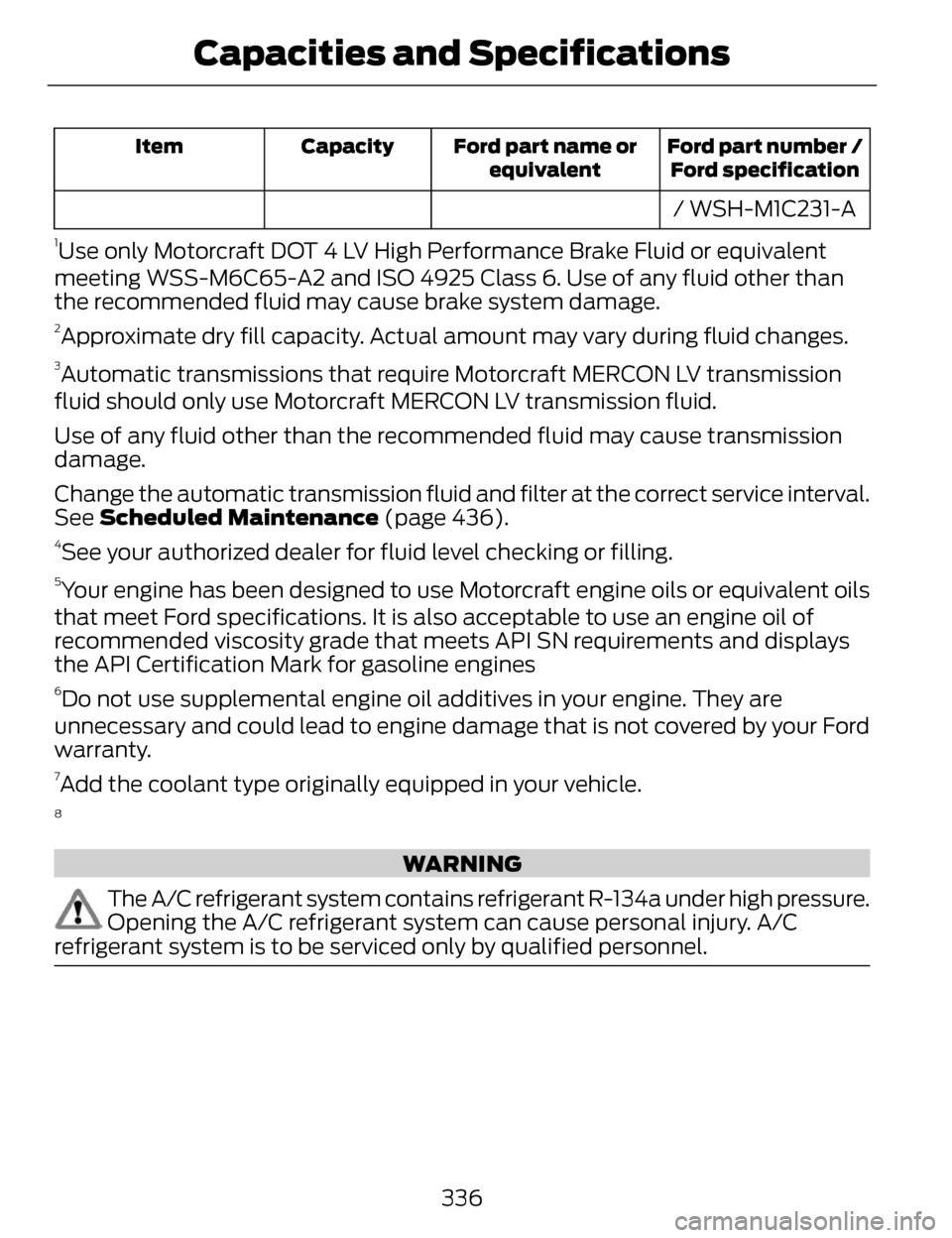
Ford part number /Ford specification
Ford part name or
equivalent
Capacity
Item
/ WSH-M1C231-A
1Use only Motorcraft DOT 4 LV High Performance Brake Fluid or equivalent
meeting WSS-M6C65-A2 and ISO 4925 Class 6. Use of any fluid other than
the recommended fluid may cause brake system damage.
2Approximate dry fill capacity. Actual amount may vary during fluid changes.
3Automatic transmissions that require Motorcraft MERCON LV transmission
fluid should only use Motorcraft MERCON LV transmission fluid.
Use of any fluid other than the recommended fluid may cause transmission
damage.
Change the automatic transmission fluid and filter at the correct service interval.
See Scheduled Maintenance (page 436).
4See your authorized dealer for fluid level checking or filling.
5Your engine has been designed to use Motorcraft engine oils or equivalent oils
that meet Ford specifications. It is also acceptable to use an engine oil of
recommended viscosity grade that meets API SN requirements and displays
the API Certification Mark for gasoline engines
6Do not use supplemental engine oil additives in your engine. They are
unnecessary and could lead to engine damage that is not covered by your Ford
warranty.
7Add the coolant type originally equipped in your vehicle.
8
WARNING
The A/C refrigerant system contains refrigerant R-134a under high pressure.
Opening the A/C refrigerant system can cause personal injury. A/C
refrigerant system is to be serviced only by qualified personnel.
336
Capacities and Specifications
Page 341 of 468
For maximum vehicle performance,
keep the following information in mind
when adding accessories or
equipment to your vehicle:
• When adding accessories,equipment, passengers and
luggage to your vehicle, do not
exceed the total weight capacity
of the vehicle or of the front or rear
axle (GVWR or GAWR as indicated
on the Safety Compliance
Certification label). Consult an
authorized dealer for specific
weight information.
• The Federal Communications Commission (FCC) and Canadian
Radio Telecommunications
Commission (CRTC) regulate the
use of mobile communications
systems that are equipped with
radio transmitters, for example,
two-way radios, telephones and
theft alarms. Any such equipment
installed in your vehicle should
comply with the Federal
Communications Commission
(FCC) and Canadian Radio
Telecommunications Commission
(CRTC) regulations and should be
installed only by an authorized
dealer.
• Mobile communications systems may harm the operation of your
vehicle, particularly if their
manufacturer did not design them
specifically for automotive use. • To avoid interference with other
vehicle functions, for example
anti-lock brake systems, do not
locate amateur radio antennas in
the area of the driver side hood.
• If you or an authorized Lincoln dealer add any non-Lincoln
custom electrical or electronic
accessories or components to your
vehicle, you may adversely affect
battery performance and
durability. In addition, you may also
adversely affect the performance
of other electrical systems in the
vehicle.
338
Accessories
Page 343 of 468
• Travel expense reimbursement forlodging, meals and rental car
• Destination assistance for taxi, shuttle, rental car coverage and
emergency transportation
Transferable Coverage
If you sell your vehicle before your
Ford Extended Service Plan coverage
expires, you can transfer any
remaining coverage to the new owner.
Whenever you sell your vehicle,
prospective buyers may have a higher
degree of confidence that vehicle was
properly maintained with Ford ESP,
thereby improving resale value.
Avoid the Rising Cost of Properly
Maintaining Your Vehicle!
Ford Extended Service Plan also
offers a Premium Maintenance Plan
that covers all scheduled
maintenance, and select items that
routinely wear out.
The coverage is prepaid, so you never
have to worry about affording your
vehicle maintenance. It covers regular
checkups, routine inspections,
preventive care and replacement of
select items that require periodic
attention for normal wear:
• Windshield Wiper Blades
• Spark Plugs (except in California) • The Clutch Disc
• Brake Pads and Linings
• Shock Absorbers
• Belts and Hoses
• Diesel Exhaust Fluid
Replenishment
Contact your selling authorized Ford
or Lincoln dealership today so they
can customize a Ford Extended
Service Plan that fits your driving
lifestyle and budget.
Interest Free Finance Options
Available
Take advantage of our interest free
installment payment plan. Just a 10%
down payment will provide you with
an affordable, no interest, no fee
payment program.
To learn more, call our Ford ESP
specialists at 800-367-3377. Don’t
forget to ask about our interest free
payment program, allowing you all
the security and benefits Ford ESP has
to offer while paying over time. You
are pre-approved with no credit
checks, no hassles!
Complete the information below and
mail to:
Ford ESP
P.O. Box 8072
Royal Oak, MI 48068-0039
340
Ford Extended Service Plan (ESP)
Page 387 of 468
WARNINGS
Store the portable music player
in a secure location, such as the
center console or the glove box, when
your vehicle is moving. Hard objects
may become projectiles in a crash or
sudden stop, which may increase the
risk of serious injury. The audio
extension cable must be long enough
to allow the portable music player to
be safely stored while your vehicle is
moving.
E142622
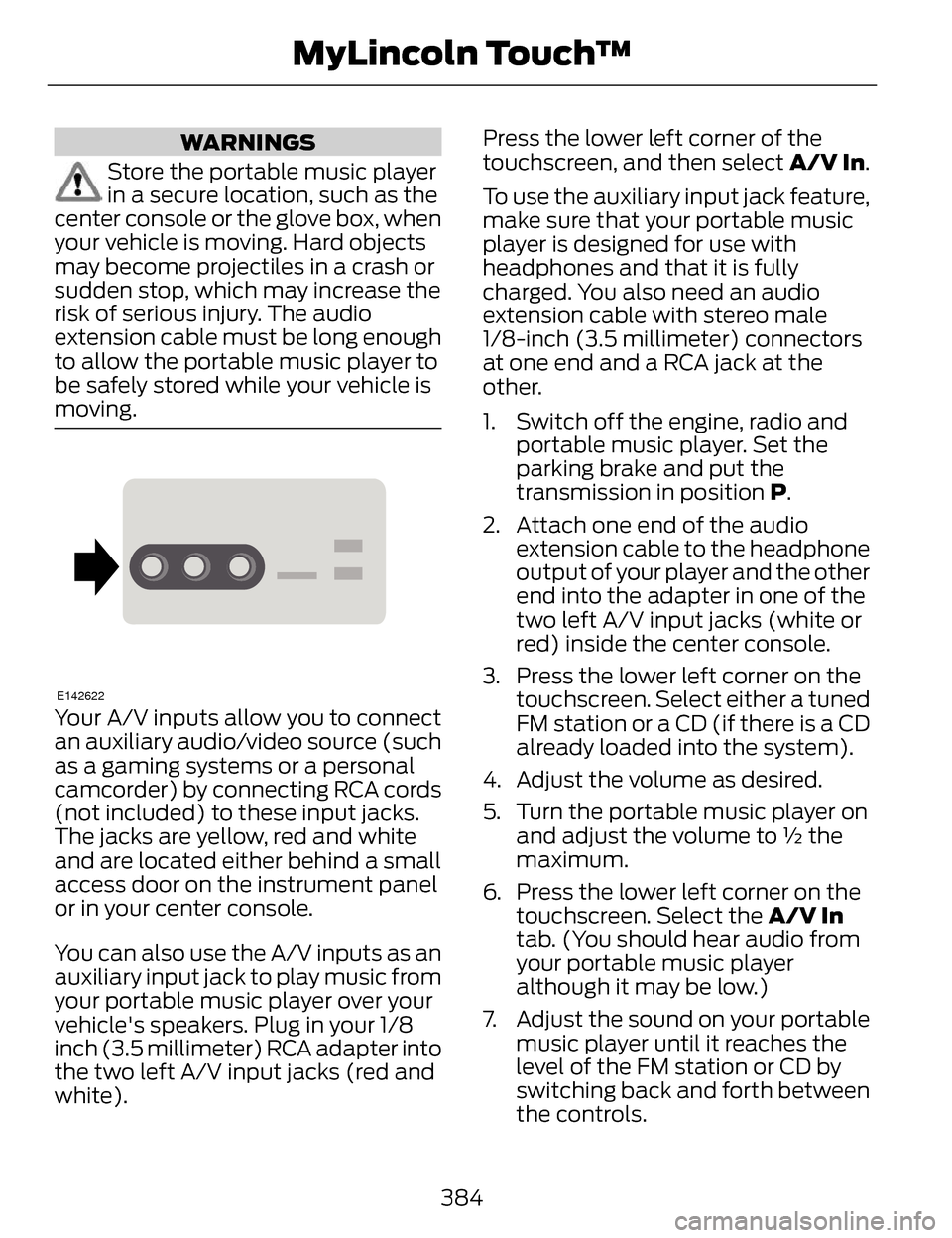
Your A/V inputs allow you to connect
an auxiliary audio/video source (such
as a gaming systems or a personal
camcorder) by connecting RCA cords
(not included) to these input jacks.
The jacks are yellow, red and white
and are located either behind a small
access door on the instrument panel
or in your center console.
You can also use the A/V inputs as an
auxiliary input jack to play music from
your portable music player over your
vehicle's speakers. Plug in your 1/8
inch (3.5 millimeter) RCA adapter into
the two left A/V input jacks (red and
white). Press the lower left corner of the
touchscreen, and then select
A/V In.
To use the auxiliary input jack feature,
make sure that your portable music
player is designed for use with
headphones and that it is fully
charged. You also need an audio
extension cable with stereo male
1/8-inch (3.5 millimeter) connectors
at one end and a RCA jack at the
other.
1. Switch off the engine, radio and portable music player. Set the
parking brake and put the
transmission in position P.
2. Attach one end of the audio extension cable to the headphone
output of your player and the other
end into the adapter in one of the
two left A/V input jacks (white or
red) inside the center console.
3. Press the lower left corner on the touchscreen. Select either a tuned
FM station or a CD (if there is a CD
already loaded into the system).
4. Adjust the volume as desired.
5. Turn the portable music player on and adjust the volume to ½ the
maximum.
6. Press the lower left corner on the touchscreen. Select the A/V In
tab. (You should hear audio from
your portable music player
although it may be low.)
7. Adjust the sound on your portable music player until it reaches the
level of the FM station or CD by
switching back and forth between
the controls.
384
MyLincoln Touch™
Page 406 of 468
Vehicle Health Report (If Equipped)
WARNING
Always follow scheduled
maintenance instructions,
regularly inspect your vehicle, and
seek repair for any damage or problem
you suspect. Vehicle Health Report
supplements, but cannot replace,
normal maintenance and vehicle
inspection. Vehicle Health Report only
monitors certain systems
electronically monitored by your
vehicle and will not monitor or report
the status of any other system, (such
as brake lining wear). Failure to
perform scheduled maintenance and
regularly inspect your vehicle may
result in vehicle damage and serious
injury.
Note: This feature is only available in
the United States.
Note: Your Vehicle Health Report
feature requires activation prior to use.
Visit www.SYNCMyRide.com to
register. There is no fee or subscription
associated with Vehicle Health Report,
but you must register to use this
feature.
Note: This feature may not function
properly if you have enabled caller ID
blocking on your cellular phone. Before
running a report, review the Vehicle
Health Report Privacy Notice.
Note: In order to allow a break-in
period for your vehicle, you may not be
able to create a Vehicle Health Report
until your vehicle odometer has
reached 200 miles. Note:
Cellular phone and SMS charges
may apply when making a report.
Register for Vehicle Health Report and
set your report preferences at
www.SYNCMyRide.com. After
registering, you can request a Vehicle
Health Report (inside your vehicle).
Return to your account at
www.SYNCMyRide.com to view your
report. You can also choose for SYNC
to remind you automatically to run
reports at specific mileage intervals.
Cellular phone airtime usage may
apply when reporting.
The system allows you to check your
vehicle’s overall health in the form of
a diagnostic report card. The Vehicle
Health Report contains valuable
information, such as:
• Vehicle diagnostic information
• Scheduled maintenance
• Open recalls and Field Service Actions
• Items noted during vehicle inspections by your authorized
dealer that still need servicing.
Making a Report
E142608
If you want to run a report by
using the touchscreen, touch
Apps > Vehicle Health
Report.
E142599
To run a report by voice
command, press the voice
button on the steering wheel
and, when prompted, say "Vehicle
health report".
403
MyLincoln Touch™
Page 441 of 468
Oils, Fluids and Flushing
In many cases, fluid discoloration is a
normal operating characteristic and,
by itself, does not necessarily indicate
a concern or that the fluid needs to be
changed. However, a qualified expert,
such as the factory-trained
technicians at your dealership, should
inspect discolored fluids that also
show signs of overheating or foreign
material contamination immediately.Make sure to change your vehicle’s
oils and fluids at the specified
intervals or in conjunction with a
repair. Flushing is a viable way to
change fluid for many vehicle
sub-systems during scheduled
maintenance. It is critical that systems
are flushed only with new fluid that is
the same as that required to fill and
operate the system or using a
Ford-approved flushing chemical.
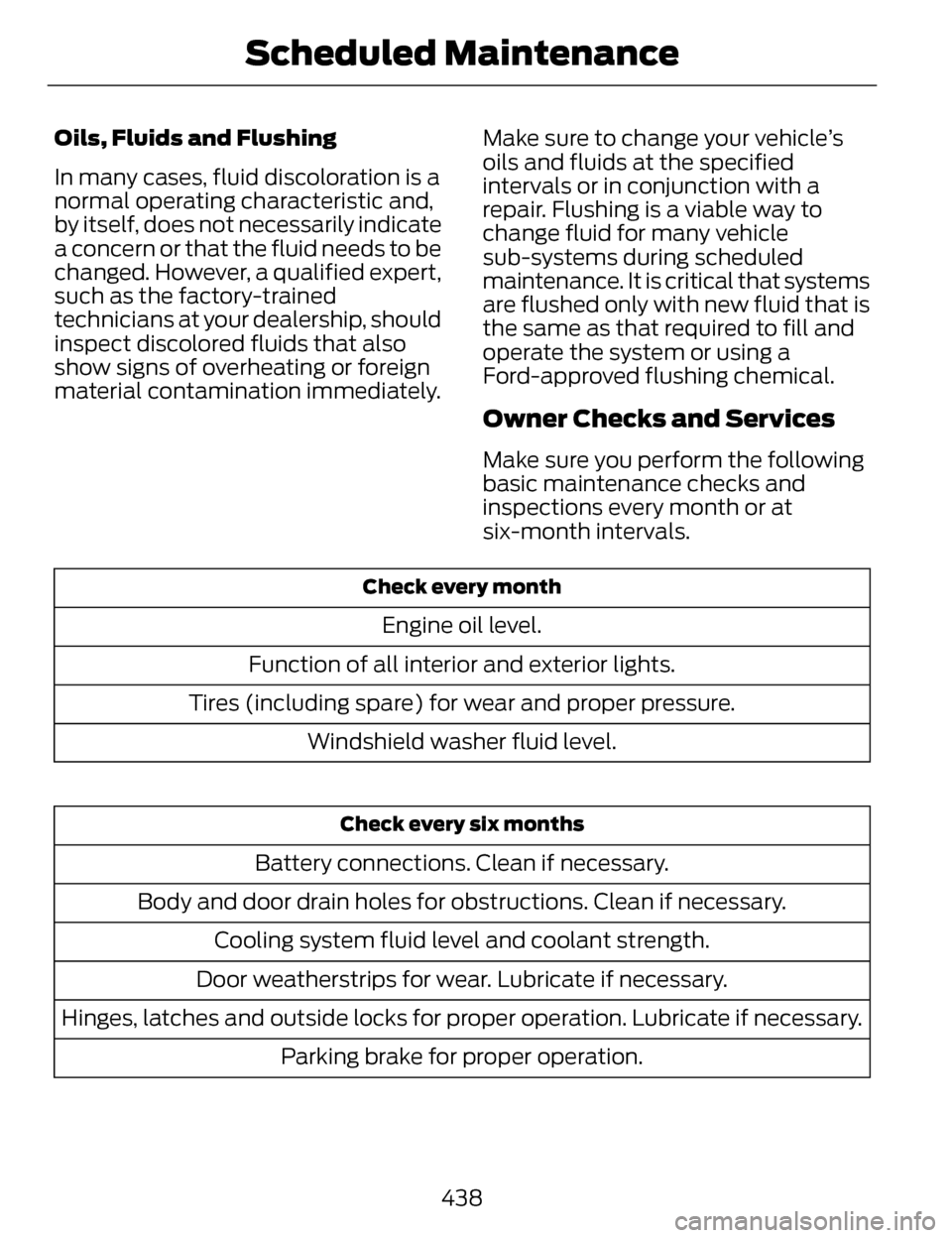
Owner Checks and Services
Make sure you perform the following
basic maintenance checks and
inspections every month or at
six-month intervals.
Check every month
Engine oil level.
Function of all interior and exterior lights.
Tires (including spare) for wear and proper pressure. Windshield washer fluid level.
Check every six months
Battery connections. Clean if necessary.
Body and door drain holes for obstructions. Clean if necessary. Cooling system fluid level and coolant strength.
Door weatherstrips for wear. Lubricate if necessary.
Hinges, latches and outside locks for proper operation. Lubricate if necessary. Parking brake for proper operation.
438
Scheduled Maintenance
Page 442 of 468
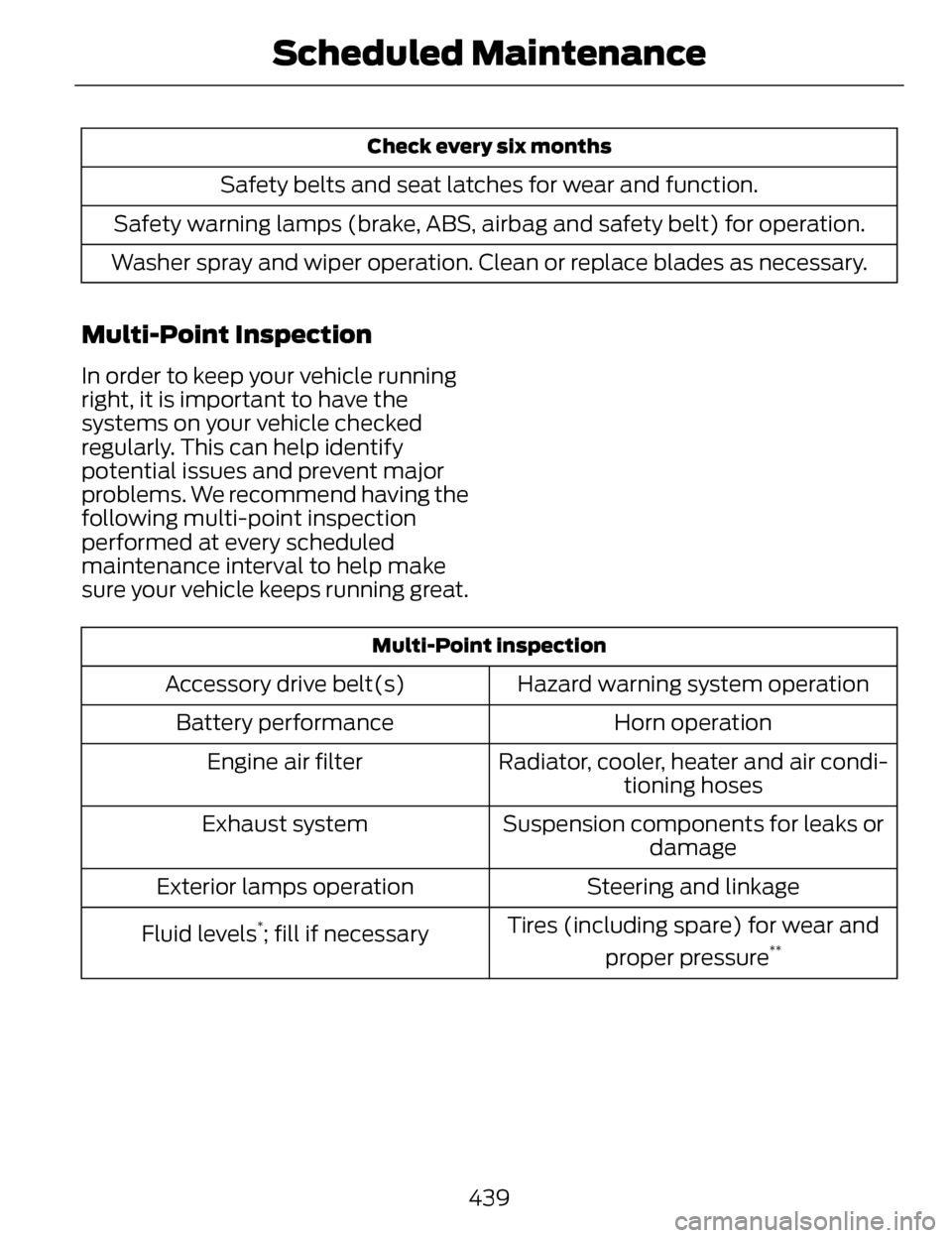
Check every six months
Safety belts and seat latches for wear and function.
Safety warning lamps (brake, ABS, airbag and safety belt) for operation.
Washer spray and wiper operation. Clean or replace blades as necessary.
Multi-Point Inspection
In order to keep your vehicle running
right, it is important to have the
systems on your vehicle checked
regularly. This can help identify
potential issues and prevent major
problems. We recommend having the
following multi-point inspection
performed at every scheduled
maintenance interval to help make
sure your vehicle keeps running great.
Multi-Point inspection
Hazard warning system operation
Accessory drive belt(s)
Horn operation
Battery performance
Radiator, cooler, heater and air condi-tioning hoses
Engine air filter
Suspension components for leaks ordamage
Exhaust system
Steering and linkage
Exterior lamps operation
Tires (including spare) for wear andproper pressure
**Fluid levels*; fill if necessary
439
Scheduled Maintenance