power steering LINCOLN MKZ 2015 Owners Manual
[x] Cancel search | Manufacturer: LINCOLN, Model Year: 2015, Model line: MKZ, Model: LINCOLN MKZ 2015Pages: 516, PDF Size: 4.48 MB
Page 5 of 516
Steering Wheel
Adjusting the Steering Wheel......................78
Audio Control...................................................79
Voice Control
...................................................80
Cruise Control
.................................................80
Information Display Control
.........................80
Heated Steering Wheel..................................81
Wipers and Washers
Windshield Wipers
.........................................82
Autowipers.......................................................83
Windshield Washers
.......................................84
Lighting
Lighting Control
..............................................85
Autolamps.........................................................85
Instrument Lighting Dimmer........................86
Headlamp Exit Delay
......................................87
Daytime Running Lamps
...............................87
Automatic High Beam Control
....................88
Adaptive Headlamps.....................................89
Direction Indicators
........................................90
Interior Lamps
..................................................90 Windows and Mirrors
Power Windows
..............................................93
Global Opening and Closing.......................94
Exterior Mirrors
................................................94
Interior Mirror...................................................96
Sun Visors
.........................................................97
Sun Shades
......................................................97
Moonroof..........................................................98
Instrument Cluster
Gauges............................................................100
Warning Lamps and Indicators..................102
Audible Warnings and Indicators
..............106
Information Displays
General Information
......................................107
Information Messages...................................113
Climate Control
Automatic Climate Control
..........................132
Hints on Controlling the Interior Climate.........................................................134
Heated Windows and Mirrors....................135 Cabin Air Filter...............................................135
Remote Start
...................................................136
Seats
Sitting in the Correct Position.....................137
Head Restraints
..............................................137
Power Seats
....................................................139
Memory Function
..........................................142
Rear Seats.......................................................143
Heated Seats
..................................................144
Climate Controlled Seats
............................146
Rear Seat Armrest.........................................147
Universal Garage Door Opener
Universal Garage Door Opener
................148
Auxiliary Power Points
Auxiliary Power Points.................................153
Storage Compartments
Center Console.............................................155
Overhead Console
.......................................155
2
MKZ (), enUSA Table of Contents
Page 7 of 516
Roadside Emergencies
Roadside Assistance...................................247
Hazard Warning Flashers...........................248
Fuel Shutoff....................................................248
Jump Starting the Vehicle..........................249
Post-Crash Alert System.............................251
Customer Assistance
Getting the Services You Need................253
In California (U.S. Only)...............................254
The Better Business Bureau (BBB) Auto Line Program (U.S. Only)
........................255
Utilizing the Mediation/Arbitration Program (Canada Only)
...........................................256
Getting Assistance Outside the U.S. and Canada
.......................................................256
Ordering Additional Owner's Literature....................................................258
Reporting Safety Defects (U.S. Only)......258
Reporting Safety Defects (Canada Only)............................................................259
Fuses
Fuse Specification Chart............................260 Changing a Fuse...........................................277
Maintenance
General Information
.....................................278
Opening and Closing the Hood
...............279
Under Hood Overview -
2.0L
EcoBoost™..................................................280
Under Hood Overview - 3.7L....................282
Engine Oil Dipstick - 2.0L EcoBoost™......284
Engine Oil Dipstick - 3.7L...........................284
Engine Oil Check..........................................284
Engine Coolant Check................................285
Automatic Transmission Fluid Check
......288
Brake Fluid Check.......................................292
Power Steering Fluid Check.....................292
Washer Fluid Check....................................292
Fuel Filter
........................................................293
Changing the 12V Battery..........................293
Checking the Wiper Blades.......................295
Changing the Wiper Blades......................295
Adjusting the Headlamps
..........................296
Changing a Bulb
...........................................297
Bulb Specification Chart.............................297 Changing the Engine Air Filter
.................300
Vehicle Care
General Information.....................................302
Cleaning Products
.......................................302
Cleaning the Exterior..................................302
Waxing............................................................303
Cleaning the Engine
....................................304
Cleaning the Windows and Wiper Blades.........................................................304
Cleaning the Interior...................................305
Cleaning the Instrument Panel and Instrument Cluster Lens.........................306
Cleaning Leather Seats
..............................307
Repairing Minor Paint Damage.................308
Cleaning the Alloy Wheels........................308
Vehicle Storage............................................308
Wheels and Tires
Temporary Mobility Kit..................................311
Tire Care
.........................................................324
Using Snow Chains
......................................338
Tire Pressure Monitoring System.............339
4
MKZ (), enUSA Table of Contents
Page 12 of 516
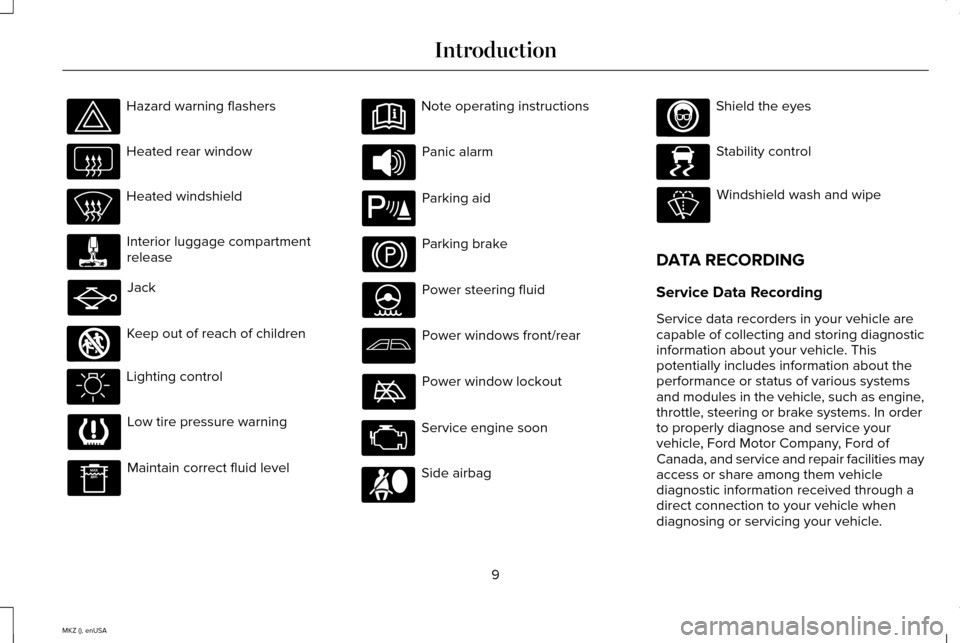
Hazard warning flashers
Heated rear window
Heated windshield
Interior luggage compartment
release
Jack
Keep out of reach of children
Lighting control
Low tire pressure warning
Maintain correct fluid level Note operating instructions
Panic alarm
Parking aid
Parking brake
Power steering fluid
Power windows front/rear
Power window lockout
Service engine soon
Side airbag Shield the eyes
Stability control
Windshield wash and wipe
DATA RECORDING
Service Data Recording
Service data recorders in your vehicle are
capable of collecting and storing diagnostic
information about your vehicle. This
potentially includes information about the
performance or status of various systems
and modules in the vehicle, such as engine,
throttle, steering or brake systems. In order
to properly diagnose and service your
vehicle, Ford Motor Company, Ford of
Canada, and service and repair facilities may
access or share among them vehicle
diagnostic information received through a
direct connection to your vehicle when
diagnosing or servicing your vehicle.
9
MKZ (), enUSA Introduction E161353 E139213 E167012 E138639
Page 81 of 516
ADJUSTING THE STEERING WHEEL
WARNING
Do not adjust the steering wheel when
your vehicle is moving.
Note:
Make sure that you are sitting in the
correct position. See Sitting in the Correct
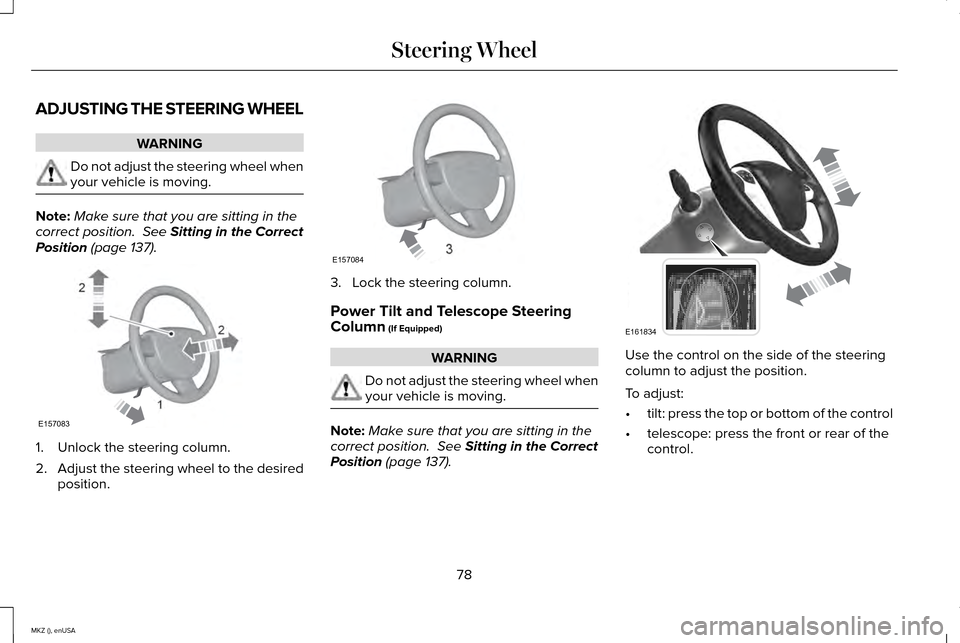
Position (page 137). 1. Unlock the steering column.
2.
Adjust the steering wheel to the desired
position. 3. Lock the steering column.
Power Tilt and Telescope Steering
Column
(If Equipped)
WARNING
Do not adjust the steering wheel when
your vehicle is moving.
Note:
Make sure that you are sitting in the
correct position.
See Sitting in the Correct
Position (page 137). Use the control on the side of the steering
column to adjust the position.
To adjust:
•
tilt: press the top or bottom of the control
• telescope: press the front or rear of the
control.
78
MKZ (), enUSA Steering Wheel2
2
1E157083 E157084 E161834
Page 128 of 516
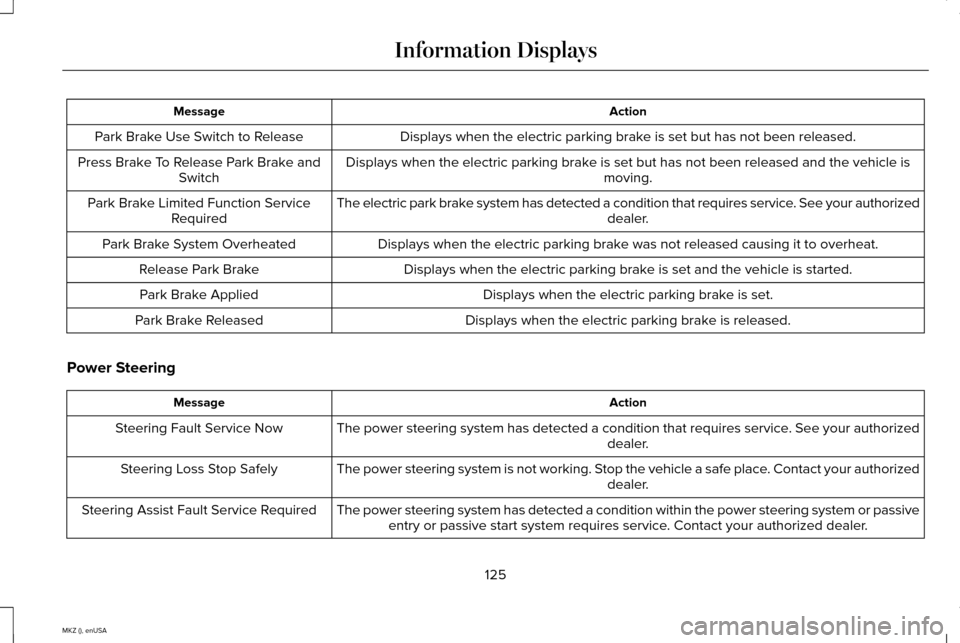
Action
Message
Displays when the electric parking brake is set but has not been released.
Park Brake Use Switch to Release
Displays when the electric parking brake is set but has not been released and the vehicle is moving.
Press Brake To Release Park Brake and
Switch
The electric park brake system has detected a condition that requires service. See your authorized dealer.
Park Brake Limited Function Service
Required
Displays when the electric parking brake was not released causing it to overheat.
Park Brake System Overheated
Displays when the electric parking brake is set and the vehicle is started.
Release Park Brake
Displays when the electric parking brake is set.
Park Brake Applied
Displays when the electric parking brake is released.
Park Brake Released
Power Steering Action
Message
The power steering system has detected a condition that requires service\
. See your authorized dealer.
Steering Fault Service Now
The power steering system is not working. Stop the vehicle a safe place. Contact your authorized dealer.
Steering Loss Stop Safely
The power steering system has detected a condition within the power stee\
ring system or passiveentry or passive start system requires service. Contact your authorized dealer.
Steering Assist Fault Service Required
125
MKZ (), enUSA Information Displays
Page 145 of 516
1
The massage feature will default to an
alternating massage mode with back
massage intensity adjustment. The lumbar
and bolster feature will default to the middle
lumbar mode.
2 Press C a second time to adjust the back
bolster. Press C a third time to adjust the
cushion bolster.
You can also adjust this feature through the
touchscreen. Press the Menu Settings icon, then
Vehicle. Choose Multi-Contour
Seats.
When switched on, the system displays
directions for you to adjust the lumbar
settings in your seat or to set the massage
function.
To access and make adjustments to the
lumbar setting:
1. Choose the desired seat to adjust.
2. Press the + or - to adjust the lumbar intensity.
To access and make adjustments to the
massage setting: 1. Press the Menu Settings icon, then
Vehicle. Choose Multi-Contour Seats.
2. Choose the desired seat to adjust.
3. Press OFF, LO or HI.
MEMORY FUNCTION WARNINGS
Before activating the seat memory,
make sure that the area immediately
surrounding the seat is clear of obstructions
and that all occupants are clear of moving
parts. Do not use the memory function when
your vehicle is moving.
This feature will automatically recall the
position of the driver seat, power mirrors and
optional power steering column. The memory
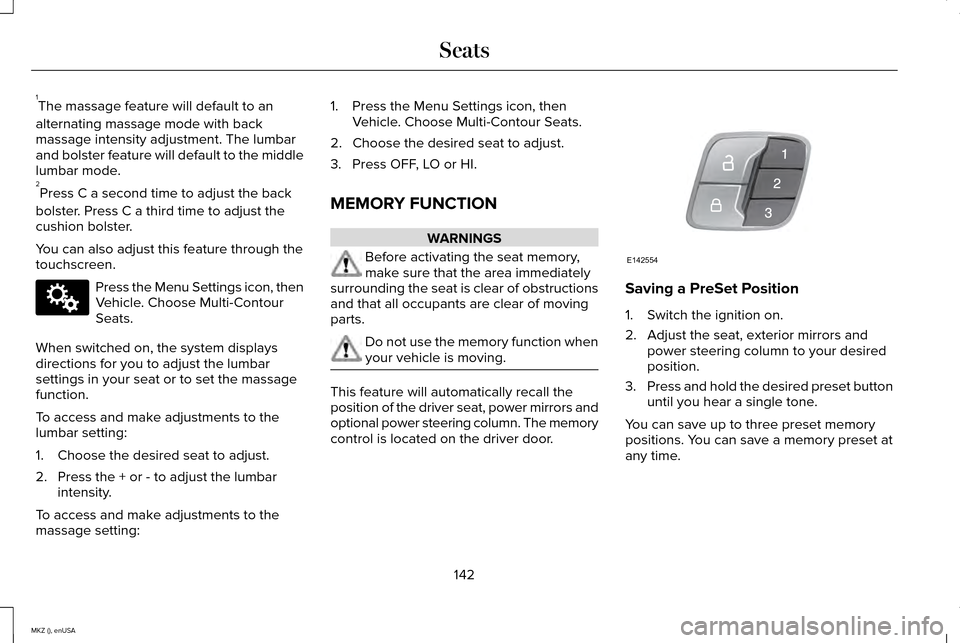
control is located on the driver door. Saving a PreSet Position
1. Switch the ignition on.
2. Adjust the seat, exterior mirrors and
power steering column to your desired
position.
3. Press and hold the desired preset button
until you hear a single tone.
You can save up to three preset memory
positions. You can save a memory preset at
any time.
142
MKZ (), enUSA SeatsE142607 E142554
Page 180 of 516
USING ALL-WHEEL DRIVE
All-wheel drive uses all four wheels to power
the vehicle. This increases traction, enabling
you to drive over terrain and road conditions
that a conventional two-wheel drive vehicle
cannot. The AWD system is active all the time
and requires no input from the operator.
Note:
Your AWD vehicle is not for off-road
use. The AWD feature gives your vehicle
some limited off-road capabilities in which
driving surfaces are relatively level,
obstruction-free and otherwise similar to
normal on-road driving conditions. Operating
your vehicle under other than those
conditions could subject the vehicle to
excessive stress which might result in
damage not covered under your warranty.
Note: A warning message will display in the
information display when an AWD system
fault is present See Information Messages
(page 113). An AWD system fault will cause
the AWD system to default to front-wheel
drive only mode. When this warning
message displays, have your vehicle
serviced at an authorized dealer. Note:
A warning message will display in the
information display if the AWD system has
overheated.
See Information Messages
(page 113). This condition may occur if the
vehicle operates in extreme conditions with
excessive wheel slip, such as deep sand. To
resume normal AWD function as soon as
possible, stop the vehicle in a safe location
and stop the engine for at least 10 minutes.
After the engine restarts and the AWD
system has adequately cooled, the warning
message will turn off and normal AWD
function will return.
Do not use a spare tire of a different size
other than the tire provided. If the mini-spare
tire is installed, the AWD system may disable
automatically and enter front-wheel drive
only mode to protect driveline components.
This condition will be indicated by a warning
in the information display.
See Information
Messages (page 113). If there is a warning
message in the information display from
using the spare tire, this indicator should turn
off after reinstalling the repaired or replaced
normal road tire and cycling the ignition off
and on. It is recommended to reinstall the repaired or replaced road tire as soon as
possible. Major dissimilar tire sizes between
the front and rear axles could cause the AWD
system to stop functioning and default to
front-wheel drive or damage the AWD
system.
Driving In Special Conditions With All-
Wheel Drive (AWD)
AWD vehicles are equipped for driving on
sand, snow, mud and rough roads and have
operating characteristics that are somewhat
different from conventional vehicles, both on
and off the highway.
Under severe operating conditions, the A/C
may cycle on and off to protect overheating
of the engine.
Basic operating principles in special
conditions
•
Drive slower in strong crosswinds which
can affect the normal steering
characteristics of your vehicle.
• Be extremely careful when driving on
pavement made slippery by loose sand,
water, gravel, snow or ice.
177
MKZ (), enUSA All-Wheel Drive
(If Equipped)
Page 184 of 516
Driving on Snow and Ice
WARNING
If you are driving in slippery conditions
that require tire chains or cables, then
it is critical that you drive cautiously. Keep
speeds down, allow for longer stopping
distances and avoid aggressive steering to
reduce the chances of a loss of vehicle
control which can lead to serious injury or
death. If the rear end of the vehicle slides
while cornering, steer in the direction of the
slide until you regain control of the vehicle. Note:
Excessive tire slippage can cause
driveline damage.
AWD vehicles have advantages over 2WD
vehicles in snow and ice but can skid like
any other vehicle.
Should you start to slide while driving on
snowy or icy roads, turn the steering wheel
in the direction of the slide until you regain
control. Avoid sudden applications of power and
quick changes of direction on snow and ice.
Apply the accelerator slowly and steadily
when starting from a full stop.
Avoid sudden braking as well. Although an
AWD vehicle may accelerate better than a
two-wheel drive vehicle in snow and ice, it
won
’t stop any faster, because as in other
vehicles, braking occurs at all four wheels.
Do not become overconfident as to road
conditions.
Make sure you allow sufficient distance
between you and other vehicles for stopping.
Drive slower than usual and consider using
one of the lower gears. In emergency
stopping situations, apply the brake steadily.
Since your vehicle is equipped with a four
wheel (ABS), do not “pump ” the brakes. See
Hints on Driving With Anti-Lock Brakes
(page 183). for more information on the
operation of the anti-lock brake system
(ABS). Maintenance and Modifications
The suspension and steering systems on
your vehicle are designed and tested to
provide predictable performance whether
loaded or empty and durable load carrying
capability. For this reason, Lincoln Motor
Company strongly recommends that you do
not make modifications such as adding or
removing parts (such as lowering kits or
stabilizer bars) or by using replacement parts
not equivalent to the original factory
equipment.
Any modifications to a vehicle that raise the
center of gravity can make it more likely the
vehicle will rollover as a result of a loss of
control. Lincoln Motor Company
recommends that you use caution with any
vehicle equipped with a high load or device
(such as ladder or luggage racks).
181
MKZ (), enUSA All-Wheel Drive
(If Equipped)
Page 186 of 516
GENERAL INFORMATION
Note:
Occasional brake noise is normal. If a
metal-to-metal, continuous grinding or
continuous squeal sound is present, the
brake linings may be worn-out. Have the
system checked by an authorized dealer. If
your vehicle has continuous vibration or
shudder in the steering wheel while braking,
have it checked by an authorized dealer.
Note: Brake dust may accumulate on the
wheels, even under normal driving
conditions. Some dust is inevitable as the
brakes wear and does not contribute to
brake noise. See Cleaning the Alloy Wheels
(page 308). See
Warning Lamps and
Indicators (page 102).
Wet brakes result in reduced braking
efficiency. Gently press the brake pedal a
few times when driving from a car wash or
standing water to dry the brakes. Brake Over Accelerator
In the event the accelerator pedal becomes
stuck or entrapped, apply steady and firm
pressure to the brake pedal to slow the
vehicle and reduce engine power. If you
experience this condition, apply the brakes
and bring your vehicle to a safe stop. Move
the transmission to park (P), switch the
engine off and apply the parking brake.
Inspect the accelerator pedal for any
interference. If none are found and the
condition persists, have your vehicle towed
to the nearest authorized dealer.
Brake Assist
Brake assist detects when you brake rapidly
by measuring the rate at which you press the
brake pedal. It provides maximum braking
efficiency as long as you press the pedal,
and can reduce stopping distances in critical
situations.
Anti-lock Brake System
This system helps you maintain steering
control during emergency stops by keeping
the brakes from locking. This lamp momentarily illuminates
when you turn the ignition on. If
the light does not illuminate during
start up, remains on or flashes, the system
may be disabled. Have the system checked
by an authorized dealer. If the anti-lock brake
system is disabled, normal braking is still
effective. If the brake warning lamp
illuminates when you release the
parking brake, have the system
checked by an authorized dealer.
HINTS ON DRIVING WITH ANTI-
LOCK BRAKES
Note: When the system is operating, the
brake pedal will pulse and may travel further.
Maintain pressure on the brake pedal. You
may also hear a noise from the system. This
is normal.
183
MKZ (), enUSA BrakesE144522 E144522
Page 225 of 516
There may be certain instances when either
the BLIS or cross traffic alert systems
illuminate the alert indicator with no vehicle
in the coverage zone; this is known as a false
alert. Some amount of false alerts are normal;
they are temporary and self-correct.
System Errors
If either system senses a problem with the
left or right sensor, the BLIS telltale will
illuminate and a message will appear in the
information display.
All other system faults will only be displayed
by a message in the information display.
Switching the Systems Off and On
One or both systems can be switched off
temporarily by using the information display
control. See (page 107). When the BLIS is
switched off, you will not receive alerts and
a telltale illuminates in the information
display. The yellow alert indicator in the
outside mirror will also flash twice. Note:
The CTA system always switches on
whenever the ignition is switched on.
However, the BLIS system will remember the
last selected on or off setting.
One or both systems cannot be switched off
when MyKey is used.
See General
Information (page 374).
One or both systems can also be switched
off permanently at your authorized dealer.
Once switched off, switching it back on must
also be done at your authorized dealer.
STEERING
Electric Power Steering WARNINGS
The electric power steering system has
diagnostic checks that continuously
monitor the system to ensure proper
operation. When a system error is detected
a steering message will appear in the
information display. WARNINGS
The electric power steering system has
diagnostic checks that continuously
monitor the system to ensure proper
operation of the electronic system. When an
electronic error is detected, a message will
be displayed in the information display. If this
happens, stop the vehicle in a safe place,
and turn off the engine. After at least 10
seconds, reset the system by restarting the
engine, and watch the information display
for a steering message. If a steering message
returns, or returns while driving, take the
vehicle to your dealer to have it checked. Obtain immediate service if a system
error is detected. You may not notice
any difference in the feel of your steering,
but a serious condition may exist. Failure to
do so may result in loss of steering control. Your vehicle has an electric power steering
system. There is no fluid reservoir to check
or fill.
222
MKZ (), enUSA Driving Aids