lock LINCOLN MKZ 2016 Owners Manual
[x] Cancel search | Manufacturer: LINCOLN, Model Year: 2016, Model line: MKZ, Model: LINCOLN MKZ 2016Pages: 544, PDF Size: 5.77 MB
Page 352 of 544
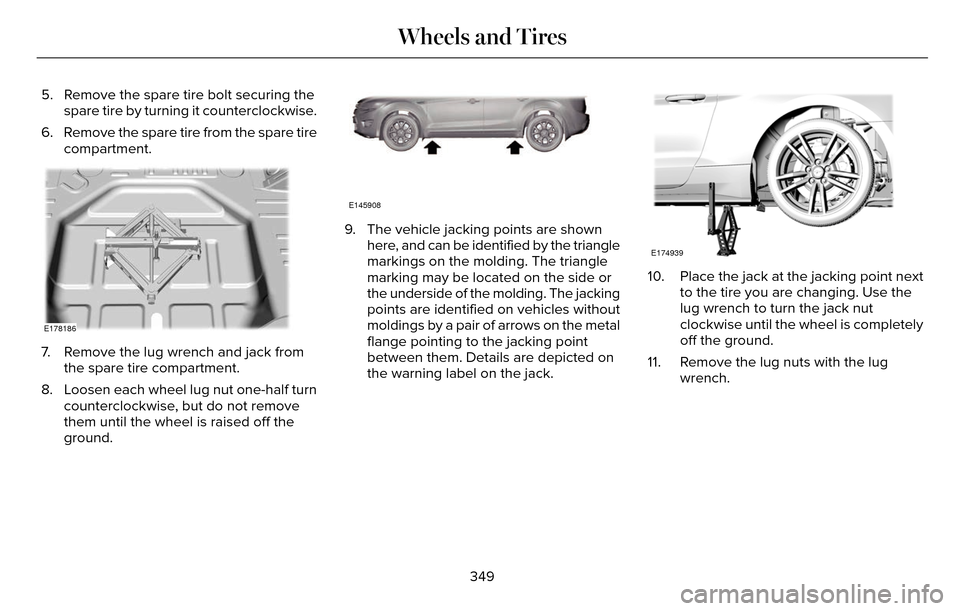
5. Remove the spare tire bolt securing thespare tire by turning it counterclockwise.
6. Remove the spare tire from the spare tire compartment.
E178186
7. Remove the lug wrench and jack fromthe spare tire compartment.
8. Loosen each wheel lug nut one-half turn counterclockwise, but do not remove
them until the wheel is raised off the
ground.
E145908
9. The vehicle jacking points are shownhere, and can be identified by the triangle
markings on the molding. The triangle
marking may be located on the side or
the underside of the molding. The jacking
points are identified on vehicles without
moldings by a pair of arrows on the metal
flange pointing to the jacking point
between them. Details are depicted on
the warning label on the jack.
E174939
10. Place the jack at the jacking point next to the tire you are changing. Use the
lug wrench to turn the jack nut
clockwise until the wheel is completely
off the ground.
11. Remove the lug nuts with the lug wrench.
349
Wheels and Tires
Page 353 of 544
12. Replace the flat tire with the spare tire,making sure the valve stem is facing
outward. Reinstall the lug nuts until the
wheel is snug against the hub. Do not
fully tighten the lug nuts until the wheel
has been lowered. If you are using the
temporary tire, the lug nut washers will
not appear to be flush with the rim. This
is normal only when using the
temporary spare tire.
13. Lower the wheel by turning the jack handle counterclockwise.
1
2
3
4
5
E75442
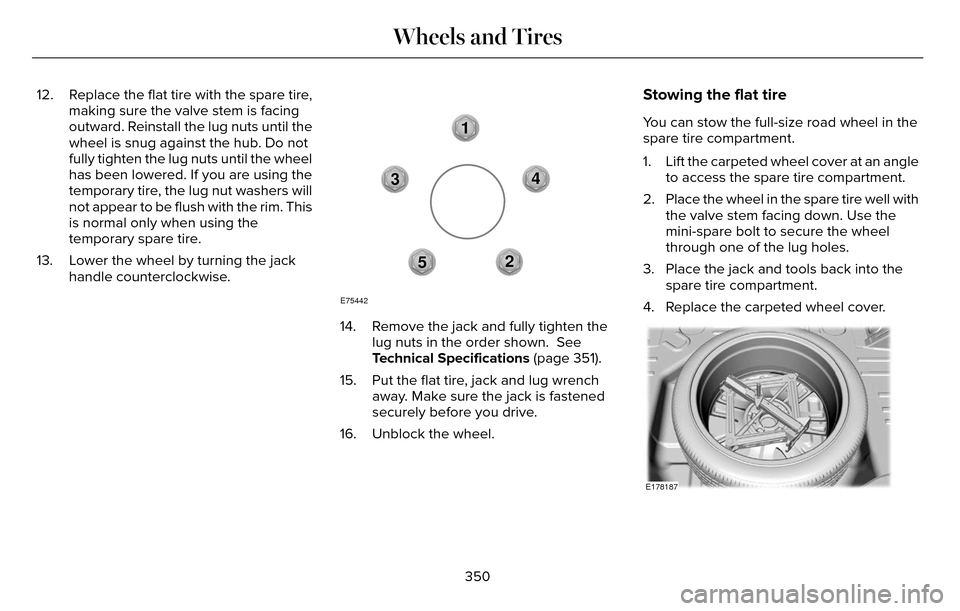
14. Remove the jack and fully tighten the lug nuts in the order shown. See
Technical Specifications (page 351).
15. Put the flat tire, jack and lug wrench away. Make sure the jack is fastened
securely before you drive.
16. Unblock the wheel.
Stowing the flat tire
You can stow the full-size road wheel in the
spare tire compartment.
1. Lift the carpeted wheel cover at an angle to access the spare tire compartment.
2. Place the wheel in the spare tire well with the valve stem facing down. Use the
mini-spare bolt to secure the wheel
through one of the lug holes.
3. Place the jack and tools back into the spare tire compartment.
4. Replace the carpeted wheel cover.
E178187
350
Wheels and Tires
Page 364 of 544
Specification
Name
YN-19
WSH-M17B19-A
A/C refrigerant (Canada):
Motorcraft R-134a Refrigerant
CYN-16-R
WSH-M17B19-A
A/C refrigerant (Mexico):
Motorcraft R-134a Refrigerant
MYN-19
WSH-M1C231-B
A/C refrigerant compressor oil:
Motorcraft PAG Refrigerant Compressor Oil
YN-12-D
ESB-M1C93-B
Multi-purpose grease:
Motorcraft Multi-Purpose Grease Spray
XL-5
--
Lock cylinders (U.S.):
Penetrating and Lock Lubricant
XL-1
--
Lock cylinders (Canada):
Penetrating Fluid
CXC-51-A
--
Lock cylinders (Mexico):
Penetrating and Lock Lubricant
361
Capacities and Specifications
Page 370 of 544
Specification
Name
YN-19
WSH-M17B19-A
A/C refrigerant (Canada):
Motorcraft R-134a Refrigerant
CYN-16-R
WSH-M17B19-A
A/C refrigerant (Mexico):
Motorcraft R-134a Refrigerant
MYN-19
WSH-M1C231-B
A/C refrigerant compressor oil:
Motorcraft PAG Refrigerant Compressor Oil
YN-12-D
ESB-M1C93-B
Multi-purpose grease:
Motorcraft Multi-Purpose Grease Spray
XL-5
--
Lock cylinders (U.S.):
Penetrating and Lock Lubricant
XL-1
--
Lock cylinders (Canada):
Penetrating Fluid
CXC-51-A
--
Lock cylinders (Mexico):
Penetrating and Lock Lubricant
367
Capacities and Specifications
Page 378 of 544
Note:You can access the entertainment
features for 30 minutes after you switch the
ignition off, and no doors are opened.
PHONE
Press to select any of the following:
Menu Item
Phone
Quick Dial
Phonebook
History
Messaging
Settings NAVIGATION
Press to select any of the following:
Menu Item
My Home
Favorites
Previous Destinations
Point of Interest
Emergency
Street Address
Intersection
City Center
Map
Edit Route
Cancel Route
CLIMATE
Press the corresponding icons to control the
following options: • Driver Settings
• Recirculated Air
• Auto
• Dual
• Passenger Settings
• A/C
• Defrost
SETTINGS
E142607
Press to select any of the following:
Menu Item
Clock
Display
Sound
Vehicle
Settings
Help
375
MyLincoln Touch™
Page 387 of 544
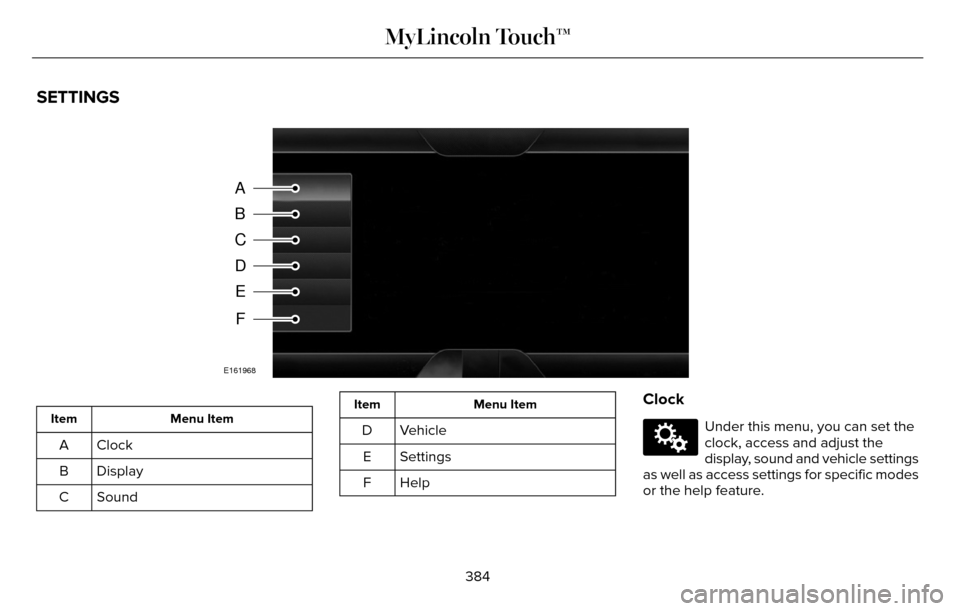
SETTINGS
A
B
C
D
E
F
E161968
Menu Item
Item
Clock
A
Display
B
Sound
C
Menu Item
Item
Vehicle
D
Settings
E
HelpF
Clock
E142607
Under this menu, you can set the
clock, access and adjust the
display, sound and vehicle settings
as well as access settings for specific modes
or the help feature.
384
MyLincoln Touch™
Page 388 of 544
To make adjustments using the touchscreen, select:
Action and Description
Menu Item
Press the settings icon.
Settings
Press the + or - to adjust the time.
Clock
From this screen, you can also make other adjustments such as 12-hour or\
24-hour mode, activate
GPS time synchronization and have the system automatically update new ti\
me zones.
You can also switch the outside air temperature display off and on. It ap\
pears at the top center
of the touchscreen, next to the time and date.
Note: You cannot manually set the date. Your vehicle’s GPS does this for you.
Note: If the battery has been disconnected, your vehicle needs to acquire a GP\
S signal to update the clock. Once your vehicle acquires the
signal, it may take a few minutes for the update to display the correct \
time.
Display
E142607
You can adjust the display using
the touchscreen or the voice
button on the steering wheel
controls.
385
MyLincoln Touch™
Page 394 of 544
Enable Valet Mode
E142607
Valet mode allows you to lock the
system. No information is
accessible until the system isunlocked with the correct PIN.
Note:
If the system locks, and you need to
reset the PIN, please contact the Customer
Relationship Center. United States: 1-800-521-4140
Canada: 1-800-387-9333
To make adjustments using the touchscreen, select:
Action and Description
Menu Item
Press the settings icon.
Settings
Vehicle
Then enter a four digit PIN twice, as prompted.
Enable Valet Mode
After you press Continue the system locks until you enter the PIN again.\
Continue
Settings
Access and adjust system settings, voice
features, as well as phone, navigation and
wireless settings. SystemE142607
391
MyLincoln Touch™
Page 417 of 544

Action and Description
Menu Item
Touch this button to hear a brief sampling of channels.
Scan
Touch this button to view a list of all available stations. Scroll to see\
more categories. Touch the station
you want to listen to.
Browse
Note: SIRIUS does not support the Alert feature on all channels. Ford Motor Co\
mpany shall not be responsible for Alert feature variation.
Browsing Controls
Action and Description
Message
Touch this button if you want to skip this channel.
Skip
Touch this button if you do not want anyone to listen to this channel.
Lock
Touch this button to see song titles being played on other stations.
Title
Touch this button to see artists being played on other stations.
Artist
Touch this button to see a list of all the channel names.
Channel
Options
Touch this button to view and adjust various
media settings.
414
MyLincoln Touch™
Page 418 of 544
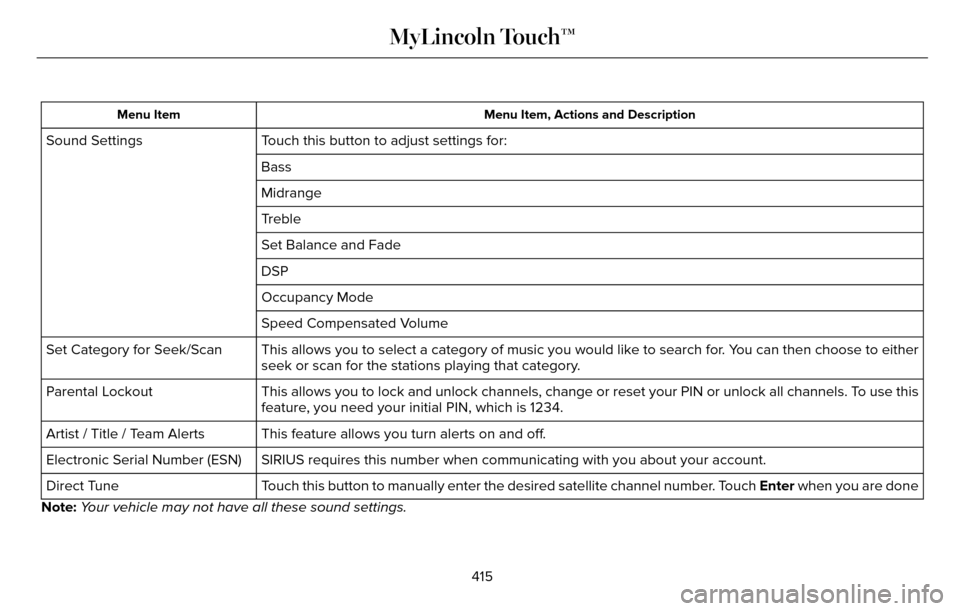
Menu Item, Actions and Description
Menu Item
Touch this button to adjust settings for:
Sound Settings
Bass
Midrange
Treble
Set Balance and Fade
DSP
Occupancy Mode
Speed Compensated Volume
This allows you to select a category of music you would like to search f\
or. You can then choose to either
seek or scan for the stations playing that category.
Set Category for Seek/Scan
This allows you to lock and unlock channels, change or reset your PIN or\
unlock all channels. To use this
feature, you need your initial PIN, which is 1234.
Parental Lockout
This feature allows you turn alerts on and off.
Artist / Title / Team Alerts
SIRIUS requires this number when communicating with you about your accou\
nt.
Electronic Serial Number (ESN)
Touch this button to manually enter the desired satellite channel number. Touch Enter when you are done
Direct Tune
Note: Your vehicle may not have all these sound settings.
415
MyLincoln Touch™