page 93 LINCOLN MKZ 2016 Owners Manual
[x] Cancel search | Manufacturer: LINCOLN, Model Year: 2016, Model line: MKZ, Model: LINCOLN MKZ 2016Pages: 544, PDF Size: 5.77 MB
Page 373 of 544
Do not expose discs to direct sunlight or heat
sources for extended periods.
MP3 Track and Folder Structure
Audio systems capable of recognizing and
playing MP3 individual tracks and folder
structures work as follows:
• There are two different modes for MP3disc playback: MP3 track mode (system
default) and MP3 folder mode.
• MP3 track mode ignores any folder structure on the MP3 disc. The player
numbers each MP3 track on the disc
(noted by the .mp3 file extension) from
T001 to a maximum of T255. The
maximum number of playable MP3 files
may be less depending on the structure
of the CD and exact model of radio
present. • MP3 folder mode represents a folder
structure consisting of one level of
folders. The CD player numbers all MP3
tracks on the disc (noted by the .mp3 file
extension) and all folders containing MP3
files, from F001 (folder) T001 (track) to
F253 T255.
• Creating discs with only one level of folders helps with navigation through the
disc files.
If you are burning your own MP3 discs, it is
important to understand how the system
reads the structures you create. While
various files may be present, (files with
extensions other than mp3), only files with
the .mp3 extension are played; other files
are ignored by the system. This enables you
to use the same MP3 disc for a variety of
tasks on your work computer, home
computer and your in-vehicle system.
In track mode, the system displays and plays
the structure as if it were only one level deep
(all .mp3 files play, regardless of being in a
specific folder). In folder mode, the system
only plays the .mp3 files in the current folder.
AUDIO UNIT - VEHICLES WITH:
PREMIUM AM/FM/CD
WARNING
Driving while distracted can result in
loss of vehicle control, crash and injury.
We strongly recommend that you use
extreme caution when using any device that
may take your focus off the road. Your
primary responsibility is the safe operation
of your vehicle. We recommend against the
use of any hand-held device while driving
and encourage the use of voice-operated
systems when possible. Make sure you are
aware of all applicable local laws that may
affect the use of electronic devices while
driving.
Note: The MyLincoln Touch system controls
most of the audio features. See
Entertainment (page 403).
370
Audio System
Page 385 of 544
Press the voice button and when prompted
say:
Voice command
Main Menu
What Can I Say
Previous Page
Go Back
Help
Helpful Hints
• Make sure the interior of your vehicle is as quiet as possible. Wind noise from
open windows and road vibrations may
prevent the system from correctly
recognizing spoken voice commands.
• After pressing the voice command icon, wait until after the tone sounds and a
message appears before saying a voice
command. Any voice command spoken
prior to this does not register with the
system. • Speak naturally, without long pauses
between words.
• At any time, you can interrupt the system while it is speaking by pressing the voice
command icon.
Accessing a List of Available Voice
Commands
To access a list of available voice commands
you can do either of the following.
Using the touchscreen, press:
Menu Item
Settings
Help
Voice Command List Using the steering wheel control, press the
voice button and when prompted say one
of the following:
Voice Commands
List of Commands
Radio List of Commands
Phone List of Commands
Voice Instructions List of Commands
Voice Command Settings
These allow you to customize the level of
system interaction, help and feedback. The
system defaults to standard interaction that
uses candidate lists and confirmation
prompts as these provide the highest level
of guidance and feedback.
382
MyLincoln Touch™
Page 393 of 544
Action and Description
Menu Item
Mileage Interval (Miles)
To run the vehicle health report immediately.
Run Vehicle Health Report Now
You can find more information on Vehicle Health Report in this chapter.
Camera Settings
This menu allows you to access settings for
your rear view camera. See Parking Aids
(page 196).
E142607
To make adjustments using the touchscreen, select:
Action and Description
Menu Item
Press the settings icon.
Settings
Vehicle
Camera Settings
Then select from the following:
Enhanced Park Aids
Rear Camera Delay
You can find more information on the rear view camera system in another c\
hapter.
390
MyLincoln Touch™
Page 401 of 544
Action and Description
Menu Item
Turn on or turn off the 911 Assist feature. See Information (page 436).
911 Assist
Select the type of notification for phone calls - ring tone, beep, text to speech or silent.
Phone Ringer
Select the type of notification for text messages - alert tone, beep, text to speech, or have it be
silent.
Text Message Notification
If compatible with your phone, you can adjust your internet data connection. Select to make your
connection profile with the personal area network or to turn off your co\
nnection. You can also
choose to adjust your settings or have the system always connect, never \
connect when roaming,
or query on connect. Press ? for more information.
Internet Data Connection
Access features, such as automatic phonebook download, re-download your \
phonebook, add
contacts from your phone as well as delete or upload your phonebook.
Manage Phonebook
Have the system alert you when in Roaming mode.
Roaming Warning
Wireless and Internet
E142607
Your system has a Wi-Fi feature
that creates a wireless network
within your vehicle, thereby
allowing other devices (such as personal
computers or phones) in your vehicle to
speak to each other, share files or play games. Using this Wi-Fi feature, everyone in
your vehicle can also access the internet if
you have a USB mobile broadband
connection inside your vehicle, your phone
supports personal area networking or if you
park outside a wireless hotspot.
398
MyLincoln Touch™
Page 405 of 544

Action and Description
Menu Item
View the licenses for any software and applications installed on your sy\
stem.
View Software Licenses
Certain features are not accessible when your vehicle is moving.
Driving Restrictions
Turn on and turn off the 911 Assist feature. See Information (page 436).
911 Assist
Allows you to save up to two numbers as ICE
contacts for quick access if there is an emer-
gency.
In Case of Emergency (ICE) Quick Dial
The ICE contacts you select appear at the end of
the Emergency Assistance call process.
Select to access your phonebook and then select
the desired contacts. The numbers then appear
as options on this screen for the ICE 1 and ICE 2
buttons.
Edit
View categorized lists of voice commands.
Voice Command List
E142599
You can also access Help using
the voice commands. The system
provides allowable voice
commands for the current mode.
402
MyLincoln Touch™
Page 424 of 544
If you are not listening to a CD, press the
voice button and, after the tone, say:
Voice command
CD Player
When listening to a CD you can say many
commands. Following are a few examples
of what you can say.
Voice command
Play
Pause
Next Track
Previous Track
Help
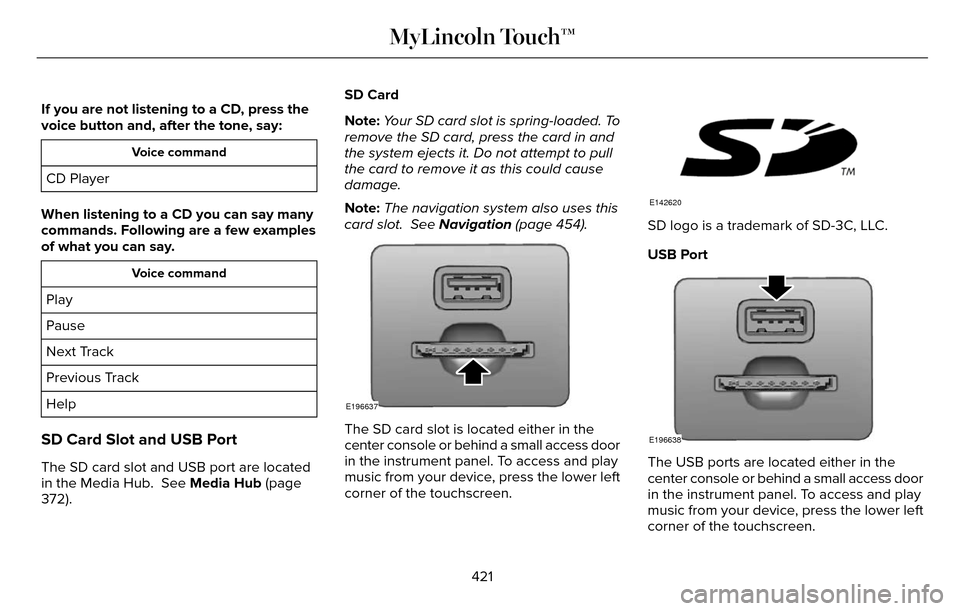
SD Card Slot and USB Port
The SD card slot and USB port are located
in the Media Hub. See Media Hub (page
372). SD Card
Note:
Your SD card slot is spring-loaded. To
remove the SD card, press the card in and
the system ejects it. Do not attempt to pull
the card to remove it as this could cause
damage.
Note: The navigation system also uses this
card slot. See Navigation (page 454).
E196637
The SD card slot is located either in the
center console or behind a small access door
in the instrument panel. To access and play
music from your device, press the lower left
corner of the touchscreen.
E142620
SD logo is a trademark of SD-3C, LLC.
USB Port
E196638
The USB ports are located either in the
center console or behind a small access door
in the instrument panel. To access and play
music from your device, press the lower left
corner of the touchscreen.
421
MyLincoln Touch™
Page 426 of 544
Sound
You can adjust the settings for:
Action and Description
Menu Item
Bass
Sound Settings
Midrange
Treble
Set Balance and Fade
DSP
EQ Mode
Speed Compensated Volume
Allows you to select more settings, which is under Media Player. See Settings (page 384).
Media Player Settings
Displays software and firmware information about the currently connected\
media device.
Device Information
Indexes your device when you connect it for the first time and each time the \
content changes (for example
adding or removing tracks) to make sure you have the latest voice comma\
nds available for all media on
the device.
Update Media Index
Note: Your vehicle may not have all these sound settings.
423
MyLincoln Touch™
Page 437 of 544
When a new message arrives, an audible
tone sounds and the screen displays a
pop-up with the caller name and ID, if
supported by your cell phone. You can
select:
Action and Description
Message
Action and Description
Message
To view the text message.
View
For SYNC to read the
message to you.
Listen
To call the contact.
Dial
To exit the screen.
Ignore
Phone Settings
To enter the phone settings menu select:
Action and Description
Message
Phone
Settings
Then any of the following:
Connect, disconnect, add or delete a device, as well as save it as a favorite.
Bluetooth Devices
To turn Bluetooth off or on.
Bluetooth
If you want all calls to go directly to your voicemail and not ring in t\
he vehicle. When this feature
is on, text message notifications do not ring inside the cabin either.
Do Not Disturb
Turn the 911 Assist feature on and off. See Information (page 436).
911 Assist
434
MyLincoln Touch™
Page 440 of 544
Menu Item
Item
SYNC Services
A
Travel Link
B
Alerts
C
Calendar
D
AppsE
Where Am I?
F
E142608
If your vehicle is equipped with
Navigation, press the Information
button to access these features. If
your vehicle is not equipped with Navigation,
press the corner of the touchscreen with the
green tab.
SYNC Services (If Equipped, United
States Only)
Note: SYNC Services varies by trim level and
model year and may require a subscription.
Traffic alerts and turn-by-turn directions
available in select markets. Message and
data rates may apply. Ford Motor Company
reserves the right to change or discontinue
this product service at any time without prior
notification or incurring any future obligation.
Note: SYNC Services requires activation
before use. Visit www.SYNCMyRide.com to
register and check your eligibility for
complimentary services. Standard phone
and message rates may apply. Subscription
may be required. You must also have the
active SYNC Services Bluetooth-enabled
cellular phone paired and connected to the
system in order to connect to, and use, SYNC
Services. See Phone (page 426).
Note: This feature does not function properly
if you have enabled caller ID blocking on
your cellular phone. Make sure your cellular
phone is not blocking caller ID before using
SYNC Services. Note:
The driver is ultimately responsible for
the safe operation of the vehicle, and
therefore, must evaluate whether it is safe
to follow the suggested directions. Any
navigation features provided are only an aid.
Make your driving decisions based on your
observations of local conditions and existing
traffic regulations. Do not follow the route
suggestions if doing so would result in an
unsafe or illegal maneuver, if you would be
placed in an unsafe situation, or if you would
be directed into an area that you consider
unsafe. Maps used by this system may be
inaccurate because of errors, changes in
roads, traffic conditions or driving conditions.
437
MyLincoln Touch™
Page 449 of 544
Note:The SYNC 911 Assist feature must be
set on prior to the incident.
Note: Before setting this feature on, make
sure that you read the 911 Assist Privacy
Notice later in this section for important
information.
Note: If any user turns 911 Assist on or off,
that setting applies for all paired phones. If
911 Assist is turned off, either a voice
message plays or a display message (or
icon) comes on (or both) when your vehicle
is started after a previously paired phone
connects.
Note: Every phone operates differently.
While SYNC 911 Assist works with most
cellular phones, some may have trouble
using this feature.
If a crash deploys an airbag, excluding knee
airbags and rear inflatable safety belts where
fitted or activates the fuel pump shut-off, your
SYNC-equipped vehicle may be able to
contact emergency services by dialing 911
through a paired and connected
Bluetooth-enabled phone. For more
information about the 911 Assist feature visit:
Website
visit www.SYNCMyRide.com www.SYNCMyRide.cawww.syncmaroute.ca
See Supplementary Restraints System
(page 44). Important information regarding
airbag deployment is in this chapter.
See Roadside Emergencies (page 251).
Important information regarding the fuel
pump shut-off is in this chapter.
Setting 911 Assist On
E142608
If your vehicle is equipped with Navigation,
touch the I (Information) button to access
these features. If your vehicle is not
equipped with Navigation, touch the corner
of the touchscreen with the green tab. Then
select:
Menu Item
Apps
911 Assist
On
E142607
You can also access 911 Assist by pressing
the Setting icon and then selecting:
Menu Item
Settings
Phone
911 Assist
446
MyLincoln Touch™