lighting LINCOLN MKZ 2016 User Guide
[x] Cancel search | Manufacturer: LINCOLN, Model Year: 2016, Model line: MKZ, Model: LINCOLN MKZ 2016Pages: 544, PDF Size: 5.77 MB
Page 101 of 544
Lincoln Welcome Mat
Projection lights, on the bottom of the mirror
housings, project an image onto the ground
a short distance from the vehicle. See
Lighting (page 87).
Integrated Blind Spot Mirrors
WARNING
Objects in the blind spot mirror are
closer than they appear.
Blind spot mirrors have an integrated convex
mirror built into the upper outboard corner
of the exterior mirrors. Their design can
increase your visibility along the side of your
vehicle.
Check the main mirror first before a lane
change, then check the blind spot mirror. If
no vehicles are present in the blind spot
mirror and the traffic in the adjacent lane is
at a safe distance, signal that you intend to
change lanes. Glance over your shoulder to
verify traffic is clear and carefully change
lanes.
A
B
C
E138665
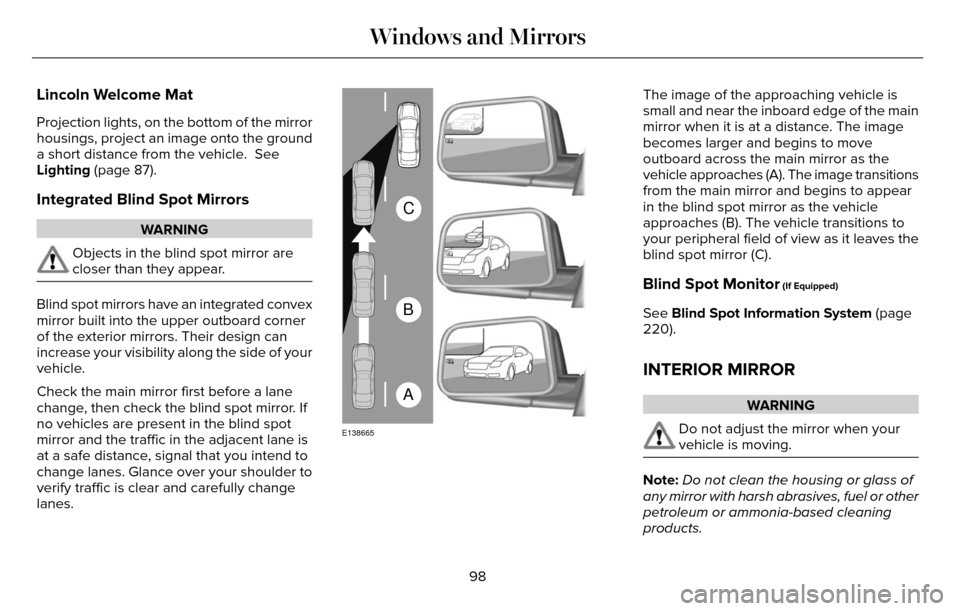
The image of the approaching vehicle is
small and near the inboard edge of the main
mirror when it is at a distance. The image
becomes larger and begins to move
outboard across the main mirror as the
vehicle approaches (A). The image transitions
from the main mirror and begins to appear
in the blind spot mirror as the vehicle
approaches (B). The vehicle transitions to
your peripheral field of view as it leaves the
blind spot mirror (C).
Blind Spot Monitor (If Equipped)
See Blind Spot Information System (page
220).
INTERIOR MIRROR
WARNING
Do not adjust the mirror when your
vehicle is moving.
Note: Do not clean the housing or glass of
any mirror with harsh abrasives, fuel or other
petroleum or ammonia-based cleaning
products.
98
Windows and Mirrors
Page 115 of 544
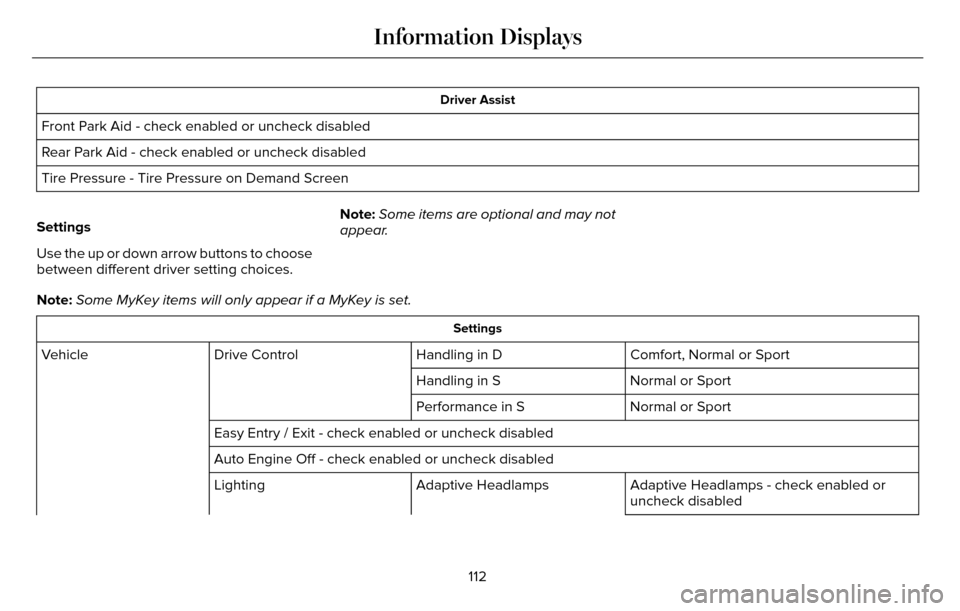
Driver Assist
Front Park Aid - check enabled or uncheck disabled
Rear Park Aid - check enabled or uncheck disabled
Tire Pressure - Tire Pressure on Demand Screen
Settings
Use the up or down arrow buttons to choose
between different driver setting choices. Note:
Some items are optional and may not
appear.
Note: Some MyKey items will only appear if a MyKey is set.
Settings
Comfort, Normal or Sport
Handling in D
Drive Control
Vehicle
Normal or Sport
Handling in S
Normal or Sport
Performance in S
Easy Entry / Exit - check enabled or uncheck disabled
Auto Engine Off - check enabled or uncheck disabled Adaptive Headlamps - check enabled or
uncheck disabled
Adaptive Headlamps
Lighting
112
Information Displays
Page 116 of 544
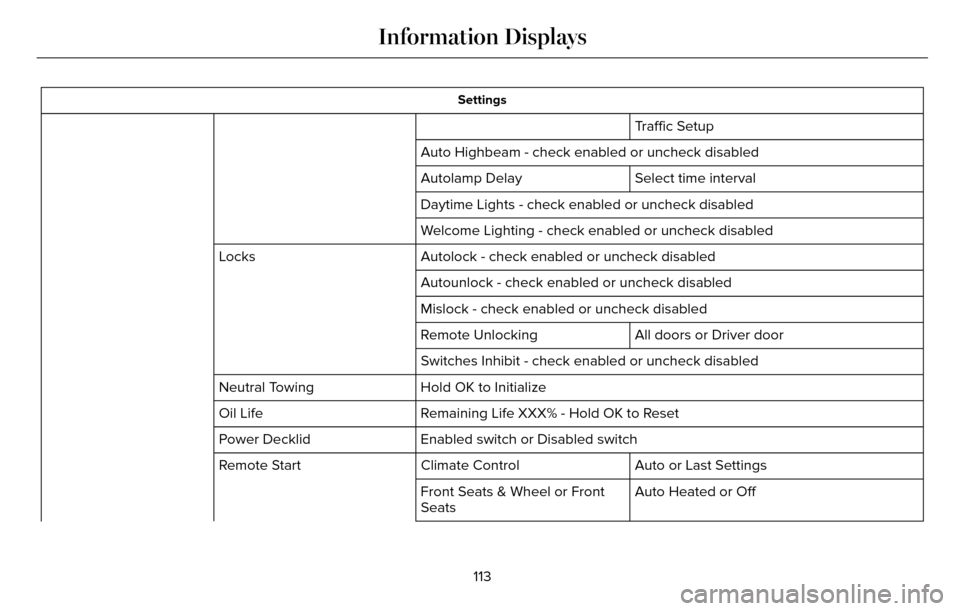
Settings
Traffic Setup
Auto Highbeam - check enabled or uncheck disabled Select time interval
Autolamp Delay
Daytime Lights - check enabled or uncheck disabled
Welcome Lighting - check enabled or uncheck disabled
Autolock - check enabled or uncheck disabled
Locks
Autounlock - check enabled or uncheck disabled
Mislock - check enabled or uncheck disabled
All doors or Driver door
Remote Unlocking
Switches Inhibit - check enabled or uncheck disabled
Hold OK to Initialize
Neutral Towing
Remaining Life XXX% - Hold OK to Reset
Oil Life
Enabled switch or Disabled switch
Power Decklid
Auto or Last Settings
Climate Control
Remote Start
Auto Heated or Off
Front Seats & Wheel or Front
Seats
113
Information Displays
Page 155 of 544
HomeLink Wireless Control System (If
Equipped)
WARNING
Do not use the system with any garage
door opener that does not have the
safety stop and reverse feature as required
by U.S. Federal Safety Standards (this
includes any garage door opener
manufactured before April 1, 1982). A garage
door opener which cannot detect an object,
signaling the door to stop and reverse, does
not meet current federal safety standards.
Using a garage door opener without these
features increases the risk of serious injury
or death.
Note: Make sure that the garage door and
security device are free from obstruction
when you are programming. Do not program
the system with the vehicle in the garage.
Note: Make sure you keep the original
remote control transmitter for use in other
vehicles as well as for future system
programming. Note:
We recommend that upon the sale or
lease termination of your vehicle, you erase
the programmed function buttons for security
reasons. See Erasing the function button
codes later in this section.
Note: You can program a maximum of three
devices. To change or replace any of the
three devices after it has been initially
programmed, you must first erase the current
settings. See Erasing the function button
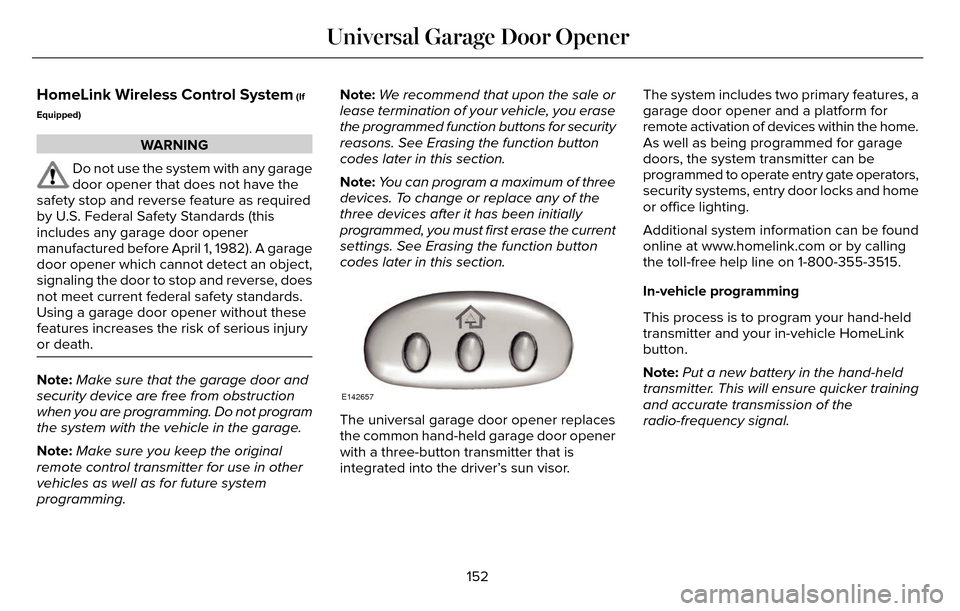
codes later in this section.E142657
The universal garage door opener replaces
the common hand-held garage door opener
with a three-button transmitter that is
integrated into the driver’s sun visor. The system includes two primary features, a
garage door opener and a platform for
remote activation of devices within the home.
As well as being programmed for garage
doors, the system transmitter can be
programmed to operate entry gate operators,
security systems, entry door locks and home
or office lighting.
Additional system information can be found
online at www.homelink.com or by calling
the toll-free help line on 1-800-355-3515.
In-vehicle programming
This process is to program your hand-held
transmitter and your in-vehicle HomeLink
button.
Note:
Put a new battery in the hand-held
transmitter. This will ensure quicker training
and accurate transmission of the
radio-frequency signal.
152
Universal Garage Door Opener
Page 218 of 544
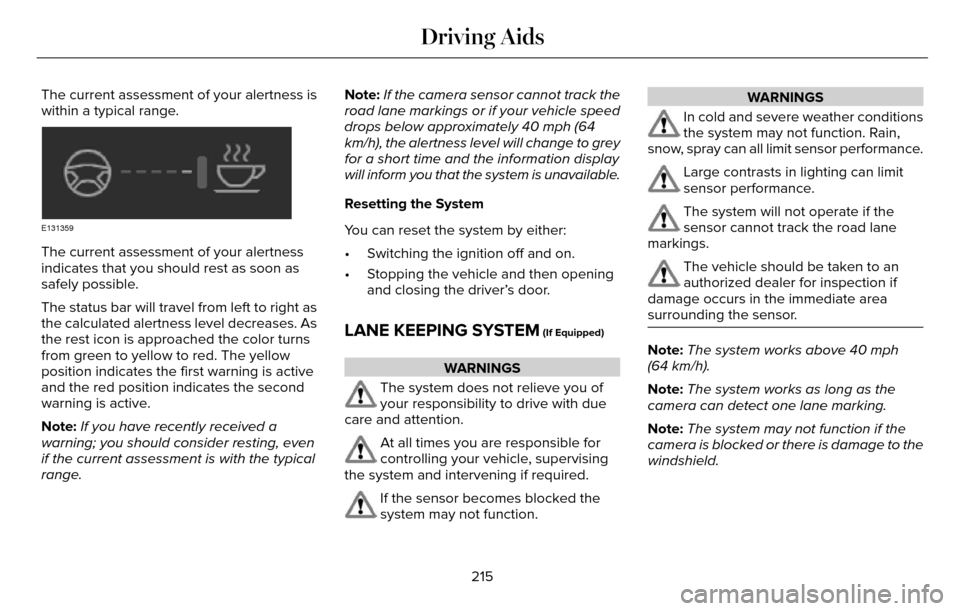
The current assessment of your alertness is
within a typical range.
E131359
The current assessment of your alertness
indicates that you should rest as soon as
safely possible.
The status bar will travel from left to right as
the calculated alertness level decreases. As
the rest icon is approached the color turns
from green to yellow to red. The yellow
position indicates the first warning is active
and the red position indicates the second
warning is active.
Note:If you have recently received a
warning; you should consider resting, even
if the current assessment is with the typical
range. Note:
If the camera sensor cannot track the
road lane markings or if your vehicle speed
drops below approximately 40 mph (64
km/h), the alertness level will change to grey
for a short time and the information display
will inform you that the system is unavailable.
Resetting the System
You can reset the system by either:
• Switching the ignition off and on.
• Stopping the vehicle and then opening and closing the driver’s door.
LANE KEEPING SYSTEM (If Equipped)
WARNINGS
The system does not relieve you of
your responsibility to drive with due
care and attention.
At all times you are responsible for
controlling your vehicle, supervising
the system and intervening if required.
If the sensor becomes blocked the
system may not function.
WARNINGS
In cold and severe weather conditions
the system may not function. Rain,
snow, spray can all limit sensor performance.
Large contrasts in lighting can limit
sensor performance.
The system will not operate if the
sensor cannot track the road lane
markings.
The vehicle should be taken to an
authorized dealer for inspection if
damage occurs in the immediate area
surrounding the sensor.
Note: The system works above 40 mph
(64 km/h).
Note: The system works as long as the
camera can detect one lane marking.
Note: The system may not function if the
camera is blocked or there is damage to the
windshield.
215
Driving Aids
Page 269 of 544
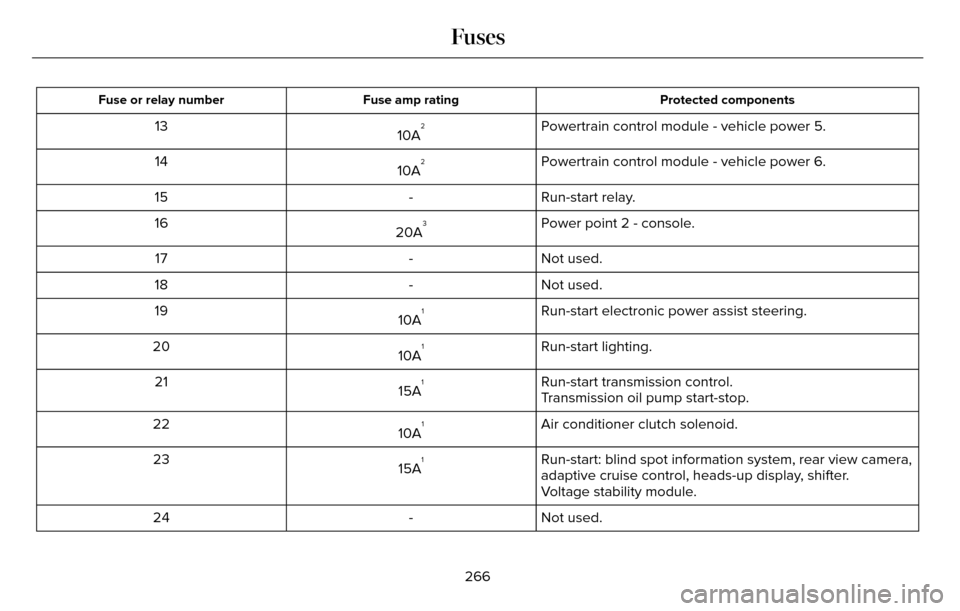
Protected components
Fuse amp rating
Fuse or relay number
Powertrain control module - vehicle power 5.
10A213
Powertrain control module - vehicle power 6.
10A
214
Run-start relay.
-
15
Power point 2 - console.
20A
316
Not used.
-
17
Not used.
-
18
Run-start electronic power assist steering.
10A
119
Run-start lighting.
10A
120
Run-start transmission control.
15A
121
Transmission oil pump start-stop.
Air conditioner clutch solenoid.
10A
122
Run-start: blind spot information system, rear view camera,
adaptive cruise control, heads-up display, shifter.
15A
123
Voltage stability module.
Not used.
-
24
266
Fuses
Page 279 of 544
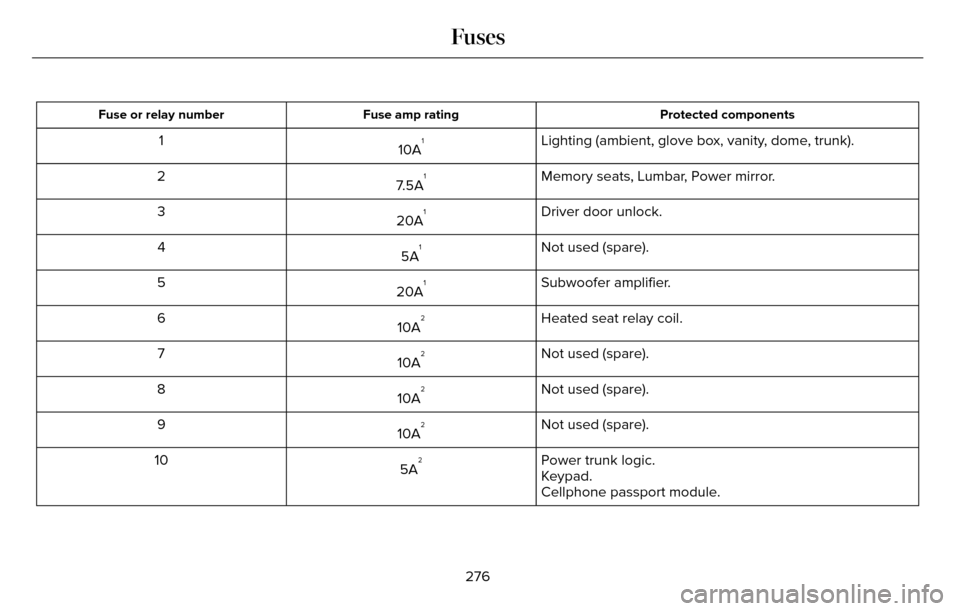
Protected components
Fuse amp rating
Fuse or relay number
Lighting (ambient, glove box, vanity, dome, trunk).
10A11
Memory seats, Lumbar, Power mirror.
7.5A
12
Driver door unlock.
20A
13
Not used (spare).
5A
14
Subwoofer amplifier.
20A
15
Heated seat relay coil.
10A
26
Not used (spare).
10A
27
Not used (spare).
10A
28
Not used (spare).
10A
29
Power trunk logic.
5A
210
Keypad.
Cellphone passport module.
276
Fuses
Page 389 of 544
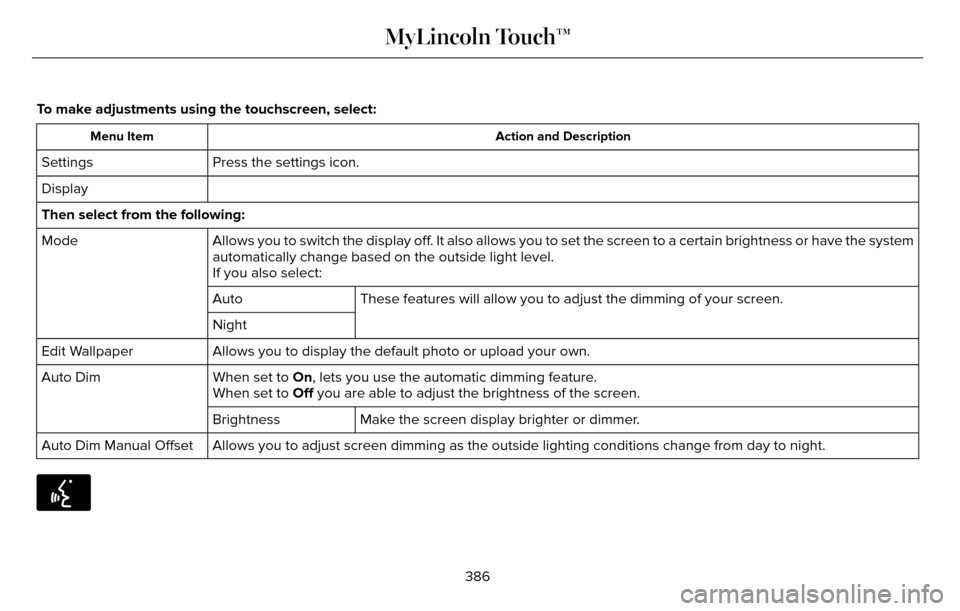
To make adjustments using the touchscreen, select:
Action and Description
Menu Item
Press the settings icon.
Settings
Display
Then select from the following:
Allows you to switch the display off. It also allows you to set the screen to a certain brightness or have t\
he system
automatically change based on the outside light level.
Mode
If you also select:These features will allow you to adjust the dimming of your screen.
Auto
Night
Allows you to display the default photo or upload your own.
Edit Wallpaper
When set to On, lets you use the automatic dimming feature.
Auto Dim
When set to Off you are able to adjust the brightness of the screen.
Make the screen display brighter or dimmer.
Brightness
Allows you to adjust screen dimming as the outside lighting conditions c\
hange from day to night.
Auto Dim Manual Offset
E142599
386
MyLincoln Touch™
Page 391 of 544

To make adjustments using the
touchscreen, select:
Menu Item
Settings
Sound
Then select from the following:
Bass
Midrange
Treble
Set Balance and Fade
Occupancy Mode
Menu Item
Speed Compensated Volume
DSP
Note: Your vehicle may not have all of these
sound settings.
Vehicle
E142607
To make adjustments using the
touchscreen, select:
Menu Item
Settings
Vehicle
Then select from the following:
Menu Item
Ambient Lighting
Vehicle Health Report
Camera Settings
Enable Valet Mode
Ambient Lighting
When you switch this feature on, ambient
lighting illuminates the dashboard, footwells,
doors, cupholders, and console with a choice
of colors.
388
MyLincoln Touch™
Page 392 of 544
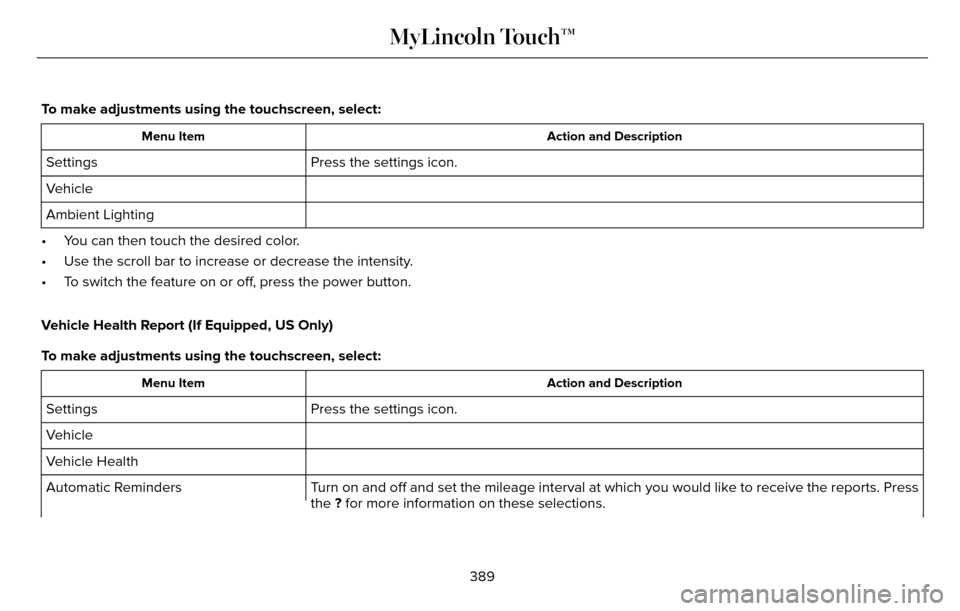
To make adjustments using the touchscreen, select:
Action and Description
Menu Item
Press the settings icon.
Settings
Vehicle
Ambient Lighting
• You can then touch the desired color.
• Use the scroll bar to increase or decrease the intensity.
• To switch the feature on or off, press the power button.
Vehicle Health Report (If Equipped, US Only)
To make adjustments using the touchscreen, select:
Action and Description
Menu Item
Press the settings icon.
Settings
Vehicle
Vehicle Health
Turn on and off and set the mileage interval at which you would like to r\
eceive the reports. Press
the ? for more information on these selections.
Automatic Reminders
389
MyLincoln Touch™