navigation LINCOLN MKZ 2016 User Guide
[x] Cancel search | Manufacturer: LINCOLN, Model Year: 2016, Model line: MKZ, Model: LINCOLN MKZ 2016Pages: 544, PDF Size: 5.77 MB
Page 400 of 544
Action and Description
Menu Item
Have the system display where there may be reduced visibility.
Have the system turn on your radio for traffic announcements.
Enter specific areas that would like to avoid on planned navigation rout\
es.
Avoid Areas
Phone
E142607
To make adjustments using the touchscreen, select:
Action and Description
Menu Item
Press the settings icon.
Settings
Phone
Then select from the following:
Connect, disconnect, add or delete a device, as well as save it as a favorite.
Bluetooth Devices
Turn Bluetooth on and off.
Bluetooth
Have all calls go directly to your voice mail and not ring inside your v\
ehicle. With this feature
turned on, text message notifications are also suppressed and do not rin\
g inside your vehicle.
Do Not Disturb
397
MyLincoln Touch™
Page 404 of 544
E142626
The Wi-Fi CERTIFIED Logo is a certification
mark of the Wi-Fi Alliance.
Help
E142607
To make adjustments using the touchscreen, select:
Action and Description
Menu Item
Press the settings icon.
Settings
Help
Then select from the following:
Touchscreen system serial number
System Information
Your vehicle identification number (VIN)
Touchscreen system software version
Navigation system version
Map database version
Sirius satellite radio ESN
Gracenote® Database Information and Library version
401
MyLincoln Touch™
Page 424 of 544
If you are not listening to a CD, press the
voice button and, after the tone, say:
Voice command
CD Player
When listening to a CD you can say many
commands. Following are a few examples
of what you can say.
Voice command
Play
Pause
Next Track
Previous Track
Help
SD Card Slot and USB Port
The SD card slot and USB port are located
in the Media Hub. See Media Hub (page
372). SD Card
Note:
Your SD card slot is spring-loaded. To
remove the SD card, press the card in and
the system ejects it. Do not attempt to pull
the card to remove it as this could cause
damage.
Note: The navigation system also uses this
card slot. See Navigation (page 454).
E196637
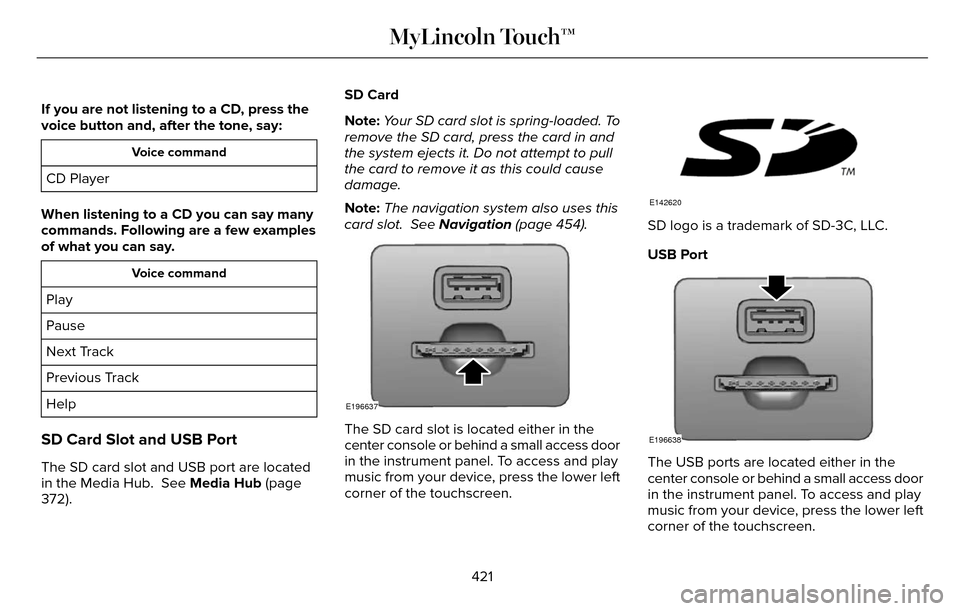
The SD card slot is located either in the
center console or behind a small access door
in the instrument panel. To access and play
music from your device, press the lower left
corner of the touchscreen.
E142620
SD logo is a trademark of SD-3C, LLC.
USB Port
E196638
The USB ports are located either in the
center console or behind a small access door
in the instrument panel. To access and play
music from your device, press the lower left
corner of the touchscreen.
421
MyLincoln Touch™
Page 440 of 544
Menu Item
Item
SYNC Services
A
Travel Link
B
Alerts
C
Calendar
D
AppsE
Where Am I?
F
E142608
If your vehicle is equipped with
Navigation, press the Information
button to access these features. If
your vehicle is not equipped with Navigation,
press the corner of the touchscreen with the
green tab.
SYNC Services (If Equipped, United
States Only)
Note: SYNC Services varies by trim level and
model year and may require a subscription.
Traffic alerts and turn-by-turn directions
available in select markets. Message and
data rates may apply. Ford Motor Company
reserves the right to change or discontinue
this product service at any time without prior
notification or incurring any future obligation.
Note: SYNC Services requires activation
before use. Visit www.SYNCMyRide.com to
register and check your eligibility for
complimentary services. Standard phone
and message rates may apply. Subscription
may be required. You must also have the
active SYNC Services Bluetooth-enabled
cellular phone paired and connected to the
system in order to connect to, and use, SYNC
Services. See Phone (page 426).
Note: This feature does not function properly
if you have enabled caller ID blocking on
your cellular phone. Make sure your cellular
phone is not blocking caller ID before using
SYNC Services. Note:
The driver is ultimately responsible for
the safe operation of the vehicle, and
therefore, must evaluate whether it is safe
to follow the suggested directions. Any
navigation features provided are only an aid.
Make your driving decisions based on your
observations of local conditions and existing
traffic regulations. Do not follow the route
suggestions if doing so would result in an
unsafe or illegal maneuver, if you would be
placed in an unsafe situation, or if you would
be directed into an area that you consider
unsafe. Maps used by this system may be
inaccurate because of errors, changes in
roads, traffic conditions or driving conditions.
437
MyLincoln Touch™
Page 442 of 544
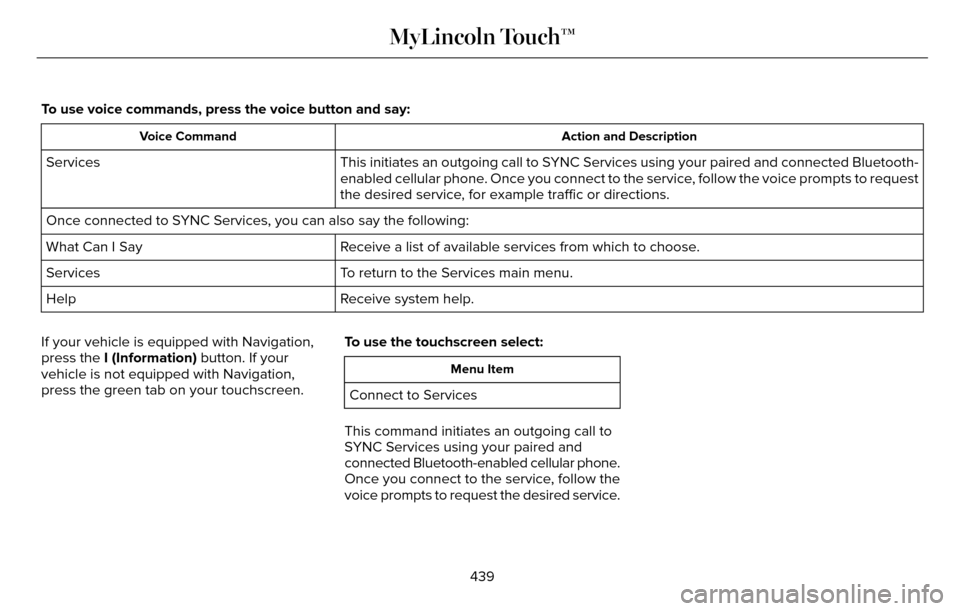
To use voice commands, press the voice button and say:
Action and Description
Voice Command
This initiates an outgoing call to SYNC Services using your paired and connected Bluetooth-
enabled cellular phone. Once you connect to the service, follow the voice prompts to request
the desired service, for example traffic or directions.
Services
Once connected to SYNC Services, you can also say the following:
Receive a list of available services from which to choose.
What Can I Say
To return to the Services main menu.
Services
Receive system help.
Help
If your vehicle is equipped with Navigation,
press the I (Information) button. If your
vehicle is not equipped with Navigation,
press the green tab on your touchscreen. To use the touchscreen select:
Menu Item
Connect to Services
This command initiates an outgoing call to
SYNC Services using your paired and
connected Bluetooth-enabled cellular phone.
Once you connect to the service, follow the
voice prompts to request the desired service.
439
MyLincoln Touch™
Page 445 of 544

SYNC Services Quick Tips
Tips
You can personalize your Services feature to provide quicker access to yo\
ur most used or favoriteinformation. You can save address points, such as work or home. You can also save favorite
information like sports teams, for example Detroit Lions, or a news cate\
gory. You can learn more about personalization by logging onto www.SYNCMyRide.com.
Personalizing
Press the voice button at any time (while connected to SYNC Services) to interrupt a voice promptor an audio clip (such as a sports report) and say your voice command.\
Push to interrupt
Your subscription is associated with your Bluetooth-enabled cellular phon\
e number, not your
VIN (Vehicle Identification Number). You can pair and connect your phone to any vehicle equipped with SYNC Services and continue enjoying your personalized services.
Portable
SYNC Services Voice Commands
E142599
When a route has been
downloaded (non-navigation
systems), press the voice button
on the steering wheel controls. When
prompted, say any of the following
commands: ServicesVoice command
Cancel Route
Route Status
Route summary
Update Route
Help
442
MyLincoln Touch™
Page 446 of 544
Sirius Travel Link (If Equipped)
WARNING
Driving while distracted can result in
loss of vehicle control, crash and injury.
We strongly recommend that you use
extreme caution when using any device that
may take your focus off the road. Your
primary responsibility is the safe operation
of your vehicle. We recommend against the
use of any handheld device while driving and
encourage the use of voice-operated
systems when possible. Make sure you are
aware of all applicable local laws that may
affect the use of electronic devices while
driving.
Note: In order to use Sirius Travel Link, your
vehicle must be equipped with navigation
and your navigation SD card must be in the
SD card slot.
Note: A paid subscription is required to
access and use these features. Go to
www.siriusxm.com/travellink for more
information.
Note: Visit www.siriusxm.com/traffic and click
on Coverage map and details for a complete
listing of all traffic areas covered by Sirius
Travel Link.
Note: Neither Sirius nor Ford is responsible
for any errors or inaccuracies in the Sirius
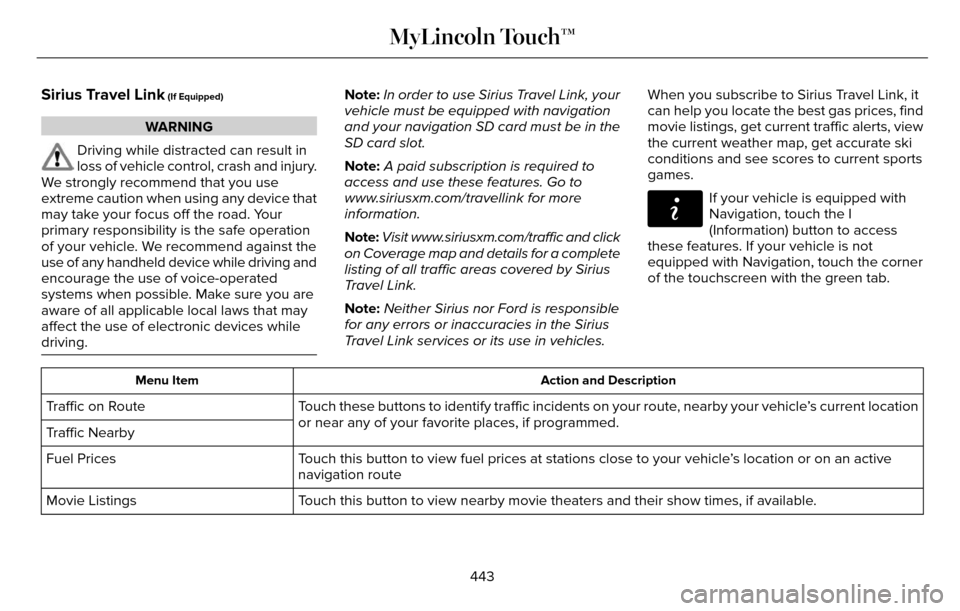
Travel Link services or its use in vehicles. When you subscribe to Sirius Travel Link, it
can help you locate the best gas prices, find
movie listings, get current traffic alerts, view
the current weather map, get accurate ski
conditions and see scores to current sports
games.
E142608
If your vehicle is equipped with
Navigation, touch the I
(Information) button to access
these features. If your vehicle is not
equipped with Navigation, touch the corner
of the touchscreen with the green tab.
Action and Description
Menu Item
Touch these buttons to identify traffic incidents on your route, nearby your vehicle’s current location
or near any of your favorite places, if programmed.
Traffic on Route
Traffic Nearby
Touch this button to view fuel prices at stations close to your vehicle’\
s location or on an active
navigation route
Fuel Prices
Touch this button to view nearby movie theaters and their show times, if \
available.
Movie Listings
443
MyLincoln Touch™
Page 448 of 544
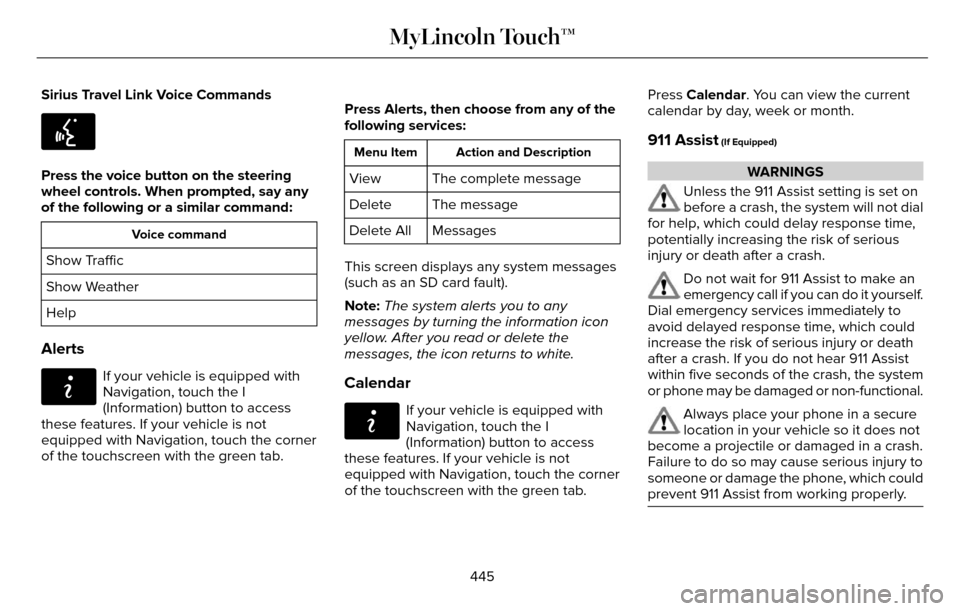
Sirius Travel Link Voice Commands
E142599
Press the voice button on the steering
wheel controls. When prompted, say any
of the following or a similar command:
Voice command
Show Traffic
Show Weather
Help
Alerts
E142608
If your vehicle is equipped with
Navigation, touch the I
(Information) button to access
these features. If your vehicle is not
equipped with Navigation, touch the corner
of the touchscreen with the green tab. Press Alerts, then choose from any of the
following services:
Action and Description
Menu Item
The complete message
View
The message
Delete
Messages
Delete All
This screen displays any system messages
(such as an SD card fault).
Note: The system alerts you to any
messages by turning the information icon
yellow. After you read or delete the
messages, the icon returns to white.
Calendar
E142608
If your vehicle is equipped with
Navigation, touch the I
(Information) button to access
these features. If your vehicle is not
equipped with Navigation, touch the corner
of the touchscreen with the green tab. Press Calendar. You can view the current
calendar by day, week or month.
911 Assist (If Equipped)
WARNINGS
Unless the 911 Assist setting is set on
before a crash, the system will not dial
for help, which could delay response time,
potentially increasing the risk of serious
injury or death after a crash.
Do not wait for 911 Assist to make an
emergency call if you can do it yourself.
Dial emergency services immediately to
avoid delayed response time, which could
increase the risk of serious injury or death
after a crash. If you do not hear 911 Assist
within five seconds of the crash, the system
or phone may be damaged or non-functional.
Always place your phone in a secure
location in your vehicle so it does not
become a projectile or damaged in a crash.
Failure to do so may cause serious injury to
someone or damage the phone, which could
prevent 911 Assist from working properly.
445
MyLincoln Touch™
Page 449 of 544
Note:The SYNC 911 Assist feature must be
set on prior to the incident.
Note: Before setting this feature on, make
sure that you read the 911 Assist Privacy
Notice later in this section for important
information.
Note: If any user turns 911 Assist on or off,
that setting applies for all paired phones. If
911 Assist is turned off, either a voice
message plays or a display message (or
icon) comes on (or both) when your vehicle
is started after a previously paired phone
connects.
Note: Every phone operates differently.
While SYNC 911 Assist works with most
cellular phones, some may have trouble
using this feature.
If a crash deploys an airbag, excluding knee
airbags and rear inflatable safety belts where
fitted or activates the fuel pump shut-off, your
SYNC-equipped vehicle may be able to
contact emergency services by dialing 911
through a paired and connected
Bluetooth-enabled phone. For more
information about the 911 Assist feature visit:
Website
visit www.SYNCMyRide.com www.SYNCMyRide.cawww.syncmaroute.ca
See Supplementary Restraints System
(page 44). Important information regarding
airbag deployment is in this chapter.
See Roadside Emergencies (page 251).
Important information regarding the fuel
pump shut-off is in this chapter.
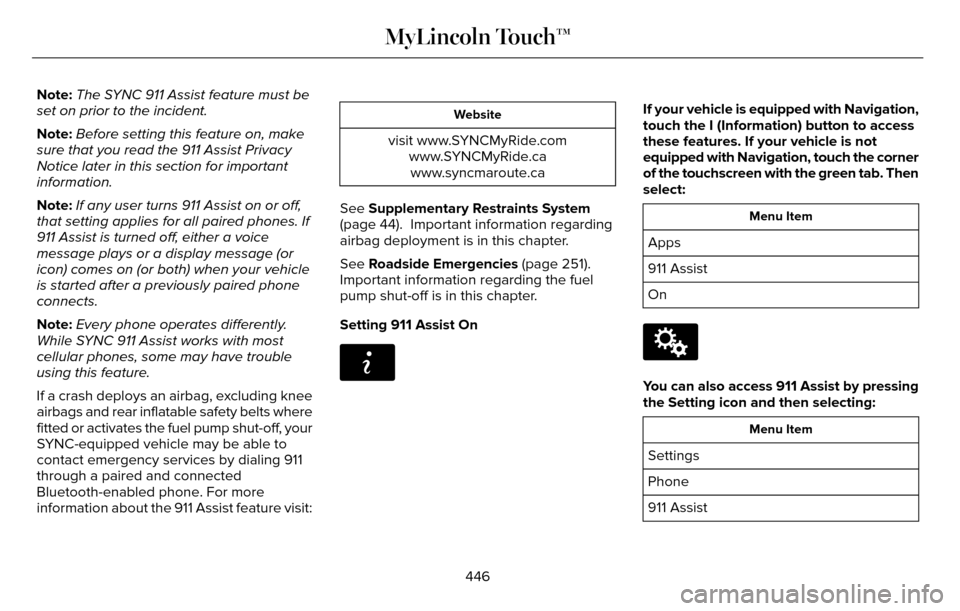
Setting 911 Assist On
E142608
If your vehicle is equipped with Navigation,
touch the I (Information) button to access
these features. If your vehicle is not
equipped with Navigation, touch the corner
of the touchscreen with the green tab. Then
select:
Menu Item
Apps
911 Assist
On
E142607
You can also access 911 Assist by pressing
the Setting icon and then selecting:
Menu Item
Settings
Phone
911 Assist
446
MyLincoln Touch™
Page 453 of 544
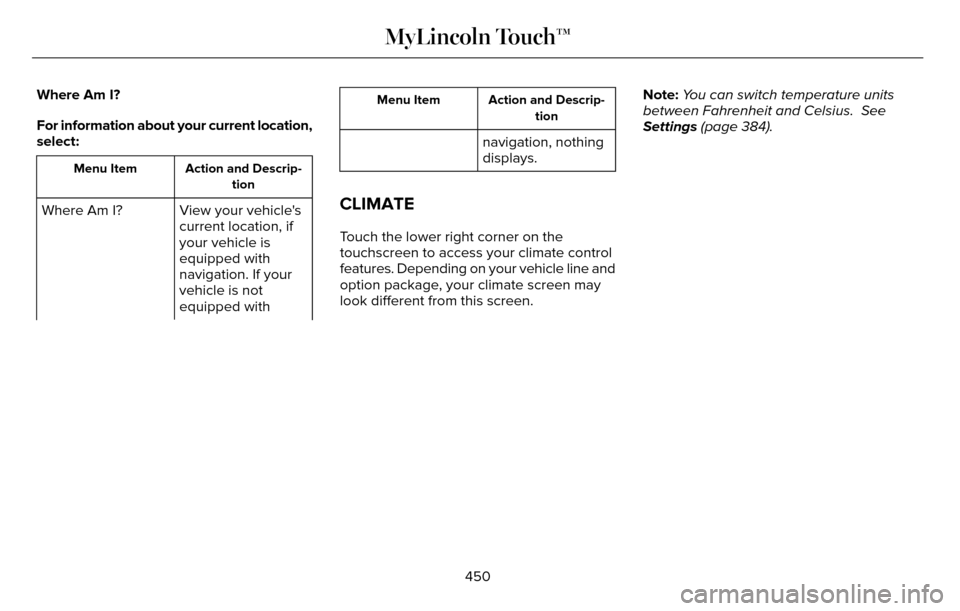
Where Am I?
For information about your current location,
select:
Action and Descrip-tion
Menu Item
View your vehicle's
current location, if
your vehicle is
equipped with
navigation. If your
vehicle is not
equipped with
Where Am I?
Action and Descrip-
tion
Menu Item
navigation, nothing
displays.
CLIMATE
Touch the lower right corner on the
touchscreen to access your climate control
features. Depending on your vehicle line and
option package, your climate screen may
look different from this screen. Note:
You can switch temperature units
between Fahrenheit and Celsius. See
Settings (page 384).
450
MyLincoln Touch™