change time LINCOLN MKZ 2016 Owner's Manual
[x] Cancel search | Manufacturer: LINCOLN, Model Year: 2016, Model line: MKZ, Model: LINCOLN MKZ 2016Pages: 544, PDF Size: 5.77 MB
Page 415 of 544
HD Radio Technology manufactured under
license from iBiquity Digital Corp. U.S. and
foreign patents. HD Radio and the HD and
HD Radio logos are proprietary trademarks
of iBiquity Digital Corp. Ford Motor Companyand iBiquity Digital Corp. are not responsible
for the content sent using HD Radio
technology. Content may be changed, added
or deleted at any time at the station owner's
discretion.Radio Voice Commands
E142599
Press the voice button and when prompted say:
Action and Description
Voice command
Radio
Then you can say a command similar to the following:
Say a frequency or preset.
FM
Off
Help
SIRIUS® Satellite Radio (If Activated)
E142611
412
MyLincoln Touch™
Page 419 of 544
SIRIUS Satellite Radio Information
Note:SIRIUS reserves the unrestricted right
to change, rearrange, add or delete
programming including canceling, moving
or adding particular channels, and its prices,
at any time, with or without notice to you.
Ford Motor Company shall not be
responsible for any such programming
changes.
E142593
SIRIUS satellite radio is a subscription-based
satellite radio service that broadcasts a
variety of music, sports, news, weather, traffic
and entertainment programming. Your
factory-installed SIRIUS satellite radio system
includes hardware and a limited subscription
term that begins on the date of sale or lease
of your vehicle. See an authorized dealer for
availability.
For more information on extended
subscription terms (a service fee is required),
the online media player and a list of SIRIUS
satellite radio channels, and other features,
please visit www.siriusxm.com in the United
States, www.sirius.ca in Canada, or call
SIRIUS at 1-888-539-7474. Note:
This receiver includes the eCos
real-time operating system. eCos is
published under the eCos License.
Satellite Radio Electronic Serial Number
(ESN)
You need your ESN to activate, modify or
track your satellite radio account. The ESN
is on the System Information Screen (SR
ESN:XXXXXXXXXXXX).
To access your ESN, touch the bottom left
corner of the touchscreen, then select:
Menu Item
SIRIUS
Options
416
MyLincoln Touch™
Page 426 of 544
Sound
You can adjust the settings for:
Action and Description
Menu Item
Bass
Sound Settings
Midrange
Treble
Set Balance and Fade
DSP
EQ Mode
Speed Compensated Volume
Allows you to select more settings, which is under Media Player. See Settings (page 384).
Media Player Settings
Displays software and firmware information about the currently connected\
media device.
Device Information
Indexes your device when you connect it for the first time and each time the \
content changes (for example
adding or removing tracks) to make sure you have the latest voice comma\
nds available for all media on
the device.
Update Media Index
Note: Your vehicle may not have all these sound settings.
423
MyLincoln Touch™
Page 440 of 544
Menu Item
Item
SYNC Services
A
Travel Link
B
Alerts
C
Calendar
D
AppsE
Where Am I?
F
E142608
If your vehicle is equipped with
Navigation, press the Information
button to access these features. If
your vehicle is not equipped with Navigation,
press the corner of the touchscreen with the
green tab.
SYNC Services (If Equipped, United
States Only)
Note: SYNC Services varies by trim level and
model year and may require a subscription.
Traffic alerts and turn-by-turn directions
available in select markets. Message and
data rates may apply. Ford Motor Company
reserves the right to change or discontinue
this product service at any time without prior
notification or incurring any future obligation.
Note: SYNC Services requires activation
before use. Visit www.SYNCMyRide.com to
register and check your eligibility for
complimentary services. Standard phone
and message rates may apply. Subscription
may be required. You must also have the
active SYNC Services Bluetooth-enabled
cellular phone paired and connected to the
system in order to connect to, and use, SYNC
Services. See Phone (page 426).
Note: This feature does not function properly
if you have enabled caller ID blocking on
your cellular phone. Make sure your cellular
phone is not blocking caller ID before using
SYNC Services. Note:
The driver is ultimately responsible for
the safe operation of the vehicle, and
therefore, must evaluate whether it is safe
to follow the suggested directions. Any
navigation features provided are only an aid.
Make your driving decisions based on your
observations of local conditions and existing
traffic regulations. Do not follow the route
suggestions if doing so would result in an
unsafe or illegal maneuver, if you would be
placed in an unsafe situation, or if you would
be directed into an area that you consider
unsafe. Maps used by this system may be
inaccurate because of errors, changes in
roads, traffic conditions or driving conditions.
437
MyLincoln Touch™
Page 467 of 544
Auto Zoom
Press the green bar to access map mode,
then select the + or - zoom button to bring
up the zoom level and Auto buttons on the
touchscreen. When you press Auto, Auto
Zoom turns on and Auto displays in the
bottom left corner of the screen in the map
scale. The map zoom level then synchronizes
with vehicle speed. The slower your vehicle
is traveling, the farther the map zooms in;
the faster your vehicle is traveling, the farther
the map zooms out. To switch off the feature,
just press the + or - button again.
In 3D mode, rotate the map view by swiping
your finger across the shaded bar with the
arrows.
The ETA box under the zoom buttons
appears when a route is active and displays
the distance and time to your destination. If
the button is pressed, a pop up appears with
the destination listed (and waypoint if
applicable) along with mileage and time to
destination. You may also select to have
either the estimated time to reach your
destination or your estimated arrival time.Map Icons
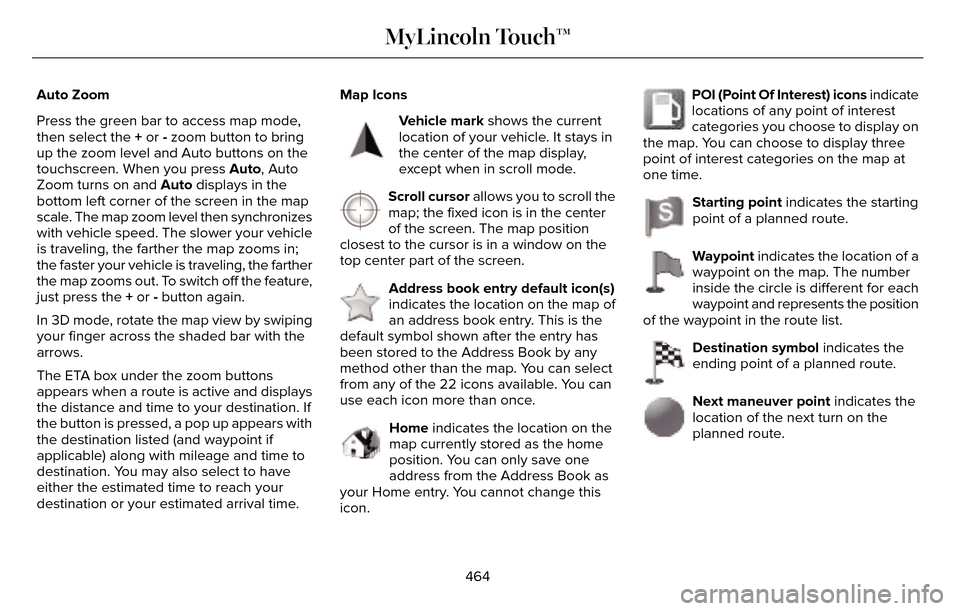
E142646
Vehicle mark shows the current
location of your vehicle. It stays in
the center of the map display,
except when in scroll mode.
E142647
Scroll cursor allows you to scroll the
map; the fixed icon is in the center
of the screen. The map position
closest to the cursor is in a window on the
top center part of the screen.
E142648
Address book entry default icon(s)
indicates the location on the map of
an address book entry. This is the
default symbol shown after the entry has
been stored to the Address Book by any
method other than the map. You can select
from any of the 22 icons available. You can
use each icon more than once.
E142649
Home indicates the location on the
map currently stored as the home
position. You can only save one
address from the Address Book as
your Home entry. You cannot change this
icon.
E142650
POI (Point Of Interest) icons indicate
locations of any point of interest
categories you choose to display on
the map. You can choose to display three
point of interest categories on the map at
one time.
E142651
Starting point indicates the starting
point of a planned route.
E142652
Waypoint indicates the location of a
waypoint on the map. The number
inside the circle is different for each
waypoint and represents the position
of the waypoint in the route list.
E142653
Destination symbol indicates the
ending point of a planned route.
E142654
Next maneuver point indicates the
location of the next turn on the
planned route.
464
MyLincoln Touch™
Page 482 of 544
There are several Lincoln Extended Service
Plans available in various time, distance and
deductible combinations. Each plan is
tailored to fit your own driving needs,
including reimbursement for towing and
rental. When you purchase Lincoln Extended
Service Plan, you receive added
peace-of-mind protection throughout
Canada, the United States and Mexico,
provided by a network of participating
authorized Lincoln Motor Company dealers.
Note:Repairs performed outside of Canada,
the United States and Mexico are not eligible
for Lincoln Extended Service Plan coverage.
This information is subject to change. For
more information, visit your local Lincoln of
Canada dealer or www.Lincoln.ca to find the
Lincoln Extended Service Plan that is right
for you.
479
Extended Service Plan (ESP)
Page 484 of 544
Your vehicle is equipped with the Intelligent
Oil-Life Monitor system, which displays a
message in the information display at the
proper oil change interval. This interval may
be up to one year or 10000 miles (16000
kilometers).
When the oil change message appears in
the information display, it is time for an oil
change. Make sure you perform the oil
change within two weeks or 500 miles (800
kilometers) of the message appearing. Make
sure you reset the Intelligent Oil-Life Monitor
after each oil change. See Information
Messages (page 115).
If your information display resets prematurely
or becomes inoperative, you should perform
the oil change interval at six months or 5000
miles (8000 kilometers) from your last oil
change. Never exceed one year or 10000
miles (16000 kilometers) between oil change
intervals.Your vehicle is very sophisticated and built
with multiple, complex, performance systems.
Every manufacturer develops these systems
using different specifications and
performance features. That is why it is
important to rely upon your dealership to
properly diagnose and repair your vehicle.
Ford Motor Company has recommended
maintenance intervals for various parts and
component systems based upon engineering
testing. Ford Motor Company relies upon this
testing to determine the most appropriate
mileage for replacement of oils and fluids to
protect your vehicle at the lowest overall cost
to you and recommends against
maintenance schedules that deviate from
the scheduled maintenance information.
We strongly recommend the use of only
genuine Ford, Motorcraft or Ford-authorized
re-manufactured replacement parts
engineered for your vehicle.Additives and Chemicals
This owner's manual and the Ford Workshop
Manual list the recommended additives and
chemicals for your vehicle. We do not
recommend using chemicals or additives not
approved by us as part of your vehicle’s
normal maintenance. Please consult your
warranty information.
Oils, Fluids and Flushing
In many cases, fluid discoloration is a normal
operating characteristic and, by itself, does
not necessarily indicate a concern or that the
fluid needs to be changed. However, a
qualified expert, such as the factory-trained
technicians at your dealership, should
inspect discolored fluids that also show signs
of overheating or foreign material
contamination immediately.
481
Scheduled Maintenance
Page 487 of 544
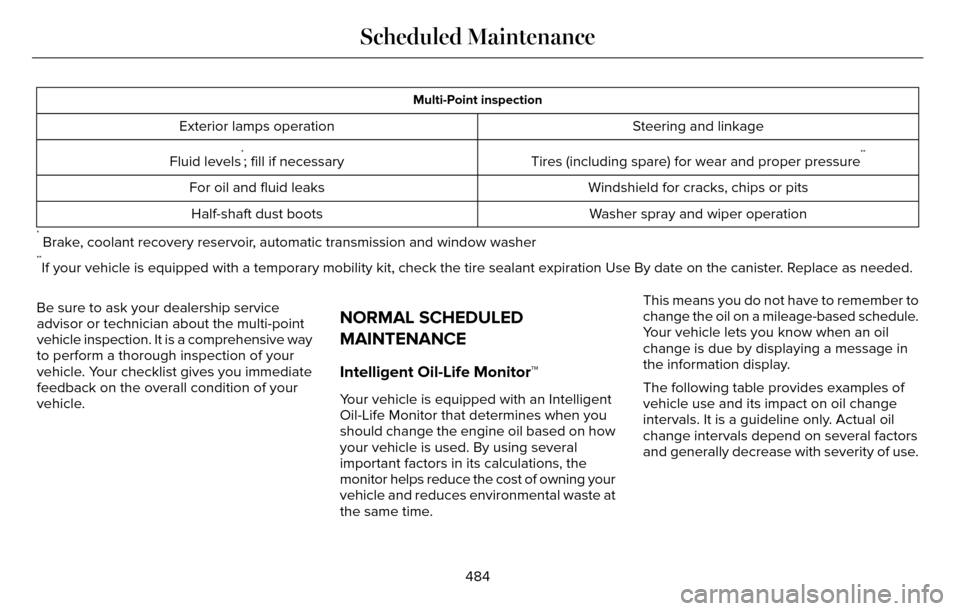
Multi-Point inspection
Steering and linkage
Exterior lamps operation
Tires (including spare) for wear and proper pressure
**Fluid levels*; fill if necessaryWindshield for cracks, chips or pits
For oil and fluid leaks
Washer spray and wiper operation
Half-shaft dust boots
* Brake, coolant recovery reservoir, automatic transmission and window washer**If your vehicle is equipped with a temporary mobility kit, check the tir\
e sealant expiration Use By date on the canister. Replace as needed.
Be sure to ask your dealership service
advisor or technician about the multi-point
vehicle inspection. It is a comprehensive way
to perform a thorough inspection of your
vehicle. Your checklist gives you immediate
feedback on the overall condition of your
vehicle.
NORMAL SCHEDULED
MAINTENANCE
Intelligent Oil-Life Monitor™
Your vehicle is equipped with an Intelligent
Oil-Life Monitor that determines when you
should change the engine oil based on how
your vehicle is used. By using several
important factors in its calculations, the
monitor helps reduce the cost of owning your
vehicle and reduces environmental waste at
the same time. This means you do not have to remember to
change the oil on a mileage-based schedule.
Your vehicle lets you know when an oil
change is due by displaying a message in
the information display.
The following table provides examples of
vehicle use and its impact on oil change
intervals. It is a guideline only. Actual oil
change intervals depend on several factors
and generally decrease with severity of use.
484
Scheduled Maintenance
Page 494 of 544
\
Perform multi-point inspection.
Change automatic transmission fluid.
Every 30000 miles (48000
km)
*Reset your Intelligent Oil-")
Operating in dusty or sandy conditions (such as unpaved or dusty roads)\
Perform multi-point inspection.
Change automatic transmission fluid.
Every 30000 miles (48000
km)
*Reset your Intelligent Oil-Life Monitor after engine oil and filter chang\
es. See Engine Oil Check (page 287).
Exclusive use of E85 (flex fuel vehicles only)
If ran exclusively on E85, fill the fuel tank full with regular unleaded fuel.
Every oil change
Exceptions
There are several exceptions to the Normal
Schedule:
Axle Maintenance
Change the axle fluid anytime an axle is
submerged in water. California Fuel Filter Replacement
If you register your vehicle in California, the
California Air Resources Board has
determined that the failure to perform this
maintenance item does not nullify the
emission warranty or limit recall liability
before the completion of your vehicle's
useful life. Ford Motor Company, however,
urges you to have all recommended
maintenance services performed at the
specified intervals and to record all vehicle
service.Hot Climate Oil Change Intervals
Vehicles operating in the Middle East, North
Africa, Sub-Saharan Africa or locations with
similar climates using an American Petroleum
Institute (API) Certified for Gasoline Engines
(Certification mark) oil of SM or SN quality,
the normal oil change interval is 3000 miles
(5000 kilometers).
If the available API SM or SN oils are not
available, then the oil change interval is 1800
miles (3000 kilometers).
491
Scheduled Maintenance
Page 512 of 544
Read and follow instructions: Before using
your Windows Automotive- based system,
read and follow all instructions and safety
information provided in this end user manual
("User's Guide"). Not following precautions
found in this User's Guide can lead to an
accident or other serious consequences.
Keep User's Guide in vehicle: When kept in
the vehicle, the User's Guide will be a ready
reference for you and other users unfamiliar
with the Windows Automotive-based system.
Please make certain that before using the
system for the first time, all persons have
access to the User's Guide and read its
instructions and safety information carefully.WARNING
Operating certain parts of this system
while driving can distract your attention
away from the road, and possibly cause an
accident or other serious consequences. Do
not change system settings or enter data
non-verbally (using your hands) while driving.
Stop the vehicle in a safe and legal manner
before attempting these operations. This is
important since while setting up or changing
some functions you might be required to
distract your attention away from the road
and remove your hands from the wheel.
General Operation
Voice Command Control: Functions within
the Windows Automotive-based system may
be accomplished using only voice
commands. Using voice commands while
driving allows you to operate the system
without removing your hands from the wheel. Prolonged Views of Screen: Do not access
any function requiring a prolonged view of
the screen while you are driving. Pull over in
a safe and legal manner before attempting
to access a function of the system requiring
prolonged attention. Even occasional short
scans to the screen may be hazardous if your
attention has been diverted away from your
driving task at a critical time.
Volume Setting: Do not raise the volume
excessively. Keep the volume at a level
where you can still hear outside traffic and
emergency signals while driving. Driving
while unable to hear these sounds could
cause an accident.
Use of Speech Recognition Functions:
Speech recognition software is inherently a
statistical process which is subject to errors.
It is your responsibility to monitor any speech
recognition functions included in the system
and address any errors.
509
Appendices