mirror LINCOLN MKZ 2016 Owner's Manual
[x] Cancel search | Manufacturer: LINCOLN, Model Year: 2016, Model line: MKZ, Model: LINCOLN MKZ 2016Pages: 544, PDF Size: 5.77 MB
Page 219 of 544
Note:When Aid mode is on and the system
detects no steering activity for a short period,
the system will alert you to put your hands
on the steering wheel. The system may
detect a light grip or touch on the steering
wheel as hands off driving.
The system notifies you to stay in your lane
through the steering system and the
instrument cluster display when the front
camera detects an unintentional drift out of
your lane is likely to occur. The system
automatically detects and tracks the road
lane markings using a camera mounted
behind the interior rear view mirror.
Switching the System On and Off
Note: The system on or off setting is stored
until it is manually changed, unless a MyKey
is detected. If the system detects a MyKey
it defaults to on and the mode is set to Alert.
Note: If a MyKey is detected, pressing the
button will not affect the on or off status of
the system.
E144813
Press the button located on the left
steering wheel stalk to switch the
system on or off. System Settings
The system has optional setting menus
available. To view or adjust the settings, See
General Information (page 109). The system
stores the last-known selection for each of
these settings. You do not need to readjust
your settings each time you turn on the
system.
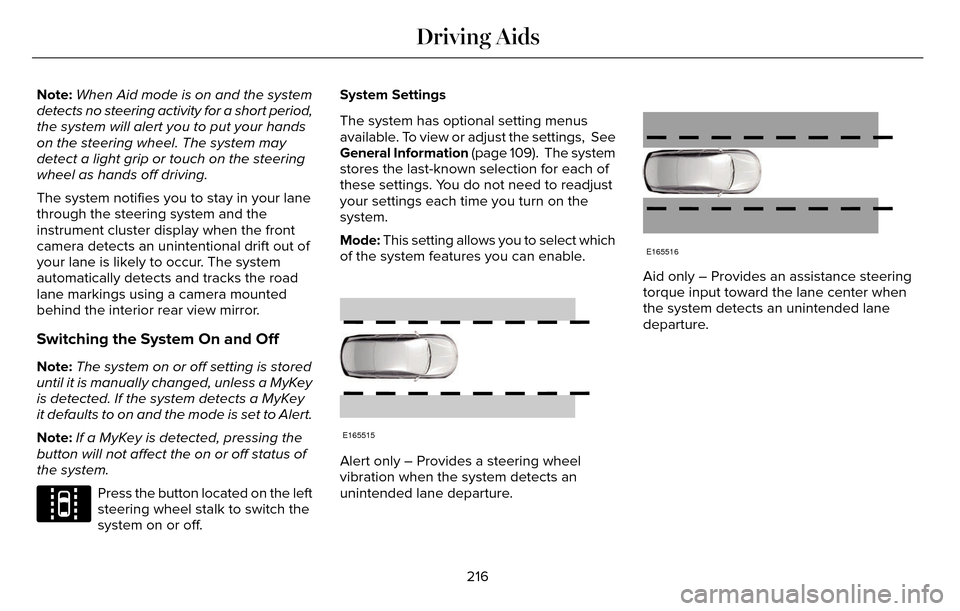
Mode: This setting allows you to select which
of the system features you can enable.
E165515
Alert only – Provides a steering wheel
vibration when the system detects an
unintended lane departure.
E165516
Aid only – Provides an assistance steering
torque input toward the lane center when
the system detects an unintended lane
departure.
216
Driving Aids
Page 223 of 544
BLIND SPOT INFORMATION
SYSTEM
Blind Spot Information System (BLIS®)
with Cross Traffic Alert
(If Equipped)
WARNING
To help avoid injuries, NEVER use the
BLIS as a replacement for using the
interior and exterior mirrors and looking over
your shoulder before changing lanes. BLIS
is not a replacement for careful driving.
A
A
E124788
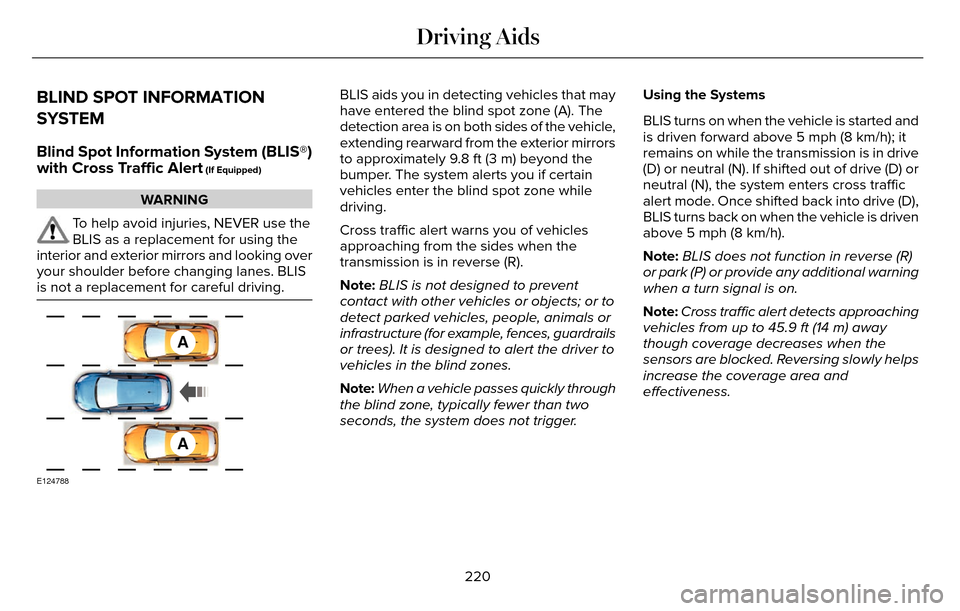
BLIS aids you in detecting vehicles that may
have entered the blind spot zone (A). The
detection area is on both sides of the vehicle,
extending rearward from the exterior mirrors
to approximately 9.8 ft (3 m) beyond the
bumper. The system alerts you if certain
vehicles enter the blind spot zone while
driving.
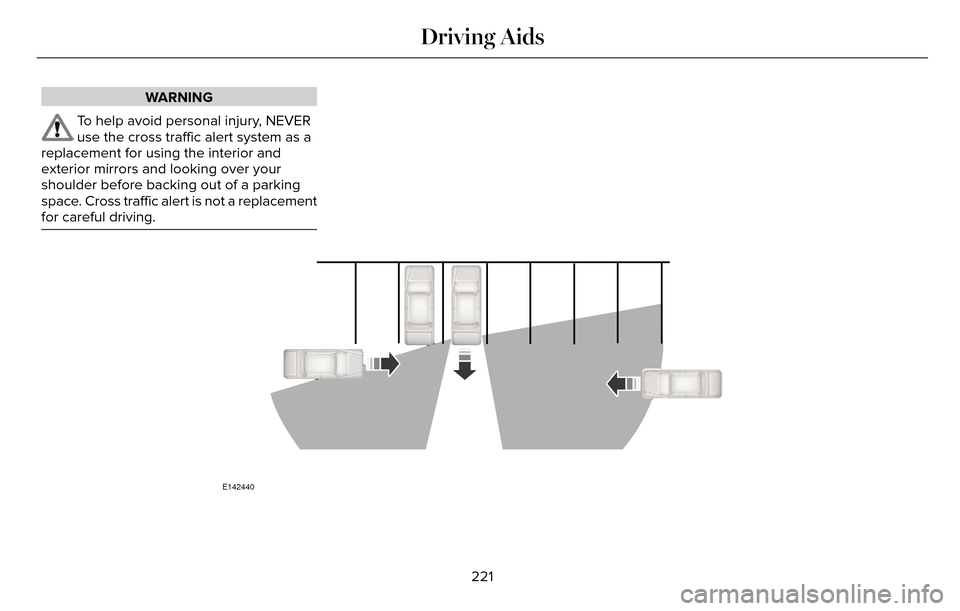
Cross traffic alert warns you of vehicles
approaching from the sides when the
transmission is in reverse (R).
Note: BLIS is not designed to prevent
contact with other vehicles or objects; or to
detect parked vehicles, people, animals or
infrastructure (for example, fences, guardrails
or trees). It is designed to alert the driver to
vehicles in the blind zones.
Note: When a vehicle passes quickly through
the blind zone, typically fewer than two
seconds, the system does not trigger. Using the Systems
BLIS turns on when the vehicle is started and
is driven forward above 5 mph (8 km/h); it
remains on while the transmission is in drive
(D) or neutral (N). If shifted out of drive (D) or
neutral (N), the system enters cross traffic
alert mode. Once shifted back into drive (D),
BLIS turns back on when the vehicle is driven
above 5 mph (8 km/h).
Note:
BLIS does not function in reverse (R)
or park (P) or provide any additional warning
when a turn signal is on.
Note: Cross traffic alert detects approaching
vehicles from up to 45.9 ft (14 m) away
though coverage decreases when the
sensors are blocked. Reversing slowly helps
increase the coverage area and
effectiveness.
220
Driving Aids
Page 224 of 544
WARNING
To help avoid personal injury, NEVER
use the cross traffic alert system as a
replacement for using the interior and
exterior mirrors and looking over your
shoulder before backing out of a parking
space. Cross traffic alert is not a replacement
for careful driving.
E142440
221
Driving Aids
Page 226 of 544
System Lights and Messages
E142442
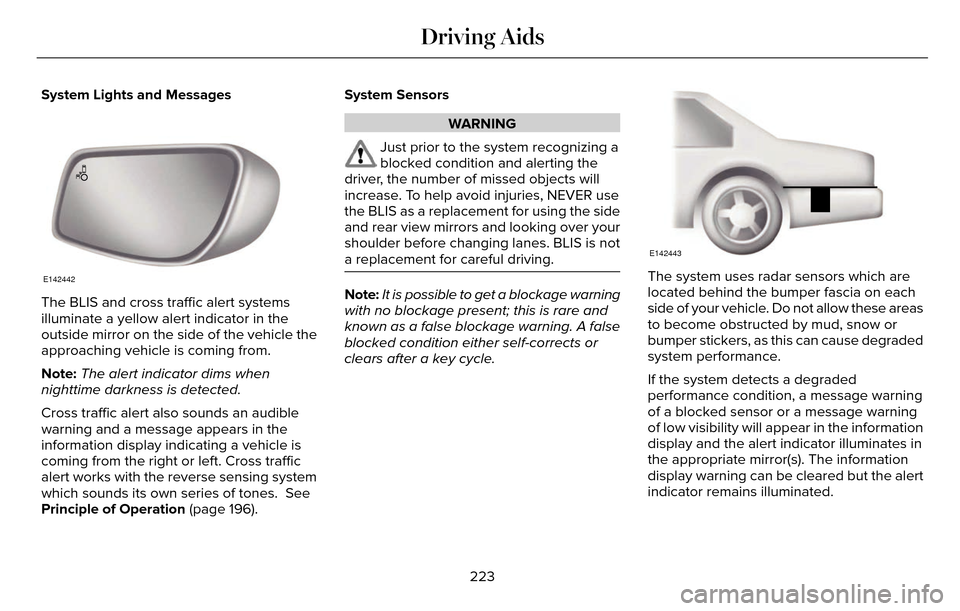
The BLIS and cross traffic alert systems
illuminate a yellow alert indicator in the
outside mirror on the side of the vehicle the
approaching vehicle is coming from.
Note:The alert indicator dims when
nighttime darkness is detected.
Cross traffic alert also sounds an audible
warning and a message appears in the
information display indicating a vehicle is
coming from the right or left. Cross traffic
alert works with the reverse sensing system
which sounds its own series of tones. See
Principle of Operation (page 196). System Sensors
WARNING
Just prior to the system recognizing a
blocked condition and alerting the
driver, the number of missed objects will
increase. To help avoid injuries, NEVER use
the BLIS as a replacement for using the side
and rear view mirrors and looking over your
shoulder before changing lanes. BLIS is not
a replacement for careful driving.
Note: It is possible to get a blockage warning
with no blockage present; this is rare and
known as a false blockage warning. A false
blocked condition either self-corrects or
clears after a key cycle.
E142443
The system uses radar sensors which are
located behind the bumper fascia on each
side of your vehicle. Do not allow these areas
to become obstructed by mud, snow or
bumper stickers, as this can cause degraded
system performance.
If the system detects a degraded
performance condition, a message warning
of a blocked sensor or a message warning
of low visibility will appear in the information
display and the alert indicator illuminates in
the appropriate mirror(s). The information
display warning can be cleared but the alert
indicator remains illuminated.
223
Driving Aids
Page 228 of 544
There may be certain instances when either
the BLIS or cross traffic alert systems
illuminate the alert indicator with no vehicle
in the coverage zone; this is known as a false
alert. Some amount of false alerts are normal;
they are temporary and self-correct.
System Errors
If either system senses a problem with the
left or right sensor, the BLIS telltale will
illuminate and a message will appear in the
information display.
All other system faults will only be displayed
by a message in the information display.
Switching the Systems Off and On
One or both systems can be switched off
temporarily by using the information display
control. See (page 109). When the BLIS is
switched off, you will not receive alerts and
a telltale illuminates in the information
display. The yellow alert indicator in the
outside mirror will also flash twice.Note:
The CTA system always switches on
whenever the ignition is switched on.
However, the BLIS system will remember the
last selected on or off setting.
One or both systems cannot be switched off
when MyKey is used. See Principle of
Operation (page 60).
One or both systems can also be switched
off permanently at your authorized dealer.
Once switched off, switching it back on must
also be done at your authorized dealer.STEERING
Electric Power Steering
WARNING
The electric power steering system has
diagnostic checks that continuously
monitor the system. If a fault is detected, a
message displays in the information display.
Stop your vehicle as soon as it is safe to do
so. Switch the ignition off. After at least 10
seconds, switch the ignition on and watch
the information display for a steering system
warning message. If a steering system
warning message returns, have the system
checked by an authorized dealer.
Your vehicle has an electric power steering
system. There is no fluid reservoir. No
maintenance is required.
If your vehicle loses electrical power while
you are driving, electric power steering
assistance is lost. The steering system still
operates and you can steer your vehicle
manually. Manually steering your vehicle
requires more effort.
225
Driving Aids
Page 279 of 544
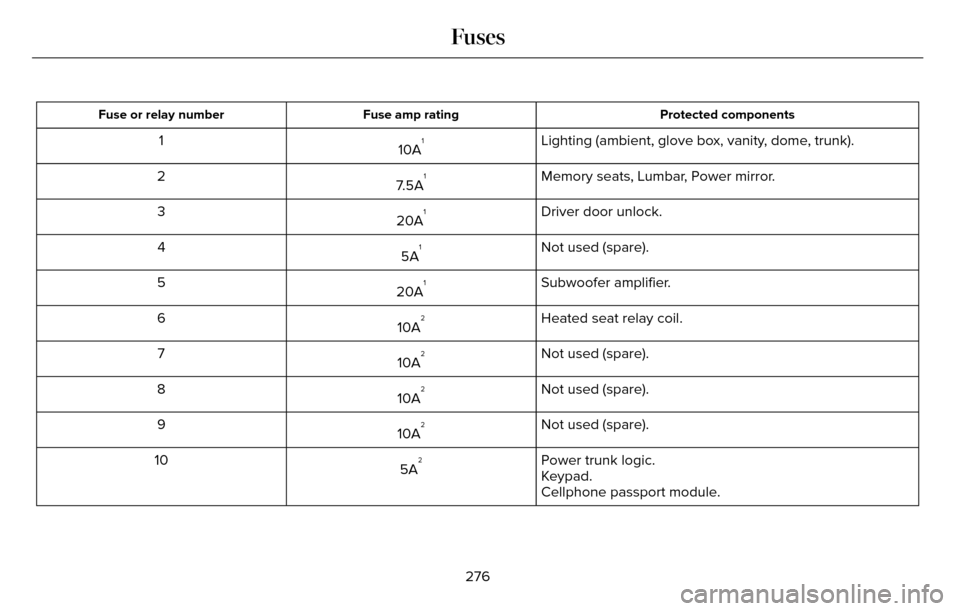
Protected components
Fuse amp rating
Fuse or relay number
Lighting (ambient, glove box, vanity, dome, trunk).
10A11
Memory seats, Lumbar, Power mirror.
7.5A
12
Driver door unlock.
20A
13
Not used (spare).
5A
14
Subwoofer amplifier.
20A
15
Heated seat relay coil.
10A
26
Not used (spare).
10A
27
Not used (spare).
10A
28
Not used (spare).
10A
29
Power trunk logic.
5A
210
Keypad.
Cellphone passport module.
276
Fuses
Page 281 of 544
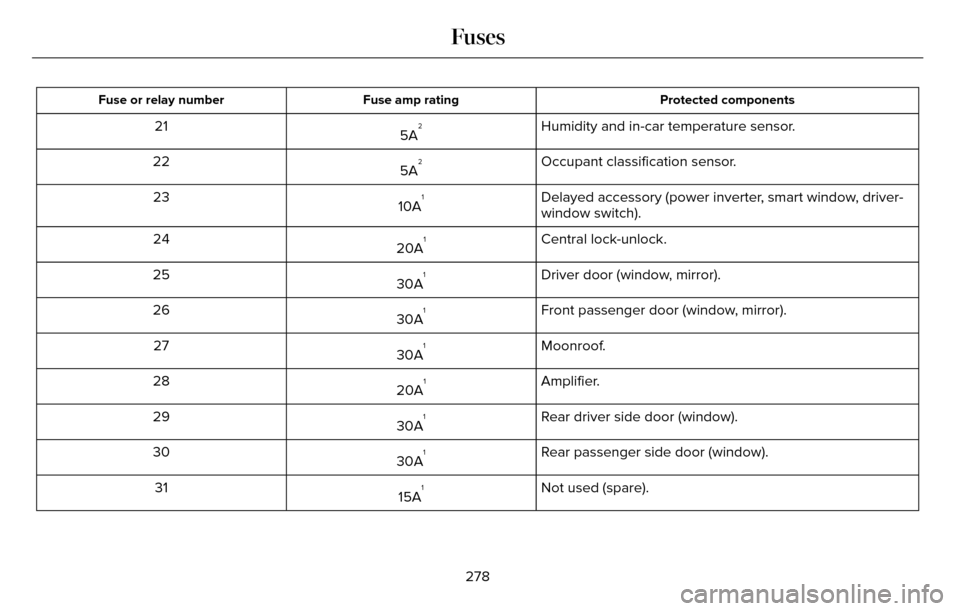
Protected components
Fuse amp rating
Fuse or relay number
Humidity and in-car temperature sensor.
5A221
Occupant classification sensor.
5A
222
Delayed accessory (power inverter, smart window, driver-
window switch).
10A
123
Central lock-unlock.
20A
124
Driver door (window, mirror).
30A
125
Front passenger door (window, mirror).
30A
126
Moonroof.
30A
127
Amplifier.
20A
128
Rear driver side door (window).
30A
129
Rear passenger side door (window).
30A
130
Not used (spare).
15A
131
278
Fuses
Page 282 of 544
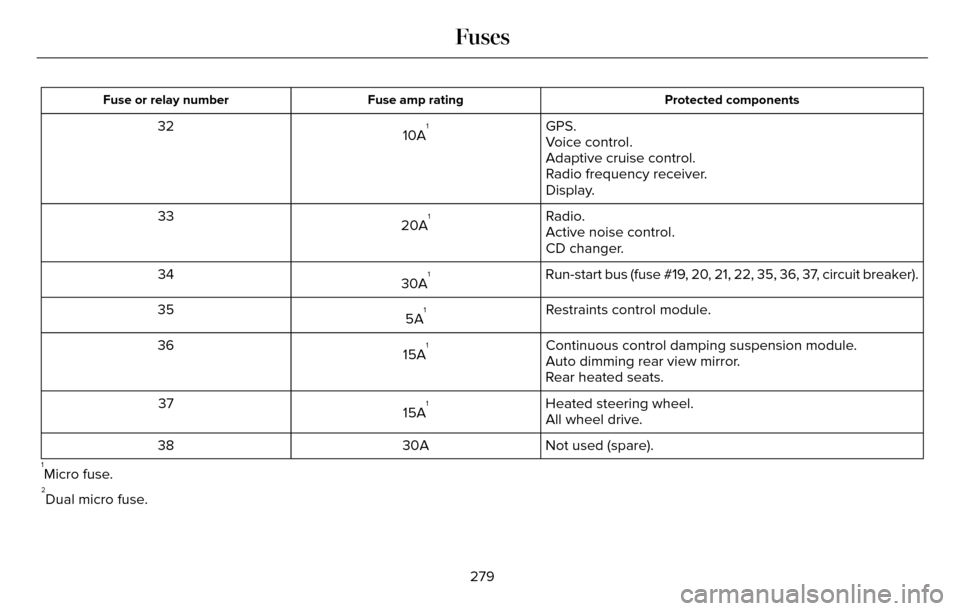
Protected components
Fuse amp rating
Fuse or relay number
GPS.
10A132
Voice control.
Adaptive cruise control.
Radio frequency receiver.
Display.
Radio.
20A
133
Active noise control.
CD changer.
Run-start bus (fuse #19, 20, 21, 22, 35, 36, 37, circuit breaker).
30A
134
Restraints control module.
5A
135
Continuous control damping suspension module.
15A
136
Auto dimming rear view mirror.
Rear heated seats.
Heated steering wheel.
15A
137
All wheel drive.
Not used (spare).
30A
38
1Micro fuse.2Dual micro fuse.
279
Fuses
Page 301 of 544
If you see any corrosion on the battery or
terminals, remove the cables from the
terminals and clean with a wire brush. You
can neutralize the acid with a solution of
baking soda and water.
When a battery replacement is required, the
battery should only be replaced with a Ford
recommended replacement battery that
matches the electrical requirements of the
vehicle.
Because your vehicle’s engine is
electronically-controlled by a computer,
some engine control settings are maintained
by power from the low voltage battery. Some
engine computer settings, like the idle trim
and fuel trim strategy, optimize the
driveability and performance of the engine.
Some other computer settings, like the clock
and radio station presets, are also maintained
in memory by power from the low voltage
battery. When a technician disconnects and
connects the low voltage battery, these
settings are erased.Note:
Until you switch the ignition to the on
position, you will receive a message in your
information display stating that your vehicle
is not in park.
Complete the following procedure in order
to restore the settings:
1. With the vehicle at a complete stop, set the parking brake.
2. Shift the transmission into P.
3. Turn off all accessories.
4. Step on the brake pedal and start the vehicle.
5. Run the engine until it reaches normal operating temperature. While the engine
is warming up, complete the following:
Reset the clock. See Windows and
Mirrors (page 95). Reset the power
windows bounce-back feature. See
Windows and Mirrors (page 95). Reset
the radio station presets. See Windows
and Mirrors (page 95).
6. Allow the engine to idle for at least one minute. If the engine turns off, step on
the accelerator to start the engine. 7. While the engine is running, step on the
brake pedal and shift the transmission to
N.
8. Allow the engine to run for at least one minute by pressing on the accelerator
pedal.
9. Drive your vehicle at least 10 miles (16 kilometers) to completely relearn the idle
and fuel trim strategy.
Note: Certain features may not operate if
the Battery Monitor System is not reset with
a scan tool following a jump start or battery
replacement. Normal electrical accessory
operation should resume after your vehicle
is left undisturbed for 8 hours.
Note: If you do not allow the engine to
relearn the idle and fuel trim strategy, the
idle quality of your vehicle may be adversely
affected until the engine computer
eventually relearns the idle trim and fuel trim
strategy.
298
Maintenance
Page 309 of 544
Exterior Chrome Parts
• Apply a high quality-cleaning product tobumpers and other chrome parts. Follow
the manufacturer’s instructions. We
recommend Motorcraft Custom Bright
Metal Cleaner.
• Do not apply the cleaning product to hot surfaces. Do not leave the cleaning
product on chrome surfaces longer than
the time recommended.
• Using other non-recommended cleaners can result in severe and permanent
cosmetic damage.
Note: Never use abrasive materials, for
example steel wool or plastic pads as they
can scratch the chrome surface.
Note: Do not use chrome cleaner, metal
cleaner or polish on wheels or wheel covers.
Exterior Plastic Parts
For routine cleaning we recommend
Motorcraft Detail Wash. If tar or grease spots
are present, we recommend Motorcraft Bug
and Tar Remover.
Stripes or Graphics (If Equipped)
Do not use a commercial or high-pressure
sprayer on the surface or edge of stripes and
graphics. This can damage them and cause
the edges to peel away from the vehicle
surface.
Underbody
Flush the complete underside of your vehicle
frequently. Keep body and door drain holes
free of debris or foreign material.
WAXING
Regular waxing is necessary to protect your
car's paint from the elements. We
recommend that you wash and wax the
painted surface once or twice a year.
When washing and waxing, park your vehicle
in a shaded area out of direct sunlight.
Always wash your vehicle before applying
wax. • Use a quality wax that does not contain
abrasives.
• Follow the manufacturer’s instructions to apply and remove the wax.
• Apply a small amount of wax in a back-and-forth motion, not in circles.
• Do not allow wax to come in contact with any non-body (low-gloss black) colored
trim. The wax will discolor or stain the
parts over time.
• Roof racks.
• Bumpers.
• Grained door handles.
• Side moldings.
• Mirror housings.
• Windshield cowl area.
• Do not apply wax to glass areas.
• After waxing, your car's paint should feel smooth, and be free of streaks and
smudges.
306
Vehicle Care