door LINCOLN MKZ 2016 Owner's Manual
[x] Cancel search | Manufacturer: LINCOLN, Model Year: 2016, Model line: MKZ, Model: LINCOLN MKZ 2016Pages: 544, PDF Size: 5.77 MB
Page 80 of 544
PASSIVE ANTI-THEFT SYSTEM
Note:The system is not compatible with
non-Ford aftermarket remote start systems.
Use of these systems may result in vehicle
starting problems and a loss of security
protection.
Note: Metallic objects, electronic devices or
a second coded key on the same key chain
may cause vehicle starting problems if they
are too close to the key when starting your
vehicle. Prevent these objects from touching
the coded key while starting your vehicle.
Switch the ignition off, move all objects on
the key chain away from the coded key and
restart your vehicle if a problem occurs.
Note: Do not leave a duplicate coded key
in your vehicle. Always take your keys and
lock all doors when leaving your vehicle.
SecuriLock
The system helps prevent your vehicle from
starting unless you use a coded key
programmed to your vehicle. Using the
wrong key may prevent your vehicle from
starting. A message may appear in the
information display.
If you are unable to start your vehicle with a
correctly coded key, it is not operating
properly. A message may appear in the
information display.
Automatic Arming
Your vehicle arms immediately after
switching the ignition off.
Automatic Disarming
Switching the ignition on with a coded key
disarms your vehicle.
Replacement Keys
Note: Your vehicle comes equipped with two
intelligent access keys. The intelligent access key functions as a
programmed key that operates the driver
door lock and activates the intelligent access
with push button start system, as well as a
remote control.
If your programmed transmitters are lost or
stolen and you do not have an extra coded
key, have your vehicle towed to an
authorized dealer. You need to erase the
key codes from your vehicle and program
new coded keys.
Store an extra programmed key away from
your vehicle in a safe place to help prevent
any inconveniences. See your authorized
dealer to purchase additional spare or
replacement keys.
Programming a Spare Intelligent Access
Key
Note:
You can program a maximum of four
intelligent access keys to your vehicle.
77
Security
Page 81 of 544
You must have two previously programmed
intelligent access keys inside your vehicle
and the new unprogrammed intelligent
access keys readily accessible. See an
authorized dealer to have the spare key
programmed if two previously programmed
keys are not available.
Make sure that your vehicle is off before
beginning this procedure. Make sure that
you close all the doors before beginning and
that they remain closed throughout the
procedure. Perform all steps within 30
seconds of starting the sequence. Stop and
wait for at least one minute before starting
again if you perform any steps out of
sequence.
Read and understand the entire procedure
before you begin.
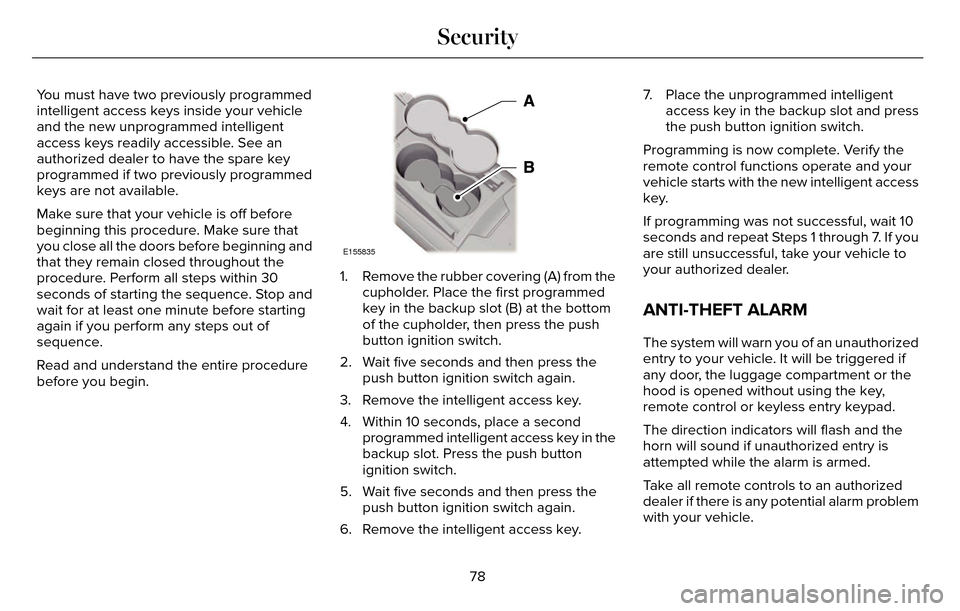
E155835
1. Remove the rubber covering (A) from thecupholder. Place the first programmed
key in the backup slot (B) at the bottom
of the cupholder, then press the push
button ignition switch.
2. Wait five seconds and then press the push button ignition switch again.
3. Remove the intelligent access key.
4. Within 10 seconds, place a second programmed intelligent access key in the
backup slot. Press the push button
ignition switch.
5. Wait five seconds and then press the push button ignition switch again.
6. Remove the intelligent access key. 7. Place the unprogrammed intelligent
access key in the backup slot and press
the push button ignition switch.
Programming is now complete. Verify the
remote control functions operate and your
vehicle starts with the new intelligent access
key.
If programming was not successful, wait 10
seconds and repeat Steps 1 through 7. If you
are still unsuccessful, take your vehicle to
your authorized dealer.
ANTI-THEFT ALARM
The system will warn you of an unauthorized
entry to your vehicle. It will be triggered if
any door, the luggage compartment or the
hood is opened without using the key,
remote control or keyless entry keypad.
The direction indicators will flash and the
horn will sound if unauthorized entry is
attempted while the alarm is armed.
Take all remote controls to an authorized
dealer if there is any potential alarm problem
with your vehicle.
78
Security
Page 82 of 544
Arming the Alarm
The alarm is ready to arm when there is not
a key in your vehicle. Electronically lock your
vehicle to arm the alarm.
Disarming the Alarm
Disarm the alarm by any of the following
actions:
• Unlock the doors or luggagecompartment with the remote control or
keyless entry keypad.
• Switch your vehicle on or start your vehicle.
• Use a key in the driver door to unlock your vehicle, then switch your vehicle on
within 12 seconds.
Note: Pressing the panic button on the
remote control will stop the horn and signal
indicators, but will not disarm the system.
79
Security
Page 92 of 544
AB
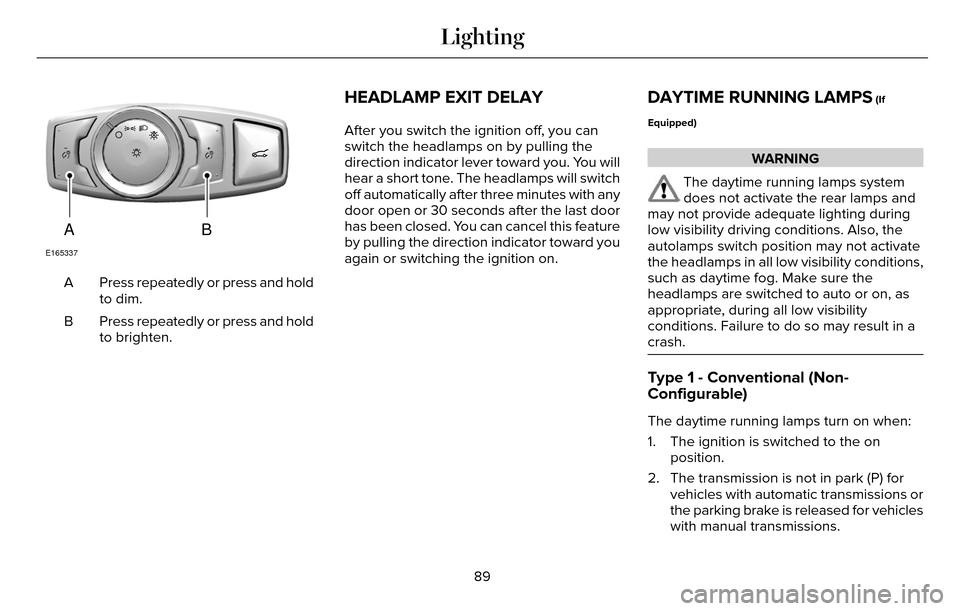
E165337
Press repeatedly or press and hold
to dim.
A
Press repeatedly or press and hold
to brighten.
B
HEADLAMP EXIT DELAY
After you switch the ignition off, you can
switch the headlamps on by pulling the
direction indicator lever toward you. You will
hear a short tone. The headlamps will switch
off automatically after three minutes with any
door open or 30 seconds after the last door
has been closed. You can cancel this feature
by pulling the direction indicator toward you
again or switching the ignition on.
DAYTIME RUNNING LAMPS (If
Equipped)
WARNING
The daytime running lamps system
does not activate the rear lamps and
may not provide adequate lighting during
low visibility driving conditions. Also, the
autolamps switch position may not activate
the headlamps in all low visibility conditions,
such as daytime fog. Make sure the
headlamps are switched to auto or on, as
appropriate, during all low visibility
conditions. Failure to do so may result in a
crash.
Type 1 - Conventional (Non-
Configurable)
The daytime running lamps turn on when:
1. The ignition is switched to the on position.
2. The transmission is not in park (P) for vehicles with automatic transmissions or
the parking brake is released for vehicles
with manual transmissions.
89
Lighting
Page 96 of 544
WELCOME LIGHTING
The Lincoln welcome mat projection lights
are on the bottom of the exterior mirror
housings. They will project an image onto
the ground a short distance from your vehicle
when welcome lighting or lighted entry turns
on.
Note:Moisture, frost and ice build-up or
other types of contamination on the surface
of the light lens can cause non-permanent
distortion or reduced brightness of the
image. Do not use abrasive materials to
clean the lens.
INTERIOR LAMPS
The lamps switch on when:
• You open any door.
• You press a remote control button.
• You press the all lamps on switch on the front interior lamp.
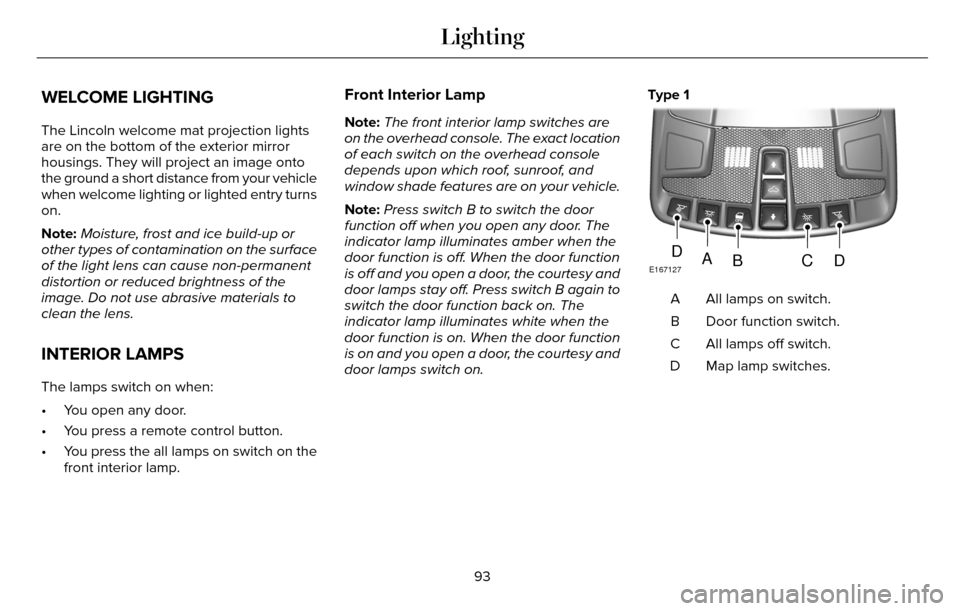
Front Interior Lamp
Note: The front interior lamp switches are
on the overhead console. The exact location
of each switch on the overhead console
depends upon which roof, sunroof, and
window shade features are on your vehicle.
Note: Press switch B to switch the door
function off when you open any door. The
indicator lamp illuminates amber when the
door function is off. When the door function
is off and you open a door, the courtesy and
door lamps stay off. Press switch B again to
switch the door function back on. The
indicator lamp illuminates white when the
door function is on. When the door function
is on and you open a door, the courtesy and
door lamps switch on. Type 1
E167127ABCDD
All lamps on switch.
A
Door function switch.
B
All lamps off switch.
C
Map lamp switches.
D
93
Lighting
Page 97 of 544
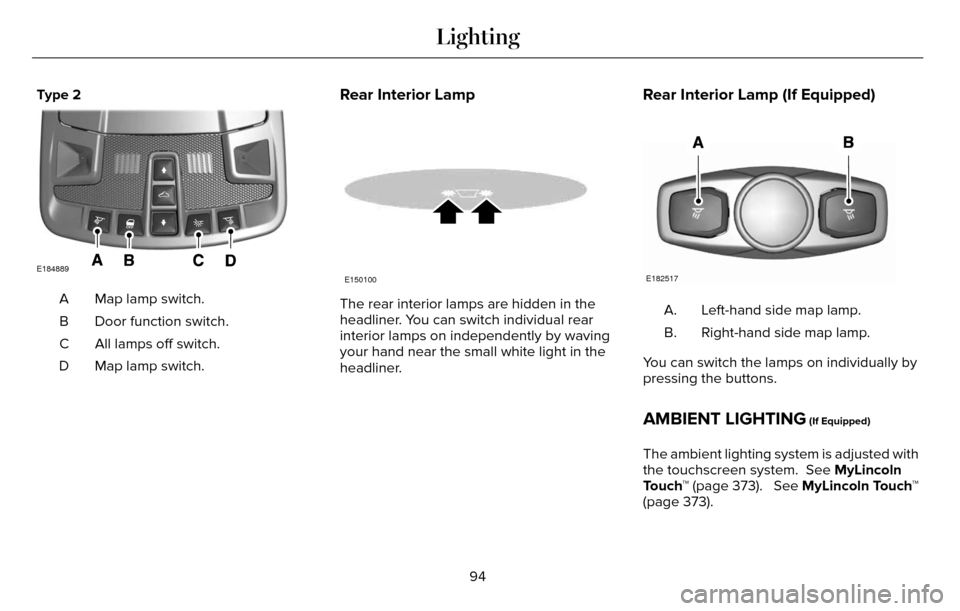
Type 2
E184889
Map lamp switch.
A
Door function switch.
B
All lamps off switch.
C
Map lamp switch.
D
Rear Interior Lamp
E150100
The rear interior lamps are hidden in the
headliner. You can switch individual rear
interior lamps on independently by waving
your hand near the small white light in the
headliner.
Rear Interior Lamp (If Equipped)
E182517
Left-hand side map lamp.
A.
Right-hand side map lamp.
B.
You can switch the lamps on individually by
pressing the buttons.
AMBIENT LIGHTING (If Equipped)
The ambient lighting system is adjusted with
the touchscreen system. See MyLincoln
Touch™ (page 373). See MyLincoln Touch™
(page 373).
94
Lighting
Page 99 of 544
Window Lock
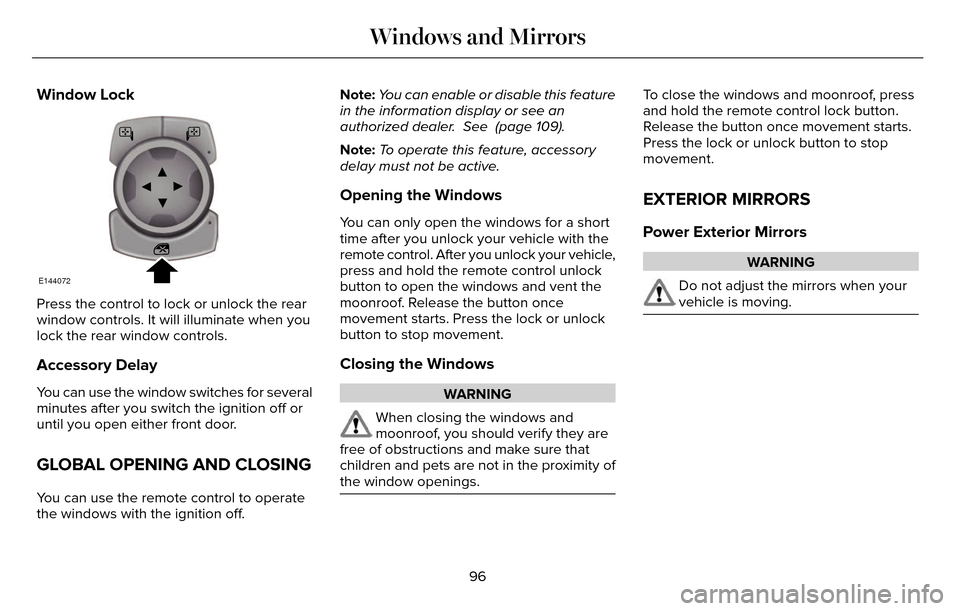
E144072
Press the control to lock or unlock the rear
window controls. It will illuminate when you
lock the rear window controls.
Accessory Delay
You can use the window switches for several
minutes after you switch the ignition off or
until you open either front door.
GLOBAL OPENING AND CLOSING
You can use the remote control to operate
the windows with the ignition off.Note:
You can enable or disable this feature
in the information display or see an
authorized dealer. See (page 109).
Note: To operate this feature, accessory
delay must not be active.
Opening the Windows
You can only open the windows for a short
time after you unlock your vehicle with the
remote control. After you unlock your vehicle,
press and hold the remote control unlock
button to open the windows and vent the
moonroof. Release the button once
movement starts. Press the lock or unlock
button to stop movement.
Closing the Windows
WARNING
When closing the windows and
moonroof, you should verify they are
free of obstructions and make sure that
children and pets are not in the proximity of
the window openings.
To close the windows and moonroof, press
and hold the remote control lock button.
Release the button once movement starts.
Press the lock or unlock button to stop
movement.
EXTERIOR MIRRORS
Power Exterior Mirrors
WARNING
Do not adjust the mirrors when your
vehicle is moving.
96
Windows and Mirrors
Page 100 of 544
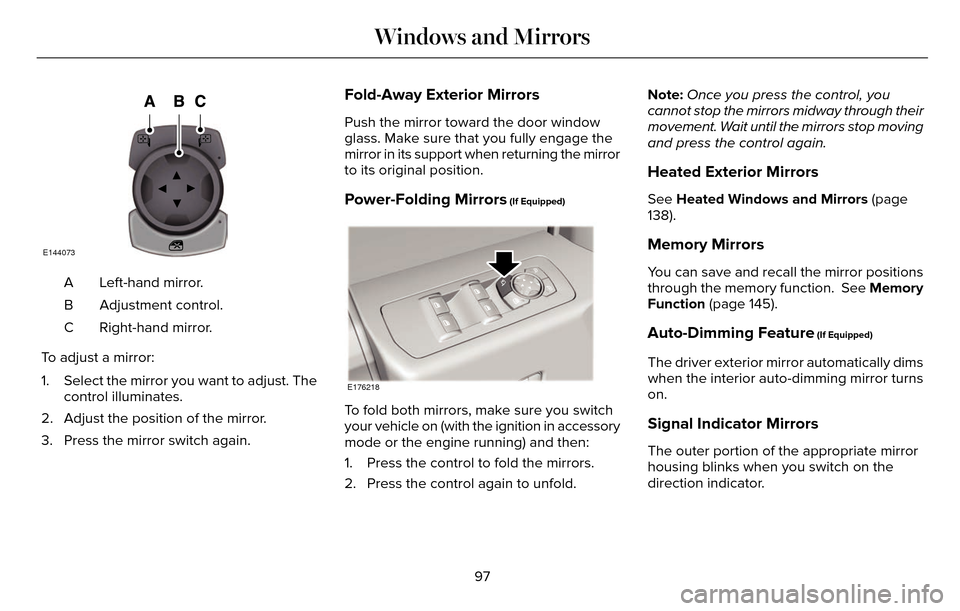
E144073
Left-hand mirror.
A
Adjustment control.
B
Right-hand mirror.
C
To adjust a mirror:
1. Select the mirror you want to adjust. The control illuminates.
2. Adjust the position of the mirror.
3. Press the mirror switch again.
Fold-Away Exterior Mirrors
Push the mirror toward the door window
glass. Make sure that you fully engage the
mirror in its support when returning the mirror
to its original position.
Power-Folding Mirrors (If Equipped)
E176218
To fold both mirrors, make sure you switch
your vehicle on (with the ignition in accessory
mode or the engine running) and then:
1. Press the control to fold the mirrors.
2. Press the control again to unfold. Note:
Once you press the control, you
cannot stop the mirrors midway through their
movement. Wait until the mirrors stop moving
and press the control again.
Heated Exterior Mirrors
See Heated Windows and Mirrors (page
138).
Memory Mirrors
You can save and recall the mirror positions
through the memory function. See Memory
Function (page 145).
Auto-Dimming Feature (If Equipped)
The driver exterior mirror automatically dims
when the interior auto-dimming mirror turns
on.
Signal Indicator Mirrors
The outer portion of the appropriate mirror
housing blinks when you switch on the
direction indicator.
97
Windows and Mirrors
Page 106 of 544
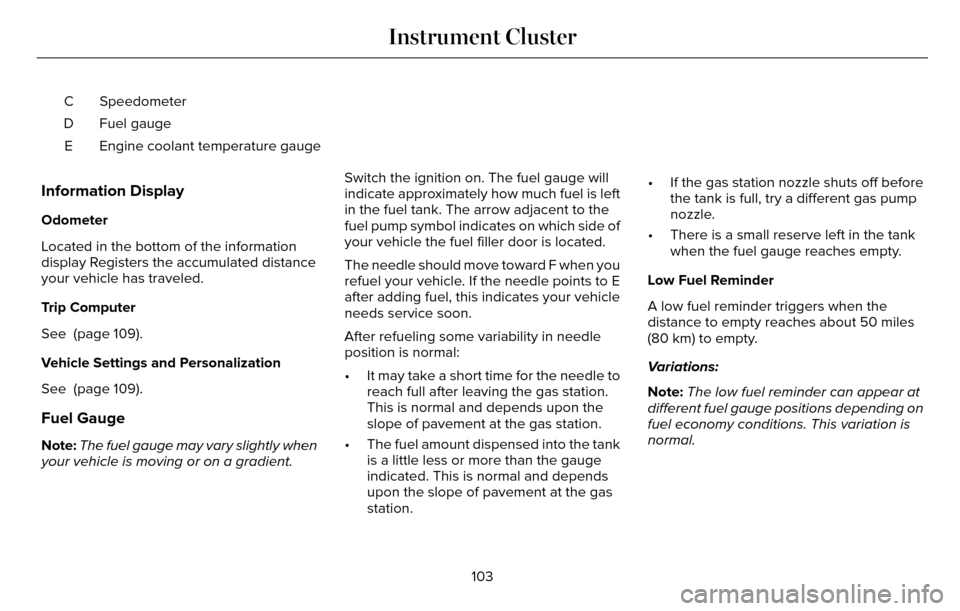
Speedometer
C
Fuel gauge
D
Engine coolant temperature gauge
E
Information Display
Odometer
Located in the bottom of the information
display Registers the accumulated distance
your vehicle has traveled.
Trip Computer
See (page 109).
Vehicle Settings and Personalization
See (page 109).
Fuel Gauge
Note: The fuel gauge may vary slightly when
your vehicle is moving or on a gradient. Switch the ignition on. The fuel gauge will
indicate approximately how much fuel is left
in the fuel tank. The arrow adjacent to the
fuel pump symbol indicates on which side of
your vehicle the fuel filler door is located.
The needle should move toward F when you
refuel your vehicle. If the needle points to E
after adding fuel, this indicates your vehicle
needs service soon.
After refueling some variability in needle
position is normal:
• It may take a short time for the needle to
reach full after leaving the gas station.
This is normal and depends upon the
slope of pavement at the gas station.
• The fuel amount dispensed into the tank is a little less or more than the gauge
indicated. This is normal and depends
upon the slope of pavement at the gas
station. • If the gas station nozzle shuts off before
the tank is full, try a different gas pump
nozzle.
• There is a small reserve left in the tank when the fuel gauge reaches empty.
Low Fuel Reminder
A low fuel reminder triggers when the
distance to empty reaches about 50 miles
(80 km) to empty.
Variations:
Note: The low fuel reminder can appear at
different fuel gauge positions depending on
fuel economy conditions. This variation is
normal.
103
Instrument Cluster
Page 108 of 544
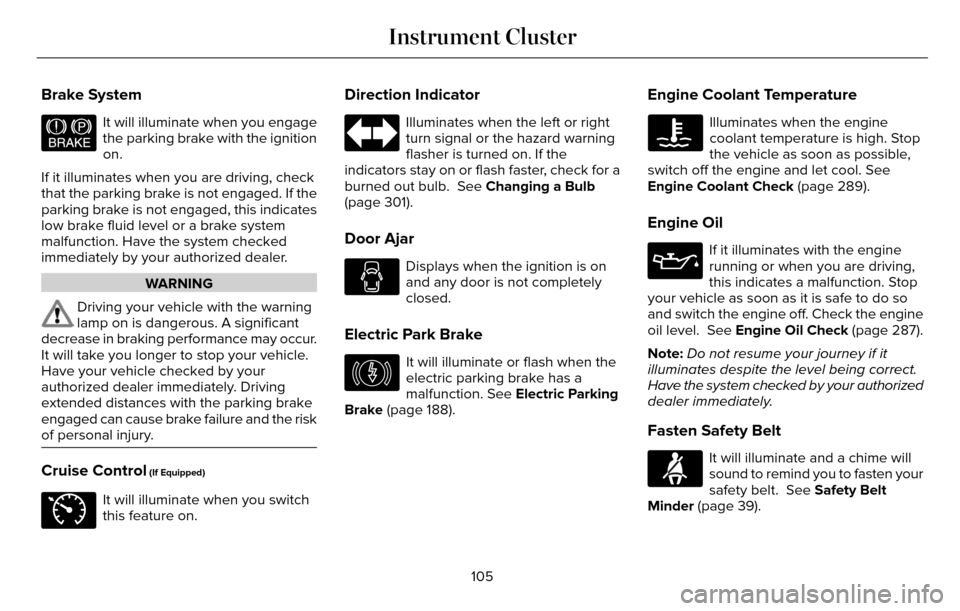
Brake System
E144522
It will illuminate when you engage
the parking brake with the ignition
on.
If it illuminates when you are driving, check
that the parking brake is not engaged. If the
parking brake is not engaged, this indicates
low brake fluid level or a brake system
malfunction. Have the system checked
immediately by your authorized dealer.
WARNING
Driving your vehicle with the warning
lamp on is dangerous. A significant
decrease in braking performance may occur.
It will take you longer to stop your vehicle.
Have your vehicle checked by your
authorized dealer immediately. Driving
extended distances with the parking brake
engaged can cause brake failure and the risk
of personal injury.
Cruise Control (If Equipped)
E71340
It will illuminate when you switch
this feature on.
Direction Indicator
Illuminates when the left or right
turn signal or the hazard warning
flasher is turned on. If the
indicators stay on or flash faster, check for a
burned out bulb. See Changing a Bulb
(page 301).
Door Ajar
Displays when the ignition is on
and any door is not completely
closed.
Electric Park Brake
E146190
It will illuminate or flash when the
electric parking brake has a
malfunction. See Electric Parking
Brake (page 188).
Engine Coolant Temperature
Illuminates when the engine
coolant temperature is high. Stop
the vehicle as soon as possible,
switch off the engine and let cool. See
Engine Coolant Check (page 289).
Engine Oil
If it illuminates with the engine
running or when you are driving,
this indicates a malfunction. Stop
your vehicle as soon as it is safe to do so
and switch the engine off. Check the engine
oil level. See Engine Oil Check (page 287).
Note: Do not resume your journey if it
illuminates despite the level being correct.
Have the system checked by your authorized
dealer immediately.
Fasten Safety Belt
It will illuminate and a chime will
sound to remind you to fasten your
safety belt. See Safety Belt
Minder (page 39).
105
Instrument Cluster