ESP LINCOLN MKZ 2016 Repair Manual
[x] Cancel search | Manufacturer: LINCOLN, Model Year: 2016, Model line: MKZ, Model: LINCOLN MKZ 2016Pages: 544, PDF Size: 5.77 MB
Page 474 of 544
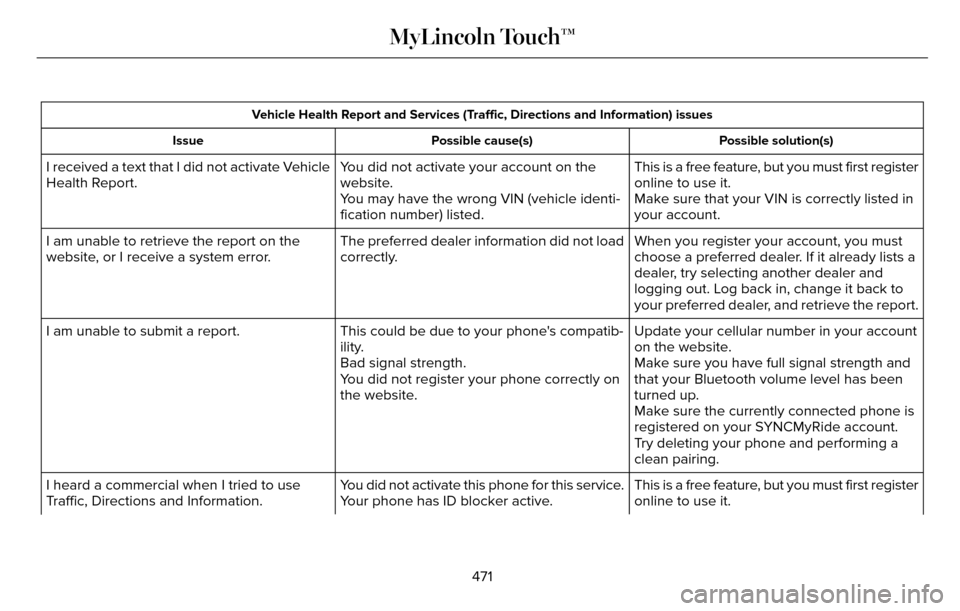
Vehicle Health Report and Services (Traffic, Directions and Information) issuesPossible solution(s)
Possible cause(s)
Issue
This is a free feature, but you must first register
online to use it.
You did not activate your account on the
website.
I received a text that I did not activate Vehicle
Health Report.
Make sure that your VIN is correctly listed in
your account.
You may have the wrong VIN (vehicle identi-
fication number) listed.
When you register your account, you must
choose a preferred dealer. If it already lists a
dealer, try selecting another dealer and
logging out. Log back in, change it back to
your preferred dealer, and retrieve the report.
The preferred dealer information did not load
correctly.
I am unable to retrieve the report on the
website, or I receive a system error.
Update your cellular number in your account
on the website.
This could be due to your phone's compatib-
ility.
I am unable to submit a report.
Make sure you have full signal strength and
that your Bluetooth volume level has been
turned up.
Bad signal strength.
You did not register your phone correctly on
the website.
Make sure the currently connected phone is
registered on your SYNCMyRide account.
Try deleting your phone and performing a
clean pairing.
This is a free feature, but you must first register
online to use it.
You did not activate this phone for this service.
Your phone has ID blocker active.
I heard a commercial when I tried to use
Traffic, Directions and Information.
471
MyLincoln Touch™
Page 475 of 544
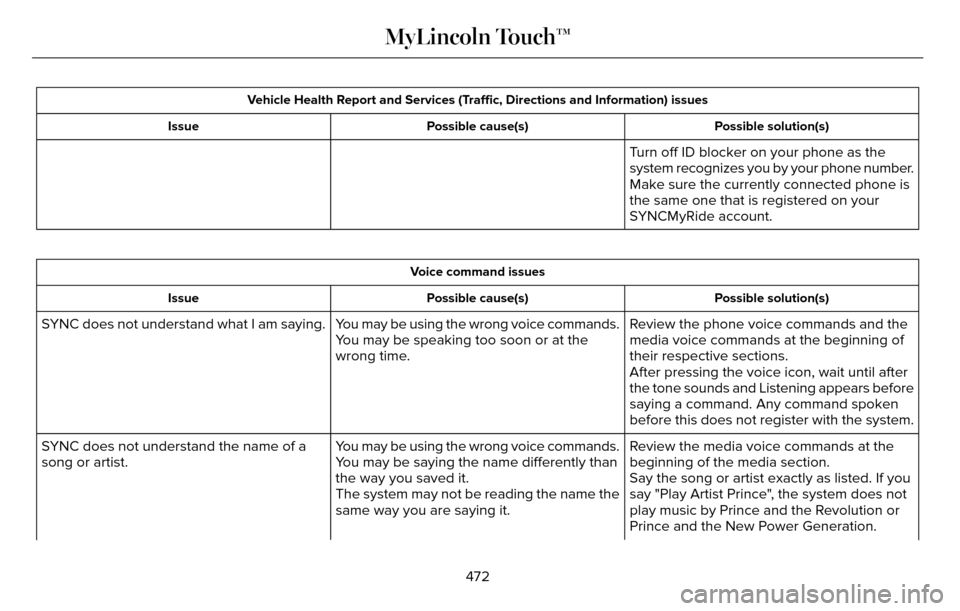
Vehicle Health Report and Services (Traffic, Directions and Information) issuesPossible solution(s)
Possible cause(s)
Issue
Turn off ID blocker on your phone as the
system recognizes you by your phone number.
Make sure the currently connected phone is
the same one that is registered on your
SYNCMyRide account.
Voice command issues
Possible solution(s)
Possible cause(s)
Issue
Review the phone voice commands and the
media voice commands at the beginning of
their respective sections.
You may be using the wrong voice commands.
You may be speaking too soon or at the
wrong time.
SYNC does not understand what I am saying.
After pressing the voice icon, wait until after
the tone sounds and Listening appears before
saying a command. Any command spoken
before this does not register with the system.
Review the media voice commands at the
beginning of the media section.
You may be using the wrong voice commands.
You may be saying the name differently than
the way you saved it.
SYNC does not understand the name of a
song or artist.
Say the song or artist exactly as listed. If you
say "Play Artist Prince", the system does not
play music by Prince and the Revolution or
Prince and the New Power Generation.
The system may not be reading the name the
same way you are saying it.
472
MyLincoln Touch™
Page 476 of 544
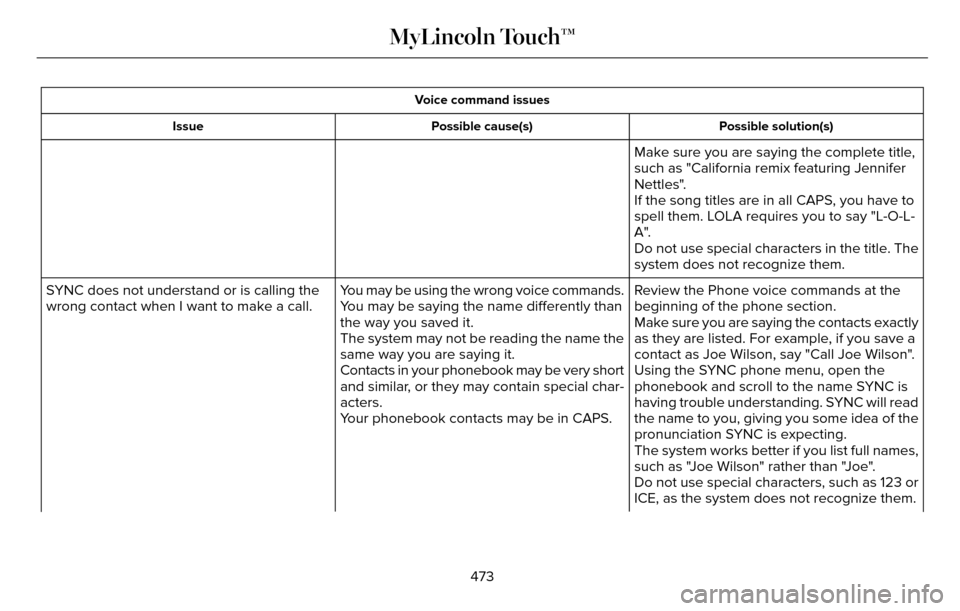
Voice command issuesPossible solution(s)
Possible cause(s)
Issue
Make sure you are saying the complete title,
such as "California remix featuring Jennifer
Nettles".
If the song titles are in all CAPS, you have to
spell them. LOLA requires you to say "L-O-L-
A".
Do not use special characters in the title. The
system does not recognize them.
Review the Phone voice commands at the
beginning of the phone section.
You may be using the wrong voice commands.
You may be saying the name differently than
the way you saved it.
SYNC does not understand or is calling the
wrong contact when I want to make a call.
Make sure you are saying the contacts exactly
as they are listed. For example, if you save a
contact as Joe Wilson, say "Call Joe Wilson".
The system may not be reading the name the
same way you are saying it.
Using the SYNC phone menu, open the
phonebook and scroll to the name SYNC is
having trouble understanding. SYNC will read
the name to you, giving you some idea of the
pronunciation SYNC is expecting.
Contacts in your phonebook may be very short
and similar, or they may contain special char-
acters.
Your phonebook contacts may be in CAPS.
The system works better if you list full names,
such as "Joe Wilson" rather than "Joe".
Do not use special characters, such as 123 or
ICE, as the system does not recognize them.
473
MyLincoln Touch™
Page 477 of 544
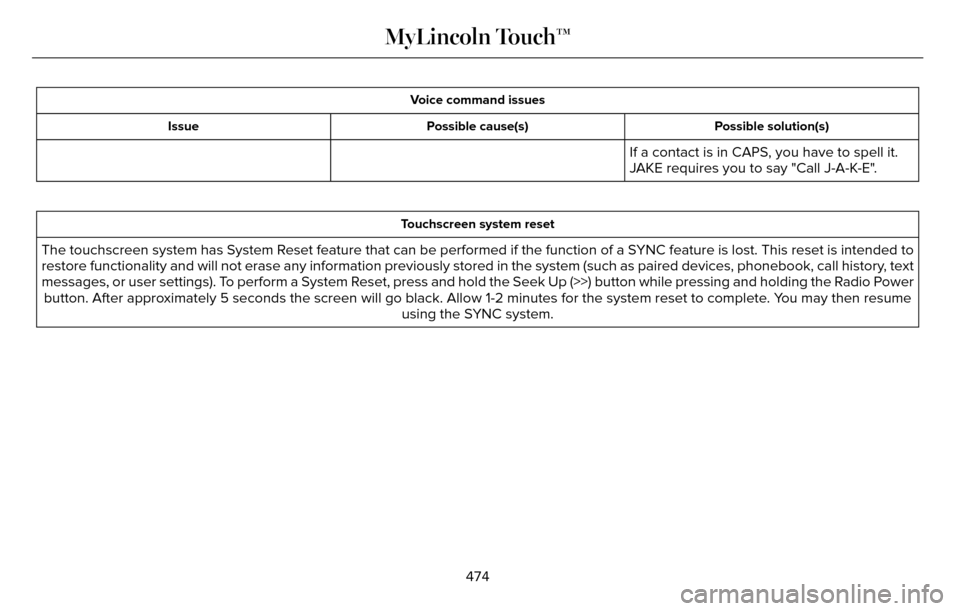
Voice command issuesPossible solution(s)
Possible cause(s)
Issue
If a contact is in CAPS, you have to spell it.
JAKE requires you to say "Call J-A-K-E".
Touchscreen system reset
The touchscreen system has System Reset feature that can be performed if the function of a SYNC feature is lost. This reset is intended to
restore functionality and will not erase any information previously stor\
ed in the system (such as paired devices, phonebook, call history, text
messages, or user settings). To perform a System Reset, press and hold the Seek Up (>>) button while pressing and holdin\
g the Radio Power
button. After approximately 5 seconds the screen will go black. Allow 1-2 minutes for the s\
ystem reset to complete. You may then resume using the SYNC system.
474
MyLincoln Touch™
Page 480 of 544
PROTECT YOURSELF FROM THE RISING
COST OF VEHICLE REPAIRS WITH A
LINCOLN EXTENDED SERVICE PLAN.
SERVICE PLANS (U.S. Only)
Lincoln owners have discovered the powerful
protection of Lincoln Extended Service Plan.
It is the only extended service plan backed
by Lincoln Motor Company, and provides
peace of mind protection beyond the New
Vehicle Limited Warranty coverage.
Lincoln ESP Can Quickly Pay for Itself
One service bill – the cost of parts and labor
– can easily exceed the price of your Lincoln
Extended Service Plan. With Lincoln ESP,
you minimize your risk for unexpected repair
bills and rising repair costs.
Up to 1000+ Covered Vehicle Components
There are four Extended Service Plans with
different levels of coverage. Ask your
authorized dealer for details.1. PremiumCARE - Our most comprehensive
coverage. With over 1000 covered
components, this plan is so complete that
we generally only discuss what’s not
covered.
2. ExtraCARE - Covers 113 components, and includes many high-tech items.
3. BaseCARE - Covers 84 components.
4. PowertrainCARE - Covers 29 critical components.
Lincoln Extended Service Plan is honored by
all authorized Lincoln and Ford dealers in
the United States, Canada and Mexico. It is
the only extended service plan authorized
and backed by Lincoln Motor Company.
That means you get:
• Reliable, quality service at any Lincoln or Ford dealership.
• Repairs performed by factory trained technicians, using genuine parts. Rental Car Reimbursement
1st day Rental Benefit
You take advantage of replacement
transportation if your vehicle is at your
authorized dealer for same day covered
repairs.
Extended Rental Benefits
If your vehicle is kept overnight for covered
repairs, you are eligible for rental car
coverage, including bumper to bumper
warranty repairs, and Field Service Actions.
Roadside Assistance
Exclusive 24/7 roadside assistance, including:
• Towing, flat-tire change and battery jump
starts.
• Out of fuel and lock-out assistance.
• Travel expense reimbursement for lodging, meals and rental car.
• Destination assistance for taxi, shuttle, rental car coverage and emergency
transportation.
477
Extended Service Plan (ESP)
Page 481 of 544
Transferable Coverage
If you sell your vehicle before your Lincoln
Extended Service Plan coverage expires,
you can transfer any remaining coverage to
the new owner. Whenever you sell your
vehicle, prospective buyers may have a
higher degree of confidence that vehicle was
properly maintained with Lincoln ESP,
thereby improving resale value.
Avoid the Rising Cost of Properly
Maintaining Your Vehicle!
Lincoln Extended Service Plan also offers a
Premium Maintenance Plan that covers all
scheduled maintenance, and select items
that routinely wear out. The coverage is
prepaid, so you never have to worry about
affording your vehicle maintenance. It covers
regular checkups, routine inspections,
preventive care and replacement of select
items that require periodic attention for
normal wear:
• Windshield wiper blades.
• Spark plugs.
• The clutch disc.• Brake pads and linings.
• Shock absorbers and struts.
• Engine cooling hoses, clamps and
o-rings.
• Engine belts.
• Diesel exhaust fluid replenishment.
Interest Free Finance Options Available
Take advantage of our interest free
installment payment plan. Just a 10% down
payment will provide you with an affordable,
no interest, no fee payment program allowing
you all the security and benefits Lincoln ESP
has to offer while paying over time. You are
pre-approved with no credit checks, no
hassles! To learn more, call our Lincoln ESP
specialists at 800-367-3377.
Complete the information below and mail to:
Ford ESP
P.O. Box 321067
Detroit, MI 48232SERVICE PLANS (CANADA ONLY)
You can get more protection for your vehicle
by purchasing a Lincoln Extended Service
Plan. Lincoln Extended Service Plan is the
only service contract backed by Lincoln
Motor Company of Canada, Limited.
Depending on the plan you purchase, Lincoln
Extended Service Plan provides benefits
such as:
• Rental reimbursement.
• Coverage for certain maintenance and wear items.
• Protection against repair costs after your New Vehicle Limited Warranty Coverage
expires.
• Roadside Assistance benefits.
478
Extended Service Plan (ESP)
Page 482 of 544
There are several Lincoln Extended Service
Plans available in various time, distance and
deductible combinations. Each plan is
tailored to fit your own driving needs,
including reimbursement for towing and
rental. When you purchase Lincoln Extended
Service Plan, you receive added
peace-of-mind protection throughout
Canada, the United States and Mexico,
provided by a network of participating
authorized Lincoln Motor Company dealers.
Note:Repairs performed outside of Canada,
the United States and Mexico are not eligible
for Lincoln Extended Service Plan coverage.
This information is subject to change. For
more information, visit your local Lincoln of
Canada dealer or www.Lincoln.ca to find the
Lincoln Extended Service Plan that is right
for you.
479
Extended Service Plan (ESP)
Page 483 of 544
GENERAL MAINTENANCE
INFORMATION
Why Maintain Your Vehicle?
Carefully following the maintenance
schedule helps protect against major repair
expenses resulting from neglect or
inadequate maintenance and may help to
increase the value of your vehicle when you
sell or trade it. Keep all receipts for
completed maintenance with your vehicle.
We have established regular maintenance
intervals for your vehicle based upon
rigorous testing. It is important that you have
your vehicle serviced at the proper times.
These intervals serve two purposes; one is
to maintain the reliability of your vehicle and
the second is to keep your cost of owning
your vehicle down.
It is your responsibility to have all scheduled
maintenance performed and to make sure
that the materials used meet the
specifications identified in this owner's
manual. See Capacities and Specifications
(page 353).Failure to perform scheduled maintenance
invalidates warranty coverage on parts
affected by the lack of maintenance.
Why Maintain Your Vehicle at Your
Dealership?
Factory-Trained Technicians
Service technicians participate in extensive
factory-sponsored certification training to
help them become experts on the operation
of your vehicle. Ask your dealership about
the training and certification their technicians
have received.
Genuine Ford and Motorcraft® Replacement
Parts
Dealerships stock Ford, Motorcraft and
Ford-authorized branded re-manufactured
replacement parts. These parts meet or
exceed our specifications. Parts installed at
your dealership carry a nationwide 24-month
or unlimited mile (kilometer) parts and labor
limited warranty.
If you do not use Ford authorized parts they
may not meet our specifications and
depending on the part, it could affect
emissions compliance.
Convenience
Many dealerships have extended evening
and Saturday hours to make your service
visit more convenient and they offer one stop
shopping. They can perform any services
that are required on your vehicle, from
general maintenance to collision repairs.
Note:
Not all dealers have extended hours
or body shops. Please contact your dealer
for details.
Protecting Your Investment
Maintenance is an investment that pays
dividends in the form of improved reliability,
durability and resale value. To maintain the
proper performance of your vehicle and its
emission control systems, make sure you
have scheduled maintenance performed at
the designated intervals.
480
Scheduled Maintenance
Page 510 of 544
•Links to Third Party Sites: The MS
SOFTWARE may provide you with the
ability to link to third party sites through
the use of the SOFTWARE. The third
party sites are not under the control of
MS, Microsoft Corporation, their affiliates
and/or their designated agent. Neither
MS nor Microsoft Corporation nor their
affiliates nor their designated agent are
responsible for (i) the contents of any
third party sites, any links contained in
third party sites, or any changes or
updates to third party sites, or (ii)
webcasting or any other form of
transmission received from any third
party sites. If the SOFTWARE provides
links to third party sites, those links are
provided to you only as a convenience,
and the inclusion of any link does not
imply an endorsement of the third party
site by MS, Microsoft Corporation, their
affiliates and/or their designated agent. •
Obligation to Drive Responsibly: Yo u
recognize your obligation to drive
responsibly and keep attention on the
road. You will read and abide with the
DEVICE operating instructions particularly
as they pertain to safety and assumes
any risk associated with the use of the
DEVICE.
UPGRADES AND RECOVERY MEDIA: If the
SOFTWARE is provided by FORD MOTOR
COMPANY separate from the DEVICE on
media such as a ROM chip, CD ROM disk(s)
or via web download or other means, and is
labeled "For Upgrade Purposes Only" or "For
Recovery Purposes Only" you may install one
(1) copy of such SOFTWARE onto the DEVICE
as a replacement copy for the existing
SOFTWARE, and use it in accordance with
this EULA, including any additional EULA
terms accompanying the upgrade
SOFTWARE.
INTELLECTUAL PROPERTY RIGHTS: All
title and intellectual property rights in and to
the SOFTWARE (including but not limited to
any images, photographs, animations, video,
audio, music, text and "applets" incorporated
into the SOFTWARE), the accompanying printed materials, and any copies of the
SOFTWARE, are owned by MS, Microsoft
Corporation, FORD MOTOR COMPANY, or
their affiliates or suppliers. The SOFTWARE
is licensed, not sold. You may not copy the
printed materials accompanying the
SOFTWARE. All title and intellectual property
rights in and to the content which may be
accessed through use of the SOFTWARE is
the property of the respective content owner
and may be protected by applicable
copyright or other intellectual property laws
and treaties. This EULA grants you no rights
to use such content. All rights not specifically
granted under this EULA are reserved by MS,
Microsoft Corporation, FORD MOTOR
COMPANY, third party software and service
providers, their affiliates and suppliers. Use
of any on-line services which may be
accessed through the SOFTWARE may be
governed by the respective terms of use
relating to such services. If this SOFTWARE
contains documentation that is provided only
in electronic form, you may print one copy
of such electronic documentation.
507
Appendices
Page 512 of 544
Read and follow instructions: Before using
your Windows Automotive- based system,
read and follow all instructions and safety
information provided in this end user manual
("User's Guide"). Not following precautions
found in this User's Guide can lead to an
accident or other serious consequences.
Keep User's Guide in vehicle: When kept in
the vehicle, the User's Guide will be a ready
reference for you and other users unfamiliar
with the Windows Automotive-based system.
Please make certain that before using the
system for the first time, all persons have
access to the User's Guide and read its
instructions and safety information carefully.WARNING
Operating certain parts of this system
while driving can distract your attention
away from the road, and possibly cause an
accident or other serious consequences. Do
not change system settings or enter data
non-verbally (using your hands) while driving.
Stop the vehicle in a safe and legal manner
before attempting these operations. This is
important since while setting up or changing
some functions you might be required to
distract your attention away from the road
and remove your hands from the wheel.
General Operation
Voice Command Control: Functions within
the Windows Automotive-based system may
be accomplished using only voice
commands. Using voice commands while
driving allows you to operate the system
without removing your hands from the wheel. Prolonged Views of Screen: Do not access
any function requiring a prolonged view of
the screen while you are driving. Pull over in
a safe and legal manner before attempting
to access a function of the system requiring
prolonged attention. Even occasional short
scans to the screen may be hazardous if your
attention has been diverted away from your
driving task at a critical time.
Volume Setting: Do not raise the volume
excessively. Keep the volume at a level
where you can still hear outside traffic and
emergency signals while driving. Driving
while unable to hear these sounds could
cause an accident.
Use of Speech Recognition Functions:
Speech recognition software is inherently a
statistical process which is subject to errors.
It is your responsibility to monitor any speech
recognition functions included in the system
and address any errors.
509
Appendices