light LINCOLN MKZ 2016 Manual PDF
[x] Cancel search | Manufacturer: LINCOLN, Model Year: 2016, Model line: MKZ, Model: LINCOLN MKZ 2016Pages: 544, PDF Size: 5.77 MB
Page 221 of 544
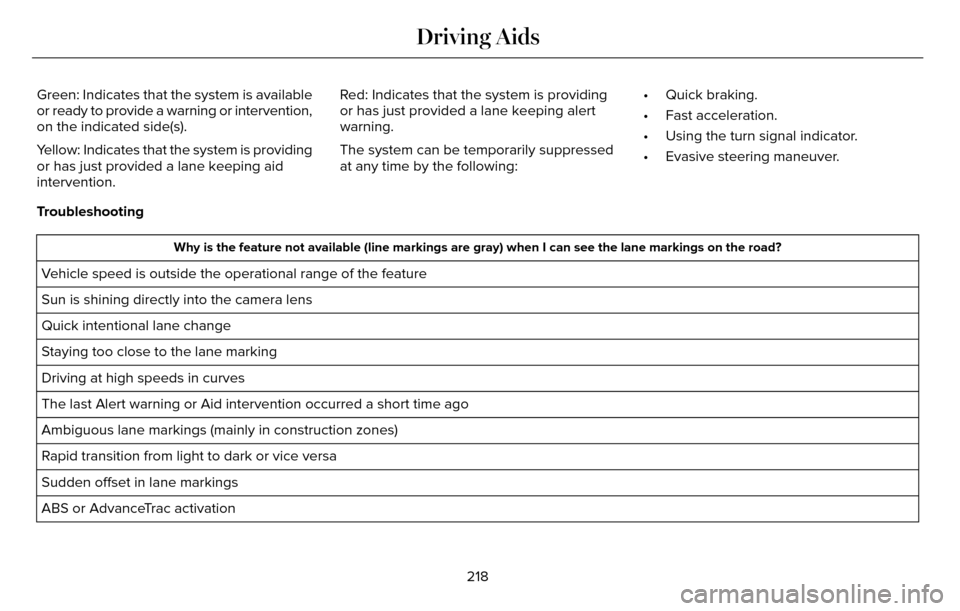
Green: Indicates that the system is available
or ready to provide a warning or intervention,
on the indicated side(s).
Yellow: Indicates that the system is providing
or has just provided a lane keeping aid
intervention.Red: Indicates that the system is providing
or has just provided a lane keeping alert
warning.
The system can be temporarily suppressed
at any time by the following:
• Quick braking.
• Fast acceleration.
• Using the turn signal indicator.
• Evasive steering maneuver.
Troubleshooting
Why is the feature not available (line markings are gray) when I can s\
ee the lane markings on the road?
Vehicle speed is outside the operational range of the feature
Sun is shining directly into the camera lens
Quick intentional lane change
Staying too close to the lane marking
Driving at high speeds in curves
The last Alert warning or Aid intervention occurred a short time ago
Ambiguous lane markings (mainly in construction zones)
Rapid transition from light to dark or vice versa
Sudden offset in lane markings
ABS or AdvanceTrac activation
218
Driving Aids
Page 226 of 544
System Lights and Messages
E142442
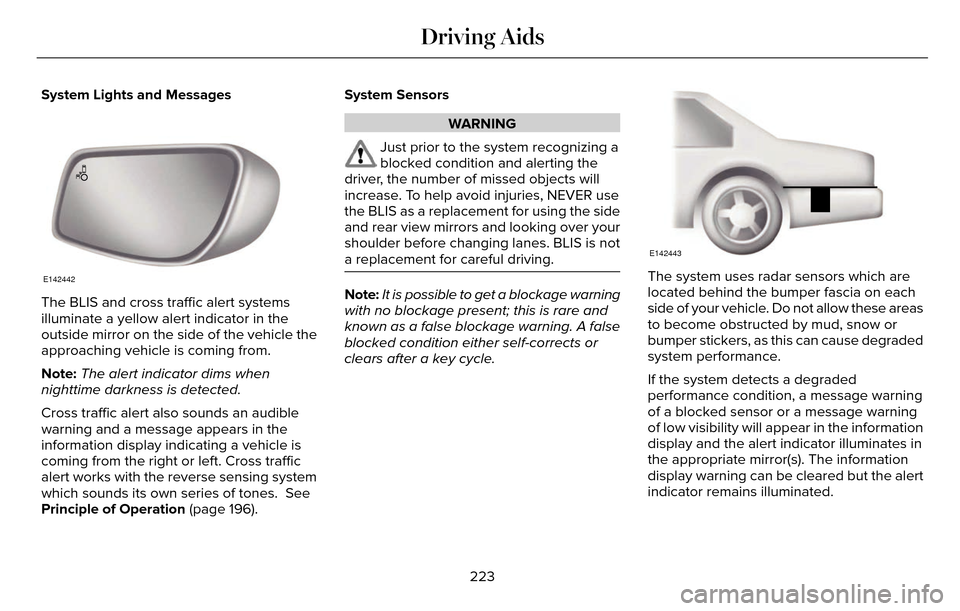
The BLIS and cross traffic alert systems
illuminate a yellow alert indicator in the
outside mirror on the side of the vehicle the
approaching vehicle is coming from.
Note:The alert indicator dims when
nighttime darkness is detected.
Cross traffic alert also sounds an audible
warning and a message appears in the
information display indicating a vehicle is
coming from the right or left. Cross traffic
alert works with the reverse sensing system
which sounds its own series of tones. See
Principle of Operation (page 196). System Sensors
WARNING
Just prior to the system recognizing a
blocked condition and alerting the
driver, the number of missed objects will
increase. To help avoid injuries, NEVER use
the BLIS as a replacement for using the side
and rear view mirrors and looking over your
shoulder before changing lanes. BLIS is not
a replacement for careful driving.
Note: It is possible to get a blockage warning
with no blockage present; this is rare and
known as a false blockage warning. A false
blocked condition either self-corrects or
clears after a key cycle.
E142443
The system uses radar sensors which are
located behind the bumper fascia on each
side of your vehicle. Do not allow these areas
to become obstructed by mud, snow or
bumper stickers, as this can cause degraded
system performance.
If the system detects a degraded
performance condition, a message warning
of a blocked sensor or a message warning
of low visibility will appear in the information
display and the alert indicator illuminates in
the appropriate mirror(s). The information
display warning can be cleared but the alert
indicator remains illuminated.
223
Driving Aids
Page 230 of 544
E156131
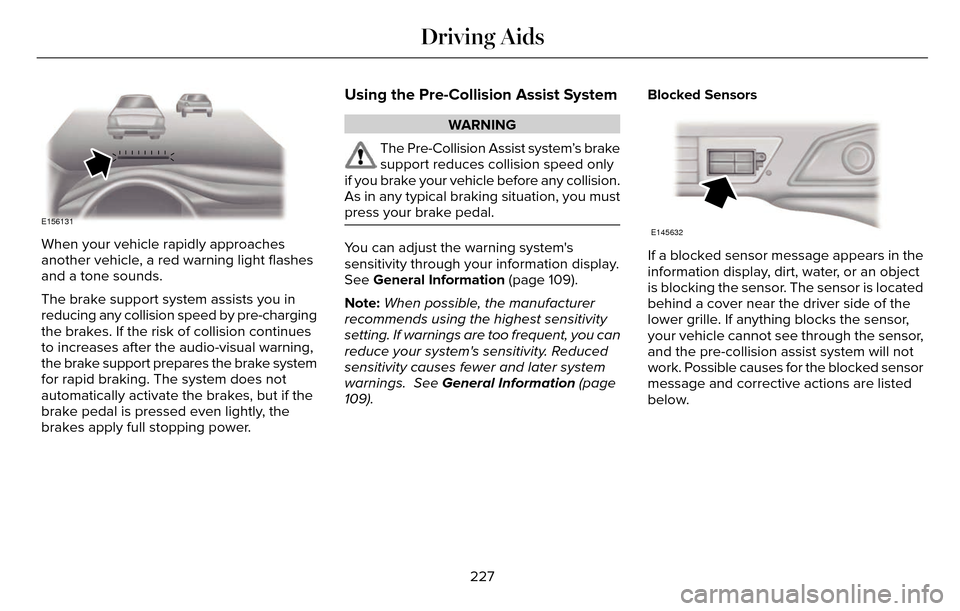
When your vehicle rapidly approaches
another vehicle, a red warning light flashes
and a tone sounds.
The brake support system assists you in
reducing any collision speed by pre-charging
the brakes. If the risk of collision continues
to increases after the audio-visual warning,
the brake support prepares the brake system
for rapid braking. The system does not
automatically activate the brakes, but if the
brake pedal is pressed even lightly, the
brakes apply full stopping power.
Using the Pre-Collision Assist System
WARNING
The Pre-Collision Assist system’s brake
support reduces collision speed only
if you brake your vehicle before any collision.
As in any typical braking situation, you must
press your brake pedal.
You can adjust the warning system's
sensitivity through your information display.
See General Information (page 109).
Note: When possible, the manufacturer
recommends using the highest sensitivity
setting. If warnings are too frequent, you can
reduce your system's sensitivity. Reduced
sensitivity causes fewer and later system
warnings. See General Information (page
109). Blocked Sensors
E145632
If a blocked sensor message appears in the
information display, dirt, water, or an object
is blocking the sensor. The sensor is located
behind a cover near the driver side of the
lower grille. If anything blocks the sensor,
your vehicle cannot see through the sensor,
and the pre-collision assist system will not
work. Possible causes for the blocked sensor
message and corrective actions are listed
below.
227
Driving Aids
Page 243 of 544
TOWING A TRAILER
WARNINGS
Do not exceed the GVWR or the
GAWR specified on the certification
label.
Towing trailers beyond the
maximum recommended gross
trailer weight exceeds the limit of your
vehicle and could result in engine
damage, transmission damage,
structural damage, loss of vehicle
control, vehicle rollover and personal
injury.
Note: There may be electrical items
such as fuses or relays that can affect
trailer towing operation. See Fuses
(page 263). The load capacity of your vehicle is
designated by weight not volume. You
may not necessarily be able to use all
available space when loading your
vehicle or trailer.
Towing a trailer places extra load on the
engine, transmission, axle, brakes, tires,
and suspension. Inspect these
components before, during and after
towing.
Load Placement
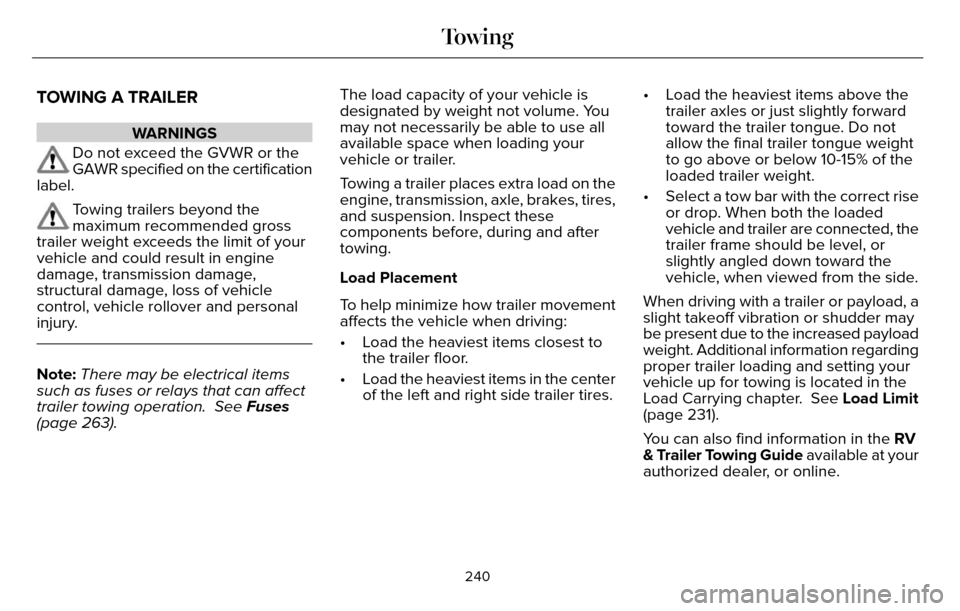
To help minimize how trailer movement
affects the vehicle when driving:
• Load the heaviest items closest to
the trailer floor.
• Load the heaviest items in the center of the left and right side trailer tires. • Load the heaviest items above the
trailer axles or just slightly forward
toward the trailer tongue. Do not
allow the final trailer tongue weight
to go above or below 10-15% of the
loaded trailer weight.
• Select a tow bar with the correct rise or drop. When both the loaded
vehicle and trailer are connected, the
trailer frame should be level, or
slightly angled down toward the
vehicle, when viewed from the side.
When driving with a trailer or payload, a
slight takeoff vibration or shudder may
be present due to the increased payload
weight. Additional information regarding
proper trailer loading and setting your
vehicle up for towing is located in the
Load Carrying chapter. See Load Limit
(page 231).
You can also find information in the RV
& Trailer Towing Guide available at your
authorized dealer, or online.
240
Towing
Page 246 of 544
ESSENTIAL TOWING CHECKS
Follow these guidelines for safe towing:
• Do not tow a trailer until you drive yourvehicle at least 1000 miles (1600
kilometers).
• Consult your local motor vehicle laws for towing a trailer.
• See the instructions included with towing accessories for the proper installation
and adjustment specifications.
• Service your vehicle more frequently if you tow a trailer. See your scheduled
maintenance information.
• If you use a rental trailer, follow the instructions the rental agency gives you.
You can find information on load
specification terms found on the tire label
and Safety Compliance label as well as
instructions on calculating your vehicle's load
in the Load Carrying chapter. See Load Limit
(page 231).
Remember to account for the trailer tongue
weight as part of your vehicle load when
calculating the total vehicle weight.
Hitches
Do not use a hitch that either clamps onto
the bumper or attaches to the axle.
Distribute the trailer load so 10-15% of the
total trailer weight is on the tongue.
Safety Chains
Note: Never attach safety chains to the
bumper.
Always connect the safety chains to the hook
retainers of your vehicle hitch.
To connect the safety chains, cross them
under the trailer tongue and allow enough
slack for turning tight corners. Do not allow
the chains to drag on the ground.
Trailer Brakes
WARNING
Do not connect a trailer's hydraulic
brake system directly to your vehicle's
brake system. Your vehicle may not have
enough braking power and your chances of
having a collision greatly increase.
Electric brakes and manual, automatic or
surge-type trailer brakes are safe if you install
them properly and adjust them to the
manufacturer's specifications. The trailer
brakes must meet local and federal
regulations.
The rating for the tow vehicle's braking
system operation is at the gross vehicle
weight rating, not the gross combined
weight rating.
Trailer Lamps
WARNING
Never connect any trailer lamp wiring
to the vehicle's tail lamp wiring; this
may damage the electrical system resulting
in fire. Contact your authorized dealer as
soon as possible for assistance in proper
trailer tow wiring installation. Additional
electrical equipment may be required.
Trailer lamps are required on most towed
vehicles. Make sure all running lights, brake
lights, turn signals and hazard lights are
working.
243
Towing
Page 251 of 544
BREAKING-IN
You need to break in new tires for
approximately 300 miles (480 kilometers).
During this time, your vehicle may exhibit
some unusual driving characteristics.
Avoid driving too fast during the first 1000
miles (1600 kilometers). Vary your speed
frequently and change up through the gears
early. Do not labor the engine.
Do not tow during the first 1000 miles (1600
kilometers).
ECONOMICAL DRIVING
Fuel economy is affected by several things
such as how you drive, the conditions you
drive under and how you maintain your
vehicle.
There are some things to keep in mind that
may improve your fuel economy:
• Accelerate and slow down in a smooth,moderate fashion.
• Drive at steady speeds. • Anticipate stops; slowing down may
eliminate the need to stop.
• Combine errands and minimize stop-and-go driving.
• When running errands, go to thefurthest destination first and then
work your way back home.
• Close the windows for high-speed driving.
• Drive at reasonable speeds. (Traveling at 65 mph/105 kph uses about 15% less
fuel than traveling at 75 mph/121 kph).
• Keep the tires properly inflated and use only the recommended size.
• Use the recommended engine oil.
• Perform all regularly scheduled maintenance.
There are also some things you may want to
avoid doing because they reduce your fuel
economy:
• Avoid sudden or hard accelerations.
• Avoid revving the engine before turning off the car.
• Avoid long idle periods. • Do not warm up your vehicle on cold
mornings.
• Reduce the use of air conditioning and heat.
• Avoid using speed control in hilly terrain.
• Do not rest your foot on the brake pedal while driving.
• Avoid carrying unnecessary weight (approximately 1 mpg [0.4 kilometers/liter]
is lost for every 400 lbs [180 kilograms]
of weight carried).
• Avoid adding particular accessories to your vehicle (e.g. bug deflectors,
rollbars/light bars, running boards, ski
racks).
• Avoid driving with the wheels out of alignment.
DRIVING THROUGH WATER
WARNING
Do not drive through flowing or deep
water as you may lose control of your
vehicle.
248
Driving Hints
Page 252 of 544
Note:Driving through standing water can
cause vehicle damage.
Note: Engine damage can occur if water
enters the air filter.
Before driving through standing water, check
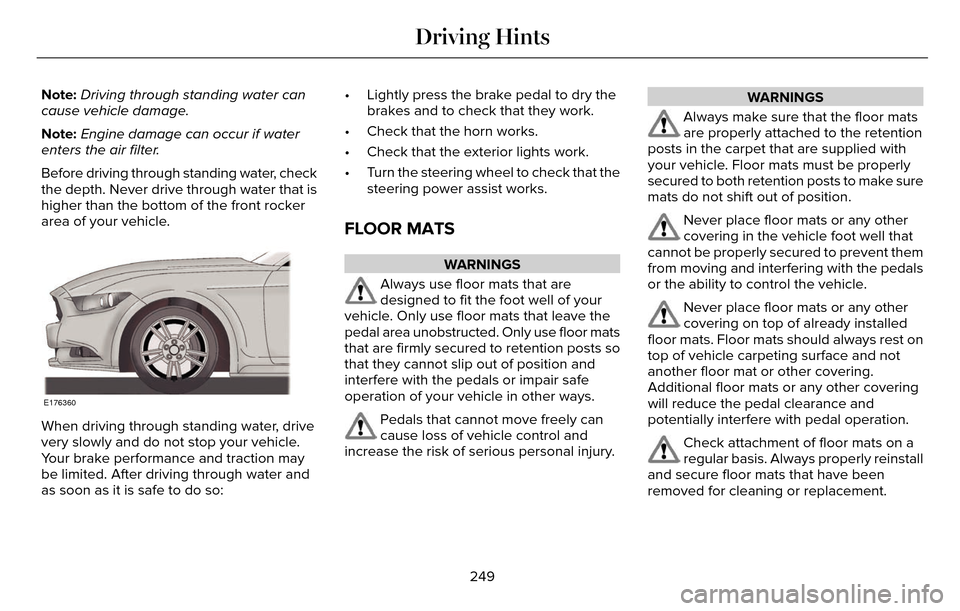
the depth. Never drive through water that is
higher than the bottom of the front rocker
area of your vehicle.
E176360
When driving through standing water, drive
very slowly and do not stop your vehicle.
Your brake performance and traction may
be limited. After driving through water and
as soon as it is safe to do so: • Lightly press the brake pedal to dry the
brakes and to check that they work.
• Check that the horn works.
• Check that the exterior lights work.
• Turn the steering wheel to check that the steering power assist works.
FLOOR MATS
WARNINGS
Always use floor mats that are
designed to fit the foot well of your
vehicle. Only use floor mats that leave the
pedal area unobstructed. Only use floor mats
that are firmly secured to retention posts so
that they cannot slip out of position and
interfere with the pedals or impair safe
operation of your vehicle in other ways.
Pedals that cannot move freely can
cause loss of vehicle control and
increase the risk of serious personal injury.
WARNINGS
Always make sure that the floor mats
are properly attached to the retention
posts in the carpet that are supplied with
your vehicle. Floor mats must be properly
secured to both retention posts to make sure
mats do not shift out of position.
Never place floor mats or any other
covering in the vehicle foot well that
cannot be properly secured to prevent them
from moving and interfering with the pedals
or the ability to control the vehicle.
Never place floor mats or any other
covering on top of already installed
floor mats. Floor mats should always rest on
top of vehicle carpeting surface and not
another floor mat or other covering.
Additional floor mats or any other covering
will reduce the pedal clearance and
potentially interfere with pedal operation.
Check attachment of floor mats on a
regular basis. Always properly reinstall
and secure floor mats that have been
removed for cleaning or replacement.
249
Driving Hints
Page 256 of 544
Should your vehicle shut off after a collision,
you may restart your vehicle. For vehicles
equipped with a key system:
1. Switch off the ignition.
2. Switch on the ignition.
3. Repeat Steps 1 and 2 to re-enable thefuel pump.
For vehicles equipped with a push button
start system:
1. Press the START/STOP button to switch off the ignition.
2. Press the brake pedal and press the START/STOP button to switch on the
ignition.
3. Remove your foot from the brake pedal and press the START/STOP button to
switch off the ignition.
4. You can either attempt to start the engine by pressing the brake pedal and the
START/STOP button, or switch on the
ignition only by pressing the
START/STOP button without pressing
the brake pedal. Both ways re-enable the
fuel system. Note:
When you try to restart your vehicle
after a fuel shutoff, the vehicle makes sure
that various systems are safe to restart.
Once your vehicle determines that the
systems are safe, then the vehicle will allow
you to restart.
Note: In the event that your vehicle does not
restart after your third attempt, contact an
authorized dealer.
JUMP STARTING THE VEHICLE
WARNINGS
Batteries normally produce explosive
gases which can cause personal injury.
Therefore, do not allow flames, sparks or
lighted substances to come near the battery.
When working near the battery, always shield
your face and protect your eyes. Always
provide correct ventilation.
WARNINGS
Keep batteries out of reach of children.
Batteries contain sulfuric acid. Avoid
contact with skin, eyes or clothing. Shield
your eyes when working near the battery to
protect against possible splashing of acid
solution. In case of acid contact with skin or
eyes, flush immediately with water for a
minimum of 15 minutes and get prompt
medical attention. If acid is swallowed, call a
physician immediately.
Use only adequately sized cables with
insulated clamps.
Preparing Your Vehicle
Do not attempt to push-start your automatic
transmission vehicle.
Note: Attempting to push-start a vehicle with
an automatic transmission may cause
transmission damage.
Note: Use only a 12-volt supply to start your
vehicle.
Note: Do not disconnect the battery of the
disabled vehicle as this could damage the
vehicle electrical system.
253
Roadside Emergencies
Page 269 of 544
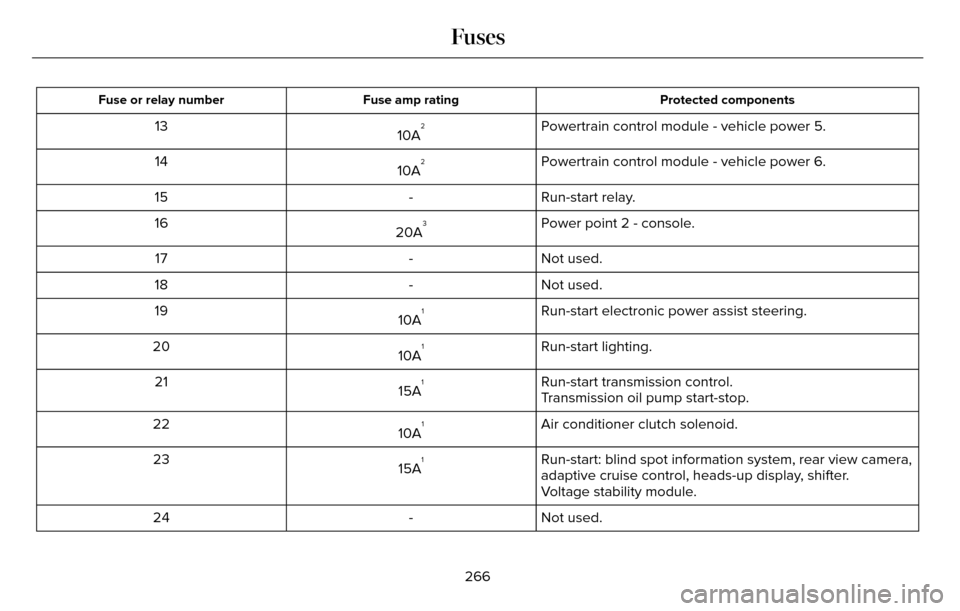
Protected components
Fuse amp rating
Fuse or relay number
Powertrain control module - vehicle power 5.
10A213
Powertrain control module - vehicle power 6.
10A
214
Run-start relay.
-
15
Power point 2 - console.
20A
316
Not used.
-
17
Not used.
-
18
Run-start electronic power assist steering.
10A
119
Run-start lighting.
10A
120
Run-start transmission control.
15A
121
Transmission oil pump start-stop.
Air conditioner clutch solenoid.
10A
122
Run-start: blind spot information system, rear view camera,
adaptive cruise control, heads-up display, shifter.
15A
123
Voltage stability module.
Not used.
-
24
266
Fuses
Page 279 of 544
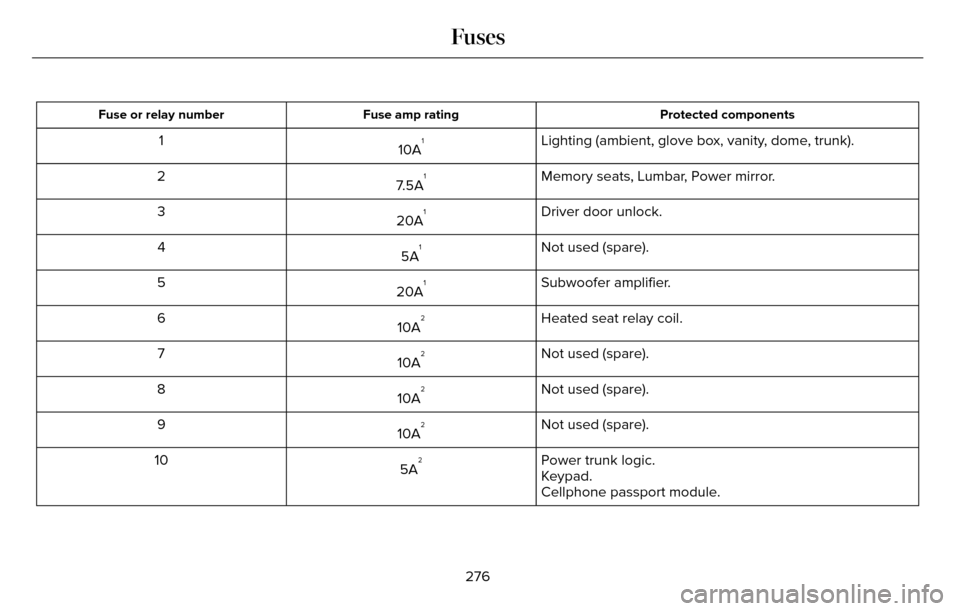
Protected components
Fuse amp rating
Fuse or relay number
Lighting (ambient, glove box, vanity, dome, trunk).
10A11
Memory seats, Lumbar, Power mirror.
7.5A
12
Driver door unlock.
20A
13
Not used (spare).
5A
14
Subwoofer amplifier.
20A
15
Heated seat relay coil.
10A
26
Not used (spare).
10A
27
Not used (spare).
10A
28
Not used (spare).
10A
29
Power trunk logic.
5A
210
Keypad.
Cellphone passport module.
276
Fuses