Installing car seat LINCOLN MKZ 2017 Owners Manual
[x] Cancel search | Manufacturer: LINCOLN, Model Year: 2017, Model line: MKZ, Model: LINCOLN MKZ 2017Pages: 564, PDF Size: 5.54 MB
Page 22 of 564
•
You are required by law to properly use
safety seats for infants and toddlers in
the United States and Canada.
• Many states and provinces require that
small children use approved booster
seats until they reach age eight, a height
of 4 feet 9 inches (1.45 meters) tall, or 80
pounds (36 kilograms). Check your local
and state or provincial laws for specific
requirements about the safety of children
in your vehicle.
• When possible, always properly restrain
children 12 years of age and under in a
rear seating position of your vehicle.
Accident statistics suggest that children
are safer when properly restrained in the
rear seating positions than in a front
seating position. See Front Passenger
Sensing System (page 47). INSTALLING CHILD RESTRAINTS
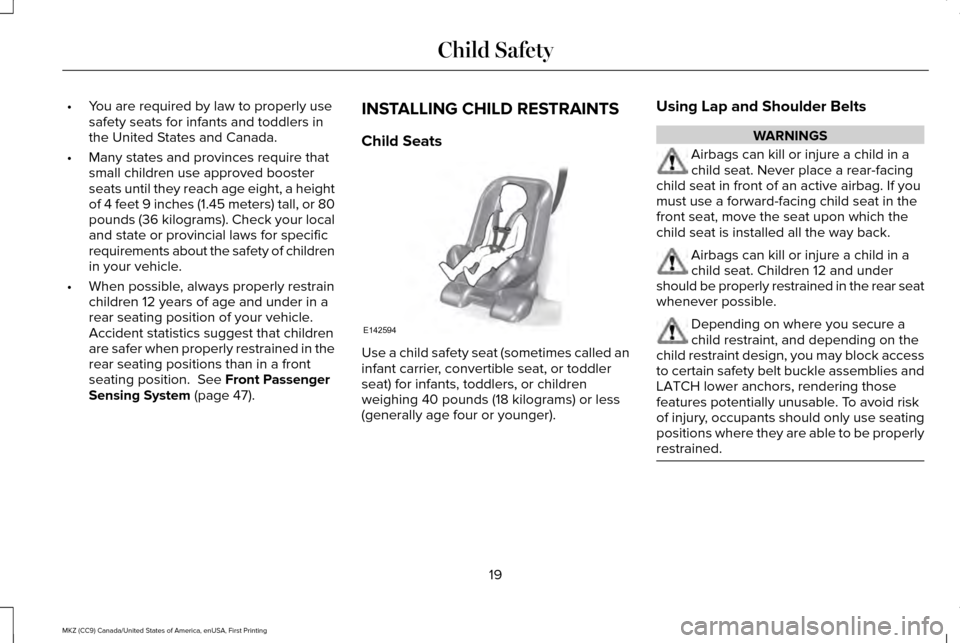
Child Seats
Use a child safety seat (sometimes called an
infant carrier, convertible seat, or toddler
seat) for infants, toddlers, or children
weighing 40 pounds (18 kilograms) or less
(generally age four or younger).Using Lap and Shoulder Belts WARNINGS
Airbags can kill or injure a child in a
child seat. Never place a rear-facing
child seat in front of an active airbag. If you
must use a forward-facing child seat in the
front seat, move the seat upon which the
child seat is installed all the way back. Airbags can kill or injure a child in a
child seat. Children 12 and under
should be properly restrained in the rear seat
whenever possible. Depending on where you secure a
child restraint, and depending on the
child restraint design, you may block access
to certain safety belt buckle assemblies and
LATCH lower anchors, rendering those
features potentially unusable. To avoid risk
of injury, occupants should only use seating
positions where they are able to be properly
restrained. 19
MKZ (CC9) Canada/United States of America, enUSA, First Printing Child SafetyE142594
Page 144 of 564
Lowering the Head Restraint
1. Press and hold button C.
2. Push the head restraint down.
Removing the Head Restraint
1.
Pull the head restraint up until it reaches
its highest position.
2. Press and hold buttons C and D.
3. Pull the head restraint up.
Installing the Head Restraint
Align the steel stems into the guide sleeves
and push the head restraint down until it
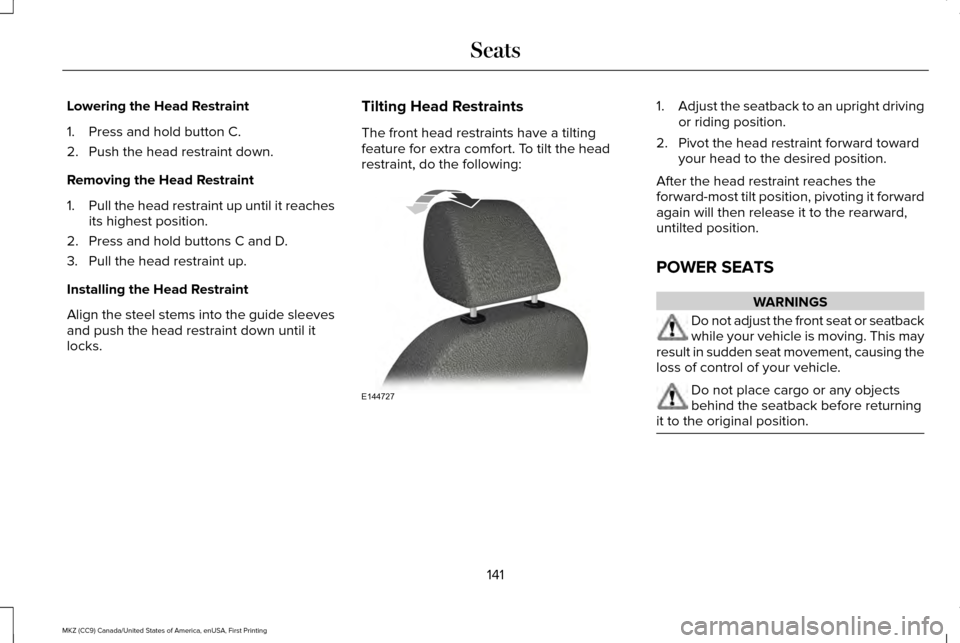
locks. Tilting Head Restraints
The front head restraints have a tilting
feature for extra comfort. To tilt the head
restraint, do the following: 1.
Adjust the seatback to an upright driving
or riding position.
2. Pivot the head restraint forward toward your head to the desired position.
After the head restraint reaches the
forward-most tilt position, pivoting it forward
again will then release it to the rearward,
untilted position.
POWER SEATS WARNINGS
Do not adjust the front seat or seatback
while your vehicle is moving. This may
result in sudden seat movement, causing the
loss of control of your vehicle. Do not place cargo or any objects
behind the seatback before returning
it to the original position. 141
MKZ (CC9) Canada/United States of America, enUSA, First Printing SeatsE144727
Page 184 of 564
Operating AWD Vehicles With Spare
or Mismatched Tires
WARNING
Only use replacement tires and wheels
that are the same size, load index,
speed rating and type (such as P-metric
versus LT-metric or all-season versus
all-terrain) as those originally provided by
Ford. The recommended tire and wheel size
may be found on either the Safety
Compliance Certification Label (affixed to
either the door hinge pillar, door-latch post,
or the door edge that meets the door-latch
post, next to the driver’ s seating position), or
the Tire Label which is located on the B-Pillar
or edge of the driver’ s door. If this
information is not found on these labels, then
you should contact your authorized dealer
as soon as possible. Use of any tire or wheel
not recommended by Ford can affect the
safety and performance of your vehicle,
which could result in an increased risk of loss
of vehicle control, vehicle rollover, personal
injury and death. A spare tire of a different size other than the
tire provided should never be used. The
AWD system may disable automatically and
enter front-wheel drive only mode to protect
driveline components if a non-full sized tire
is installed. This condition may display an
AWD OFF message in the information
display. If there is an AWD OFF message in
the information display from using a non-full
sized spare tire, this indicator should turn off
after reinstalling the repaired or replaced
normal road tire and cycling the ignition off
and on. It is recommended to reinstall the
repaired or replaced road tire as soon as
possible.
Major dissimilar tire sizes between the front
and rear axles (for example, 17 inch low
profile tires on the front axle and 22 inch high
profile tires on the rear axle) could cause the
AWD system to stop functioning and default
to front-wheel drive or damage the AWD
system. However, the AWD system is
capable of tolerating any combination of new
and worn tires of the same original tire size.
For example, using 3 worn tread tires and 1
new tread tire all of the same original tire
size, can be tolerated by the AWD system. Driving In Special Conditions With All-
Wheel Drive (AWD)
AWD vehicles are equipped for driving on
sand, snow, mud and rough roads and have
operating characteristics that are somewhat
different from conventional vehicles, both on
and off the highway.
When driving at slow speeds in deep sand
under high outside temperatures, use a low
gear when possible. Lower gear operation
will maximize the engine and transmission
cooling capability.
Under severe operating conditions, the A/C
may cycle on and off to protect overheating
of the engine.
Basic operating principles in special
conditions
•
Drive slower in strong crosswinds which
can affect the normal steering
characteristics of your vehicle.
• Be extremely careful when driving on
pavement made slippery by loose sand,
water, gravel, snow or ice.
181
MKZ (CC9) Canada/United States of America, enUSA, First Printing All-Wheel Drive
(If Equipped)
Page 559 of 564
Traction Control...................................................130
Transmission..........................................................131
Installing Child Restraints..............................19
Child Seats..............................................................19
Using Lap and Shoulder Belts............................19
Using Lower Anchors and Tethers for
CHildren (LATCH).............................................25
Using Tether Straps..............................................27
Instrument Cluster.........................................101
Instrument Lighting Dimmer........................86
Interior Lamps
...................................................91
Front Interior Lamp................................................91
Rear Interior Lamp................................................92
Interior Luggage Compartment Release...........................................................73
Interior Mirror
...................................................97
Auto-Dimming Mirror............................................97
Introduction
.........................................................7
J
Jump Starting the Vehicle...........................261 Connecting the Jumper Cables.....................
262
Jump Starting......................................................263
Preparing Your Vehicle......................................261
Removing the Jumper Cables.........................263 K
Keyless Entry.....................................................71
SECURICODE™ KEYLESS ENTRY
KEYPAD................................................................71
Keyless Starting.............................................159 Ignition Modes.....................................................159
Keys and Remote Controls
...........................54
L
Lane Keeping System
.................................226
Switching the System On and Off..................227
Lighting Control
..............................................85
Headlamp Flasher................................................85
Headlamp High Beam.........................................85
Lighting..............................................................85
Lincoln Automotive Financial Services......12
Lincoln Protect
..............................................493
EXTENDED SERVICE PLANS (CANADA
ONLY)................................................................494
Lincoln Protect (U.S. Only)................................493
Load Carrying
................................................244
Load Limit.......................................................244
Special Loading Instructions for Owners of
Pick-up Trucks and Utility-type
Vehicles............................................................248 Vehicle Loading - with and without a
Trailer................................................................244
Locking and Unlocking
.................................65
Activating Intelligent Access.............................66
Autolock..................................................................68
Battery Saver.........................................................69
Illuminated Entry...................................................68
Illuminated Exit......................................................68
Locking and Unlocking the Doors with the
Key Blade............................................................67
Luggage Compartment.......................................69
Power Decklid.......................................................69
Power Door Locks................................................65
Remote Control.....................................................65
Smart Unlocks for Intelligent Access Keys......................................................................67
Locks..................................................................65
Lug Nuts See: Changing a Road Wheel.........................357
M
Maintenance..................................................295 General Information...........................................295
Media Hub......................................................389
Memory Function..........................................145 Easy Entry and Exit Feature..............................146
556
MKZ (CC9) Canada/United States of America, enUSA, First Printing Index