belt LINCOLN MKZ 2018 Service Manual
[x] Cancel search | Manufacturer: LINCOLN, Model Year: 2018, Model line: MKZ, Model: LINCOLN MKZ 2018Pages: 595, PDF Size: 5.06 MB
Page 153 of 595
Linking a PreSet Position to yourRemote Control or Intelligent AccessKey Fob
Your vehicle can save the preset memorypositions for up to two remote controls orintelligent access (IA) keys.
After you have saved your desired memorypreset positions:
1.Press and hold the desired preset buttonfor about three seconds until you hear asingle tone.
2. Within three seconds, press the lockbutton on the remote control you arelinking.
To unlink a remote control, follow the sameprocedure – except in step 2, press theunlock button on the remote control.
Note:If more than one linked remote controlor intelligent access key is in range, thememory function moves to the settings ofthe first key to initiate a memory recall.
Easy Entry and Exit Feature
If you enable the easy entry and exit feature,it automatically moves the driver seatposition rearward up to 2 in (5 cm) when youswitch the ignition off.
The driver seat returns to the previousposition when you switch the ignition on.
You can enable or disable this feature in theinformation display. See GeneralInformation (page 111).
REAR SEATS
Note:Your vehicle may have split seatbacksthat you must fold individually.
Note:Make sure the center safety belt isunbuckled before folding the seatback.
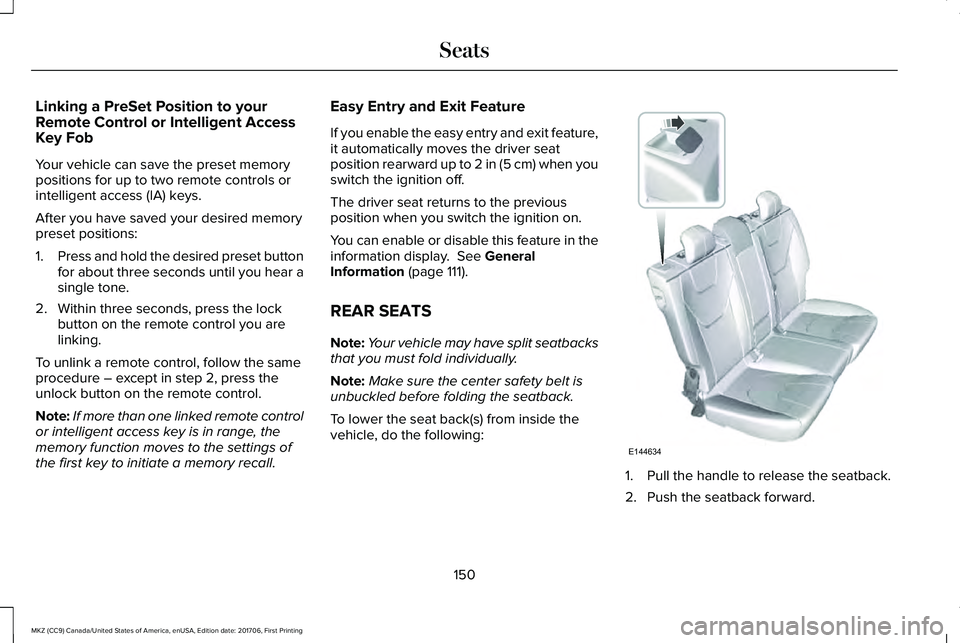
To lower the seat back(s) from inside thevehicle, do the following:
1. Pull the handle to release the seatback.
2. Push the seatback forward.
150
MKZ (CC9) Canada/United States of America, enUSA, Edition date: 201706, First Printing
SeatsE144634
Page 154 of 595
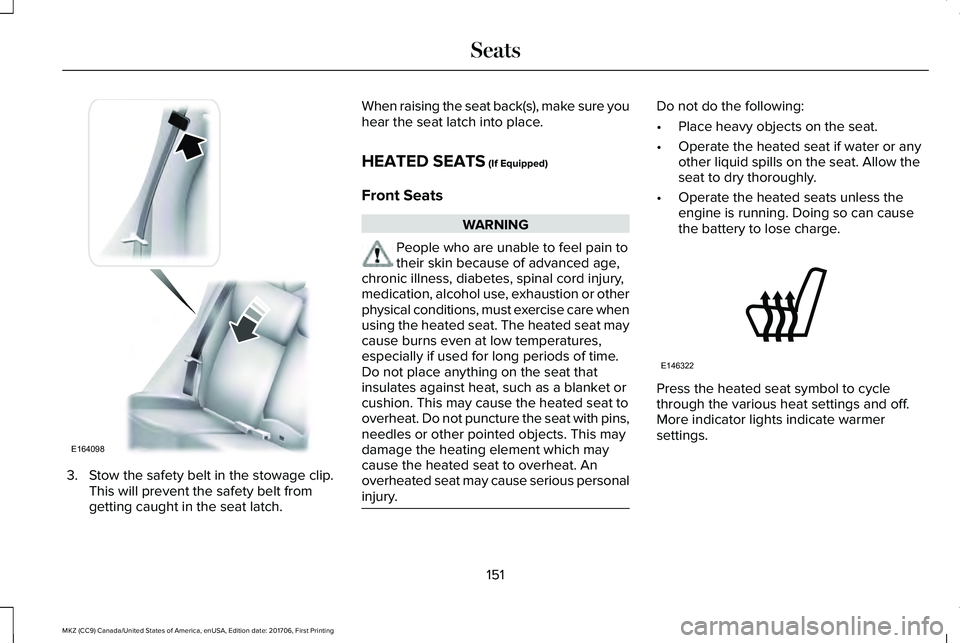
3. Stow the safety belt in the stowage clip.This will prevent the safety belt fromgetting caught in the seat latch.
When raising the seat back(s), make sure youhear the seat latch into place.
HEATED SEATS (If Equipped)
Front Seats
WARNING
People who are unable to feel pain totheir skin because of advanced age,chronic illness, diabetes, spinal cord injury,medication, alcohol use, exhaustion or otherphysical conditions, must exercise care whenusing the heated seat. The heated seat maycause burns even at low temperatures,especially if used for long periods of time.Do not place anything on the seat thatinsulates against heat, such as a blanket orcushion. This may cause the heated seat tooverheat. Do not puncture the seat with pins,needles or other pointed objects. This maydamage the heating element which maycause the heated seat to overheat. Anoverheated seat may cause serious personalinjury.
Do not do the following:
•Place heavy objects on the seat.
•Operate the heated seat if water or anyother liquid spills on the seat. Allow theseat to dry thoroughly.
•Operate the heated seats unless theengine is running. Doing so can causethe battery to lose charge.
Press the heated seat symbol to cyclethrough the various heat settings and off.More indicator lights indicate warmersettings.
151
MKZ (CC9) Canada/United States of America, enUSA, Edition date: 201706, First Printing
SeatsE164098 E146322
Page 167 of 595
The keyless starting system has threemodes:
•Off: Turns the ignition off.
•Without applying the brake pedal,press and release the button oncewhen the ignition is in the on mode,or when the vehicle is running but isnot moving.
•On: All electrical circuits are operationaland the warning lamps and indicatorsilluminate.
•Without applying the brake pedal,press and release the button once.
•Start: Starts the vehicle. The engine maynot start when the vehicle starts.
•Press the brake pedal, and then pressthe button until the vehicle starts. Anindicator light on the buttonilluminates when the ignition is onand when the vehicle starts.
STARTING A GASOLINE ENGINE
When you start the engine, the idle speedincreases, this helps to warm up the engine.If the engine idle speed does not slow downautomatically, have your vehicle checked byan authorized dealer.
Before starting the engine, check thefollowing:
•Make sure all occupants have fastenedtheir safety belts.
•Make sure the headlamps and electricalaccessories are off.
•Make sure the parking brake is on.
•Put the transmission in P.
Note:Do not touch the accelerator pedal.
1. Fully press the brake pedal.
2. Press the button.
The system does not function if:
•The key frequencies are jammed.
•The key battery has no charge.
If you are unable to start the engine, do thefollowing:
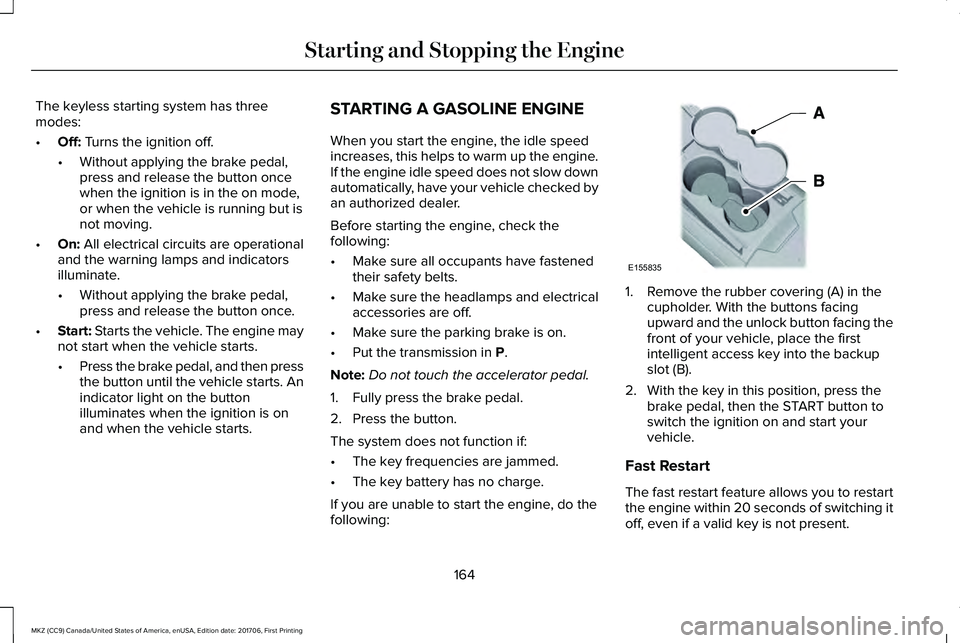
1. Remove the rubber covering (A) in thecupholder. With the buttons facingupward and the unlock button facing thefront of your vehicle, place the firstintelligent access key into the backupslot (B).
2. With the key in this position, press thebrake pedal, then the START button toswitch the ignition on and start yourvehicle.
Fast Restart
The fast restart feature allows you to restartthe engine within 20 seconds of switching itoff, even if a valid key is not present.
164
MKZ (CC9) Canada/United States of America, enUSA, Edition date: 201706, First Printing
Starting and Stopping the EngineE155835
Page 184 of 595
Note:If you attempt to leave your vehiclewhile it is in gear, the vehicle willautomatically shift into park (P). Safety beltand door monitors determine your intent andmake the shift for you. During this time, amessage will appear in the informationdisplay screen prompting you to make theshift. See Information Messages (page 117).
Note:To put your vehicle in gear with thedoor open, perform steps 1-4. See theAutomatic Return to Park section in thischapter for more information on this feature.
Park (P)
With the transmission in park (P), your vehiclelocks the transmission and prevents the frontwheels from turning. Always come to acomplete stop before putting your vehicleinto and out of park (P). An audible chimesounds once you select park (P).
When the ignition is turned off, the vehiclewill automatically shift into park (P). If theignition is turned off while the vehicle ismoving, it will first shift into neutral (N) untila slow enough speed is reached. The vehiclewill then shift into park (P) automatically.
Automatic Return to Park
Note:This feature will not operate when yourvehicle is in Stay in Neutral mode or neutraltow.
Your vehicle has a safety feature that willautomatically shift your vehicle into park (P)when any of the following conditions occur:
•You turn the ignition off
•You open the driver's door with yoursafety belt unlatched
•Your safety belt is unlatched while thedriver's door is open
If you turn the ignition off while your vehicleis moving, your vehicle will first shift intoneutral (N) until it slows down enough to shiftinto park (P) automatically.
Note:If you have waited an extended periodof time, (2-15 minutes) before starting yourvehicle, unlatching your safety belt will causethis feature to activate, even with the driver'sdoor closed.
Note:This feature may not work properly ifthe door ajar switch is malfunctioning. If yourdoor ajar indicator does not illuminate whenyou open the driver’s door or the indicatorilluminates with the driver’s door closed. Seeyour authorized dealer.
Reverse (R)
With the transmission in reverse (R), yourvehicle will move backward. Always cometo a complete stop before shifting into andout of reverse (R).
Neutral (N)
With the transmission in neutral (N), you canstart your vehicle and it is free to roll. Holdthe brake pedal down while in this position.
Stay in Neutral mode
Stay in Neutral mode allows your vehicle tostay in neutral (N) when you exit the vehicle.Your vehicle must be stationary to enter thismode.
To enter Stay in Neutral mode:
1. Press the neutral (N) button on yourshifter assembly.
181
MKZ (CC9) Canada/United States of America, enUSA, Edition date: 201706, First Printing
Transmission
Page 202 of 595
WARNINGS
The system will turn off if a malfunctionis apparent. Failure to take care mayresult in the loss of control of your vehicle,serious personal injury or death.
Auto Hold uses your vehicle's brakes to holdyour vehicle at a stop once your vehicle hasreached a standstill condition. For example,Auto Hold can assist you while stopping attraffic lights or while in traffic jams by holdingthe brake pressure for you once you bringyour vehicle to a stop.
Switch Auto Hold off during vehicle or trailertowing.
Note:In case of a malfunction in the systemwhile Auto Hold actively holds the vehicle(for example, low power supply), a messageappears in the information display askingyou to press the brake pedal. If you see thismessage, press the brake pedalimmediately.
Note:Auto Hold only activates if the systemrecognizes it is applying enough brakepressure. On a steep hill or incline, you mayneed to make sure the brake pedal ispressed sufficiently to activate the Auto Holdsystem.
Note:In some cases, Auto Hold might handover to the parking brake. When the parkingbrake automatically applies, the red brakelamp appears. This is normal. When youpress the accelerator pedal, the drive awayrelease feature automatically releases theparking brake.
Note:Auto Hold works on all road gradesand in reverse (R).
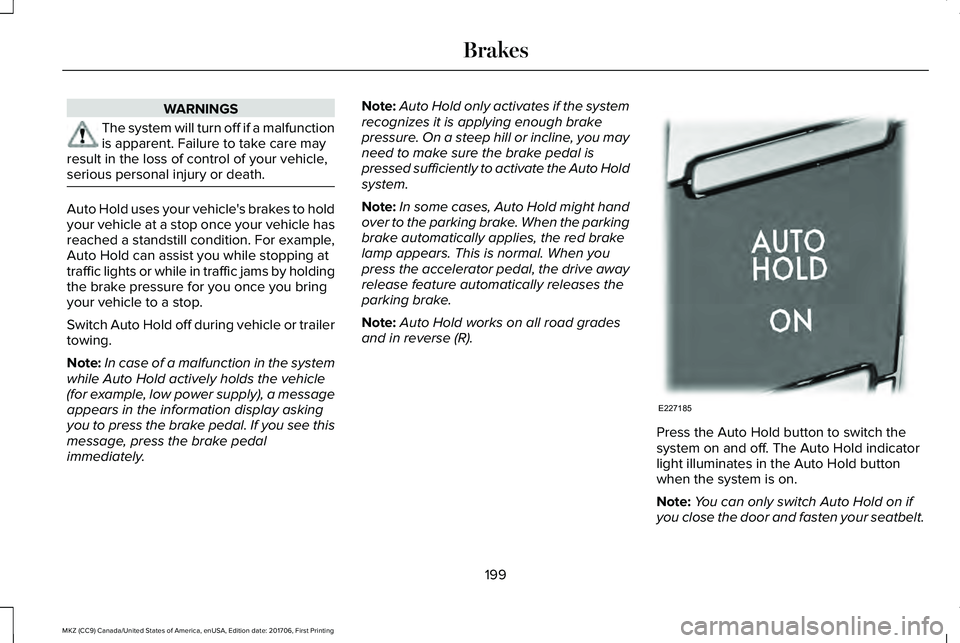
Press the Auto Hold button to switch thesystem on and off. The Auto Hold indicatorlight illuminates in the Auto Hold buttonwhen the system is on.
Note:You can only switch Auto Hold on ifyou close the door and fasten your seatbelt.
199
MKZ (CC9) Canada/United States of America, enUSA, Edition date: 201706, First Printing
BrakesE227185
Page 203 of 595
Note:Auto Hold turns off every time youpower down your vehicle.
When Auto Hold is off, your vehicle behavesthe same as a vehicle without Auto Hold.
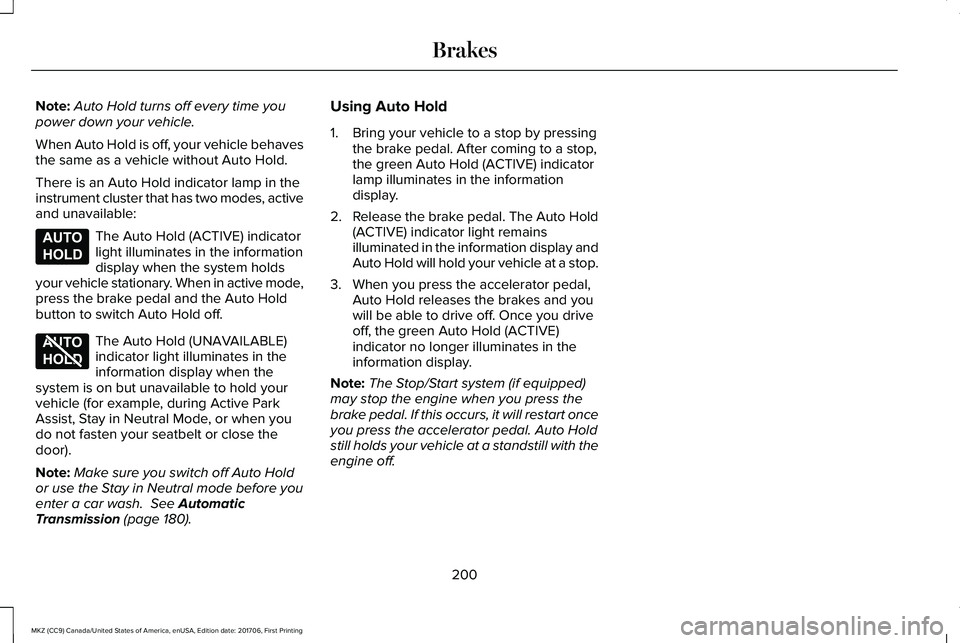
There is an Auto Hold indicator lamp in theinstrument cluster that has two modes, activeand unavailable:
The Auto Hold (ACTIVE) indicatorlight illuminates in the informationdisplay when the system holdsyour vehicle stationary. When in active mode,press the brake pedal and the Auto Holdbutton to switch Auto Hold off.
The Auto Hold (UNAVAILABLE)indicator light illuminates in theinformation display when thesystem is on but unavailable to hold yourvehicle (for example, during Active ParkAssist, Stay in Neutral Mode, or when youdo not fasten your seatbelt or close thedoor).
Note:Make sure you switch off Auto Holdor use the Stay in Neutral mode before youenter a car wash. See AutomaticTransmission (page 180).
Using Auto Hold
1. Bring your vehicle to a stop by pressingthe brake pedal. After coming to a stop,the green Auto Hold (ACTIVE) indicatorlamp illuminates in the informationdisplay.
2.Release the brake pedal. The Auto Hold(ACTIVE) indicator light remainsilluminated in the information display andAuto Hold will hold your vehicle at a stop.
3. When you press the accelerator pedal,Auto Hold releases the brakes and youwill be able to drive off. Once you driveoff, the green Auto Hold (ACTIVE)indicator no longer illuminates in theinformation display.
Note:The Stop/Start system (if equipped)may stop the engine when you press thebrake pedal. If this occurs, it will restart onceyou press the accelerator pedal. Auto Holdstill holds your vehicle at a standstill with theengine off.
200
MKZ (CC9) Canada/United States of America, enUSA, Edition date: 201706, First Printing
BrakesE197933 E197934
Page 230 of 595
Park Brake Application
Automatic parking brake application andcancellation occurs if:
•You unbuckle the seatbelt and open thedoor after you stop the vehicle.
•You hold the vehicle at a stopcontinuously for more than three minutes.
Hilly Condition Usage
Note:An audible alarm sounds and thesystem shuts down if it applies brakes for anextended period of time. This allows thebrakes to cool. The system functionsnormally again after the brakes cool.
Select a lower gear when the system isactive in situations such as prolongeddownhill driving on steep grades, forexample in mountainous areas. The systemneeds additional engine braking in thesesituations to reduce the load on the vehicle’sregular brake system to prevent it fromoverheating.
Switching Adaptive Cruise Control Off
Note:You erase the set speed and gapsetting when you switch the system off.
Press OFF when the system is in standbymode, or switch the ignition off.
Detection Issues
WARNINGS
On rare occasions, detection issuescan occur due to the roadinfrastructures, for example bridges, tunnelsand safety barriers. In these cases, thesystem may brake late or unexpectedly. Atall times, you are responsible for controllingyour vehicle, supervising the system andintervening, if required.
If the system malfunctions, have yourvehicle checked as soon as possible.
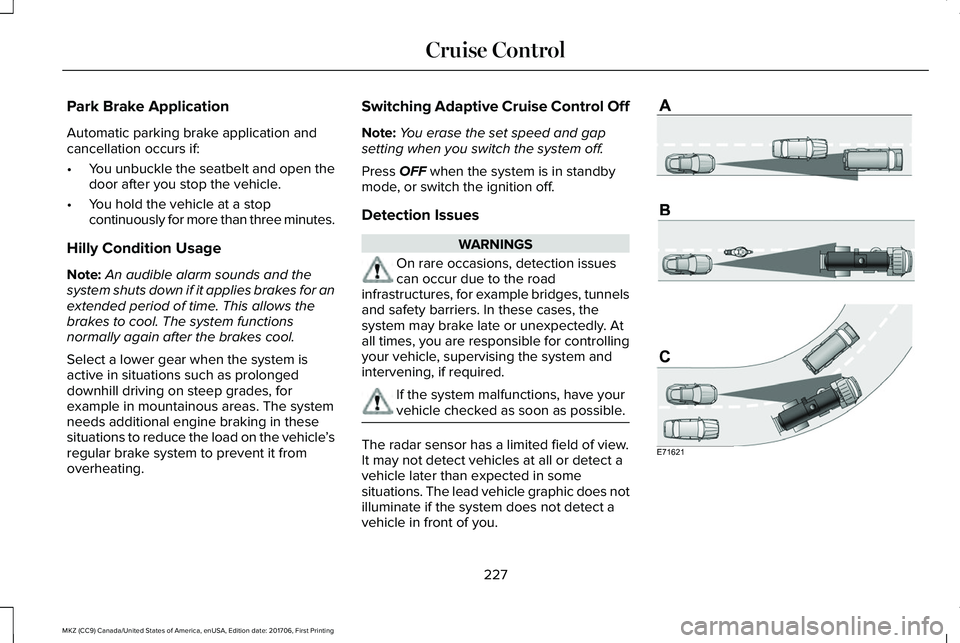
The radar sensor has a limited field of view.It may not detect vehicles at all or detect avehicle later than expected in somesituations. The lead vehicle graphic does notilluminate if the system does not detect avehicle in front of you.
227
MKZ (CC9) Canada/United States of America, enUSA, Edition date: 201706, First Printing
Cruise ControlE71621
Page 274 of 595
2. Remove the jumper cable on thenegative (-) terminal of the boostervehicle battery.
3. Remove the jumper cable from thepositive (+) terminal of the booster vehiclebattery.
4. Remove the jumper cable from thepositive (+) terminal of the disabledvehicle battery.
5. Allow the engine to idle for at least oneminute.
POST-CRASH ALERT SYSTEM
The system flashes the direction indicatorsand sounds the horn (intermittently) in theevent of a serious impact that deploys anairbag (front, side, side curtain or SafetyCanopy) or the seatbelt pretensioners.
The horn and indicators turn off when:
•You press the hazard control button.
•You press the panic button on the remoteentry transmitter (if equipped).
•Your vehicle runs out of power.
•Sounding of the horn is only enabled inspecific markets.
TRANSPORTING THE VEHICLE
271
MKZ (CC9) Canada/United States of America, enUSA, Edition date: 201706, First Printing
Roadside EmergenciesE143886
Page 275 of 595
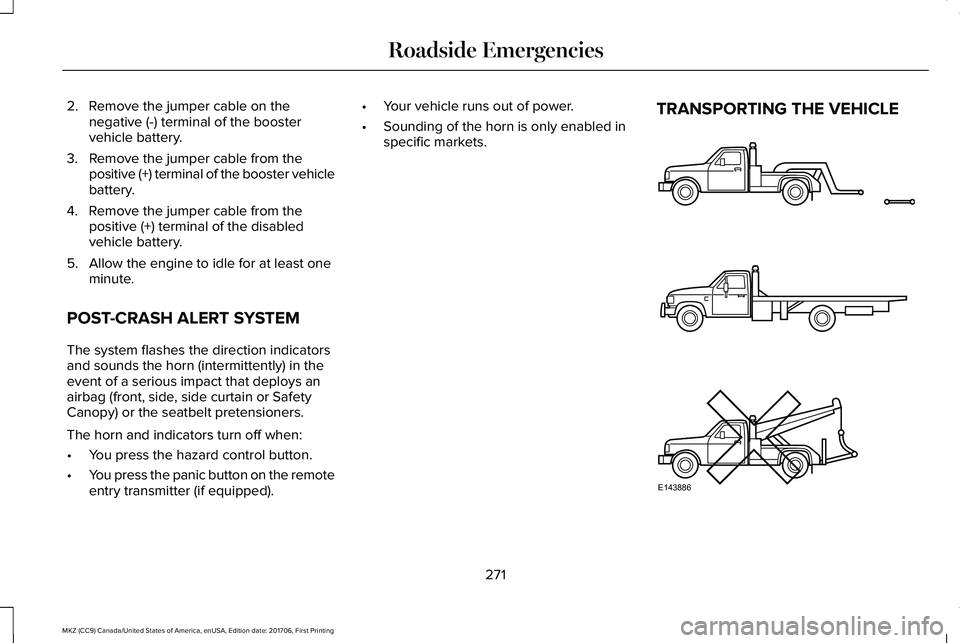
If you need to tow your vehicle, contact aprofessional towing service or, if you are amember of a roadside assistance program,your roadside assistance service provider.
We recommend the use of a wheel lift anddollies or flatbed equipment to tow yourvehicle. Do not tow with a slingbelt. LincolnMotor Company does not approve a slingbelttowing procedure. If you tow your vehicleincorrectly, or by any other means, vehicledamage may occur.
Lincoln Motor Company produces a towingmanual for all authorized tow truck operators.Have your tow truck operator refer to thismanual for proper hook-up and towingprocedures for your vehicle.
It is acceptable to have your front-wheeldrive vehicle towed from the front if usingproper wheel lift equipment to raise the frontwheels off the ground. When towing in thismanner, the rear wheels can remain on theground.
Front-wheel drive vehicles must have thefront wheels placed on a tow dolly whentowing your vehicle from the rear usingwheel lift equipment. This prevents damageto the transmission.
Towing an all-wheel drive vehicle requiresthat all wheels be off the ground, such asusing a wheel lift and dollies or flatbedequipment. This prevents damage to thetransmission, all-wheel drive system andvehicle.
TOWING POINTS
Due to local market requirements in somecountries, some vehicles may be equippedwith a recovery hook.
Recovery Hook Location
If your vehicle is equipped with a screw-inrecovery hook, it is with the spare tire kit orthe rear under floor storage.
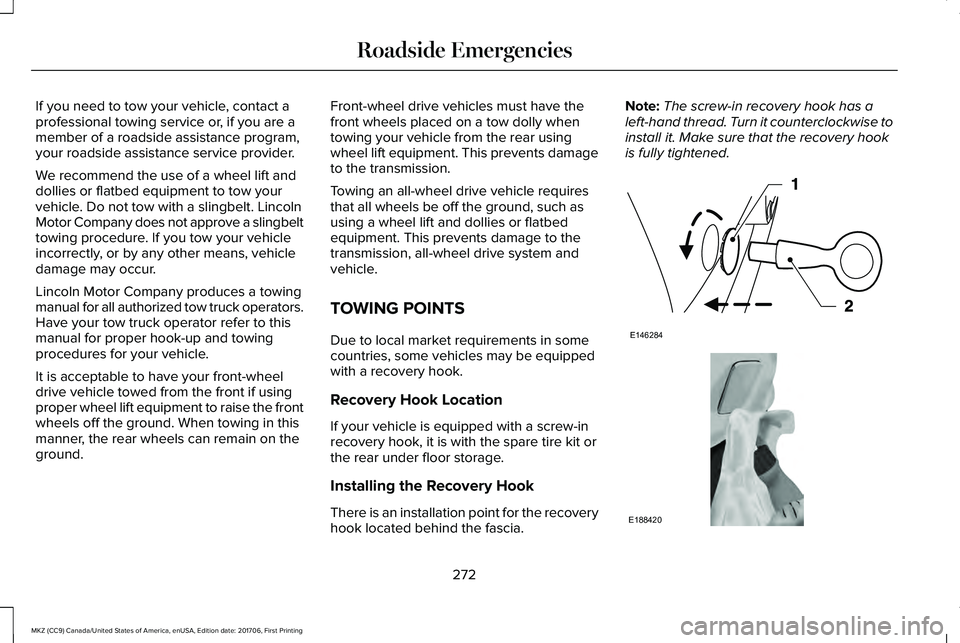
Installing the Recovery Hook
There is an installation point for the recoveryhook located behind the fascia.
Note:The screw-in recovery hook has aleft-hand thread. Turn it counterclockwise toinstall it. Make sure that the recovery hookis fully tightened.
272
MKZ (CC9) Canada/United States of America, enUSA, Edition date: 201706, First Printing
Roadside EmergenciesE146284 E188420
Page 332 of 595
When washing:
•Take care when using a power washerto clean the engine. The high-pressurefluid could penetrate the sealed partsand cause damage.
•Do not spray a hot engine with cold waterto avoid cracking the engine block orother engine components.
•Spray Motorcraft Engine Shampoo andDegreaser on all parts that requirecleaning and pressure rinse clean. InCanada, use Motorcraft Engine Shampoo.
•Never wash or rinse the engine while itis hot or running; water in the runningengine may cause internal damage.
•Never wash or rinse any ignition coil,spark plug wire or spark plug well, or thearea in and around these locations.
•Cover the battery, power distribution box,and air filter assembly to prevent waterdamage when cleaning the engine.
CLEANING THE WINDOWS AND
WIPER BLADES
Car wash chemicals and environmentalfallout can result in windshield and wiperblade contamination. Dirty windshield andwipers will result in poor windshield wiperoperation. Keep the windshield and wiperblades clean to maintain windshield wiperperformance.
To clean the windshield and wiper blades:
•Clean the windshield with a non-abrasiveglass cleaner. When cleaning the interiorof the windshield, avoid getting any glasscleaner on the instrument panel or doorpanels. Wipe any glass cleaner off thesesurfaces immediately.
•For windshields contaminated with treesap, chemicals, wax or bugs, clean theentire windshield using steel wool (nogreater than 0000 grade) in a circularmotion and rinse with water.
•Clean the wiper blades with isopropylrubbing alcohol or windshield washerconcentrate.
Note: Do not use razor blades or othersharp objects to clean or remove decals fromthe inside of the heated rear window. Thevehicle warranty does not cover damagecaused to the heated rear window grid lines.
CLEANING THE INTERIOR
WARNINGS
Do not use cleaning solvents, bleachor dye on the vehicle’s safety belts, asthese actions may weaken the belt webbing.
On vehicles equipped withseat-mounted airbags, do not usechemical solvents or strong detergents. Suchproducts could contaminate the side airbagsystem and affect performance of the sideairbag in a collision.
Note:Follow the same procedure forcleaning leather seats when cleaning leatherinterior. See Cleaning Leather Seats (page332).
329
MKZ (CC9) Canada/United States of America, enUSA, Edition date: 201706, First Printing
Vehicle Care