belt LINCOLN MKZ 2018 Owner's Guide
[x] Cancel search | Manufacturer: LINCOLN, Model Year: 2018, Model line: MKZ, Model: LINCOLN MKZ 2018Pages: 595, PDF Size: 5.06 MB
Page 52 of 595

Proper Driver and Front PassengerSeating Adjustment
WARNING
National Highway Traffic SafetyAdministration (NHTSA) recommendsa minimum distance of at least 10 in (25 cm)between an occupant's chest and the driverairbag module.
To properly position yourself away from theairbag:
•Move your seat to the rear as far as youcan while still reaching the pedalscomfortably.
•Recline the seat slightly (one or twodegrees) from the upright position.
After all occupants have adjusted their seatsand put on seatbelts, it is very important thatthey continue to sit properly. A properlyseated occupant sits upright, leaning againstthe seatback, and centered on the seatcushion, with their feet comfortably extendedon the floor. Sitting improperly can increase
the chance of injury in a crash event. Forexample, if an occupant slouches, lies down,turns sideways, sits forward, leans forwardor sideways, or puts one or both feet up, thechance of injury during a crash is greatlyincreased.
Children and Airbags
WARNING
Airbags can kill or injure a child in achild restraint. Never place arear-facing child restraint in front of an activeairbag. If you must use a forward-facing childrestraint in the front seat, move the seat uponwhich the child restraint is installed all theway back.
Children must always be properly restrained.Accident statistics suggest that children aresafer when properly restrained in the rearseating positions than in the front seatingposition. Failure to follow these instructionsmay increase the risk of injury in a crash.
49
MKZ (CC9) Canada/United States of America, enUSA, Edition date: 201706, First Printing
Supplementary Restraints SystemE142846
Page 53 of 595
FRONT PASSENGER SENSING
SYSTEM
WARNINGS
Even with advanced restraints systems,properly restrain children 12 and underin a rear seating position. Failure to followthis could seriously increase the risk of injuryor death.
Sitting improperly, out of position orwith the seatback reclined too far cantake weight off the seat cushion and affectthe decision of the passenger sensingsystem, resulting in serious injury or deathin the event of a crash. Always sit uprightagainst your seat back, with your feet on thefloor.
Any alteration or modification to thefront passenger seat may affect theperformance of the front passenger sensingsystem. This could seriously increase the riskof injury or death.
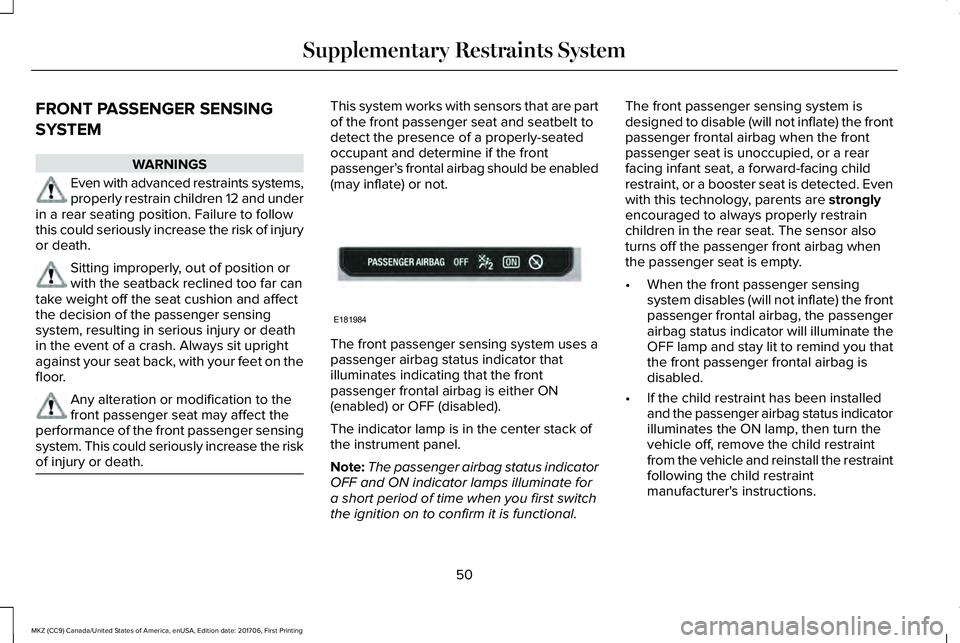
This system works with sensors that are partof the front passenger seat and seatbelt todetect the presence of a properly-seatedoccupant and determine if the frontpassenger’s frontal airbag should be enabled(may inflate) or not.
The front passenger sensing system uses apassenger airbag status indicator thatilluminates indicating that the frontpassenger frontal airbag is either ON(enabled) or OFF (disabled).
The indicator lamp is in the center stack ofthe instrument panel.
Note:The passenger airbag status indicatorOFF and ON indicator lamps illuminate fora short period of time when you first switchthe ignition on to confirm it is functional.
The front passenger sensing system isdesigned to disable (will not inflate) the frontpassenger frontal airbag when the frontpassenger seat is unoccupied, or a rearfacing infant seat, a forward-facing childrestraint, or a booster seat is detected. Evenwith this technology, parents are stronglyencouraged to always properly restrainchildren in the rear seat. The sensor alsoturns off the passenger front airbag whenthe passenger seat is empty.
•When the front passenger sensingsystem disables (will not inflate) the frontpassenger frontal airbag, the passengerairbag status indicator will illuminate theOFF lamp and stay lit to remind you thatthe front passenger frontal airbag isdisabled.
•If the child restraint has been installedand the passenger airbag status indicatorilluminates the ON lamp, then turn thevehicle off, remove the child restraintfrom the vehicle and reinstall the restraintfollowing the child restraintmanufacturer's instructions.
50
MKZ (CC9) Canada/United States of America, enUSA, Edition date: 201706, First Printing
Supplementary Restraints SystemE181984
Page 55 of 595

After all occupants have adjusted their seatsand put on seatbelts, it is very important thatthey continue to sit properly. A properlyseated occupant sits upright, leaning againstthe seat back, and centered on the seatcushion, with their feet comfortably extendedon the floor. Sitting improperly can increasethe chance of injury in a crash event. Forexample, if an occupant slouches, lies down,turns sideways, sits forward, leans forwardor sideways, or puts one or both feet up, thechance of injury during a crash is greatlyincreased.
The conditions listed above may cause theweight of a properly seated occupant to beincorrectly interpreted by the front passengersensing system. The person in the frontpassenger seat may appear heavier or lighterdue to the conditions described in the listabove.
To know if the front passengersensing system is operatingproperly, See Crash Sensors andAirbag Indicator (page 55).
Do not attempt to repair or service thesystem. Take your vehicle immediately to anauthorized dealer.
If it is necessary to modify an advanced frontairbag system to accommodate a personwith disabilities, contact the Ford CustomerRelationship Center. See Getting theServices You Need (page 274).
SIDE AIRBAGS
WARNINGS
Do not place objects or mountequipment on or near the airbag cover,on the side of the seatbacks (of the frontseats), or in front seat areas that may comeinto contact with a deploying airbag. Failureto follow these instructions may increase therisk of personal injury in the event of a crash.
Do not use accessory seat covers. Theuse of accessory seat covers mayprevent the deployment of the side airbagsand increase the risk of injury in an accident.
Do not lean your head on the door. Theside airbag could injure you as itdeploys from the side of the seatback.
WARNINGS
Do not attempt to service, repair, ormodify the seat airbag supplementalrestraint systems, its fuses or the seat coveron a vehicle containing seat airbags as youcould be seriously injured or killed. Contactyour authorized dealer as soon as possible.
If the side airbag has deployed, theairbag will not function again. The sideairbag system (including the seat) must beinspected as soon as possible. If the airbagis not replaced, the unrepaired area willincrease the risk of injury in a crash.
The side airbags are on the outboard sideof the seatbacks of the front seats. In certainsideways crashes, the side airbags will beinflated. The airbag was designed to inflatebetween the door panel and occupant tofurther enhance the protection providedoccupants in side impact crashes.
52
MKZ (CC9) Canada/United States of America, enUSA, Edition date: 201706, First Printing
Supplementary Restraints SystemE67017
Page 57 of 595
WARNINGS
All occupants of your vehicle, includingthe driver, should always properly weartheir seatbelts, even when an airbagsupplemental restraint system is provided.Failure to properly wear your seatbelt couldseriously increase the risk of injury or death.
To reduce risk of injury, do not obstructor place objects in the deploymentpath of the airbag.
If a supplementary restraint systemcomponent has deployed, it will notfunction again. Have the system andassociated components inspected as soonas possible. Failure to follow this instructioncould result in personal injury or death.
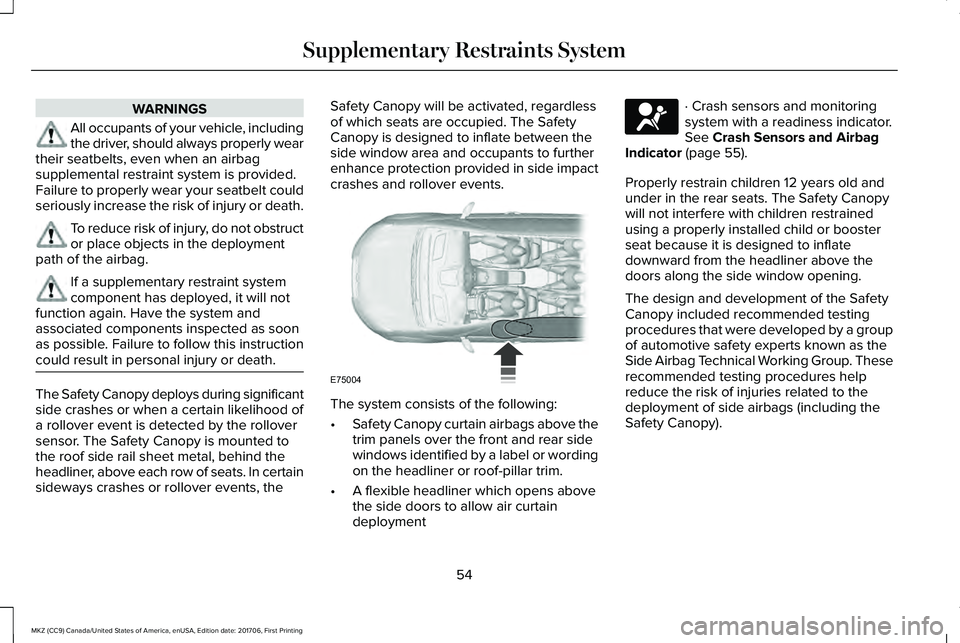
The Safety Canopy deploys during significantside crashes or when a certain likelihood ofa rollover event is detected by the rolloversensor. The Safety Canopy is mounted tothe roof side rail sheet metal, behind theheadliner, above each row of seats. In certainsideways crashes or rollover events, the
Safety Canopy will be activated, regardlessof which seats are occupied. The SafetyCanopy is designed to inflate between theside window area and occupants to furtherenhance protection provided in side impactcrashes and rollover events.
The system consists of the following:
•Safety Canopy curtain airbags above thetrim panels over the front and rear sidewindows identified by a label or wordingon the headliner or roof-pillar trim.
•A flexible headliner which opens abovethe side doors to allow air curtaindeployment
· Crash sensors and monitoringsystem with a readiness indicator.See Crash Sensors and AirbagIndicator (page 55).
Properly restrain children 12 years old andunder in the rear seats. The Safety Canopywill not interfere with children restrainedusing a properly installed child or boosterseat because it is designed to inflatedownward from the headliner above thedoors along the side window opening.
The design and development of the SafetyCanopy included recommended testingprocedures that were developed by a groupof automotive safety experts known as theSide Airbag Technical Working Group. Theserecommended testing procedures helpreduce the risk of injuries related to thedeployment of side airbags (including theSafety Canopy).
54
MKZ (CC9) Canada/United States of America, enUSA, Edition date: 201706, First Printing
Supplementary Restraints SystemE75004 E67017
Page 58 of 595
CRASH SENSORS AND AIRBAG
INDICATOR
WARNING
Modifying or adding equipment to thefront end of the vehicle (includingframe, bumper, front end body structure andtow hooks) may affect the performance ofthe airbag system, increasing the risk ofinjury. Do not modify the front end of thevehicle.
Your vehicle has a collection of crash andoccupant sensors which provide informationto the restraints control module. Therestraints control module deploys (activates)the front seatbelt system, the adaptivecollapsible steering column, driver airbag,passenger airbag, knee airbag(s), seatmounted side airbags, Safety Canopy andoptional rear inflatable seatbelts. Based onthe type of crash, the restraints controlmodule will deploy the appropriate safetydevices.
The restraints control module also monitorsthe readiness of the above safety devicesplus the crash and occupant sensors. Thereadiness of the safety system is indicatedby a warning indicator light in the instrumentcluster or a backup tone (if equipped).Routine maintenance of the airbag is notrequired.
A difficulty with the system is indicated byone or more of the following:
The readiness light will notilluminate immediately after theignition is turned on.
•The readiness light will either flash orstay lit.
•A series of five beeps will be heard (Ifequipped). The tone pattern will repeatperiodically until the problem, the lightor both are repaired.
If any of these things happen, evenintermittently, have the supplementalrestraint system serviced at an authorizeddealer immediately. Unless serviced, thesystem may not function properly in theevent of a crash.
The seatbelt pretensioners and the frontairbag supplemental restraint system aredesigned to activate when the vehiclesustains frontal deceleration sufficient tocause the restraints control module to deploya safety device.
The fact that the seatbelt pretensioners orfront airbags did not activate for both frontseat occupants in a crash does not meanthat something is wrong with the system.Rather, it means the restraints control moduledetermined the accident conditions (crashseverity, belt usage) were not appropriate toactivate these safety devices.
•The design of the front airbags is toactivate only in frontal and near-frontalcrashes (not rollovers, side impacts orrear impacts) unless the crash causessufficient frontal deceleration.
•The seatbelt pretensioners and rearinflatable seatbelts are designed toactivate in frontal, near-frontal and sidecrashes and rollovers.
•The knee airbag(s) may deploy based oncrash severity and occupant conditions.
55
MKZ (CC9) Canada/United States of America, enUSA, Edition date: 201706, First Printing
Supplementary Restraints SystemE67017
Page 65 of 595
PRINCIPLE OF OPERATION
MyKey allows you to program keys withrestricted driving modes to promote gooddriving habits. You can program therestrictions to all keys but one. Any keys thatyou did not program are administrator keysor admin keys.
You can use admin keys to:
•Create a MyKey with certain vehiclerestrictions.
•Program certain MyKey settings.
•Clear all MyKey restrictions.
After you program a MyKey, you can viewthe following information through theinformation display:
•The total number of admin keys andMyKeys for your vehicle.
•The total distance a MyKey drivertraveled with your vehicle.
Note:Every MyKey receives the samerestrictions and settings. You cannotprogram them individually.
Note:For vehicles equipped with apush-button start switch: When both a MyKeyand an admin key are present when youstart your vehicle, the system recognizes theadmin key only.
Standard Settings
Not every vehicle includes the features listedbelow. If your vehicle has this equipment,then you cannot change the followingsettings when using a MyKey:
•Seatbelt reminder or Belt-Minder™. MyKeymutes the audio system until drivers, andin some instances, passengers, fastentheir seatbelts. Note: If your vehicleincludes an AM/FM radio or a very basicaudio system, then the radio may notmute.
•Earlier low-fuel warning. The low-fuelwarning activates earlier for MyKeydrivers, giving them more time to refuel.
•Certain driver alerts, stability systems orparking aids turn on automatically whenyou use the MyKey system. For example,Blind Spot Information System (BLIS),cross traffic alert, lane departure warningor forward collision warning. Note: MyKeydrivers may be able to turn the lanedeparture warning feature off, but thisfeature turns back on automatically withevery new key cycle.
•Restricted touchscreen operation in somemarkets. For example, MyKey mayprevent manual navigation destinationinput while the vehicle is in any gearother than park (P) or when the vehiclereaches a certain rate of speed.
•Satellite radio adult content restrictions,if this feature is available in your market.
Optional Settings
You can configure certain vehicle featuresettings when you first create a MyKey. Youcan also change the settings afterward withan admin key.
62
MKZ (CC9) Canada/United States of America, enUSA, Edition date: 201706, First Printing
MyKey™
Page 67 of 595
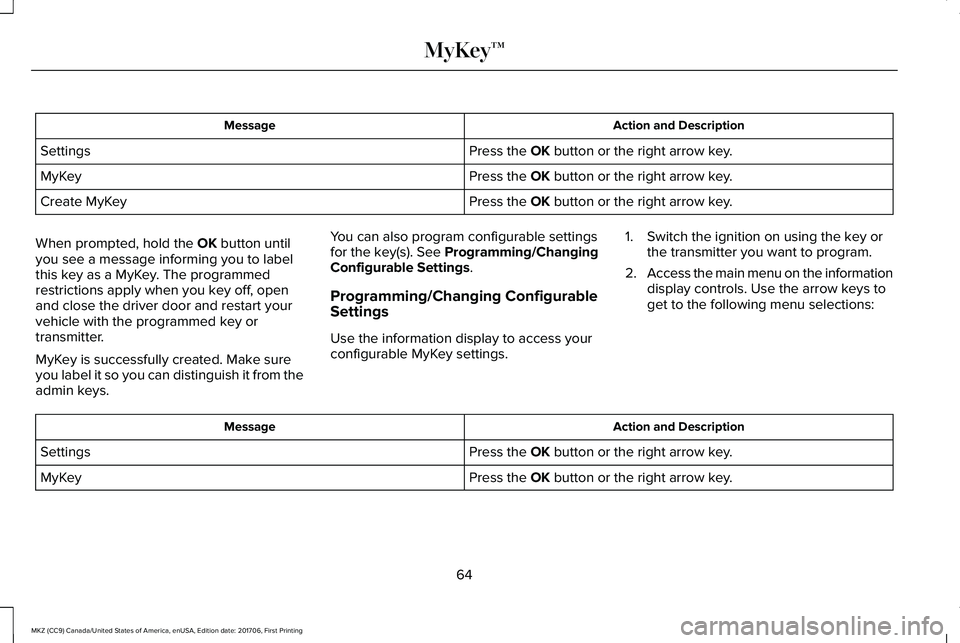
Action and DescriptionMessage
Press the OK button or the right arrow key.Settings
Press the OK button or the right arrow key.MyKey
Press the OK button or the right arrow key.Create MyKey
When prompted, hold the OK button untilyou see a message informing you to labelthis key as a MyKey. The programmedrestrictions apply when you key off, openand close the driver door and restart yourvehicle with the programmed key ortransmitter.
MyKey is successfully created. Make sureyou label it so you can distinguish it from theadmin keys.
You can also program configurable settingsfor the key(s). See Programming/ChangingConfigurable Settings.
Programming/Changing ConfigurableSettings
Use the information display to access yourconfigurable MyKey settings.
1. Switch the ignition on using the key orthe transmitter you want to program.
2.Access the main menu on the informationdisplay controls. Use the arrow keys toget to the following menu selections:
Action and DescriptionMessage
Press the OK button or the right arrow key.Settings
Press the OK button or the right arrow key.MyKey
64
MKZ (CC9) Canada/United States of America, enUSA, Edition date: 201706, First Printing
MyKey™
Page 111 of 595
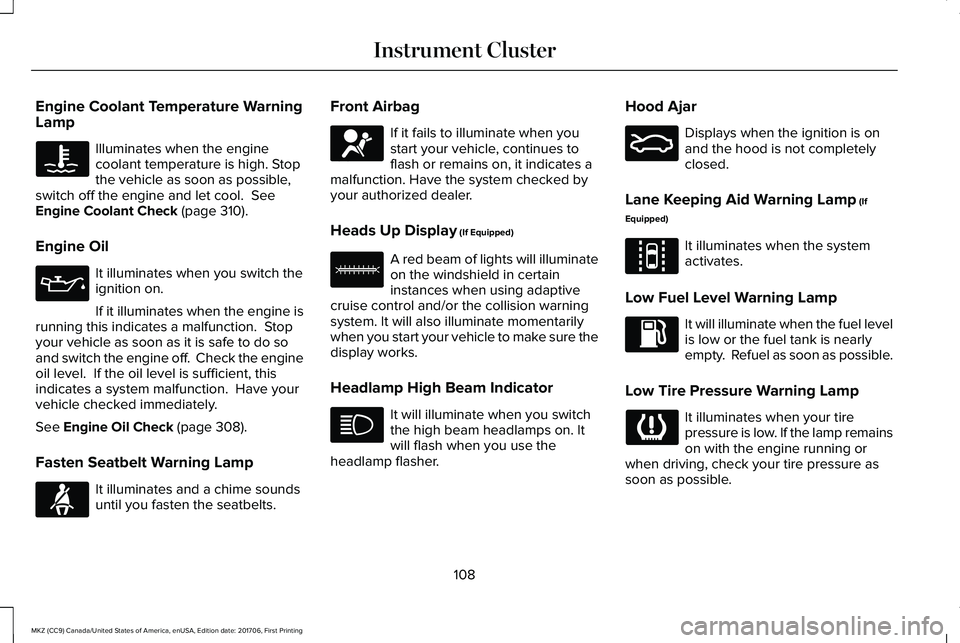
Engine Coolant Temperature WarningLamp
Illuminates when the enginecoolant temperature is high. Stopthe vehicle as soon as possible,switch off the engine and let cool. SeeEngine Coolant Check (page 310).
Engine Oil
It illuminates when you switch theignition on.
If it illuminates when the engine isrunning this indicates a malfunction. Stopyour vehicle as soon as it is safe to do soand switch the engine off. Check the engineoil level. If the oil level is sufficient, thisindicates a system malfunction. Have yourvehicle checked immediately.
See Engine Oil Check (page 308).
Fasten Seatbelt Warning Lamp
It illuminates and a chime soundsuntil you fasten the seatbelts.
Front Airbag
If it fails to illuminate when youstart your vehicle, continues toflash or remains on, it indicates amalfunction. Have the system checked byyour authorized dealer.
Heads Up Display (If Equipped)
A red beam of lights will illuminateon the windshield in certaininstances when using adaptivecruise control and/or the collision warningsystem. It will also illuminate momentarilywhen you start your vehicle to make sure thedisplay works.
Headlamp High Beam Indicator
It will illuminate when you switchthe high beam headlamps on. Itwill flash when you use theheadlamp flasher.
Hood Ajar
Displays when the ignition is onand the hood is not completelyclosed.
Lane Keeping Aid Warning Lamp (If
Equipped)
It illuminates when the systemactivates.
Low Fuel Level Warning Lamp
It will illuminate when the fuel levelis low or the fuel tank is nearlyempty. Refuel as soon as possible.
Low Tire Pressure Warning Lamp
It illuminates when your tirepressure is low. If the lamp remainson with the engine running orwhen driving, check your tire pressure assoon as possible.
108
MKZ (CC9) Canada/United States of America, enUSA, Edition date: 201706, First Printing
Instrument Cluster E71880 E67017 E156133 E159324 E144813
Page 131 of 595
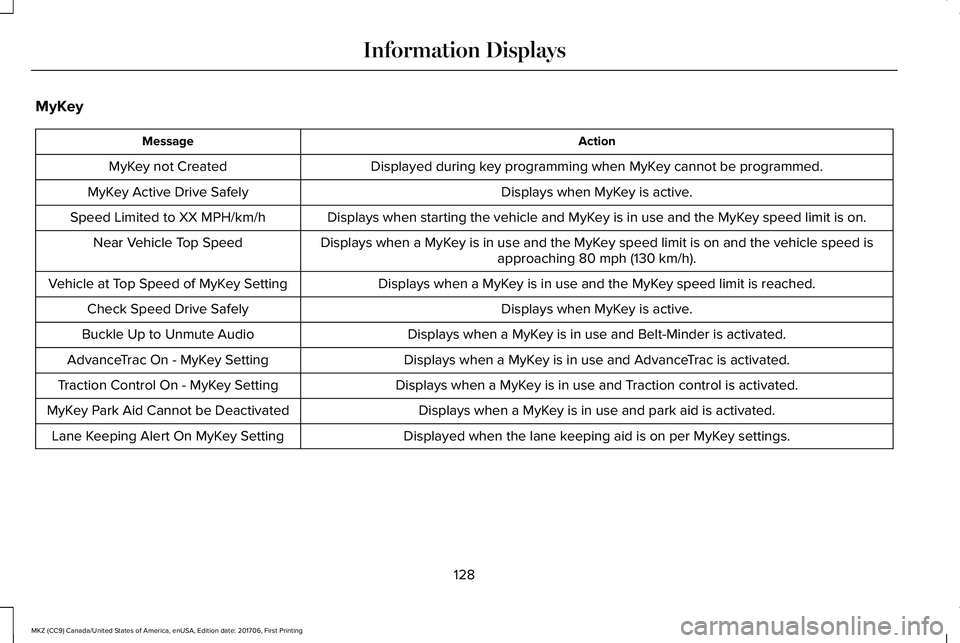
MyKey
ActionMessage
Displayed during key programming when MyKey cannot be programmed.MyKey not Created
Displays when MyKey is active.MyKey Active Drive Safely
Displays when starting the vehicle and MyKey is in use and the MyKey speed limit is on.Speed Limited to XX MPH/km/h
Displays when a MyKey is in use and the MyKey speed limit is on and the vehicle speed isapproaching 80 mph (130 km/h).Near Vehicle Top Speed
Displays when a MyKey is in use and the MyKey speed limit is reached.Vehicle at Top Speed of MyKey Setting
Displays when MyKey is active.Check Speed Drive Safely
Displays when a MyKey is in use and Belt-Minder is activated.Buckle Up to Unmute Audio
Displays when a MyKey is in use and AdvanceTrac is activated.AdvanceTrac On - MyKey Setting
Displays when a MyKey is in use and Traction control is activated.Traction Control On - MyKey Setting
Displays when a MyKey is in use and park aid is activated.MyKey Park Aid Cannot be Deactivated
Displayed when the lane keeping aid is on per MyKey settings.Lane Keeping Alert On MyKey Setting
128
MKZ (CC9) Canada/United States of America, enUSA, Edition date: 201706, First Printing
Information Displays
Page 146 of 595
SITTING IN THE CORRECT
POSITION
WARNINGS
Sitting improperly, out of position orwith the seatback reclined too far cantake weight off the seat cushion and affectthe decision of the passenger sensingsystem, resulting in serious injury or deathin the event of a crash. Always sit uprightagainst your seat back, with your feet on thefloor.
Do not recline the seatback as this cancause the occupant to slide under thesafety belt, resulting in serious injury in theevent of a crash.
Do not place objects higher than theseatback to reduce the risk of seriousinjury in the event of a crash or during heavybraking.
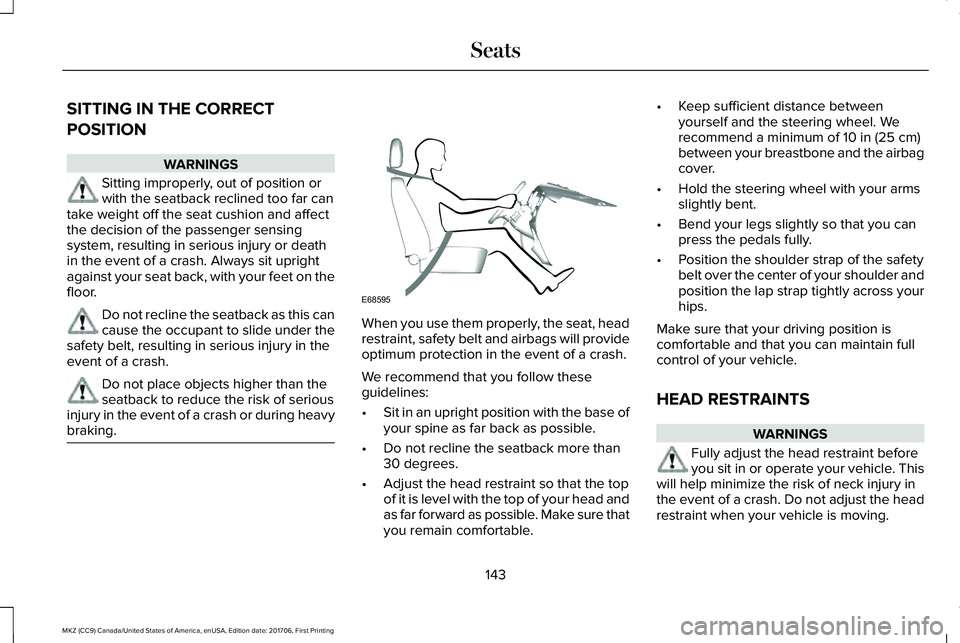
When you use them properly, the seat, headrestraint, safety belt and airbags will provideoptimum protection in the event of a crash.
We recommend that you follow theseguidelines:
•Sit in an upright position with the base ofyour spine as far back as possible.
•Do not recline the seatback more than30 degrees.
•Adjust the head restraint so that the topof it is level with the top of your head andas far forward as possible. Make sure thatyou remain comfortable.
•Keep sufficient distance betweenyourself and the steering wheel. Werecommend a minimum of 10 in (25 cm)between your breastbone and the airbagcover.
•Hold the steering wheel with your armsslightly bent.
•Bend your legs slightly so that you canpress the pedals fully.
•Position the shoulder strap of the safetybelt over the center of your shoulder andposition the lap strap tightly across yourhips.
Make sure that your driving position iscomfortable and that you can maintain fullcontrol of your vehicle.
HEAD RESTRAINTS
WARNINGS
Fully adjust the head restraint beforeyou sit in or operate your vehicle. Thiswill help minimize the risk of neck injury inthe event of a crash. Do not adjust the headrestraint when your vehicle is moving.
143
MKZ (CC9) Canada/United States of America, enUSA, Edition date: 201706, First Printing
SeatsE68595