service LINCOLN MKZ 2019 User Guide
[x] Cancel search | Manufacturer: LINCOLN, Model Year: 2019, Model line: MKZ, Model: LINCOLN MKZ 2019Pages: 595, PDF Size: 4.95 MB
Page 55 of 595
After all occupants have adjusted their seatsand put on seatbelts, it is very important thatthey continue to sit properly. A properlyseated occupant sits upright, leaning againstthe seat backrest, and centered on the seatcushion, with their feet comfortably extendedon the floor. Sitting improperly can increasethe chance of injury in a crash event. Forexample, if an occupant slouches, lies down,turns sideways, sits forward, leans forwardor sideways, or puts one or both feet up, thechance of injury during a crash greatlyincreases.
The conditions listed above may cause theweight of a properly seated occupant to beincorrectly interpreted by the front passengersensing system. The person in the frontpassenger seat may appear heavier or lighterdue to the conditions described in the listabove.
Make sure the front passengersensing system is operatingproperly. See Crash Sensors andAirbag Indicator (page 55).
Do not attempt to repair or service thesystem. Take your vehicle immediately to anauthorized dealer.
If it is necessary to modify an advanced frontairbag system to accommodate a personwith disabilities, contact the Ford CustomerRelationship Center. See Getting theServices You Need (page 269).
SIDE AIRBAGS
WARNING: Do not place objects ormount equipment on or near the airbagcover, on the side of the front or rearseatbacks, or in areas that may come intocontact with a deploying airbag. Failure tofollow these instructions may increase therisk of personal injury in the event of a crash.
WARNING: Do not use accessory seatcovers. The use of accessory seat coversmay prevent the deployment of the sideairbags and increase the risk of injury in anaccident.
WARNING: Do not lean your head onthe door. The side airbag could injure youas it deploys from the side of the seatback.
WARNING: Do not attempt to service,repair, or modify the supplementary restraintsystem or associated components. Failureto follow this instruction could result inpersonal injury or death.
WARNING: If a supplementary restraintsystem component has deployed, it will notfunction again. Have the system andassociated components inspected as soonas possible. Failure to follow this instructioncould result in personal injury or death.
The side airbags are on the outboard sideof the seat backrests of the front seats. Incertain sideways crashes, the side airbagswill be inflated. The airbag was designed toinflate between the door panel and occupantto further enhance the protection providedoccupants in side impact crashes.
52
MKZ (CC9) Canada/United States of America, enUSA, Edition date: 201805, First-Printing
Supplementary Restraints SystemE67017
Page 56 of 595
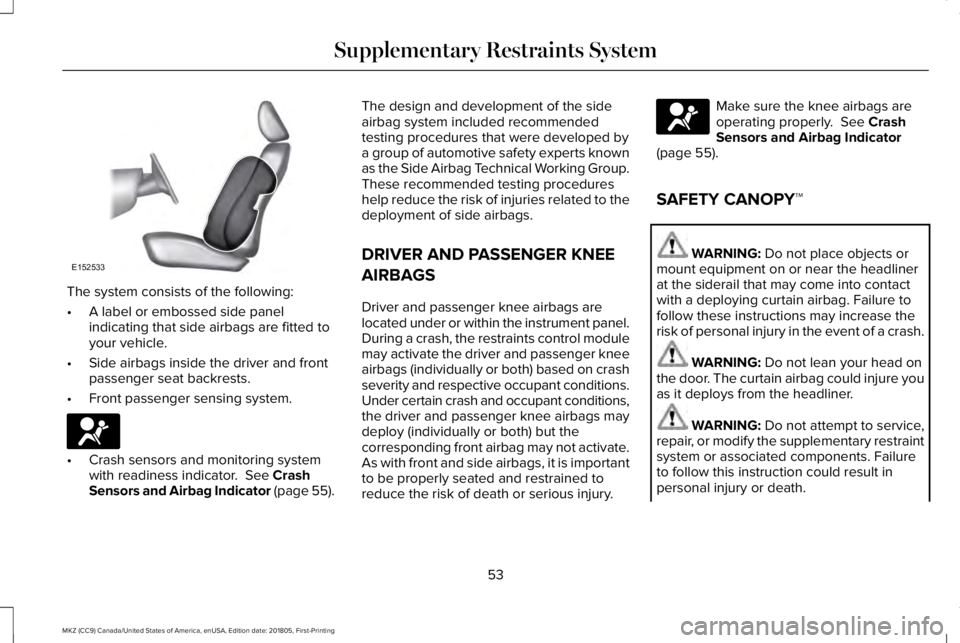
The system consists of the following:
•A label or embossed side panelindicating that side airbags are fitted toyour vehicle.
•Side airbags inside the driver and frontpassenger seat backrests.
•Front passenger sensing system.
•Crash sensors and monitoring systemwith readiness indicator. See CrashSensors and Airbag Indicator (page 55).
The design and development of the sideairbag system included recommendedtesting procedures that were developed bya group of automotive safety experts knownas the Side Airbag Technical Working Group.These recommended testing procedureshelp reduce the risk of injuries related to thedeployment of side airbags.
DRIVER AND PASSENGER KNEE
AIRBAGS
Driver and passenger knee airbags arelocated under or within the instrument panel.During a crash, the restraints control modulemay activate the driver and passenger kneeairbags (individually or both) based on crashseverity and respective occupant conditions.Under certain crash and occupant conditions,the driver and passenger knee airbags maydeploy (individually or both) but thecorresponding front airbag may not activate.As with front and side airbags, it is importantto be properly seated and restrained toreduce the risk of death or serious injury.
Make sure the knee airbags areoperating properly. See CrashSensors and Airbag Indicator(page 55).
SAFETY CANOPY™
WARNING: Do not place objects ormount equipment on or near the headlinerat the siderail that may come into contactwith a deploying curtain airbag. Failure tofollow these instructions may increase therisk of personal injury in the event of a crash.
WARNING: Do not lean your head onthe door. The curtain airbag could injure youas it deploys from the headliner.
WARNING: Do not attempt to service,repair, or modify the supplementary restraintsystem or associated components. Failureto follow this instruction could result inpersonal injury or death.
53
MKZ (CC9) Canada/United States of America, enUSA, Edition date: 201805, First-Printing
Supplementary Restraints SystemE152533 E67017 E67017
Page 58 of 595
CRASH SENSORS AND AIRBAG
INDICATOR
WARNING: Modifying or addingequipment to the front end of the vehicle(including frame, bumper, front end bodystructure and tow hooks) may affect theperformance of the airbag system, increasingthe risk of injury. Do not modify the front endof the vehicle.
Your vehicle has a collection of crash andoccupant sensors which provide informationto the restraints control module. Therestraints control module deploys (activates)the front seatbelt system, the adaptivecollapsible steering column, driver airbag,passenger airbag, knee airbag(s), seatmounted side airbags, Safety Canopy andoptional rear inflatable seatbelts. Based onthe type of crash, the restraints controlmodule will deploy the appropriate safetydevices.
The restraints control module also monitorsthe readiness of the above safety devicesplus the crash and occupant sensors. Thereadiness of the safety system is indicatedby a warning indicator light in the instrumentcluster or a backup tone (if equipped).Routine maintenance of the airbag is notrequired.
A difficulty with the system is indicated byone or more of the following:
The readiness light will notilluminate immediately after theignition is turned on.
•The readiness light will either flash orstay lit.
•A series of five beeps will be heard (Ifequipped). The tone pattern will repeatperiodically until the problem, the lightor both are repaired.
If any of these things happen, evenintermittently, have the supplementalrestraint system serviced at an authorizeddealer immediately. Unless serviced, thesystem may not function properly in theevent of a crash.
The seatbelt pretensioners and the frontairbag supplemental restraint system aredesigned to activate when the vehiclesustains frontal deceleration sufficient tocause the restraints control module to deploya safety device.
The fact that the seatbelt pretensioners orfront airbags did not activate for both frontseat occupants in a crash does not meanthat something is wrong with the system.Rather, it means the restraints control moduledetermined the accident conditions (crashseverity, belt usage) were not appropriate toactivate these safety devices.
•The design of the front airbags is toactivate only in frontal and near-frontalcrashes (not rollovers, side impacts orrear impacts) unless the crash causessufficient frontal deceleration.
•The seatbelt pretensioners and rearinflatable seatbelts are designed toactivate in frontal, near-frontal and sidecrashes and rollovers.
•The knee airbag(s) may deploy based oncrash severity and occupant conditions.
55
MKZ (CC9) Canada/United States of America, enUSA, Edition date: 201805, First-Printing
Supplementary Restraints SystemE67017
Page 111 of 595
Parking Lamps
It illuminates when you switch theparking lamps on.
Powertrain Fault
Illuminates when a powertrain oran AWD fault has been detected.Contact your authorized dealer assoon as possible.
Service Engine Soon
If it illuminates when the engine isrunning this indicates amalfunction. The On BoardDiagnostics system has detected amalfunction of the vehicle emission controlsystem.
If it flashes, engine misfire may be occurring. Increased exhaust gas temperatures coulddamage the catalytic converter or othervehicle components. Drive in a moderatefashion (avoid heavy acceleration anddeceleration) and have your vehicleimmediately serviced.
It illuminates when you switch the ignitionon prior to engine start to check the bulb andto indicate whether your vehicle is ready forInspection and Maintenance (I/M) testing.
Normally, it illuminates until the engine iscranked and automatically turns off if nomalfunctions are present. However, if after15 seconds it flashes eight times, thisindicates that your vehicle is not ready forInspection and Maintenance (I/M) testing.See Emission Law (page 173).
Stability Control
It flashes when the system isactive. If it remains illuminated ordoes not illuminate when youswitch the ignition on, this indicates amalfunction. During a malfunction the systemwill switch off. Have the system checked byyour authorized dealer immediately. SeeUsing Stability Control (page 199).
Stability Control Off
It illuminates when you switch thesystem off.
Trunk Ajar
Displays when the ignition is onand the trunk is not completelyclosed.
AUDIBLE WARNINGS AND
INDICATORS
Keyless Warning Alert
The horn will sound twice when you exit yourvehicle with the intelligent access key andyour vehicle is in RUN, indicating your vehicleis still on.
Headlamps On Warning Chime
Sounds when you remove the key from theignition and open the driver's door and youhave left the headlamps or parking lampson.
108
MKZ (CC9) Canada/United States of America, enUSA, Edition date: 201805, First-Printing
Instrument Cluster E138639 E130458 E159323
Page 119 of 595
INFORMATION MESSAGES
Note: Depending on the vehicle optionsequipped with your vehicle, not all of themessages will display or be available.Certain messages may be abbreviated orshortened depending upon which clustertype you have.
Press the OK button to acknowledge andremove some messages from the informationdisplay. Other messages will be removedautomatically after a short time.
Certain messages need to be confirmedbefore you can access the menus.
Active Park
ActionMessage
Displayed when the system needs service. Contact your authorized dealer as soon as possible.Active Park Fault
116
MKZ (CC9) Canada/United States of America, enUSA, Edition date: 201805, First-Printing
Information DisplaysE145981
Page 121 of 595
Adaptive Headlamps
ActionMessage
Displays when a fault with the system has occurred. Contact an authorized dealer as soon aspossible.Check Headlamp System See Manual
AdvanceTrac™
ActionMessage
Displays when the system detects a malfunction due to a blocked sensor.Service AdvanceTrac
Displayed when the traction control has been disabled or enabled by the driver.AdvanceTrac Off On
Airbag
ActionMessage
Displays when the system detects a malfunction due to a blocked sensor.Occupant Sensor BLOCKED RemoveObjects Near Passenger Seat
118
MKZ (CC9) Canada/United States of America, enUSA, Edition date: 201805, First-Printing
Information Displays
Page 123 of 595
AWD
ActionMessage
Displayed when the AWD system has been temporarily disabled to protect itself from overheating.AWD Temporarily Disabled
Displayed when the AWD system has been automatically disabled to protect itself. This is causedby operating the vehicle with the compact spare tire installed or if the system is overheating.AWD OFF
The AWD system will resume normal function and clear this message after driving a short distancewith the road tire re-installed or after the system is allowed to cool.AWD Restored
Displayed in conjunction with the Throttle Control/Transmission/AWD light when the AWD systemis not operating properly. If the warning stays on or continues to come on, contact your authorizeddealer as soon as possible.
AWD Malfunction Service Required
120
MKZ (CC9) Canada/United States of America, enUSA, Edition date: 201805, First-Printing
Information Displays
Page 126 of 595
ActionMessage
Displays when the door switches have been disabled.Switches Inhibited Security Mode
Displayed when there is a system malfunction with the child locks. Contact your authorized dealeras soon as possible.Child Lock Malfunction Service Required
Displays the factory keypad code after the keypad has been reset. See Keyless Entry (page73).Factory Keypad Code {X X X X X}
Driver Alert
ActionMessage
Stop and rest as soon as it is safe to do so.Driver Alert Warning Rest Now
Take a rest soon.Driver Alert Warning Rest Suggested
Fuel
ActionMessage
Displayed as an early reminder of a low fuel condition.Fuel Level Low
Displayed when the fuel fill inlet may not be properly closed.Check Fuel Fill Inlet
123
MKZ (CC9) Canada/United States of America, enUSA, Edition date: 201805, First-Printing
Information Displays
Page 127 of 595
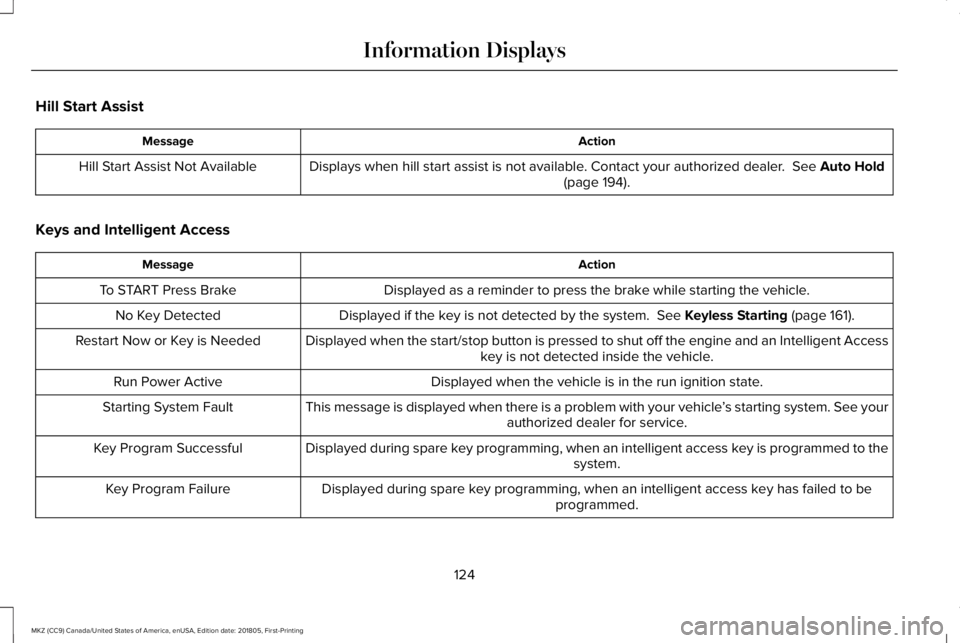
Hill Start Assist
ActionMessage
Displays when hill start assist is not available. Contact your authorized dealer. See Auto Hold(page 194).Hill Start Assist Not Available
Keys and Intelligent Access
ActionMessage
Displayed as a reminder to press the brake while starting the vehicle.To START Press Brake
Displayed if the key is not detected by the system. See Keyless Starting (page 161).No Key Detected
Displayed when the start/stop button is pressed to shut off the engine and an Intelligent Accesskey is not detected inside the vehicle.Restart Now or Key is Needed
Displayed when the vehicle is in the run ignition state.Run Power Active
This message is displayed when there is a problem with your vehicle’s starting system. See yourauthorized dealer for service.Starting System Fault
Displayed during spare key programming, when an intelligent access key is programmed to thesystem.Key Program Successful
Displayed during spare key programming, when an intelligent access key has failed to beprogrammed.Key Program Failure
124
MKZ (CC9) Canada/United States of America, enUSA, Edition date: 201805, First-Printing
Information Displays
Page 128 of 595
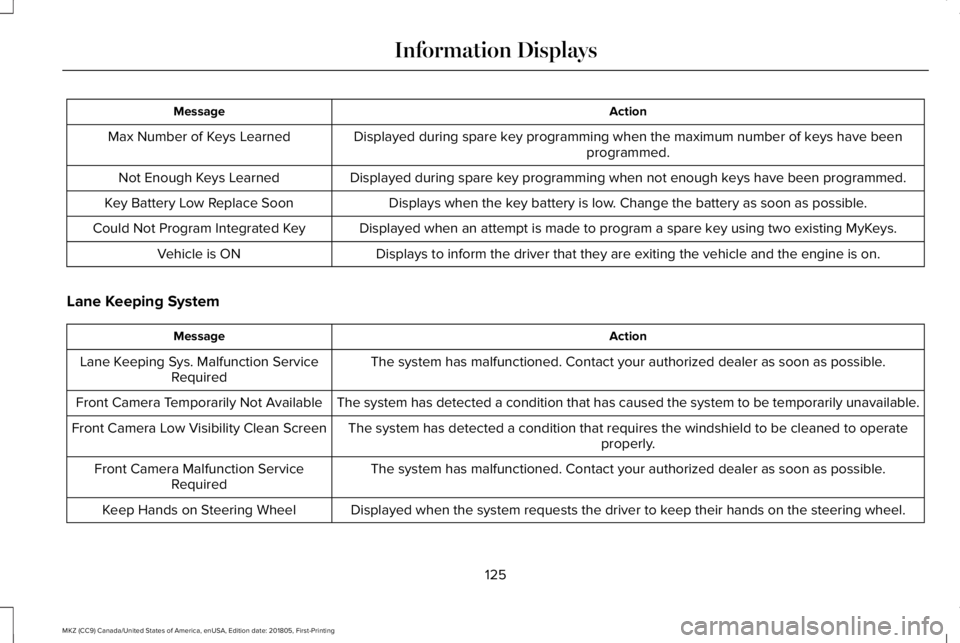
ActionMessage
Displayed during spare key programming when the maximum number of keys have beenprogrammed.Max Number of Keys Learned
Displayed during spare key programming when not enough keys have been programmed.Not Enough Keys Learned
Displays when the key battery is low. Change the battery as soon as possible.Key Battery Low Replace Soon
Displayed when an attempt is made to program a spare key using two existing MyKeys.Could Not Program Integrated Key
Displays to inform the driver that they are exiting the vehicle and the engine is on.Vehicle is ON
Lane Keeping System
ActionMessage
The system has malfunctioned. Contact your authorized dealer as soon as possible.Lane Keeping Sys. Malfunction ServiceRequired
The system has detected a condition that has caused the system to be temporarily unavailable.Front Camera Temporarily Not Available
The system has detected a condition that requires the windshield to be cleaned to operateproperly.Front Camera Low Visibility Clean Screen
The system has malfunctioned. Contact your authorized dealer as soon as possible.Front Camera Malfunction ServiceRequired
Displayed when the system requests the driver to keep their hands on the steering wheel.Keep Hands on Steering Wheel
125
MKZ (CC9) Canada/United States of America, enUSA, Edition date: 201805, First-Printing
Information Displays