steering wheel LINCOLN MKZ 2019 User Guide
[x] Cancel search | Manufacturer: LINCOLN, Model Year: 2019, Model line: MKZ, Model: LINCOLN MKZ 2019Pages: 595, PDF Size: 4.95 MB
Page 94 of 595
A camera sensor, centrally mounted behindthe windshield of your vehicle, continuouslymonitors conditions to turn the high beamson and off.
Once the system is active, the high beamsturn on if:
•The ambient light level is low enough.
•There is no traffic in front of your vehicle.
•The vehicle speed is greater thanapproximately 32 mph (51 km/h).
The system turns the high beams off if:
•The ambient light level is high enoughthat high beams are not required.
•The system detects an approachingvehicle's headlamps or tail lamps.
•The vehicle speed falls belowapproximately 27 mph (44 km/h).
•The system detects severe rain, snow orfog.
•The camera is blocked.
Switching the System On and Off
Switch the system on using the informationdisplay. See Information Displays (page110).
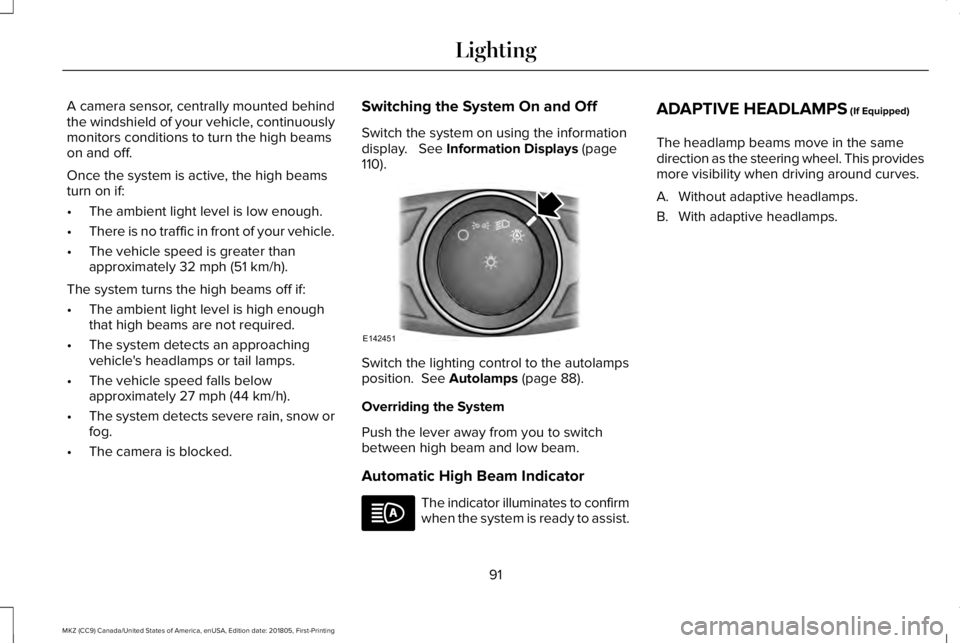
Switch the lighting control to the autolampsposition. See Autolamps (page 88).
Overriding the System
Push the lever away from you to switchbetween high beam and low beam.
Automatic High Beam Indicator
The indicator illuminates to confirmwhen the system is ready to assist.
ADAPTIVE HEADLAMPS (If Equipped)
The headlamp beams move in the samedirection as the steering wheel. This providesmore visibility when driving around curves.
A. Without adaptive headlamps.
B. With adaptive headlamps.
91
MKZ (CC9) Canada/United States of America, enUSA, Edition date: 201805, First-Printing
LightingE142451
Page 113 of 595
GENERAL INFORMATION
WARNING: Driving while distractedcan result in loss of vehicle control, crashand injury. We strongly recommend that youuse extreme caution when using any devicethat may take your focus off the road. Yourprimary responsibility is the safe operationof your vehicle. We recommend against theuse of any hand-held device while drivingand encourage the use of voice-operatedsystems when possible. Make sure you areaware of all applicable local laws that mayaffect the use of electronic devices whiledriving.
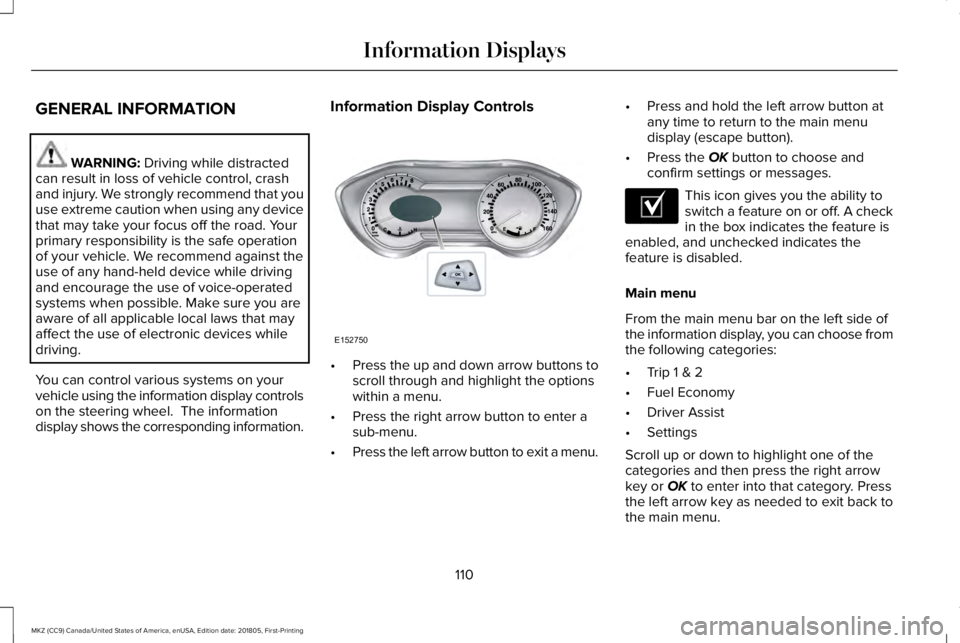
You can control various systems on yourvehicle using the information display controlson the steering wheel. The informationdisplay shows the corresponding information.
Information Display Controls
•Press the up and down arrow buttons toscroll through and highlight the optionswithin a menu.
•Press the right arrow button to enter asub-menu.
•Press the left arrow button to exit a menu.
•Press and hold the left arrow button atany time to return to the main menudisplay (escape button).
•Press the OK button to choose andconfirm settings or messages.
This icon gives you the ability toswitch a feature on or off. A checkin the box indicates the feature isenabled, and unchecked indicates thefeature is disabled.
Main menu
From the main menu bar on the left side ofthe information display, you can choose fromthe following categories:
•Trip 1 & 2
•Fuel Economy
•Driver Assist
•Settings
Scroll up or down to highlight one of thecategories and then press the right arrowkey or OK to enter into that category. Pressthe left arrow key as needed to exit back tothe main menu.
110
MKZ (CC9) Canada/United States of America, enUSA, Edition date: 201805, First-Printing
Information DisplaysE152750 E204495
Page 122 of 595
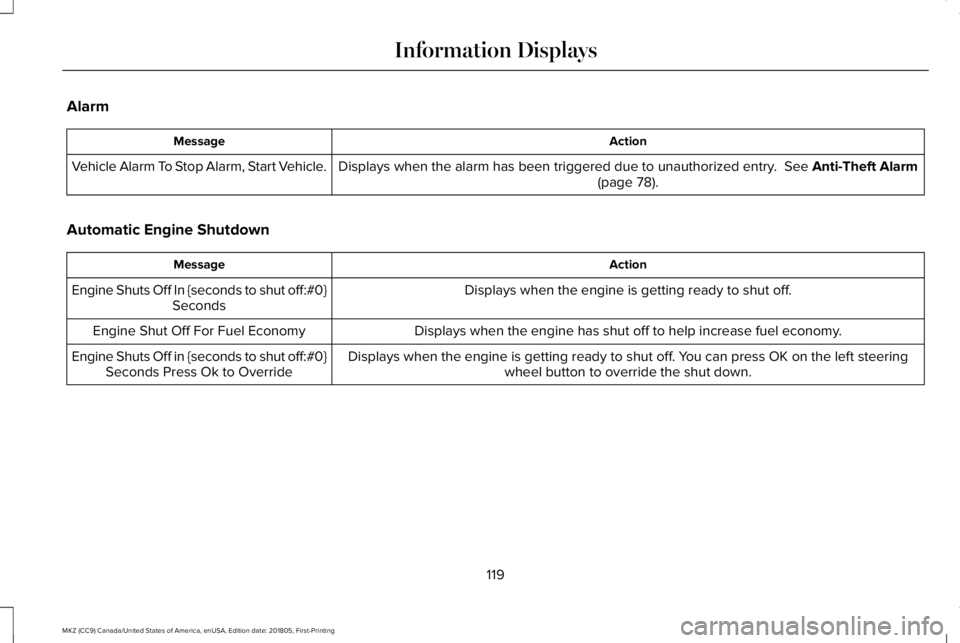
Alarm
ActionMessage
Displays when the alarm has been triggered due to unauthorized entry. See Anti-Theft Alarm(page 78).Vehicle Alarm To Stop Alarm, Start Vehicle.
Automatic Engine Shutdown
ActionMessage
Displays when the engine is getting ready to shut off.Engine Shuts Off In {seconds to shut off:#0}Seconds
Displays when the engine has shut off to help increase fuel economy.Engine Shut Off For Fuel Economy
Displays when the engine is getting ready to shut off. You can press OK on the left steeringwheel button to override the shut down.Engine Shuts Off in {seconds to shut off:#0}Seconds Press Ok to Override
119
MKZ (CC9) Canada/United States of America, enUSA, Edition date: 201805, First-Printing
Information Displays
Page 128 of 595
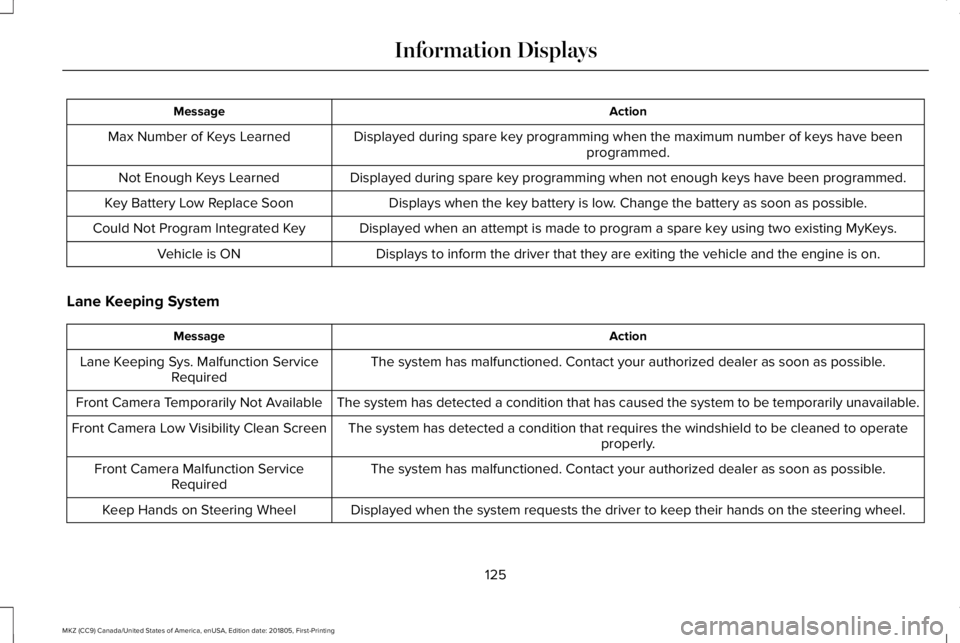
ActionMessage
Displayed during spare key programming when the maximum number of keys have beenprogrammed.Max Number of Keys Learned
Displayed during spare key programming when not enough keys have been programmed.Not Enough Keys Learned
Displays when the key battery is low. Change the battery as soon as possible.Key Battery Low Replace Soon
Displayed when an attempt is made to program a spare key using two existing MyKeys.Could Not Program Integrated Key
Displays to inform the driver that they are exiting the vehicle and the engine is on.Vehicle is ON
Lane Keeping System
ActionMessage
The system has malfunctioned. Contact your authorized dealer as soon as possible.Lane Keeping Sys. Malfunction ServiceRequired
The system has detected a condition that has caused the system to be temporarily unavailable.Front Camera Temporarily Not Available
The system has detected a condition that requires the windshield to be cleaned to operateproperly.Front Camera Low Visibility Clean Screen
The system has malfunctioned. Contact your authorized dealer as soon as possible.Front Camera Malfunction ServiceRequired
Displayed when the system requests the driver to keep their hands on the steering wheel.Keep Hands on Steering Wheel
125
MKZ (CC9) Canada/United States of America, enUSA, Edition date: 201805, First-Printing
Information Displays
Page 140 of 595
Use air conditioning with recirculated air toimprove cooling performance and efficiency.
Note:In certain conditions (for example,maximum defrost) the air conditioningcompressor may continue to operate eventhough you switch off the air conditioning.
Switching the Climate Control On andOff
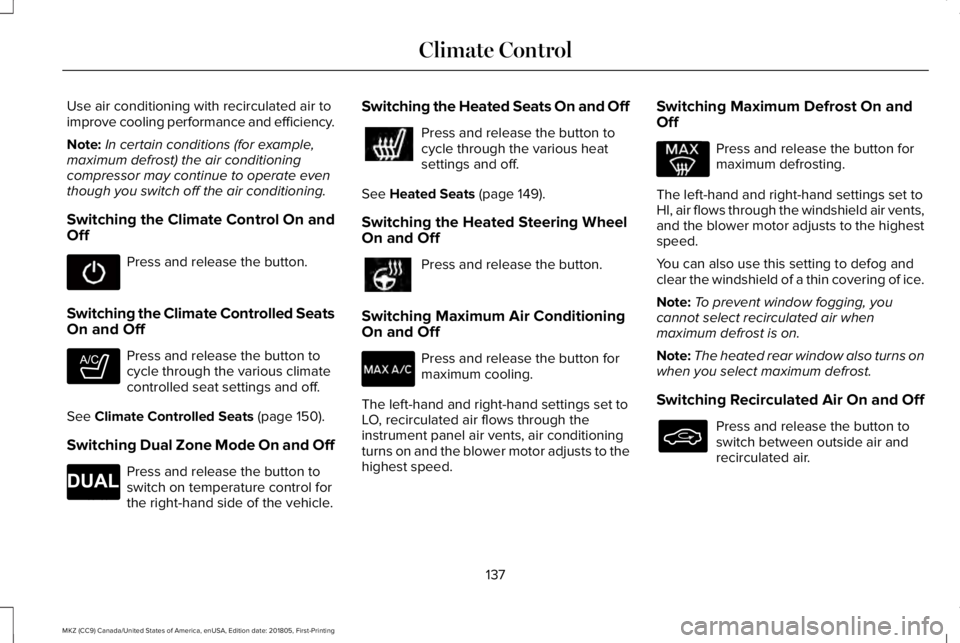
Press and release the button.
Switching the Climate Controlled SeatsOn and Off
Press and release the button tocycle through the various climatecontrolled seat settings and off.
See Climate Controlled Seats (page 150).
Switching Dual Zone Mode On and Off
Press and release the button toswitch on temperature control forthe right-hand side of the vehicle.
Switching the Heated Seats On and Off
Press and release the button tocycle through the various heatsettings and off.
See Heated Seats (page 149).
Switching the Heated Steering WheelOn and Off
Press and release the button.
Switching Maximum Air ConditioningOn and Off
Press and release the button formaximum cooling.
The left-hand and right-hand settings set toLO, recirculated air flows through theinstrument panel air vents, air conditioningturns on and the blower motor adjusts to thehighest speed.
Switching Maximum Defrost On andOff
Press and release the button formaximum defrosting.
The left-hand and right-hand settings set toHI, air flows through the windshield air vents,and the blower motor adjusts to the highestspeed.
You can also use this setting to defog andclear the windshield of a thin covering of ice.
Note:To prevent window fogging, youcannot select recirculated air whenmaximum defrost is on.
Note:The heated rear window also turns onwhen you select maximum defrost.
Switching Recirculated Air On and Off
Press and release the button toswitch between outside air andrecirculated air.
137
MKZ (CC9) Canada/United States of America, enUSA, Edition date: 201805, First-Printing
Climate Control E265282 E265280
Page 143 of 595
REMOTE START
The climate control system adjusts theinterior temperature during remote start.
You can switch this feature on or off andadjust the settings using the informationdisplay controls. See Information Displays(page 110).
You cannot adjust the climate control settingduring remote start operation. Switch theignition on to make adjustments.
Based on your remote start settings, thefollowing vehicle-dependent features mayor may not remain on after remote startingyour vehicle:
•Climate controlled seats.
•Heated steering wheel.
•Heated mirrors.
•Heated rear window.
•Windshield wiper de-icer.
Note:For dual zone climate controlled seats,the passenger seat setting defaults to matchthe driver seat during remote start.
Automatic Settings
If Auto is on, the system sets the interiortemperature to 72°F (22°C) and heats orcools the vehicle interior as required toachieve comfort.
Note:In cold weather, the heated rearwindow and heated mirrors turn on.
Last Settings
If Last Settings is on, the system uses thesettings last selected before you turned offthe vehicle.
Heated and Cooled Features
In Auto mode, certain heated features mayswitch on during cold weather, and cooledfeatures during hot weather.
140
MKZ (CC9) Canada/United States of America, enUSA, Edition date: 201805, First-Printing
Climate Control
Page 144 of 595
SITTING IN THE CORRECT
POSITION
WARNING: Sitting improperly, out ofposition or with the seatback reclined too farcan take weight off the seat cushion andaffect the decision of the passenger sensingsystem, resulting in serious injury or deathin the event of a crash. Always sit uprightagainst your seat back, with your feet on thefloor.
WARNING: Do not recline the seatbackas this can cause the occupant to slide underthe safety belt, resulting in serious injury inthe event of a crash.
WARNING: Do not place objects higherthan the seatback to reduce the risk ofserious injury in the event of a crash orduring heavy braking.
When you use them properly, the seat, headrestraint, safety belt and airbags will provideoptimum protection in the event of a crash.
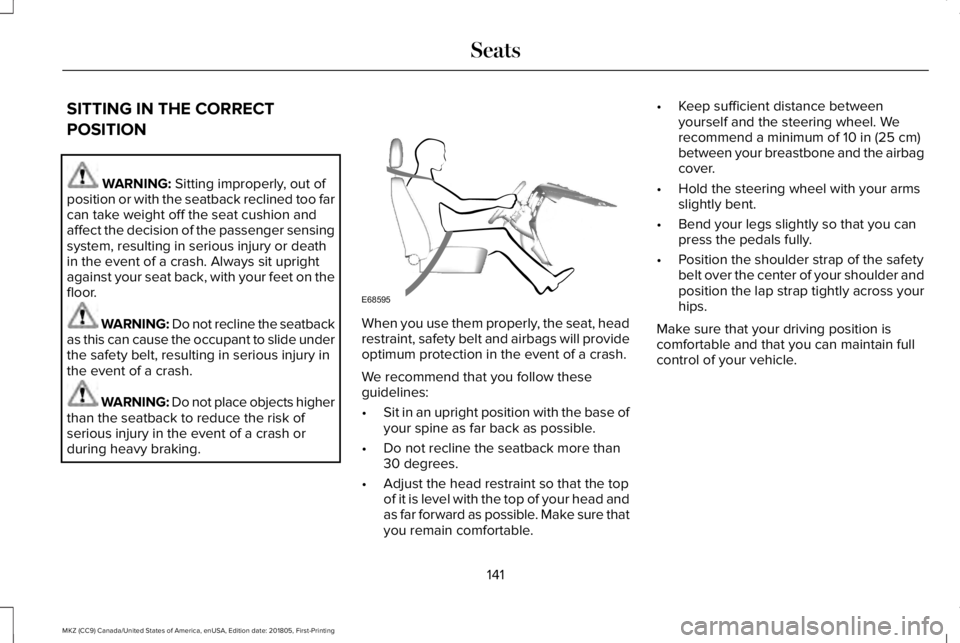
We recommend that you follow theseguidelines:
•Sit in an upright position with the base ofyour spine as far back as possible.
•Do not recline the seatback more than30 degrees.
•Adjust the head restraint so that the topof it is level with the top of your head andas far forward as possible. Make sure thatyou remain comfortable.
•Keep sufficient distance betweenyourself and the steering wheel. Werecommend a minimum of 10 in (25 cm)between your breastbone and the airbagcover.
•Hold the steering wheel with your armsslightly bent.
•Bend your legs slightly so that you canpress the pedals fully.
•Position the shoulder strap of the safetybelt over the center of your shoulder andposition the lap strap tightly across yourhips.
Make sure that your driving position iscomfortable and that you can maintain fullcontrol of your vehicle.
141
MKZ (CC9) Canada/United States of America, enUSA, Edition date: 201805, First-Printing
SeatsE68595
Page 182 of 595
2. A message will appear in yourinformation display screen prompting youto press the neutral (N) button.
3. Press the neutral (N) button again toenter Stay in Neutral mode.
A message will appear in your informationdisplay screen when your vehicle hasentered Stay in Neutral mode.
Note:During this mode the neutral (N) buttonwill flash continuously and your instrumentcluster will display N as the selected gear.
Exiting Stay in Neutral mode
To disable Stay in Neutral mode selectanother gear. See the Putting the Vehiclein Gear for instructions on how to do this.
Entering a Carwash
Note:Always put your vehicle in Stay inNeutral mode when entering an automaticcar wash. Failure to do this could result invehicle damage not covered by warranty.
Drive (D)
The normal driving position for the best fueleconomy.
Sport (S)
Putting the vehicle in sport (S):
•Provides additional engine braking andextends lower gear operation to enhanceperformance for uphill climbs, hilly terrainor mountainous areas. This will increaseengine RPM during engine braking
•Provides additional lower gear operationthrough the automatic transmission shiftstrategy
•Provides gear selection more quickly andat higher engine speeds
SelectShift Automatic™ Transmission
Your SelectShift Automatic transmissiongives you the ability to change gearsmanually.
Paddle Shifters
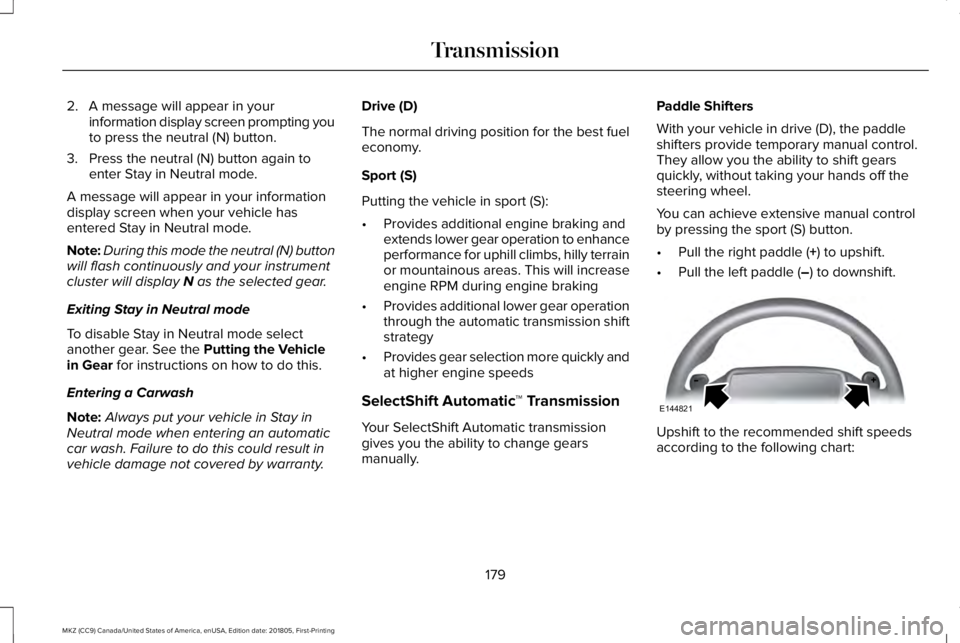
With your vehicle in drive (D), the paddleshifters provide temporary manual control.They allow you the ability to shift gearsquickly, without taking your hands off thesteering wheel.
You can achieve extensive manual controlby pressing the sport (S) button.
•Pull the right paddle (+) to upshift.
•Pull the left paddle (–) to downshift.
Upshift to the recommended shift speedsaccording to the following chart:
179
MKZ (CC9) Canada/United States of America, enUSA, Edition date: 201805, First-Printing
TransmissionE144821
Page 188 of 595
Operating AWD Vehicles With Spareor Mismatched Tires
WARNING: Only use replacement tiresand wheels that are the same size, loadindex, speed rating and type (such asP-metric versus LT-metric or all-seasonversus all-terrain) as those originally providedby Ford. The recommended tire and wheelsize may be found on either the SafetyCompliance Certification Label (affixed toeither the door hinge pillar, door-latch post,or the door edge that meets the door-latchpost, next to the driver’s seating position), orthe Tire Label which is located on the B-Pillaror edge of the driver’s door. If thisinformation is not found on these labels, thenyou should contact your authorized dealeras soon as possible. Use of any tire or wheelnot recommended by Ford can affect thesafety and performance of your vehicle,which could result in an increased risk of lossof vehicle control, vehicle rollover, personalinjury and death.
A spare tire of a different size other than thetire provided should never be used. TheAWD system may disable automatically andenter front-wheel drive only mode to protectdriveline components if a non-full sized tireis installed. This condition may display anAWD OFF message in the informationdisplay. If there is an AWD OFF message inthe information display from using a non-fullsized spare tire, this indicator should turn offafter reinstalling the repaired or replacednormal road tire and cycling the ignition offand on. It is recommended to reinstall therepaired or replaced road tire as soon aspossible.
Major dissimilar tire sizes between the frontand rear axles (for example, 17 inch lowprofile tires on the front axle and 22 inch highprofile tires on the rear axle) could cause theAWD system to stop functioning and defaultto front-wheel drive or damage the AWDsystem. However, the AWD system iscapable of tolerating any combination of newand worn tires of the same original tire size.For example, using 3 worn tread tires and 1new tread tire all of the same original tiresize, can be tolerated by the AWD system.
Driving In Special Conditions With All-Wheel Drive (AWD)
AWD vehicles are equipped for driving onsand, snow, mud and rough roads and haveoperating characteristics that are somewhatdifferent from conventional vehicles, both onand off the highway.
When driving at slow speeds in deep sandunder high outside temperatures, use a lowgear when possible. Lower gear operationwill maximize the engine and transmissioncooling capability.
Under severe operating conditions, the A/Cmay cycle on and off to protect overheatingof the engine.
Basic operating principles in specialconditions
•Drive slower in strong crosswinds whichcan affect the normal steeringcharacteristics of your vehicle.
•Be extremely careful when driving onpavement made slippery by loose sand,water, gravel, snow or ice.
185
MKZ (CC9) Canada/United States of America, enUSA, Edition date: 201805, First-Printing
All-Wheel Drive (If Equipped)
Page 189 of 595
If Your Vehicle Goes Off the Edge of thePavement
•If your vehicle goes off the edge of thepavement, slow down, but avoid severebrake application, ease the vehicle backonto the pavement only after reducingyour speed. Do not turn the steeringwheel too sharply while returning to theroad surface.
•It may be safer to stay on the apron orshoulder of the road and slow downgradually before returning to thepavement. You may lose control if youdo not slow down or if you turn thesteering wheel too sharply or abruptly.
•It often may be less risky to strike smallobjects, such as highway reflectors, withminor damage to your vehicle rather thanattempt a sudden return to the pavementwhich could cause the vehicle to slidesideways out of control or rollover.Remember, your safety and the safety ofothers should be your primary concern.
If Your Vehicle Gets Stuck
WARNING: Always set the parkingbrake fully and make sure you shift thegearshift lever to park (P). Switch the ignitionoff and remove the key whenever you leaveyour vehicle.
WARNING: If the parking brake is fullyreleased, but the brake warning lampremains illuminated, the brakes may not beworking properly. Have your vehicle checkedas soon as possible.
WARNING: Do not spin the wheels atover 34 mph (55 km/h). The tires may fail andinjure a passenger or bystander.
Note:Do not rock the vehicle if the engineis not at normal operating temperature ordamage to the transmission may occur.
Note:Do not rock the vehicle for more thana few minutes or damage to the transmissionand tires may occur or the engine mayoverheat.
If your vehicle gets stuck in mud or snow itmay be rocked out by shifting betweenforward and reverse gears, stoppingbetween shifts, in a steady pattern. Presslightly on the accelerator in each gear.
If your vehicle is equipped withAdvanceTrac® with Roll Stability Control™, itmay be beneficial to disengage theAdvanceTrac® with Roll Stability Control™system while attempting to rock the vehicle.
Emergency Maneuvers
•In an unavoidable emergency situationwhere a sudden sharp turn must bemade, remember to avoid "over-driving"your vehicle (that is, turn the steeringwheel only as rapidly and as far asrequired to avoid the emergency).Excessive steering will result in lessvehicle control, not more. Additionally,smooth variations of the acceleratorand/or brake pedal pressure should beutilized if changes in vehicle speed arecalled for. Avoid abrupt steering,
186
MKZ (CC9) Canada/United States of America, enUSA, Edition date: 201805, First-Printing
All-Wheel Drive (If Equipped)