tow LINCOLN MKZ 2019 User Guide
[x] Cancel search | Manufacturer: LINCOLN, Model Year: 2019, Model line: MKZ, Model: LINCOLN MKZ 2019Pages: 595, PDF Size: 4.95 MB
Page 88 of 595
AUTOWIPERS (If Equipped)
Wet or winter driving conditions with ice,snow or salty road mist can causeinconsistent and unexpected wiping orsmearing.
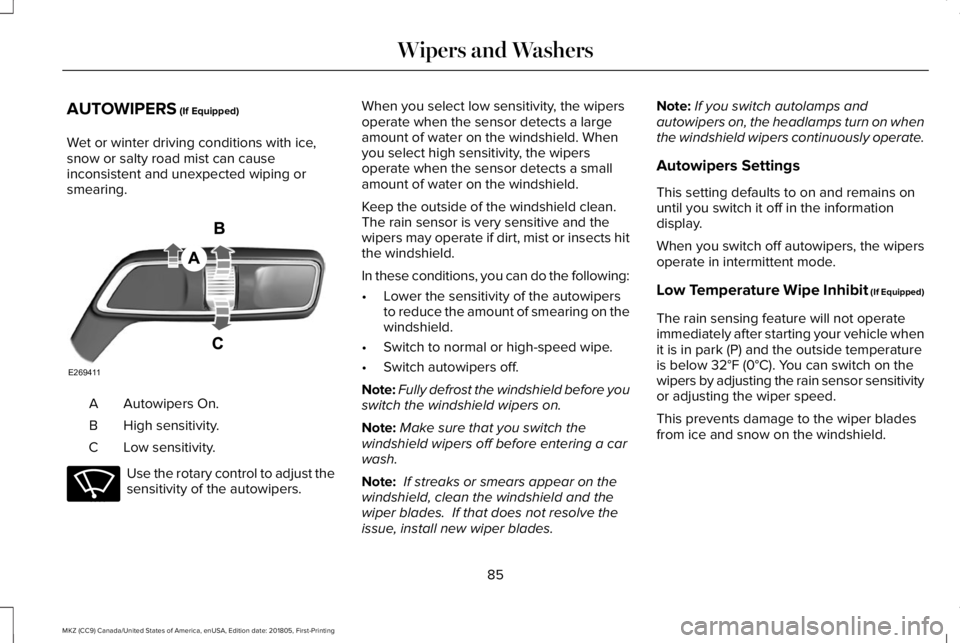
Autowipers On.A
High sensitivity.B
Low sensitivity.C
Use the rotary control to adjust thesensitivity of the autowipers.
When you select low sensitivity, the wipersoperate when the sensor detects a largeamount of water on the windshield. Whenyou select high sensitivity, the wipersoperate when the sensor detects a smallamount of water on the windshield.
Keep the outside of the windshield clean. The rain sensor is very sensitive and thewipers may operate if dirt, mist or insects hitthe windshield.
In these conditions, you can do the following:
•Lower the sensitivity of the autowipersto reduce the amount of smearing on thewindshield.
•Switch to normal or high-speed wipe.
•Switch autowipers off.
Note:Fully defrost the windshield before youswitch the windshield wipers on.
Note:Make sure that you switch thewindshield wipers off before entering a carwash.
Note: If streaks or smears appear on thewindshield, clean the windshield and thewiper blades. If that does not resolve theissue, install new wiper blades.
Note:If you switch autolamps andautowipers on, the headlamps turn on whenthe windshield wipers continuously operate.
Autowipers Settings
This setting defaults to on and remains onuntil you switch it off in the informationdisplay.
When you switch off autowipers, the wipersoperate in intermittent mode.
Low Temperature Wipe Inhibit (If Equipped)
The rain sensing feature will not operateimmediately after starting your vehicle whenit is in park (P) and the outside temperatureis below 32°F (0°C). You can switch on thewipers by adjusting the rain sensor sensitivityor adjusting the wiper speed.
This prevents damage to the wiper bladesfrom ice and snow on the windshield.
85
MKZ (CC9) Canada/United States of America, enUSA, Edition date: 201805, First-Printing
Wipers and WashersE269411 E270969
Page 89 of 595
WINDSHIELD WASHERS
Note: Do not operate the washers when thewasher reservoir is empty. This may causethe washer pump to overheat.
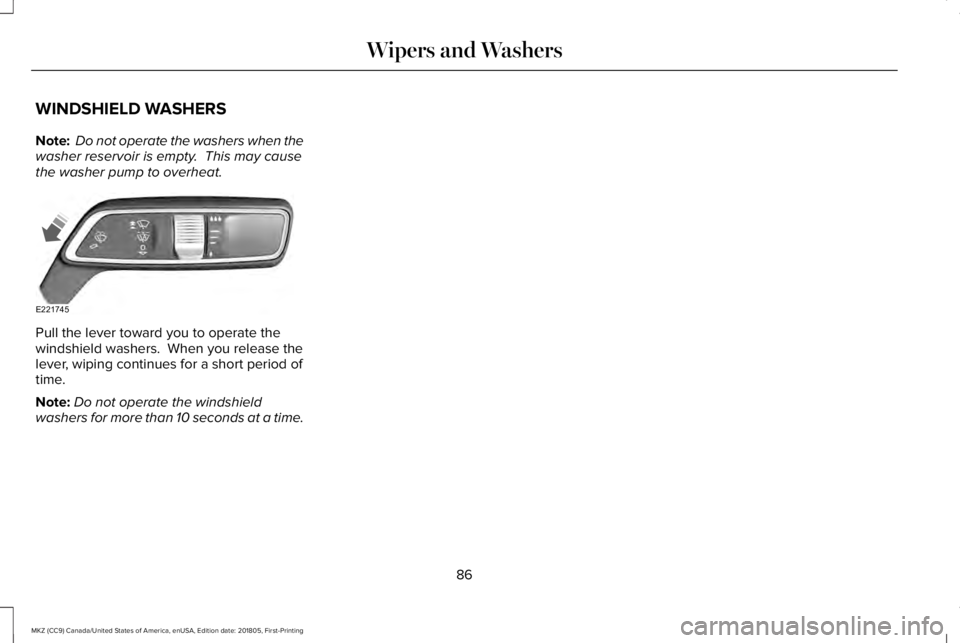
Pull the lever toward you to operate thewindshield washers. When you release thelever, wiping continues for a short period oftime.
Note:Do not operate the windshieldwashers for more than 10 seconds at a time.
86
MKZ (CC9) Canada/United States of America, enUSA, Edition date: 201805, First-Printing
Wipers and WashersE221745
Page 91 of 595
Headlamp High Beam
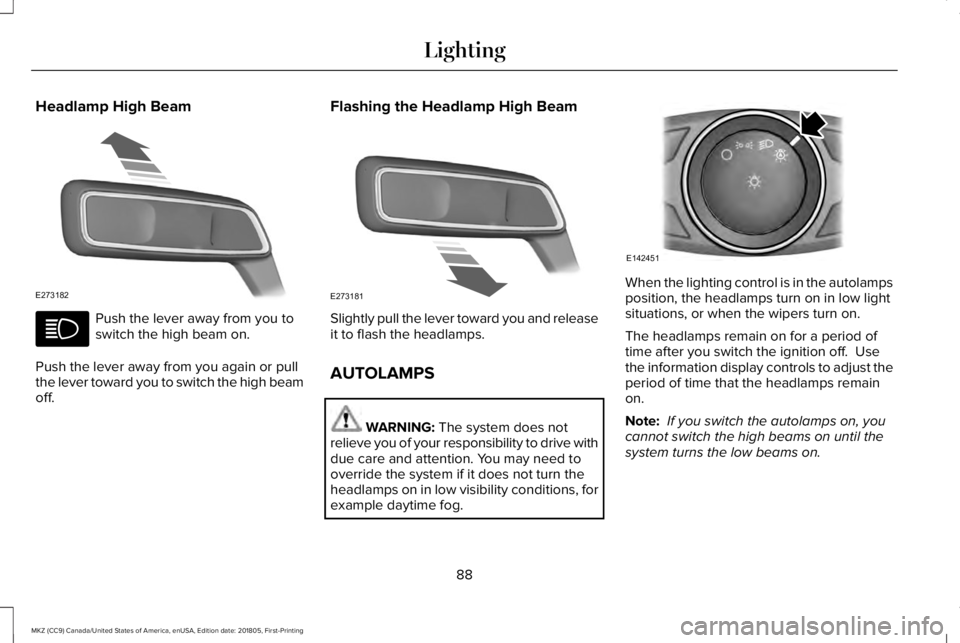
Push the lever away from you toswitch the high beam on.
Push the lever away from you again or pullthe lever toward you to switch the high beamoff.
Flashing the Headlamp High Beam
Slightly pull the lever toward you and releaseit to flash the headlamps.
AUTOLAMPS
WARNING: The system does notrelieve you of your responsibility to drive withdue care and attention. You may need tooverride the system if it does not turn theheadlamps on in low visibility conditions, forexample daytime fog.
When the lighting control is in the autolampsposition, the headlamps turn on in low lightsituations, or when the wipers turn on.
The headlamps remain on for a period oftime after you switch the ignition off. Usethe information display controls to adjust theperiod of time that the headlamps remainon.
Note: If you switch the autolamps on, youcannot switch the high beams on until thesystem turns the low beams on.
88
MKZ (CC9) Canada/United States of America, enUSA, Edition date: 201805, First-Printing
LightingE273182 E273181 E142451
Page 92 of 595
Windshield Wiper Activated Headlamps
When you switch the autolamps on, theheadlamps turn on within 10 seconds ofswitching the wipers on. They turn offapproximately 60 seconds after you switchthe windshield wipers off.
The headlamps do not turn on with thewipers:
•During a single wipe.
•When using the windshield washers.
•If the wipers are in intermittent mode.
Note:If you switch the autolamps and theautowipers on, the headlamps turn on whenthe windshield wipers continuously operate.
INSTRUMENT LIGHTING DIMMER
Note:If you disconnect and connect thebattery, or fully discharge and charge thebattery, the illuminated components switchto the maximum setting.
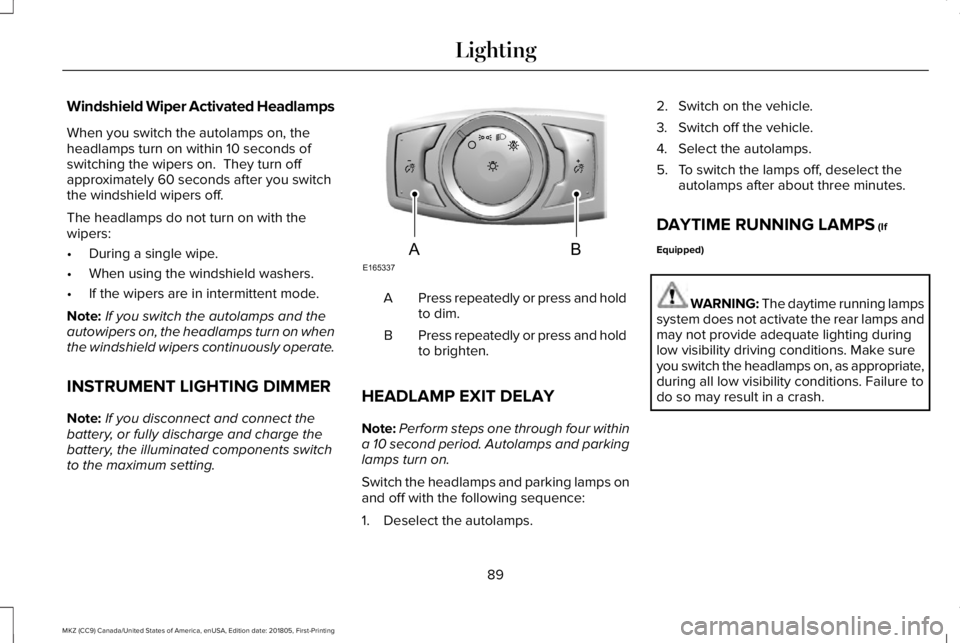
Press repeatedly or press and holdto dim.A
Press repeatedly or press and holdto brighten.B
HEADLAMP EXIT DELAY
Note:Perform steps one through four withina 10 second period. Autolamps and parkinglamps turn on.
Switch the headlamps and parking lamps onand off with the following sequence:
1. Deselect the autolamps.
2. Switch on the vehicle.
3. Switch off the vehicle.
4. Select the autolamps.
5. To switch the lamps off, deselect theautolamps after about three minutes.
DAYTIME RUNNING LAMPS (If
Equipped)
WARNING: The daytime running lampssystem does not activate the rear lamps andmay not provide adequate lighting duringlow visibility driving conditions. Make sureyou switch the headlamps on, as appropriate,during all low visibility conditions. Failure todo so may result in a crash.
89
MKZ (CC9) Canada/United States of America, enUSA, Edition date: 201805, First-Printing
LightingE165337AB
Page 100 of 595
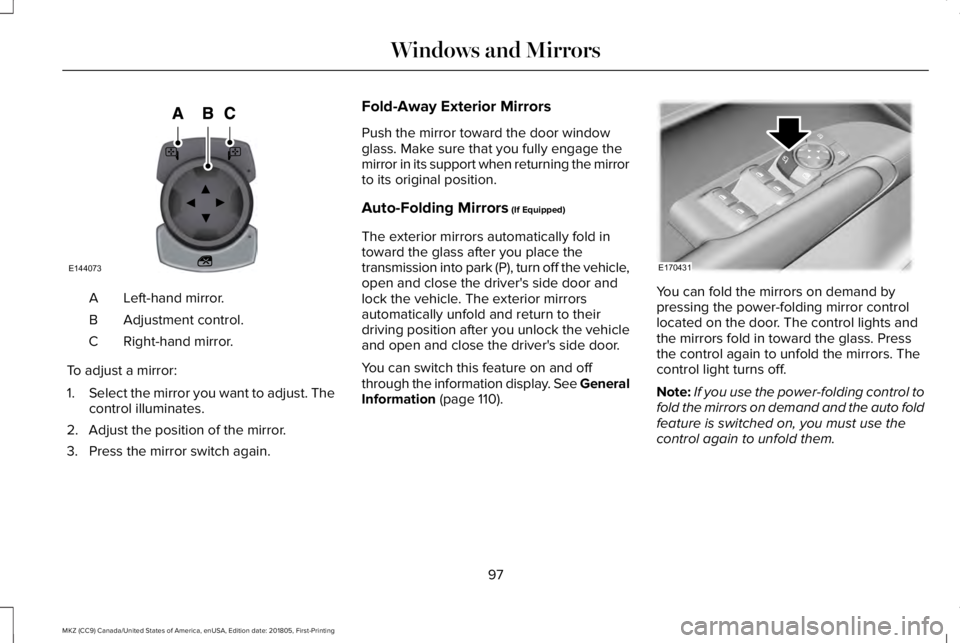
Left-hand mirror.A
Adjustment control.B
Right-hand mirror.C
To adjust a mirror:
1.Select the mirror you want to adjust. Thecontrol illuminates.
2. Adjust the position of the mirror.
3. Press the mirror switch again.
Fold-Away Exterior Mirrors
Push the mirror toward the door windowglass. Make sure that you fully engage themirror in its support when returning the mirrorto its original position.
Auto-Folding Mirrors (If Equipped)
The exterior mirrors automatically fold intoward the glass after you place thetransmission into park (P), turn off the vehicle,open and close the driver's side door andlock the vehicle. The exterior mirrorsautomatically unfold and return to theirdriving position after you unlock the vehicleand open and close the driver's side door.
You can switch this feature on and offthrough the information display. See GeneralInformation (page 110).
You can fold the mirrors on demand bypressing the power-folding mirror controllocated on the door. The control lights andthe mirrors fold in toward the glass. Pressthe control again to unfold the mirrors. Thecontrol light turns off.
Note:If you use the power-folding control tofold the mirrors on demand and the auto foldfeature is switched on, you must use thecontrol again to unfold them.
97
MKZ (CC9) Canada/United States of America, enUSA, Edition date: 201805, First-Printing
Windows and MirrorsE144073 E170431
Page 103 of 595
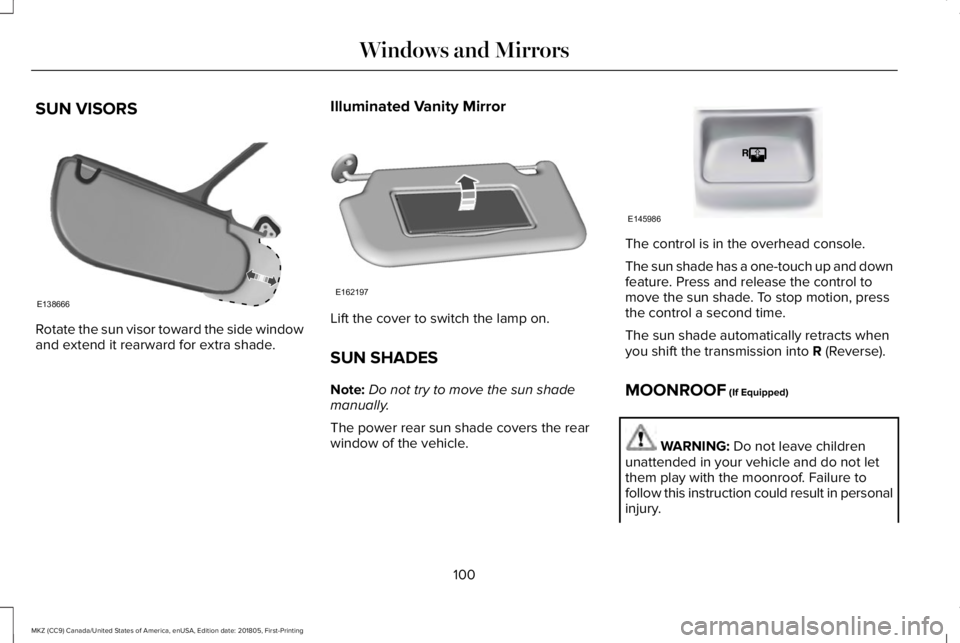
SUN VISORS
Rotate the sun visor toward the side windowand extend it rearward for extra shade.
Illuminated Vanity Mirror
Lift the cover to switch the lamp on.
SUN SHADES
Note:Do not try to move the sun shademanually.
The power rear sun shade covers the rearwindow of the vehicle.
The control is in the overhead console.
The sun shade has a one-touch up and downfeature. Press and release the control tomove the sun shade. To stop motion, pressthe control a second time.
The sun shade automatically retracts whenyou shift the transmission into R (Reverse).
MOONROOF (If Equipped)
WARNING: Do not leave childrenunattended in your vehicle and do not letthem play with the moonroof. Failure tofollow this instruction could result in personalinjury.
100
MKZ (CC9) Canada/United States of America, enUSA, Edition date: 201805, First-Printing
Windows and MirrorsE138666 E162197 E145986
Page 104 of 595
WARNING: When closing themoonroof, verify that it is free of obstructionand make sure that children and pets are notin the proximity of the roof opening.
Type 1
The sliding shade can be manually openedor closed when the moonroof is closed. Pullthe shade toward the front of the vehicle toclose it.
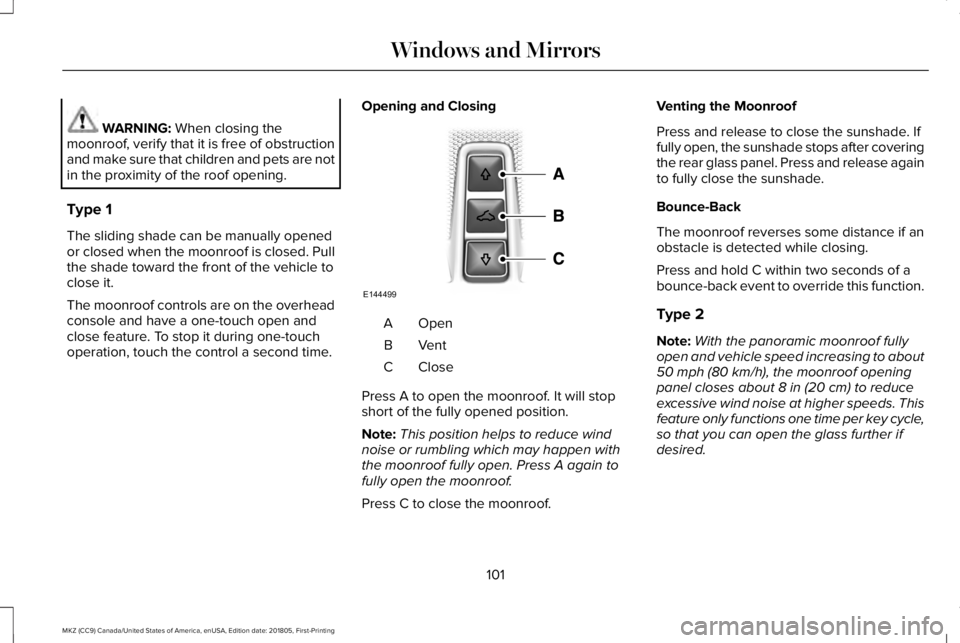
The moonroof controls are on the overheadconsole and have a one-touch open andclose feature. To stop it during one-touchoperation, touch the control a second time.
Opening and Closing
OpenA
VentB
CloseC
Press A to open the moonroof. It will stopshort of the fully opened position.
Note:This position helps to reduce windnoise or rumbling which may happen withthe moonroof fully open. Press A again tofully open the moonroof.
Press C to close the moonroof.
Venting the Moonroof
Press and release to close the sunshade. Iffully open, the sunshade stops after coveringthe rear glass panel. Press and release againto fully close the sunshade.
Bounce-Back
The moonroof reverses some distance if anobstacle is detected while closing.
Press and hold C within two seconds of abounce-back event to override this function.
Type 2
Note:With the panoramic moonroof fullyopen and vehicle speed increasing to about50 mph (80 km/h), the moonroof openingpanel closes about 8 in (20 cm) to reduceexcessive wind noise at higher speeds. Thisfeature only functions one time per key cycle,so that you can open the glass further ifdesired.
101
MKZ (CC9) Canada/United States of America, enUSA, Edition date: 201805, First-Printing
Windows and MirrorsE144499
Page 117 of 595
Settings
FeedbackFeedback
Mislock
All doors or Driver doorRemote Unlock
Switches Inhibit
AutofoldMirror
Hold OK to InitializeNeutral Towing
Remaining Life XXX% - Hold OK to ResetOil Life
Enable Switch or Disable SwitchPower Decklid
Auto or Last SettingsClimate ControlRemote Start
Auto Heated or OffFront Seats & Wheel
5, 10 or 15 minutesDuration
System
RemoteWindows
Courtesy WipeWipers
Rain Sensing
Hold OK to Create MyKeyCreate MyKeyMyKey
114
MKZ (CC9) Canada/United States of America, enUSA, Edition date: 201805, First-Printing
Information Displays
Page 137 of 595
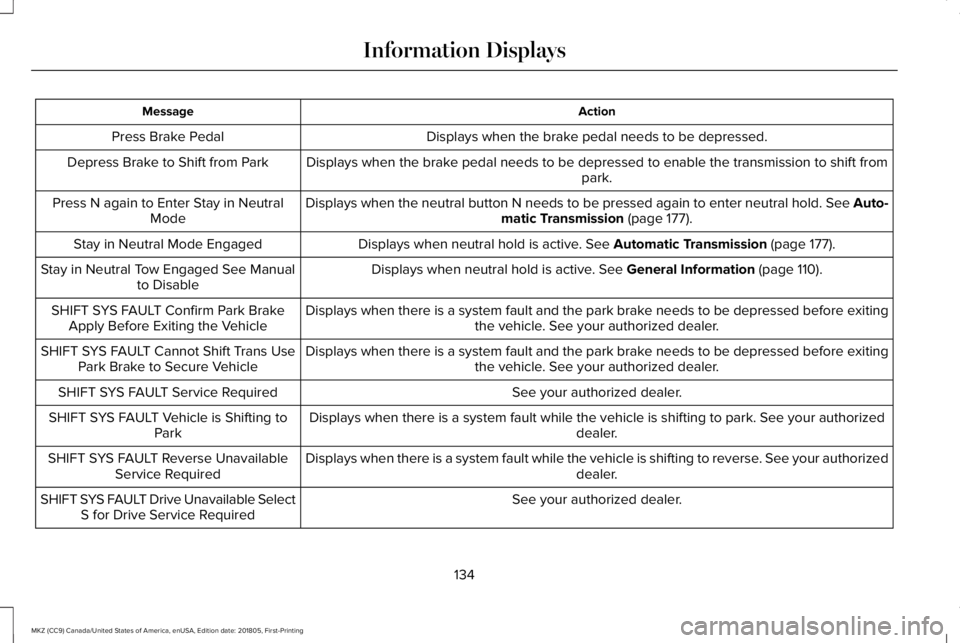
ActionMessage
Displays when the brake pedal needs to be depressed.Press Brake Pedal
Displays when the brake pedal needs to be depressed to enable the transmission to shift frompark.Depress Brake to Shift from Park
Displays when the neutral button N needs to be pressed again to enter neutral hold. See Auto-matic Transmission (page 177).Press N again to Enter Stay in NeutralMode
Displays when neutral hold is active. See Automatic Transmission (page 177).Stay in Neutral Mode Engaged
Displays when neutral hold is active. See General Information (page 110).Stay in Neutral Tow Engaged See Manualto Disable
Displays when there is a system fault and the park brake needs to be depressed before exitingthe vehicle. See your authorized dealer.SHIFT SYS FAULT Confirm Park BrakeApply Before Exiting the Vehicle
Displays when there is a system fault and the park brake needs to be depressed before exitingthe vehicle. See your authorized dealer.SHIFT SYS FAULT Cannot Shift Trans UsePark Brake to Secure Vehicle
See your authorized dealer.SHIFT SYS FAULT Service Required
Displays when there is a system fault while the vehicle is shifting to park. See your authorizeddealer.SHIFT SYS FAULT Vehicle is Shifting toPark
Displays when there is a system fault while the vehicle is shifting to reverse. See your authorizeddealer.SHIFT SYS FAULT Reverse UnavailableService Required
See your authorized dealer.SHIFT SYS FAULT Drive Unavailable SelectS for Drive Service Required
134
MKZ (CC9) Canada/United States of America, enUSA, Edition date: 201805, First-Printing
Information Displays
Page 138 of 595
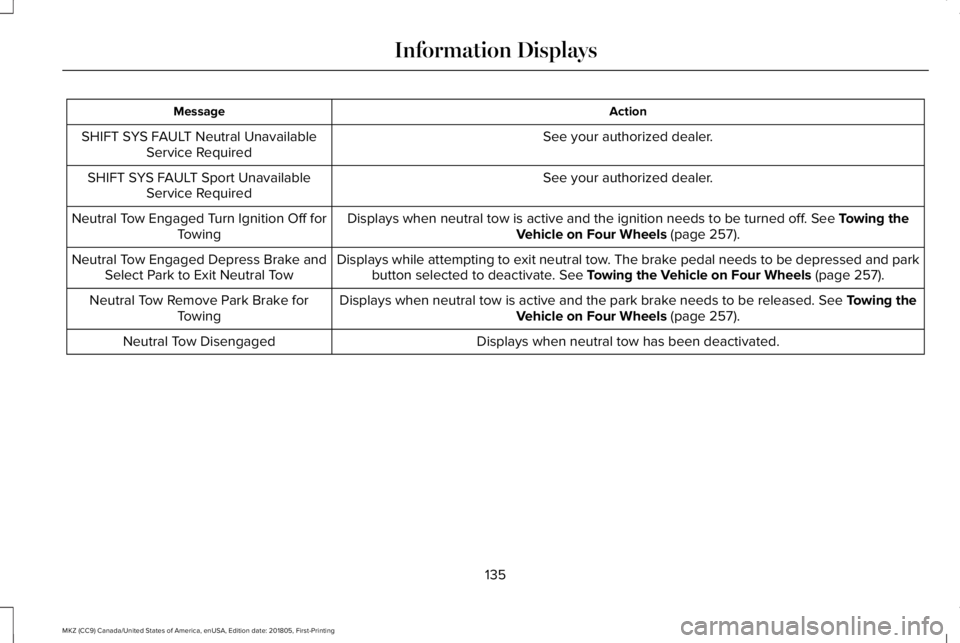
ActionMessage
See your authorized dealer.SHIFT SYS FAULT Neutral UnavailableService Required
See your authorized dealer.SHIFT SYS FAULT Sport UnavailableService Required
Displays when neutral tow is active and the ignition needs to be turned off. See Towing theVehicle on Four Wheels (page 257).Neutral Tow Engaged Turn Ignition Off forTowing
Displays while attempting to exit neutral tow. The brake pedal needs to be depressed and parkbutton selected to deactivate. See Towing the Vehicle on Four Wheels (page 257).Neutral Tow Engaged Depress Brake andSelect Park to Exit Neutral Tow
Displays when neutral tow is active and the park brake needs to be released. See Towing theVehicle on Four Wheels (page 257).Neutral Tow Remove Park Brake forTowing
Displays when neutral tow has been deactivated.Neutral Tow Disengaged
135
MKZ (CC9) Canada/United States of America, enUSA, Edition date: 201805, First-Printing
Information Displays