settings LINCOLN MKZ 2019 Owner's Manual
[x] Cancel search | Manufacturer: LINCOLN, Model Year: 2019, Model line: MKZ, Model: LINCOLN MKZ 2019Pages: 595, PDF Size: 4.95 MB
Page 149 of 595
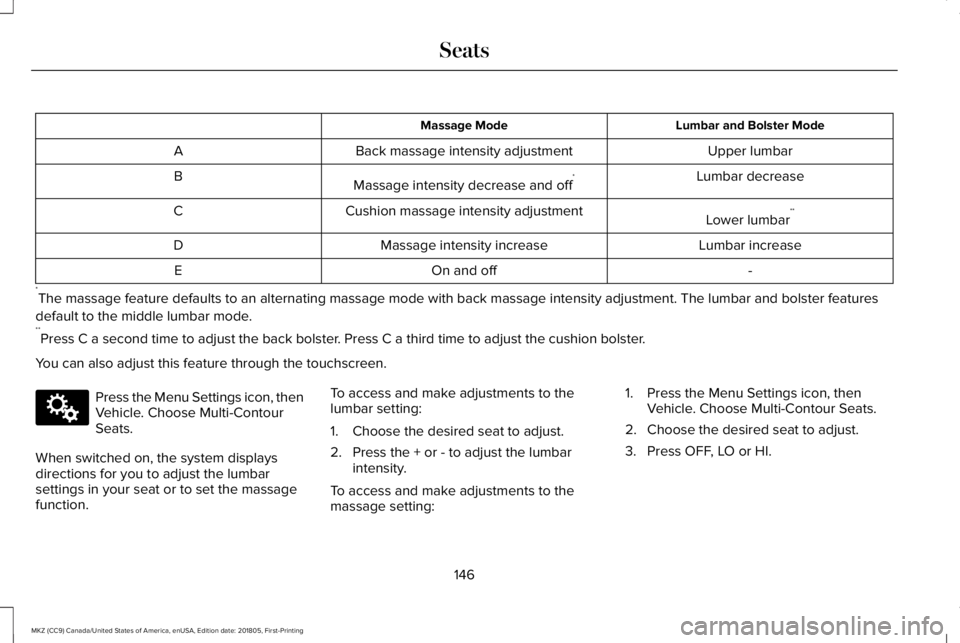
Lumbar and Bolster ModeMassage Mode
Upper lumbarBack massage intensity adjustmentA
Lumbar decreaseMassage intensity decrease and off*B
Lower lumbar**Cushion massage intensity adjustmentC
Lumbar increaseMassage intensity increaseD
-On and offE
*The massage feature defaults to an alternating massage mode with back massage intensity adjustment. The lumbar and bolster features
default to the middle lumbar mode.**Press C a second time to adjust the back bolster. Press C a third time to adjust the cushion bolster.
You can also adjust this feature through the touchscreen.
Press the Menu Settings icon, thenVehicle. Choose Multi-ContourSeats.
When switched on, the system displaysdirections for you to adjust the lumbarsettings in your seat or to set the massagefunction.
To access and make adjustments to thelumbar setting:
1. Choose the desired seat to adjust.
2. Press the + or - to adjust the lumbarintensity.
To access and make adjustments to themassage setting:
1. Press the Menu Settings icon, thenVehicle. Choose Multi-Contour Seats.
2. Choose the desired seat to adjust.
3. Press OFF, LO or HI.
146
MKZ (CC9) Canada/United States of America, enUSA, Edition date: 201805, First-Printing
SeatsE142607
Page 151 of 595
Linking a PreSet Position to yourRemote Control or Intelligent AccessKey Fob
Your vehicle can save the preset memorypositions for up to two remote controls orintelligent access (IA) keys.
After you have saved your desired memorypreset positions:
1.Press and hold the desired preset buttonfor about three seconds until you hear asingle tone.
2. Within three seconds, press the lockbutton on the remote control you arelinking.
To unlink a remote control, follow the sameprocedure – except in step 2, press theunlock button on the remote control.
Note:If more than one linked remote controlor intelligent access key is in range, thememory function moves to the settings ofthe first key to initiate a memory recall.
Easy Entry and Exit Feature
If you enable the easy entry and exit feature,it automatically moves the driver seatposition rearward up to 2 in (5 cm) when youswitch the ignition off.
The driver seat returns to the previousposition when you switch the ignition on.
You can enable or disable this feature in theinformation display. See GeneralInformation (page 110).
REAR SEATS
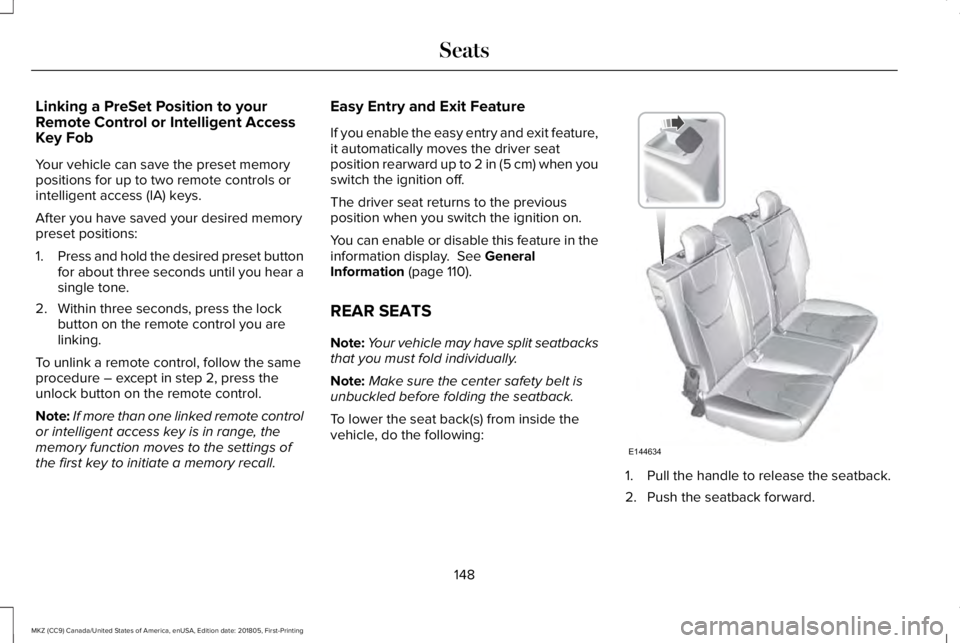
Note:Your vehicle may have split seatbacksthat you must fold individually.
Note:Make sure the center safety belt isunbuckled before folding the seatback.
To lower the seat back(s) from inside thevehicle, do the following:
1. Pull the handle to release the seatback.
2. Push the seatback forward.
148
MKZ (CC9) Canada/United States of America, enUSA, Edition date: 201805, First-Printing
SeatsE144634
Page 152 of 595
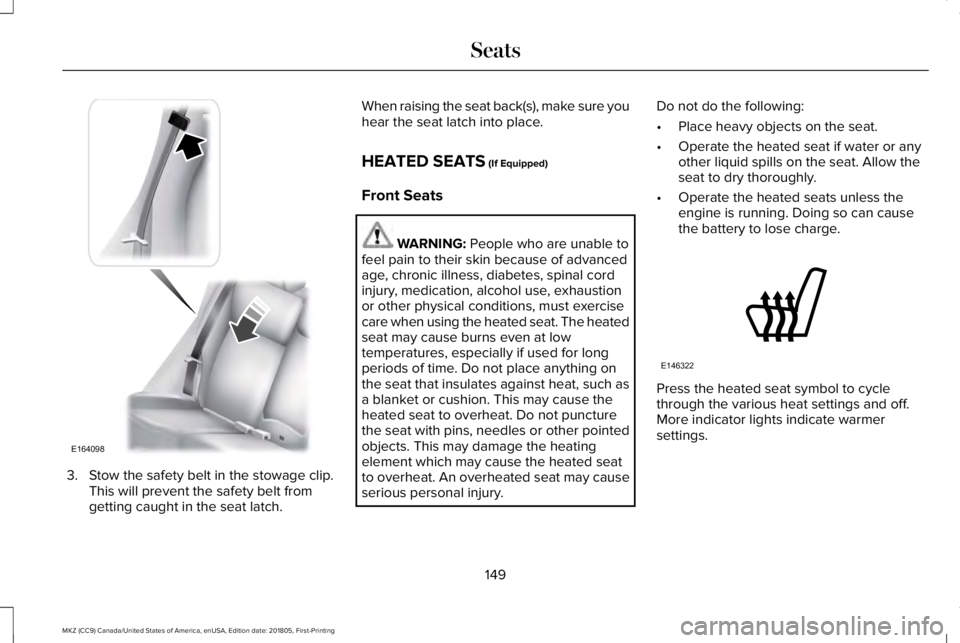
3. Stow the safety belt in the stowage clip.This will prevent the safety belt fromgetting caught in the seat latch.
When raising the seat back(s), make sure youhear the seat latch into place.
HEATED SEATS (If Equipped)
Front Seats
WARNING: People who are unable tofeel pain to their skin because of advancedage, chronic illness, diabetes, spinal cordinjury, medication, alcohol use, exhaustionor other physical conditions, must exercisecare when using the heated seat. The heatedseat may cause burns even at lowtemperatures, especially if used for longperiods of time. Do not place anything onthe seat that insulates against heat, such asa blanket or cushion. This may cause theheated seat to overheat. Do not puncturethe seat with pins, needles or other pointedobjects. This may damage the heatingelement which may cause the heated seatto overheat. An overheated seat may causeserious personal injury.
Do not do the following:
•Place heavy objects on the seat.
•Operate the heated seat if water or anyother liquid spills on the seat. Allow theseat to dry thoroughly.
•Operate the heated seats unless theengine is running. Doing so can causethe battery to lose charge.
Press the heated seat symbol to cyclethrough the various heat settings and off.More indicator lights indicate warmersettings.
149
MKZ (CC9) Canada/United States of America, enUSA, Edition date: 201805, First-Printing
SeatsE164098 E146322
Page 153 of 595
Rear Seats
WARNING: Persons who are unableto feel pain to the skin because of advancedage, chronic illness, diabetes, spinal cordinjury, medication, alcohol use, exhaustion,or other physical conditions, must exercisecare when using the seat heater. The seatheater may cause burns even at lowtemperatures, especially if used for longperiods of time. Do not place anything onthe seat that insulates against heat, such asa blanket or cushion, because this may causethe seat heater to overheat. Do not puncturethe seat with pins, needles, or other pointedobjects because this may damage theheating element which may cause the seatheater to overheat. An overheated seat maycause serious personal injury.
Do not do the following:
•Place heavy objects on the seat.
•Operate the seat heater if water or anyother liquid is spilled on the seat. Allowthe seat to dry thoroughly.
•Operate the heated seats unless theengine is running. Doing so can causethe battery to lose charge.
The rear seat heat controls are located onthe rear of the center console.
Press the heated seat symbol to cyclethrough the various heat settings and off.More indicator lights indicate warmersettings.
The heated seat module resets at everyignition run cycle. While the ignition is on,press the high or low heated seat switch toenable heating mode. When activated, theywill turn off automatically when you turn theengine off.
CLIMATE CONTROLLED SEATS (If
Equipped)
Heated Seats
WARNING: People who are unable tofeel pain to their skin because of advancedage, chronic illness, diabetes, spinal cordinjury, medication, alcohol use, exhaustionor other physical conditions, must exercisecare when using the heated seat. The heatedseat may cause burns even at lowtemperatures, especially if used for longperiods of time. Do not place anything onthe seat that insulates against heat, such asa blanket or cushion. This may cause the
150
MKZ (CC9) Canada/United States of America, enUSA, Edition date: 201805, First-Printing
SeatsE146322
Page 154 of 595
heated seat to overheat. Do not puncturethe seat with pins, needles or other pointedobjects. This may damage the heatingelement which may cause the heated seatto overheat. An overheated seat may causeserious personal injury.
Do not do the following:
•Place heavy objects on the seat.
•Operate the heated seat if water or anyother liquid spills on the seat. Allow theseat to dry thoroughly.
•Operate the heated seats unless theengine is running. Doing so can causethe battery to lose charge.
Touch the heated seat symbol to cyclethrough the various heat settings and off.More indicator lights indicate warmersettings.
Cooled Seats
The cooled seats will only function when theengine is running.
To operate the cooled seats:
Press the cooled seat symbol to cyclethrough the various cooling settings and off.More indicator lights indicate cooler settings.
If the engine falls below 350 RPM while thecooled seats are on, the feature will turn itselfoff. You will need to reactivate it.
Climate controlled seat air filterreplacement
Your vehicle is equipped with lifetime airfilters that are integrated with the seats.Regular maintenance or replacement is notneeded.
REAR SEAT ARMREST
Fold the armrest down to use the armrestand cupholder. To open the storage lid, pullup on the latch between the cupholders.
151
MKZ (CC9) Canada/United States of America, enUSA, Edition date: 201805, First-Printing
SeatsE146322 E146309 E144635
Page 156 of 595
HomeLink Wireless Control System
WARNING: Do not use the system withany garage door opener that does not havethe safety stop and reverse feature asrequired by U.S. Federal Safety Standards(this includes any garage door openermanufactured before April 1, 1982). A garagedoor opener which cannot detect an object,signaling the door to stop and reverse, doesnot meet current federal safety standards.Using a garage door opener without thesefeatures increases the risk of serious injuryor death.
Note:Make sure that the garage door andsecurity device are free from obstructionwhen you are programming. Do not programthe system with the vehicle in the garage.
Note:Make sure you keep the originalremote control transmitter for use in othervehicles as well as for future systemprogramming.
Note:We recommend that upon the sale orlease termination of your vehicle, you erasethe programmed function buttons for securityreasons. See Erasing the Function ButtonCodes.
Note:You can program a maximum of threedevices. To change or replace any of thethree devices after it has been initiallyprogrammed, you must first erase the currentsettings. See Erasing the Function ButtonCodes.
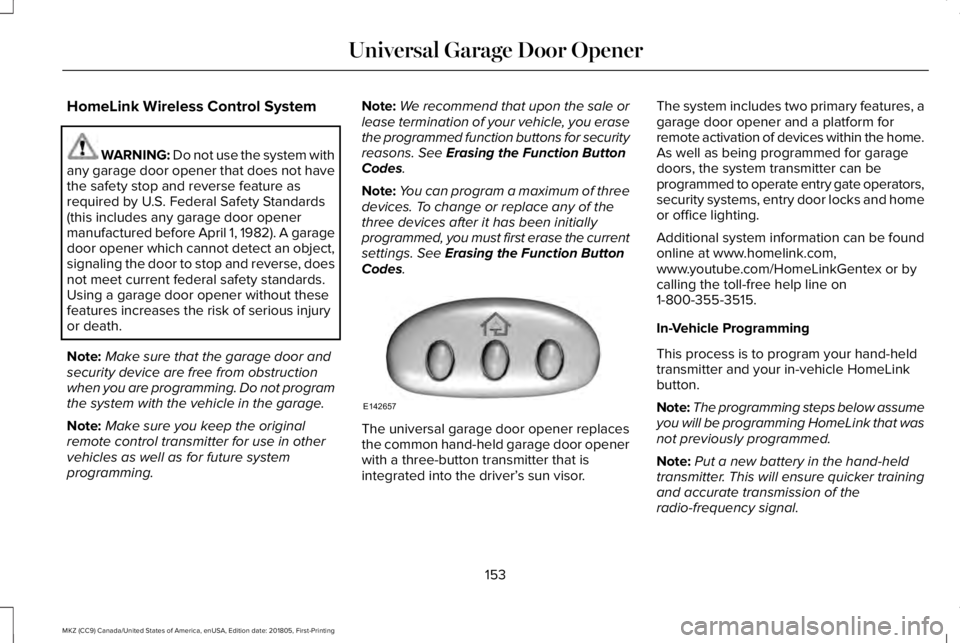
The universal garage door opener replacesthe common hand-held garage door openerwith a three-button transmitter that isintegrated into the driver’s sun visor.
The system includes two primary features, agarage door opener and a platform forremote activation of devices within the home.As well as being programmed for garagedoors, the system transmitter can beprogrammed to operate entry gate operators,security systems, entry door locks and homeor office lighting.
Additional system information can be foundonline at www.homelink.com,www.youtube.com/HomeLinkGentex or bycalling the toll-free help line on1-800-355-3515.
In-Vehicle Programming
This process is to program your hand-heldtransmitter and your in-vehicle HomeLinkbutton.
Note:The programming steps below assumeyou will be programming HomeLink that wasnot previously programmed.
Note:Put a new battery in the hand-heldtransmitter. This will ensure quicker trainingand accurate transmission of theradio-frequency signal.
153
MKZ (CC9) Canada/United States of America, enUSA, Edition date: 201805, First-Printing
Universal Garage Door OpenerE142657
Page 217 of 595
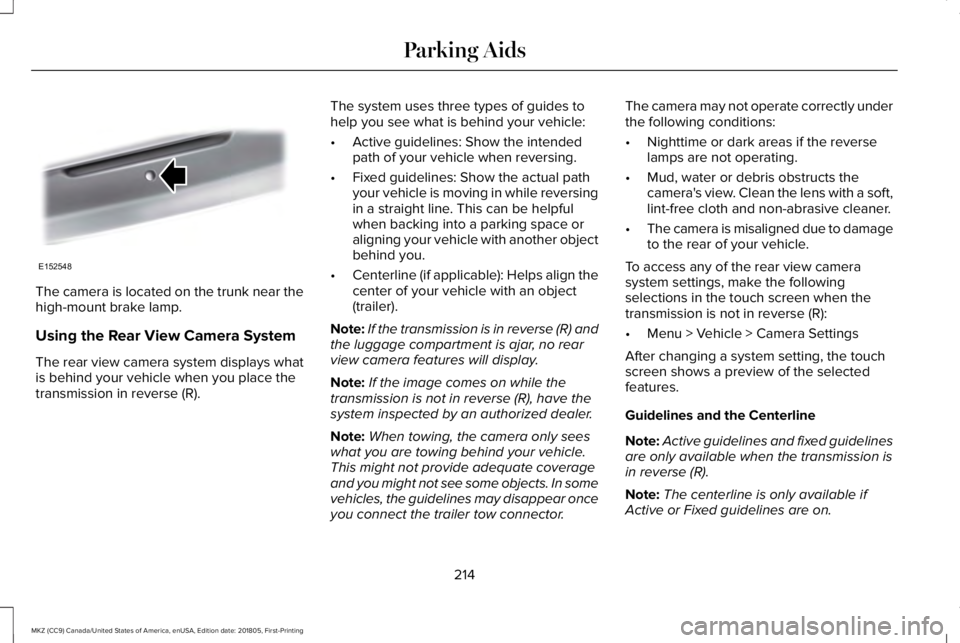
The camera is located on the trunk near thehigh-mount brake lamp.
Using the Rear View Camera System
The rear view camera system displays whatis behind your vehicle when you place thetransmission in reverse (R).
The system uses three types of guides tohelp you see what is behind your vehicle:
•Active guidelines: Show the intendedpath of your vehicle when reversing.
•Fixed guidelines: Show the actual pathyour vehicle is moving in while reversingin a straight line. This can be helpfulwhen backing into a parking space oraligning your vehicle with another objectbehind you.
•Centerline (if applicable): Helps align thecenter of your vehicle with an object(trailer).
Note:If the transmission is in reverse (R) andthe luggage compartment is ajar, no rearview camera features will display.
Note:If the image comes on while thetransmission is not in reverse (R), have thesystem inspected by an authorized dealer.
Note:When towing, the camera only seeswhat you are towing behind your vehicle.This might not provide adequate coverageand you might not see some objects. In somevehicles, the guidelines may disappear onceyou connect the trailer tow connector.
The camera may not operate correctly underthe following conditions:
•Nighttime or dark areas if the reverselamps are not operating.
•Mud, water or debris obstructs thecamera's view. Clean the lens with a soft,lint-free cloth and non-abrasive cleaner.
•The camera is misaligned due to damageto the rear of your vehicle.
To access any of the rear view camerasystem settings, make the followingselections in the touch screen when thetransmission is not in reverse (R):
•Menu > Vehicle > Camera Settings
After changing a system setting, the touchscreen shows a preview of the selectedfeatures.
Guidelines and the Centerline
Note:Active guidelines and fixed guidelinesare only available when the transmission isin reverse (R).
Note:The centerline is only available ifActive or Fixed guidelines are on.
214
MKZ (CC9) Canada/United States of America, enUSA, Edition date: 201805, First-Printing
Parking AidsE152548
Page 218 of 595
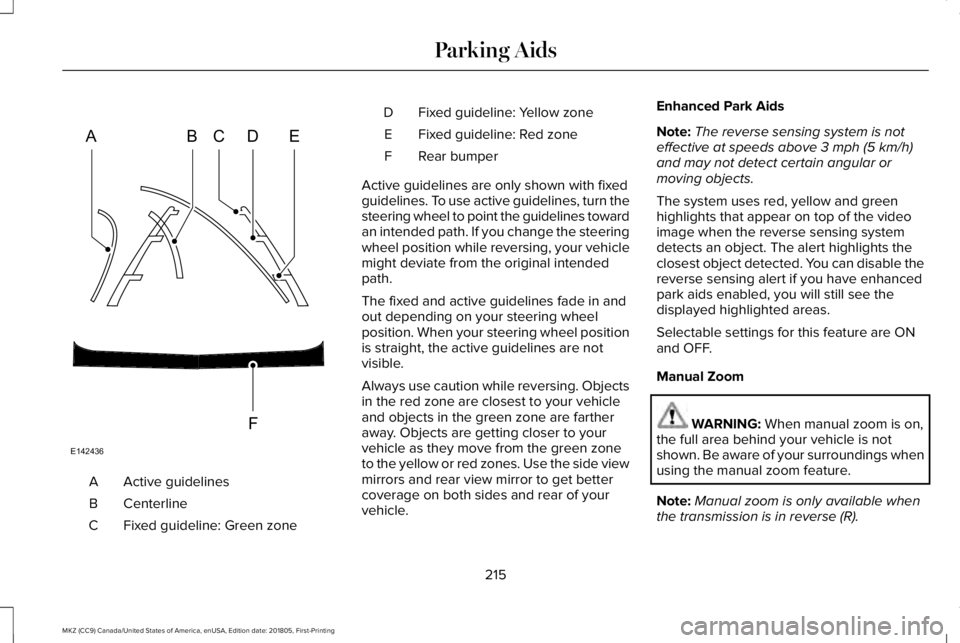
Active guidelinesA
CenterlineB
Fixed guideline: Green zoneC
Fixed guideline: Yellow zoneD
Fixed guideline: Red zoneE
Rear bumperF
Active guidelines are only shown with fixedguidelines. To use active guidelines, turn thesteering wheel to point the guidelines towardan intended path. If you change the steeringwheel position while reversing, your vehiclemight deviate from the original intendedpath.
The fixed and active guidelines fade in andout depending on your steering wheelposition. When your steering wheel positionis straight, the active guidelines are notvisible.
Always use caution while reversing. Objectsin the red zone are closest to your vehicleand objects in the green zone are fartheraway. Objects are getting closer to yourvehicle as they move from the green zoneto the yellow or red zones. Use the side viewmirrors and rear view mirror to get bettercoverage on both sides and rear of yourvehicle.
Enhanced Park Aids
Note:The reverse sensing system is noteffective at speeds above 3 mph (5 km/h)and may not detect certain angular ormoving objects.
The system uses red, yellow and greenhighlights that appear on top of the videoimage when the reverse sensing systemdetects an object. The alert highlights theclosest object detected. You can disable thereverse sensing alert if you have enhancedpark aids enabled, you will still see thedisplayed highlighted areas.
Selectable settings for this feature are ONand OFF.
Manual Zoom
WARNING: When manual zoom is on,the full area behind your vehicle is notshown. Be aware of your surroundings whenusing the manual zoom feature.
Note:Manual zoom is only available whenthe transmission is in reverse (R).
215
MKZ (CC9) Canada/United States of America, enUSA, Edition date: 201805, First-Printing
Parking AidsABCD
F
E
E142436
Page 219 of 595
Note:Only the centerline shows when youenable manual zoom.
This allows you to get a closer view of anobject behind your vehicle. The zoomedimage keeps the bumper in the image toprovide a reference. The zoom is only activewhile the transmission is in reverse (R). Whenyou shift the transmission out of reverse (R),the feature automatically turns off and youmust enable it to use it again.
Selectable settings for this feature are ONand OFF.
Rear Camera Delay
When shifting the transmission out of reverse(R) and into any gear other than park (P), thecamera image remains in the display untilyour vehicle speed reaches 5 mph (8 km/h)or until you select a radio button.
Selectable settings for this feature are ONand OFF. The default setting for the rearcamera delay is OFF.
216
MKZ (CC9) Canada/United States of America, enUSA, Edition date: 201805, First-Printing
Parking Aids
Page 222 of 595
WARNING: Adaptive cruise controldoes not detect oncoming vehicles in thesame lane.
WARNING: Adaptive cruise control isnot a crash warning or avoidance system.
The system adjusts your vehicle speed tomaintain the set gap between you and thevehicle in front of you in the same lane. Youcan select four gap settings.
The system uses a radar sensor whichprojects a beam directly in front of yourvehicle.
Note:It is your responsibility to stay alert,drive safely and be in control of the vehicleat all times.
The cruise controls are on the steeringwheel. See Cruise Control (page 83).
Switching Adaptive Cruise Control On
For vehicles without Speed Limiter,press and release the button.
For vehicles with Speed Limiter,press and release the button.
The indicator, current gap setting and setspeed appear in the information display.
Setting the Adaptive Cruise Speed
Drive to your preferred speed.
Press and release the button.
Take your foot off the accelerator pedal.
The indicator, current gap setting and setspeed appear in the information display.
219
MKZ (CC9) Canada/United States of America, enUSA, Edition date: 201805, First-Printing
Cruise ControlE262918 E265296 E144529 E164805 E164805