settings LINCOLN MKZ 2019 Manual PDF
[x] Cancel search | Manufacturer: LINCOLN, Model Year: 2019, Model line: MKZ, Model: LINCOLN MKZ 2019Pages: 595, PDF Size: 4.95 MB
Page 488 of 595
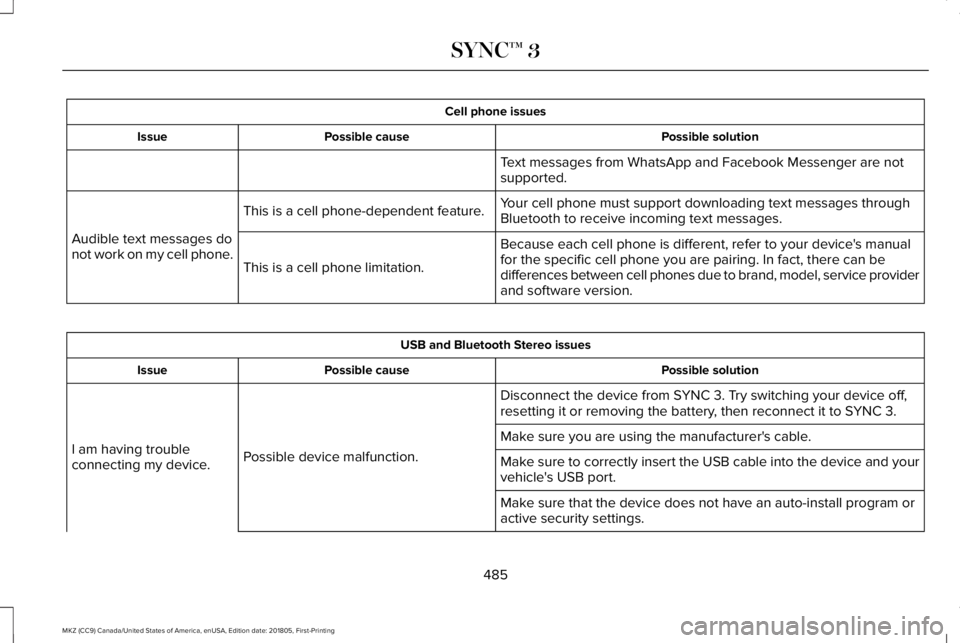
Cell phone issues
Possible solutionPossible causeIssue
Text messages from WhatsApp and Facebook Messenger are notsupported.
Your cell phone must support downloading text messages throughBluetooth to receive incoming text messages.This is a cell phone-dependent feature.
Audible text messages donot work on my cell phone.Because each cell phone is different, refer to your device's manualfor the specific cell phone you are pairing. In fact, there can bedifferences between cell phones due to brand, model, service providerand software version.
This is a cell phone limitation.
USB and Bluetooth Stereo issues
Possible solutionPossible causeIssue
Disconnect the device from SYNC 3. Try switching your device off,resetting it or removing the battery, then reconnect it to SYNC 3.
Possible device malfunction.I am having troubleconnecting my device.
Make sure you are using the manufacturer's cable.
Make sure to correctly insert the USB cable into the device and yourvehicle's USB port.
Make sure that the device does not have an auto-install program oractive security settings.
485
MKZ (CC9) Canada/United States of America, enUSA, Edition date: 201805, First-Printing
SYNC™ 3
Page 489 of 595
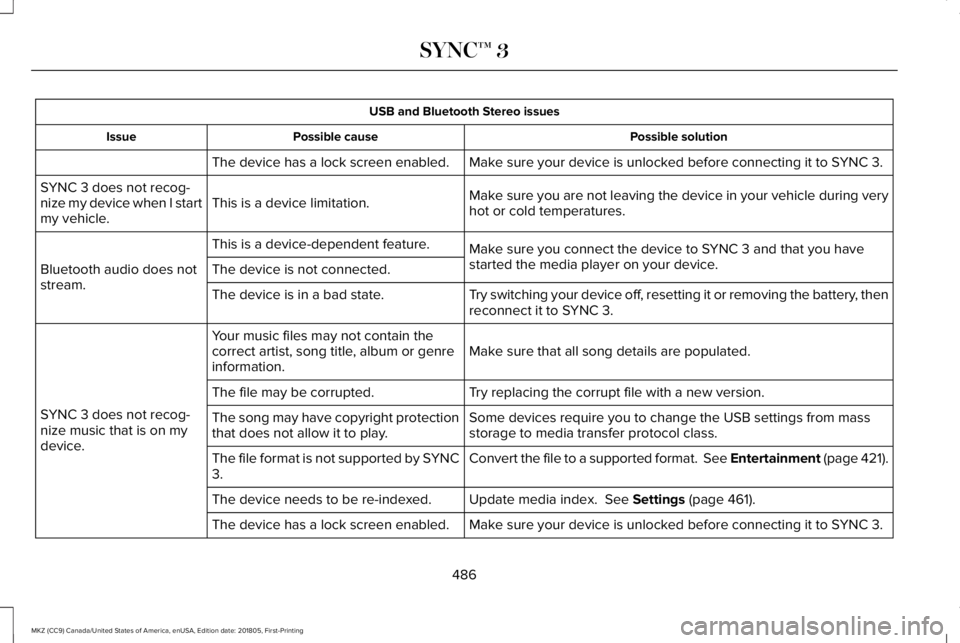
USB and Bluetooth Stereo issues
Possible solutionPossible causeIssue
Make sure your device is unlocked before connecting it to SYNC 3.The device has a lock screen enabled.
Make sure you are not leaving the device in your vehicle during veryhot or cold temperatures.This is a device limitation.SYNC 3 does not recog-nize my device when I startmy vehicle.
Make sure you connect the device to SYNC 3 and that you havestarted the media player on your device.
This is a device-dependent feature.
Bluetooth audio does notstream.The device is not connected.
Try switching your device off, resetting it or removing the battery, thenreconnect it to SYNC 3.The device is in a bad state.
Make sure that all song details are populated.Your music files may not contain thecorrect artist, song title, album or genreinformation.
SYNC 3 does not recog-nize music that is on mydevice.
Try replacing the corrupt file with a new version.The file may be corrupted.
Some devices require you to change the USB settings from massstorage to media transfer protocol class.The song may have copyright protectionthat does not allow it to play.
Convert the file to a supported format. See Entertainment (page 421).The file format is not supported by SYNC3.
Update media index. See Settings (page 461).The device needs to be re-indexed.
Make sure your device is unlocked before connecting it to SYNC 3.The device has a lock screen enabled.
486
MKZ (CC9) Canada/United States of America, enUSA, Edition date: 201805, First-Printing
SYNC™ 3
Page 493 of 595
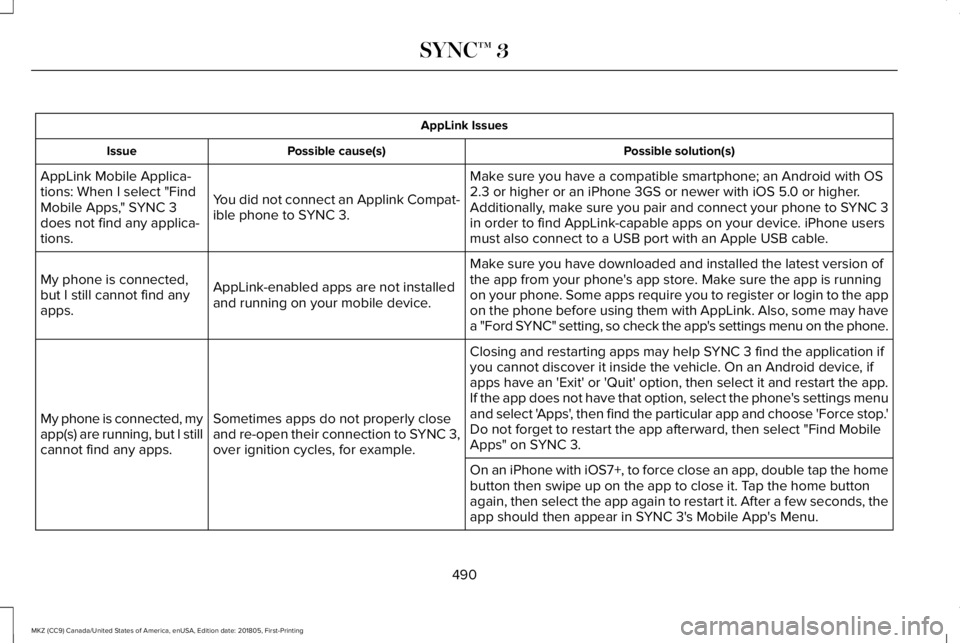
AppLink Issues
Possible solution(s)Possible cause(s)Issue
Make sure you have a compatible smartphone; an Android with OS2.3 or higher or an iPhone 3GS or newer with iOS 5.0 or higher.Additionally, make sure you pair and connect your phone to SYNC 3in order to find AppLink-capable apps on your device. iPhone usersmust also connect to a USB port with an Apple USB cable.
You did not connect an Applink Compat-ible phone to SYNC 3.
AppLink Mobile Applica-tions: When I select "FindMobile Apps," SYNC 3does not find any applica-tions.
Make sure you have downloaded and installed the latest version ofthe app from your phone's app store. Make sure the app is runningon your phone. Some apps require you to register or login to the appon the phone before using them with AppLink. Also, some may havea "Ford SYNC" setting, so check the app's settings menu on the phone.
AppLink-enabled apps are not installedand running on your mobile device.
My phone is connected,but I still cannot find anyapps.
Closing and restarting apps may help SYNC 3 find the application ifyou cannot discover it inside the vehicle. On an Android device, ifapps have an 'Exit' or 'Quit' option, then select it and restart the app.If the app does not have that option, select the phone's settings menuand select 'Apps', then find the particular app and choose 'Force stop.'Do not forget to restart the app afterward, then select "Find MobileApps" on SYNC 3.
Sometimes apps do not properly closeand re-open their connection to SYNC 3,over ignition cycles, for example.
My phone is connected, myapp(s) are running, but I stillcannot find any apps.
On an iPhone with iOS7+, to force close an app, double tap the homebutton then swipe up on the app to close it. Tap the home buttonagain, then select the app again to restart it. After a few seconds, theapp should then appear in SYNC 3's Mobile App's Menu.
490
MKZ (CC9) Canada/United States of America, enUSA, Edition date: 201805, First-Printing
SYNC™ 3
Page 494 of 595
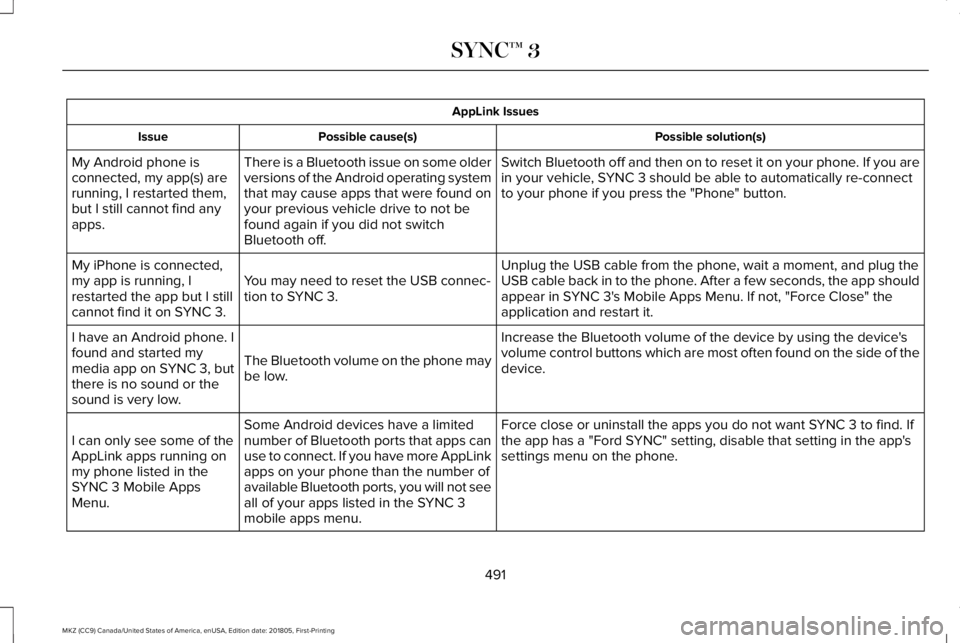
AppLink Issues
Possible solution(s)Possible cause(s)Issue
Switch Bluetooth off and then on to reset it on your phone. If you arein your vehicle, SYNC 3 should be able to automatically re-connectto your phone if you press the "Phone" button.
There is a Bluetooth issue on some olderversions of the Android operating systemthat may cause apps that were found onyour previous vehicle drive to not befound again if you did not switchBluetooth off.
My Android phone isconnected, my app(s) arerunning, I restarted them,but I still cannot find anyapps.
Unplug the USB cable from the phone, wait a moment, and plug theUSB cable back in to the phone. After a few seconds, the app shouldappear in SYNC 3's Mobile Apps Menu. If not, "Force Close" theapplication and restart it.
You may need to reset the USB connec-tion to SYNC 3.
My iPhone is connected,my app is running, Irestarted the app but I stillcannot find it on SYNC 3.
Increase the Bluetooth volume of the device by using the device'svolume control buttons which are most often found on the side of thedevice.The Bluetooth volume on the phone maybe low.
I have an Android phone. Ifound and started mymedia app on SYNC 3, butthere is no sound or thesound is very low.
Force close or uninstall the apps you do not want SYNC 3 to find. Ifthe app has a "Ford SYNC" setting, disable that setting in the app'ssettings menu on the phone.
Some Android devices have a limitednumber of Bluetooth ports that apps canuse to connect. If you have more AppLinkapps on your phone than the number ofavailable Bluetooth ports, you will not seeall of your apps listed in the SYNC 3mobile apps menu.
I can only see some of theAppLink apps running onmy phone listed in theSYNC 3 Mobile AppsMenu.
491
MKZ (CC9) Canada/United States of America, enUSA, Edition date: 201805, First-Printing
SYNC™ 3
Page 498 of 595
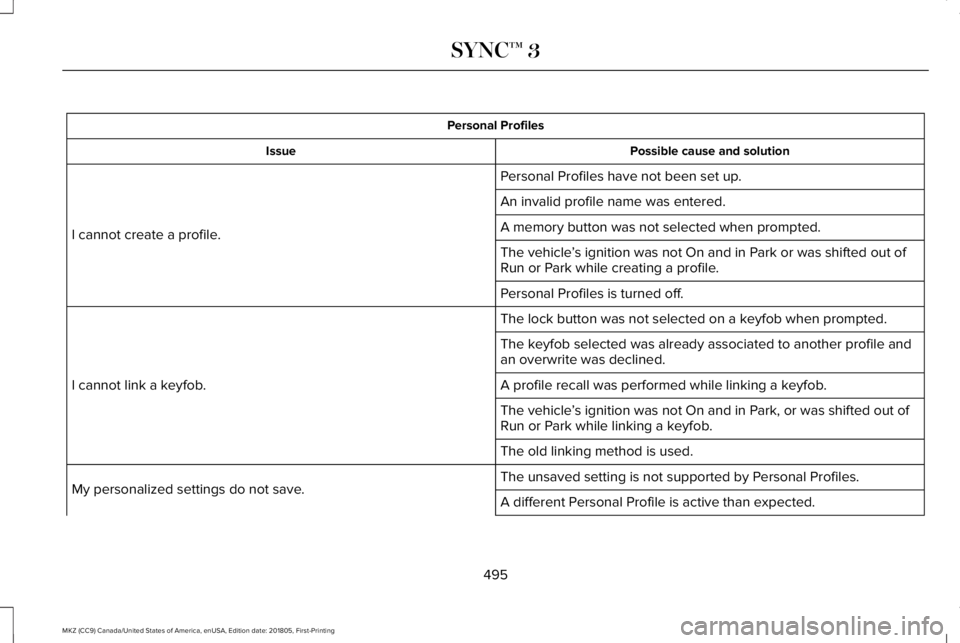
Personal Profiles
Possible cause and solutionIssue
Personal Profiles have not been set up.
I cannot create a profile.
An invalid profile name was entered.
A memory button was not selected when prompted.
The vehicle’s ignition was not On and in Park or was shifted out ofRun or Park while creating a profile.
Personal Profiles is turned off.
The lock button was not selected on a keyfob when prompted.
I cannot link a keyfob.
The keyfob selected was already associated to another profile andan overwrite was declined.
A profile recall was performed while linking a keyfob.
The vehicle’s ignition was not On and in Park, or was shifted out ofRun or Park while linking a keyfob.
The old linking method is used.
The unsaved setting is not supported by Personal Profiles.My personalized settings do not save.A different Personal Profile is active than expected.
495
MKZ (CC9) Canada/United States of America, enUSA, Edition date: 201805, First-Printing
SYNC™ 3
Page 499 of 595
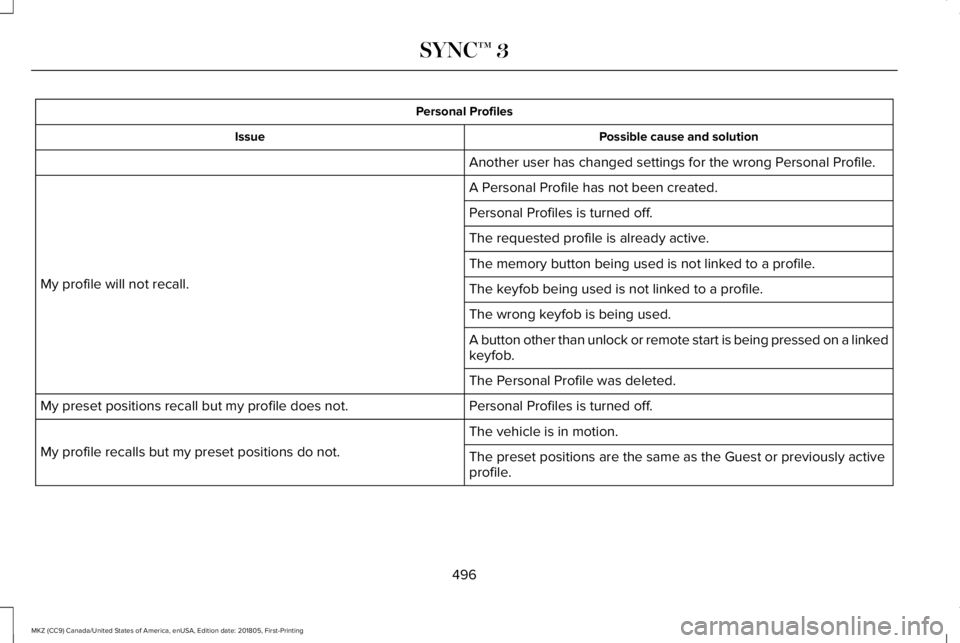
Personal Profiles
Possible cause and solutionIssue
Another user has changed settings for the wrong Personal Profile.
A Personal Profile has not been created.
My profile will not recall.
Personal Profiles is turned off.
The requested profile is already active.
The memory button being used is not linked to a profile.
The keyfob being used is not linked to a profile.
The wrong keyfob is being used.
A button other than unlock or remote start is being pressed on a linkedkeyfob.
The Personal Profile was deleted.
Personal Profiles is turned off.My preset positions recall but my profile does not.
The vehicle is in motion.
My profile recalls but my preset positions do not.The preset positions are the same as the Guest or previously activeprofile.
496
MKZ (CC9) Canada/United States of America, enUSA, Edition date: 201805, First-Printing
SYNC™ 3
Page 501 of 595
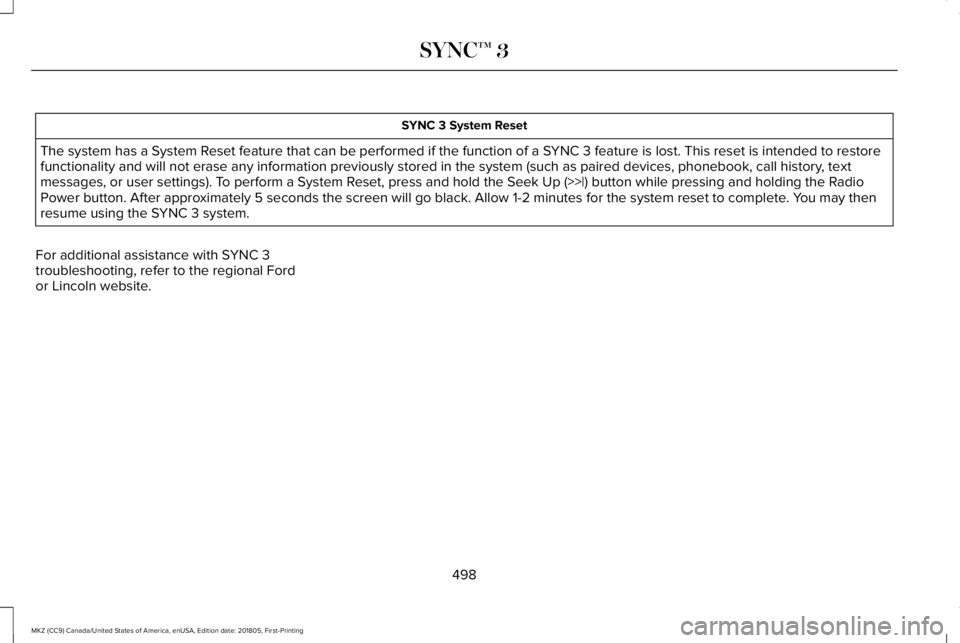
SYNC 3 System Reset
The system has a System Reset feature that can be performed if the function of a SYNC 3 feature is lost. This reset is intended to restorefunctionality and will not erase any information previously stored in the system (such as paired devices, phonebook, call history, textmessages, or user settings). To perform a System Reset, press and hold the Seek Up (>>|) button while pressing and holding the RadioPower button. After approximately 5 seconds the screen will go black. Allow 1-2 minutes for the system reset to complete. You may thenresume using the SYNC 3 system.
For additional assistance with SYNC 3troubleshooting, refer to the regional Fordor Lincoln website.
498
MKZ (CC9) Canada/United States of America, enUSA, Edition date: 201805, First-Printing
SYNC™ 3
Page 585 of 595
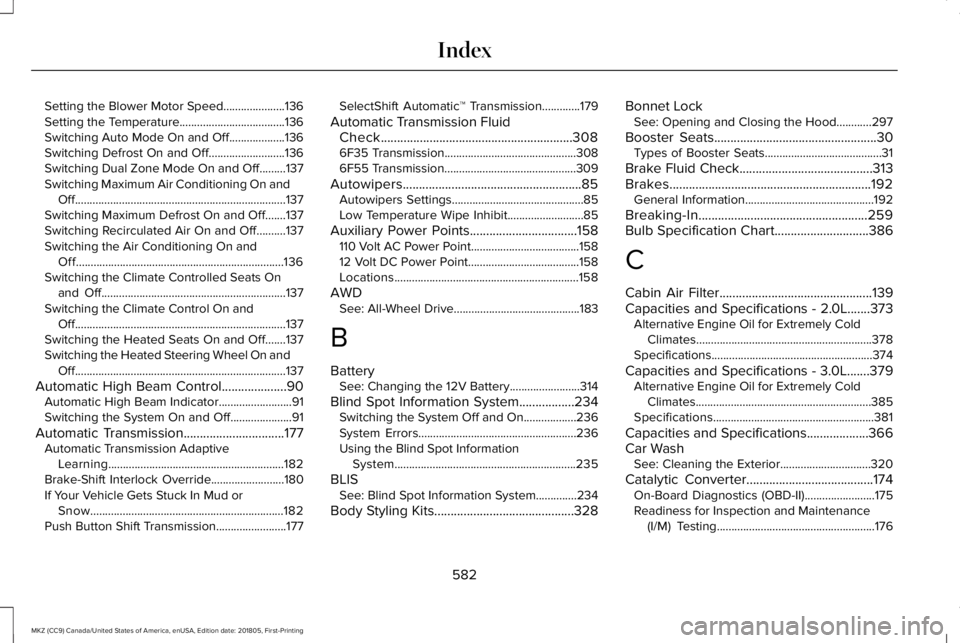
Setting the Blower Motor Speed.....................136Setting the Temperature....................................136Switching Auto Mode On and Off...................136Switching Defrost On and Off..........................136Switching Dual Zone Mode On and Off.........137Switching Maximum Air Conditioning On andOff........................................................................137Switching Maximum Defrost On and Off.......137Switching Recirculated Air On and Off..........137Switching the Air Conditioning On andOff.......................................................................136Switching the Climate Controlled Seats Onand Off...............................................................137Switching the Climate Control On andOff........................................................................137Switching the Heated Seats On and Off.......137Switching the Heated Steering Wheel On andOff........................................................................137
Automatic High Beam Control....................90Automatic High Beam Indicator.........................91Switching the System On and Off.....................91
Automatic Transmission...............................177Automatic Transmission AdaptiveLearning............................................................182Brake-Shift Interlock Override.........................180If Your Vehicle Gets Stuck In Mud orSnow..................................................................182Push Button Shift Transmission........................177
SelectShift Automatic™ Transmission.............179
Automatic Transmission FluidCheck...........................................................3086F35 Transmission.............................................3086F55 Transmission.............................................309
Autowipers.......................................................85Autowipers Settings.............................................85Low Temperature Wipe Inhibit..........................85
Auxiliary Power Points.................................158110 Volt AC Power Point.....................................15812 Volt DC Power Point......................................158Locations...............................................................158
AWDSee: All-Wheel Drive...........................................183
B
BatterySee: Changing the 12V Battery........................314
Blind Spot Information System.................234Switching the System Off and On..................236System Errors......................................................236Using the Blind Spot InformationSystem..............................................................235
BLISSee: Blind Spot Information System..............234
Body Styling Kits...........................................328
Bonnet LockSee: Opening and Closing the Hood............297
Booster Seats..................................................30Types of Booster Seats........................................31
Brake Fluid Check.........................................313Brakes..............................................................192General Information............................................192
Breaking-In....................................................259Bulb Specification Chart.............................386
C
Cabin Air Filter...............................................139Capacities and Specifications - 2.0L.......373Alternative Engine Oil for Extremely ColdClimates............................................................378Specifications.......................................................374
Capacities and Specifications - 3.0L.......379Alternative Engine Oil for Extremely ColdClimates............................................................385Specifications.......................................................381
Capacities and Specifications...................366Car WashSee: Cleaning the Exterior...............................320
Catalytic Converter.......................................174On-Board Diagnostics (OBD-II)........................175Readiness for Inspection and Maintenance(I/M) Testing......................................................176
582
MKZ (CC9) Canada/United States of America, enUSA, Edition date: 201805, First-Printing
Index
Page 586 of 595
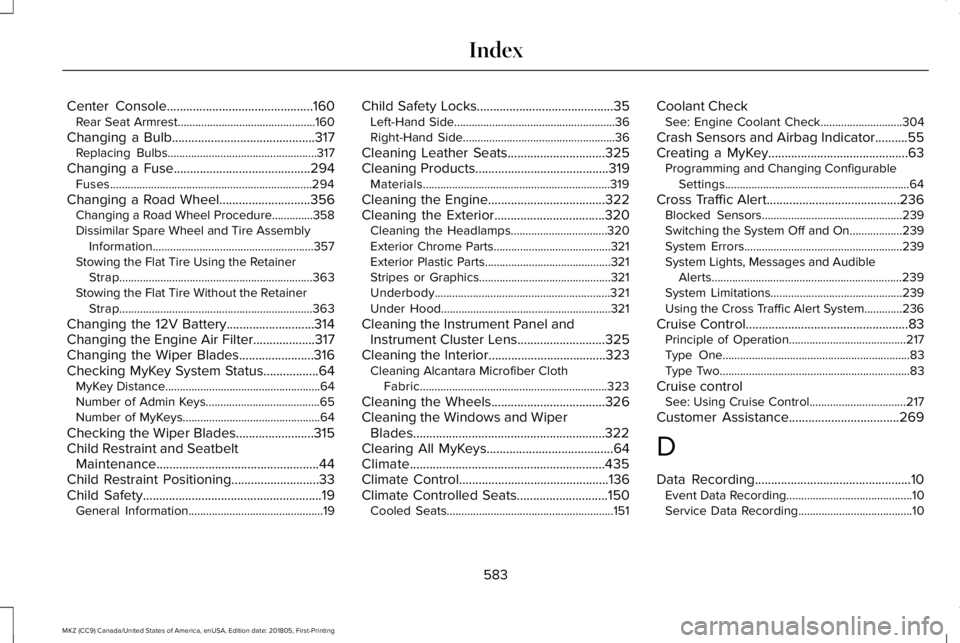
Center Console.............................................160Rear Seat Armrest...............................................160
Changing a Bulb............................................317Replacing Bulbs...................................................317
Changing a Fuse..........................................294Fuses.....................................................................294
Changing a Road Wheel............................356Changing a Road Wheel Procedure..............358Dissimilar Spare Wheel and Tire AssemblyInformation.......................................................357Stowing the Flat Tire Using the RetainerStrap..................................................................363Stowing the Flat Tire Without the RetainerStrap..................................................................363
Changing the 12V Battery...........................314Changing the Engine Air Filter...................317Changing the Wiper Blades.......................316Checking MyKey System Status.................64MyKey Distance.....................................................64Number of Admin Keys.......................................65Number of MyKeys...............................................64
Checking the Wiper Blades........................315Child Restraint and SeatbeltMaintenance..................................................44Child Restraint Positioning...........................33Child Safety.......................................................19General Information..............................................19
Child Safety Locks..........................................35Left-Hand Side.......................................................36Right-Hand Side....................................................36
Cleaning Leather Seats..............................325Cleaning Products.........................................319Materials................................................................319
Cleaning the Engine....................................322Cleaning the Exterior..................................320Cleaning the Headlamps.................................320Exterior Chrome Parts........................................321Exterior Plastic Parts...........................................321Stripes or Graphics.............................................321Underbody............................................................321Under Hood..........................................................321
Cleaning the Instrument Panel andInstrument Cluster Lens...........................325Cleaning the Interior....................................323Cleaning Alcantara Microfiber ClothFabric................................................................323
Cleaning the Wheels...................................326Cleaning the Windows and WiperBlades...........................................................322Clearing All MyKeys.......................................64Climate............................................................435Climate Control..............................................136Climate Controlled Seats............................150Cooled Seats.........................................................151
Coolant CheckSee: Engine Coolant Check............................304
Crash Sensors and Airbag Indicator..........55Creating a MyKey...........................................63Programming and Changing ConfigurableSettings...............................................................64
Cross Traffic Alert.........................................236Blocked Sensors................................................239Switching the System Off and On..................239System Errors......................................................239System Lights, Messages and AudibleAlerts.................................................................239System Limitations.............................................239Using the Cross Traffic Alert System.............236
Cruise Control..................................................83Principle of Operation........................................217Type One................................................................83Type Two.................................................................83
Cruise controlSee: Using Cruise Control.................................217
Customer Assistance..................................269
D
Data Recording................................................10Event Data Recording...........................................10Service Data Recording.......................................10
583
MKZ (CC9) Canada/United States of America, enUSA, Edition date: 201805, First-Printing
Index
Page 589 of 595
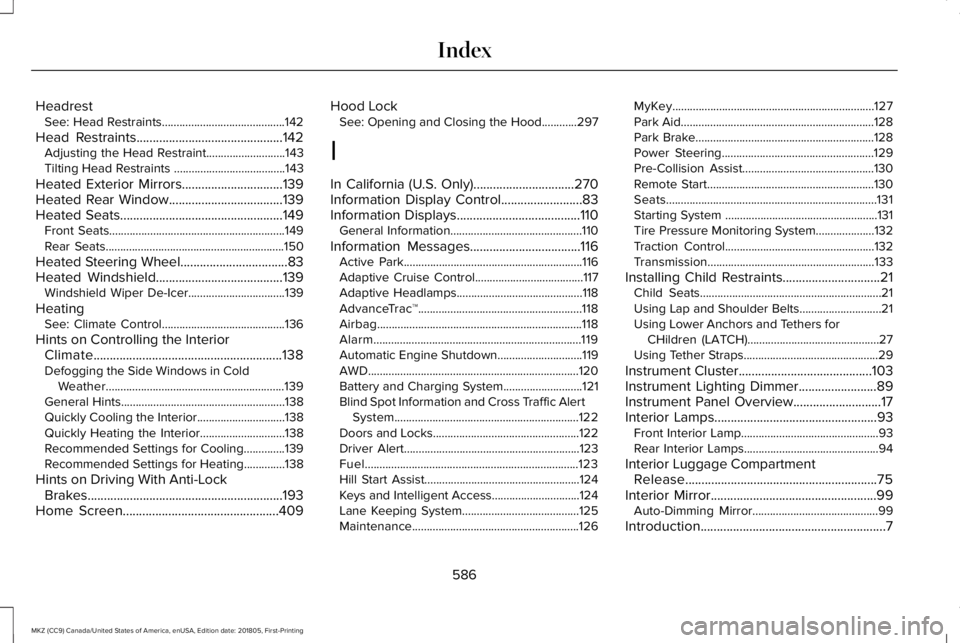
HeadrestSee: Head Restraints..........................................142
Head Restraints.............................................142Adjusting the Head Restraint...........................143Tilting Head Restraints ......................................143
Heated Exterior Mirrors...............................139Heated Rear Window...................................139Heated Seats..................................................149Front Seats............................................................149Rear Seats.............................................................150
Heated Steering Wheel.................................83Heated Windshield.......................................139Windshield Wiper De-Icer.................................139
HeatingSee: Climate Control..........................................136
Hints on Controlling the InteriorClimate..........................................................138Defogging the Side Windows in ColdWeather.............................................................139General Hints........................................................138Quickly Cooling the Interior..............................138Quickly Heating the Interior.............................138Recommended Settings for Cooling..............139Recommended Settings for Heating..............138
Hints on Driving With Anti-LockBrakes............................................................193Home Screen................................................409
Hood LockSee: Opening and Closing the Hood............297
I
In California (U.S. Only)...............................270Information Display Control.........................83Information Displays......................................110General Information.............................................110
Information Messages..................................116Active Park.............................................................116Adaptive Cruise Control.....................................117Adaptive Headlamps...........................................118AdvanceTrac™........................................................118Airbag......................................................................118Alarm.......................................................................119Automatic Engine Shutdown.............................119AWD........................................................................120Battery and Charging System...........................121Blind Spot Information and Cross Traffic AlertSystem...............................................................122Doors and Locks..................................................122Driver Alert............................................................123Fuel.........................................................................123Hill Start Assist.....................................................124Keys and Intelligent Access..............................124Lane Keeping System........................................125Maintenance.........................................................126
MyKey.....................................................................127Park Aid..................................................................128Park Brake.............................................................128Power Steering....................................................129Pre-Collision Assist.............................................130Remote Start.........................................................130Seats........................................................................131Starting System ....................................................131Tire Pressure Monitoring System....................132Traction Control...................................................132Transmission.........................................................133
Installing Child Restraints..............................21Child Seats..............................................................21Using Lap and Shoulder Belts............................21Using Lower Anchors and Tethers forCHildren (LATCH).............................................27Using Tether Straps..............................................29
Instrument Cluster.........................................103Instrument Lighting Dimmer........................89Instrument Panel Overview...........................17Interior Lamps..................................................93Front Interior Lamp...............................................93Rear Interior Lamps..............................................94
Interior Luggage CompartmentRelease...........................................................75Interior Mirror...................................................99Auto-Dimming Mirror...........................................99
Introduction.........................................................7
586
MKZ (CC9) Canada/United States of America, enUSA, Edition date: 201805, First-Printing
Index