climate control LINCOLN MKZ 2020 Owners Manual
[x] Cancel search | Manufacturer: LINCOLN, Model Year: 2020, Model line: MKZ, Model: LINCOLN MKZ 2020Pages: 561, PDF Size: 5.7 MB
Page 6 of 561
Instrument Cluster
Gauges
...........................................................102
Warning Lamps and Indicators .................
104
Audible Warnings and Indicators .............
107
Information Displays
General Information ....................................
109
Information Messages .................................
115
Climate Control
Automatic Climate Control ........................
135
Hints on Controlling the Interior Climate .......................................................................
137
Heated Rear Window ..................................
138
Heated Exterior Mirrors ..............................
138
Cabin Air Filter ..............................................
139
Remote Start ..................................................
139
Seats
Sitting in the Correct Position ...................
140
Head Restraints .............................................
141
Power Seats ...................................................
142
Memory Function .........................................
146Rear Seats
......................................................
147
Heated Seats .................................................
148
Climate Controlled Seats ...........................
149
Garage Door Opener
Universal Garage Door Opener ................
151
Auxiliary Power Points
Auxiliary Power Points ................................
157
Storage Compartments
Center Console ............................................
159
Overhead Console ......................................
159
Rear Seat Armrest ........................................
159
Starting and Stopping the Engine
General Information ......................................
161
Keyless Starting .............................................
161
Starting a Gasoline Engine ........................
162
Engine Block Heater ...................................
165Fuel and Refueling
Safety Precautions
.......................................
167
Fuel Quality ....................................................
168
Fuel Filler Funnel Location ........................
168
Running Out of Fuel ....................................
169
Refueling .........................................................
170
Fuel Consumption ........................................
173
Engine Emission Control
Emission Law .................................................
174
Catalytic Converter ......................................
175
Transmission
Automatic Transmission ..............................
178
All-Wheel Drive
Using All-Wheel Drive .................................
184
Brakes
General Information .....................................
193
Hints on Driving With Anti-Lock Brakes .......................................................................
194
Electric Parking Brake .................................
194
3
MKZ (CC9) Canada/United States of America, enUSA, Edition date: 201905, Second-Printing Table of Contents
Page 15 of 561
Note:
Event data recorder data is recorded
by your vehicle only if a non-trivial crash
situation occurs; no data is recorded by the
event data recorder under normal driving
conditions and no personal data or
information (e.g., name, gender, age, and
crash location) is recorded. However, other
parties, such as law enforcement, could
combine the event data recorder data with
the type of personally identifying data
routinely acquired during a crash
investigation.
To read data recorded by an event data
recorder, special equipment is required, and
access to the vehicle or the event data
recorder is needed. In addition to the vehicle
manufacturer, other parties, such as law
enforcement, that have such special
equipment, can read the information if they
have access to the vehicle or the event data
recorder. Comfort, Convenience and
Entertainment Data
Your vehicle has electronic control units that
have the ability to store data based on your
personalized settings. The data is stored
locally in the vehicle or on devices that you
connect to it, for example, a USB drive or
digital music player. You can delete some of
this data and also choose whether to share
it through the services to which you
subscribe. See Settings (page 451).
Comfort and Convenience Data
Data recorded includes, for example:
• Seat and steering wheel position.
• Climate control settings.
• Radio presets.
Entertainment Data
Data recorded includes, for example:
• Music, videos or album art.
• Contacts and corresponding address
book entries.
• Navigation destinations. Services That We Provide
If you use our services, we collect and use
data, for example, account information,
vehicle location and driving characteristics,
that could identify you. We transmit this data
through a dedicated, protected connection.
We only collect and use data to enable your
use of our services to which you have
subscribed, with your consent or where
permitted by law. For additional information,
see the terms and conditions of the services
to which you have subscribed.
Services That Third Parties Provide
We recommend that you review the terms
and conditions and data privacy information
for any services to which you subscribe. We
take no responsibility for services that third
parties provide.
12
MKZ (CC9) Canada/United States of America, enUSA, Edition date: 201905, Second-Printing Introduction
Page 23 of 561
Direction indicators. See Direction Indicators (page 90).
A
Instrument cluster.
See Gauges (page 102). See Warning Lamps and Indicators (page 104).
B
Wiper lever.
See Wipers and Washers (page 84).
C
Information and entertainment display.
D
Audio unit.
See Audio Unit (page 401).
E
Hazard warning flasher switch.
See Hazard Flashers (page 266).
F
Parking aid switch.
See Parking Aids (page 203).
G
Heated rear window switch.
See Heated Rear Window (page 138).
H
Climate controls.
See Climate Control (page 135).
I
Start button.
See Keyless Starting (page 161).
J
Entertainment, navigation and phone.
K
Voice control.
See Voice Control (page 82).
L
Horn.M
Steering wheel adjustment.
See Adjusting the Steering Wheel (page 80).
N
Cruise control switches.
See What Is Cruise Control (page 221).
O
Information display controls.
See Information Displays (page 109).
P
Parking brake.
See Electric Parking Brake (page 194).
Q
Lighting control.
See Lighting Control (page 87). Instrument lighting dimmer. See Instrument Lighting Dimmer (page 89).
R
20
MKZ (CC9) Canada/United States of America, enUSA, Edition date: 201905, Second-Printing At a Glance
Page 63 of 561
5. Reinstall the battery cover and the key
blade.
Car Finder Press the button twice within three
seconds. A tone sounds and the
direction indicators flash. We
recommend you use this method to locate
your vehicle, rather than using the panic
alarm.
Sounding the Panic Alarm
Note: The panic alarm only operates when
the ignition is off. Press the button to sound the
panic alarm. Press the button
again or switch the ignition on to
turn it off. Remote Start WARNING: To avoid exhaust fumes,
do not use remote start if your vehicle is
parked indoors or in areas that are not well
ventilated.
Note: Do not use remote start if your fuel
level is low. The remote start button is on the
transmitter.
This feature allows you to start your vehicle
from the outside. The transmitter has an
extended operating range.
You can configure your automatic climate
control to operate when you remote start
your vehicle.
See Climate Control (page
135).
Many states and provinces have restrictions
for the use of remote start. Check your local
and state or provincial laws for specific
requirements regarding remote start
systems. The remote start system does not work if any
of the following occur:
•
The ignition is on.
• The anti-theft alarm triggers.
• You switch the feature off in the
information display.
• The hood is open.
• The transmission is not in park (P).
• The battery voltage is below the
minimum operating voltage.
Remote Control Feedback (If Equipped)
An LED on the remote control provides status
feedback of remote start or stop commands. Status
LED
Remote startsuccessful
Solid green
Remote stopsuccessful
Solid red
Request failed or
status not received
Blinking red
Status incomplete
Blinking green
60
MKZ (CC9) Canada/United States of America, enUSA, Edition date: 201905, Second-Printing Keys and Remote ControlsE138623 E138624 E138625
Page 86 of 561
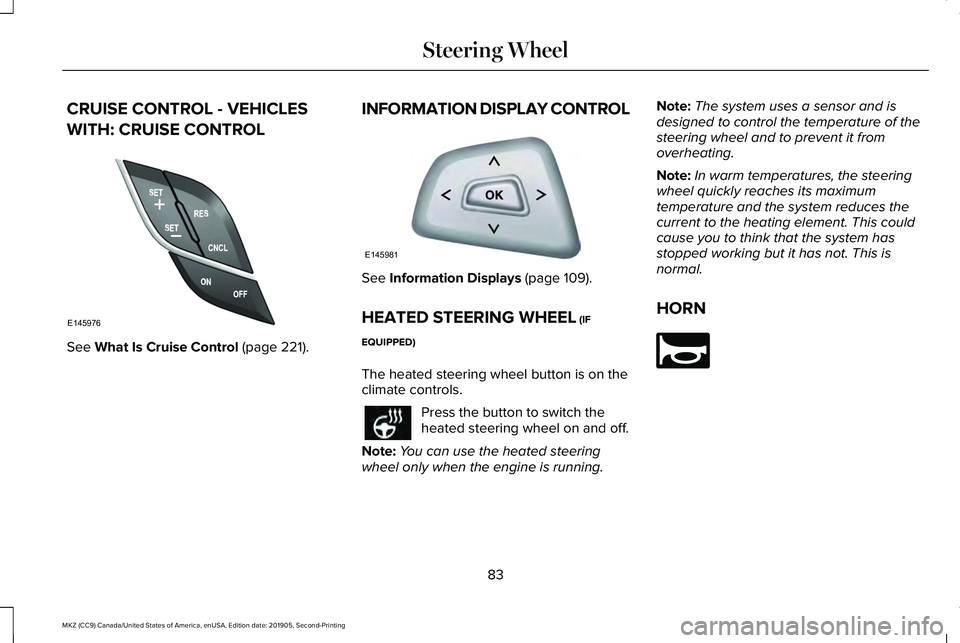
CRUISE CONTROL - VEHICLES
WITH: CRUISE CONTROL
See What Is Cruise Control (page 221).
INFORMATION DISPLAY CONTROL See
Information Displays (page 109).
HEATED STEERING WHEEL
(IF
EQUIPPED)
The heated steering wheel button is on the
climate controls. Press the button to switch the
heated steering wheel on and off.
Note: You can use the heated steering
wheel only when the engine is running. Note:
The system uses a sensor and is
designed to control the temperature of the
steering wheel and to prevent it from
overheating.
Note: In warm temperatures, the steering
wheel quickly reaches its maximum
temperature and the system reduces the
current to the heating element. This could
cause you to think that the system has
stopped working but it has not. This is
normal.
HORN 83
MKZ (CC9) Canada/United States of America, enUSA, Edition date: 201905, Second-Printing Steering WheelE145976 E145981 E270945
Page 116 of 561
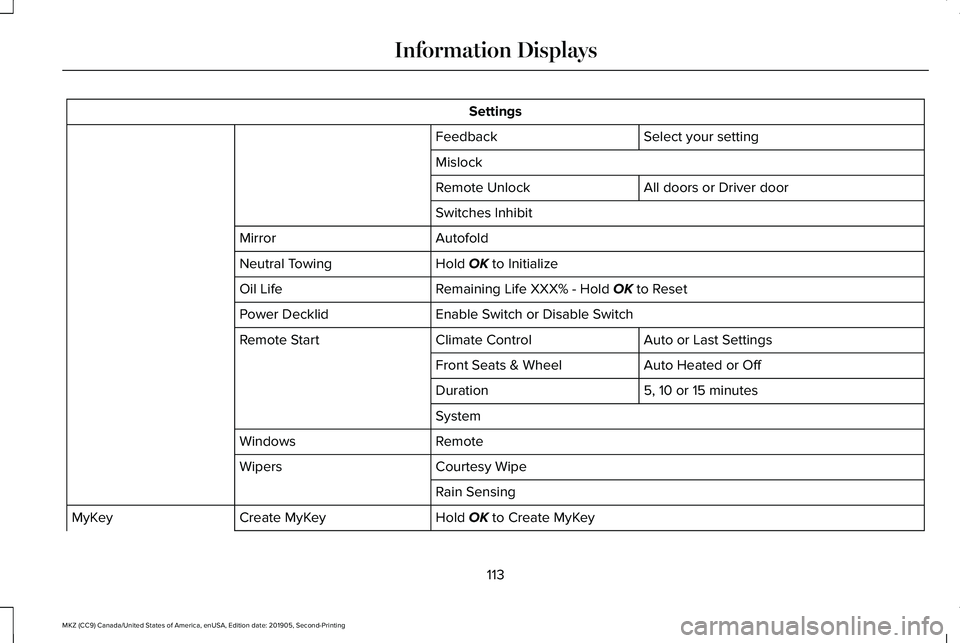
Settings
Select your setting
Feedback
Mislock
All doors or Driver door
Remote Unlock
Switches Inhibit
Autofold
Mirror
Hold OK to Initialize
Neutral Towing
Remaining Life XXX% - Hold
OK to Reset
Oil Life
Enable Switch or Disable Switch
Power Decklid
Auto or Last Settings
Climate Control
Remote Start
Auto Heated or Off
Front Seats & Wheel
5, 10 or 15 minutes
Duration
System
Remote
Windows
Courtesy Wipe
Wipers
Rain Sensing
Hold
OK to Create MyKey
Create MyKey
MyKey
113
MKZ (CC9) Canada/United States of America, enUSA, Edition date: 201905, Second-Printing Information Displays
Page 138 of 561
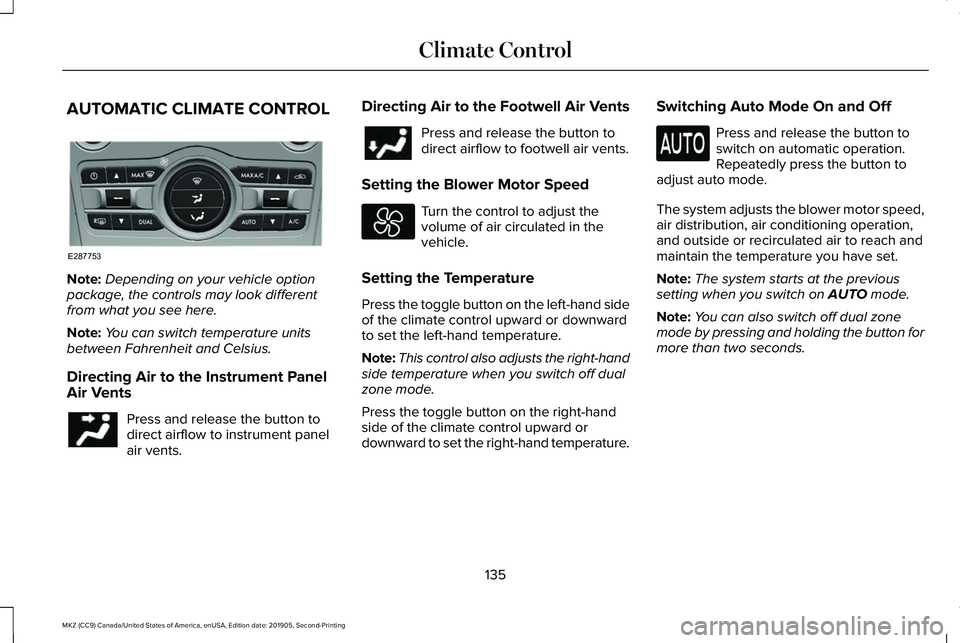
AUTOMATIC CLIMATE CONTROL
Note:
Depending on your vehicle option
package, the controls may look different
from what you see here.
Note: You can switch temperature units
between Fahrenheit and Celsius.
Directing Air to the Instrument Panel
Air Vents Press and release the button to
direct airflow to instrument panel
air vents. Directing Air to the Footwell Air Vents Press and release the button to
direct airflow to footwell air vents.
Setting the Blower Motor Speed Turn the control to adjust the
volume of air circulated in the
vehicle.
Setting the Temperature
Press the toggle button on the left-hand side
of the climate control upward or downward
to set the left-hand temperature.
Note: This control also adjusts the right-hand
side temperature when you switch off dual
zone mode.
Press the toggle button on the right-hand
side of the climate control upward or
downward to set the right-hand temperature. Switching Auto Mode On and Off Press and release the button to
switch on automatic operation.
Repeatedly press the button to
adjust auto mode.
The system adjusts the blower motor speed,
air distribution, air conditioning operation,
and outside or recirculated air to reach and
maintain the temperature you have set.
Note: The system starts at the previous
setting when you switch on AUTO mode.
Note: You can also switch off dual zone
mode by pressing and holding the button for
more than two seconds.
135
MKZ (CC9) Canada/United States of America, enUSA, Edition date: 201905, Second-Printing Climate ControlE287753
Page 139 of 561
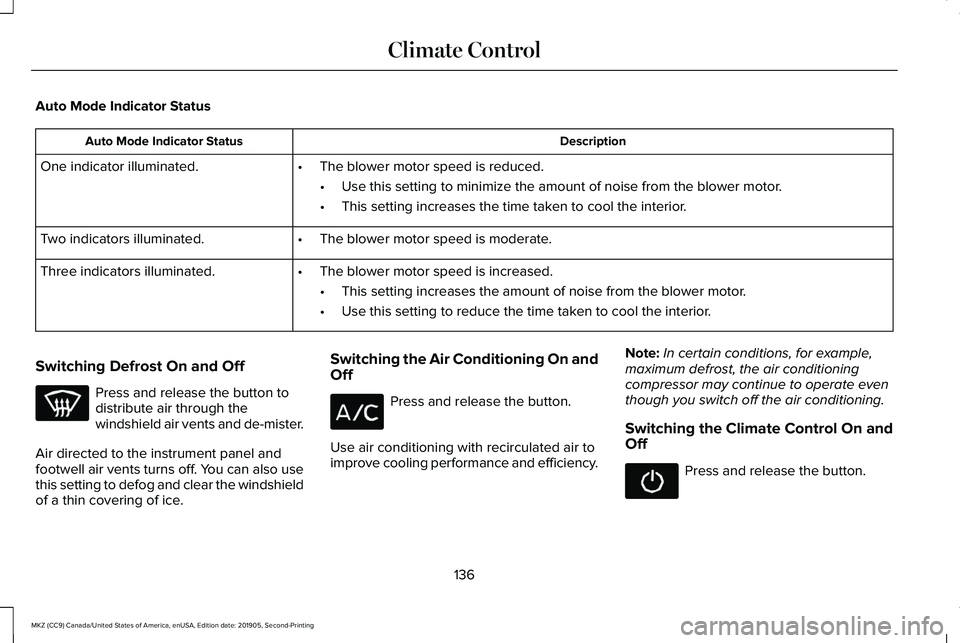
Auto Mode Indicator Status
Description
Auto Mode Indicator Status
One indicator illuminated. •The blower motor speed is reduced.
•Use this setting to minimize the amount of noise from the blower motor.
• This setting increases the time taken to cool the interior.
Two indicators illuminated. •The blower motor speed is moderate.
Three indicators illuminated. •The blower motor speed is increased.
•This setting increases the amount of noise from the blower motor.
• Use this setting to reduce the time taken to cool the interior.
Switching Defrost On and Off Press and release the button to
distribute air through the
windshield air vents and de-mister.
Air directed to the instrument panel and
footwell air vents turns off. You can also use
this setting to defog and clear the windshield
of a thin covering of ice. Switching the Air Conditioning On and
Off Press and release the button.
Use air conditioning with recirculated air to
improve cooling performance and efficiency. Note:
In certain conditions, for example,
maximum defrost, the air conditioning
compressor may continue to operate even
though you switch off the air conditioning.
Switching the Climate Control On and
Off Press and release the button.
136
MKZ (CC9) Canada/United States of America, enUSA, Edition date: 201905, Second-Printing Climate Control
Page 140 of 561
Switching Dual Zone Mode On and Off
Press and release the button to
switch on temperature control for
the right-hand side of the vehicle.
Switching Maximum Air Conditioning
On and Off Press and release the button for
maximum cooling.
The left-hand and right-hand settings set to
LO, recirculated air flows through the
instrument panel air vents, air conditioning
turns on and the blower motor adjusts to the
highest speed.
Switching Maximum Defrost On and
Off Press and release the button for
maximum defrosting.
The left-hand and right-hand settings set to
HI, air flows through the windshield air vents,
and the blower motor adjusts to the highest
speed. You can also use this setting to defog and
clear the windshield of a thin covering of ice.
Note:
To prevent window fogging, you
cannot select recirculated air when
maximum defrost is on.
Note: The heated rear window also turns on
when you select maximum defrost.
Switching Recirculated Air On and Off Press and release the button to
switch between outside air and
recirculated air.
The air currently in the passenger
compartment recirculates. This may reduce
the time needed to cool the interior, when
used with A/C, and reduce unwanted odors
from entering your vehicle.
Note: Recirculated air may turn off, or
prevent you from switching on, in all air flow
modes except MAX A/C to reduce the risk
of fogging. Recirculation may also turn on
and off in various air distribution control
combinations during hot weather to improve
cooling efficiency. HINTS ON CONTROLLING THE
INTERIOR CLIMATE
General Hints
Note:
Prolonged use of recirculated air may
cause the windows to fog up.
Note: You may feel a small amount of air
from the footwell air vents regardless of the
air distribution setting.
Note: To reduce humidity build-up inside
your vehicle, do not drive with the system
switched off or with recirculated air always
switched on.
Note: Do not place objects under the front
seats as this may interfere with the airflow
to the rear seats.
Note: Remove any snow, ice or leaves from
the air intake area at the base of the
windshield.
Note: To improve the time to reach a
comfortable temperature in hot weather,
drive with the windows open until you feel
cold air through the air vents.
137
MKZ (CC9) Canada/United States of America, enUSA, Edition date: 201905, Second-Printing Climate ControlE265280
Page 141 of 561
Automatic Climate Control
Note:
Adjusting the settings when your
vehicle interior is extremely hot or cold is not
necessary. Automatic mode is best
recommended to maintain set temperature.
Note: The system adjusts to heat or cool the
interior to the temperature you select as
quickly as possible.
Note: For the system to function efficiently,
the instrument panel and side air vents
should be fully open.
Note: If you select AUTO during cold outside
temperatures, the system directs air flow to
the windshield and side window air vents. In
addition, the blower motor may run at a
slower speed until the engine warms up.
Note: If you select
AUTO during hot
temperatures and the inside of the vehicle
is hot, the system uses recirculated air to
maximize interior cooling. Blower motor
speed may also reduce until the air cools.
Quickly Heating the Interior
1. Press and release
AUTO. 2. Adjust the temperature function to the
setting you prefer.
Recommended Settings for Heating
1. Press and release
AUTO.
2. Adjust the temperature function to the setting you prefer. Use
72°F (22°C) as a
starting point, then adjust the setting as
necessary.
Quickly Cooling the Interior
1. Press and release
MAX A/C.
Recommended Settings for Cooling
1. Press and release
AUTO.
2. Adjust the temperature function to the setting you prefer. Use
72°F (22°C) as a
starting point, then adjust the setting as
necessary.
Defogging the Side Windows in Cold
Weather
1. Press and release defrost or maximum defrost. 2. Adjust the temperature control to the
setting you prefer. Use
72°F (22°C) as a
starting point, then adjust the setting as
necessary.
HEATED REAR WINDOW Press the button to clear the rear
window of thin ice and fog. The
heated rear window turns off after
a short period of time.
Note: Do not use harsh chemicals, razor
blades or other sharp objects to clean or
remove decals from the inside of the heated
rear window. The vehicle warranty may not
cover damage to the heated rear window
grid lines.
HEATED EXTERIOR MIRRORS
When you switch the heated rear window
on, the heated exterior mirrors turn on.
Note: Do not remove ice from the mirrors
with a scraper or adjust the mirror glass
when it is frozen in place.
138
MKZ (CC9) Canada/United States of America, enUSA, Edition date: 201905, Second-Printing Climate ControlE184884