climate control LINCOLN MKZ 2020 Owner's Manual
[x] Cancel search | Manufacturer: LINCOLN, Model Year: 2020, Model line: MKZ, Model: LINCOLN MKZ 2020Pages: 561, PDF Size: 5.7 MB
Page 352 of 561
USING SUMMER TIRES
Summer tires provide superior performance
on wet and dry roads. Summer tires do not
have the Mud and Snow (M+S or M/S) tire
traction rating on the tire side wall. Since
summer tires do not have the same traction
performance as All-season or Snow tires, we
do not recommend using summer tires when
temperatures drop to approximately 45°F
(7°C) or below (depending on tire wear and
environmental conditions) or in snow and ice
conditions. Like any tire, summer tire
performance is affected by tire wear and
environmental conditions. If you must drive
in those conditions, we recommend using
Mud and Snow (M+S, M/S), All-season or
Snow tires.
Always store your summer tires indoors at
temperatures above
19°F (-7°C). The rubber
compounds used in these tires lose flexibility
and may develop surface cracks in the tread
area at temperatures below
19°F (-7°C). If the
tires have been subjected to 19°F (-7°C) or
less, warm them in a heated space to at least
41°F (5°C)
for at least 24 hours before
installing them on a vehicle, or moving the vehicle with the tires installed, or checking
tire inflation. Do not place tires near heaters
or heating devices used to warm the room
where the tires are stored. Do not apply heat
or blow heated air directly on the tires.
Always inspect the tires after storage periods
and before use.
USING SNOW CHAINS
WARNING:
If you choose to install
snow tires on your vehicle, they must be
the same size, construction, and load range
as the original tires listed on the tire
placard, and they must be installed on all
four wheels. Mixing tires of different size
or construction on your vehicle can
adversely affect your vehicle's handling
and braking, and may lead to loss of
vehicle control. WARNING:
The use of
non-recommended tires and wheels could
cause steering, suspension, axle, transfer
case or power transfer unit failure. If you
have questions regarding tire replacement,
contact your authorized dealer as soon as
possible.
The tires on your vehicle may have
all-weather treads to provide traction in rain
and snow. However, in some climates you
may need to use snow chains.
Your vehicle may not be compatible with
snow chain or cable usage with the
factory-fitted wheels and tires. Only certain
chains or snow cables have been approved
by Lincoln as safe for use on your vehicle
with the following tire size: 225/55R17. You
should only install chains or cables sized at
10 mm or less in dimension as measured on
the sidewall of your tire. Not all S-class snow
chains meet these restrictions. Chains of this
size restriction will include a tensioning
349
MKZ (CC9) Canada/United States of America, enUSA, Edition date: 201905, Second-Printing Wheels and Tires
Page 411 of 561
Action
Condition
Message
Use the channel guide to turn off the Lock or
Skip function on that station.
All the channels in the selected category are
either skipped or locked.
None found
Check Channel Guide
No action required.
SiriusXM has updated the channels available
for your vehicle.
Subscription Updated
USB PORT WARNING: Driving while distracted
can result in loss of vehicle control, crash
and injury. We strongly recommend that
you use extreme caution when using any
device that may take your focus off the
road. Your primary responsibility is the safe
operation of your vehicle. We recommend
against the use of any hand-held device
while driving and encourage the use of
voice-operated systems when possible.
Make sure you are aware of all applicable
local laws that may affect the use of
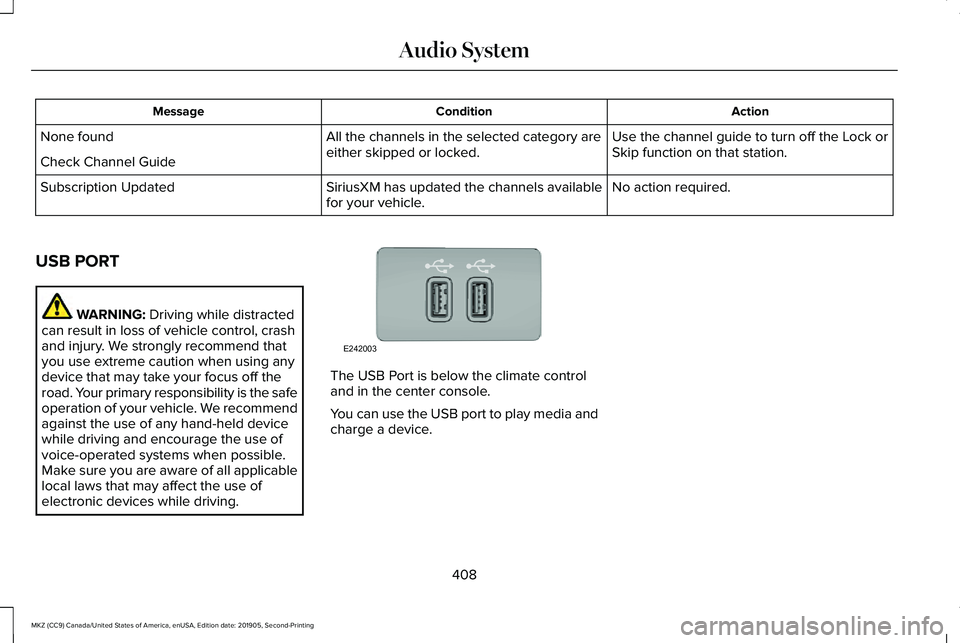
electronic devices while driving. The USB Port is below the climate control
and in the center console.
You can use the USB port to play media and
charge a device.
408
MKZ (CC9) Canada/United States of America, enUSA, Edition date: 201905, Second-Printing Audio SystemE242003
Page 418 of 561
Description
Voice Command
Browse All Audiobooks
Browse All Genres
Browse All Playlists
Browse All Podcasts
Browse All Songs
Browse your music by category on a USB device.1
Browse Album ___
Browse Artist ___
Browse Audiobook ___
Browse Genre ___
Browse Playlist ___
Browse Podcast ___
1 Add an album name, artist name, audiobook name, genre name, playlist name, podcast name or track name to the command. Say the name
exactly as it appears on your device.
Climate (If Equipped)
You can control the temperature of the
vehicle using voice commands. ___ is a dynamic listing, meaning that for
climate voice commands it can be the
desired degrees for the temperature setting.
415
MKZ (CC9) Canada/United States of America, enUSA, Edition date: 201905, Second-Printing SYNC™ 3
Page 438 of 561
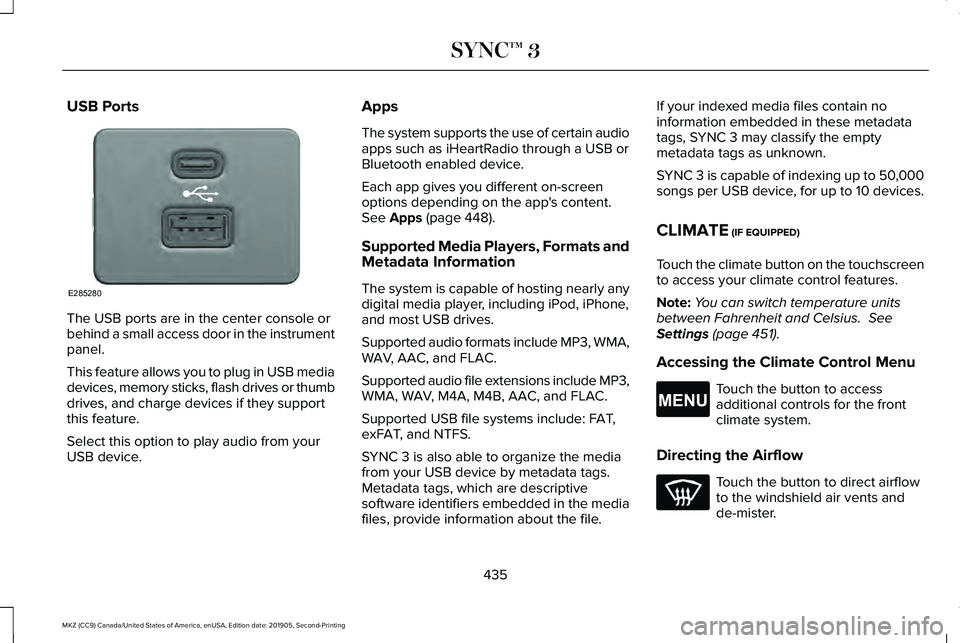
USB Ports
The USB ports are in the center console or
behind a small access door in the instrument
panel.
This feature allows you to plug in USB media
devices, memory sticks, flash drives or thumb
drives, and charge devices if they support
this feature.
Select this option to play audio from your
USB device. Apps
The system supports the use of certain audio
apps such as iHeartRadio through a USB or
Bluetooth enabled device.
Each app gives you different on-screen
options depending on the app's content.
See Apps (page 448).
Supported Media Players, Formats and
Metadata Information
The system is capable of hosting nearly any
digital media player, including iPod, iPhone,
and most USB drives.
Supported audio formats include MP3, WMA,
WAV, AAC, and FLAC.
Supported audio file extensions include MP3,
WMA, WAV, M4A, M4B, AAC, and FLAC.
Supported USB file systems include: FAT,
exFAT, and NTFS.
SYNC 3 is also able to organize the media
from your USB device by metadata tags.
Metadata tags, which are descriptive
software identifiers embedded in the media
files, provide information about the file. If your indexed media files contain no
information embedded in these metadata
tags, SYNC 3 may classify the empty
metadata tags as unknown.
SYNC 3 is capable of indexing up to 50,000
songs per USB device, for up to 10 devices.
CLIMATE (IF EQUIPPED)
Touch the climate button on the touchscreen
to access your climate control features.
Note: You can switch temperature units
between Fahrenheit and Celsius.
See
Settings (page 451).
Accessing the Climate Control Menu Touch the button to access
additional controls for the front
climate system.
Directing the Airflow Touch the button to direct airflow
to the windshield air vents and
de-mister.
435
MKZ (CC9) Canada/United States of America, enUSA, Edition date: 201905, Second-Printing SYNC™ 3E285280 E265038
Page 439 of 561
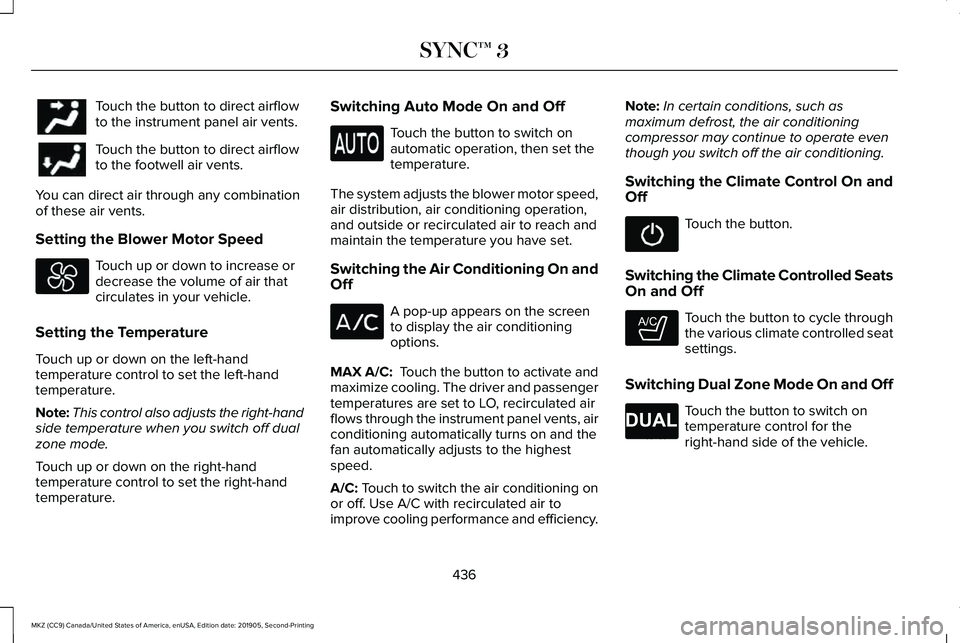
Touch the button to direct airflow
to the instrument panel air vents.
Touch the button to direct airflow
to the footwell air vents.
You can direct air through any combination
of these air vents.
Setting the Blower Motor Speed Touch up or down to increase or
decrease the volume of air that
circulates in your vehicle.
Setting the Temperature
Touch up or down on the left-hand
temperature control to set the left-hand
temperature.
Note: This control also adjusts the right-hand
side temperature when you switch off dual
zone mode.
Touch up or down on the right-hand
temperature control to set the right-hand
temperature. Switching Auto Mode On and Off Touch the button to switch on
automatic operation, then set the
temperature.
The system adjusts the blower motor speed,
air distribution, air conditioning operation,
and outside or recirculated air to reach and
maintain the temperature you have set.
Switching the Air Conditioning On and
Off A pop-up appears on the screen
to display the air conditioning
options.
MAX A/C: Touch the button to activate and
maximize cooling. The driver and passenger
temperatures are set to LO, recirculated air
flows through the instrument panel vents, air
conditioning automatically turns on and the
fan automatically adjusts to the highest
speed.
A/C: Touch to switch the air conditioning on
or off. Use A/C with recirculated air to
improve cooling performance and efficiency. Note:
In certain conditions, such as
maximum defrost, the air conditioning
compressor may continue to operate even
though you switch off the air conditioning.
Switching the Climate Control On and
Off Touch the button.
Switching the Climate Controlled Seats
On and Off Touch the button to cycle through
the various climate controlled seat
settings.
Switching Dual Zone Mode On and Off Touch the button to switch on
temperature control for the
right-hand side of the vehicle.
436
MKZ (CC9) Canada/United States of America, enUSA, Edition date: 201905, Second-Printing SYNC™ 3 E265282 E265280
Page 441 of 561
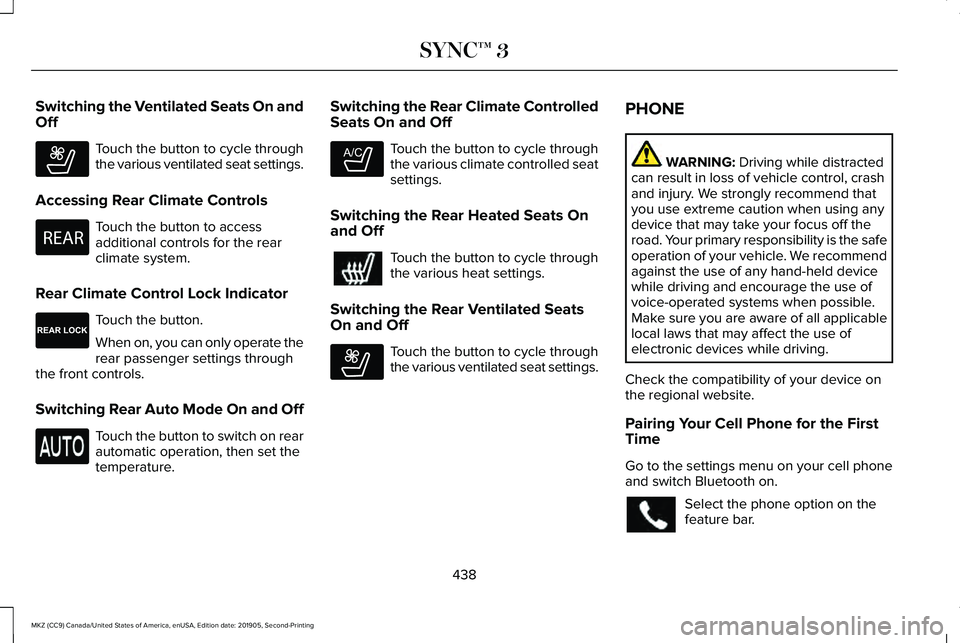
Switching the Ventilated Seats On and
Off
Touch the button to cycle through
the various ventilated seat settings.
Accessing Rear Climate Controls Touch the button to access
additional controls for the rear
climate system.
Rear Climate Control Lock Indicator Touch the button.
When on, you can only operate the
rear passenger settings through
the front controls.
Switching Rear Auto Mode On and Off Touch the button to switch on rear
automatic operation, then set the
temperature. Switching the Rear Climate Controlled
Seats On and Off Touch the button to cycle through
the various climate controlled seat
settings.
Switching the Rear Heated Seats On
and Off Touch the button to cycle through
the various heat settings.
Switching the Rear Ventilated Seats
On and Off Touch the button to cycle through
the various ventilated seat settings.PHONE WARNING: Driving while distracted
can result in loss of vehicle control, crash
and injury. We strongly recommend that
you use extreme caution when using any
device that may take your focus off the
road. Your primary responsibility is the safe
operation of your vehicle. We recommend
against the use of any hand-held device
while driving and encourage the use of
voice-operated systems when possible.
Make sure you are aware of all applicable
local laws that may affect the use of
electronic devices while driving.
Check the compatibility of your device on
the regional website.
Pairing Your Cell Phone for the First
Time
Go to the settings menu on your cell phone
and switch Bluetooth on. Select the phone option on the
feature bar.
438
MKZ (CC9) Canada/United States of America, enUSA, Edition date: 201905, Second-Printing SYNC™ 3E268558 E270447 E265289 E265282 E268558
Page 548 of 561
9
911 Assist...........................................................55
A
A/C See: Climate Control..........................................135
About This Manual
............................................7
ABS See: Brakes...........................................................193
ABS driving hints See: Hints on Driving With Anti-Lock
Brakes................................................................194
Accessories....................................................470
Accessories See: Replacement Parts Recommendation.....15
ACC See: Using Adaptive Cruise Control.............222
Active Park Assist........................................209 Using Active Park Assist....................................210
Adaptive Headlamps
.....................................90
System Check........................................................90
Adjusting the Headlamps............................321 Horizontal Aim Adjustment..............................322
Vertical Aim Adjustment....................................321 Adjusting the Steering Wheel - Vehicles
With: Manual Adjustable Steering
Column...........................................................80
Adjusting the Steering Wheel - Vehicles With: Power Adjustable Steering
Column...........................................................80
End of Travel Position...........................................81
Memory Feature.....................................................81
AFS See: Adaptive Headlamps..................................90
Airbag Disposal
...............................................54
Air Conditioning See: Climate Control..........................................135
Air Filter See: Changing the Engine Air Filter..............322
Alarm See: Anti-Theft Alarm...........................................78
All-Wheel Drive
..............................................184
Ambient Lighting............................................92
Adjusting the Brightness....................................92
Changing the Color..............................................92
Switching Ambient Lighting Off........................92
Switching Ambient Lighting On........................92
Anti-Theft Alarm..............................................78 Arming the Alarm..................................................79
Disarming the Alarm.............................................79
Appendices...................................................508 Apps.................................................................448
SiriusXM Traffic and Travel Link......................449
Using Apps on an Android Device................449
Using Apps on an iOS Device.........................
448
Using Mobile Navigation on an Android Device...............................................................449
At a Glance
........................................................19
Audible Warnings and Indicators..............107 Headlamps On Warning Chime.......................
107
Keyless Warning Alert........................................107
Parking Brake On Warning Chime..................108
Audio Control..................................................82 You can operate the following functions with
the control:.........................................................82
Audio System
................................................400
General Information...........................................400
Audio Unit
.......................................................401
Adjusting the Volume.........................................401
Changing Radio Stations...................................401
Ejecting the CD....................................................401
Inserting a CD.....................................................402
Playing or Pausing Media................................402
Selecting the Audio Modes.............................402
Switching the Audio Unit On and Off............402
Using Seek, Fast Forward and Reverse.......402
Auto Hold........................................................196 Using Auto Hold..................................................197
545
MKZ (CC9) Canada/United States of America, enUSA, Edition date: 201905, Second-Printing Index
Page 549 of 561
Autolamps.........................................................88
Windshield Wiper Activated Headlamps........88
Automatic Climate Control..........................135 Directing Air to the Footwell Air Vents..........135
Directing Air to the Instrument Panel Air
Vents..................................................................135
Setting the Blower Motor Speed.....................135
Setting the Temperature....................................135
Switching Auto Mode On and Off...................135
Switching Defrost On and Off..........................136
Switching Dual Zone Mode On and Off.........137
Switching Maximum Air Conditioning On and Off........................................................................\
137
Switching Maximum Defrost On and Off.......137
Switching Recirculated Air On and Off..........137
Switching the Air Conditioning On and Off.......................................................................136
Switching the Climate Control On and Off.......................................................................136
Automatic High Beam Control....................93
Automatic High Beam Control Indicators........................................................94
Automatic Transmission
...............................178
Automatic Transmission Adaptive
Learning............................................................183
Brake-Shift Interlock Override..........................181
If Your Vehicle Gets Stuck In Mud or Snow..................................................................183 Push Button Shift Transmission.......................178
SelectShift Automatic
™ Transmission.............180
Automatic Transmission Fluid Check.......313 6F35 Transmission..............................................313
6F55 Transmission..............................................313
Autowipers.......................................................85 Autowipers Settings.............................................85
Auxiliary Power Points..................................157 110 Volt AC Power Point.....................................157
12 Volt DC Power Point......................................157
Locations................................................................157
AWD See: All-Wheel Drive...........................................184
B
Battery See: Changing the 12V Battery........................318
Blind Spot Information System..................237 Switching the System Off and On..................239
System Errors......................................................239
Using the Blind Spot Information
System..............................................................238
BLIS See: Blind Spot Information System..............
237
Body Styling Kits
...........................................334
Bonnet Lock See: Opening and Closing the Hood.............301 Booster Seats
..................................................30
Types of Booster Seats.......................................30
Brake Fluid Check.........................................317 Brake Fluid Service Interval..............................317
Brakes..............................................................193 General Information............................................193
Breaking-In....................................................262
Bulb Specification Chart
.............................392
C
Cabin Air Filter
...............................................139
Canceling the Set Speed...........................222
Capacities and Specifications - 2.0L.......372 Air Conditioning System...................................372
Alternative Engine Oil for Extremely Cold
Climates............................................................376
Automatic Transmission....................................373
Engine Coolant....................................................374
Engine Oil.............................................................375
Fuel Tank...............................................................378
Grease...................................................................378
Hydraulic Brake System....................................379
Locks......................................................................379
Power Transfer Unit...........................................380
Rear Axle...............................................................381
Washer Reservoir................................................381
546
MKZ (CC9) Canada/United States of America, enUSA, Edition date: 201905, Second-Printing Index
Page 550 of 561
Capacities and Specifications - 3.0L.......382
Air Conditioning System...................................382
Alternative Engine Oil for Extremely Cold
Climates...........................................................386
Automatic Transmission....................................383
Engine Coolant...................................................384
Engine Oil.............................................................385
Fuel Tank..............................................................388
Grease...................................................................388
Hydraulic Brake System...................................389
Locks.....................................................................389
Power Transfer Unit...........................................390
Rear Axle...............................................................391
Washer Reservoir................................................391
Capacities and Specifications...................365
Car Wash See: Cleaning the Exterior...............................325
Catalytic Converter.......................................175
On-Board Diagnostics (OBD-II)........................176
Readiness for Inspection and Maintenance
(I/M) Testing.......................................................177
Center Console
.............................................159
Changing a Bulb...........................................322 Replacing Bulbs..................................................322
Changing a Fuse..........................................298 Fuses.....................................................................298
Changing a Road Wheel............................355 Changing a Road Wheel Procedure..............357 Dissimilar Spare Wheel and Tire Assembly
Information......................................................356
Stowing the Flat Tire Using the Retainer Strap..................................................................362
Stowing the Flat Tire Without the Retainer Strap...................................................................361
Changing the 12V Battery...........................318
Changing the Engine Air Filter.................322
Changing the Wi-Fi Hotspot Name or Password
.....................................................398
Changing the Wiper Blades......................320
Checking MyKey System Status.................64 MyKey Distance.....................................................64
Number of Admin Keys.......................................65
Number of MyKeys...............................................65
Checking the Wiper Blades.......................320
Child Restraint and Seatbelt Maintenance..................................................42
Child Restraint Positioning
...........................33
Child Safety.......................................................21
General Information..............................................21
Child Safety Locks..........................................35 Left-Hand Side.......................................................35
Right-Hand Side....................................................35
Cleaning Leather Seats...............................331
Cleaning Products
........................................324
Materials...............................................................324
Cleaning the Engine....................................327 Cleaning the Exterior..................................325
Cleaning the Headlamps..................................325
Exterior Chrome Parts.......................................326
Exterior Plastic Parts..........................................326
Stripes or Graphics............................................326
Underbody...........................................................326
Under Hood.........................................................326
Cleaning the Instrument Panel and Instrument Cluster Lens...........................330
Cleaning the Interior
....................................328
Cleaning Alcantara Microfiber Cloth
Fabric................................................................328
Cleaning the Wheels
....................................331
Cleaning the Windows and Wiper Blades...........................................................327
Clearing All MyKeys.......................................64
Climate............................................................435 Accessing Rear Climate Controls...................
438
Accessing the Climate Control Menu...........435
Directing the Airflow..........................................435
Rear Climate Control Lock Indicator.............438
Setting the Blower Motor Speed....................
436
Setting the Temperature...................................436
Switching Auto Mode On and Off..................
436
Switching Dual Zone Mode On and Off.......436
Switching Maximum Air Conditioning On and Off.......................................................................437
Switching Maximum Defrost On and Off......437
547
MKZ (CC9) Canada/United States of America, enUSA, Edition date: 201905, Second-Printing Index
Page 551 of 561
Switching Rear Auto Mode On and Off........438
Switching Recirculated Air On and Off.........437
Switching the Air Conditioning On and
Off......................................................................436
Switching the Climate Controlled Seats On and Off..............................................................436
Switching the Climate Control On and Off......................................................................436
Switching the Heated Exterior Mirrors On and Off.......................................................................437
Switching the Heated Rear Window On and Off.......................................................................437
Switching the Heated Seats On and Off......437
Switching the Heated Steering Wheel On and Off.......................................................................437
Switching the Heated Windshield On and Off.......................................................................437
Switching the Rear Climate Controlled Seats On and Off.......................................................438
Switching the Rear Heated Seats On and Off......................................................................438
Switching the Rear Ventilated Seats On and Off......................................................................438
Switching the Ventilated Seats On and Off......................................................................438
Climate Control..............................................135
Climate Controlled Seats............................149
Cooled Seats........................................................150 Connected Vehicle
......................................395
Connecting the Vehicle to a Mobile
Network............................................................395
Connected Vehicle Limitations.................395
Connected Vehicle Requirements...........395
Connected Vehicle – Troubleshooting.........................................396
Connecting the Vehicle to a Mobile Network.......................................................395
Connecting Lincoln Way to the Modem.......395
Enabling and Disabling the Modem..............395
What Is the Modem............................................395
Connecting the Vehicle to a Wi-Fi Network.......................................................395
Coolant Check See: Engine Coolant Check............................308
Crash Sensors and Airbag Indicator
..........53
Creating a MyKey...........................................63 Programming and Changing Configurable
Settings...............................................................64
Creating a Wi-Fi Hotspot............................398 Connecting a Device to the Wi-Fi
Hotspot.............................................................398
Finding the Wi-Fi Hotspot Name and Password..........................................................398
Cross Traffic Alert.........................................239 Cross Traffic Alert Behavior When Trailer is
Attached...........................................................242 Cross Traffic Alert Indicator.............................243
Cross Traffic Alert Information
Messages.........................................................243
Cross Traffic Alert System Limitations..........242
Cross Traffic Alert System Sensors...............242
Switching the System On and Off..................242
Using Cross Traffic Alert...................................
239
Cruise Control
................................................221
Cruise Control Indicators...........................222
Cruise Control - Vehicles With: Adaptive Cruise Control With Stop and Go
............82
Cruise Control - Vehicles With: Cruise Control............................................................83
Customer Assistance
..................................272
D
Data Recording
................................................10
Comfort, Convenience and Entertainment
Data.......................................................................12
Event Data................................................................11
Service Data............................................................10
Services That Third Parties Provide..................12
Services That We Provide...................................12
Vehicles With a Modem.......................................13
Vehicles With an Emergency Call System.......14
Vehicles With SYNC..............................................13
548
MKZ (CC9) Canada/United States of America, enUSA, Edition date: 201905, Second-Printing Index