wheel LINCOLN MKZ 2020 Owners Manual
[x] Cancel search | Manufacturer: LINCOLN, Model Year: 2020, Model line: MKZ, Model: LINCOLN MKZ 2020Pages: 561, PDF Size: 5.7 MB
Page 362 of 561
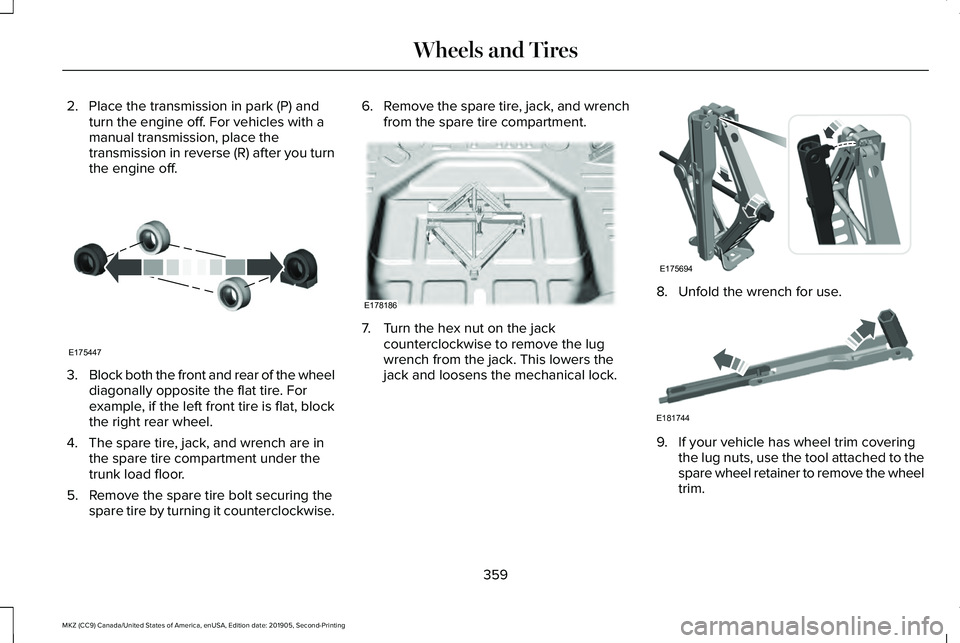
2. Place the transmission in park (P) and
turn the engine off. For vehicles with a
manual transmission, place the
transmission in reverse (R) after you turn
the engine off. 3.
Block both the front and rear of the wheel
diagonally opposite the flat tire. For
example, if the left front tire is flat, block
the right rear wheel.
4. The spare tire, jack, and wrench are in the spare tire compartment under the
trunk load floor.
5. Remove the spare tire bolt securing the spare tire by turning it counterclockwise. 6.
Remove the spare tire, jack, and wrench
from the spare tire compartment. 7. Turn the hex nut on the jack
counterclockwise to remove the lug
wrench from the jack. This lowers the
jack and loosens the mechanical lock. 8. Unfold the wrench for use.
9. If your vehicle has wheel trim covering
the lug nuts, use the tool attached to the
spare wheel retainer to remove the wheel
trim.
359
MKZ (CC9) Canada/United States of America, enUSA, Edition date: 201905, Second-Printing Wheels and TiresE175447 E178186 E175694 E181744
Page 363 of 561
10.
If jacking on the roadside shoulder, set
the warning triangle upright on the
shoulder in the direction of oncoming
traffic if the vehicle has a warning
triangle.
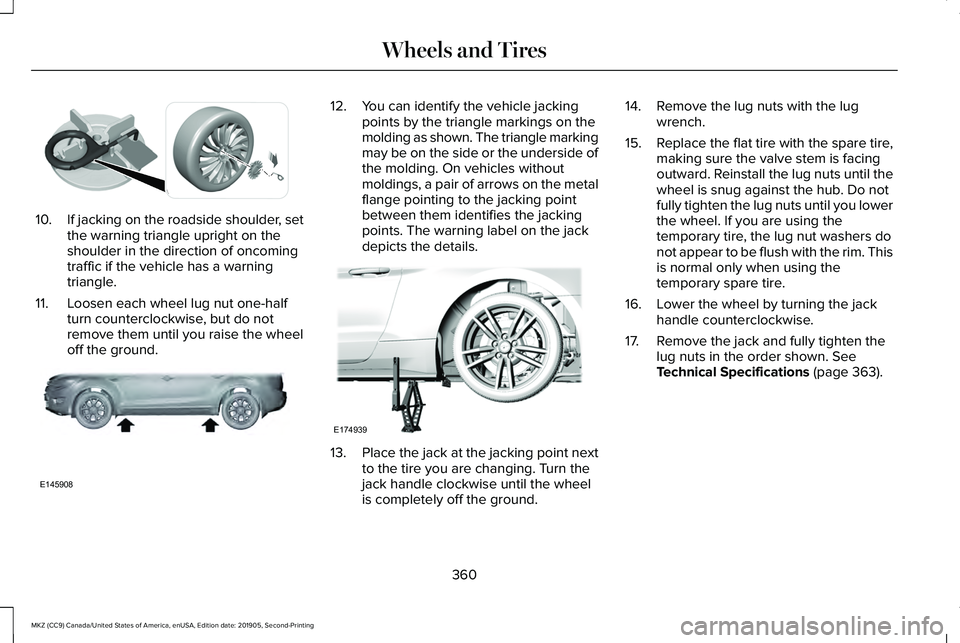
11. Loosen each wheel lug nut one-half turn counterclockwise, but do not
remove them until you raise the wheel
off the ground. 12. You can identify the vehicle jacking
points by the triangle markings on the
molding as shown. The triangle marking
may be on the side or the underside of
the molding. On vehicles without
moldings, a pair of arrows on the metal
flange pointing to the jacking point
between them identifies the jacking
points. The warning label on the jack
depicts the details. 13.
Place the jack at the jacking point next
to the tire you are changing. Turn the
jack handle clockwise until the wheel
is completely off the ground. 14. Remove the lug nuts with the lug
wrench.
15. Replace the flat tire with the spare tire,
making sure the valve stem is facing
outward. Reinstall the lug nuts until the
wheel is snug against the hub. Do not
fully tighten the lug nuts until you lower
the wheel. If you are using the
temporary tire, the lug nut washers do
not appear to be flush with the rim. This
is normal only when using the
temporary spare tire.
16. Lower the wheel by turning the jack handle counterclockwise.
17. Remove the jack and fully tighten the lug nuts in the order shown. See
Technical Specifications (page 363).
360
MKZ (CC9) Canada/United States of America, enUSA, Edition date: 201905, Second-Printing Wheels and TiresE302004 E145908 E174939
Page 364 of 561
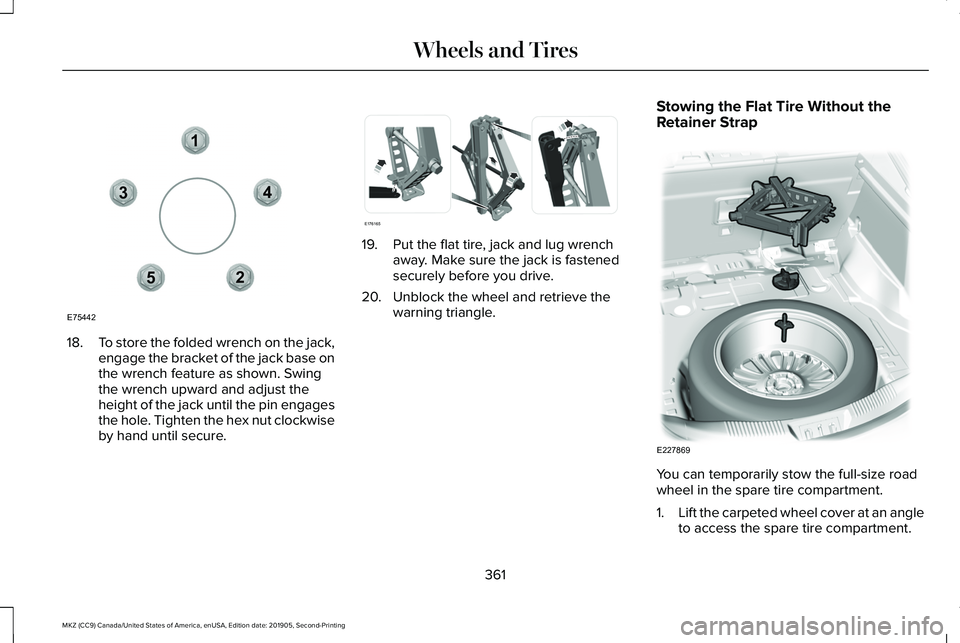
18.
To store the folded wrench on the jack,
engage the bracket of the jack base on
the wrench feature as shown. Swing
the wrench upward and adjust the
height of the jack until the pin engages
the hole. Tighten the hex nut clockwise
by hand until secure. 19. Put the flat tire, jack and lug wrench
away. Make sure the jack is fastened
securely before you drive.
20. Unblock the wheel and retrieve the warning triangle. Stowing the Flat Tire Without the
Retainer Strap
You can temporarily stow the full-size road
wheel in the spare tire compartment.
1.
Lift the carpeted wheel cover at an angle
to access the spare tire compartment.
361
MKZ (CC9) Canada/United States of America, enUSA, Edition date: 201905, Second-Printing Wheels and Tires12
3
4
5
E75442 E176165 E227869
Page 365 of 561
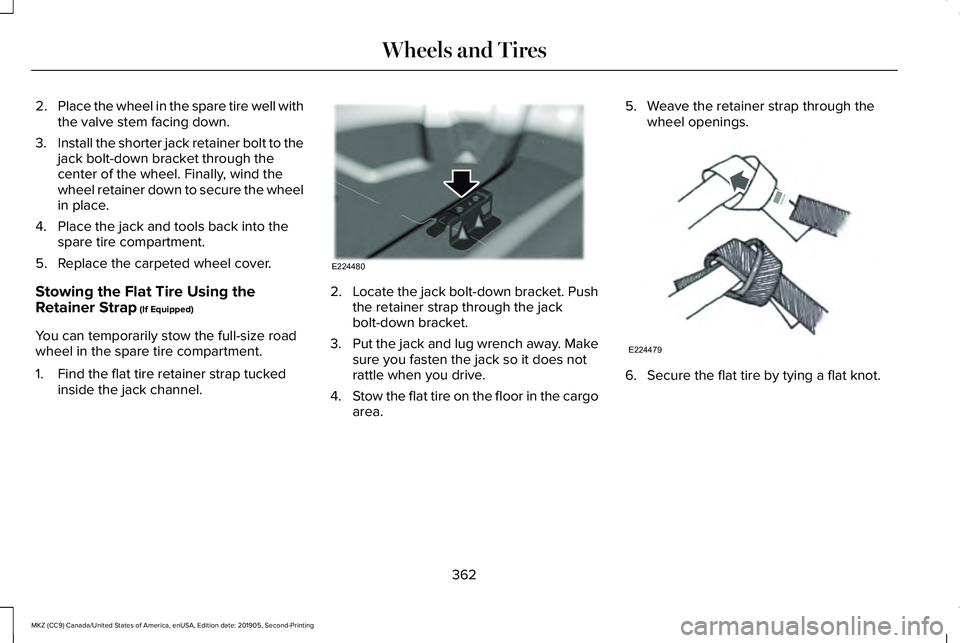
2.
Place the wheel in the spare tire well with
the valve stem facing down.
3. Install the shorter jack retainer bolt to the
jack bolt-down bracket through the
center of the wheel. Finally, wind the
wheel retainer down to secure the wheel
in place.
4. Place the jack and tools back into the spare tire compartment.
5. Replace the carpeted wheel cover.
Stowing the Flat Tire Using the
Retainer Strap (If Equipped)
You can temporarily stow the full-size road
wheel in the spare tire compartment.
1. Find the flat tire retainer strap tucked inside the jack channel. 2.
Locate the jack bolt-down bracket. Push
the retainer strap through the jack
bolt-down bracket.
3. Put the jack and lug wrench away. Make
sure you fasten the jack so it does not
rattle when you drive.
4. Stow the flat tire on the floor in the cargo
area. 5. Weave the retainer strap through the
wheel openings. 6. Secure the flat tire by tying a flat knot.
362
MKZ (CC9) Canada/United States of America, enUSA, Edition date: 201905, Second-Printing Wheels and TiresE224480 E224479
Page 366 of 561

TECHNICAL SPECIFICATIONS
Wheel Lug Nut Torque Specifications
WARNING: When you install a wheel, always remove any corrosion, dirt or foreign m\
aterials present on the mounting surfaces of the
wheel or the surface of the wheel hub, brake drum or brake disc that contacts the wheel. Make sure to secure any fasteners that attach
the rotor to the hub so they do not interfere with the mounting surfaces\
of the wheel. Installing wheels without correct metal-to-metal contact
at the wheel mounting surfaces can cause the wheel nuts to loosen and th\
e wheel to come off while your vehicle is in motion, resulting in
loss of vehicle control, personal injury or death. lb.ft (Nm)
1
Bolt Size
150 lb.ft (204 Nm)
M14 x 1.5
1 Torque specifications are for nut and bolt threads free of dirt and rust.\
Use only Ford recommended replacement fasteners.
Retighten the lug nuts to the specified torque within 100 miles (160 kil\
ometers) after any wheel disturbance, such as tire rotation, changing a
flat tire or wheel removal.
363
MKZ (CC9) Canada/United States of America, enUSA, Edition date: 201905, Second-Printing Wheels and Tires
Page 367 of 561
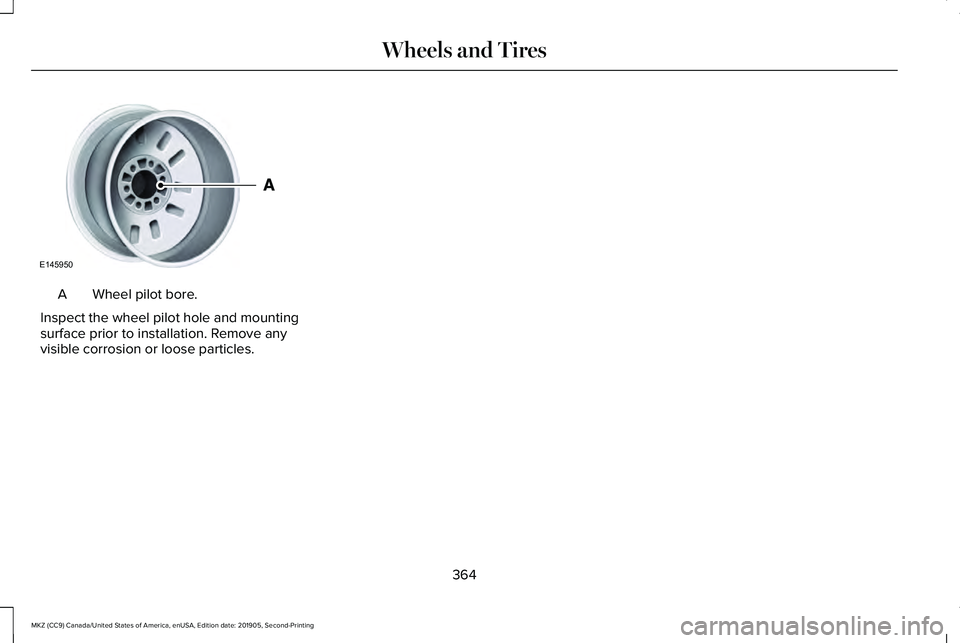
Wheel pilot bore.
A
Inspect the wheel pilot hole and mounting
surface prior to installation. Remove any
visible corrosion or loose particles.
364
MKZ (CC9) Canada/United States of America, enUSA, Edition date: 201905, Second-Printing Wheels and TiresE145950
Page 381 of 561
Fuel Tank
Capacities
Quantity
Variant
16.5 gal (62.5 L)
Front wheel drive.
18.0 gal (68.1 L)
All wheel drive.
Grease
Materials Specification
Name
ESB-M1C93-B
Motorcraft® Multi-Purpose Grease Spray (U.S.)
Motorcraft® Multi-Purpose Grease Spray / Graisse tout usage en aér\
osol Motorcraft®
(Canada)
XL-5-A (U.S. & Canada)
378
MKZ (CC9) Canada/United States of America, enUSA, Edition date: 201905, Second-Printing Capacities and Specifications
Page 387 of 561
Capacities
Quantity
Variant
11.6 qt (11 L)1
All.
1 Approximate dry fill capacity. Actual amount could vary during fluid changes.
Materials Specification
Name
MERCON® LV WSS-M2C938-A
Motorcraft® MERCON® LV Automatic Transmission Fluid (U.S.)
Motorcraft® MERCON® LV Automatic Transmission Fluid / Huile pour boîte auto-
matique MERCON® LV Motorcraft® (Canada)
XT-10-QLVC (U.S.)
CXT-10-LV6 (Canada)
Engine Coolant
Capacities Quantity
Variant
11.4 qt (10.8 L)
Front wheel drive.
11.5 qt (10.9 L)
All wheel drive.
384
MKZ (CC9) Canada/United States of America, enUSA, Edition date: 201905, Second-Printing Capacities and Specifications
Page 414 of 561
Installing an Update
Note:
You can use the system when an
installation is in progress.
1. Disconnect all other USB devices from the USB ports.
2. Connect the USB drive with the update to a USB port.
Note: Installation starts automatically within
a few minutes.
Updating the System Using a Wi-Fi Network
Connection
Switching Automatic System Updates On Select the settings option on the
feature bar.
1. Select Automatic Updates.
2. Switch
Automatic System Updates on.
The system is now set to check for and
receive system updates when it is connected
to a Wi-Fi network. Note:
You can use the system when a
download is in progress.
Note: If the system is disconnected from the
Wi-Fi network when a download is in
progress, the download continues the next
time the system is connected to a Wi-Fi
network.
Connecting to a Wi-Fi Network
See
Wi-Fi Hotspot (page 398).
Additional Information and Assistance
For additional information and assistance,
we recommend that you contact an
authorized dealer or refer to the local
website.
USING VOICE RECOGNITION
The system allows you to interact with the
entertainment, information and
communication systems on your vehicle
using voice commands. This allows you to
keep your hands on the steering wheel and
focus on what is in front of you. Press the voice control button on
the steering wheel and wait for the
voice prompt.
Note: Press the voice control button again
to interrupt a voice prompt and begin
speaking.
Note: Turn the volume control when a voice
prompt plays to adjust the volume.
Note: Press and hold the voice control
button on the steering wheel to use Siri on
your iOS device.
The following voice commands are designed
to help you from any screen:
• List of Commands
• Help
The following tables list some of the more
frequently used voice commands. For a
complete list of voice commands, refer to
our website.
411
MKZ (CC9) Canada/United States of America, enUSA, Edition date: 201905, Second-Printing SYNC™ 3E280315 E142599
Page 440 of 561
Switching the Heated Exterior Mirrors
On and Off
Touch the button.
Switching the Heated Windshield On
and Off Touch the button to clear the
windshield of thin ice and fog. The
heated windshield turns off after a
short period of time.
Switching the Heated Rear Window On
and Off Touch the button to clear the rear
window of thin ice and fog.
Switching the Heated Seats On and Off Touch the button to cycle through
the various heat settings. Switching the Heated Steering Wheel
On and Off Touch the button.
Switching Maximum Air Conditioning
On and Off Touch the button for maximum
cooling.
Recirculated air flows through the instrument
panel air vents, air conditioning turns on and
the blower motor adjusts to the highest
speed.
Switching Maximum Defrost On and
Off Touch the button for maximum
defrosting.
Air flows through the windshield air vents,
and the blower motor adjusts to the highest
speed.
You can also use this setting to defog and
clear the windshield of a thin covering of ice. Note:
To prevent window fogging, you
cannot select recirculated air when
maximum defrost is on.
Note: The heated rear window also turns on
when you select maximum defrost.
Switching Recirculated Air On and Off Touch the button to switch
between outside air and
recirculated air.
The air currently in the passenger
compartment recirculates. This may reduce
the time needed to cool the interior, when
used with A/C, and reduce unwanted odors
from entering your vehicle.
Note: Recirculated air may turn off, or
prevent you from switching on, in all air flow
modes except MAX A/C to reduce the risk
of fogging. Recirculation may also turn on
and off in various air distribution control
combinations during hot weather to improve
cooling efficiency.
437
MKZ (CC9) Canada/United States of America, enUSA, Edition date: 201905, Second-Printing SYNC™ 3E266189 E184884