wheel LINCOLN MKZ 2020 Owners Manual
[x] Cancel search | Manufacturer: LINCOLN, Model Year: 2020, Model line: MKZ, Model: LINCOLN MKZ 2020Pages: 561, PDF Size: 5.7 MB
Page 451 of 561
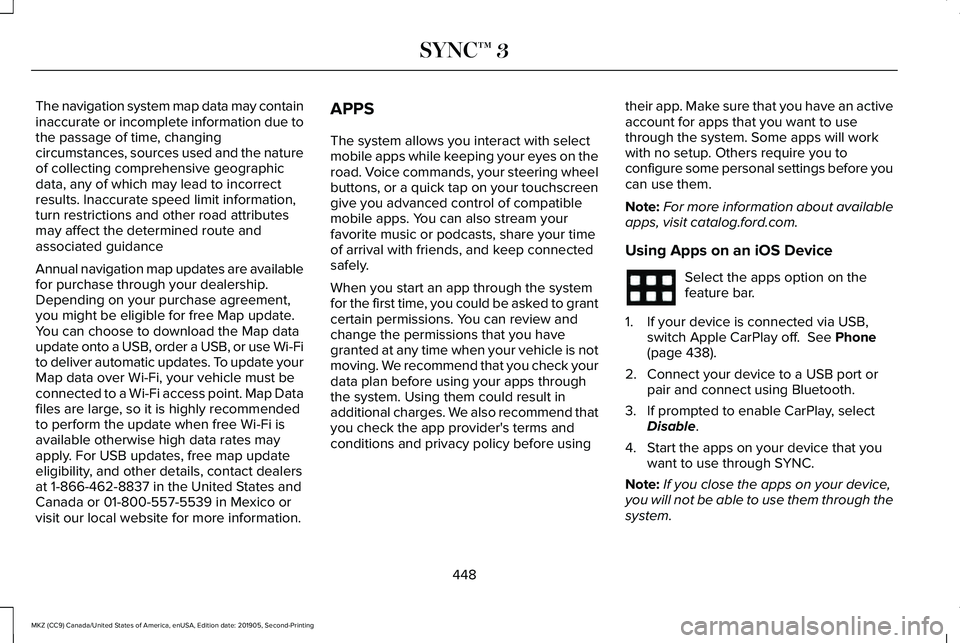
The navigation system map data may contain
inaccurate or incomplete information due to
the passage of time, changing
circumstances, sources used and the nature
of collecting comprehensive geographic
data, any of which may lead to incorrect
results. Inaccurate speed limit information,
turn restrictions and other road attributes
may affect the determined route and
associated guidance
Annual navigation map updates are available
for purchase through your dealership.
Depending on your purchase agreement,
you might be eligible for free Map update.
You can choose to download the Map data
update onto a USB, order a USB, or use Wi-Fi
to deliver automatic updates. To update your
Map data over Wi-Fi, your vehicle must be
connected to a Wi-Fi access point. Map Data
files are large, so it is highly recommended
to perform the update when free Wi-Fi is
available otherwise high data rates may
apply. For USB updates, free map update
eligibility, and other details, contact dealers
at 1-866-462-8837 in the United States and
Canada or 01-800-557-5539 in Mexico or
visit our local website for more information.
APPS
The system allows you interact with select
mobile apps while keeping your eyes on the
road. Voice commands, your steering wheel
buttons, or a quick tap on your touchscreen
give you advanced control of compatible
mobile apps. You can also stream your
favorite music or podcasts, share your time
of arrival with friends, and keep connected
safely.
When you start an app through the system
for the first time, you could be asked to grant
certain permissions. You can review and
change the permissions that you have
granted at any time when your vehicle is not
moving. We recommend that you check your
data plan before using your apps through
the system. Using them could result in
additional charges. We also recommend that
you check the app provider's terms and
conditions and privacy policy before using
their app. Make sure that you have an active
account for apps that you want to use
through the system. Some apps will work
with no setup. Others require you to
configure some personal settings before you
can use them.
Note:
For more information about available
apps, visit catalog.ford.com.
Using Apps on an iOS Device Select the apps option on the
feature bar.
1. If your device is connected via USB, switch Apple CarPlay off. See Phone
(page 438).
2. Connect your device to a USB port or pair and connect using Bluetooth.
3. If prompted to enable CarPlay, select Disable
.
4. Start the apps on your device that you want to use through SYNC.
Note: If you close the apps on your device,
you will not be able to use them through the
system.
448
MKZ (CC9) Canada/United States of America, enUSA, Edition date: 201905, Second-Printing SYNC™ 3
Page 457 of 561
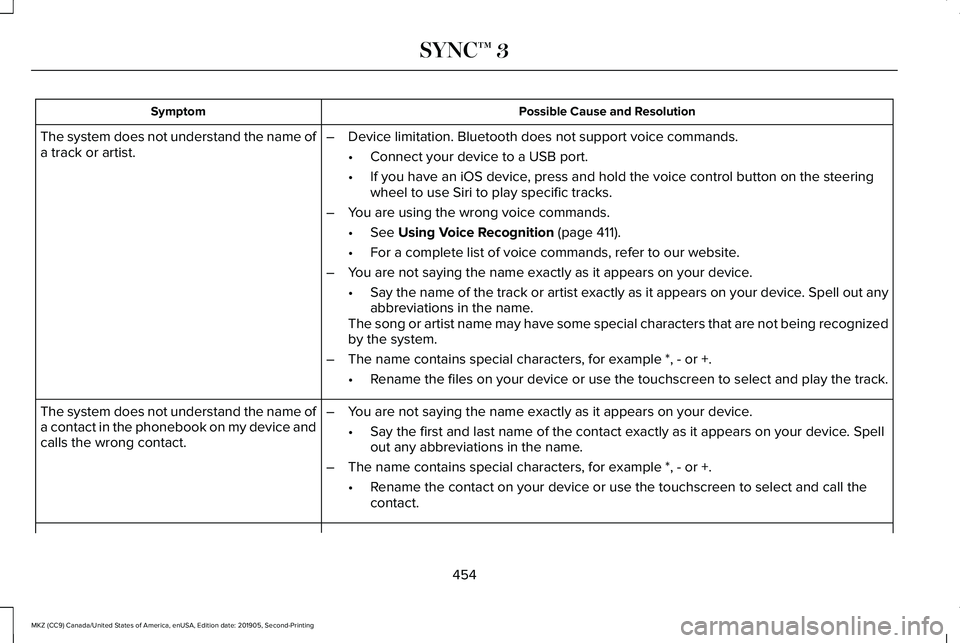
Possible Cause and Resolution
Symptom
–Device limitation. Bluetooth does not support voice commands.
•Connect your device to a USB port.
• If you have an iOS device, press and hold the voice control button on the steering
wheel to use Siri to play specific tracks.
– You are using the wrong voice commands.
•See Using Voice Recognition (page 411).
• For a complete list of voice commands, refer to our website.
– You are not saying the name exactly as it appears on your device.
•Say the name of the track or artist exactly as it appears on your device\
. Spell out any
abbreviations in the name.
The song or artist name may have some special characters that are not be\
ing recognized
by the system.
– The name contains special characters, for example *, - or +.
•Rename the files on your device or use the touchscreen to select and play\
the track.
The system does not understand the name of
a track or artist.
–You are not saying the name exactly as it appears on your device.
•Say the first and last name of the contact exactly as it appears on your\
device. Spell
out any abbreviations in the name.
– The name contains special characters, for example *, - or +.
•Rename the contact on your device or use the touchscreen to select and ca\
ll the
contact.
The system does not understand the name of
a contact in the phonebook on my device and
calls the wrong contact.
454
MKZ (CC9) Canada/United States of America, enUSA, Edition date: 201905, Second-Printing SYNC™ 3
Page 459 of 561

Possible Cause and Resolution
Symptom
–Incorrect device settings.
•Make sure that your device does not have an auto-install program or active \
security
settings.
• Check that your device is not set only to charge.
– Device lock screen enabled.
•Unlock your device before connecting it.
The system does not recognize my device. –Device limitation.
•Do not leave your device in your vehicle during very hot or very cold we\
ather condi-
tions.
– Cable connection issue.
•Correctly connect the cable to your device and the vehicle USB port.
– Incompatible cable.
•Use the cable recommended by the manufacturer of your device.
The system does not understand the name of
a track or artist. –
Device limitation. Bluetooth does not support voice commands.
•Connect your device to a USB port.
• If you have an iOS device, press and hold the voice control button on the steering
wheel to use Siri to play specific tracks.
456
MKZ (CC9) Canada/United States of America, enUSA, Edition date: 201905, Second-Printing SYNC™ 3
Page 485 of 561
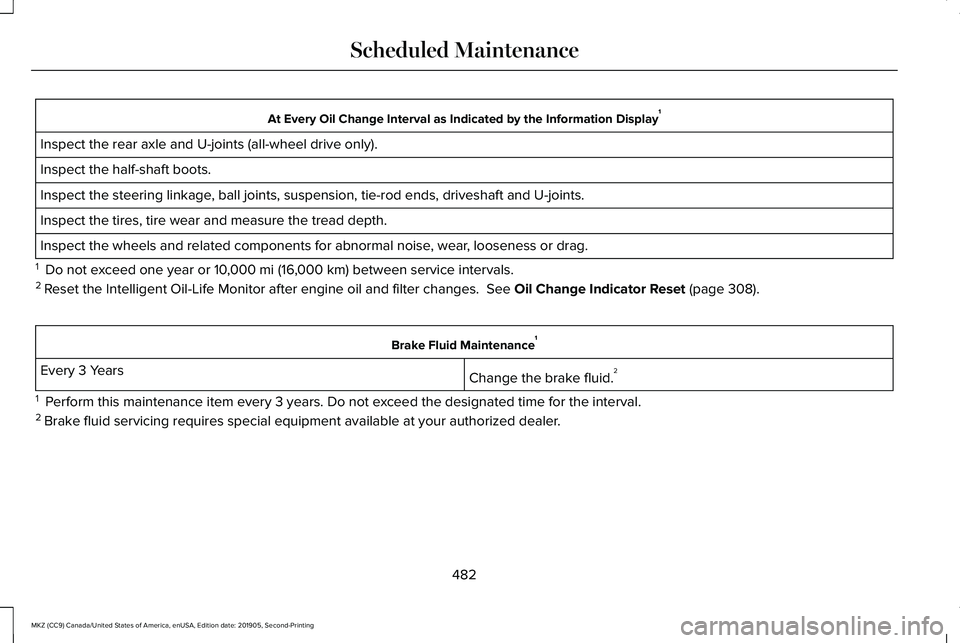
At Every Oil Change Interval as Indicated by the Information Display
1
Inspect the rear axle and U-joints (all-wheel drive only).
Inspect the half-shaft boots.
Inspect the steering linkage, ball joints, suspension, tie-rod ends, driveshaft and U-joints.
Inspect the tires, tire wear and measure the tread depth.
Inspect the wheels and related components for abnormal noise, wear, looseness or drag.
1 Do not exceed one year or 10,000 mi (16,000 km) between service intervals.
2 Reset the Intelligent Oil-Life Monitor after engine oil and filter change\
s.
See Oil Change Indicator Reset (page 308). Brake Fluid Maintenance
1
Change the brake fluid. 2
Every 3 Years
1 Perform this maintenance item every 3 years. Do not exceed the designated time for the interval.
2 Brake fluid servicing requires special equipment available at your authorize\
d dealer.
482
MKZ (CC9) Canada/United States of America, enUSA, Edition date: 201905, Second-Printing Scheduled Maintenance
Page 486 of 561
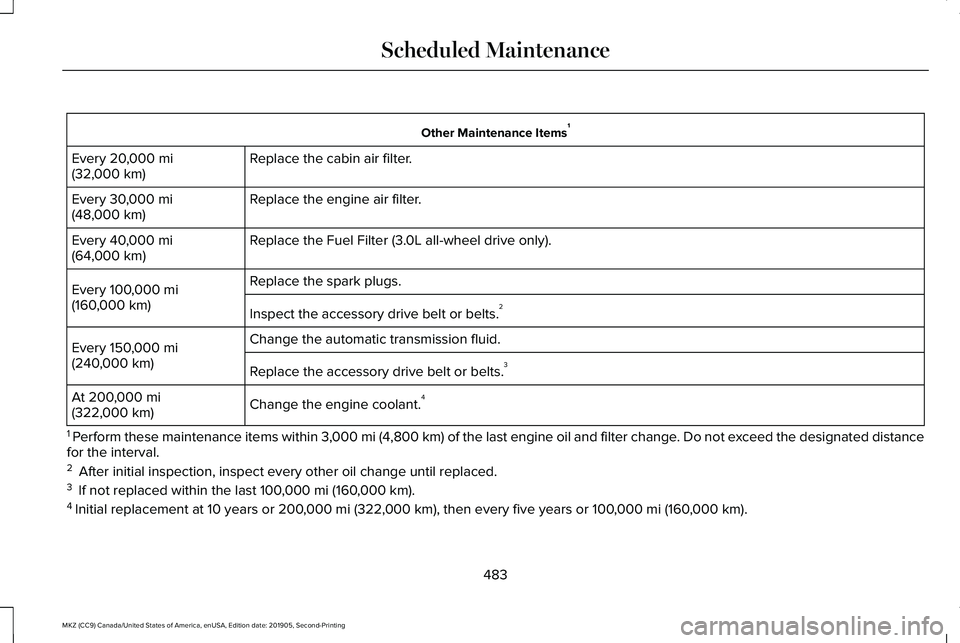
Other Maintenance Items
1
Replace the cabin air filter.
Every 20,000 mi
(32,000 km)
Replace the engine air filter.
Every
30,000 mi
(48,000 km)
Replace the Fuel Filter (3.0L all-wheel drive only).
Every
40,000 mi
(64,000 km)
Replace the spark plugs.
Every
100,000 mi
(160,000 km) Inspect the accessory drive belt or belts. 2
Change the automatic transmission fluid.
Every
150,000 mi
(240,000 km) Replace the accessory drive belt or belts. 3
Change the engine coolant. 4
At
200,000 mi
(322,000 km)
1 Perform these maintenance items within 3,000 mi (4,800 km) of the last engine oil and filter change. Do not exceed the designated distance
for the interval.
2 After initial inspection, inspect every other oil change until replaced\
.
3 If not replaced within the last
100,000 mi (160,000 km).
4 Initial replacement at 10 years or
200,000 mi (322,000 km), then every five years or 100,000 mi (160,000 km).
483
MKZ (CC9) Canada/United States of America, enUSA, Edition date: 201905, Second-Printing Scheduled Maintenance
Page 489 of 561
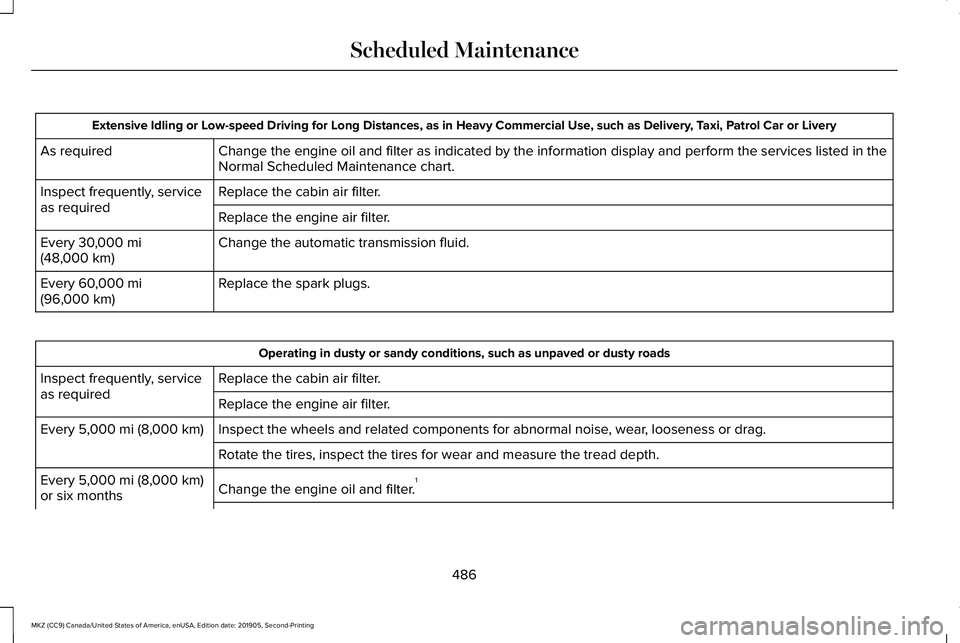
Extensive Idling or Low-speed Driving for Long Distances, as in Heavy Commercial Use, such as Delivery, Taxi, Patrol Car or Livery
Change the engine oil and filter as indicated by the information display\
and perform the services listed in the
Normal Scheduled Maintenance chart.
As required
Replace the cabin air filter.
Inspect frequently, service
as required
Replace the engine air filter.
Change the automatic transmission fluid.
Every 30,000 mi
(48,000 km)
Replace the spark plugs.
Every
60,000 mi
(96,000 km) Operating in dusty or sandy conditions, such as unpaved or dusty roads
Replace the cabin air filter.
Inspect frequently, service
as required
Replace the engine air filter.
Inspect the wheels and related components for abnormal noise, wear, looseness or drag.
Every
5,000 mi (8,000 km)
Rotate the tires, inspect the tires for wear and measure the tread depth.\
Change the engine oil and filter. 1
Every
5,000 mi (8,000 km)
or six months
486
MKZ (CC9) Canada/United States of America, enUSA, Edition date: 201905, Second-Printing Scheduled Maintenance
Page 490 of 561
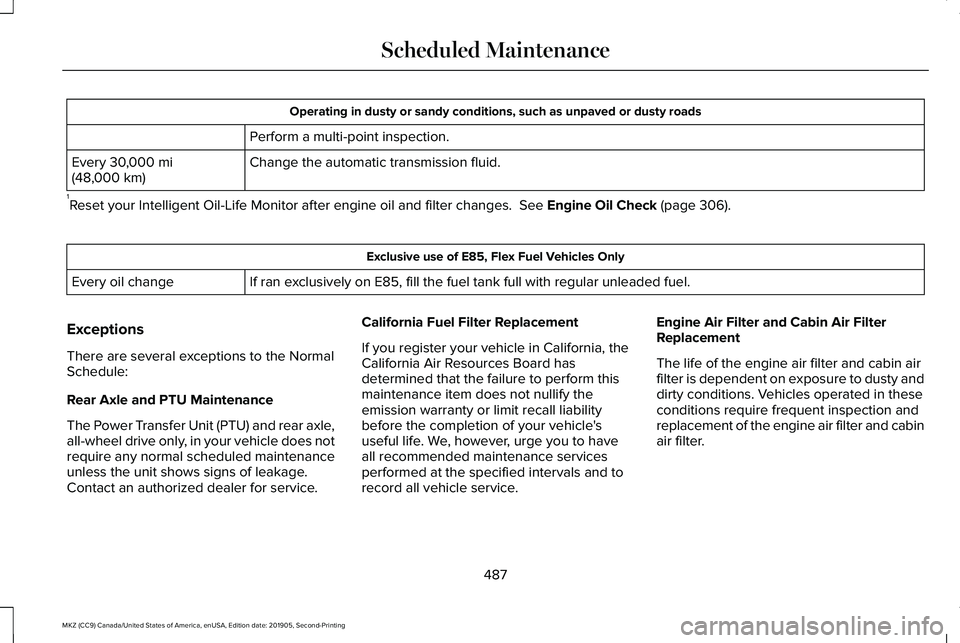
Operating in dusty or sandy conditions, such as unpaved or dusty roads
Perform a multi-point inspection.
Change the automatic transmission fluid.
Every 30,000 mi
(48,000 km)
1 Reset your Intelligent Oil-Life Monitor after engine oil and filter chang\
es.
See Engine Oil Check (page 306). Exclusive use of E85, Flex Fuel Vehicles Only
If ran exclusively on E85, fill the fuel tank full with regular unleaded fuel.
Every oil change
Exceptions
There are several exceptions to the Normal
Schedule:
Rear Axle and PTU Maintenance
The Power Transfer Unit (PTU) and rear axle,
all-wheel drive only, in your vehicle does not
require any normal scheduled maintenance
unless the unit shows signs of leakage.
Contact an authorized dealer for service. California Fuel Filter Replacement
If you register your vehicle in California, the
California Air Resources Board has
determined that the failure to perform this
maintenance item does not nullify the
emission warranty or limit recall liability
before the completion of your vehicle's
useful life. We, however, urge you to have
all recommended maintenance services
performed at the specified intervals and to
record all vehicle service.Engine Air Filter and Cabin Air Filter
Replacement
The life of the engine air filter and cabin air
filter is dependent on exposure to dusty and
dirty conditions. Vehicles operated in these
conditions require frequent inspection and
replacement of the engine air filter and cabin
air filter.
487
MKZ (CC9) Canada/United States of America, enUSA, Edition date: 201905, Second-Printing Scheduled Maintenance
Page 520 of 561
EXPORT RESTRICTIONS: You acknowledge
that the SOFTWARE is subject to U.S. and
European Union export jurisdiction. You
agree to comply with all applicable
international and national laws that apply to
the SOFTWARE, including the U.S. Export
Administration Regulations, as well as
end-user, end-use and destination
restrictions issued by U.S. and other
governments.
TRADEMARKS: This EULA does not grant
you any rights in connection with any
trademarks or service marks of FORD
MOTOR COMPANY, its affiliates, and third
party software and service providers.
PRODUCT SUPPORT: Please refer to FORD
MOTOR COMPANY instructions provided in
the documentation for the DEVICES product
support, such as the vehicle owner guide.
Should you have any questions concerning
this EULA, or if you desire to contact FORD
MOTOR COMPANY for any other reason,
please refer to the address provided in the
documentation for the DEVICES. No Liability for Certain Damages:
EXCEPT
AS PROHIBITED BY LAW, FORD MOTOR
COMPANY, ANY THIRD PARTY SOFTWARE
OR SERVICES SUPPLIERS, AND THEIR
AFFILIATES SHALL HAVE NO LIABILITY FOR
ANY INDIRECT, SPECIAL, CONSEQUENTIAL
OR INCIDENTAL DAMAGES ARISING FROM
OR IN CONNECTION WITH THE USE OR
PERFORMANCE OF THE SOFTWARE. THIS
LIMITATION SHALL APPLY EVEN IF ANY
REMEDY FAILS OF ITS ESSENTIAL
PURPOSE. THERE ARE NO WARRANTIES
OTHER THAN THOSE THAT MAY BE
EXPRESSLY PROVIDED FOR YOUR NEW
VEHICLE.
SYNC® Automotive Important Safety
Information Read and follow instructions:
• Before using your SYNC® system, read
and follow all instructions and safety
information provided in this end user
manual ("Owner Guide".) Not following
precautions found in the Owner Guide
can lead to an accident or other serious
injuries. General Operation
•
Voice Command Control
: Certain
functions within the SYNC® system may
be accomplished using voice commands.
Using voice commands while driving
helps you to operate the system without
removing your hands from the wheel or
eyes from the road.
• Prolonged Views of Screen:
Do not
access any function requiring a
prolonged view of the screen while you
are driving. Pull over in a safe and legal
manner before attempting to access a
function of the system requiring
prolonged attention.
• Volume Setting: Do not raise the volume
excessively. Keep the volume at a level
where you can still hear outside traffic
and emergency signals while driving.
Driving while unable to hear these
sounds could cause an accident.
517
MKZ (CC9) Canada/United States of America, enUSA, Edition date: 201905, Second-Printing Appendices
Page 548 of 561
9
911 Assist...........................................................55
A
A/C See: Climate Control..........................................135
About This Manual
............................................7
ABS See: Brakes...........................................................193
ABS driving hints See: Hints on Driving With Anti-Lock
Brakes................................................................194
Accessories....................................................470
Accessories See: Replacement Parts Recommendation.....15
ACC See: Using Adaptive Cruise Control.............222
Active Park Assist........................................209 Using Active Park Assist....................................210
Adaptive Headlamps
.....................................90
System Check........................................................90
Adjusting the Headlamps............................321 Horizontal Aim Adjustment..............................322
Vertical Aim Adjustment....................................321 Adjusting the Steering Wheel - Vehicles
With: Manual Adjustable Steering
Column...........................................................80
Adjusting the Steering Wheel - Vehicles With: Power Adjustable Steering
Column...........................................................80
End of Travel Position...........................................81
Memory Feature.....................................................81
AFS See: Adaptive Headlamps..................................90
Airbag Disposal
...............................................54
Air Conditioning See: Climate Control..........................................135
Air Filter See: Changing the Engine Air Filter..............322
Alarm See: Anti-Theft Alarm...........................................78
All-Wheel Drive
..............................................184
Ambient Lighting............................................92
Adjusting the Brightness....................................92
Changing the Color..............................................92
Switching Ambient Lighting Off........................92
Switching Ambient Lighting On........................92
Anti-Theft Alarm..............................................78 Arming the Alarm..................................................79
Disarming the Alarm.............................................79
Appendices...................................................508 Apps.................................................................448
SiriusXM Traffic and Travel Link......................449
Using Apps on an Android Device................449
Using Apps on an iOS Device.........................
448
Using Mobile Navigation on an Android Device...............................................................449
At a Glance
........................................................19
Audible Warnings and Indicators..............107 Headlamps On Warning Chime.......................
107
Keyless Warning Alert........................................107
Parking Brake On Warning Chime..................108
Audio Control..................................................82 You can operate the following functions with
the control:.........................................................82
Audio System
................................................400
General Information...........................................400
Audio Unit
.......................................................401
Adjusting the Volume.........................................401
Changing Radio Stations...................................401
Ejecting the CD....................................................401
Inserting a CD.....................................................402
Playing or Pausing Media................................402
Selecting the Audio Modes.............................402
Switching the Audio Unit On and Off............402
Using Seek, Fast Forward and Reverse.......402
Auto Hold........................................................196 Using Auto Hold..................................................197
545
MKZ (CC9) Canada/United States of America, enUSA, Edition date: 201905, Second-Printing Index
Page 549 of 561
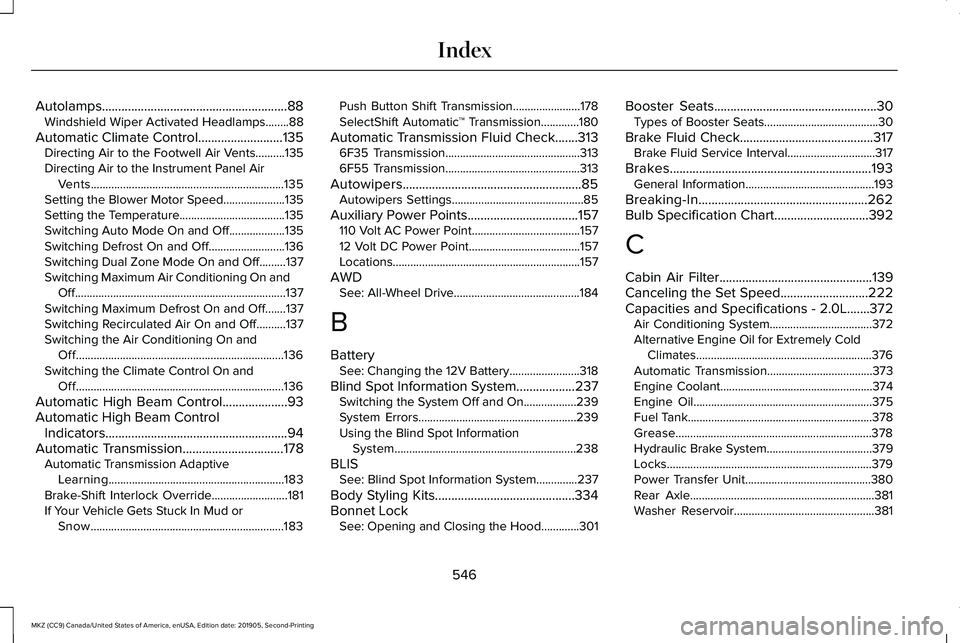
Autolamps.........................................................88
Windshield Wiper Activated Headlamps........88
Automatic Climate Control..........................135 Directing Air to the Footwell Air Vents..........135
Directing Air to the Instrument Panel Air
Vents..................................................................135
Setting the Blower Motor Speed.....................135
Setting the Temperature....................................135
Switching Auto Mode On and Off...................135
Switching Defrost On and Off..........................136
Switching Dual Zone Mode On and Off.........137
Switching Maximum Air Conditioning On and Off........................................................................\
137
Switching Maximum Defrost On and Off.......137
Switching Recirculated Air On and Off..........137
Switching the Air Conditioning On and Off.......................................................................136
Switching the Climate Control On and Off.......................................................................136
Automatic High Beam Control....................93
Automatic High Beam Control Indicators........................................................94
Automatic Transmission
...............................178
Automatic Transmission Adaptive
Learning............................................................183
Brake-Shift Interlock Override..........................181
If Your Vehicle Gets Stuck In Mud or Snow..................................................................183 Push Button Shift Transmission.......................178
SelectShift Automatic
™ Transmission.............180
Automatic Transmission Fluid Check.......313 6F35 Transmission..............................................313
6F55 Transmission..............................................313
Autowipers.......................................................85 Autowipers Settings.............................................85
Auxiliary Power Points..................................157 110 Volt AC Power Point.....................................157
12 Volt DC Power Point......................................157
Locations................................................................157
AWD See: All-Wheel Drive...........................................184
B
Battery See: Changing the 12V Battery........................318
Blind Spot Information System..................237 Switching the System Off and On..................239
System Errors......................................................239
Using the Blind Spot Information
System..............................................................238
BLIS See: Blind Spot Information System..............
237
Body Styling Kits
...........................................334
Bonnet Lock See: Opening and Closing the Hood.............301 Booster Seats
..................................................30
Types of Booster Seats.......................................30
Brake Fluid Check.........................................317 Brake Fluid Service Interval..............................317
Brakes..............................................................193 General Information............................................193
Breaking-In....................................................262
Bulb Specification Chart
.............................392
C
Cabin Air Filter
...............................................139
Canceling the Set Speed...........................222
Capacities and Specifications - 2.0L.......372 Air Conditioning System...................................372
Alternative Engine Oil for Extremely Cold
Climates............................................................376
Automatic Transmission....................................373
Engine Coolant....................................................374
Engine Oil.............................................................375
Fuel Tank...............................................................378
Grease...................................................................378
Hydraulic Brake System....................................379
Locks......................................................................379
Power Transfer Unit...........................................380
Rear Axle...............................................................381
Washer Reservoir................................................381
546
MKZ (CC9) Canada/United States of America, enUSA, Edition date: 201905, Second-Printing Index