power LINCOLN MKZ 2020 Owner's Manual
[x] Cancel search | Manufacturer: LINCOLN, Model Year: 2020, Model line: MKZ, Model: LINCOLN MKZ 2020Pages: 561, PDF Size: 5.7 MB
Page 116 of 561
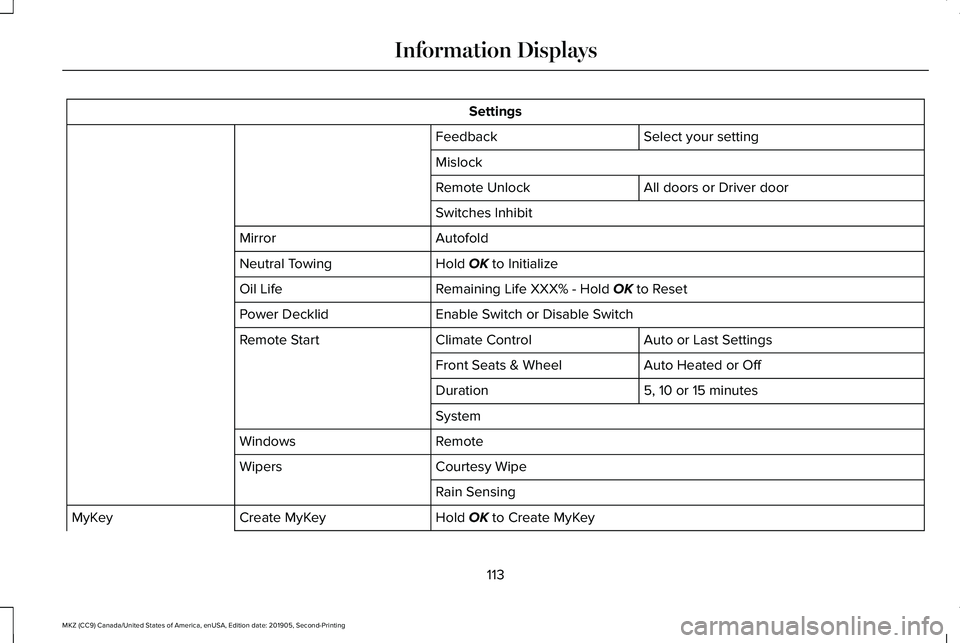
Settings
Select your setting
Feedback
Mislock
All doors or Driver door
Remote Unlock
Switches Inhibit
Autofold
Mirror
Hold OK to Initialize
Neutral Towing
Remaining Life XXX% - Hold
OK to Reset
Oil Life
Enable Switch or Disable Switch
Power Decklid
Auto or Last Settings
Climate Control
Remote Start
Auto Heated or Off
Front Seats & Wheel
5, 10 or 15 minutes
Duration
System
Remote
Windows
Courtesy Wipe
Wipers
Rain Sensing
Hold
OK to Create MyKey
Create MyKey
MyKey
113
MKZ (CC9) Canada/United States of America, enUSA, Edition date: 201905, Second-Printing Information Displays
Page 123 of 561

Battery and Charging System
Action
Message
Displayed when the charging system needs servicing. If the warning stays\
on or continues tocome on, contact your authorized dealer as soon as possible.
Check Charging System
Displayed when the battery management system detects an extended low-vol\
tage condition.Various vehicle features will be disabled to help preserve the battery. Turn off as many of the electrical loads as soon as possible to improve system voltage. If the system voltage has recovered, the disabled features will operate again as normal.
Low Battery Features Temporarily Turned
Off
The battery management system determines that the battery is at a low st\
ate of charge. Turn
the ignition off as soon as possible to protect the battery. This message will clear once the vehicle
has been started and the battery state of charge has recovered. Turning off unnecessary electrical loads will allow faster battery state-of-charge recovery.
Turn Power Off To Save Battery
The battery management system determines that the 12V battery is at a lo\
w state of charge.
Start the engine to charge the battery or charge the battery using an aft\
ermarket battery charger.
This message clears once you restart your vehicle and the battery state \
of charge has recovered.
Battery State of Charge Low
120
MKZ (CC9) Canada/United States of America, enUSA, Edition date: 201905, Second-Printing Information Displays
Page 126 of 561
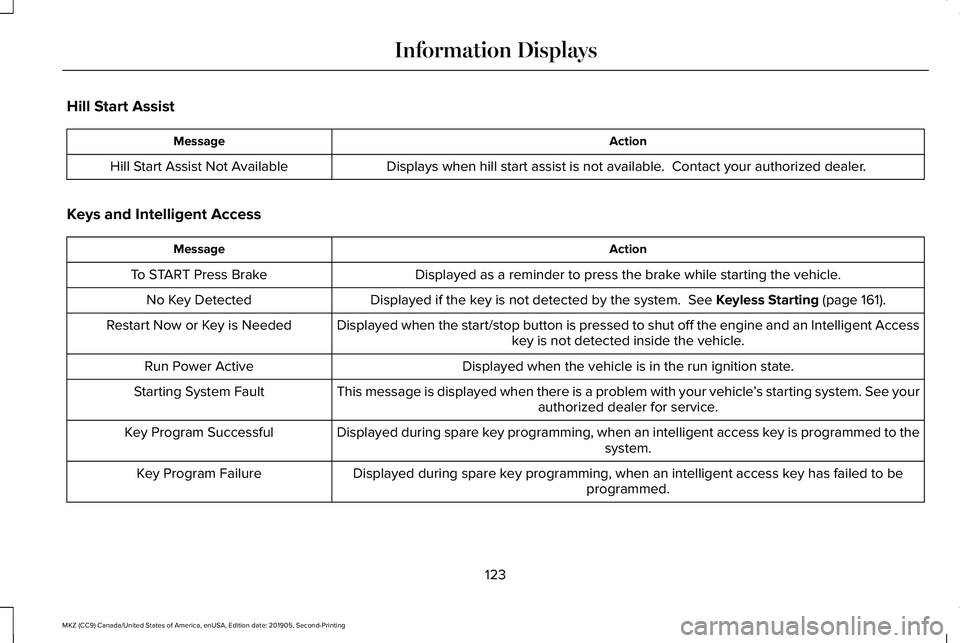
Hill Start Assist
Action
Message
Displays when hill start assist is not available. Contact your authorized dealer.
Hill Start Assist Not Available
Keys and Intelligent Access Action
Message
Displayed as a reminder to press the brake while starting the vehicle.
To START Press Brake
Displayed if the key is not detected by the system. See Keyless Starting (page 161).
No Key Detected
Displayed when the start/stop button is pressed to shut off the engine a\
nd an Intelligent Accesskey is not detected inside the vehicle.
Restart Now or Key is Needed
Displayed when the vehicle is in the run ignition state.
Run Power Active
This message is displayed when there is a problem with your vehicle ’s starting system. See your
authorized dealer for service.
Starting System Fault
Displayed during spare key programming, when an intelligent access key is programmed to the system.
Key Program Successful
Displayed during spare key programming, when an intelligent access key has failed to be programmed.
Key Program Failure
123
MKZ (CC9) Canada/United States of America, enUSA, Edition date: 201905, Second-Printing Information Displays
Page 128 of 561
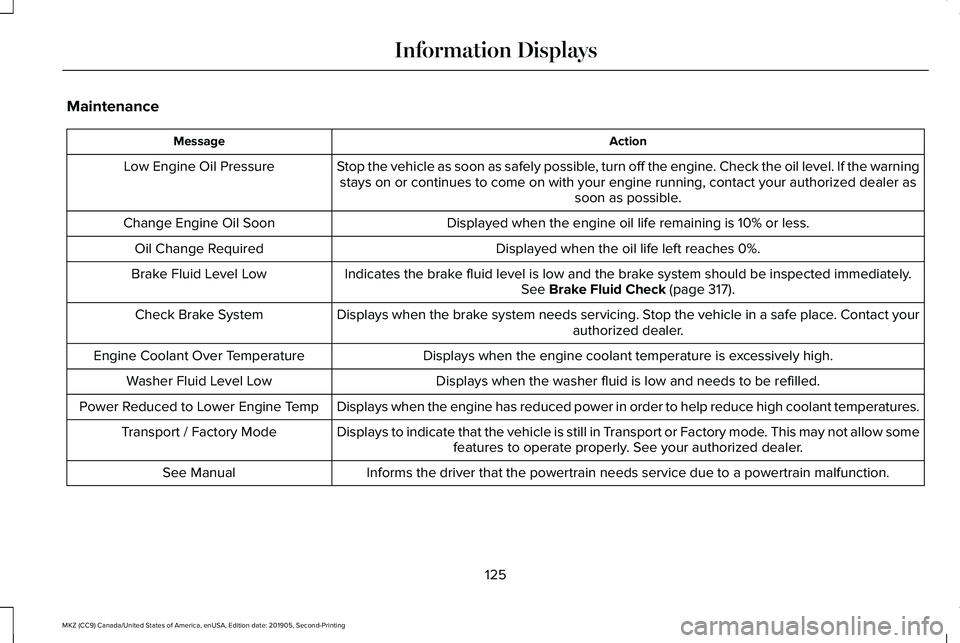
Maintenance
Action
Message
Stop the vehicle as soon as safely possible, turn off the engine. Check the oil level. If the warningstays on or continues to come on with your engine running, contact your \
authorized dealer as soon as possible.
Low Engine Oil Pressure
Displayed when the engine oil life remaining is 10% or less.
Change Engine Oil Soon
Displayed when the oil life left reaches 0%.
Oil Change Required
Indicates the brake fluid level is low and the brake system should be inspected immediately.See Brake Fluid Check (page 317).
Brake Fluid Level Low
Displays when the brake system needs servicing. Stop the vehicle in a safe place. Contact your authorized dealer.
Check Brake System
Displays when the engine coolant temperature is excessively high.
Engine Coolant Over Temperature
Displays when the washer fluid is low and needs to be refilled.
Washer Fluid Level Low
Displays when the engine has reduced power in order to help reduce high \
coolant temperatures.
Power Reduced to Lower Engine Temp
Displays to indicate that the vehicle is still in Transport or Factory mode. This may not allow somefeatures to operate properly. See your authorized dealer.
Transport / Factory Mode
Informs the driver that the powertrain needs service due to a powertrain\
malfunction.
See Manual
125
MKZ (CC9) Canada/United States of America, enUSA, Edition date: 201905, Second-Printing Information Displays
Page 131 of 561
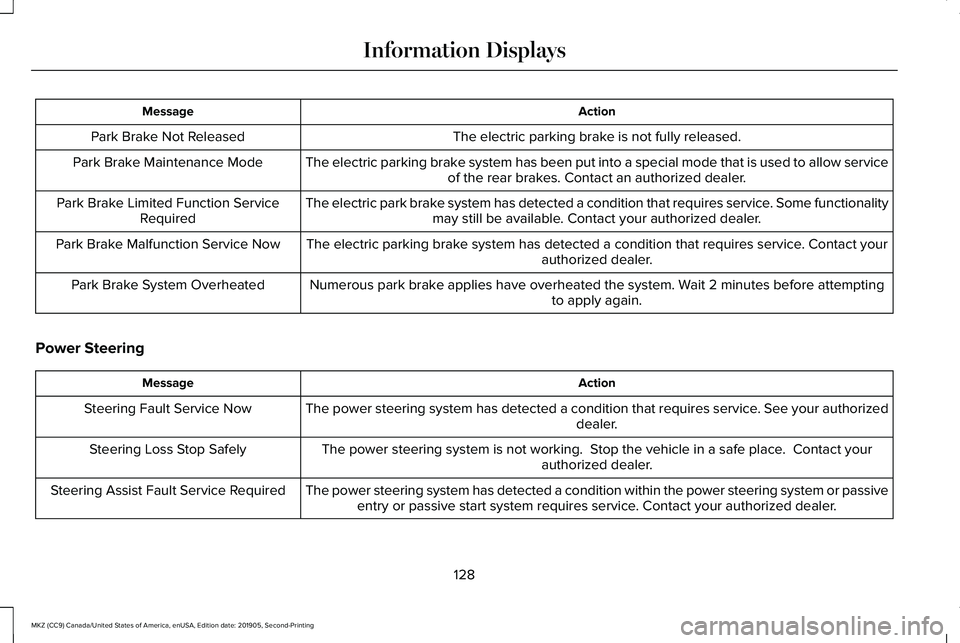
Action
Message
The electric parking brake is not fully released.
Park Brake Not Released
The electric parking brake system has been put into a special mode that is used to allow serviceof the rear brakes. Contact an authorized dealer.
Park Brake Maintenance Mode
The electric park brake system has detected a condition that requires service. Some functionalitymay still be available. Contact your authorized dealer.
Park Brake Limited Function Service
Required
The electric parking brake system has detected a condition that requires service. Contact your authorized dealer.
Park Brake Malfunction Service Now
Numerous park brake applies have overheated the system. Wait 2 minutes before attemptingto apply again.
Park Brake System Overheated
Power Steering Action
Message
The power steering system has detected a condition that requires service\
. See your authorized dealer.
Steering Fault Service Now
The power steering system is not working. Stop the vehicle in a safe place. Contact yourauthorized dealer.
Steering Loss Stop Safely
The power steering system has detected a condition within the power stee\
ring system or passiveentry or passive start system requires service. Contact your authorized dealer.
Steering Assist Fault Service Required
128
MKZ (CC9) Canada/United States of America, enUSA, Edition date: 201905, Second-Printing Information Displays
Page 145 of 561
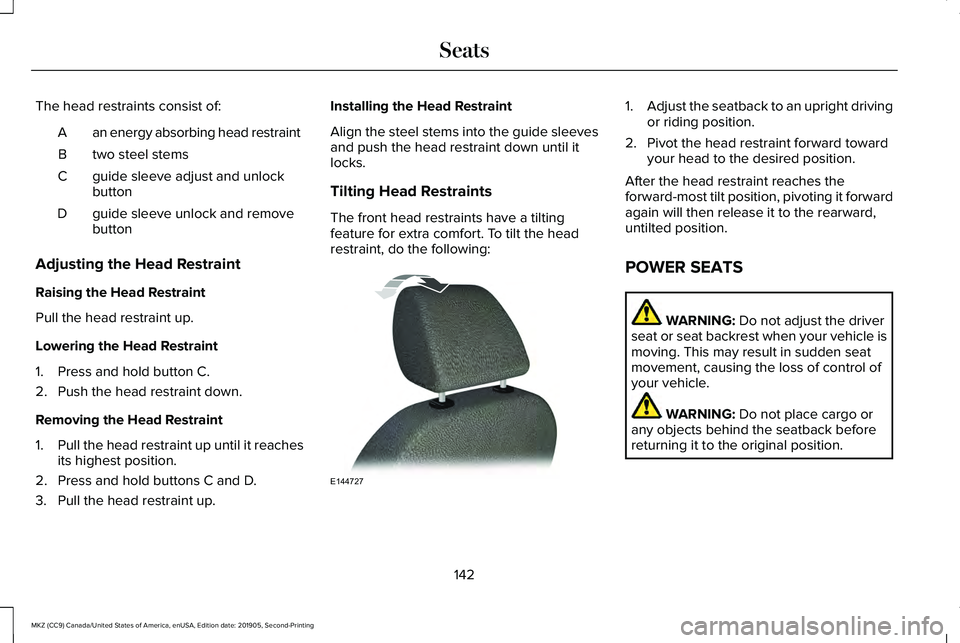
The head restraints consist of:
an energy absorbing head restraint
A
two steel stems
B
guide sleeve adjust and unlock
button
C
guide sleeve unlock and remove
button
D
Adjusting the Head Restraint
Raising the Head Restraint
Pull the head restraint up.
Lowering the Head Restraint
1. Press and hold button C.
2. Push the head restraint down.
Removing the Head Restraint
1. Pull the head restraint up until it reaches
its highest position.
2. Press and hold buttons C and D.
3. Pull the head restraint up. Installing the Head Restraint
Align the steel stems into the guide sleeves
and push the head restraint down until it
locks.
Tilting Head Restraints
The front head restraints have a tilting
feature for extra comfort. To tilt the head
restraint, do the following: 1.
Adjust the seatback to an upright driving
or riding position.
2. Pivot the head restraint forward toward your head to the desired position.
After the head restraint reaches the
forward-most tilt position, pivoting it forward
again will then release it to the rearward,
untilted position.
POWER SEATS WARNING: Do not adjust the driver
seat or seat backrest when your vehicle is
moving. This may result in sudden seat
movement, causing the loss of control of
your vehicle. WARNING:
Do not place cargo or
any objects behind the seatback before
returning it to the original position.
142
MKZ (CC9) Canada/United States of America, enUSA, Edition date: 201905, Second-Printing SeatsE144727
Page 149 of 561
MEMORY FUNCTION
WARNING: Before activating the
memory seat, make sure that the area
immediately surrounding the seat is clear
of obstructions and that all occupants are
clear of moving parts. WARNING:
Do not use the memory
function when your vehicle is moving.
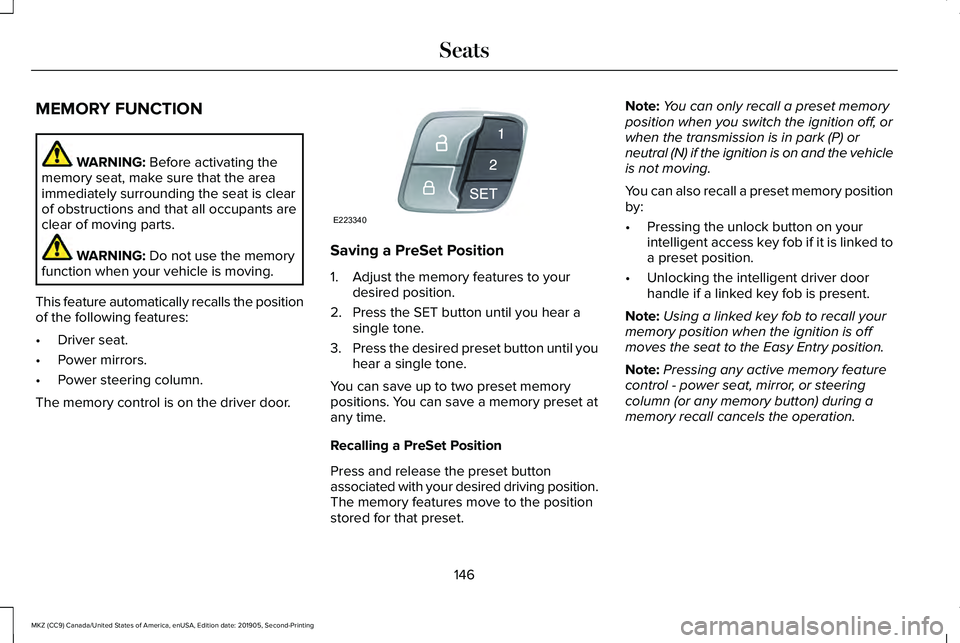
This feature automatically recalls the position
of the following features:
• Driver seat.
• Power mirrors.
• Power steering column.
The memory control is on the driver door. Saving a PreSet Position
1. Adjust the memory features to your
desired position.
2. Press the SET button until you hear a single tone.
3. Press the desired preset button until you
hear a single tone.
You can save up to two preset memory
positions. You can save a memory preset at
any time.
Recalling a PreSet Position
Press and release the preset button
associated with your desired driving position.
The memory features move to the position
stored for that preset. Note:
You can only recall a preset memory
position when you switch the ignition off, or
when the transmission is in park (P) or
neutral (N) if the ignition is on and the vehicle
is not moving.
You can also recall a preset memory position
by:
• Pressing the unlock button on your
intelligent access key fob if it is linked to
a preset position.
• Unlocking the intelligent driver door
handle if a linked key fob is present.
Note: Using a linked key fob to recall your
memory position when the ignition is off
moves the seat to the Easy Entry position.
Note: Pressing any active memory feature
control - power seat, mirror, or steering
column (or any memory button) during a
memory recall cancels the operation.
146
MKZ (CC9) Canada/United States of America, enUSA, Edition date: 201905, Second-Printing SeatsE223340
Page 160 of 561
12 Volt DC Power Point
WARNING: Do not plug optional
electrical accessories into the cigar lighter
socket. Incorrect use of the cigar lighter
can cause damage not covered by the
vehicle warranty, and can result in fire or
serious injury.
Note: When you switch the ignition on, you
can use the socket to power 12 volt
appliances with a maximum current rating
of 15 amps.
If the power supply does not work after you
switch the ignition off, switch the ignition on.
Note: Do not hang any accessory from the
accessory plug.
Note: Do not use the power point over the
vehicle capacity of 12 volt DC 180 watts or
a fuse may blow.
Note: Always keep the power point caps
closed when not in use.
Do not insert objects other than an accessory
plug into the power point. This damages the
power point and may blow the fuse. Run the vehicle for full capacity use of the
power point.
To prevent the battery from running out of
charge:
•
Do not use the power point longer than
necessary when the vehicle is not
running.
• Do not leave devices plugged in
overnight or when you park your vehicle
for extended periods.
Locations
Power points may be in the following
locations:
• On the front of the center console.
• Inside the center console.
• On the rear of the center console. 110 Volt AC Power Point WARNING: Do not keep electrical
devices plugged in the power point
whenever the device is not in use. Do not
use any extension cord with the 110 volt
AC power point, since it will defeat the
safety protection design. Doing so may
cause the power point to overload due to
powering multiple devices that can reach
beyond the 150 watt load limit and could
result in fire or serious injury.
Note: The power point turns off when you
switch the ignition off, or when the battery
voltage drops below 11 volts.
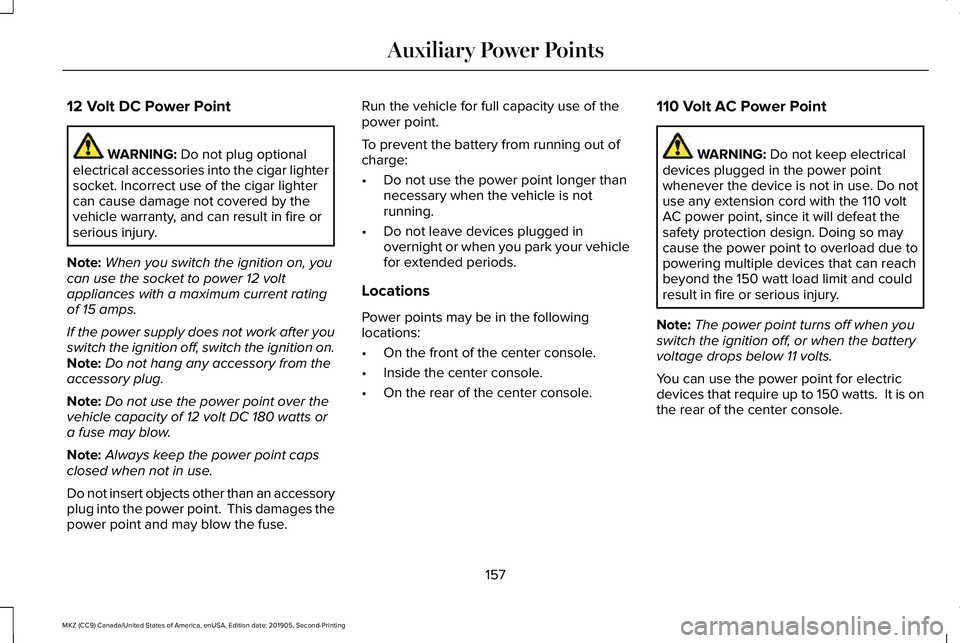
You can use the power point for electric
devices that require up to 150 watts. It is on
the rear of the center console.
157
MKZ (CC9) Canada/United States of America, enUSA, Edition date: 201905, Second-Printing Auxiliary Power Points
Page 161 of 561
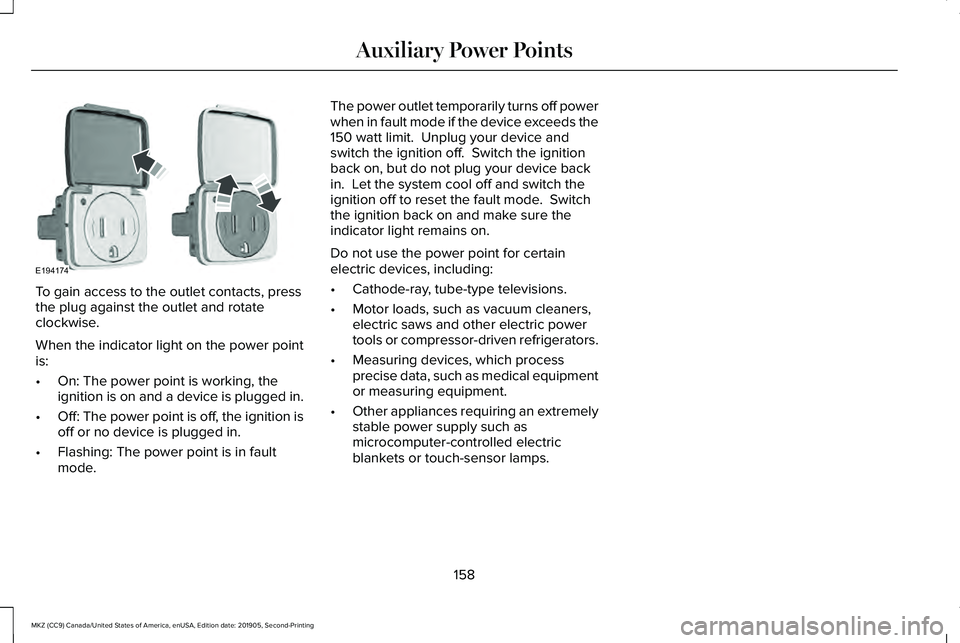
To gain access to the outlet contacts, press
the plug against the outlet and rotate
clockwise.
When the indicator light on the power point
is:
•
On: The power point is working, the
ignition is on and a device is plugged in.
• Off: The power point is off, the ignition is
off or no device is plugged in.
• Flashing: The power point is in fault
mode. The power outlet temporarily turns off power
when in fault mode if the device exceeds the
150 watt limit. Unplug your device and
switch the ignition off. Switch the ignition
back on, but do not plug your device back
in. Let the system cool off and switch the
ignition off to reset the fault mode. Switch
the ignition back on and make sure the
indicator light remains on.
Do not use the power point for certain
electric devices, including:
•
Cathode-ray, tube-type televisions.
• Motor loads, such as vacuum cleaners,
electric saws and other electric power
tools or compressor-driven refrigerators.
• Measuring devices, which process
precise data, such as medical equipment
or measuring equipment.
• Other appliances requiring an extremely
stable power supply such as
microcomputer-controlled electric
blankets or touch-sensor lamps.
158
MKZ (CC9) Canada/United States of America, enUSA, Edition date: 201905, Second-Printing Auxiliary Power PointsE194174
Page 162 of 561
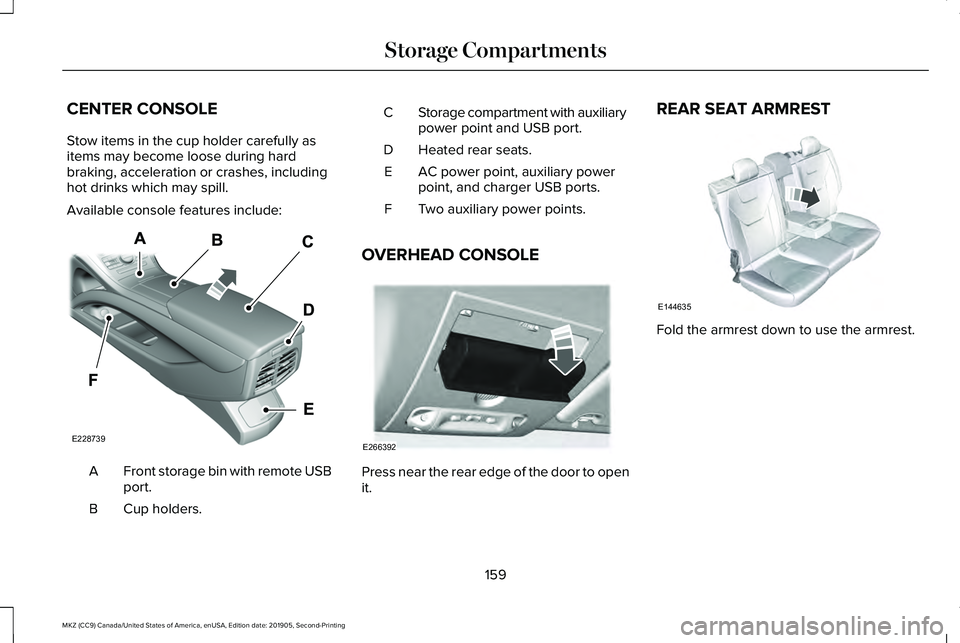
CENTER CONSOLE
Stow items in the cup holder carefully as
items may become loose during hard
braking, acceleration or crashes, including
hot drinks which may spill.
Available console features include:
Front storage bin with remote USB
port.
A
Cup holders.
B Storage compartment with auxiliary
power point and USB port.
C
Heated rear seats.
D
AC power point, auxiliary power
point, and charger USB ports.
E
Two auxiliary power points.
F
OVERHEAD CONSOLE Press near the rear edge of the door to open
it.REAR SEAT ARMREST
Fold the armrest down to use the armrest.
159
MKZ (CC9) Canada/United States of America, enUSA, Edition date: 201905, Second-Printing Storage CompartmentsE228739 E266392 E144635