power LINCOLN MKZ 2020 Service Manual
[x] Cancel search | Manufacturer: LINCOLN, Model Year: 2020, Model line: MKZ, Model: LINCOLN MKZ 2020Pages: 561, PDF Size: 5.7 MB
Page 196 of 561
GENERAL INFORMATION
Note:
Occasional brake noise is normal. If
a metal-to-metal, continuous grinding or
continuous squeal sound is present, the
brake linings may be worn-out. Have the
system checked by an authorized dealer. If
your vehicle has continuous vibration or
shudder in the steering wheel while braking,
have it checked by an authorized dealer.
Note: Brake dust may accumulate on the
wheels, even under normal driving
conditions. Some dust is inevitable as the
brakes wear and does not contribute to
brake noise. See Cleaning the Wheels
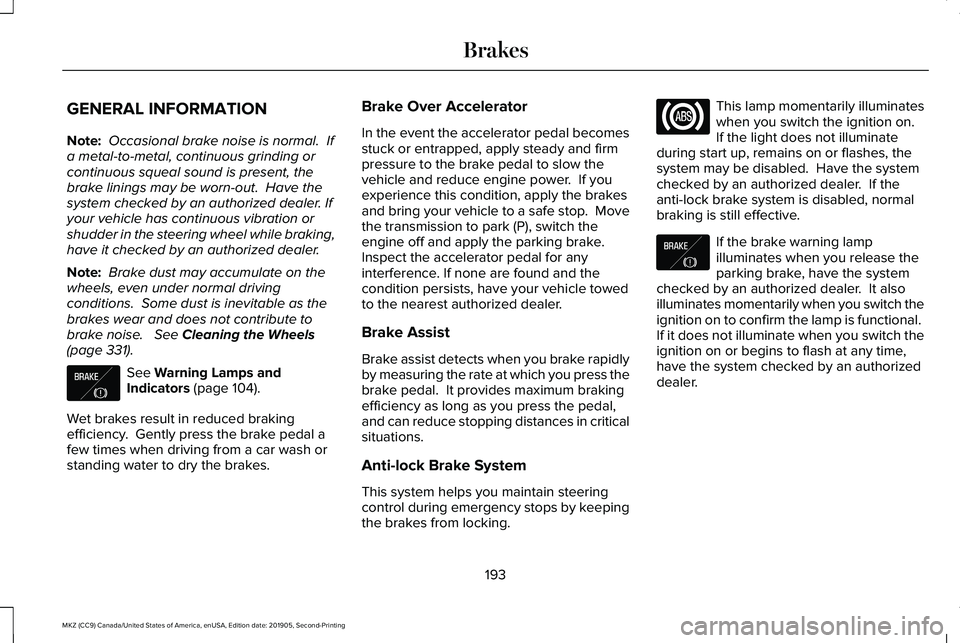
(page 331). See
Warning Lamps and
Indicators (page 104).
Wet brakes result in reduced braking
efficiency. Gently press the brake pedal a
few times when driving from a car wash or
standing water to dry the brakes. Brake Over Accelerator
In the event the accelerator pedal becomes
stuck or entrapped, apply steady and firm
pressure to the brake pedal to slow the
vehicle and reduce engine power. If you
experience this condition, apply the brakes
and bring your vehicle to a safe stop. Move
the transmission to park (P), switch the
engine off and apply the parking brake.
Inspect the accelerator pedal for any
interference. If none are found and the
condition persists, have your vehicle towed
to the nearest authorized dealer.
Brake Assist
Brake assist detects when you brake rapidly
by measuring the rate at which you press the
brake pedal. It provides maximum braking
efficiency as long as you press the pedal,
and can reduce stopping distances in critical
situations.
Anti-lock Brake System
This system helps you maintain steering
control during emergency stops by keeping
the brakes from locking. This lamp momentarily illuminates
when you switch the ignition on.
If the light does not illuminate
during start up, remains on or flashes, the
system may be disabled. Have the system
checked by an authorized dealer. If the
anti-lock brake system is disabled, normal
braking is still effective. If the brake warning lamp
illuminates when you release the
parking brake, have the system
checked by an authorized dealer. It also
illuminates momentarily when you switch the
ignition on to confirm the lamp is functional.
If it does not illuminate when you switch the
ignition on or begins to flash at any time,
have the system checked by an authorized
dealer.
193
MKZ (CC9) Canada/United States of America, enUSA, Edition date: 201905, Second-Printing BrakesE138644 E138644
Page 199 of 561
AUTO HOLD
WARNING: The system does not
replace the parking brake. When you leave
your vehicle, always apply the parking
brake. WARNING: You must remain in your
vehicle when the system turns on. At all
times, you are responsible for controlling
your vehicle, supervising the system and
intervening, if required. Failure to take care
may result in the loss of control of your
vehicle, serious personal injury or death. WARNING:
The system will turn off
if a malfunction is apparent. Failure to take
care may result in the loss of control of
your vehicle, serious personal injury or
death. Auto Hold uses your vehicle's brakes to hold
your vehicle at a stop once your vehicle has
reached a standstill condition. For example,
Auto Hold can assist you while stopping at
traffic lights or while in traffic jams by holding
the brake pressure for you once you bring
your vehicle to a stop.
Switch Auto Hold off during vehicle or trailer
towing.
Note:
In case of a malfunction in the system
while Auto Hold actively holds the vehicle
(for example, low power supply), a message
appears in the information display asking
you to press the brake pedal. If you see this
message, press the brake pedal
immediately.
Note: Auto Hold only activates if the system
recognizes it is applying enough brake
pressure. On a steep hill or incline, you may
need to make sure the brake pedal is
pressed sufficiently to activate the Auto Hold
system. Note:
In some cases, Auto Hold might hand
over to the parking brake. When the parking
brake applies, the red brake lamp appears.
This is normal. When you press the
accelerator pedal, the drive away release
feature releases the parking brake.
Note: Auto Hold works on all road grades.
196
MKZ (CC9) Canada/United States of America, enUSA, Edition date: 201905, Second-Printing Brakes
Page 202 of 561
PRINCIPLE OF OPERATION
The traction control system helps avoid drive
wheel spin and loss of traction.
If your vehicle begins to slide, the system
applies the brakes to individual wheels and,
when needed, reduces engine power at the
same time. If the wheels spin when
accelerating on slippery or loose surfaces,
the system reduces engine power in order
to increase traction.
USING TRACTION CONTROL
WARNING: The stability and traction
control light illuminates steadily if the
system detects a failure. Make sure you
did not manually disable the traction
control system using the information
display controls or the switch. If the stability
control and traction control light is still illuminating steadily, have the system
serviced by an authorized dealer
immediately. Operating your vehicle with
the traction control disabled could lead to
an increased risk of loss of vehicle control,
vehicle rollover, personal injury and death.
The system automatically turns on each time
you switch the ignition on.
If your vehicle is stuck in mud or snow,
switching traction control off may be
beneficial as this allows the wheels to spin.
Note: When you switch traction control off,
stability control remains fully active.
Switching the System Off
When you switch the system off or on, a
message appears in the information display
showing system status.
You can switch the system off by either using
the information display controls or the switch. Using the Information Display Controls
You can switch this feature off or on in the
information display. See General Information
(page
109).
Using a Switch
(If Equipped)
Use the traction control switch on the
instrument panel to switch the system off or
on.
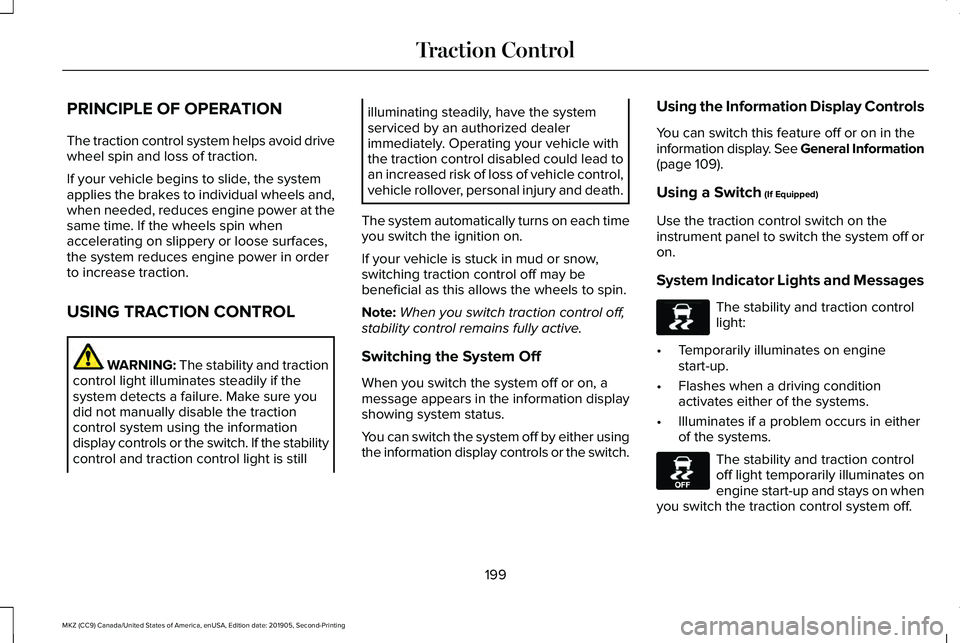
System Indicator Lights and Messages The stability and traction control
light:
• Temporarily illuminates on engine
start-up.
• Flashes when a driving condition
activates either of the systems.
• Illuminates if a problem occurs in either
of the systems. The stability and traction control
off light temporarily illuminates on
engine start-up and stays on when
you switch the traction control system off.
199
MKZ (CC9) Canada/United States of America, enUSA, Edition date: 201905, Second-Printing Traction ControlE138639 E130458
Page 203 of 561
PRINCIPLE OF OPERATION
WARNING: Vehicle modifications
involving braking system, aftermarket roof
racks, suspension, steering system, tire
construction and wheel and tire size may
change the handling characteristics of your
vehicle and may adversely affect the
performance of the electronic stability
control system. In addition, installing any
stereo loudspeakers may interfere with
and adversely affect the electronic stability
control system. Install any aftermarket
stereo loudspeaker as far as possible from
the front center console, the tunnel, and
the front seats in order to minimize the risk
of interfering with the electronic stability
control sensors. Reducing the
effectiveness of the electronic stability
control system could lead to an increased
risk of loss of vehicle control, vehicle
rollover, personal injury and death. WARNING:
Remember that even
advanced technology cannot defy the laws
of physics. It’ s always possible to lose
control of a vehicle due to inappropriate
driver input for the conditions. Aggressive
driving on any road condition can cause
you to lose control of your vehicle
increasing the risk of personal injury or
property damage. Activation of the
electronic stability control system is an
indication that at least some of the tires
have exceeded their ability to grip the
road; this could reduce the operator’ s
ability to control the vehicle potentially
resulting in a loss of vehicle control, vehicle
rollover, personal injury and death. If your
electronic stability control system activates,
SLOW DOWN.
The system automatically turns on each time
you switch the ignition on.
If a fault occurs in either the stability control
or the traction control system, you may
experience the following conditions: •
The stability and traction control light
illuminates steadily.
• The stability control and traction control
systems do not enhance your vehicle's
ability to maintain traction of the wheels.
If a driving condition activates either the
stability control or the traction control system
you may experience the following conditions:
• The stability and traction control light
flashes.
• Your vehicle slows down.
• Reduced engine power.
• A vibration in the brake pedal.
• The brake pedal is stiffer than usual.
• If the driving condition is severe and your
foot is not on the brake, the brake pedal
may move as the system applies higher
brake force.
The stability control system has several
features built into it to help you maintain
control of your vehicle:
200
MKZ (CC9) Canada/United States of America, enUSA, Edition date: 201905, Second-Printing Stability Control
Page 204 of 561
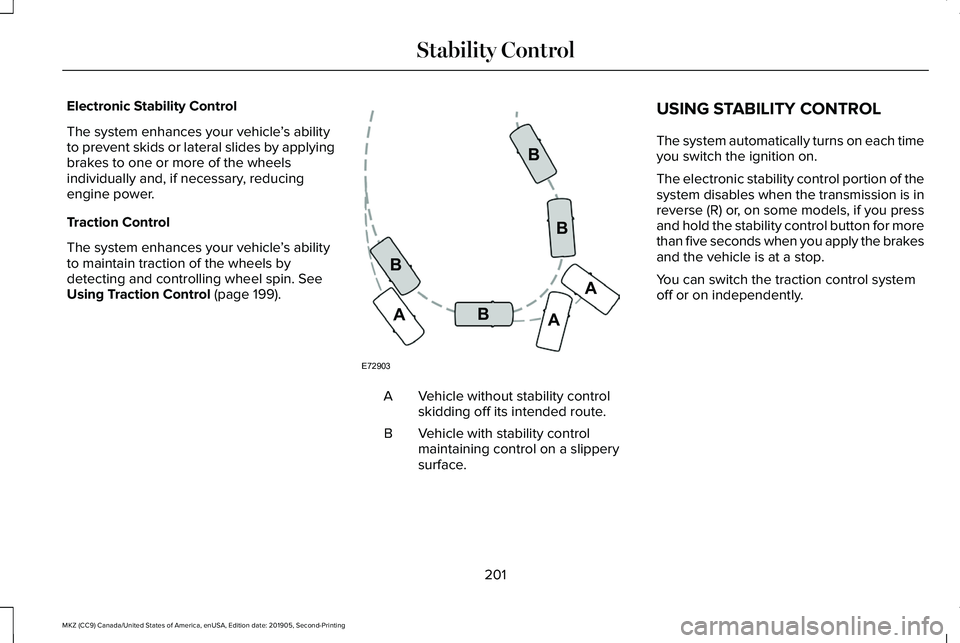
Electronic Stability Control
The system enhances your vehicle
’s ability
to prevent skids or lateral slides by applying
brakes to one or more of the wheels
individually and, if necessary, reducing
engine power.
Traction Control
The system enhances your vehicle ’s ability
to maintain traction of the wheels by
detecting and controlling wheel spin. See
Using Traction Control (page 199). Vehicle without stability control
skidding off its intended route.
A
Vehicle with stability control
maintaining control on a slippery
surface.
B USING STABILITY CONTROL
The system automatically turns on each time
you switch the ignition on.
The electronic stability control portion of the
system disables when the transmission is in
reverse (R) or, on some models, if you press
and hold the stability control button for more
than five seconds when you apply the brakes
and the vehicle is at a stop.
You can switch the traction control system
off or on independently.
201
MKZ (CC9) Canada/United States of America, enUSA, Edition date: 201905, Second-Printing Stability ControlE72903A
AA
B
BB
B
Page 247 of 561
STEERING
Electric Power Steering
WARNING: The electric power
steering system has diagnostic checks that
continuously monitor the system. If a fault
is detected, a message displays in the
information display. Stop your vehicle as
soon as it is safe to do so. Switch the
ignition off. After at least 10 seconds,
switch the ignition on and watch the
information display for a steering system
warning message. If a steering system
warning message returns, have the system
checked as soon as possible. WARNING:
If the system detects an
error, you may not feel a difference in the
steering, however a serious condition may
exist. Have your vehicle checked as soon
as possible. Failure to do so may result in
loss of steering control.
Your vehicle has an electric power steering
system, there is no fluid reservoir, no
maintenance is required. If your vehicle loses electrical power while
you are driving, electric power steering
assistance is lost. The steering system still
operates and you can steer your vehicle
manually. Manually steering your vehicle
requires more effort.
Extreme continuous steering may increase
the effort required for you to steer your
vehicle, this increased effort prevents
overheating and permanent damage to the
steering system. You do not lose the ability
to steer your vehicle manually. Typical
steering and driving maneuvers allow the
system to cool and return to normal
operation.
Steering Tips
If the steering wanders or pulls, check for:
•
Correct tire pressures.
• Uneven tire wear.
• Loose or worn suspension components.
• Loose or worn steering components.
• Improper vehicle alignment. Note:
A high crown in the road or high
crosswinds may also make the steering
seem to wander or pull.
Adaptive Learning
(If Equipped)
The electronic power steering system
adaptive learning helps correct road
irregularities and improves overall handling
and steering feel. It communicates with the
brake system to help operate advanced
stability control and accident avoidance
systems. Additionally, whenever the battery
is disconnected or a new battery installed,
you must drive your vehicle a short distance
before the system relearns the strategy and
reactivates all systems.
244
MKZ (CC9) Canada/United States of America, enUSA, Edition date: 201905, Second-Printing Driving Aids
Page 252 of 561
Note:
If something hits the front end of your
vehicle or damage occurs, the radar sensing
zone may change. This could cause missed
or false vehicle detections. Contact an
authorized dealer to have the radar checked
for proper coverage and operation.
Note: If your vehicle detects excessive heat
at the camera or a potential misalignment
condition, a message may display in the
information display indicating temporary
sensor unavailability. This message
deactivates automatically when operational
conditions return to normal. For example,
when the ambient temperature around the
sensor decreases or the sensor
automatically recalibrates successfully.
DRIVE CONTROL (IF EQUIPPED)
Lincoln Drive Control
Lincoln Drive Control delivers the Lincoln
driving experience through a suite of
sophisticated electronic vehicle systems.
These systems continuously monitor your
driving inputs and the road conditions to
optimize ride comfort, steering, handling, powertrain response and sound. You can
preset your preferences for these systems
within the information display. Lincoln Drive
Control will respond to your preferences
based on what gear position you select. This
provides a single location to control multiple
systems performance settings.
Lincoln Drive Control consists of the
following systems:
•
Adaptive suspension dynamically adjusts
the shock absorbers stiffness in real time
to match the road surface and driver
inputs. This system continuously monitors
your vehicle ’s motion, suspension
position, load, speed, road conditions
and steering to adjust the suspension
damping for optimal vehicle control.
• Electronically power-assisted steering
adjusts steering effort and feel based on
your vehicle speed and your inputs.
• Active noise control utilizes your vehicle
electronics to enhance the acoustic
experience. •
Electronic stability control and traction
control maintain your vehicle control in
adverse conditions or high performance
driving.
• Electronic throttle control enhances the
powertrain response to your inputs.
Using Lincoln Drive Control
You can configure which of the drive control
modes are active when your vehicle is in
drive (D) or sport (S). The configuration
remains active until modified from the main
menu on the information display.
249
MKZ (CC9) Canada/United States of America, enUSA, Edition date: 201905, Second-Printing Driving Aids
Page 253 of 561
These systems have a range of modes which
you can choose from in order to customize
your ideal driving experience:
•
Comfort – Provides a more relaxed
driving experience, maximizing comfort.
Your steering effort decreases and the
suspension movement is more fluid.
Comfort mode is ideal when you desire
enhanced traveling comfort.
• Normal – Delivers a balanced
combination of comfortable, controlled
ride and confident handling. This mode
provides an engaging drive experience
and a direct connection to the road
without sacrificing any of the composure
demanded from a luxury vehicle.
• Sport – Provides a sportier driving
experience. The suspension stiffens, with
an emphasis on handling and control.
The engine responds more directly to
your inputs and takes on a more powerful
tone. Sport mode is ideal for use during
more spirited driving.
You can change your vehicle's Drive Control
settings from the menu on the display
screen. See General Information (page 109). Note:
Not all settings may be available.
Note: Lincoln Drive Control has diagnostic
checks that continuously monitor the system
to ensure proper operation. Certain types of
system errors gray out the mode selections
within the information display, preventing
you from changing states when the gear
position is changed. Other types of errors
produce a temporary message in the
information display. See Information
Messages (page 115). If either condition
persists for multiple key cycles, see an
authorized dealer.
250
MKZ (CC9) Canada/United States of America, enUSA, Edition date: 201905, Second-Printing Driving Aids
Page 260 of 561
RV & Trailer Towing Guide Online
http://www.fleet.ford.com/towing-guides/
Website
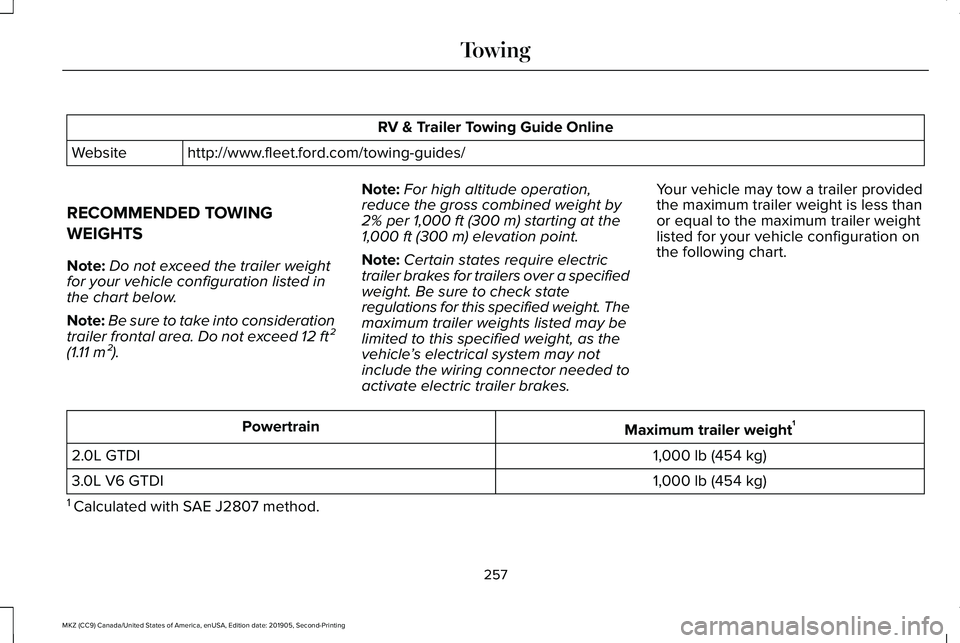
RECOMMENDED TOWING
WEIGHTS
Note: Do not exceed the trailer weight
for your vehicle configuration listed in
the chart below.
Note: Be sure to take into consideration
trailer frontal area. Do not exceed 12 ft²
(1.11 m²). Note:
For high altitude operation,
reduce the gross combined weight by
2% per 1,000 ft (300 m) starting at the
1,000 ft (300 m) elevation point.
Note: Certain states require electric
trailer brakes for trailers over a specified
weight. Be sure to check state
regulations for this specified weight. The
maximum trailer weights listed may be
limited to this specified weight, as the
vehicle ’s electrical system may not
include the wiring connector needed to
activate electric trailer brakes. Your vehicle may tow a trailer provided
the maximum trailer weight is less than
or equal to the maximum trailer weight
listed for your vehicle configuration on
the following chart.
Maximum trailer weight
1
Powertrain
1,000 lb (454 kg)
2.0L GTDI
1,000 lb (454 kg)
3.0L V6 GTDI
1 Calculated with SAE J2807 method.
257
MKZ (CC9) Canada/United States of America, enUSA, Edition date: 201905, Second-Printing Towing
Page 261 of 561
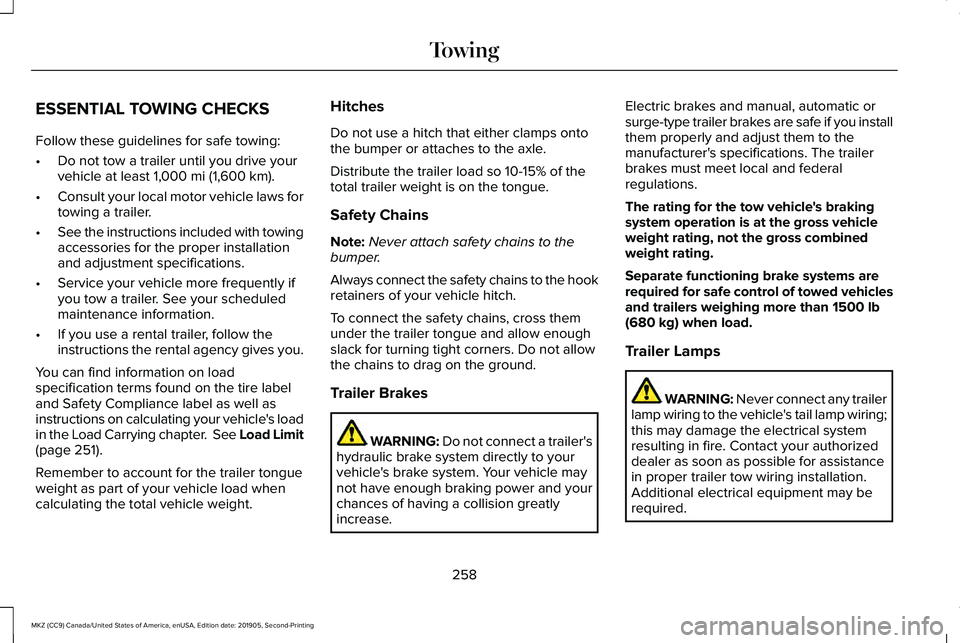
ESSENTIAL TOWING CHECKS
Follow these guidelines for safe towing:
•
Do not tow a trailer until you drive your
vehicle at least 1,000 mi (1,600 km).
• Consult your local motor vehicle laws for
towing a trailer.
• See the instructions included with towing
accessories for the proper installation
and adjustment specifications.
• Service your vehicle more frequently if
you tow a trailer. See your scheduled
maintenance information.
• If you use a rental trailer, follow the
instructions the rental agency gives you.
You can find information on load
specification terms found on the tire label
and Safety Compliance label as well as
instructions on calculating your vehicle's load
in the Load Carrying chapter. See Load Limit
(page
251).
Remember to account for the trailer tongue
weight as part of your vehicle load when
calculating the total vehicle weight. Hitches
Do not use a hitch that either clamps onto
the bumper or attaches to the axle.
Distribute the trailer load so 10-15% of the
total trailer weight is on the tongue.
Safety Chains
Note:
Never attach safety chains to the
bumper.
Always connect the safety chains to the hook
retainers of your vehicle hitch.
To connect the safety chains, cross them
under the trailer tongue and allow enough
slack for turning tight corners. Do not allow
the chains to drag on the ground.
Trailer Brakes WARNING: Do not connect a trailer's
hydraulic brake system directly to your
vehicle's brake system. Your vehicle may
not have enough braking power and your
chances of having a collision greatly
increase. Electric brakes and manual, automatic or
surge-type trailer brakes are safe if you install
them properly and adjust them to the
manufacturer's specifications. The trailer
brakes must meet local and federal
regulations.
The rating for the tow vehicle's braking
system operation is at the gross vehicle
weight rating, not the gross combined
weight rating.
Separate functioning brake systems are
required for safe control of towed vehicles
and trailers weighing more than 1500 lb
(680 kg) when load.
Trailer Lamps
WARNING: Never connect any trailer
lamp wiring to the vehicle's tail lamp wiring;
this may damage the electrical system
resulting in fire. Contact your authorized
dealer as soon as possible for assistance
in proper trailer tow wiring installation.
Additional electrical equipment may be
required.
258
MKZ (CC9) Canada/United States of America, enUSA, Edition date: 201905, Second-Printing Towing