change wheel LINCOLN MKZ HYBRID 2013 User Guide
[x] Cancel search | Manufacturer: LINCOLN, Model Year: 2013, Model line: MKZ HYBRID, Model: LINCOLN MKZ HYBRID 2013Pages: 475, PDF Size: 3.89 MB
Page 302 of 475
VEHICLE STORAGE
If you plan on storing your vehicle for
an extended period of time (30 days
or more), read the following
maintenance recommendations to
make sure your vehicle stays in good
operating condition.
All motor vehicles and their
components were engineered and
tested for reliable, regular driving.
Long term storage under various
conditions may lead to component
degradation or failure unless specific
precautions are taken to preserve the
components.
General
•
Store all vehicles in a dry,
ventilated place.
• Protect from sunlight, if possible.
• If vehicles are stored outside, they
require regular maintenance to
protect against rust and damage.
Body
• Wash your vehicle thoroughly to
remove dirt, grease, oil, tar or mud
from exterior surfaces, rear-wheel
housing and underside of front
fenders.
• Periodically wash your vehicle
stored in exposed locations.
• Touch-up exposed or primed
metal to prevent rust. •
Cover chrome and stainless steel
parts with a thick coat of auto wax
to prevent discoloration. Re-wax
as necessary when your vehicle is
washed.
• Lubricate all hood, door and trunk
lid hinges, and latches with a light
grade oil.
• Cover interior trim to prevent
fading.
• Keep all rubber parts free from oil
and solvents.
Engine
• The engine oil and filter should be
changed prior to storage, as used
engine oil contain contaminates
that may cause engine damage.
• Start the engine every 15 days. Run
at fast idle until it reaches normal
operating temperature
• With your foot on the brake, shift
through all the gears while the
engine is running.
Fuel system
• Fill the fuel tank with high-quality
fuel until the first automatic
shutoff of the fuel pump nozzle.
300
MKZ (CC9) Vehicle Care
Page 319 of 475
B.
215: Indicates the nominal
width of the tire in millimeters
from sidewall edge to sidewall
edge. In general, the larger the
number, the wider the tire.
C. 65:
Indicates the aspect ratio
which gives the tire's ratio of
height to width.
D. R:
Indicates a radial type tire.
E. 15:
Indicates the wheel or rim
diameter in inches. If you change
your wheel size, you will have to
purchase new tires to match the
new wheel diameter.
F. 95:
Indicates the tire's load
index. It is an index that relates to
how much weight a tire can carry.
You may find this information in
your owner ’s manual. If not,
contact a local tire dealer.
Note: You may not find this
information on all tires because it
is not required by federal law.
G. H:
Indicates the tire's speed
rating. The speed rating denotes
the speed at which a tire is
designed to be driven for extended
periods of time under a standard
condition of load and inflation
pressure. The tires on your vehicle
may operate at different
conditions for load and inflation
pressure. These speed ratings may
need to be adjusted for the
difference in conditions. The
ratings range from 81 mph (130
km/h) to 186 mph (299 km/h).
These ratings are listed in the
following chart. Note:
You may not find this
information on all tires because it
is not required by federal law. mph ( km/h)
Letter
rating
81 mph (130 km/h)
M
87 mph (140 km/h)
N
99 mph (159 km/h)
Q
106 mph (171 km/h)
R
112 mph (180 km/h)
S
118 mph (190 km/h)
T
124 mph (200 km/h)
U
130 mph (210 km/h)
H
149 mph (240 km/h)
V
168 mph (270 km/h)
W
186 mph (299 km/h)
Y
Note: For tires with a maximum
speed capability over 149 mph
(240 km/h), tire manufacturers
sometimes use the letters ZR. For
those with a maximum speed
capability over 186 mph (299
km/h), tire manufacturers always
use the letters ZR.
H. U.S. DOT Tire Identification
Number:
This begins with the
letters DOT and indicates that the
tire meets all federal standards.
The next two numbers or letters
are the plant code designating
where it was manufactured, the
next two are the tire size code and
317
MKZ (CC9) Wheels and Tires
Page 322 of 475
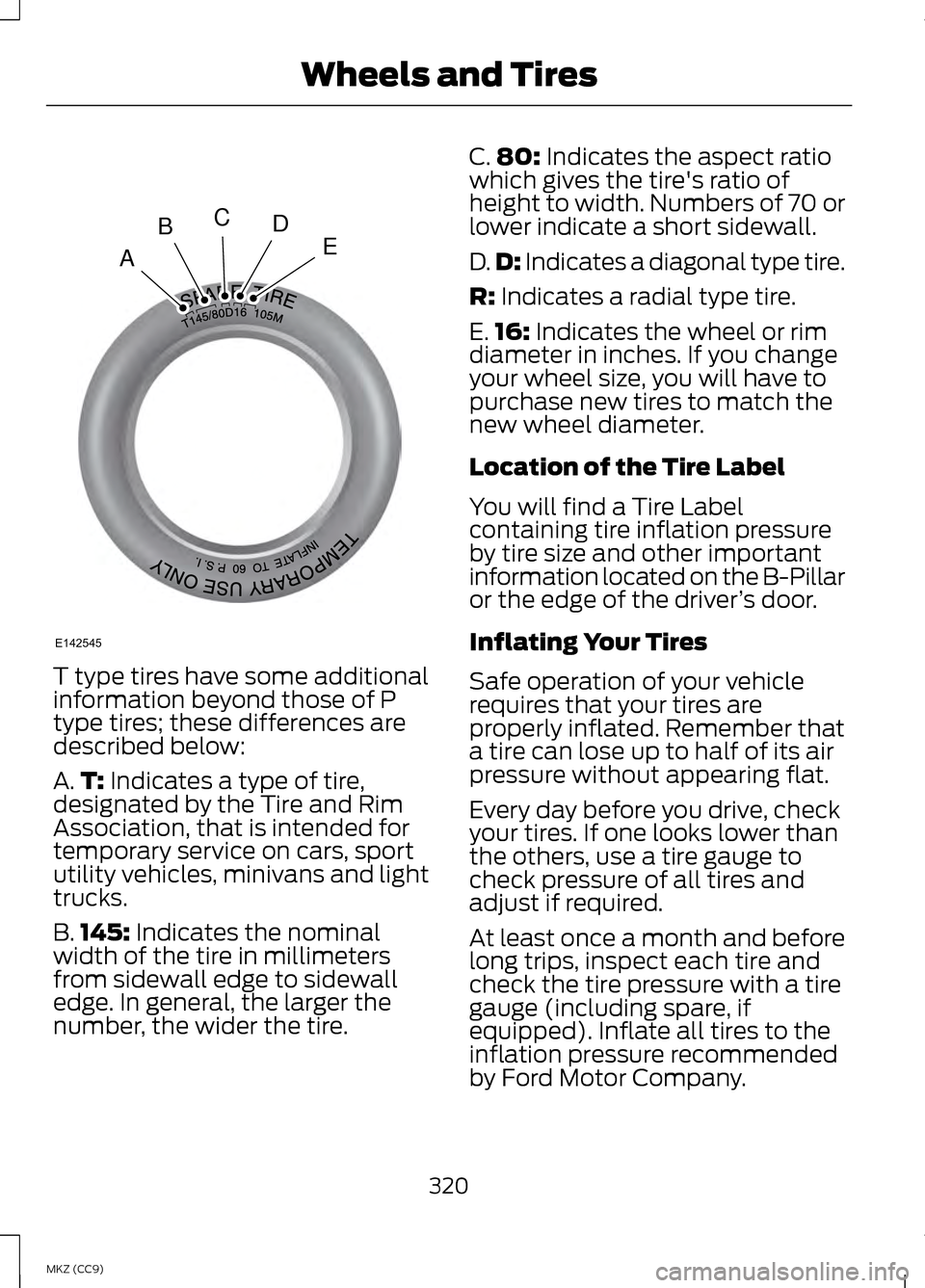
T type tires have some additional
information beyond those of P
type tires; these differences are
described below:
A.
T: Indicates a type of tire,
designated by the Tire and Rim
Association, that is intended for
temporary service on cars, sport
utility vehicles, minivans and light
trucks.
B. 145:
Indicates the nominal
width of the tire in millimeters
from sidewall edge to sidewall
edge. In general, the larger the
number, the wider the tire. C.
80:
Indicates the aspect ratio
which gives the tire's ratio of
height to width. Numbers of 70 or
lower indicate a short sidewall.
D. D:
Indicates a diagonal type tire.
R:
Indicates a radial type tire.
E. 16:
Indicates the wheel or rim
diameter in inches. If you change
your wheel size, you will have to
purchase new tires to match the
new wheel diameter.
Location of the Tire Label
You will find a Tire Label
containing tire inflation pressure
by tire size and other important
information located on the B-Pillar
or the edge of the driver ’s door.
Inflating Your Tires
Safe operation of your vehicle
requires that your tires are
properly inflated. Remember that
a tire can lose up to half of its air
pressure without appearing flat.
Every day before you drive, check
your tires. If one looks lower than
the others, use a tire gauge to
check pressure of all tires and
adjust if required.
At least once a month and before
long trips, inspect each tire and
check the tire pressure with a tire
gauge (including spare, if
equipped). Inflate all tires to the
inflation pressure recommended
by Ford Motor Company.
320
MKZ (CC9) Wheels and TiresA
BCDE
E142545
Page 324 of 475
When weather temperature
changes occur, tire inflation
pressures also change. A 10°F
(6°C) temperature drop can
cause a corresponding drop of 1
psi (7 kPa) in inflation pressure.
Check your tire pressures
frequently and adjust them to the
proper pressure which can be
found on the Safety Compliance
Certification Label or Tire Label.
To check the pressure in your
tire(s):
1. Make sure the tires are cool,
meaning they are not hot from
driving even a mile.
Note: If you are checking tire
pressure when the tire is hot, (for
example driven more than 1 mile
[1.6 kilometers]), never bleed or
reduce air pressure. The tires are
hot from driving and it is normal for
pressures to increase above
recommended cold pressures. A
hot tire at or below recommended
cold inflation pressure could be
significantly under-inflated.
Note: If you have to drive a
distance to get air for your tire(s),
check and record the tire pressure
first and add the appropriate air
pressure when you get to the
pump. It is normal for tires to heat
up and the air pressure inside to go
up as you drive.
2. Remove the cap from the valve
on one tire, then firmly press
the tire gauge onto the valve
and measure the pressure. 3.
Add enough air to reach the
recommended air pressure.
Note: If you overfill the tire, release
air by pressing on the metal stem
in the center of the valve. Then
recheck the pressure with your tire
gauge.
4. Replace the valve cap.
5. Repeat this procedure for each
tire, including the spare.
Note: Some spare tires operate at
a higher inflation pressure than the
other tires. For T type mini-spare
tires (refer to the Dissimilar spare
wheel and tire assembly
information for a description):
Store and maintain at 60 psi (4.15
bar). For full-size and dissimilar
spare tires (refer to the Dissimilar
spare wheel and tire assembly
information for a description):
Store and maintain at the higher of
the front and rear inflation pressure
as shown on the Tire Label.
6. Visually inspect the tires to
make sure there are no nails or
other objects embedded that
could poke a hole in the tire
and cause an air leak.
7. Check the sidewalls to make sure there are no gouges, cuts
or bulges.
322
MKZ (CC9) Wheels and Tires
Page 351 of 475
access the information independently
of Ford Motor Company and Ford of
Canada. For further privacy
information, see the sections on 911
Assist, Vehicle Health Report, and
Traffic, Directions and Information.
Accessing and Adjusting Modes Through Your Vehicle Information
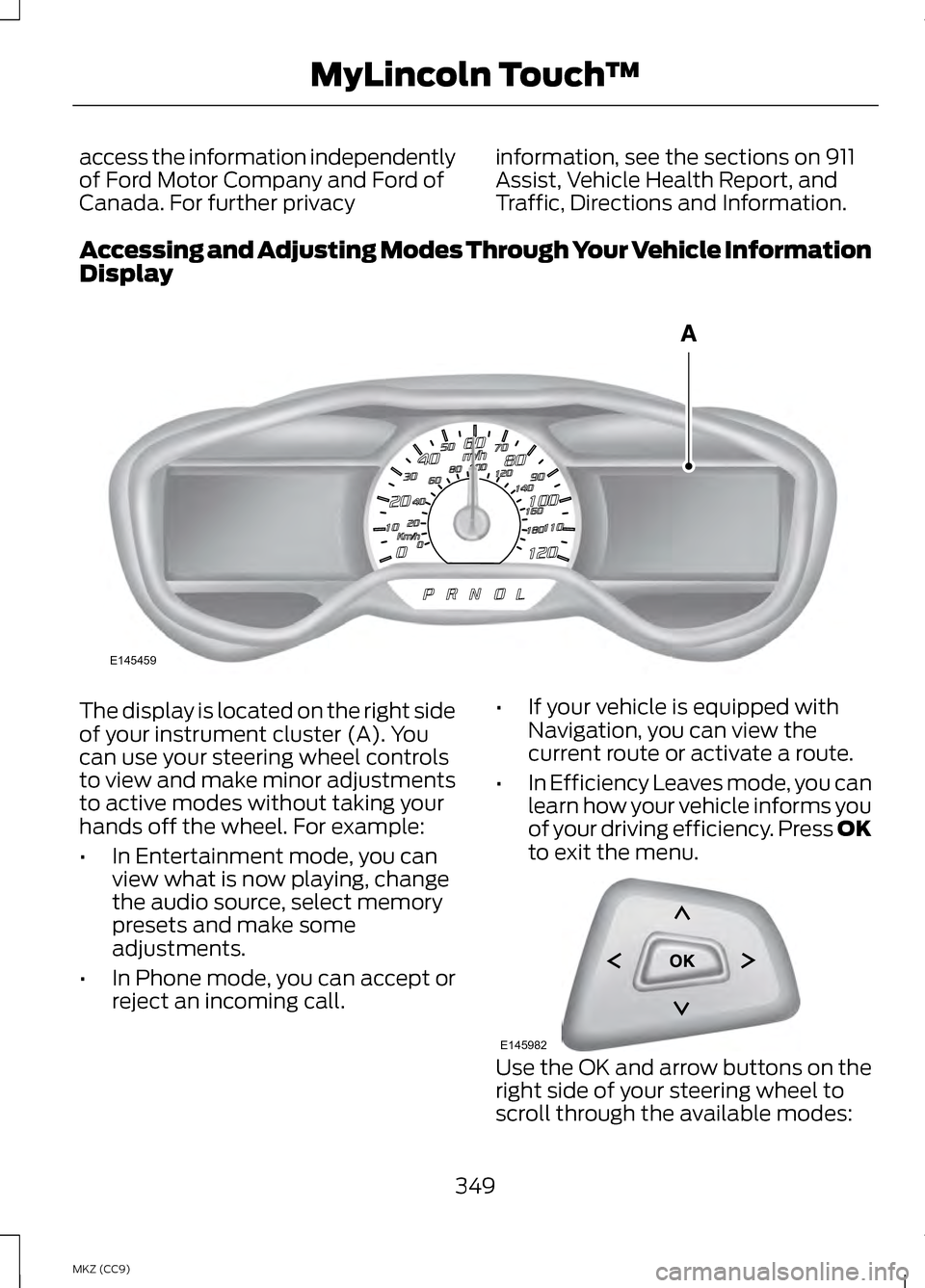
Display The display is located on the right side
of your instrument cluster (A). You
can use your steering wheel controls
to view and make minor adjustments
to active modes without taking your
hands off the wheel. For example:
•
In Entertainment mode, you can
view what is now playing, change
the audio source, select memory
presets and make some
adjustments.
• In Phone mode, you can accept or
reject an incoming call. •
If your vehicle is equipped with
Navigation, you can view the
current route or activate a route.
• In Efficiency Leaves mode, you can
learn how your vehicle informs you
of your driving efficiency. Press OK
to exit the menu. Use the OK and arrow buttons on the
right side of your steering wheel to
scroll through the available modes:
349
MKZ (CC9) MyLincoln Touch
™E145459 E145982
Page 358 of 475
Under this menu, you can set
your clock, access and adjust
the display, sound and
vehicle settings as well as access
settings for specific modes or the help
feature.
Clock
Note: You cannot manually set the
date. Your vehicle ’s GPS does this for
you.
Note: If the battery has been
disconnected, your vehicle needs to
acquire a GPS signal to update the
clock. Once your vehicle acquires the
signal, it may take a few minutes for
the update to display the correct time. 1. Press the Settings icon > Clock.
2. Press
+ and - to adjust the time.
From this screen, you can also make
other adjustments such as 12-hour or
24-hour mode, activate GPS time
synchronization and have the system
automatically update new time zones.
You can also turn the outside air
temperature display off and on. It
appears at the top center of the
touchscreen, next to the time and
date.
The system automatically saves any
updates you make to the settings. Display
You can adjust the touchscreen
display through the touchscreen or by
pressing the voice button on your
steering wheel controls and when
prompted, say, "Display settings". Press the Settings icon >
Display, to access and make
adjustments using the
touchscreen.
• Brightness
allows you to make
the screen display brighter or
dimmer.
• Auto DIM
, when set to On, lets
you use the Auto Dim Manual
Offset feature.
• Mode
allows you to set the screen
to a certain brightness or have the
system automatically change
based on the outside light level, or
turn the display off.
• If you select
AUTO or NIGHT,
you have the options of turning
the display's Auto Dim feature
on or off and changing the Auto
Dim Manual Offset feature.
• Auto Dim Manual Offset
allows
you to adjust screen dimming as
the outside lighting conditions
change from day to night.
• Edit Wallpaper
•You can have your touchscreen
display the default photo or
upload your own.
356
MKZ (CC9) MyLincoln Touch
™E142607 E142607 E142607
Page 370 of 475
Press the voice icon on the
steering wheel. When
prompted, you can say:
"BROWSE" within devices
"Browse" *
"Browse
"Browse
"Browse SD card"
"Browse Sirius channel guide" **
"Browse USB" "Help"
* If you only say, "Browse", you can
then say any commands in the
following chart.
** This command is only usable if you
have an active subscription to Sirius
satellite radio. "BROWSE"
"
"
"SD card" **
"Sirius Channel Guide" * "BROWSE"
"USB" **
"Help"
* This command is only usable if you
have an active subscription to Sirius
satellite radio.
** For more commands in SD card or
USB mode, see the "SD Card and USB
Port" section of this chapter.
Your voice system allows you to
change audio sources with a simple
voice command. For example, if you
are listening to music on a USB device,
then want to switch to a satellite radio
channel, simply press the voice button
on the steering wheel controls and say
the name of the Sirius station (such
as, "the Highway"). The following
voice commands are available at the
top level of the voice session no
matter which current audio source you
are listening to (such as a USB device
or Sirius satellite radio).
Note: This is only available when your
MyFord Touch system language is set
to North American English. Sample commands
"<87.7-107.9>""<530-1710>"
"
"AM <530-1710>"
"FM <87.7-107.9>"
368
MKZ (CC9) MyLincoln Touch
™E142599
Page 376 of 475
HD Radio Technology manufactured
under license from iBiquity Digital
Corp. U.S. and foreign patents. HD
Radio and the HD and HD Radio logos
are proprietary trademarks of iBiquity
Digital Corp. Ford Motor Company and
iBiquity Digital Corp. are not
responsible for the content sent using
HD Radio technology. Content may
be changed, added or deleted at any
time at the station owner's discretion.
Radio Voice Commands
If you are listening to the
radio, press the voice button
on the steering wheel
controls. When prompted, say any of
the following commands.
If you are not listening to the radio,
press the voice button and, after the
tone, say "Radio", then any of the
following commands. "RADIO"
"<87.9-107.9>"
"<87.9-107.9> HD" 1
"<530-1710>" "AM"
"AM <530-1710>" "AM autoset"
"AM autoset preset <#>" "AM preset <#>"
"Browse" 2 "RADIO"
"FM"
"FM <87.9-107.9>"
"FM <87.9-107.9> HD <#>" 1
"FM autoset"
"FM autoset preset <#>" "FM preset <#>" "FM 1"
"FM 1 preset <#>" "FM 2"
"FM 2 preset <#>"
"HD <#>" 1
"Preset <#>" "Radio off""Radio on" "Set PTY"
"Tune" 3
"Help"
1 If available.
2 If you have said "Browse", see the
"Browse" chart later in this section.
3 If you have said "Tune", see the
following "Tune" chart.
374
MKZ (CC9) MyLincoln Touch
™E142599
Page 434 of 475
Keep User's Guide in vehicle: When
kept in the vehicle, the User's Guide
will be a ready reference for you and
other users unfamiliar with the
Windows Automotive-based system.
Please make certain that before using
the system for the first time, all
persons have access to the User's
Guide and read its instructions and
safety information carefully.
WARNING
Operating certain parts of this
system while driving can distract
your attention away from the road,
and possibly cause an accident or
other serious consequences. Do not
change system settings or enter data
non-verbally (using your hands) while
driving. Stop the vehicle in a safe and
legal manner before attempting these
operations. This is important since
while setting up or changing some
functions you might be required to
distract your attention away from the
road and remove your hands from the
wheel. General Operation
Voice Command Control: Functions
within the Windows
Automotive-based system may be
accomplished using only voice
commands. Using voice commands
while driving allows you to operate
the system without removing your
hands from the wheel. Prolonged Views of Screen: Do not
access any function requiring a
prolonged view of the screen while
you are driving. Pull over in a safe and
legal manner before attempting to
access a function of the system
requiring prolonged attention. Even
occasional short scans to the screen
may be hazardous if your attention
has been diverted away from your
driving task at a critical time.
Volume Setting: Do not raise the
volume excessively. Keep the volume
at a level where you can still hear
outside traffic and emergency signals
while driving. Driving while unable to
hear these sounds could cause an
accident.
Use of Speech Recognition
Functions:
Speech recognition
software is inherently a statistical
process which is subject to errors. It is
your responsibility to monitor any
speech recognition functions included
in the system and address any errors.
Navigation Features: Any navigation
features included in the system are
intended to provide turn by turn
instructions to get you to a desired
destination. Please make certain all
persons using this system carefully
read and follow instructions and
safety information fully.
432
MKZ (CC9) Appendices
Page 450 of 475
Be sure to ask your dealership service
advisor or technician about the
multi-point vehicle inspection. It is a
comprehensive way to perform a
thorough inspection of your vehicle.
Your checklist gives you immediate
feedback on the overall condition of
your vehicle.
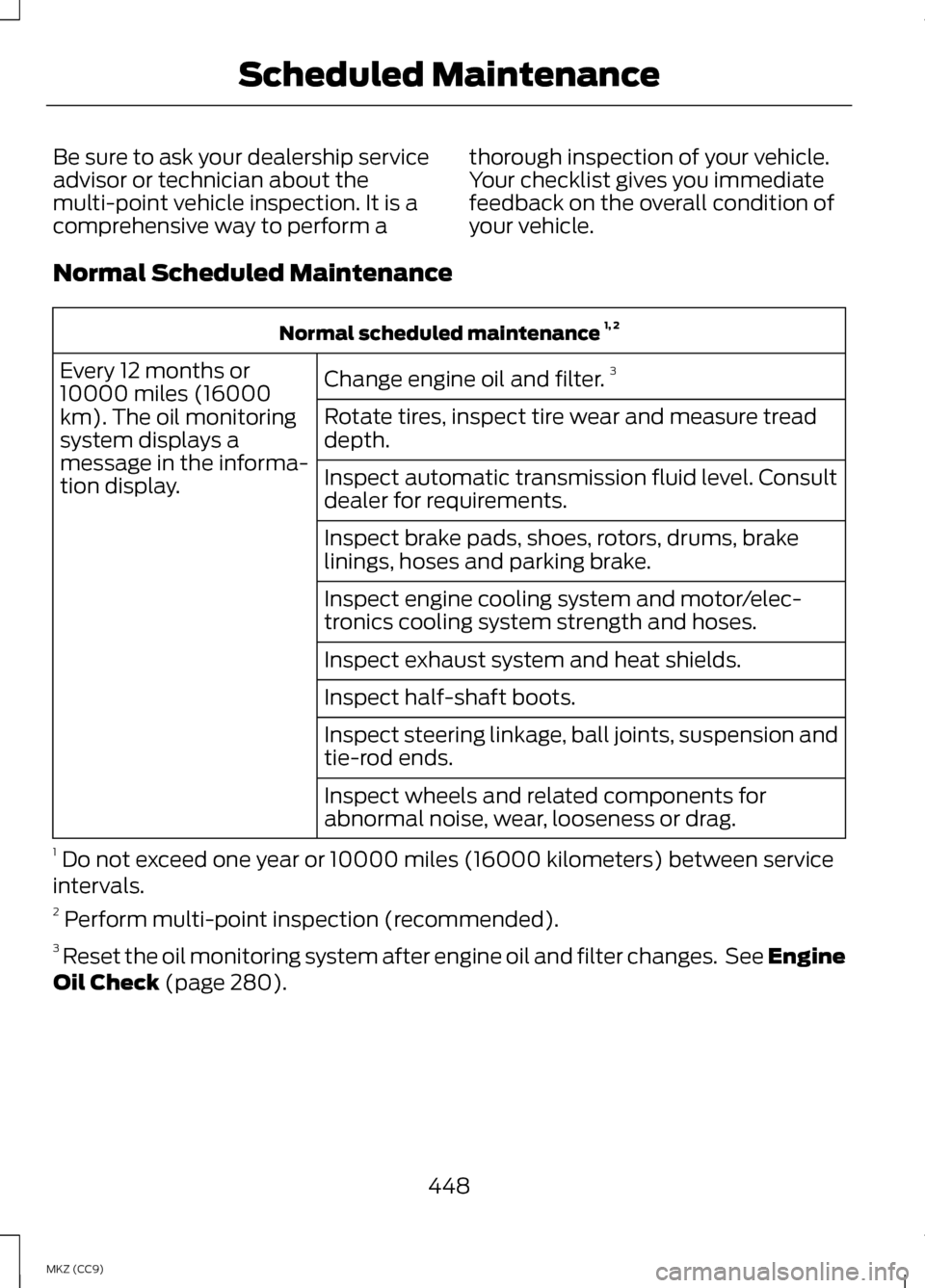
Normal Scheduled Maintenance Normal scheduled maintenance
1, 2
Change engine oil and filter. 3
Every 12 months or
10000 miles (16000
km). The oil monitoring
system displays a
message in the informa-
tion display. Rotate tires, inspect tire wear and measure tread
depth.
Inspect automatic transmission fluid level. Consult
dealer for requirements.
Inspect brake pads, shoes, rotors, drums, brake
linings, hoses and parking brake.
Inspect engine cooling system and motor/elec-
tronics cooling system strength and hoses.
Inspect exhaust system and heat shields.
Inspect half-shaft boots.
Inspect steering linkage, ball joints, suspension and
tie-rod ends.
Inspect wheels and related components for
abnormal noise, wear, looseness or drag.
1 Do not exceed one year or 10000 miles (16000 kilometers) between service
intervals.
2 Perform multi-point inspection (recommended).
3 Reset the oil monitoring system after engine oil and filter changes. See Engine
Oil Check (page 280).
448
MKZ (CC9) Scheduled Maintenance