steering wheel LINCOLN MKZ HYBRID 2013 User Guide
[x] Cancel search | Manufacturer: LINCOLN, Model Year: 2013, Model line: MKZ HYBRID, Model: LINCOLN MKZ HYBRID 2013Pages: 475, PDF Size: 3.89 MB
Page 105 of 475
GENERAL INFORMATION
WARNING
Driving while distracted can
result in loss of vehicle control,
accident and injury. We strongly
recommend that you use extreme
caution when using any device or
feature that may take your focus off
the road. Your primary responsibility
is the safe operation of the vehicle.
We recommend against the use of any
handheld device while driving and that
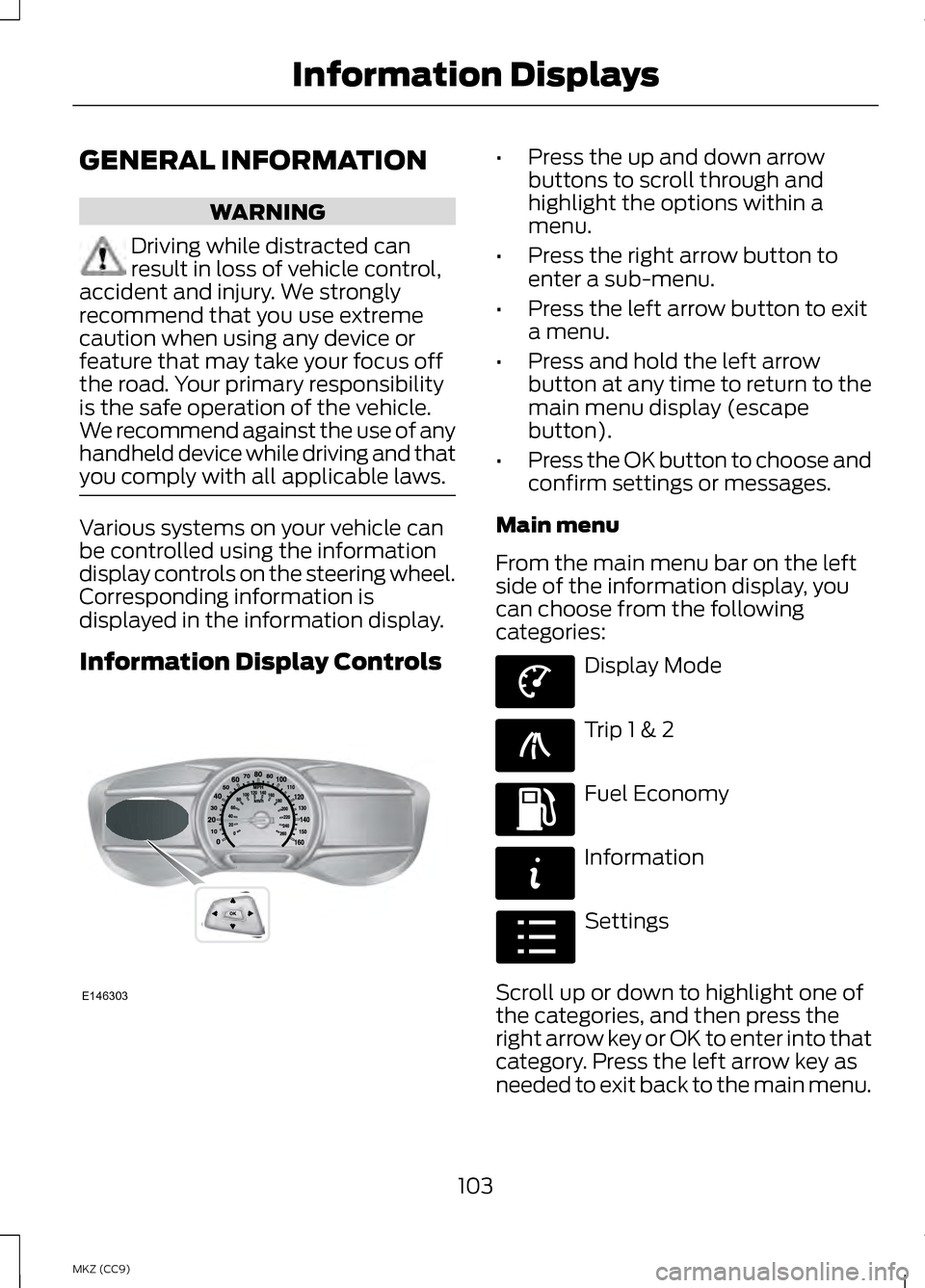
you comply with all applicable laws. Various systems on your vehicle can
be controlled using the information
display controls on the steering wheel.
Corresponding information is
displayed in the information display.
Information Display Controls •
Press the up and down arrow
buttons to scroll through and
highlight the options within a
menu.
• Press the right arrow button to
enter a sub-menu.
• Press the left arrow button to exit
a menu.
• Press and hold the left arrow
button at any time to return to the
main menu display (escape
button).
• Press the OK button to choose and
confirm settings or messages.
Main menu
From the main menu bar on the left
side of the information display, you
can choose from the following
categories: Display Mode
Trip 1 & 2
Fuel Economy
Information
Settings
Scroll up or down to highlight one of
the categories, and then press the
right arrow key or OK to enter into that
category. Press the left arrow key as
needed to exit back to the main menu.
103
MKZ (CC9) Information DisplaysE146303 E144639 E138660 E144640 E144642 E100023
Page 114 of 475
Fuel Economy
Help —
—
Help
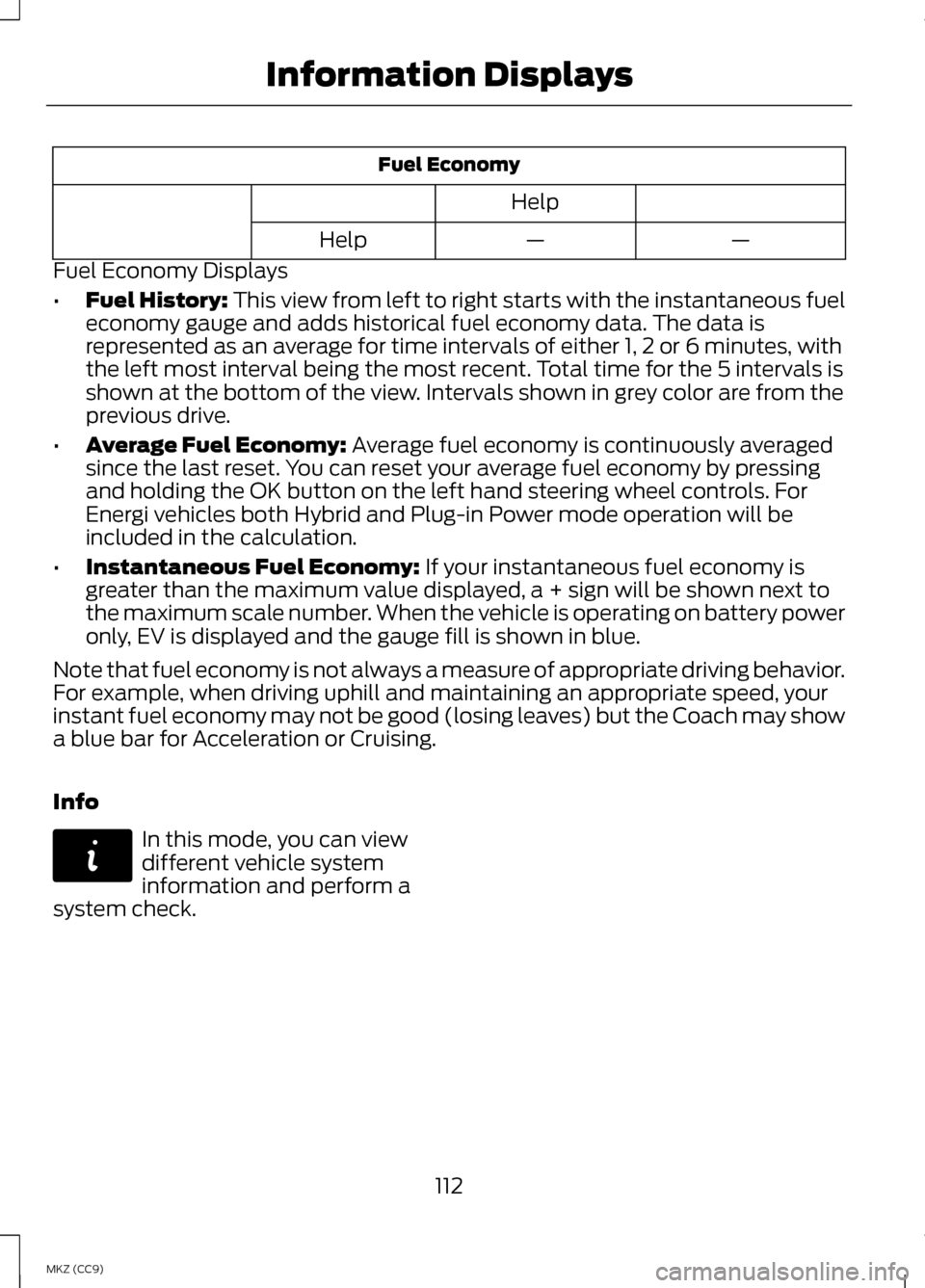
Fuel Economy Displays
• Fuel History: This view from left to right starts with the instantaneous fuel
economy gauge and adds historical fuel economy data. The data is
represented as an average for time intervals of either 1, 2 or 6 minutes, with
the left most interval being the most recent. Total time for the 5 intervals is
shown at the bottom of the view. Intervals shown in grey color are from the
previous drive.
• Average Fuel Economy:
Average fuel economy is continuously averaged
since the last reset. You can reset your average fuel economy by pressing
and holding the OK button on the left hand steering wheel controls. For
Energi vehicles both Hybrid and Plug-in Power mode operation will be
included in the calculation.
• Instantaneous Fuel Economy:
If your instantaneous fuel economy is
greater than the maximum value displayed, a + sign will be shown next to
the maximum scale number. When the vehicle is operating on battery power
only, EV is displayed and the gauge fill is shown in blue.
Note that fuel economy is not always a measure of appropriate driving behavior.
For example, when driving uphill and maintaining an appropriate speed, your
instant fuel economy may not be good (losing leaves) but the Coach may show
a blue bar for Acceleration or Cruising.
Info In this mode, you can view
different vehicle system
information and perform a
system check.
112
MKZ (CC9) Information DisplaysE144642
Page 117 of 475
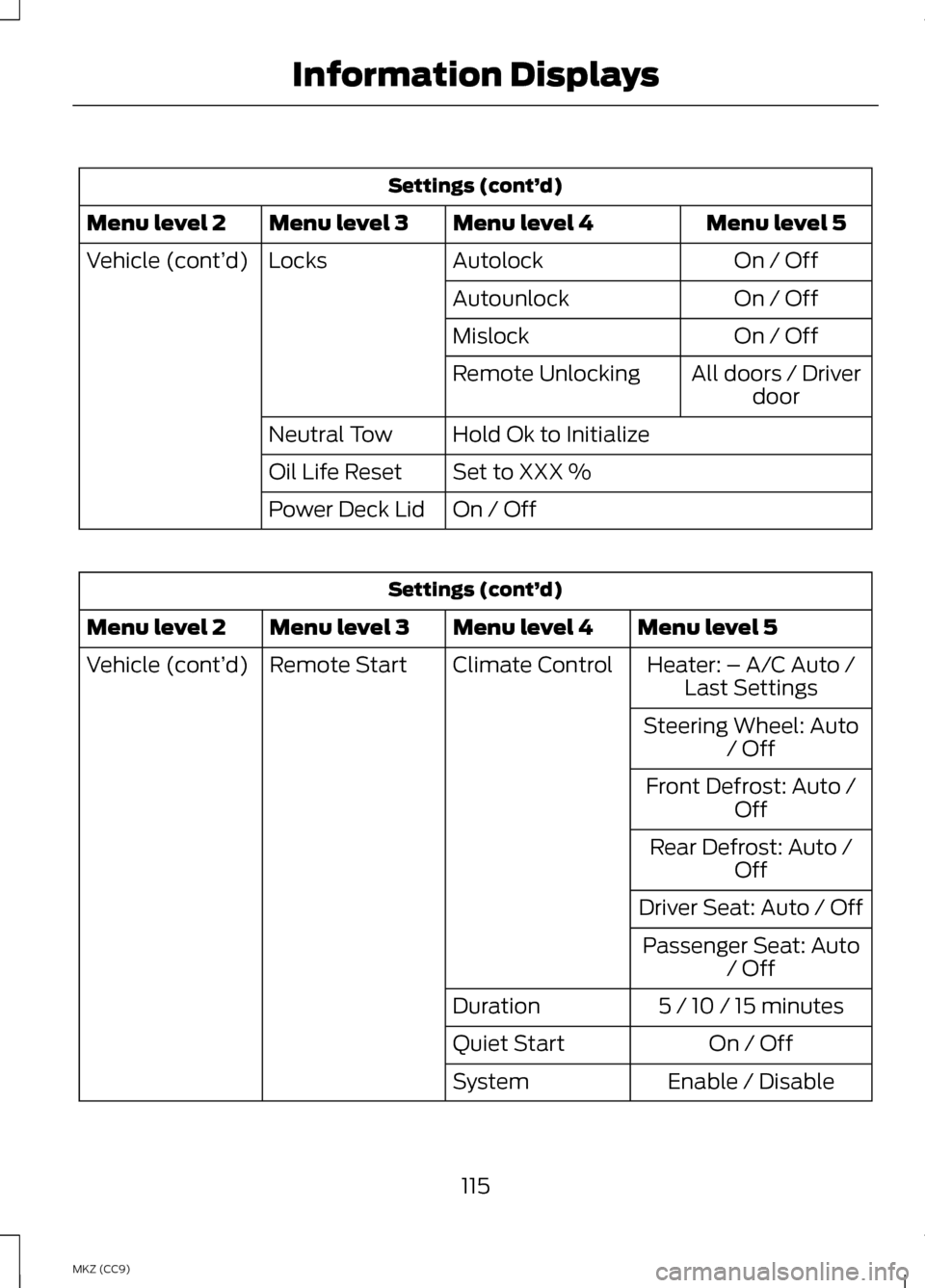
Settings (cont’
d)
Menu level 5
Menu level 4
Menu level 3
Menu level 2
On / Off
Autolock
Locks
Vehicle (cont’ d)
On / Off
Autounlock
On / Off
Mislock
All doors / Driverdoor
Remote Unlocking
Hold Ok to Initialize
Neutral Tow
Set to XXX %
Oil Life Reset
On / Off
Power Deck Lid Settings (cont’
d)
Menu level 5
Menu level 4
Menu level 3
Menu level 2
Heater: – A/C Auto /Last Settings
Climate Control
Remote Start
Vehicle (cont’ d)
Steering Wheel: Auto/ Off
Front Defrost: Auto / Off
Rear Defrost: Auto / Off
Driver Seat: Auto / Off Passenger Seat: Auto / Off
5 / 10 / 15 minutes
Duration
On / Off
Quiet Start
Enable / Disable
System
115
MKZ (CC9) Information Displays
Page 121 of 475

AdvanceTrac
™ Action
Message
Displays when the system detects a malfunction dueto a blocked sensor.
Service AdvanceTrac
Displayed when the traction control has been disabledor enabled by the driver.
AdvanceTrac Off On
Airbag Action
Message
Displays when the system detects a malfunction dueto a blocked sensor.
Occupant Sensor
BLOCKED Remove Objects Near
Passenger Seat
Alarm Action
Message
Displays when the alarm has been triggered due to
unauthorized entry. See Anti-Theft Alarm (page 73).
Vehicle Alarm to Stop
Alarm, Start Vehicle
Automatic Engine Shutdown Action
Message
Displays when the engine is getting ready to shut off.
Engine Shuts Off in
XX Seconds
Displays when the engine has shut off to help increase fuel economy.
Engine Shut Off for
Fuel Economy
Displays when the engine is getting ready to shut off.
You can press OK on the left steering wheel button to override the shut down.
Engine Shuts Off in
XX Seconds Press Ok to Override
119
MKZ (CC9) Information Displays
Page 126 of 475
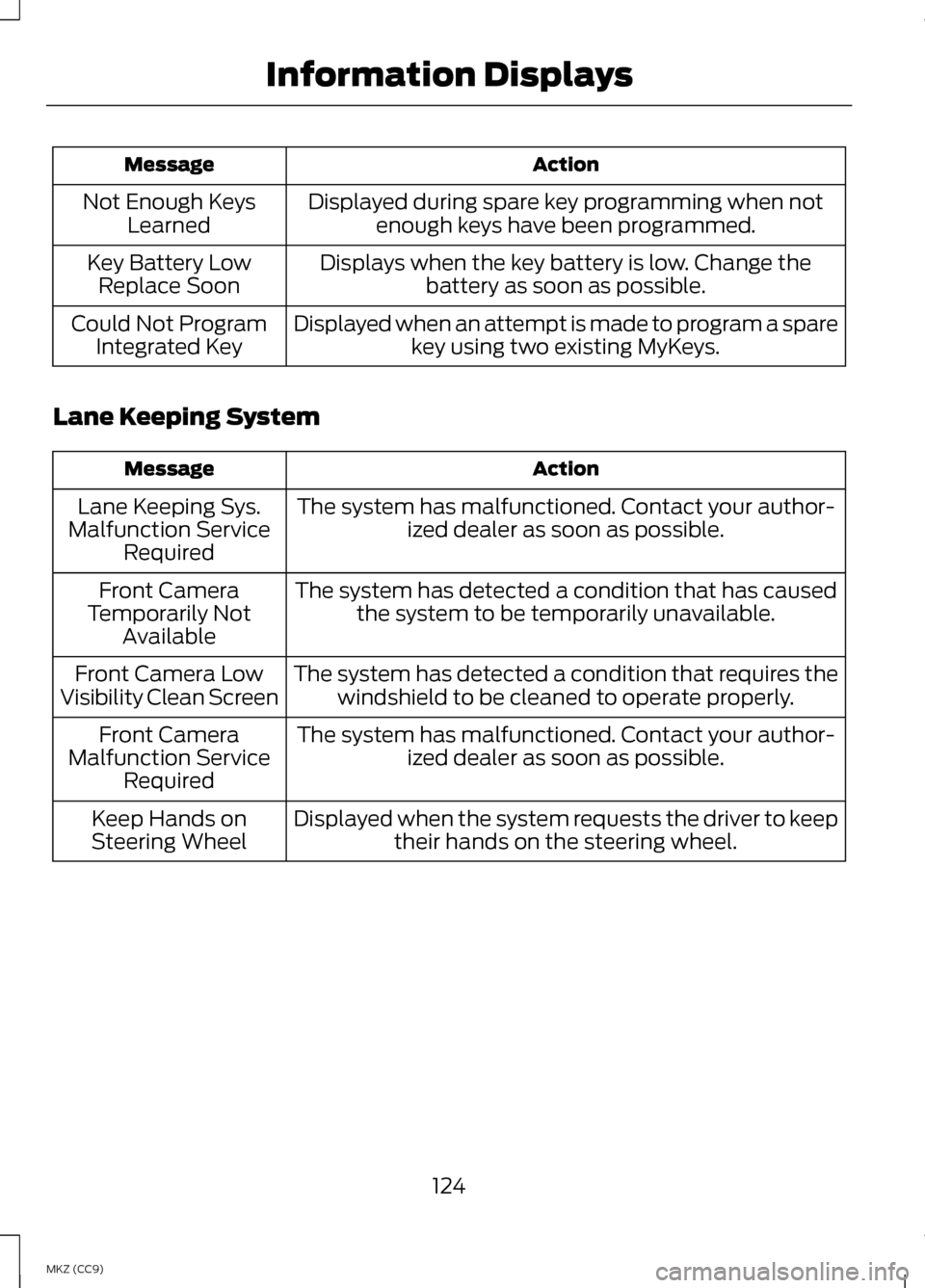
Action
Message
Displayed during spare key programming when notenough keys have been programmed.
Not Enough Keys
Learned
Displays when the key battery is low. Change thebattery as soon as possible.
Key Battery Low
Replace Soon
Displayed when an attempt is made to program a sparekey using two existing MyKeys.
Could Not Program
Integrated Key
Lane Keeping System Action
Message
The system has malfunctioned. Contact your author-ized dealer as soon as possible.
Lane Keeping Sys.
Malfunction Service Required
The system has detected a condition that has causedthe system to be temporarily unavailable.
Front Camera
Temporarily Not Available
The system has detected a condition that requires thewindshield to be cleaned to operate properly.
Front Camera Low
Visibility Clean Screen
The system has malfunctioned. Contact your author-ized dealer as soon as possible.
Front Camera
Malfunction Service Required
Displayed when the system requests the driver to keeptheir hands on the steering wheel.
Keep Hands on
Steering Wheel
124
MKZ (CC9) Information Displays
Page 143 of 475
Both heated mirrors remove ice, mist
and fog when you switch on the
heated rear window.
CABIN AIR FILTER
Your vehicle is equipped with a cabin
air filter. It is located behind the glove
box.
The particulate filtration system
reduces the concentration of airborne
particles such as dust, spores and
pollen in the air supplied to the interior
of your vehicle.
Note:
To prevent foreign objects from
entering the system, make sure the
cabin air is in place at all times.
Running the system without a filter in
place could result in degradation or
damage to the system.
The particulate filtration system gives
you and your passengers the following
benefits:
• It improves your driving comfort by
reducing particle concentration.
• It improves the interior
compartment cleanliness.
• It protects the climate control
components from particle
deposits.
Replace the filter at regular intervals.
See Scheduled Maintenance (page
444).
For additional cabin air filter
information, or to replace the filter,
see an authorized dealer. REMOTE START
The climate control system adjusts
the cabin temperature during remote
start.
You cannot adjust the system during
remote start operation. Turn the
ignition on to return the system to its
previous settings. You can now make
adjustments. You need to turn certain
vehicle-dependent features back on,
such as:
•
heated seats
• cooled seats
• heated steering wheel
• heated mirrors
• heated rear window.
You can adjust the settings using the
information display controls.
See
Information Displays (page 103).
Automatic Settings
You can set the climate control to
operate in AUTO mode through the
information display setting: Remote
Start > Climate Control > Heater-A/C
> Auto. The climate control system
automatically sets the interior
temperature to 72°F (22°C).
In hot weather, the system is set to
72°F (22°C). Cooled seats are set to
high (if available, and selected to
AUTO in the information display).
In moderate weather, the system
either heats or cools (based on
previous settings). The rear defroster,
heated mirrors and heated/cooled
seats do not automatically turn on.
141
MKZ (CC9) Climate Control
Page 144 of 475
In cold weather, the system is set to
72°F (22°C). The heated seats and
heated steering wheel are set to high
(if available, and selected to AUTO in
the information display). The rear
defroster and heated mirrors
automatically turn on.
Last Settings
You can set the climate control to
operate using the last climate control
settings through the information
display setting: Remote Start >
Climate Control > Heater
–A/C > Last
Settings. The climate control system
automatically uses the settings last
selected before turning off the vehicle.
Heated and Cooled Devices
The climate control system controls
other heated and cooled devices
inside the vehicle. These devices (if
available and selected to AUTO in the
information displays) may switch on
during remote start. Heated devices
typically switch on during cold
weather, and cooled devices during
hot weather.
142
MKZ (CC9) Climate Control
Page 145 of 475
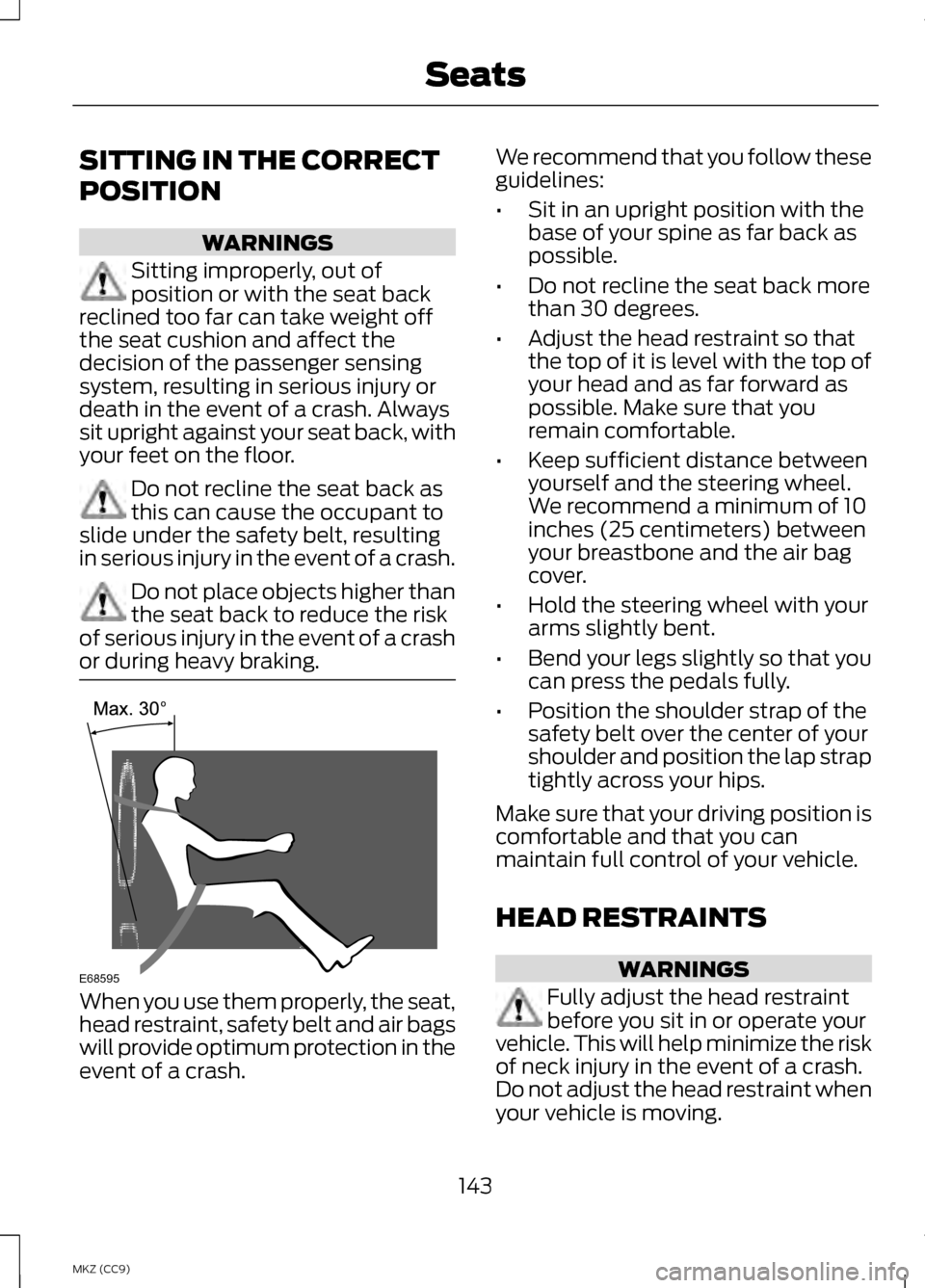
SITTING IN THE CORRECT
POSITION
WARNINGS
Sitting improperly, out of
position or with the seat back
reclined too far can take weight off
the seat cushion and affect the
decision of the passenger sensing
system, resulting in serious injury or
death in the event of a crash. Always
sit upright against your seat back, with
your feet on the floor. Do not recline the seat back as
this can cause the occupant to
slide under the safety belt, resulting
in serious injury in the event of a crash. Do not place objects higher than
the seat back to reduce the risk
of serious injury in the event of a crash
or during heavy braking. When you use them properly, the seat,
head restraint, safety belt and air bags
will provide optimum protection in the
event of a crash. We recommend that you follow these
guidelines:
•
Sit in an upright position with the
base of your spine as far back as
possible.
• Do not recline the seat back more
than 30 degrees.
• Adjust the head restraint so that
the top of it is level with the top of
your head and as far forward as
possible. Make sure that you
remain comfortable.
• Keep sufficient distance between
yourself and the steering wheel.
We recommend a minimum of 10
inches (25 centimeters) between
your breastbone and the air bag
cover.
• Hold the steering wheel with your
arms slightly bent.
• Bend your legs slightly so that you
can press the pedals fully.
• Position the shoulder strap of the
safety belt over the center of your
shoulder and position the lap strap
tightly across your hips.
Make sure that your driving position is
comfortable and that you can
maintain full control of your vehicle.
HEAD RESTRAINTS WARNINGS
Fully adjust the head restraint
before you sit in or operate your
vehicle. This will help minimize the risk
of neck injury in the event of a crash.
Do not adjust the head restraint when
your vehicle is moving.
143
MKZ (CC9) SeatsE68595
Page 193 of 475
GENERAL INFORMATION
Note:
Occasional brake noise is
normal. If a metal-to-metal,
continuous grinding or continuous
squeal sound is present, the brake
linings may be worn-out. Have the
system checked by an authorized
dealer. If the vehicle has continuous
vibration or shudder in the steering
wheel while braking, have it checked
by an authorized dealer.
Note: Brake dust may accumulate on
the wheels, even under normal driving
conditions. Some dust is inevitable as
the brakes wear and does not
contribute to brake noise. See
Cleaning the Alloy Wheels (page 299). See Warning Lamps and
Indicators (page 98).
Wet brakes result in reduced braking
efficiency. Gently press the brake
pedal a few times when driving from
a car wash or standing water to dry
the brakes.
Brake Over Accelerator
In the event the accelerator pedal
becomes stuck or entrapped, apply
steady and firm pressure to the brake
pedal to slow the vehicle and reduce
engine power. If you experience this
condition, apply the brakes and bring
your vehicle to a safe stop. Move the
transmission selector lever to position P,
switch the engine off and apply the
parking brake. Inspect the accelerator
pedal for any interference. If none are
found and the condition persists, have
your vehicle towed to the nearest
authorized dealer.
Brake Assist
Brake assist detects when you brake
heavily by measuring the rate at which
you press the brake pedal. It provides
maximum braking efficiency as long
as you press the pedal. Brake assist
can reduce stopping distances in
critical situations.
Anti-lock Brake System
This system helps you maintain
steering control during emergency
stops by keeping the brakes from
locking. This lamp momentarily
illuminates when you turn
the ignition on. If the light
does not illuminate during start up,
remains on or flashes, the anti-lock
braking system may be disabled. Have
the system checked by an authorized
dealer. If the system is disabled,
normal braking is still
effective. If the brake
warning lamp illuminates when you
release the parking brake, have your
system checked by an authorized
dealer.
191
MKZ (CC9) BrakesE144522 E144522
Page 194 of 475
Regenerative Braking System
This feature is used to simulate the
engine braking of an internal
combustion engine and assist the
standard brake system while
recovering some of the energy of
motion and storing it in the battery to
improve fuel economy. The standard
brake system is designed to fully stop
the car if regenerative braking is not
available. During regenerative braking,
the motor is spun as a generator to
create electrical current. This
recharges the battery and slows the
vehicle. In effect, once the accelerator
pedal is released, the motor changes
from an energy user to an energy
producer.
When you release the accelerator
pedal or press the brake pedal, the
brake controller automatically detects
the amount of deceleration requested
and optimizes how much of the
deceleration will be produced by
regenerative braking. The remaining
portion is generated by standard
friction braking. When the battery is
almost fully charged, the amount of
regenerative braking is limited to avoid
overcharging, and the requested
deceleration is produced by standard
friction braking alone.
Regenerative braking does not take
the place of the standard friction
brakes; it only assists them.
Regenerative braking has also been
designed to interact with the anti-lock
brake system. Regenerative braking
is disabled when the anti-lock brake
system is activated or the battery is
fully charged.
HINTS ON DRIVING WITH
ANTI-LOCK BRAKES
Note:
When the system is operating,
the brake pedal will pulse and may
travel further. Maintain pressure on the
brake pedal. You may also hear a noise
from the system. This is normal.
The anti-lock braking system will not
eliminate the risks when:
• you drive too closely to the vehicle
in front of you
• your vehicle is hydroplaning
• you take corners too fast
• the road surface is poor.
ELECTRIC PARKING BRAKE
The electric parking brake replaces
the conventional handbrake. The
operating switch is located on the
instrument panel to the left of the
steering wheel. WARNING
Always set the parking brake and
leave your vehicle with the
transmission selector in position P. Note:
When you apply the electric
parking brake in certain conditions, for
example on a steep hill, the electric
parking brake may reapply the brakes
within three to ten minutes.
Note: You may notice various noises
when you apply and release the electric
parking brake. This is normal and no
cause for concern.
192
MKZ (CC9) Brakes