manual LINCOLN MKZ HYBRID 2013 Owner's Manual
[x] Cancel search | Manufacturer: LINCOLN, Model Year: 2013, Model line: MKZ HYBRID, Model: LINCOLN MKZ HYBRID 2013Pages: 475, PDF Size: 3.89 MB
Page 196 of 475
Releasing the electric parking
brake
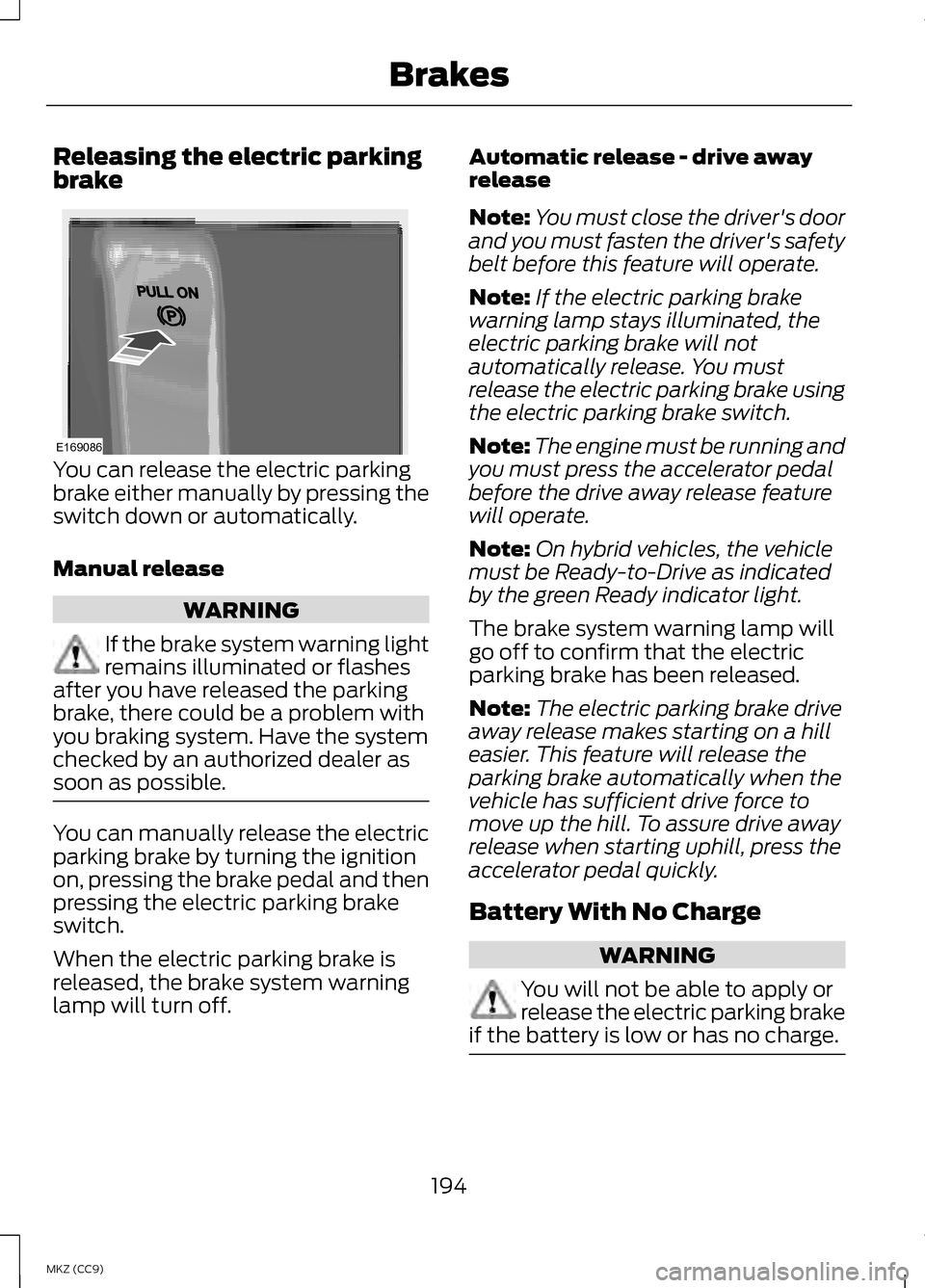
You can release the electric parking
brake either manually by pressing the
switch down or automatically.
Manual release
WARNING
If the brake system warning light
remains illuminated or flashes
after you have released the parking
brake, there could be a problem with
you braking system. Have the system
checked by an authorized dealer as
soon as possible. You can manually release the electric
parking brake by turning the ignition
on, pressing the brake pedal and then
pressing the electric parking brake
switch.
When the electric parking brake is
released, the brake system warning
lamp will turn off. Automatic release - drive away
release
Note:
You must close the driver's door
and you must fasten the driver's safety
belt before this feature will operate.
Note: If the electric parking brake
warning lamp stays illuminated, the
electric parking brake will not
automatically release. You must
release the electric parking brake using
the electric parking brake switch.
Note: The engine must be running and
you must press the accelerator pedal
before the drive away release feature
will operate.
Note: On hybrid vehicles, the vehicle
must be Ready-to-Drive as indicated
by the green Ready indicator light.
The brake system warning lamp will
go off to confirm that the electric
parking brake has been released.
Note: The electric parking brake drive
away release makes starting on a hill
easier. This feature will release the
parking brake automatically when the
vehicle has sufficient drive force to
move up the hill. To assure drive away
release when starting uphill, press the
accelerator pedal quickly.
Battery With No Charge WARNING
You will not be able to apply or
release the electric parking brake
if the battery is low or has no charge. 194
MKZ (CC9) BrakesE169086
Page 198 of 475
PRINCIPLE OF OPERATION
The traction control system helps
avoid drive wheel spin and loss of
traction.
If your vehicle begins to slide, the
system applies the brakes to
individual wheels and, when needed,
reduces engine power at the same
time. If the wheels spin when
accelerating on slippery or loose
surfaces, the system reduces engine
power in order to increase traction.
USING TRACTION
CONTROL
In certain situations (for example,
stuck in snow or mud), turning the
traction control off may be beneficial
as this allows the wheels to spin with
full engine power. Turn off the traction
control system through the
information display. See General
Information (page 103). System Indicator Lights and
Messages WARNING
If a failure has been detected
within the AdvanceTrac system,
the stability control light will
illuminate steadily. Verify that the
AdvanceTrac system was not
manually disabled through the
information display. If the stability
control light still illuminates steadily,
have the system serviced by an
authorized dealer immediately.
Operating your vehicle with
AdvanceTrac disabled could lead to
an increased risk of loss of vehicle
control, vehicle rollover, personal
injury and death. The stability control light
temporarily illuminates on
engine start-up and flashes
when a driving condition activates the
stability system. The stability control off light
temporarily illuminates on
engine start-up and stays on
when you turn the traction control
system off.
When you turn the traction control
system off or on, a message appears
in the information display showing
system status.
196
MKZ (CC9) Traction ControlE138639
Page 206 of 475
When automatic steering is finished,
the touch screen displays a message
and a chime sounds, indicating that
the active park assist process is done.
The driver is responsible for checking
the parking job and making any
necessary corrections before putting
the transmission in P (Park).
Deactivating the Park Assist
Feature
The system can be deactivated
manually by:
• pressing the active park assist
button
• grabbing the steering wheel
• driving above approximately 50
mph (80 km/h) for 30 seconds
during an active park search •
driving above 6 mph (10 km/h)
during automatic steering
• turning off the traction control
system.
Certain vehicle conditions can also
deactivate the system, such as:
• Traction control has activated on
a slippery or loose surface.
• There is an anti-lock brake system
activation or failure.
• Something touches the steering
wheel.
If a problem occurs with the system,
a warning message is displayed,
followed by a chime. Occasional
system messages may occur in
normal operation. For recurring or
frequent system faults, contact an
authorized dealer to have your vehicle
serviced.
Troubleshooting the System The system does not look for a space
The traction control system may be off
The transmission is in R (Reverse); the vehicle must be moving forward to
detect a parking space The system does not offer a particular space
Something may be contacting the front bumper or side sensors
There is not enough room on both sides of the vehicle in order to park
There is not enough space for the parking maneuver on the opposite side of
the parking space
204
MKZ (CC9) Parking Aids
Page 210 of 475
Active guidelines are only shown with
fixed guidelines. To use active
guidelines, turn the steering wheel to
point the guidelines toward an
intended path. If the steering wheel
position is changed while reversing,
the vehicle might deviate from the
original intended path.
The fixed and active guidelines fade
in and out depending on the steering
wheel position. The active guidelines
are not shown when the steering
wheel position is straight.
Always use caution while reversing.
Objects in the red zone are closest to
your vehicle and objects in the green
zone are farther away. Objects are
getting closer to your vehicle as they
move from the green zone to the
yellow or red zones. Use the side view
mirrors and rear view mirror to get
better coverage on both sides and rear
of the vehicle.
Selectable settings for this feature are
ACTIVE + FIXED, FIXED and OFF.
Visual Park Aid Alert
Note:
Visual park alert is only available
when the transmission is in R
(Reverse).
Note: The reverse sensing system is
not effective at speeds above 3 mph
(5 km/h) and may not detect certain
angular or moving objects. The system uses red, yellow and green
highlights which appear on top of the
video image when an object is
detected by the reverse sensing
system. The alert highlights the
closest object detected. The reverse
sensing alert can be disabled and if
visual park aid alert is enabled,
highlighted areas are still displayed.
Selectable settings for this feature are
ON and OFF.
Manual Zoom
WARNING
When manual zoom is on, the
full area behind the vehicle is not
shown. Be aware of your surroundings
when using the manual zoom feature. Note:
Manual zoom is only available
when the transmission is in R
(Reverse).
Note: When manual zoom is enabled,
only the centerline is shown.
This allows you to get a closer view of
an object behind the vehicle. The
zoomed image keeps the bumper in
the image to provide a reference. The
zoom is only active while the
transmission is in R (Reverse). When
the transmission is shifted out of R
(Reverse), the feature automatically
turns off and must be reset when it is
used again.
Selectable settings for this feature are
ON and OFF.
208
MKZ (CC9) Parking Aids
Page 220 of 475
You can manually change from
adaptive cruise control to normal
cruise control through the information
display.
The cruise control indicator
light replaces the adaptive
cruise control indicator light
if you select normal cruise control. The
gap setting will not display, the
system will not automatically respond
to lead vehicles and automatic
braking will activate. The system
defaults to adaptive cruise control
when you start the vehicle.
ECO Cruise Control
This feature saves vehicle energy by
relaxing acceleration compared to
standard cruise control. For example,
your vehicle may temporarily lose
speed when going uphill. ECO will
appear in the information display
when you activate ECO cruise control.
It can be switched on or off in the
information display. See
General
Information (page 103).
218
MKZ (CC9) Cruise ControlE71340
Page 231 of 475
The following are other situations that
may limit the BLIS:
•
Certain maneuvering of vehicles
entering and exiting the blind zone.
• Vehicles passing through the blind
zone at very fast rates.
• When several vehicles forming a
convoy pass through the blind
zone.
The following are other situations that
may limit the cross traffic alert
system:
• Adjacently parked vehicles or
objects obstructing the sensors.
• Approaching vehicles passing at
speeds greater than 15 mph (24
km/h).
• Driving in reverse faster than 5
mph (8 km/h).
• Backing out of an angled parking
spot.
False Alerts
Note: If a trailer is connected to the
vehicle the BLIS system may detect the
trailer causing a false alert. You may
want to turn the BLIS off manually.
There may be certain instances when
either the BLIS or cross traffic alert
systems illuminate the alert indicator
with no vehicle in the coverage zone;
this is known as a false alert. Some
amount of false alerts are normal;
they are temporary and self-correct. System Errors
If either system senses a problem with
the left or right sensor, the BLIS
telltale will illuminate and a message
will appear in the information display.
All other system faults will only be
displayed by a message in the
information display.
Switching the Systems Off and On
One or both systems can be switched
off temporarily by using the
information display control. See
General Information (page 103).
When the BLIS is switched off, you will
not receive alerts and a telltale
illuminates in the information display.
Note: The CTA system always
switches on whenever the ignition is
switched on. However, the BLIS system
will remember the last selected on or
off setting.
One or both systems cannot be
switched off when MyKey is used. See
General Information
(page 343).
One or both systems can also be
switched off permanently at your
authorized dealer. Once switched off,
switching it back on must also be
done at your authorized dealer.
229
MKZ (CC9) Driving Aids
Page 235 of 475
If the front end of the vehicle is hit or
damaged, the radar sensing zone may
be altered causing missed or false
collision warnings. See your
authorized dealer to have your
collision warning radar checked for
proper coverage and operation.
STEERING
Electric Power Steering
WARNINGS
The electric power steering
system has diagnostic checks
that continuously monitor the system
to ensure proper operation. When a
system error is detected a steering
message will appear in the
information display. The electric power steering
system has diagnostic checks
that continuously monitor the system
to ensure proper operation of the
electronic system. When an electronic
error is detected, a message will be
displayed in the information display.
If this happens, stop the vehicle in a
safe place, and turn off the engine.
After at least 10 seconds, reset the
system by restarting the engine, and
watch the information display for a
steering message. If a steering
message returns, or returns while
driving, take the vehicle to your dealer
to have it checked. WARNINGS
Obtain immediate service if a
system error is detected. You
may not notice any difference in the
feel of your steering, but a serious
condition may exist. Failure to do so
may result in loss of steering control. Your vehicle is equipped with an
electric power-assisted steering
system. There is no fluid reservoir to
check or fill.
If your vehicle loses electrical power
while you are driving (or if the ignition
is turned off), you can steer the
vehicle manually, but it takes more
effort. Extreme continuous steering
may increase the effort it takes for you
to steer. This occurs to prevent
internal overheating and permanent
damage to your steering system. If this
should occur, you will neither lose the
ability to steer the vehicle manually
nor will it cause permanent damage.
Typical steering and driving
maneuvers will allow the system to
cool and steering assist will return to
normal.
Steering Tips
If the steering wanders or pulls, check
for:
•
an improperly inflated tire
• uneven tire wear
• loose or worn suspension
components
• loose or worn steering
components
• improper vehicle alignment
233
MKZ (CC9) Driving Aids
Page 244 of 475
2.
Determine the combined
weight of the driver and
passengers that will be riding
in your vehicle.
3. Subtract the combined weight
of the driver and passengers
from XXX kg or XXX lb.
4. The resulting figure equals the
available amount of cargo and
luggage load capacity. For
example, if the “XXX” amount
equals 1,400 lb. and there will
be five 150 lb. passengers in
your vehicle, the amount of
available cargo and luggage
load capacity is 650 lb.
(1400-750 (5 x 150) = 650 lb.)
5. Determine the combined
weight of luggage and cargo
being loaded on the vehicle.
That weight may not safely
exceed the available cargo and
luggage load capacity
calculated in Step 4.
6. If your vehicle will be towing a
trailer, load from your trailer
will be transferred to your
vehicle. Consult this manual to
determine how this reduces the
available cargo and luggage
load capacity of your vehicle.
The following gives you a few
examples on how to calculate the
available amount of cargo and
luggage load capacity: *Suppose your vehicle has a
1400-pound (635-kilogram) cargo
and luggage capacity. You decide
to go golfing. Is there enough load
capacity to carry you, four of your
friends and all the golf bags? You
and four friends average 220
pounds (99 kilograms) each and
the golf bags weigh approximately
30 pounds (13.5 kilograms) each.
The calculation would be: 1400 -
(5 x 220) - (5 x 30) = 1400 - 1100
- 150 = 150 pounds. Yes, you have
enough load capacity in your
vehicle to transport four friends
and your golf bags. In metric units,
the calculation would be: 635
kilograms - (5 x 99 kilograms) -
(5 x 13.5 kilograms) = 635 - 495 -
67.5 = 72.5 kilograms.
*Suppose your vehicle has a
1400-pound (635-kilogram) cargo
and luggage capacity. You and
one of your friends decide to pick
up cement from the local home
improvement store to finish that
patio you have been planning for
the past two years. Measuring the
inside of the vehicle with the rear
seat folded down, you have room
for twelve 100-pound
(45-kilogram) bags of cement. Do
you have enough load capacity to
transport the cement to your
home? If you and your friend each
weigh 220 pounds (99 kilograms),
the calculation would be: 1400 -
(2 x 220) - (12 x 100) = 1400 - 440
- 1200 = - 240 pounds. No, you do
not have enough cargo capacity
to carry that much weight. In
242
MKZ (CC9) Load Carrying
Page 246 of 475
TOWING A TRAILER
WARNING
Never tow a trailer with an MKZ
Hybrid. This powertrain is not
designed to tow. TRANSPORTING THE
VEHICLE
If you need to have your vehicle
towed, contact a professional towing
service or, if you are a member of a
roadside assistance program, your
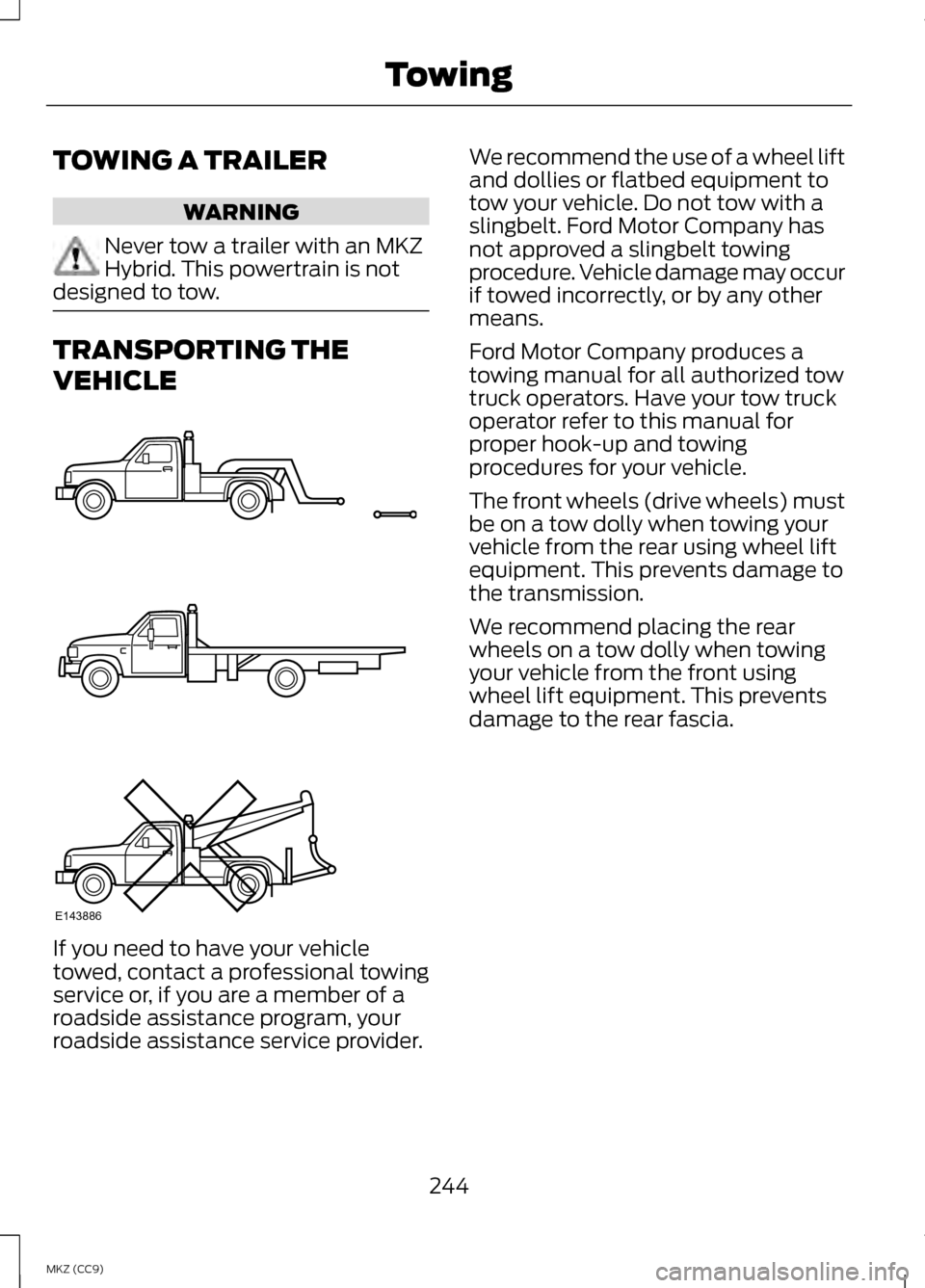
roadside assistance service provider. We recommend the use of a wheel lift
and dollies or flatbed equipment to
tow your vehicle. Do not tow with a
slingbelt. Ford Motor Company has
not approved a slingbelt towing
procedure. Vehicle damage may occur
if towed incorrectly, or by any other
means.
Ford Motor Company produces a
towing manual for all authorized tow
truck operators. Have your tow truck
operator refer to this manual for
proper hook-up and towing
procedures for your vehicle.
The front wheels (drive wheels) must
be on a tow dolly when towing your
vehicle from the rear using wheel lift
equipment. This prevents damage to
the transmission.
We recommend placing the rear
wheels on a tow dolly when towing
your vehicle from the front using
wheel lift equipment. This prevents
damage to the rear fascia.
244
MKZ (CC9) TowingE143886
Page 252 of 475
ROADSIDE ASSISTANCE
Vehicles Sold In The U.S.:
Getting Roadside Assistance
To fully assist you should you have a
vehicle concern Ford Motor Company
offers a complimentary roadside
assistance program. This program is
separate from the New Vehicle
Limited Warranty. The service is
available:
•
24-hours, seven days a week.
• for the coverage period listed on
the Roadside Assistance Card
included in your Owner's Manual
portfolio.
Roadside assistance will cover:
• a flat tire change with a good spare
(except vehicles that have been
supplied with a tire inflation kit).
• battery jump start.
• lock-out assistance (key
replacement cost is the customer's
responsibility).
• fuel delivery — Independent
Service Contractors, if not
prohibited by state, local or
municipal law shall deliver up to
2.0 gallons (7.5L) of gasoline or
5.0 gallons (18.9L) of diesel fuel
to a disabled vehicle. Fuel delivery
service is limited to two no-charge
occurrences within a 12-month
period. •
winch out — available within 100
feet (30.5 meters) of a paved or
county maintained road, no
recoveries.
• towing — Ford and Lincoln eligible
vehicles towed to an authorized
dealer within 35 miles (56 km) of
the disablement location or to the
nearest authorized dealer. If a
member requests to be towed to
an authorized dealer more than 35
miles (56 km) from the
disablement location, the member
shall be responsible for any
mileage costs in excess of 35 miles
(56 km).
Trailers shall be covered up to $200
if the disabled eligible vehicle requires
service at the nearest authorized
dealer. If the trailer is disabled, but the
towing vehicle is operational, the
trailer does not qualify for any
roadside services.
Vehicles Sold In The U.S. :
Using Roadside Assistance
Complete the roadside assistance
identification card and place it in your
wallet for quick reference. This card
is found in the owner's information
portfolio in the glove compartment.
U.S. Lincoln vehicle customers who
require Roadside Assistance, call
1-800-521-4140.
250
MKZ (CC9) Roadside Emergencies