manual LINCOLN MKZ HYBRID 2013 Owner's Guide
[x] Cancel search | Manufacturer: LINCOLN, Model Year: 2013, Model line: MKZ HYBRID, Model: LINCOLN MKZ HYBRID 2013Pages: 475, PDF Size: 3.89 MB
Page 258 of 475
Vehicle Information and General
Safety Practices
•
Know the make and model of your
vehicle.
• Review the owner ’s manual and
become familiar with your vehicle ’s
safety information and
recommended safety practices.
• Do not attempt to repair damaged
electric and hybrid-electric
vehicles yourself. Contact an
authorized Ford Dealer or vehicle
manufacturer representative for
service.
Crashes
A crash or impact significant enough
to require an emergency response for
conventional vehicles would also
require the same response for an
electric or hybrid-electric vehicle.
If possible
• Move your car to a safe, nearby
location and remain on the scene.
• Roll down the windows before
shutting your vehicle off.
• Place your vehicle in Park, set the
parking brake, turn off the vehicle,
activate the hazard lights, and
move your key(s) at least 16 feet
(5 meters) away from the vehicle. Always
•
Call 911 if assistance is needed and
advise that an electric or
hybrid-electric vehicle is involved.
• Do not touch exposed electrical
components or the engine
compartment, as a shock hazard
may exist.
• Avoid contact with leaking fluids
and gases, and remain out of the
way of oncoming traffic until
emergency responders arrive.
• When emergency responders
arrive, tell them that the vehicle
involved is an electric vehicle or
hybrid vehicle.
Fires
As with any vehicle, call 911
immediately if you see sparks, smoke
or flames coming from the vehicle.
• Exit the vehicle immediately.
• Advise 911 that an electric or
hybrid-electric vehicle is involved.
• As with any vehicle fire, do not
inhale smoke, vapors or gas from
the vehicle, as they may be
hazardous.
• Remain a safe distance upwind
and uphill from the vehicle fire.
• Stay out of the roadway and stay
out of the way of any oncoming
traffic while awaiting the arrival of
emergency responders.
256
MKZ (CC9) Roadside Emergencies
Page 260 of 475
GETTING THE SERVICES
YOU NEED
Warranty repairs to your vehicle must
be performed by an authorized dealer.
While any authorized dealer handling
your vehicle line will provide warranty
service, we recommend you return to
your selling authorized dealer who
wants to ensure your continued
satisfaction.
Please note that certain warranty
repairs require special training and
equipment, so not all authorized
dealers are authorized to perform all
warranty repairs. This means that,
depending on the warranty repair
needed, you may have to take your
vehicle to another authorized dealer.
A reasonable time must be allowed
to perform a repair after taking your
vehicle to the authorized dealer.
Repairs will be made using Ford or
Motorcraft parts, or remanufactured
or other parts that are authorized by
Ford.
Away From Home
If you are away from home when your
vehicle needs service, contact the
Ford Customer Relationship Center or
use the online resources listed below
to find the nearest authorized dealer.
In the United States:
Mailing address
Ford Motor Company
Customer Relationship Center
P.O. Box 6248
Dearborn, MI 48121
Telephone
1-800-521-4140
(TDD for the hearing impaired:
1-800-232-5952)
Online
Additional information and resources
are available online at
www.fordowner.com
These are some of the items that can
be found online:
•
U.S. dealer locator by Dealer
Name, City/State, or Zip Code
• Owner Manuals
• Maintenance Schedules
• Recalls
• Ford Extended Service Plans
• Ford Genuine Accessories
• Service specials and promotions.
In Canada:
Mailing address
Lincoln Customer Relationship Centre
Ford Motor Company of Canada,
Limited
P.O. Box 2000
Oakville, Ontario L6J 5E4
Telephone
1-800-387-9333
Online
www.ford.ca
Additional Assistance
If you have questions or concerns, or
are unsatisfied with the service you
are receiving, follow these steps:
258
MKZ (CC9) Customer Assistance
Page 266 of 475
Obtaining a French Owner
’s
Manual
French Owner ’s Manual can be
obtained from your authorized dealer
or by contacting Helm, Incorporated
using the contact information listed
previously in this section.
REPORTING SAFETY
DEFECTS (U.S. ONLY) If you believe that your vehicle has a
defect which could cause a crash or
could cause injury or death, you
should immediately inform the
National Highway Traffic Safety
Administration (NHTSA) in addition
to notifying Ford Motor Company.
If NHTSA receives similar complaints,
it may open an investigation, and if it
finds that a safety defect exists in a
group of vehicles, it may order a recall
and remedy campaign. However,
NHTSA cannot become involved in
individual problems between you, your
dealer, or Ford Motor Company.
To contact NHTSA, you may call the
Vehicle Safety Hotline toll-free at
1-888-327-4236 (TTY:
1-800-424-9153); go to
http://www.safercar.gov; or write to:
Administrator
1200 New Jersey Avenue, Southeast
Washington, D.C. 20590
You can also obtain other information
about motor vehicle safety from
http://www.safercar.gov.
REPORTING SAFETY
DEFECTS (CANADA ONLY)
If you believe that your vehicle has a
defect which could cause a crash or
could cause injury or death, you
should immediately inform Transport
Canada.
Transport Canada Contact Information
http://www.tc.gc.ca/eng/roadsafety/menu.htm
Website
1–800–333–0510
Phone
264
MKZ (CC9) Customer AssistanceE142557
Page 291 of 475
5. Run the engine until it reaches
normal operating temperature.
While the engine is warming up,
complete the following: Reset the
clock. See Audio System (page
134). Reset the power windows
bounce-back feature. See
Windows and Mirrors (page 88).
Reset the radio station presets.
See
Audio System (page 134).
6. Allow the engine to idle for at least
one minute. If the engine turns off,
step on the accelerator to start the
engine.
7. While the engine is running, step on the brake pedal and shift the
transmission to N.
8. Allow the engine to run for at least
one minute by pressing on the
accelerator pedal.
9. Drive the vehicle at least 10 miles (16 kilometers) to completely
relearn the idle and fuel trim
strategy.
Note: If you do not allow the engine to
relearn the idle and fuel trim strategy,
the idle quality of your vehicle may be
adversely affected until the engine
computer eventually relearns the idle
trim and fuel trim strategy.
Note: Always dispose of automotive
batteries in a responsible manner.
Follow your local authorized standards
for disposal. Call your local authorized
recycling center to find out more about
recycling automotive batteries. Note:
It is recommended that the
negative battery cable terminal be
disconnected from the battery if you
plan to store your vehicle for an
extended period of time.
CHECKING THE WIPER
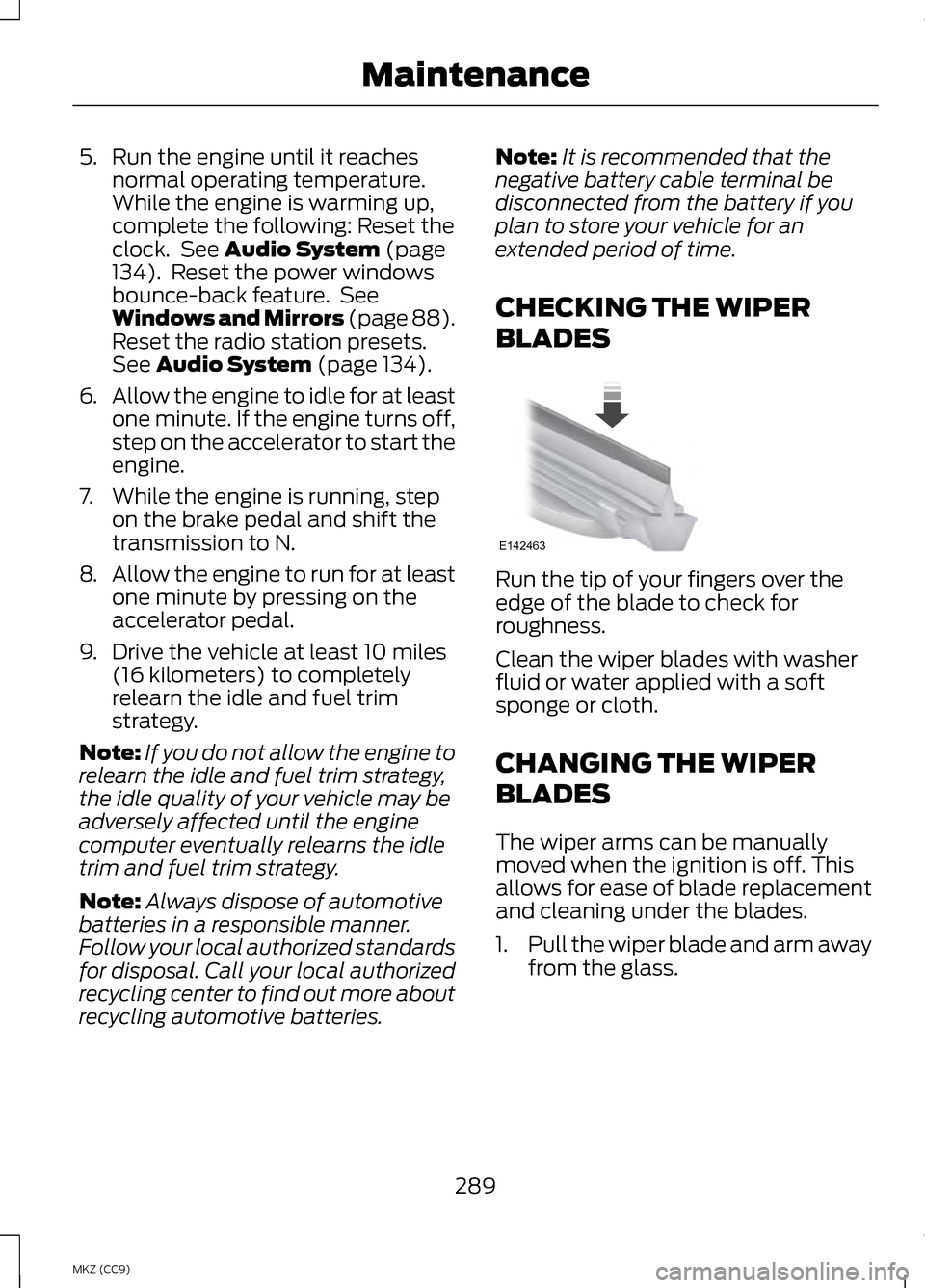
BLADES Run the tip of your fingers over the
edge of the blade to check for
roughness.
Clean the wiper blades with washer
fluid or water applied with a soft
sponge or cloth.
CHANGING THE WIPER
BLADES
The wiper arms can be manually
moved when the ignition is off. This
allows for ease of blade replacement
and cleaning under the blades.
1.
Pull the wiper blade and arm away
from the glass.
289
MKZ (CC9) MaintenanceE142463
Page 311 of 475
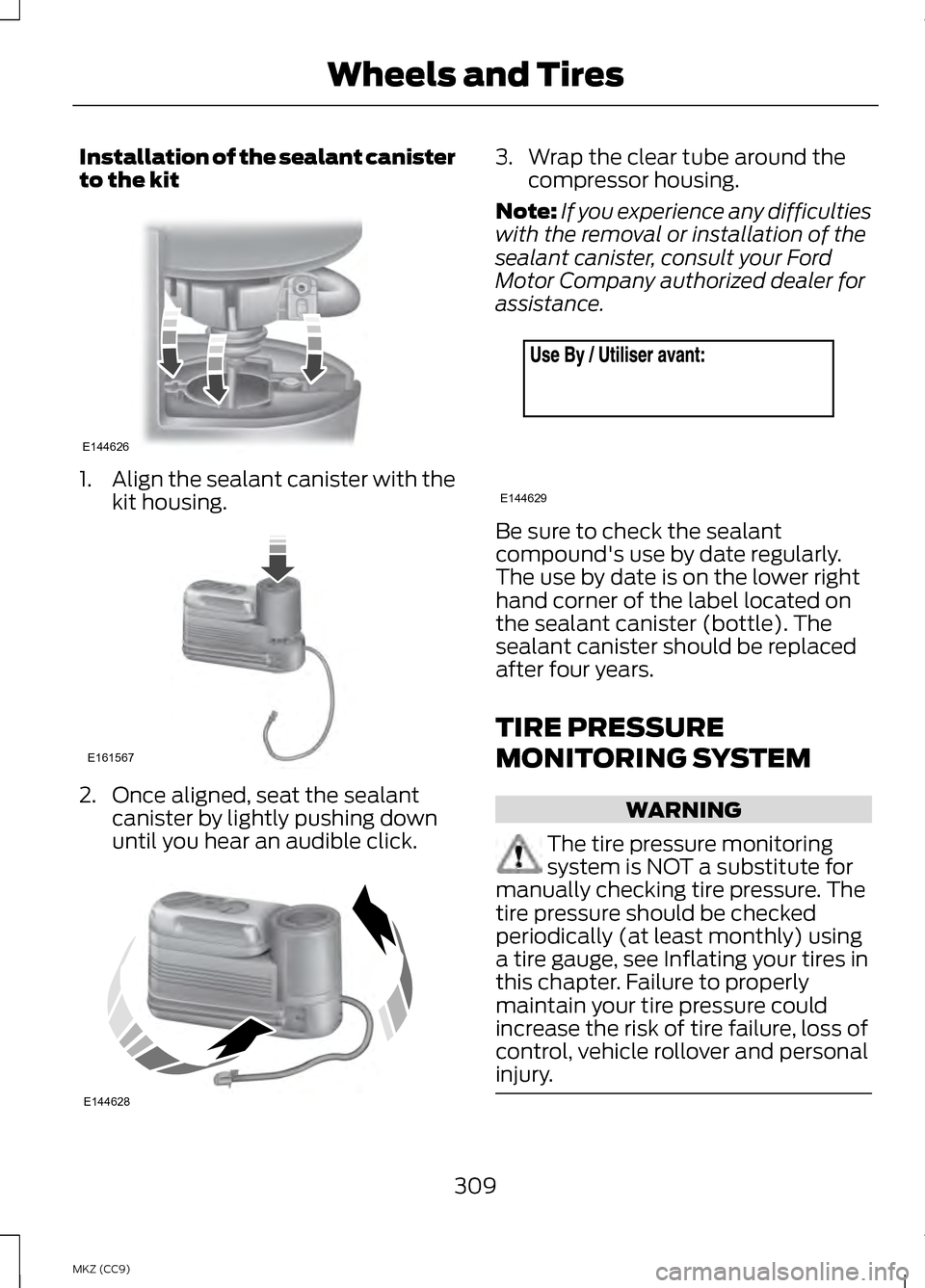
Installation of the sealant canister
to the kit
1.
Align the sealant canister with the
kit housing. 2. Once aligned, seat the sealant
canister by lightly pushing down
until you hear an audible click. 3. Wrap the clear tube around the
compressor housing.
Note: If you experience any difficulties
with the removal or installation of the
sealant canister, consult your Ford
Motor Company authorized dealer for
assistance. Be sure to check the sealant
compound's use by date regularly.
The use by date is on the lower right
hand corner of the label located on
the sealant canister (bottle). The
sealant canister should be replaced
after four years.
TIRE PRESSURE
MONITORING SYSTEM
WARNING
The tire pressure monitoring
system is NOT a substitute for
manually checking tire pressure. The
tire pressure should be checked
periodically (at least monthly) using
a tire gauge, see Inflating your tires in
this chapter. Failure to properly
maintain your tire pressure could
increase the risk of tire failure, loss of
control, vehicle rollover and personal
injury. 309
MKZ (CC9) Wheels and TiresE144626 E161567 E144628 E144629
Page 319 of 475
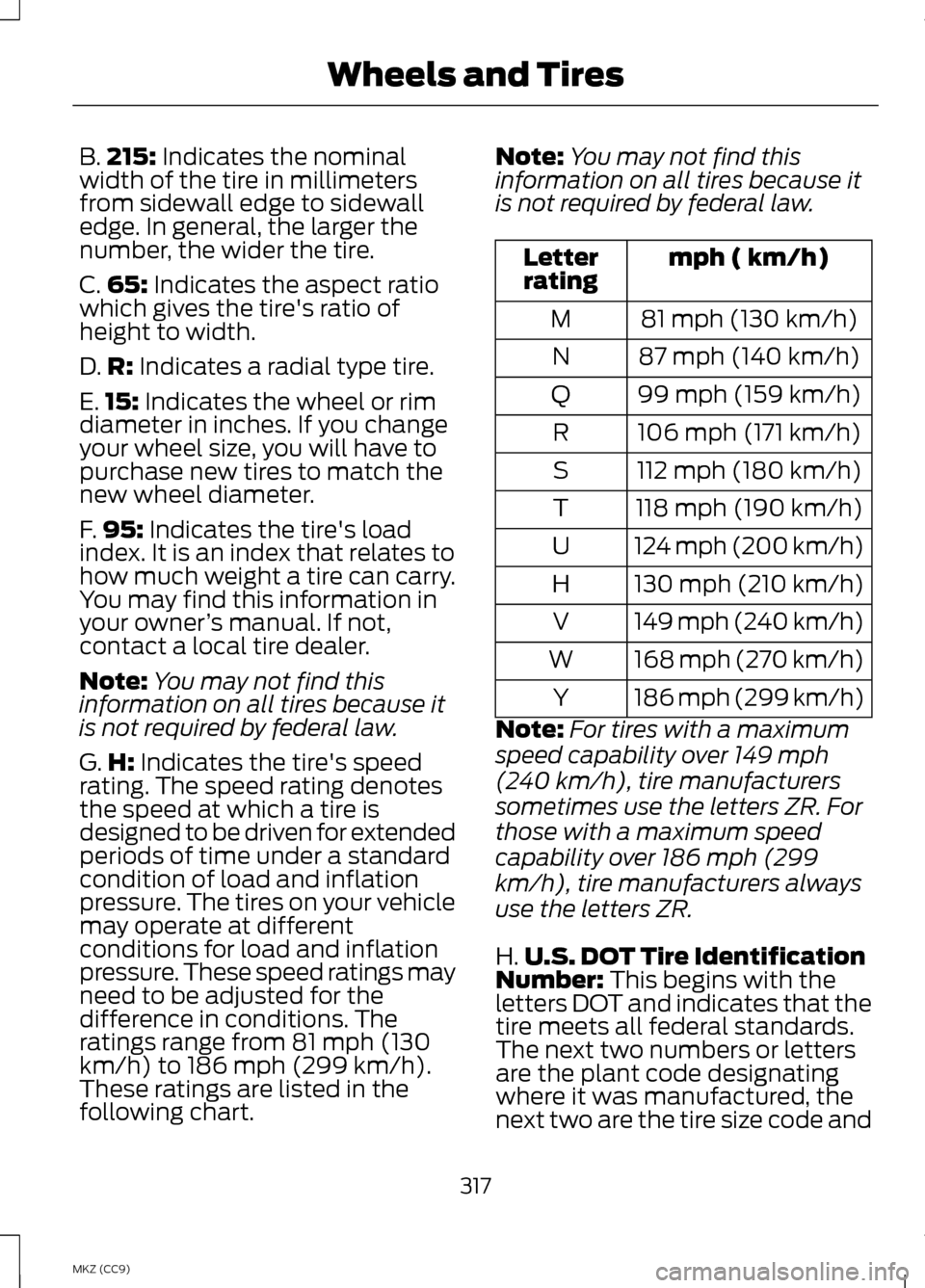
B.
215: Indicates the nominal
width of the tire in millimeters
from sidewall edge to sidewall
edge. In general, the larger the
number, the wider the tire.
C. 65:
Indicates the aspect ratio
which gives the tire's ratio of
height to width.
D. R:
Indicates a radial type tire.
E. 15:
Indicates the wheel or rim
diameter in inches. If you change
your wheel size, you will have to
purchase new tires to match the
new wheel diameter.
F. 95:
Indicates the tire's load
index. It is an index that relates to
how much weight a tire can carry.
You may find this information in
your owner ’s manual. If not,
contact a local tire dealer.
Note: You may not find this
information on all tires because it
is not required by federal law.
G. H:
Indicates the tire's speed
rating. The speed rating denotes
the speed at which a tire is
designed to be driven for extended
periods of time under a standard
condition of load and inflation
pressure. The tires on your vehicle
may operate at different
conditions for load and inflation
pressure. These speed ratings may
need to be adjusted for the
difference in conditions. The
ratings range from 81 mph (130
km/h) to 186 mph (299 km/h).
These ratings are listed in the
following chart. Note:
You may not find this
information on all tires because it
is not required by federal law. mph ( km/h)
Letter
rating
81 mph (130 km/h)
M
87 mph (140 km/h)
N
99 mph (159 km/h)
Q
106 mph (171 km/h)
R
112 mph (180 km/h)
S
118 mph (190 km/h)
T
124 mph (200 km/h)
U
130 mph (210 km/h)
H
149 mph (240 km/h)
V
168 mph (270 km/h)
W
186 mph (299 km/h)
Y
Note: For tires with a maximum
speed capability over 149 mph
(240 km/h), tire manufacturers
sometimes use the letters ZR. For
those with a maximum speed
capability over 186 mph (299
km/h), tire manufacturers always
use the letters ZR.
H. U.S. DOT Tire Identification
Number:
This begins with the
letters DOT and indicates that the
tire meets all federal standards.
The next two numbers or letters
are the plant code designating
where it was manufactured, the
next two are the tire size code and
317
MKZ (CC9) Wheels and Tires
Page 349 of 475
•
Do not leave playing devices in
your vehicle during extreme
conditions as it could cause them
damage. See your device's user
guide for further information.
• For your safety, some SYNC
functions are speed-dependent.
Their use is limited to when your
vehicle is traveling at speeds under
3 mph (5 km/h).
Make sure that you review your
device's manual before using it with
SYNC. Speed-restricted Features
Some features of this system may be
too difficult to use while your vehicle
is moving so they are restricted from
use unless your vehicle is stationary.
•
Screens crowded with information,
such as Point of Interest reviews
and ratings, SIRIUS Travel Link
sports scores, movie times or ski
conditions.
• Any action that requires you to use
a keyboard is restricted, such as
entering a navigation destination
or editing information.
• All lists are limited so the user can
view fewer entries (such as phone
contacts or recent phone call
entries).
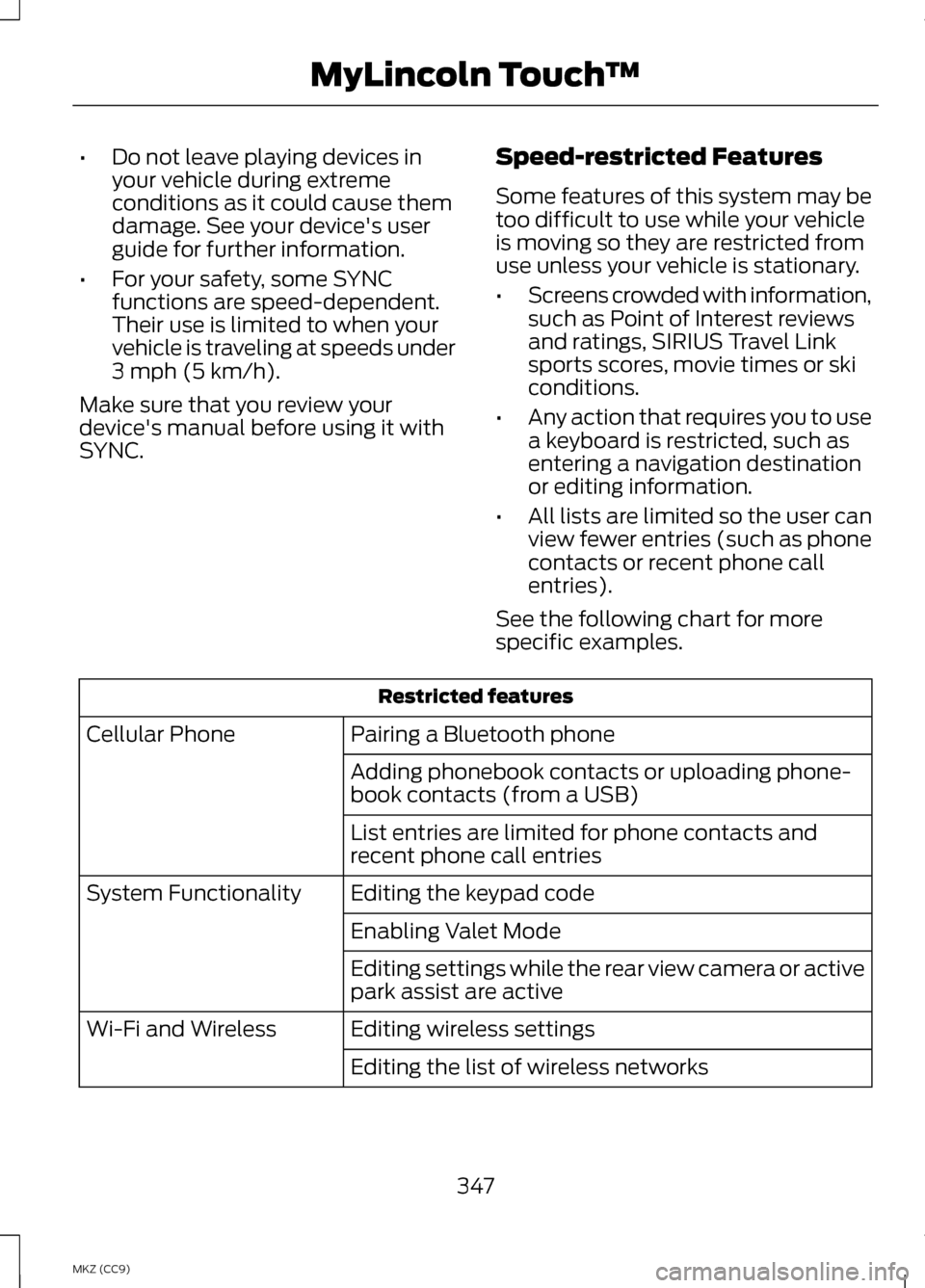
See the following chart for more
specific examples. Restricted features
Pairing a Bluetooth phone
Cellular Phone
Adding phonebook contacts or uploading phone-
book contacts (from a USB)
List entries are limited for phone contacts and
recent phone call entries
Editing the keypad code
System Functionality
Enabling Valet Mode
Editing settings while the rear view camera or active
park assist are active
Editing wireless settings
Wi-Fi and Wireless
Editing the list of wireless networks
347
MKZ (CC9) MyLincoln Touch
™
Page 358 of 475
Under this menu, you can set
your clock, access and adjust
the display, sound and
vehicle settings as well as access
settings for specific modes or the help
feature.
Clock
Note: You cannot manually set the
date. Your vehicle ’s GPS does this for
you.
Note: If the battery has been
disconnected, your vehicle needs to
acquire a GPS signal to update the
clock. Once your vehicle acquires the
signal, it may take a few minutes for
the update to display the correct time. 1. Press the Settings icon > Clock.
2. Press
+ and - to adjust the time.
From this screen, you can also make
other adjustments such as 12-hour or
24-hour mode, activate GPS time
synchronization and have the system
automatically update new time zones.
You can also turn the outside air
temperature display off and on. It
appears at the top center of the
touchscreen, next to the time and
date.
The system automatically saves any
updates you make to the settings. Display
You can adjust the touchscreen
display through the touchscreen or by
pressing the voice button on your
steering wheel controls and when
prompted, say, "Display settings". Press the Settings icon >
Display, to access and make
adjustments using the
touchscreen.
• Brightness
allows you to make
the screen display brighter or
dimmer.
• Auto DIM
, when set to On, lets
you use the Auto Dim Manual
Offset feature.
• Mode
allows you to set the screen
to a certain brightness or have the
system automatically change
based on the outside light level, or
turn the display off.
• If you select
AUTO or NIGHT,
you have the options of turning
the display's Auto Dim feature
on or off and changing the Auto
Dim Manual Offset feature.
• Auto Dim Manual Offset
allows
you to adjust screen dimming as
the outside lighting conditions
change from day to night.
• Edit Wallpaper
•You can have your touchscreen
display the default photo or
upload your own.
356
MKZ (CC9) MyLincoln Touch
™E142607 E142607 E142607
Page 372 of 475
Set PTY for Seek/Scan
This allows you to select a category
of music you would like to search for.
You can then choose to either seek or
scan for the stations playing that
category.
RDS Text Display
This allows you to view the
information broadcast by FM stations.
AST
AST (Autostore) allows you to have
the system automatically store the
six strongest stations in your current
location.
TAG Button
This feature is available when HD
Radio is on, and allows you to tag a
song to download later. When you
select On,
TAG appears on-screen
when HD Radio is active. You can
touch TAG to save the information of
the song that is playing. When you
plug in your portable music player, the
information transfers, if supported by
your device. When you are connected
to iTunes®, the tags appear to remind
you of the songs you would like to
download. See HD Radio information
later in this chapter.
Direct Tune
Touch this button to enter the desired
station number manually. Touch
Enter
when you are done. HD Radio
™ Information (If
Available)
Note: HD Radio broadcasts are not
available in all markets.
HD Radio technology is the digital
evolution of analog AM/FM radio. Your
system has a special receiver that
allows it to receive digital broadcasts
(where available) in addition to the
analog broadcasts, it already receives.
Digital broadcasts provide a better
sound quality than analog broadcasts
with free, crystal-clear audio and no
static or distortion. For more
information, and a guide to available
stations and programming, please
visit www.hdradio.com.
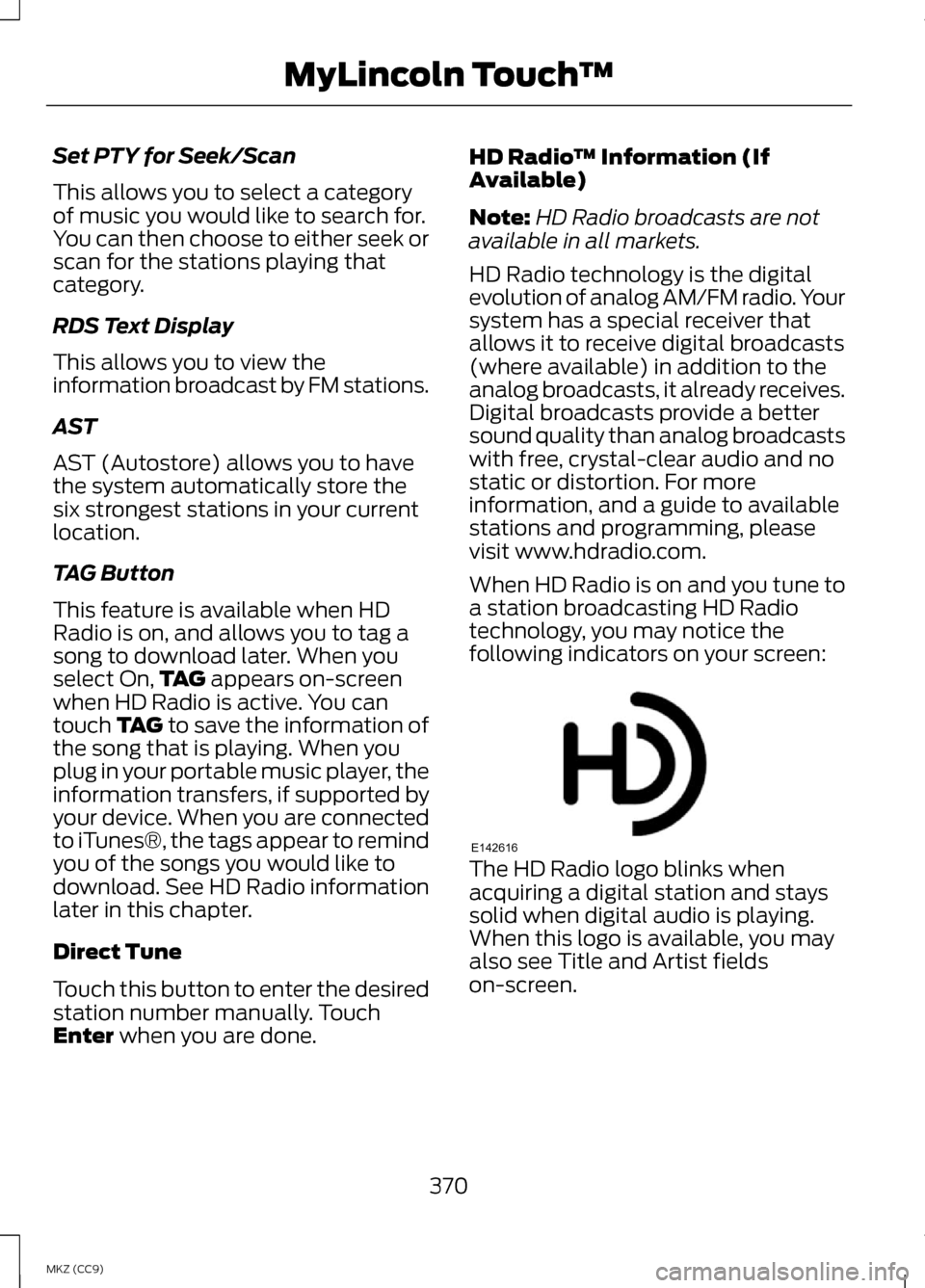
When HD Radio is on and you tune to
a station broadcasting HD Radio
technology, you may notice the
following indicators on your screen: The HD Radio logo blinks when
acquiring a digital station and stays
solid when digital audio is playing.
When this logo is available, you may
also see Title and Artist fields
on-screen.
370
MKZ (CC9) MyLincoln Touch
™E142616
Page 378 of 475
Scan
Touch this button to hear a brief
sampling of channels.
Options
Touch this button to view and adjust
various media settings.
Sound Settings
Touch this button to adjust settings
for:
•
Bass
• Midrange
• Treble
• Balance and Fade
• THX Deep Note Demo
• DSP (Digital Signal processing)
• Occupancy Mode
• Speed Compensated Volume.
Note: Your vehicle may not have all
these sound settings.
Set Category for Seek/Scan
This allows you to select a category
of music you would like to search for.
You can then choose to either seek or
scan for the stations playing that
category.
Parental Lockout
This allows you to lock and unlock
channels, change or reset your PIN or
unlock all channels. To use this
feature, you need your initial PIN,
which is 1234. Artist/Title/Team Alerts
This feature allows you to select
Artists, Titles and Teams that you
would like the system to alert you to
when they are playing on other
channels. Press Edit Alerts to delete
or turn off alerts. You can also set all
alerts to on or off. When an alert
appears on the screen, you can
choose to Tune to the channel, to
Cancel the alert or to Disable Alerts.
If you are listening to a sporting event,
you can save your favorite teams so
that the system can alert you when
they are playing on a satellite radio
channel.
Note:
Sirius does not support the Alert
feature on all channels. Ford Motor
Company shall not be responsible for
Alert feature variation.
Electronic Serial Number (ESN)
Sirius requires this number when
communicating with you about your
account.
Direct Tune
Touch this button to enter the desired
satellite channel number manually.
Touch Enter when you are done.
Browse
Touch this button to view a list of all
available stations. Scroll to see more
categories. Touch the station you
want to listen to.
Touch
Skip if you want to skip this
channel.
376
MKZ (CC9) MyLincoln Touch
™