ECO mode LINCOLN MKZ HYBRID 2013 Owner's Guide
[x] Cancel search | Manufacturer: LINCOLN, Model Year: 2013, Model line: MKZ HYBRID, Model: LINCOLN MKZ HYBRID 2013Pages: 475, PDF Size: 3.89 MB
Page 222 of 475
The current assessment of your
alertness is within a typical range.
The current assessment of your
alertness indicates that you should
rest as soon as safely possible.
The status bar will travel from left to
right as the calculated alertness level
decreases. As the rest icon is
approached the color turns from
green to yellow to red.
•
Green - No rest required.
• Yellow - First warning is active.
• Red - Second warning is active.
Note: If you have recently received a
warning; you should consider resting,
even if the current assessment is with
the typical range.
Note: The alertness level will be
shown in grey for a short time if the
camera sensor cannot track the road
lane markings or if the vehicle speed
drops below approximately 40 mph
(64 km/h), after which the system
display will inform the driver that the
system is unavailable. Resetting the System
You can reset the system by either:
•
Switching the ignition off and on.
• Stopping the vehicle and then
opening and closing the driver ’s
door.
LANE KEEPING SYSTEM WARNING
The system is designed to aid the
driver. It is not intended to
replace the driver ’s attention and
judgment. The driver is still
responsible to drive with due care and
attention. Note:
The system needs to be
activated by the driver at each key
cycle.
Note: The system works above 40
mph (64 km/h).
Note: The system works as long as one
lane marking can be detected by the
camera.
Note: If the camera is blocked or if the
windshield is damaged, the system
may not function.
Note: When Aid mode is on and the
system detects no driver steering
activity for a short continuous period
of time, the system alerts the driver to
put their hands on the steering wheel.
The system may detect a light
grip/touch on the steering wheel as
hands off driving.
220
MKZ (CC9) Driving AidsE131358 E131359
Page 227 of 475
BLIND SPOT MONITOR
Blind Spot Information System
(BLIS®) with Cross Traffic
Alert (If Equipped)
WARNING
To help avoid injuries, NEVER use
the BLIS as a replacement for
using the interior and exterior mirrors
and looking over your shoulder before
changing lanes. BLIS is not a
replacement for careful driving and
only an assist. BLIS aids you in detecting vehicles
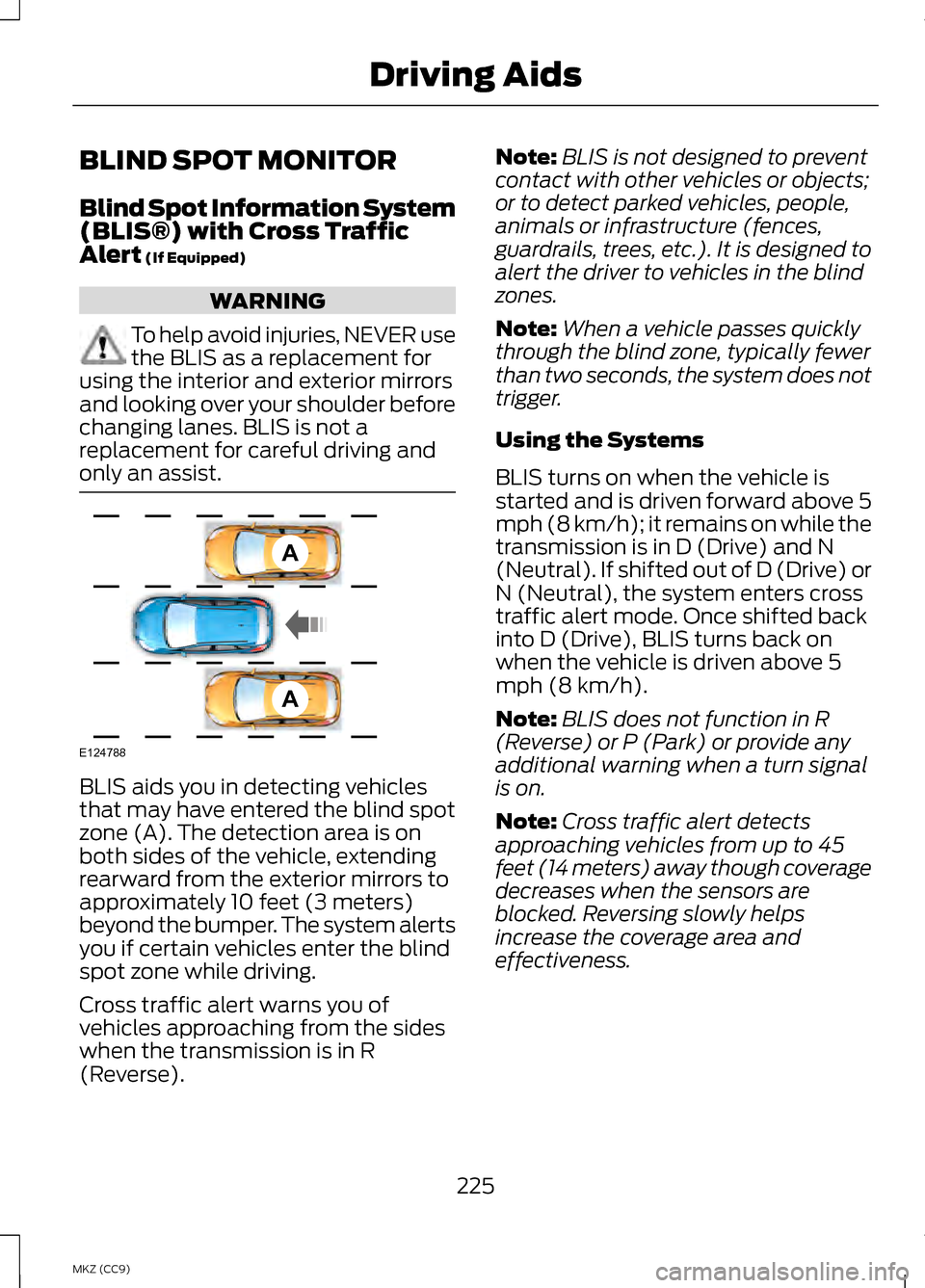
that may have entered the blind spot
zone (A). The detection area is on
both sides of the vehicle, extending
rearward from the exterior mirrors to
approximately 10 feet (3 meters)
beyond the bumper. The system alerts
you if certain vehicles enter the blind
spot zone while driving.
Cross traffic alert warns you of
vehicles approaching from the sides
when the transmission is in R
(Reverse). Note:
BLIS is not designed to prevent
contact with other vehicles or objects;
or to detect parked vehicles, people,
animals or infrastructure (fences,
guardrails, trees, etc.). It is designed to
alert the driver to vehicles in the blind
zones.
Note: When a vehicle passes quickly
through the blind zone, typically fewer
than two seconds, the system does not
trigger.
Using the Systems
BLIS turns on when the vehicle is
started and is driven forward above 5
mph (8 km/h); it remains on while the
transmission is in D (Drive) and N
(Neutral). If shifted out of D (Drive) or
N (Neutral), the system enters cross
traffic alert mode. Once shifted back
into D (Drive), BLIS turns back on
when the vehicle is driven above 5
mph (8 km/h).
Note: BLIS does not function in R
(Reverse) or P (Park) or provide any
additional warning when a turn signal
is on.
Note: Cross traffic alert detects
approaching vehicles from up to 45
feet (14 meters) away though coverage
decreases when the sensors are
blocked. Reversing slowly helps
increase the coverage area and
effectiveness.
225
MKZ (CC9) Driving AidsA
A
E124788
Page 247 of 475
TOWING THE VEHICLE ON
FOUR WHEELS
Emergency Towing
In the event your vehicle becomes
disabled (without access to wheel
dollies, car-hauling trailer, or flatbed
transport vehicle), it can be
flat-towed (all wheels on the ground,
regardless of the
powertrain/transmission
configuration) under the following
conditions:
•
The vehicle is facing forward so
that it is towed in a forward
direction.
• The transmission gear shift lever
is placed in position N. If the
transmission gear shift lever
cannot be moved to position
N, it
may need to be overridden. See
Automatic Transmission
(page
185).
• Maximum speed is 35 mph (56
km/h).
• Maximum distance is 50 miles (80
kilometers).
Recreational Towing
Note: Put your climate control system
in recirculated air mode to prevent
exhaust fumes from entering the
vehicle. See
Climate Control (page
138). Follow these guidelines if you have a
need for recreational (RV) towing. An
example of recreational towing would
be towing your vehicle behind a
motorhome. These guidelines are
designed to ensure that your
transmission is not damaged.
Your vehicle can be towed with all
four wheels on the ground using the
Neutral Tow feature, or with all four
wheels off the ground using a vehicle
transport trailer. If you are using a
vehicle transport trailer, follow the
instruction specified by the equipment
provider.
Neutral Tow
If you tow your vehicle with all four
wheels on the ground:
•
Tow only in the forward direction.
• Release the parking brake.
245
MKZ (CC9) Towing
Page 249 of 475
BREAKING-IN
You need to break in new tires for
approximately 300 miles (480
kilometers). During this time, your
vehicle may exhibit some unusual
driving characteristics. The engine also
needs to break in. Avoid hard
accelerations and driving too fast for
the first 1000 miles (1600 kilometers).
If possible, avoid carrying heavy loads
up steep grades during the break-in
period.
ECONOMICAL DRIVING
Fuel economy is affected by several
things such as how you drive, the
conditions you drive under and how
you maintain your vehicle.
There are some things to keep in mind
that may improve your fuel economy:
•
Accelerate and slow down in a
smooth, moderate fashion.
• Drive at steady speeds.
• Anticipate stops; slowing down
may eliminate the need to stop.
• Combine errands and minimize
stop-and-go driving.
•When running errands, go to
the furthest destination first
and then work your way back
home.
• Close the windows for high-speed
driving.
• Drive at reasonable speeds.
(Traveling at 65 mph/105 kph uses
about 15% less fuel than traveling
at 75 mph/121 kph). •
Keep the tires properly inflated and
use only the recommended size.
• Use the recommended engine oil.
• Perform all regularly scheduled
maintenance.
There are also some things you may
want to avoid doing because they
reduce your fuel economy:
• Avoid sudden or hard
accelerations.
• Avoid revving the engine before
turning off the car.
• Avoid long idle periods.
• Do not warm up your vehicle on
cold mornings.
• Reduce the use of air conditioning
and heat.
• Avoid using speed control in hilly
terrain.
• Do not rest your foot on the brake
pedal while driving.
• Avoid carrying unnecessary weight
(approximately 1 mpg [0.4
kilometers/liter] is lost for every
400 lbs [180 kilograms] of weight
carried).
• Avoid adding particular
accessories to your vehicle (e.g.
bug deflectors, rollbars/light bars,
running boards, ski racks).
• Avoid driving with the wheels out
of alignment.
DRIVING THROUGH WATER
Note: Driving through deep water
above the recommended levels can
cause vehicle damage.
247
MKZ (CC9) Driving Hints
Page 256 of 475
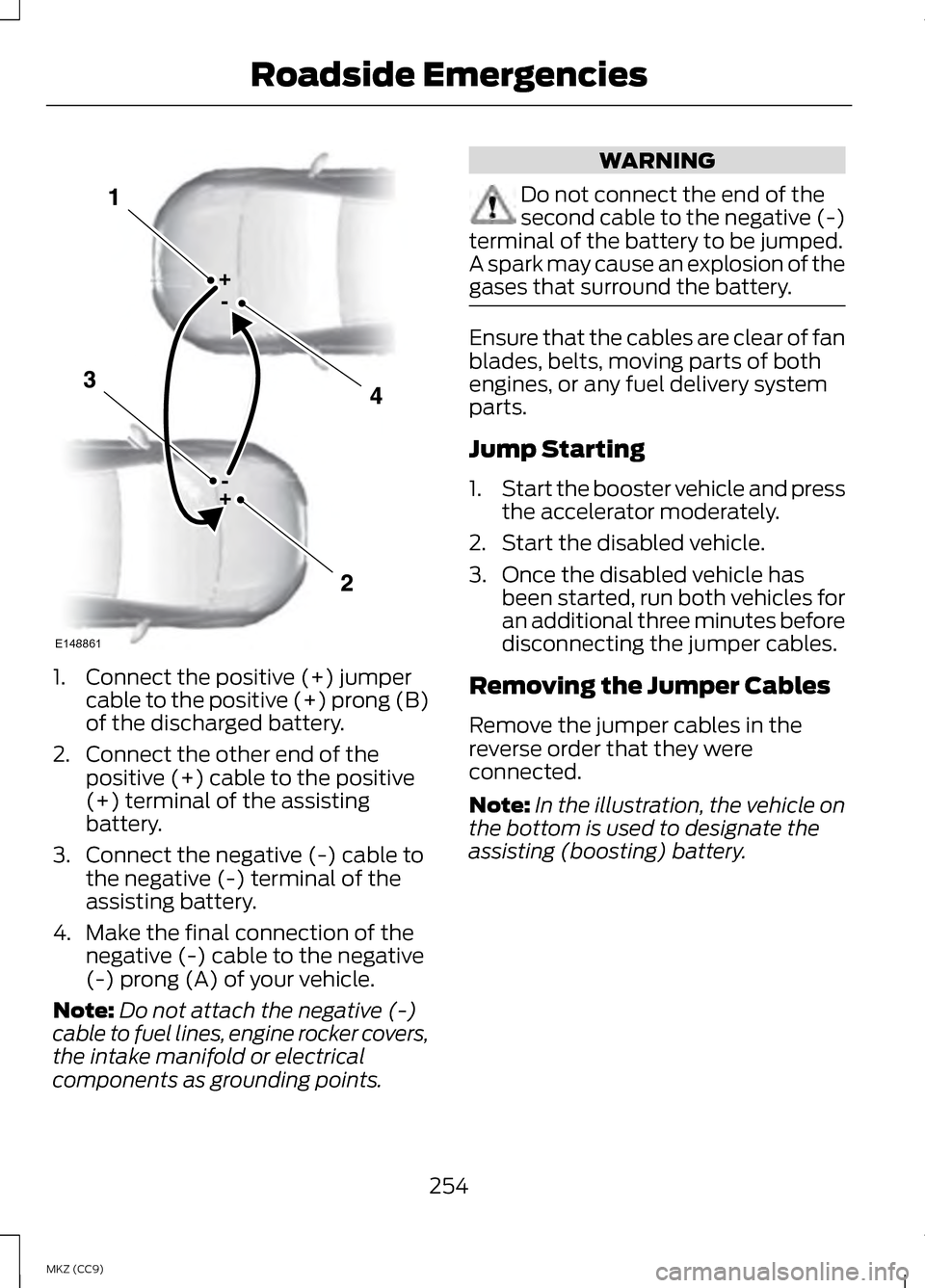
1. Connect the positive (+) jumper
cable to the positive (+) prong (B)
of the discharged battery.
2. Connect the other end of the positive (+) cable to the positive
(+) terminal of the assisting
battery.
3. Connect the negative (-) cable to the negative (-) terminal of the
assisting battery.
4. Make the final connection of the negative (-) cable to the negative
(-) prong (A) of your vehicle.
Note: Do not attach the negative (-)
cable to fuel lines, engine rocker covers,
the intake manifold or electrical
components as grounding points. WARNING
Do not connect the end of the
second cable to the negative (-)
terminal of the battery to be jumped.
A spark may cause an explosion of the
gases that surround the battery. Ensure that the cables are clear of fan
blades, belts, moving parts of both
engines, or any fuel delivery system
parts.
Jump Starting
1.
Start the booster vehicle and press
the accelerator moderately.
2. Start the disabled vehicle.
3. Once the disabled vehicle has been started, run both vehicles for
an additional three minutes before
disconnecting the jumper cables.
Removing the Jumper Cables
Remove the jumper cables in the
reverse order that they were
connected.
Note: In the illustration, the vehicle on
the bottom is used to designate the
assisting (boosting) battery.
254
MKZ (CC9) Roadside EmergenciesE148861
Page 258 of 475
Vehicle Information and General
Safety Practices
•
Know the make and model of your
vehicle.
• Review the owner ’s manual and
become familiar with your vehicle ’s
safety information and
recommended safety practices.
• Do not attempt to repair damaged
electric and hybrid-electric
vehicles yourself. Contact an
authorized Ford Dealer or vehicle
manufacturer representative for
service.
Crashes
A crash or impact significant enough
to require an emergency response for
conventional vehicles would also
require the same response for an
electric or hybrid-electric vehicle.
If possible
• Move your car to a safe, nearby
location and remain on the scene.
• Roll down the windows before
shutting your vehicle off.
• Place your vehicle in Park, set the
parking brake, turn off the vehicle,
activate the hazard lights, and
move your key(s) at least 16 feet
(5 meters) away from the vehicle. Always
•
Call 911 if assistance is needed and
advise that an electric or
hybrid-electric vehicle is involved.
• Do not touch exposed electrical
components or the engine
compartment, as a shock hazard
may exist.
• Avoid contact with leaking fluids
and gases, and remain out of the
way of oncoming traffic until
emergency responders arrive.
• When emergency responders
arrive, tell them that the vehicle
involved is an electric vehicle or
hybrid vehicle.
Fires
As with any vehicle, call 911
immediately if you see sparks, smoke
or flames coming from the vehicle.
• Exit the vehicle immediately.
• Advise 911 that an electric or
hybrid-electric vehicle is involved.
• As with any vehicle fire, do not
inhale smoke, vapors or gas from
the vehicle, as they may be
hazardous.
• Remain a safe distance upwind
and uphill from the vehicle fire.
• Stay out of the roadway and stay
out of the way of any oncoming
traffic while awaiting the arrival of
emergency responders.
256
MKZ (CC9) Roadside Emergencies
Page 348 of 475
•
Eject: Eject a CD from the
entertainment system.
• SOURCE: Touch the word
repeatedly to see all available
media modes. The screen does not
change, but you see the media
change in the lower left status bar.
• SOUND:
Touch the word to
access the Sound menu where you
can adjust settings such as: Bass,
Treble, Midrange, Balance and
Fade, DSP (Digital Signal
Processing), THX Deep Note
Demo, Occupancy Mode and
Speed Compensated Volume.
(Your vehicle may not have all of
these sound options.)
• Hazard flasher: Switch the hazard
flashers off and on.
Cleaning the Touchscreen
Display
Use a clean, soft cloth such as one
used for cleaning glasses. If dirt or
fingerprints are still visible, apply a
small amount of alcohol to the cloth.
Do not pour or spray alcohol onto the
display. Do not use detergent or any
type of solvent to clean the display.
Support
The SYNC support team is available
to help you with any questions you are
not able to answer on your own.
Monday-Saturday, 8:30am-8:00pm
EST.
In the United States, call:
1-888-270-1055.
In Canada, call: 1-800-565-3673. Times are subject to change due to
holidays.
Safety Information WARNING
Driving while distracted can
result in loss of vehicle control,
crash and injury. We strongly
recommend that you use extreme
caution when using any device that
may take your focus off the road. Your
primary responsibility is the safe
operation of your vehicle. We
recommend against the use of any
hand-held device while driving and
encourage the use of voice-operated
systems when possible. Make sure you
are aware of all applicable local laws
that may affect the use of electronic
devices while driving. •
Do not attempt to service or repair
the system. See an authorized
dealer.
• Do not operate playing devices if
the power cords or cables are
broken, split or damaged. Place
cords and cables out of the way,
so they do not interfere with the
operation of pedals, seats,
compartments or safe driving
abilities.
346
MKZ (CC9) MyLincoln Touch
™
Page 352 of 475
Entertainment
Phone
Navigation
You can make selections from the
menu by using the OK button. The
selection menu expands and different
options appear.
• Press the up and down arrows to
scroll through the modes.
• Press the right arrow to enter the
mode.
• Press the left or right arrows to
make adjustments within the
chosen mode.
• Press OK to confirm your selection.
Note: If your vehicle is not equipped
with Navigation, Compass appears in
the display instead of Navigation. If you
press the right arrow to go into the
Compass menu, you can see the
compass graphic. The compass
displays the direction in which the
vehicle is traveling, not true direction
(for example, if the vehicle is traveling
west, the middle of the compass
graphic displays west; north displays
to the left of west though its true
direction is to the right of west). Using Voice Recognition
This system helps you control many
features using voice commands. This
allows you to keep your hands on the
wheel and focus on what is in front of
you. The system provides feedback
through audible tones, prompts,
questions and spoken confirmations
depending on the situation and the
chosen level of interaction (voice
settings).
The system also asks short questions
(confirmation prompts) when it is not
sure of your request or when there are
multiple possible responses to your
request.
When using voice commands, words
and icons may appear in the lower left
status bar indicating the status of the
voice session (such as Listening,
Success, Failed, Paused or Try Again).
How to Use Voice Commands with
Your System
Press the voice icon. After the
tone, speak your command
clearly.
These commands can be said at any
time during a voice session
"Cancel""Exit"
"Go back"
"List of commands" "Main menu"
350
MKZ (CC9) MyLincoln Touch
™E142611 E142609 E142610 E142599
Page 359 of 475
Uploading Photos for Your Home
Screen Wallpaper
Note:
You cannot load photos directly
from your camera. You must access
the photos either from your USB mass
storage device or from an SD card.
Note: Photographs with extremely
large dimensions (such as 2048 x
1536) may not be compatible and
appear as a blank (black) image on the
display.
Your system allows you to upload and
view up to 32 photos. To access, press the Settings
icon > Display > Edit
Wallpaper, and then follow
the system prompts to upload your
photographs.
Only the photograph(s), which meets
the following conditions, display:
• Compatible file formats are as
follows: .jpg, .gif, .png, .bmp
• Each file must be 1.5 MB or less.
• Recommended dimensions: 800
x 384
Sound Press the
Settings icon >
Sound, then select from the
following: Sound
Bass
Midrange Treble Sound
Set Balance and Fade
DSP*
THX Deep Note Demo *
Occupancy Mode *
Speed Compensated Volume
* Your vehicle may not have these
sound settings.
Vehicle Press the Settings icon >
Vehicle
, then select from
the following:
• Ambient Lighting
• Vehicle Health Report
• Rear View Camera
• Enable Valet Mode.
Ambient Lighting (If Equipped)
When you turn this feature on,
ambient lighting illuminates footwells
and cupholders with a choice of
colors. To access and make
adjustments: 1. Press the Settings icon >
Vehicle
> Ambient Lighting.
2. Touch the desired color.
3. Use the scroll bar to increase or decrease the intensity.
357
MKZ (CC9) MyLincoln Touch
™E142607 E142607 E142607 E142607
Page 391 of 475
Phone
A
Quick Dial
B
Phonebook
C
History
D
Messaging
E
Settings
F
Hands-free calling is one of the main
features of SYNC. Once you pair your
phone, you can access many options
using the touchscreen or voice
commands. While the system
supports a variety of features, many
are dependent on your cellular
phone ’s functionality.
At a minimum, most cellular phones
with Bluetooth wireless technology
support the following functions:
• Answering an incoming call
• Ending a call
• Using privacy mode
• Dialing a number
• Redialing
• Call waiting notification
• Caller ID.
Other features, such as text
messaging using Bluetooth and
automatic phonebook download, are
phone-dependent features. To check
your phone ’s compatibility, see your
device ’s manual and visit
www.SYNCMyRide.com,
www.SYNCMyRide.ca or
www.syncmaroute.ca. Pairing Your Phone for the First
Time WARNING
Driving while distracted can
result in loss of vehicle control,
crash and injury. We strongly
recommend that you use extreme
caution when using any device that
may take your focus off the road. Your
primary responsibility is the safe
operation of your vehicle. We
recommend against the use of any
hand-held device while driving and
encourage the use of voice-operated
systems when possible. Make sure you
are aware of all applicable local laws
that may affect the use of electronic
devices while driving The first thing you must do to use the
phone features of SYNC is to pair your
Bluetooth-enabled cellular phone
with SYNC. This allows you to use
your phone in a hands-free manner.
Note:
Put the transmission in position
P. Turn on your vehicle ignition and the
radio.
389
MKZ (CC9) MyLincoln Touch
™