ECO mode LINCOLN MKZ HYBRID 2013 User Guide
[x] Cancel search | Manufacturer: LINCOLN, Model Year: 2013, Model line: MKZ HYBRID, Model: LINCOLN MKZ HYBRID 2013Pages: 475, PDF Size: 3.89 MB
Page 103 of 475
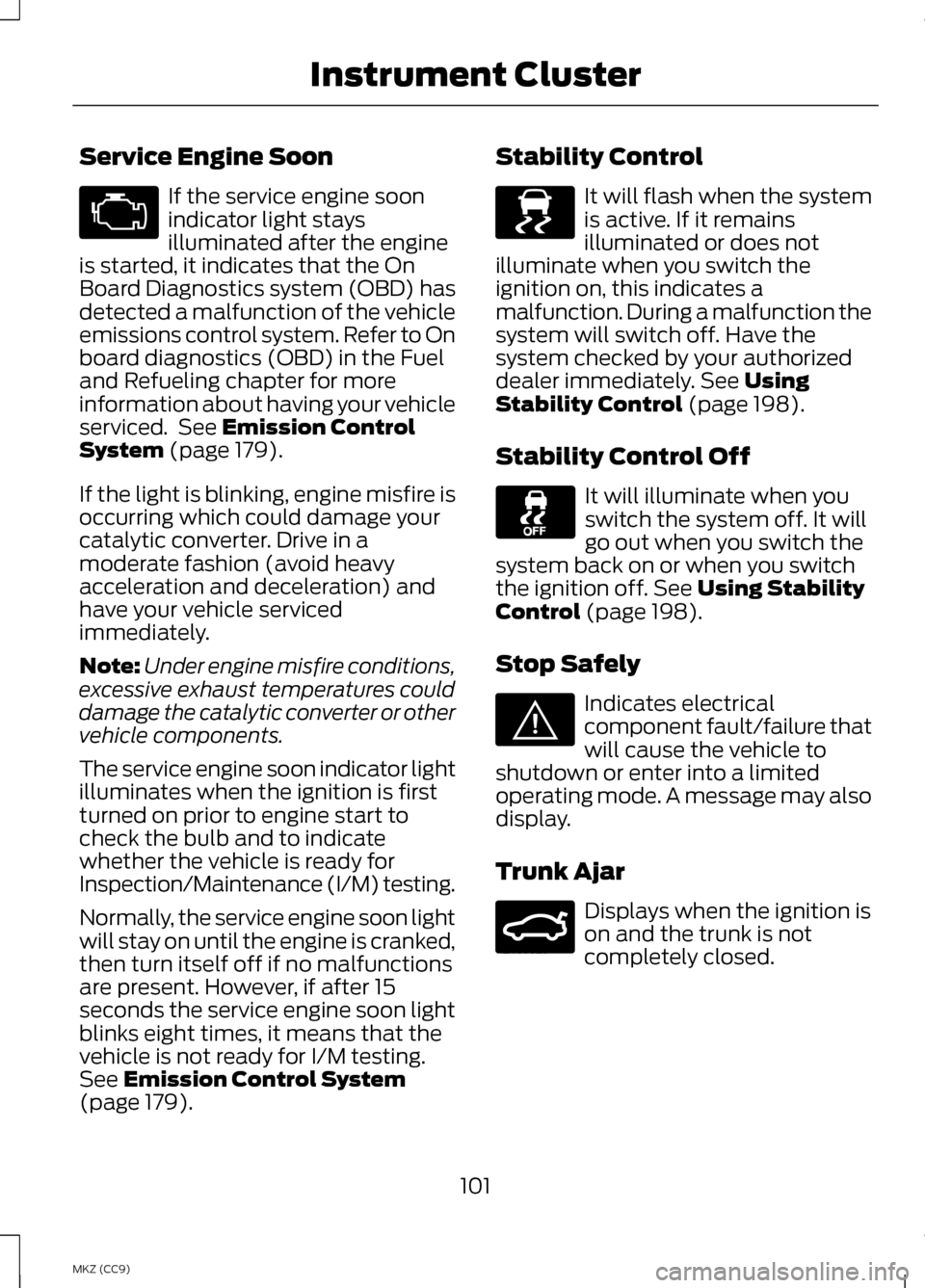
Service Engine Soon
If the service engine soon
indicator light stays
illuminated after the engine
is started, it indicates that the On
Board Diagnostics system (OBD) has
detected a malfunction of the vehicle
emissions control system. Refer to On
board diagnostics (OBD) in the Fuel
and Refueling chapter for more
information about having your vehicle
serviced. See Emission Control
System (page 179).
If the light is blinking, engine misfire is
occurring which could damage your
catalytic converter. Drive in a
moderate fashion (avoid heavy
acceleration and deceleration) and
have your vehicle serviced
immediately.
Note: Under engine misfire conditions,
excessive exhaust temperatures could
damage the catalytic converter or other
vehicle components.
The service engine soon indicator light
illuminates when the ignition is first
turned on prior to engine start to
check the bulb and to indicate
whether the vehicle is ready for
Inspection/Maintenance (I/M) testing.
Normally, the service engine soon light
will stay on until the engine is cranked,
then turn itself off if no malfunctions
are present. However, if after 15
seconds the service engine soon light
blinks eight times, it means that the
vehicle is not ready for I/M testing.
See
Emission Control System
(page 179). Stability Control It will flash when the system
is active. If it remains
illuminated or does not
illuminate when you switch the
ignition on, this indicates a
malfunction. During a malfunction the
system will switch off. Have the
system checked by your authorized
dealer immediately.
See Using
Stability Control (page 198).
Stability Control Off It will illuminate when you
switch the system off. It will
go out when you switch the
system back on or when you switch
the ignition off.
See Using Stability
Control (page 198).
Stop Safely Indicates electrical
component fault/failure that
will cause the vehicle to
shutdown or enter into a limited
operating mode. A message may also
display.
Trunk Ajar Displays when the ignition is
on and the trunk is not
completely closed.
101
MKZ (CC9) Instrument Cluster E138639 E144693 E159323
Page 105 of 475
GENERAL INFORMATION
WARNING
Driving while distracted can
result in loss of vehicle control,
accident and injury. We strongly
recommend that you use extreme
caution when using any device or
feature that may take your focus off
the road. Your primary responsibility
is the safe operation of the vehicle.
We recommend against the use of any
handheld device while driving and that
you comply with all applicable laws. Various systems on your vehicle can
be controlled using the information
display controls on the steering wheel.
Corresponding information is
displayed in the information display.
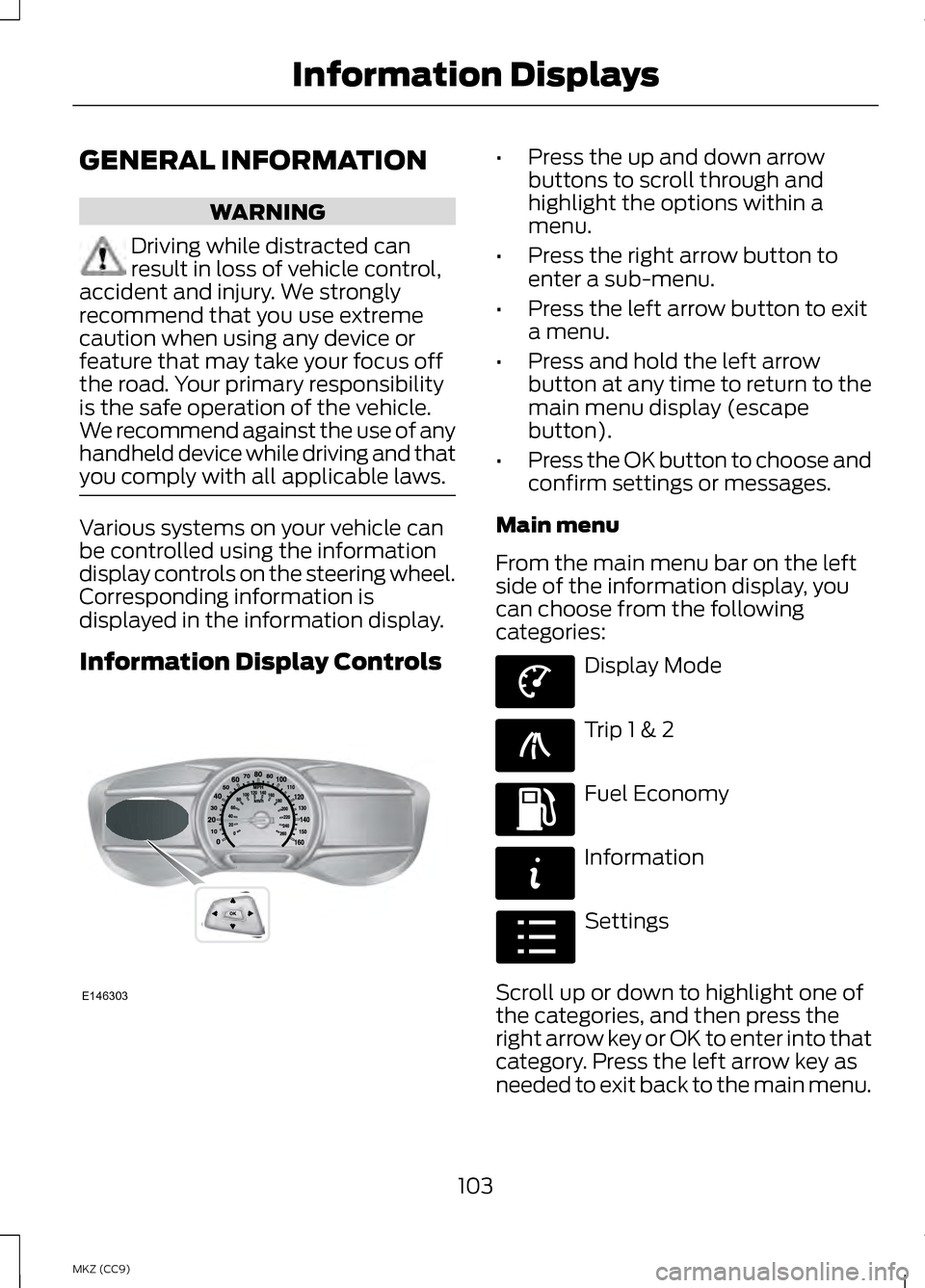
Information Display Controls •
Press the up and down arrow
buttons to scroll through and
highlight the options within a
menu.
• Press the right arrow button to
enter a sub-menu.
• Press the left arrow button to exit
a menu.
• Press and hold the left arrow
button at any time to return to the
main menu display (escape
button).
• Press the OK button to choose and
confirm settings or messages.
Main menu
From the main menu bar on the left
side of the information display, you
can choose from the following
categories: Display Mode
Trip 1 & 2
Fuel Economy
Information
Settings
Scroll up or down to highlight one of
the categories, and then press the
right arrow key or OK to enter into that
category. Press the left arrow key as
needed to exit back to the main menu.
103
MKZ (CC9) Information DisplaysE146303 E144639 E138660 E144640 E144642 E100023
Page 106 of 475
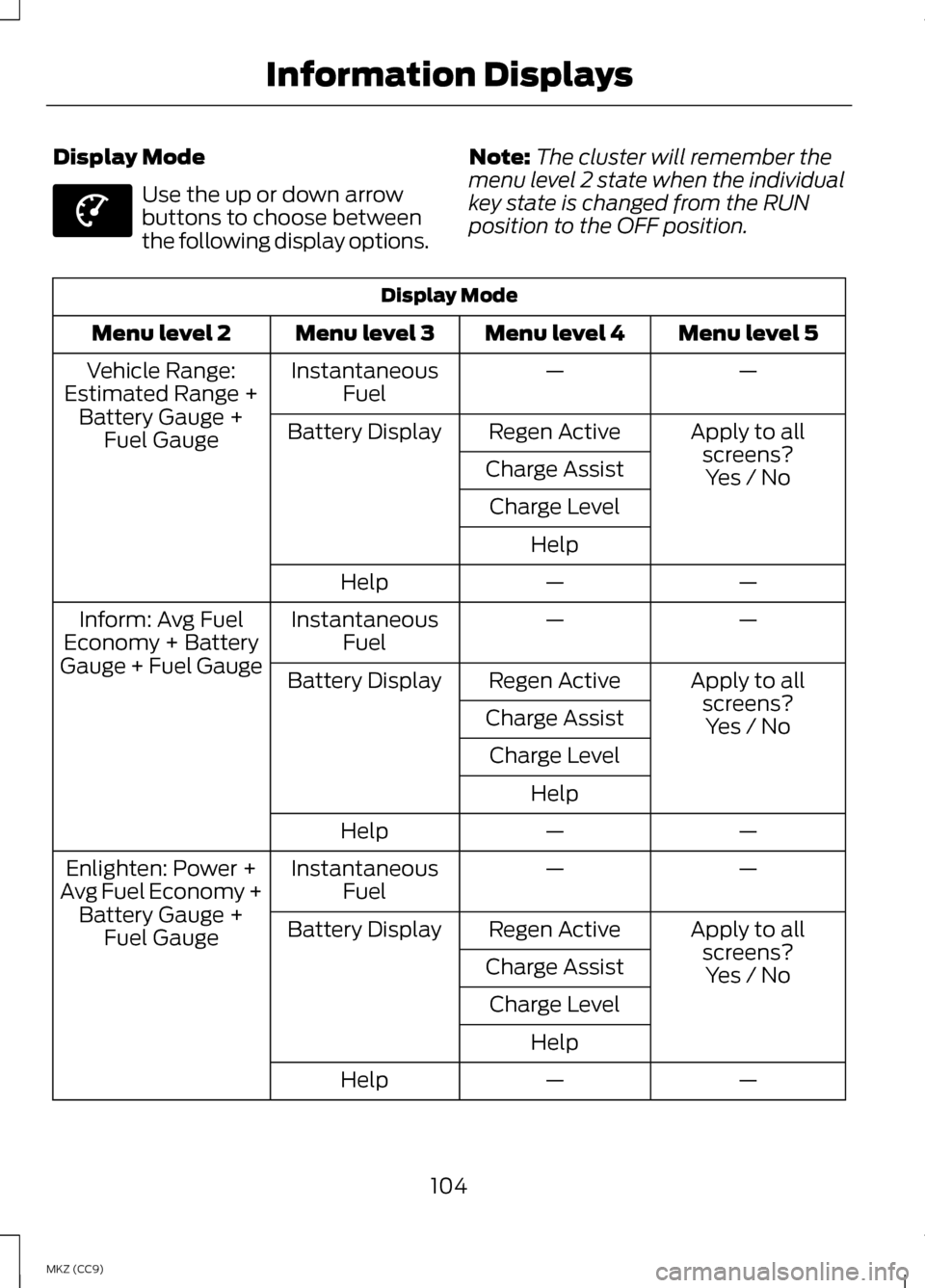
Display Mode
Use the up or down arrow
buttons to choose between
the following display options.
Note:
The cluster will remember the
menu level 2 state when the individual
key state is changed from the RUN
position to the OFF position. Display Mode
Menu level 5
Menu level 4
Menu level 3
Menu level 2
—
—
Instantaneous
Fuel
Vehicle Range:
Estimated Range + Battery Gauge + Fuel Gauge Apply to all
screens?
Regen Active
Battery Display
Charge Assist Yes / No
Charge Level
Help —
—
Help
—
—
Instantaneous
Fuel
Inform: Avg Fuel
Economy + Battery
Gauge + Fuel Gauge Apply to all
screens?
Regen Active
Battery Display
Charge Assist Yes / No
Charge Level
Help —
—
Help
—
—
Instantaneous
Fuel
Enlighten: Power +
Avg Fuel Economy + Battery Gauge + Fuel Gauge Apply to all
screens?
Regen Active
Battery Display
Charge Assist Yes / No
Charge Level
Help —
—
Help
104
MKZ (CC9) Information DisplaysE144639
Page 107 of 475
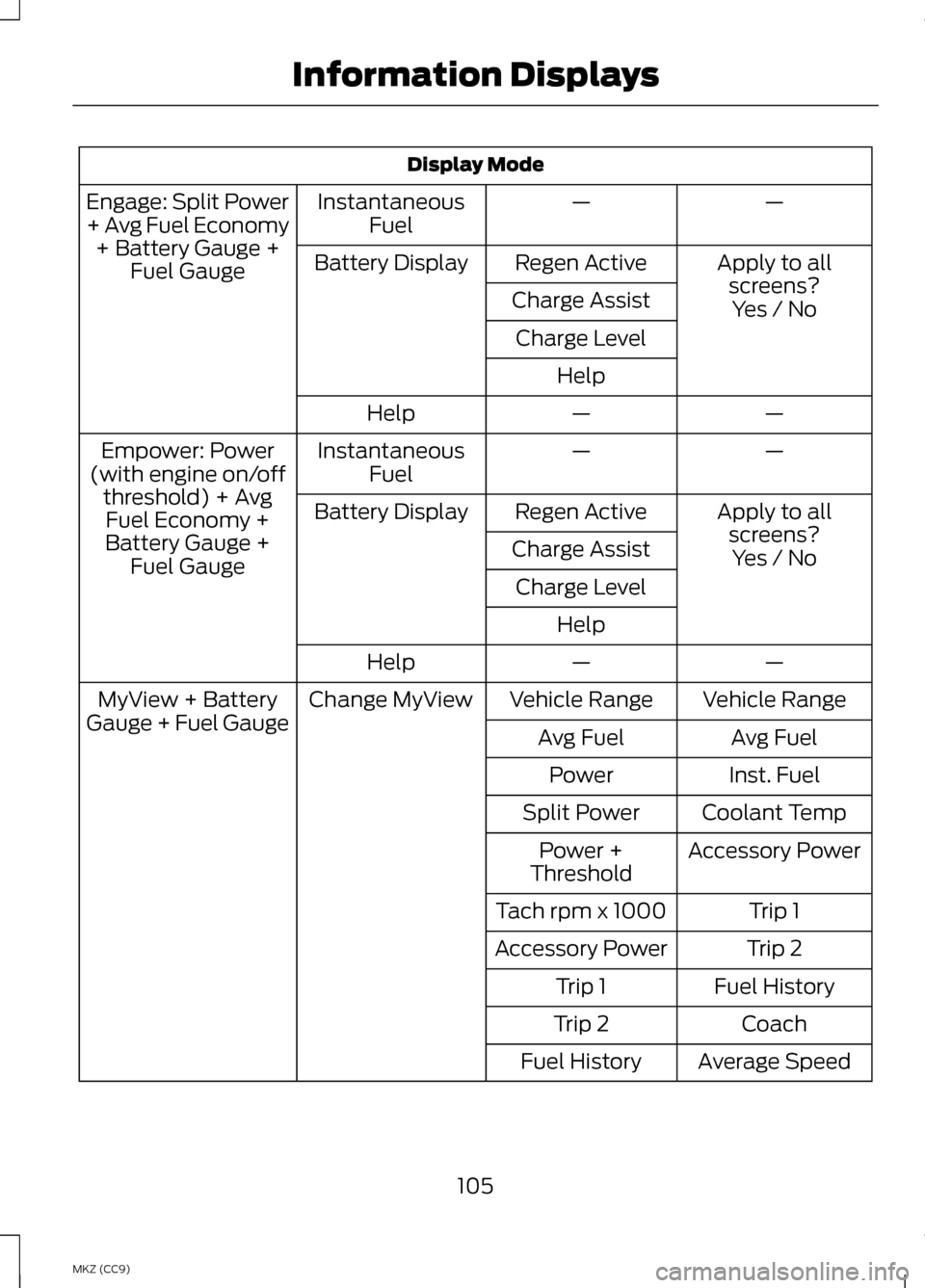
Display Mode
—
—
Instantaneous
Fuel
Engage: Split Power
+ Avg Fuel Economy
+ Battery Gauge + Fuel Gauge Apply to all
screens?
Regen Active
Battery Display
Charge Assist Yes / No
Charge Level
Help —
—
Help
—
—
Instantaneous
Fuel
Empower: Power
(with engine on/off threshold) + AvgFuel Economy +
Battery Gauge + Fuel Gauge Apply to all
screens?Yes / No
Regen Active
Battery Display
Charge AssistCharge Level Help —
—
Help
Vehicle Range
Vehicle Range
Change MyView
MyView + Battery
Gauge + Fuel Gauge Avg Fuel
Avg Fuel
Inst. Fuel
Power
Coolant Temp
Split Power
Accessory Power
Power +
Threshold
Trip 1
Tach rpm x 1000
Trip 2
Accessory Power
Fuel History
Trip 1
Coach
Trip 2
Average Speed
Fuel History
105
MKZ (CC9) Information Displays
Page 110 of 475
•
Vehicle Range — Indicates the estimated distance the vehicle will travel
with the energy currently available. For Hybrid, the vehicle range estimate
is based on the fuel remaining in the gasoline tank. For Energi, the total
estimated range equals the range available in Hybrid Mode fueled by gasoline,
plus the electric range available in Plug-in Power Mode. Changes in driving
pattern may cause the values to vary.
• Inform
— Inform shows the fuel level, battery display and average fuel
economy, with options available for the Battery Display and an Instantaneous
Fuel Economy gauge. When the vehicle is operating on battery power only
with the engine off, EV is displayed.
• Enlighten
— Enlighten displays power demand in addition to the typical
information and options from Inform. The Instantaneous Fuel Economy
gauge will be displayed by default. When the vehicle is operating on battery
power only with the engine off, EV is displayed and the gauge fill is shown
in blue. When both the engine and high voltage battery are providing power
the gauge fill is white.
• Engage
— Engage replaces the power demand gauge from Enlighten with
separate gauges for engine power and high voltage battery power. The
engine power gauge fill is white and the high voltage battery power gauge
fill is blue. When the vehicle is operating on battery power only with the
engine off, EV is displayed.
• Empower — Empower adds an engine on/off threshold to the power demand
gauge from Enlighten. The threshold is shown as a blue double outline. The
gauge is designed to show you how close you are to the gasoline engine
on/off threshold and how much power you are requesting based on how far
you press the accelerator pedal.
When power demand is below the threshold the vehicle is operating on battery
power only with the engine off, EV is displayed and the gauge fill is shown in
blue.
When power demand exceeds the threshold both the engine and the high
voltage battery provide power and the gauge fill is white.
When power demand surpasses the amber indicator, this level of demand and
associated fuel economy are shown in amber.
MyView
— You can choose what to display in this view. Selecting Change
MyView in the Options menu allows you to scroll through two columns of content
choices.
108
MKZ (CC9) Information Displays
Page 111 of 475
•
Accessory Power — Indicates electrical power demands from your vehicle ’s
accessory systems. Accessories use power but do not contribute to propelling
the vehicle. The gauge separately displays power demand in kilowatts (kW)
for climate and other accessories.
Climate includes the power being used by high voltage climate control
components such as the electric A/C compressor and the electric heater (Energi
vehicles only)
Other includes all power being used by the low voltage accessories (cabin fans,
headlights, heated seats, etc.).
• Coolant Temp – Indicates engine coolant temperature. At normal operating
temperature, the level indicator will be white and will be in the normal range
(between H and C). If the engine coolant temperature exceeds the normal
range, the level indicator will change to red to indicate that the engine is
overheating. Stop the vehicle as soon as safely possible, turn off the vehicle
and let the engine cool.
The thermometer indicator next to the gauge will illuminate in blue or white to
indicate the following:
• Blue thermometer - This indicates that the hybrid system is not warm enough
to allow EV operation. The gasoline engine will typically run continuously
when the indicator is blue.
Note: During silent key start mode, the thermometer indicator will be blue, but
the gasoline engine will not run. This is the result of the vehicle computer allowing
the engine to be cooler during the silent key start period. This is normal operation
and does not indicate a problem with your vehicle. After the first engine start the
indicator will turn white when the gasoline engine is warm enough to turn off.
• White thermometer - This indicates that the hybrid system is warm enough
to allow EV operation. If the vehicle operates on battery power long enough,
it is possible that the gasoline engine may need to run to keep the system
warm. In this case, the thermometer indicator will revert back to blue.
• Tach rpm x 1000 — When the gasoline engine is running, the tachometer
gauge displays the engine speed in revolutions per minute (RPM). When the
vehicle is operating on battery power only with the engine off, EV is displayed
and the tachometer is greyed out.
Note: The trip data, and average fuel economy cannot be reset in MyView.
109
MKZ (CC9) Information Displays
Page 114 of 475
Fuel Economy
Help —
—
Help
Fuel Economy Displays
• Fuel History: This view from left to right starts with the instantaneous fuel
economy gauge and adds historical fuel economy data. The data is
represented as an average for time intervals of either 1, 2 or 6 minutes, with
the left most interval being the most recent. Total time for the 5 intervals is
shown at the bottom of the view. Intervals shown in grey color are from the
previous drive.
• Average Fuel Economy:
Average fuel economy is continuously averaged
since the last reset. You can reset your average fuel economy by pressing
and holding the OK button on the left hand steering wheel controls. For
Energi vehicles both Hybrid and Plug-in Power mode operation will be
included in the calculation.
• Instantaneous Fuel Economy:
If your instantaneous fuel economy is
greater than the maximum value displayed, a + sign will be shown next to
the maximum scale number. When the vehicle is operating on battery power
only, EV is displayed and the gauge fill is shown in blue.
Note that fuel economy is not always a measure of appropriate driving behavior.
For example, when driving uphill and maintaining an appropriate speed, your
instant fuel economy may not be good (losing leaves) but the Coach may show
a blue bar for Acceleration or Cruising.
Info In this mode, you can view
different vehicle system
information and perform a
system check.
112
MKZ (CC9) Information DisplaysE144642
Page 116 of 475
Settings
On (default on
key cycle) / Off
Warn
—
Adaptive / Normal
Cruise Control
—
On (default on key
cycle) / Off
Cross Traffic Settings (cont’
d)
Menu level 5
Menu level 4
Menu level 3
Menu level 2
—
On / Off
ECO Cruise
Driver Assist
(cont’ d)
—
On / Off
Driver Alert
Alert / Aid / Alert+ Aid
Mode
Lane keeping Sys
High / Normal /Low
Intensity
—
On / Off
EV + Mode
—
On (default on key
cycle) / Off
Front Park Aid
—
On (default on key
cycle) / Off
Rear Park Aid
—
On (default on key
cycle) / Off
Auto Engine Off
Vehicle
—
On / Off
Easy Entry / Exit
On / Off
Adaptive Headlamps
Lighting
On / Off
Auto Highbeam
Select timeinterval
Autolamp Delay
114
MKZ (CC9) Information Displays
Page 122 of 475
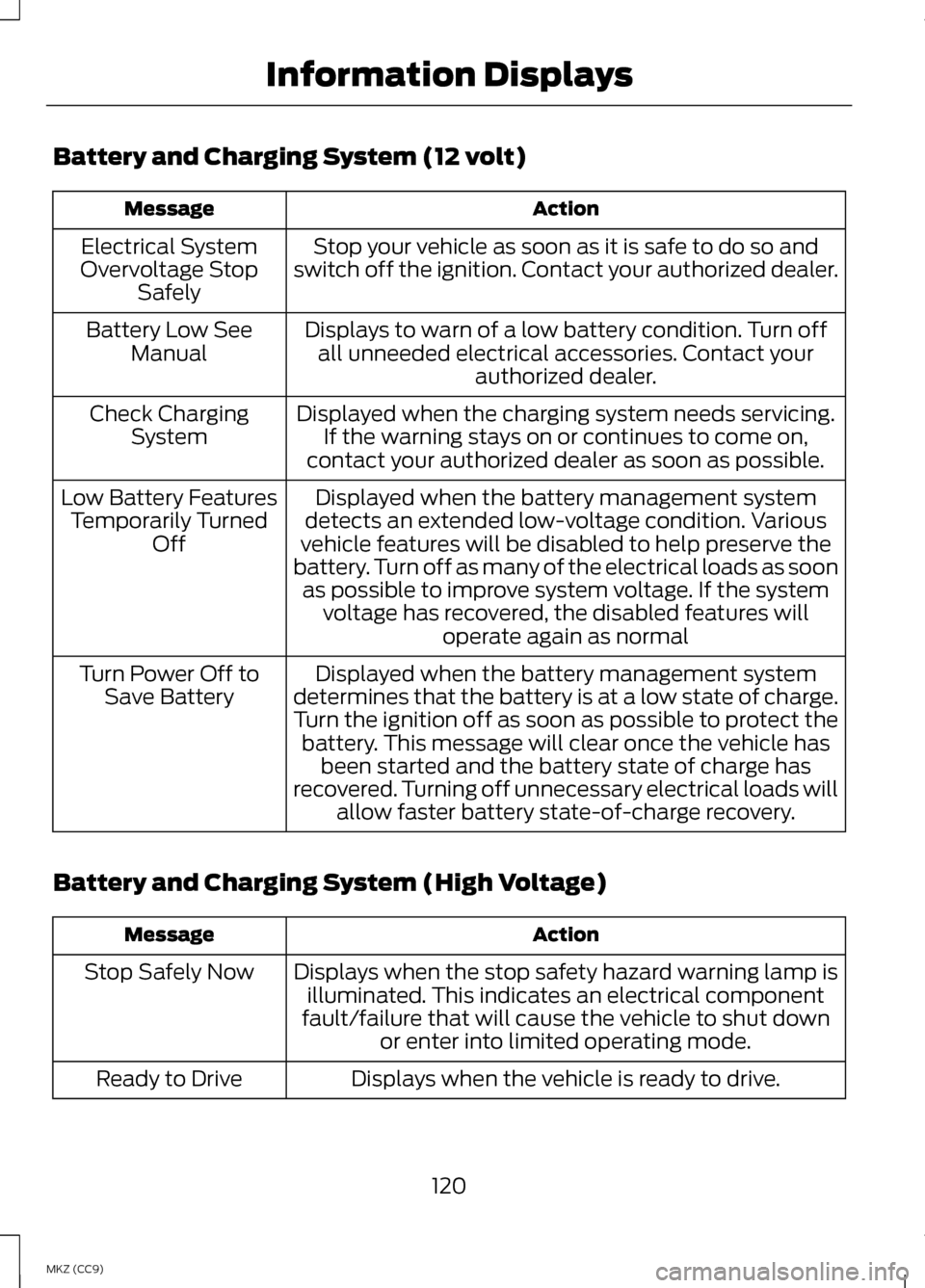
Battery and Charging System (12 volt)
Action
Message
Stop your vehicle as soon as it is safe to do so and
switch off the ignition. Contact your authorized dealer.
Electrical System
Overvoltage Stop Safely
Displays to warn of a low battery condition. Turn offall unneeded electrical accessories. Contact your authorized dealer.
Battery Low See
Manual
Displayed when the charging system needs servicing.If the warning stays on or continues to come on,
contact your authorized dealer as soon as possible.
Check Charging
System
Displayed when the battery management system
detects an extended low-voltage condition. Various
vehicle features will be disabled to help preserve the
battery. Turn off as many of the electrical loads as soon as possible to improve system voltage. If the system voltage has recovered, the disabled features will operate again as normal
Low Battery Features
Temporarily Turned Off
Displayed when the battery management system
determines that the battery is at a low state of charge.
Turn the ignition off as soon as possible to protect the battery. This message will clear once the vehicle has been started and the battery state of charge has
recovered. Turning off unnecessary electrical loads will allow faster battery state-of-charge recovery.
Turn Power Off to
Save Battery
Battery and Charging System (High Voltage) Action
Message
Displays when the stop safety hazard warning lamp isilluminated. This indicates an electrical component
fault/failure that will cause the vehicle to shut down or enter into limited operating mode.
Stop Safely Now
Displays when the vehicle is ready to drive.
Ready to Drive
120
MKZ (CC9) Information Displays
Page 137 of 475
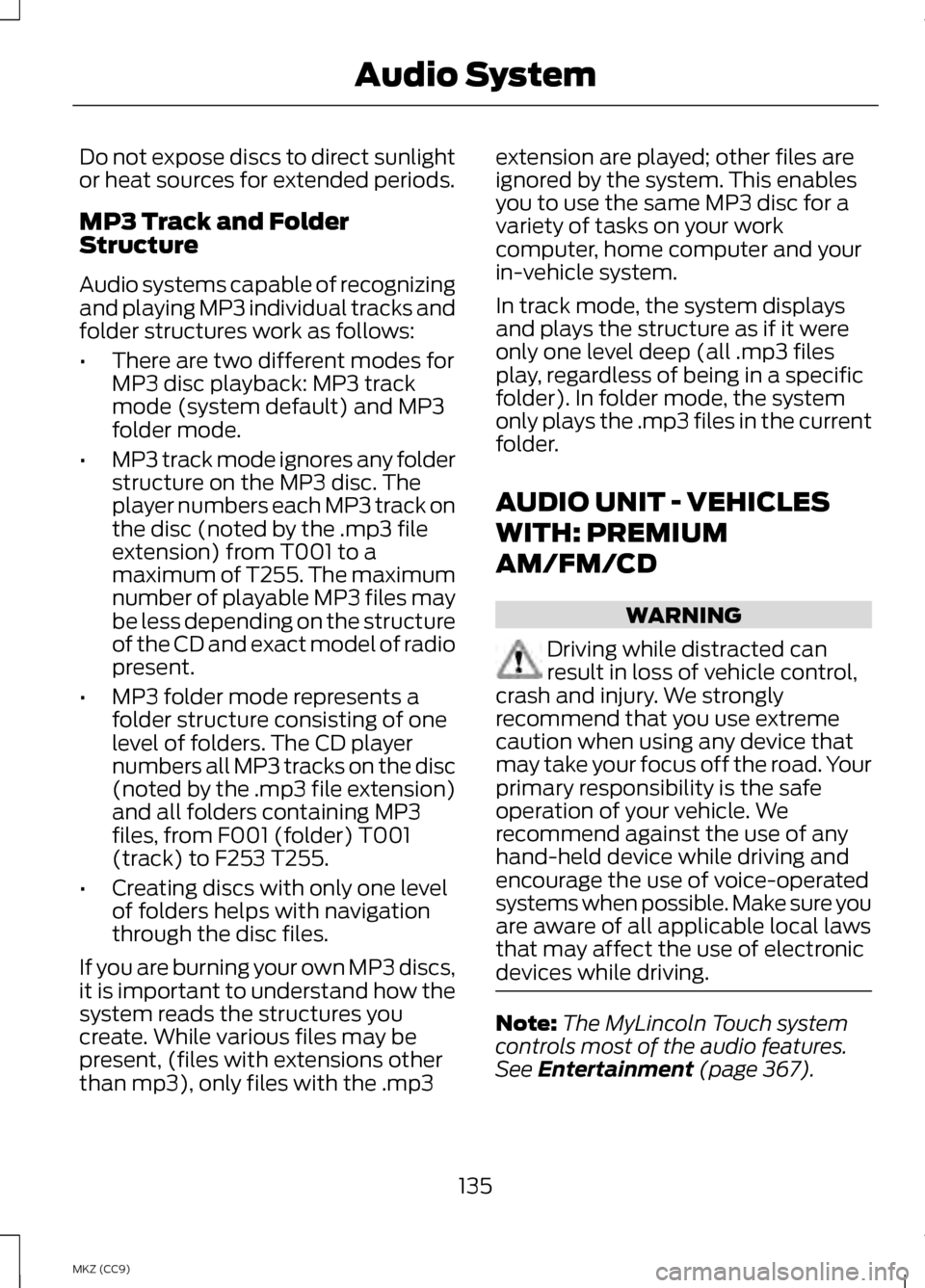
Do not expose discs to direct sunlight
or heat sources for extended periods.
MP3 Track and Folder
Structure
Audio systems capable of recognizing
and playing MP3 individual tracks and
folder structures work as follows:
•
There are two different modes for
MP3 disc playback: MP3 track
mode (system default) and MP3
folder mode.
• MP3 track mode ignores any folder
structure on the MP3 disc. The
player numbers each MP3 track on
the disc (noted by the .mp3 file
extension) from T001 to a
maximum of T255. The maximum
number of playable MP3 files may
be less depending on the structure
of the CD and exact model of radio
present.
• MP3 folder mode represents a
folder structure consisting of one
level of folders. The CD player
numbers all MP3 tracks on the disc
(noted by the .mp3 file extension)
and all folders containing MP3
files, from F001 (folder) T001
(track) to F253 T255.
• Creating discs with only one level
of folders helps with navigation
through the disc files.
If you are burning your own MP3 discs,
it is important to understand how the
system reads the structures you
create. While various files may be
present, (files with extensions other
than mp3), only files with the .mp3 extension are played; other files are
ignored by the system. This enables
you to use the same MP3 disc for a
variety of tasks on your work
computer, home computer and your
in-vehicle system.
In track mode, the system displays
and plays the structure as if it were
only one level deep (all .mp3 files
play, regardless of being in a specific
folder). In folder mode, the system
only plays the .mp3 files in the current
folder.
AUDIO UNIT - VEHICLES
WITH: PREMIUM
AM/FM/CD
WARNING
Driving while distracted can
result in loss of vehicle control,
crash and injury. We strongly
recommend that you use extreme
caution when using any device that
may take your focus off the road. Your
primary responsibility is the safe
operation of your vehicle. We
recommend against the use of any
hand-held device while driving and
encourage the use of voice-operated
systems when possible. Make sure you
are aware of all applicable local laws
that may affect the use of electronic
devices while driving. Note:
The MyLincoln Touch system
controls most of the audio features.
See Entertainment (page 367).
135
MKZ (CC9) Audio System