ECO mode LINCOLN MKZ HYBRID 2014 User Guide
[x] Cancel search | Manufacturer: LINCOLN, Model Year: 2014, Model line: MKZ HYBRID, Model: LINCOLN MKZ HYBRID 2014Pages: 445, PDF Size: 3.8 MB
Page 67 of 445
Unlocking and Locking the Doors
To Unlock the Driver Door
Enter the factory-set 5-digit code or your
personal code. You must press each
number within five seconds of each other.
The interior lamps will illuminate.
Note:
All doors will unlock if you enable
the all-door unlocking mode. See Locking
and Unlocking (page 58).
To Unlock All Doors
Enter the factory-set code or your personal
code, then press
3·4 within five seconds.
To Lock All Doors
Press and hold
7·8 and 9·0 at the same
time (with the driver door closed). You do
not need to enter the keypad code first.
To Release the Trunk
Enter the factory-set code or your personal
code, then press
5·6 within five seconds.
Displaying the Factory Set Code
Note: You will need to have two
programmed intelligent access keys for
this procedure.
To display the factory-set code in the
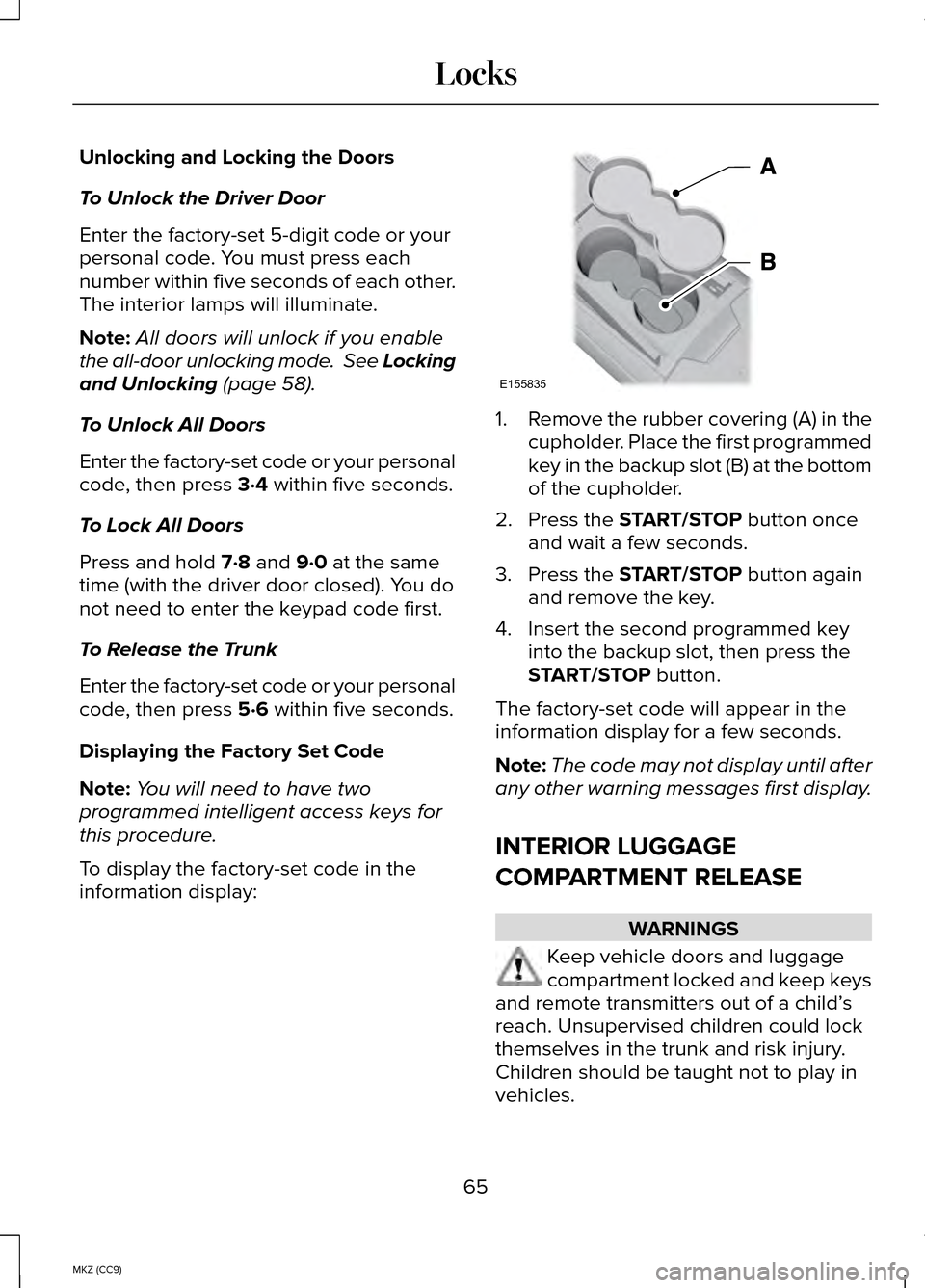
information display: 1.
Remove the rubber covering (A) in the
cupholder. Place the first programmed
key in the backup slot (B) at the bottom
of the cupholder.
2. Press the
START/STOP button once
and wait a few seconds.
3. Press the
START/STOP button again
and remove the key.
4. Insert the second programmed key into the backup slot, then press the
START/STOP
button.
The factory-set code will appear in the
information display for a few seconds.
Note: The code may not display until after
any other warning messages first display.
INTERIOR LUGGAGE
COMPARTMENT RELEASE WARNINGS
Keep vehicle doors and luggage
compartment locked and keep keys
and remote transmitters out of a child’ s
reach. Unsupervised children could lock
themselves in the trunk and risk injury.
Children should be taught not to play in
vehicles.
65
MKZ (CC9) LocksE155835
Page 80 of 445
When the headlamp switch is in the
Autolamps position, the windshield wiper
activated exterior lamps will turn on within
10 seconds when you switch the
windshield wipers on. The exterior lamps
will turn off approximately 60 seconds
after you switch the windshield wipers off.
This feature does not turn on the exterior
lamps:
•
during a mist wipe
• while the wipers are on to clear washer
fluid during a wash condition
• if the wipers are in automatic or
intermittent modes.
Note: If you have autolamps and
autowipers switched on the low beam
headlamps will turn on automatically when
the windshield wipers operate
continuously.
Note: You may have to manually switch
the headlamps on in severe weather
conditions.
Note: If you have autolamps switched on
you can only switch the high beam
headlamps on once the system has turned
the headlamps on.
INSTRUMENT LIGHTING DIMMER
Note: If you disconnect and connect the
battery, or fully discharge and charge the
battery, the illuminated components will
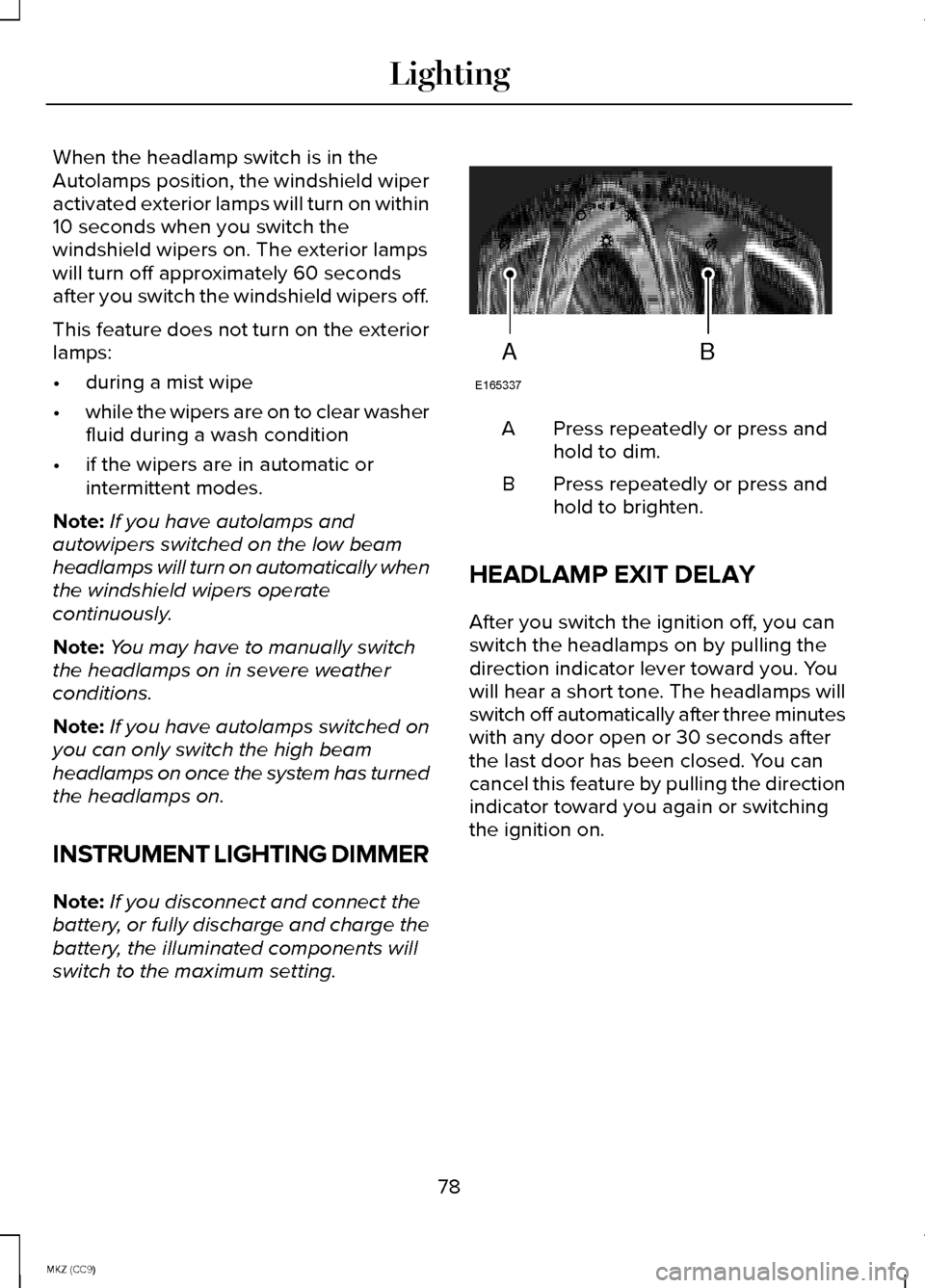
switch to the maximum setting. Press repeatedly or press and
hold to dim.
A
Press repeatedly or press and
hold to brighten.
B
HEADLAMP EXIT DELAY
After you switch the ignition off, you can
switch the headlamps on by pulling the
direction indicator lever toward you. You
will hear a short tone. The headlamps will
switch off automatically after three minutes
with any door open or 30 seconds after
the last door has been closed. You can
cancel this feature by pulling the direction
indicator toward you again or switching
the ignition on.
78
MKZ (CC9) LightingAB
E165337
Page 92 of 445
Right Information Display
Efficiency Leaves
Efficiency leaves indicate short term
driving efficiency. The more leaves and
vines that are displayed, the better your
fuel economy. Leaves and vines will
occasionally appear and disappear to
indicate a change in driving efficiency.
Note:
The efficiency leaves display can
be impacted by your use of brakes,
accelerator and accessories, as well as
environmental conditions such as hills and
weather.
Flowers
Flowers appear on the efficiency leaves
screen in addition to the leaves and vines.
The flowers indicate long term driving
efficiency. The more flowers that are
displayed, the more efficiently you have
driven. Once earned, the flowers will
remain unless reset. The flowers can be
reset through the information display. See
General Information (page 97).
Common Displays
Fuel Economy Displays:
Displays your average and instantaneous
fuel economy on most Display Mode
screens.
Note: You can reset your average fuel
economy by pressing and holding the
OK
button on the left hand steering wheel
controls. Average fuel economy cannot
be reset while on the MyView screen. •
Average Fuel Economy - is
continuously averaged since the last
reset. You can reset your average fuel
economy by pressing and holding the
OK button on the left hand steering
wheel controls.
• Instantaneous Fuel Economy - If your
instantaneous fuel economy is greater
than the maximum value displayed, a
+ sign will be shown next to the
maximum scale number. When the
vehicle is operating on battery power
only, EV is displayed and the gauge fill
is shown in blue.
Battery Gauge:
Note: Battery gauge information can be
individually selected on or off through
Battery Display in the Options sub-menu.
From any main display a right arrow press
on the steering wheel controls will take
you to the options sub-menu.
The high-voltage battery gauge appears
on the right side of the left information
display screen. This provides Charge Fill
(State of Charge), Charge Assist and
Regen Display.
Charge Fill
The fill level, or State of Charge indicates
the amount of energy stored in the
high-voltage battery as a percent of total
energy capacity. The level will increase or
decrease as the battery charges and
discharges during normal operation.
90
MKZ (CC9) Instrument Cluster
Page 97 of 445
Note:
If your engine is misfiring, excessive
exhaust temperatures could damage the
catalytic converter or other vehicle
components.
The service engine soon indicator lights
when the you first switch on your vehicle,
prior to engine start, to check the bulb and
to indicate whether the vehicle is ready
for inspection maintenance testing.
Normally, the service engine soon light
will stay on until the engine cranks, then
turn itself off if no malfunctions are
present. However, if after 15 seconds the
service engine soon light blinks eight
times, it means that the vehicle is not
ready for inspection maintenance testing.
See Emission Control System (page 164).
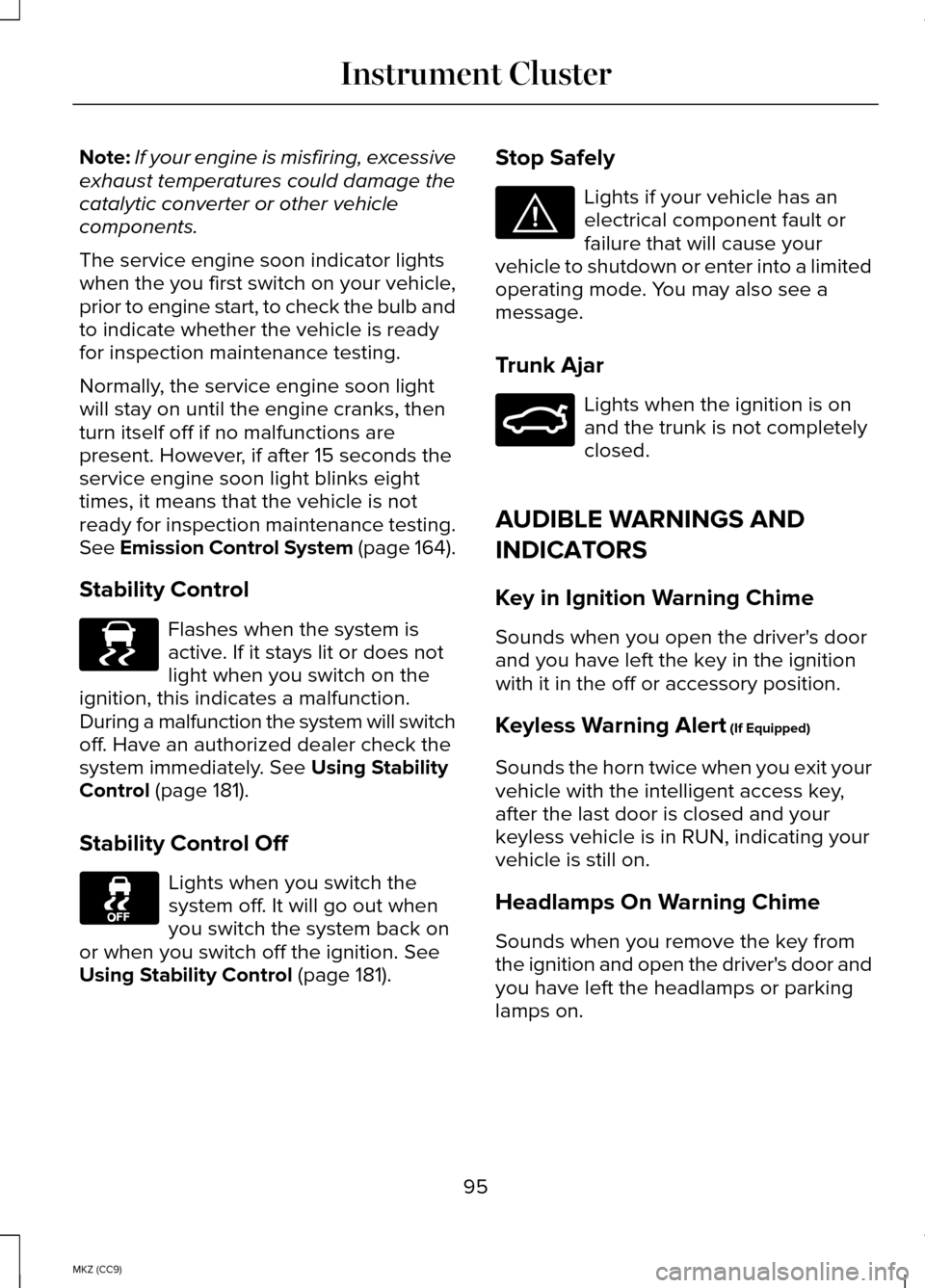
Stability Control Flashes when the system is
active. If it stays lit or does not
light when you switch on the
ignition, this indicates a malfunction.
During a malfunction the system will switch
off. Have an authorized dealer check the
system immediately.
See Using Stability
Control (page 181).
Stability Control Off Lights when you switch the
system off. It will go out when
you switch the system back on
or when you switch off the ignition.
See
Using Stability Control (page 181). Stop Safely Lights if your vehicle has an
electrical component fault or
failure that will cause your
vehicle to shutdown or enter into a limited
operating mode. You may also see a
message.
Trunk Ajar Lights when the ignition is on
and the trunk is not completely
closed.
AUDIBLE WARNINGS AND
INDICATORS
Key in Ignition Warning Chime
Sounds when you open the driver's door
and you have left the key in the ignition
with it in the off or accessory position.
Keyless Warning Alert
(If Equipped)
Sounds the horn twice when you exit your
vehicle with the intelligent access key,
after the last door is closed and your
keyless vehicle is in RUN, indicating your
vehicle is still on.
Headlamps On Warning Chime
Sounds when you remove the key from
the ignition and open the driver's door and
you have left the headlamps or parking
lamps on.
95
MKZ (CC9) Instrument ClusterE138639 E144693 E159323
Page 99 of 445
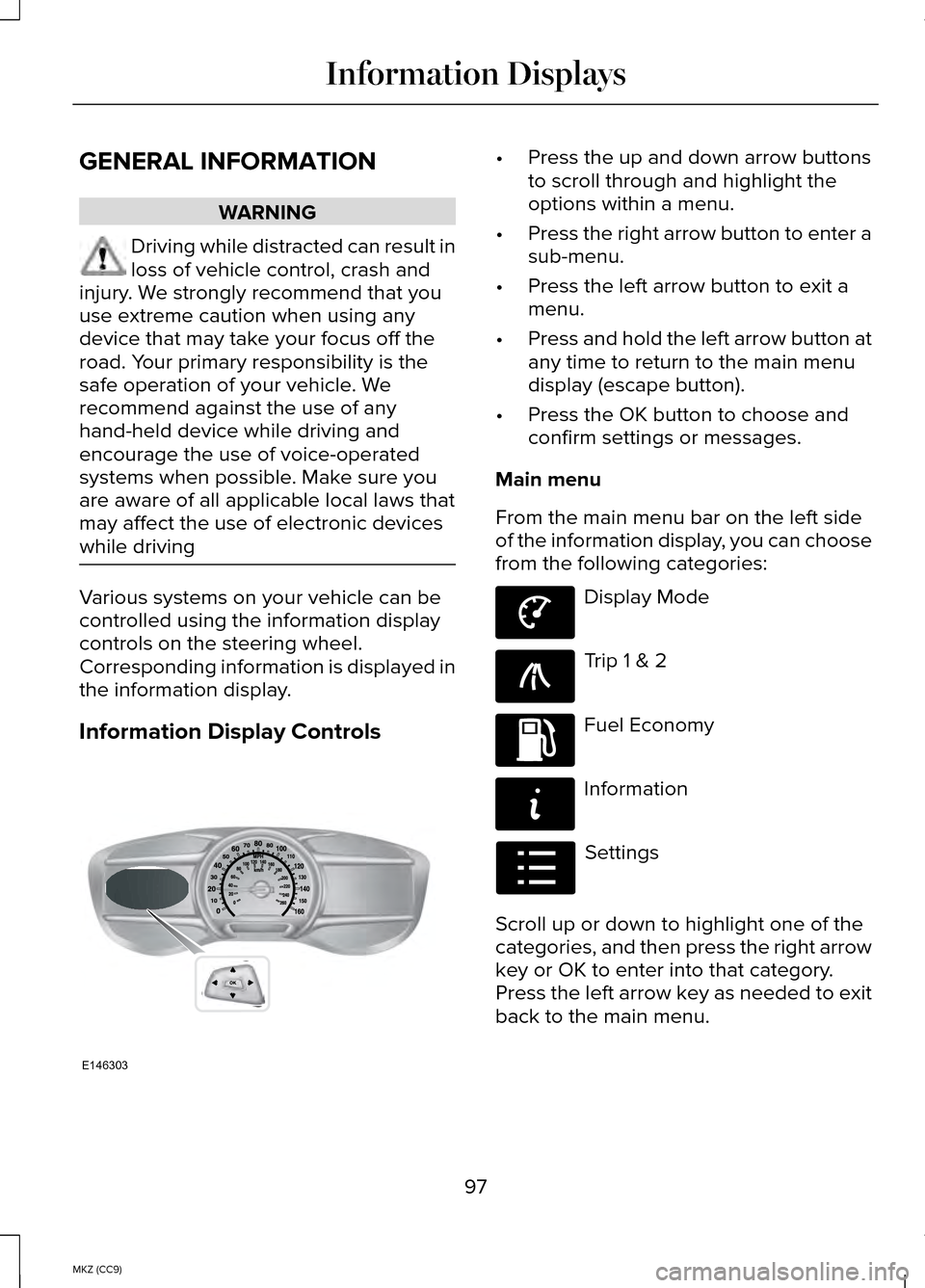
GENERAL INFORMATION
WARNING
Driving while distracted can result in
loss of vehicle control, crash and
injury. We strongly recommend that you
use extreme caution when using any
device that may take your focus off the
road. Your primary responsibility is the
safe operation of your vehicle. We
recommend against the use of any
hand-held device while driving and
encourage the use of voice-operated
systems when possible. Make sure you
are aware of all applicable local laws that
may affect the use of electronic devices
while driving Various systems on your vehicle can be
controlled using the information display
controls on the steering wheel.
Corresponding information is displayed in
the information display.
Information Display Controls •
Press the up and down arrow buttons
to scroll through and highlight the
options within a menu.
• Press the right arrow button to enter a
sub-menu.
• Press the left arrow button to exit a
menu.
• Press and hold the left arrow button at
any time to return to the main menu
display (escape button).
• Press the OK button to choose and
confirm settings or messages.
Main menu
From the main menu bar on the left side
of the information display, you can choose
from the following categories: Display Mode
Trip 1 & 2
Fuel Economy
Information
Settings
Scroll up or down to highlight one of the
categories, and then press the right arrow
key or OK to enter into that category.
Press the left arrow key as needed to exit
back to the main menu.
97
MKZ (CC9) Information DisplaysE146303 E144639 E138660 E144640 E144642 E100023
Page 100 of 445
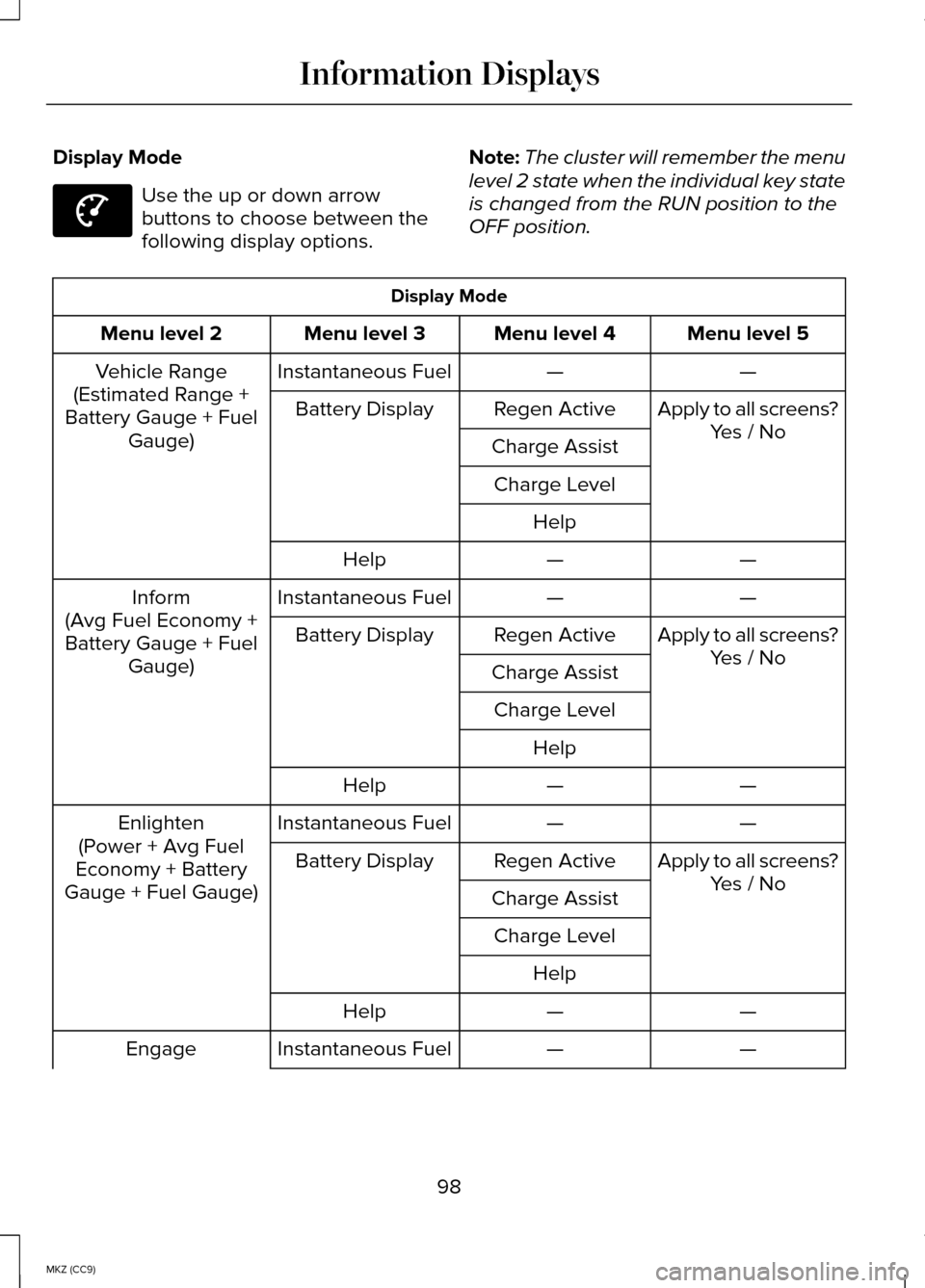
Display Mode
Use the up or down arrow
buttons to choose between the
following display options.
Note:
The cluster will remember the menu
level 2 state when the individual key state
is changed from the RUN position to the
OFF position. Display Mode
Menu level 5
Menu level 4
Menu level 3
Menu level 2
—
—
Instantaneous Fuel
Vehicle Range
(Estimated Range +
Battery Gauge + Fuel Gauge) Apply to all screens?
Yes / No
Regen Active
Battery Display
Charge AssistCharge Level Help —
—
Help
—
—
Instantaneous Fuel
Inform
(Avg Fuel Economy +
Battery Gauge + Fuel Gauge) Apply to all screens?
Yes / No
Regen Active
Battery Display
Charge AssistCharge Level Help —
—
Help
—
—
Instantaneous Fuel
Enlighten
(Power + Avg Fuel
Economy + Battery
Gauge + Fuel Gauge) Apply to all screens?
Yes / No
Regen Active
Battery Display
Charge AssistCharge Level Help —
—
Help
—
—
Instantaneous Fuel
Engage
98
MKZ (CC9) Information DisplaysE144639
Page 101 of 445
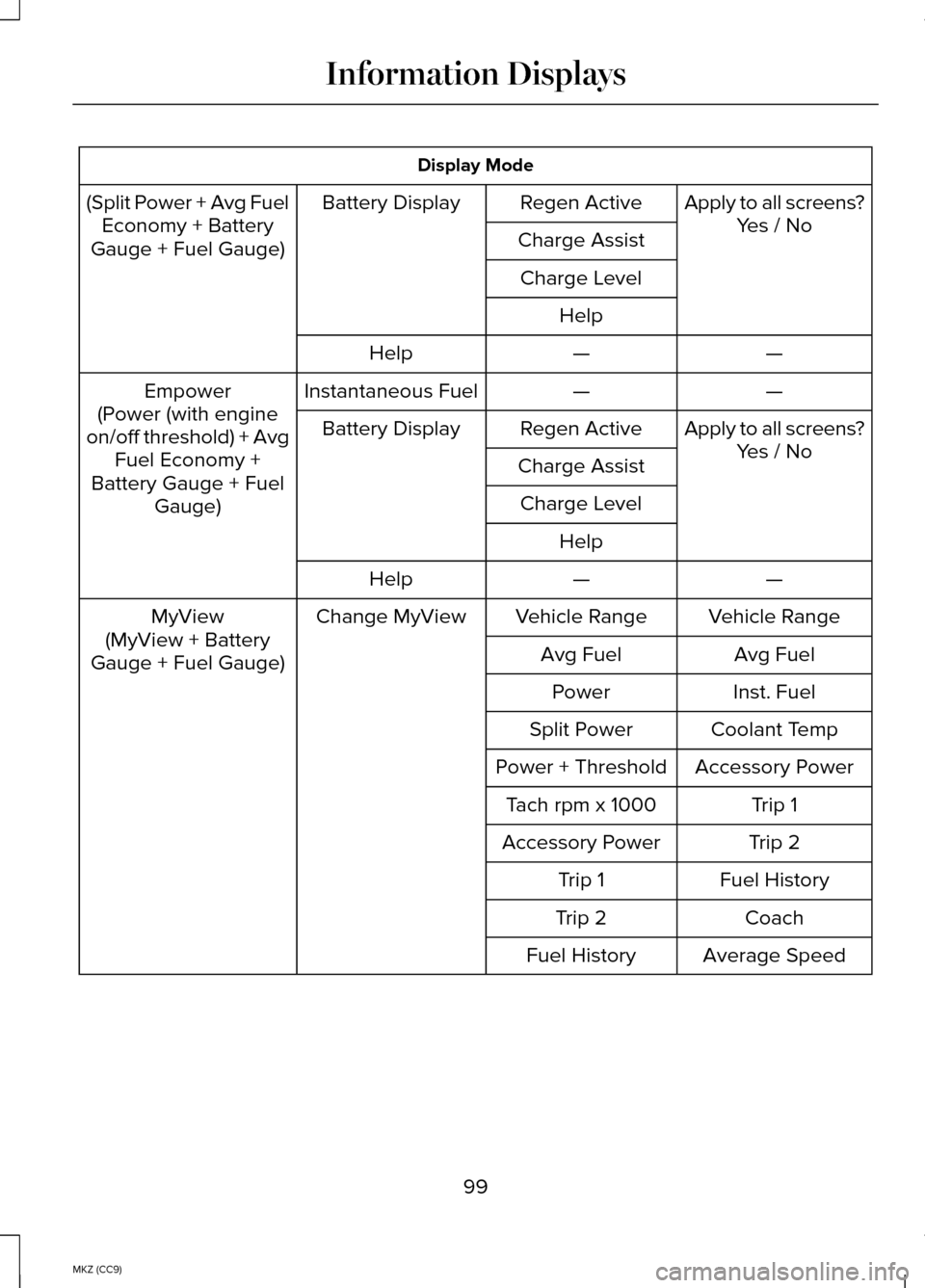
Display Mode
(Split Power + Avg Fuel Economy + Battery
Gauge + Fuel Gauge) Apply to all screens?
Yes / No
Regen Active
Battery Display
Charge AssistCharge Level Help —
—
Help
—
—
Instantaneous Fuel
Empower
(Power (with engine
on/off threshold) + Avg Fuel Economy +
Battery Gauge + Fuel Gauge) Apply to all screens?
Yes / No
Regen Active
Battery Display
Charge AssistCharge Level Help —
—
Help
Vehicle Range
Vehicle Range
Change MyView
MyView
(MyView + Battery
Gauge + Fuel Gauge) Avg Fuel
Avg Fuel
Inst. Fuel
Power
Coolant Temp
Split Power
Accessory Power
Power + Threshold
Trip 1
Tach rpm x 1000
Trip 2
Accessory Power
Fuel History
Trip 1
Coach
Trip 2
Average Speed
Fuel History
99
MKZ (CC9) Information Displays
Page 102 of 445
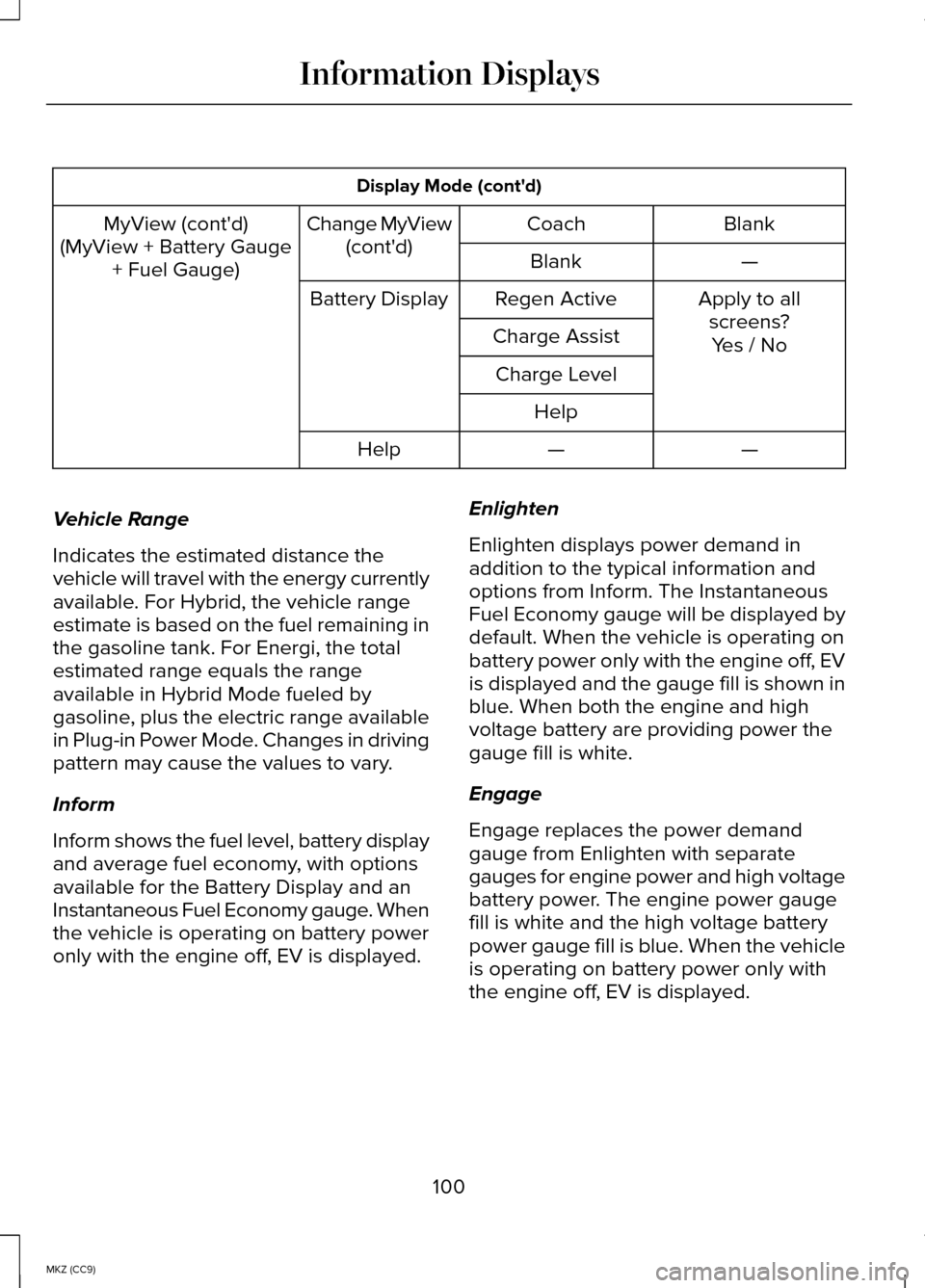
Display Mode (cont'd)
Blank
Coach
Change MyView
(cont'd)
MyView (cont'd)
(MyView + Battery Gauge + Fuel Gauge) —
Blank
Apply to allscreens?
Regen Active
Battery Display
Charge Assist Yes / No
Charge Level
Help —
—
Help
Vehicle Range
Indicates the estimated distance the
vehicle will travel with the energy currently
available. For Hybrid, the vehicle range
estimate is based on the fuel remaining in
the gasoline tank. For Energi, the total
estimated range equals the range
available in Hybrid Mode fueled by
gasoline, plus the electric range available
in Plug-in Power Mode. Changes in driving
pattern may cause the values to vary.
Inform
Inform shows the fuel level, battery display
and average fuel economy, with options
available for the Battery Display and an
Instantaneous Fuel Economy gauge. When
the vehicle is operating on battery power
only with the engine off, EV is displayed. Enlighten
Enlighten displays power demand in
addition to the typical information and
options from Inform. The Instantaneous
Fuel Economy gauge will be displayed by
default. When the vehicle is operating on
battery power only with the engine off, EV
is displayed and the gauge fill is shown in
blue. When both the engine and high
voltage battery are providing power the
gauge fill is white.
Engage
Engage replaces the power demand
gauge from Enlighten with separate
gauges for engine power and high voltage
battery power. The engine power gauge
fill is white and the high voltage battery
power gauge fill is blue. When the vehicle
is operating on battery power only with
the engine off, EV is displayed.
100
MKZ (CC9) Information Displays
Page 104 of 445
The thermometer indicator next to the
gauge will illuminate in blue or white to
indicate the following:
•
Blue thermometer - This indicates that
the hybrid system is not warm enough
to allow EV operation. The gasoline
engine will typically run continuously
when the indicator is blue.
Note: During silent key start mode, the
thermometer indicator will be blue, but the
gasoline engine will not run. This is the
result of the vehicle computer allowing the
engine to be cooler during the silent key
start period. This is normal operation and
does not indicate a problem with your
vehicle. After the first engine start the
indicator will turn white when the gasoline
engine is warm enough to turn off. •
White thermometer - This indicates that
the hybrid system is warm enough to
allow EV operation. If the vehicle
operates on battery power long
enough, it is possible that the gasoline
engine may need to run to keep the
system warm. In this case, the
thermometer indicator will revert back
to blue.
• Tach rpm x 1000 — When the gasoline
engine is running, the tachometer
gauge displays the engine speed in
revolutions per minute (RPM). When
the vehicle is operating on battery
power only with the engine off, EV is
displayed and the tachometer is
greyed out.
Note: The trip data, and average fuel
economy cannot be reset in MyView.
Trip 1 & 2 Use the arrow buttons to choose
between the following.
Note: Pressing OK resets the trip data. Trip 1 & 2
Menu level 5
Menu level 4
Menu level 3
Menu level 2
—
—
Standard
Trip 1 & Trip 2: Trip
Data+Battery
Gauge+Fuel Gauge —
—
—
—
—
—
Enhanced
—
—
Apply to all screens?
Regen Active
Battery Display
-
Yes / No
Charge Assist
102
MKZ (CC9) Information DisplaysE138660
Page 106 of 445
 Charge Assist Yes / No
Charge Level Help —
—
Help
• Fuel History: This view from left to right starts with the instantaneous fuel economy\
gauge")
Fuel Economy
(Coach + Battery
Gauge+ Fuel Gauge) Charge Assist Yes / No
Charge Level Help —
—
Help
• Fuel History: This view from left to right starts with the instantaneous fuel economy\
gauge and adds historical fuel economy data. The data is represented as \
an average
for time intervals of either 1, 2 or 6 minutes, with the left most inter\
val being the most
recent. Total time for the 5 intervals is shown at the bottom of the view. Intervals
shown in grey color are from the previous drive.
Note: You can reset your average fuel economy by pressing and holding the OK button
on the left hand steering wheel controls.
• Coach:
This view provides a comparison of your recent Acceleration, Braking an\
d
Cruising behavior to what is recommended for most efficient use of energ\
y under
present conditions. The horizontal bars fill from left to right with bes\
t behavior (and
Blue color) shown as at least half full. When the bars are less than ha\
lf full, the color
is Amber, suggesting that a change in behavior is needed to achieve better energ\
y
efficiency.
Note: Fuel economy is not always a measure of appropriate driving behavior. For
example, when driving uphill and maintaining an appropriate speed, your instant\
fuel
economy may not be good (losing leaves) but the Coach may show a blue \
bar for
Acceleration or Cruising.
Info In this mode, you can view
different vehicle system
information and perform a
system check.
104
MKZ (CC9) Information DisplaysE144642