light LINCOLN MKZ HYBRID 2018 Owner's Guide
[x] Cancel search | Manufacturer: LINCOLN, Model Year: 2018, Model line: MKZ HYBRID, Model: LINCOLN MKZ HYBRID 2018Pages: 572, PDF Size: 4.49 MB
Page 108 of 572
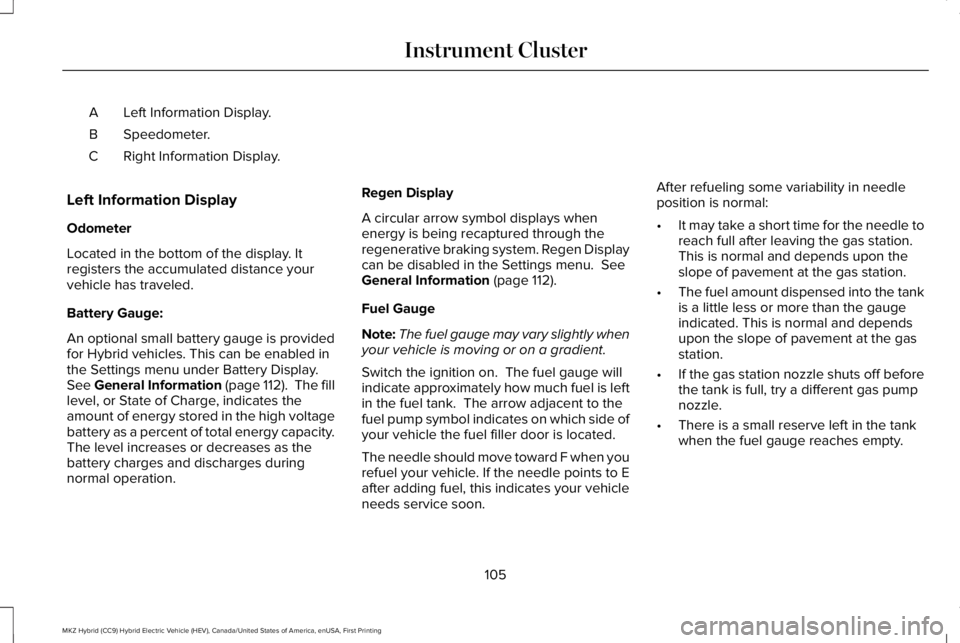
Left Information Display.A
Speedometer.B
Right Information Display.C
Left Information Display
Odometer
Located in the bottom of the display. Itregisters the accumulated distance yourvehicle has traveled.
Battery Gauge:
An optional small battery gauge is providedfor Hybrid vehicles. This can be enabled inthe Settings menu under Battery Display.See General Information (page 112). The filllevel, or State of Charge, indicates theamount of energy stored in the high voltagebattery as a percent of total energy capacity.The level increases or decreases as thebattery charges and discharges duringnormal operation.
Regen Display
A circular arrow symbol displays whenenergy is being recaptured through theregenerative braking system. Regen Displaycan be disabled in the Settings menu. SeeGeneral Information (page 112).
Fuel Gauge
Note:The fuel gauge may vary slightly whenyour vehicle is moving or on a gradient.
Switch the ignition on. The fuel gauge willindicate approximately how much fuel is leftin the fuel tank. The arrow adjacent to thefuel pump symbol indicates on which side ofyour vehicle the fuel filler door is located.
The needle should move toward F when yourefuel your vehicle. If the needle points to Eafter adding fuel, this indicates your vehicleneeds service soon.
After refueling some variability in needleposition is normal:
•It may take a short time for the needle toreach full after leaving the gas station.This is normal and depends upon theslope of pavement at the gas station.
•The fuel amount dispensed into the tankis a little less or more than the gaugeindicated. This is normal and dependsupon the slope of pavement at the gasstation.
•If the gas station nozzle shuts off beforethe tank is full, try a different gas pumpnozzle.
•There is a small reserve left in the tankwhen the fuel gauge reaches empty.
105
MKZ Hybrid (CC9) Hybrid Electric Vehicle (HEV), Canada/United States of America, enUSA, First Printing
Instrument Cluster
Page 110 of 572
Vehicle Range
Located at the bottom of the display. Itindicates the estimated distance to emptybased on the fuel remaining in the tank.Changes in your driving pattern and climatecontrol use may cause the value to vary.
Trip Efficiency Leaves
Trip Efficiency Leaves display upon shuttingoff your vehicle. The number of leavesrepresent the average for the last trip. A newtrip begins each time you start your vehicle(when the Ready to Drive message comeson). Corresponding Trip Summary datadisplays on the left information display.
WARNING LAMPS AND
INDICATORS
The following warning lamps and indicatorsalert you to a vehicle condition that maybecome serious. Some lamps illuminatewhen you start your vehicle to make surethey work. If any lamps remain on afterstarting your vehicle, refer to the respectivesystem warning lamp for further information.
Note:Some warning indicators appear inthe information display and operate thesame as a warning lamp but do notilluminate when you start your vehicle.
Adaptive Cruise Control Indicator (If
Equipped)
The speed control system indicatorlight changes color to indicatewhat mode the system is in: SeeUsing Adaptive Cruise Control (page 227).
On (white light): Lights when you turn theadaptive cruise control system on. Turns offwhen you turn the speed control system off.
Engaged (green light): Lights when theadaptive cruise control system engages.Turns off when the speed control systemdisengages.
Anti-Lock Brake System Warning Lamp
If it lights when you are driving, thisindicates a malfunction. You willcontinue to have the normalbraking system (without Anti-lock brakingsystem) unless the brake system warninglamp also lights. Have an authorized dealercheck the system.
Auto Hold Active
It illuminates when the systemholds your vehicle stationary.
Auto Hold Unavailable
It illuminates when the system ison, but unavailable to hold yourvehicle stationary.
Automatic Headlamp High BeamIndicator (If Equipped)
It illuminates when the systemautomatically turns the headlamphigh beam on.
107
MKZ Hybrid (CC9) Hybrid Electric Vehicle (HEV), Canada/United States of America, enUSA, First Printing
Instrument ClusterE144524 E197933 E197934
Page 111 of 572
See Automatic High Beam Control (page91).
Battery
If it lights while driving, it indicatesa malfunction. Switch off allunnecessary electrical equipmentand have an authorized dealer check thesystem immediately.
Blind Spot Monitor (If Equipped)
Lights when you switch this featureoff or with a blind spot message.See Blind Spot InformationSystem (page 242). See InformationMessages (page 123).
Brake System
WARNING
Driving your vehicle with the warninglamp on is dangerous. A significantdecrease in braking performance may occur.It may take you longer to stop your vehicle.Have your vehicle checked as soon aspossible. Driving extended distances withthe parking brake engaged can cause brakefailure and the risk of personal injury.
It illuminates when you engage theparking brake and the ignition ison.
If it illuminates when your vehicle is moving,make sure the parking brake is disengaged. If the parking brake is disengaged, thisindicates low brake fluid level or a brakesystem fault. Have your vehicle checkedimmediately.
Cruise Control Indicator
It illuminates when you switch thesystem on.
See Using Cruise Control (page 226).
Direction Indicator
Lights when the left or right turnsignal or the hazard warningflasher is switched on. If theindicators stay on or flash faster, check for aburned-out bulb. See Changing a Bulb(page 314).
Door Ajar
Lights when the ignition is on andany door is not completely closed.
EcoSelect
Lights when you switch on thisfeature. See EcoSelect (page 175).
Electric Park Brake
Lights or flashes when the electricparking brake malfunctions.
108
MKZ Hybrid (CC9) Hybrid Electric Vehicle (HEV), Canada/United States of America, enUSA, First Printing
Instrument Cluster E151262 E138644 E71340 E194390 E146190
Page 112 of 572
Engine or Motor Coolant Temperature
Lights when the engine or motorcooling system is overheating.Stop your vehicle in a safe placeand have an authorized dealer check thesystem.
Engine Oil
It illuminates when you switch theignition on.
If it illuminates when the engine isrunning this indicates a malfunction. Stopyour vehicle as soon as it is safe to do soand switch the engine off. Check the engineoil level. If the oil level is sufficient, thisindicates a system malfunction. Have yourvehicle checked immediately.
See Engine Oil Check (page 303).
Fasten Seatbelt Warning Lamp
It illuminates and a chime soundsuntil you fasten the seatbelts.
Front Airbag
Lights when you start your vehicle.If it continues to flash or remainson, it indicates a malfunction. Havean authorized dealer check the system.
Grade Assist
Lights when you switch on thegrade assist function.
Heads Up Display (If Equipped)
A red beam of lights appears onthe windshield in certain instanceswhen using adaptive cruise controland/or the collision warning system. To makesure the display works, it will also appearmomentarily when you start your vehicle.
Headlamp High Beam Indicator
Lights when you switch on thehigh-beam headlamps. Flasheswhen you use the headlampflasher.
Hood Ajar
Lights when the ignition is on andthe hood is not completely closed.
Lane Keeping Aid (If Equipped)
Lights when you activate the lanekeeping system.
Low Fuel Level Warning Lamp
Lights when the fuel level is low orthe fuel tank is nearly empty. Refuel as soon as possible.
Low Tire Pressure Warning Lamp
It illuminates when your tirepressure is low. If the lamp remainson with the engine running orwhen driving, check your tire pressure assoon as possible.
109
MKZ Hybrid (CC9) Hybrid Electric Vehicle (HEV), Canada/United States of America, enUSA, First Printing
Instrument Cluster E71880 E67017 E144523 E156133 E159324 E144813
Page 113 of 572
It also illuminates momentarily when youswitch the ignition on to confirm the lamp isfunctional. If it does not illuminate when youswitch the ignition on, or begins to flash atany time, have the system checked by yourauthorized dealer.
Low Washer Fluid Level Warning Lamp
Lights when the windshield washerfluid is low.
Parking Lamps
Lights when you switch on theparking lamps.
Powertrain Fault
Lights when your vehicle detectsa powertrain fault. Contact anauthorized dealer as soon aspossible.
Note:If your vehicle detects certain faults,it will not allow you to operate theaccelerator pedal. If this happens, press thebrake pedal and release it. This will activatelimp home vehicle operation. In limp homevehicle operation, your vehicle willaccelerate in a controlled manner up to amaximum speed of 35 mph (56 km/h) on aflat surface. If you apply the brake pedal ormove the transmission to neutral (N) you canoverride your vehicle’s acceleration.
Ready to Drive
Lights when you switch on yourvehicle and it is ready to drive. Acorresponding message maydisplay stating ready to drive.
Service Engine Soon
If it illuminates when the engine isrunning this indicates amalfunction. The On BoardDiagnostics system has detected amalfunction of the vehicle emission controlsystem.
If it flashes, engine misfire may be occurring. Increased exhaust gas temperatures coulddamage the catalytic converter or othervehicle components. Drive in a moderatefashion (avoid heavy acceleration anddeceleration) and have your vehicleimmediately serviced.
It illuminates when you switch the ignitionon prior to engine start to check the bulb andto indicate whether your vehicle is ready forInspection and Maintenance (I/M) testing.
Normally, it illuminates until the engine iscranked and automatically turns off if nomalfunctions are present. However, if after15 seconds it flashes eight times, thisindicates that your vehicle is not ready forInspection and Maintenance (I/M) testing.
See Catalytic Converter (page 188).
110
MKZ Hybrid (CC9) Hybrid Electric Vehicle (HEV), Canada/United States of America, enUSA, First Printing
Instrument ClusterE178202 E144692
Page 114 of 572
Stability Control
Flashes when the system is active.If it stays lit or does not light whenyou switch on the ignition, thisindicates a malfunction. During a malfunctionthe system will switch off. Have an authorizeddealer check the system immediately. SeeUsing Stability Control (page 208).
Stability Control Off
It illuminates when you switch thesystem off.
Stop Safely
Lights if your vehicle has anelectrical component fault or failurethat will cause your vehicle toshutdown or enter into a limited operatingmode. You may also see a message.
Trunk Ajar
Lights when the ignition is on andthe trunk is not completely closed.
AUDIBLE WARNINGS AND
INDICATORS
Key in Ignition Warning Chime
Sounds when you open the driver's door andyou have left the key in the ignition.
Keyless Warning Alert (If Equipped)
Sounds the horn twice when you exit yourvehicle with the intelligent access key, afterthe last door is closed and your keylessvehicle is in RUN, indicating your vehicle isstill on.
Headlamps On Warning Chime
Sounds when you remove the key from theignition and open the driver's door and youhave left the headlamps or parking lampson.
Parking Brake On Warning Chime
Sounds when you have left the parking brakeon and drive your vehicle. If the warningchime remains on after you have releasedthe parking brake, have the system checkedby an authorized dealer immediately.
111
MKZ Hybrid (CC9) Hybrid Electric Vehicle (HEV), Canada/United States of America, enUSA, First Printing
Instrument ClusterE138639 E130458 E144693 E159323
Page 115 of 572
GENERAL INFORMATION
WARNING
Driving while distracted can result inloss of vehicle control, crash and injury.We strongly recommend that you useextreme caution when using any device thatmay take your focus off the road. Yourprimary responsibility is the safe operationof your vehicle. We recommend against theuse of any hand-held device while drivingand encourage the use of voice-operatedsystems when possible. Make sure you areaware of all applicable local laws that mayaffect the use of electronic devices whiledriving.
You can control various systems on yourvehicle using the information display controlson the steering wheel. The informationdisplay shows the corresponding information.
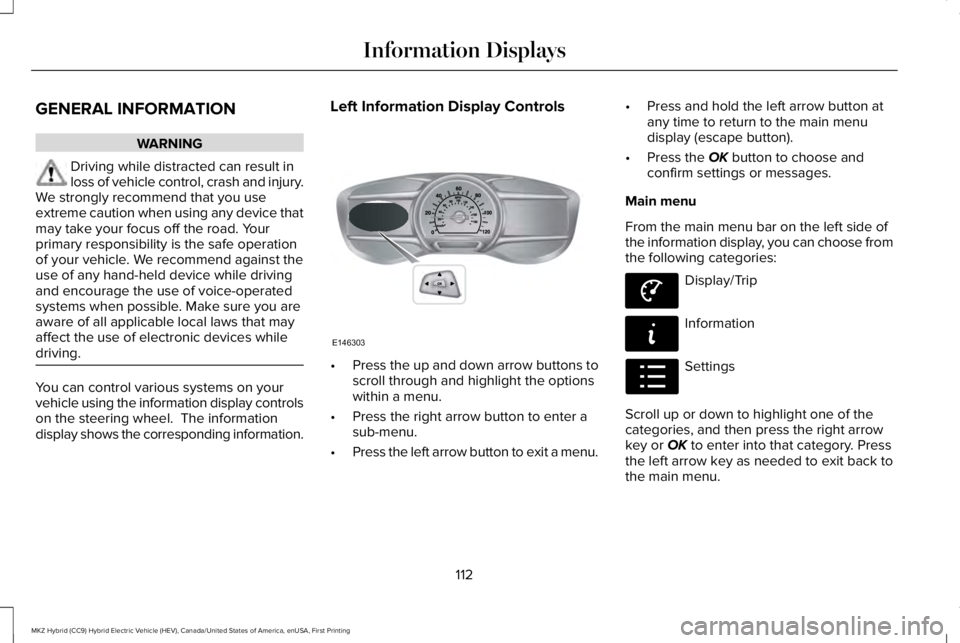
Left Information Display Controls
•Press the up and down arrow buttons toscroll through and highlight the optionswithin a menu.
•Press the right arrow button to enter asub-menu.
•Press the left arrow button to exit a menu.
•Press and hold the left arrow button atany time to return to the main menudisplay (escape button).
•Press the OK button to choose andconfirm settings or messages.
Main menu
From the main menu bar on the left side ofthe information display, you can choose fromthe following categories:
Display/Trip
Information
Settings
Scroll up or down to highlight one of thecategories, and then press the right arrowkey or OK to enter into that category. Pressthe left arrow key as needed to exit back tothe main menu.
112
MKZ Hybrid (CC9) Hybrid Electric Vehicle (HEV), Canada/United States of America, enUSA, First Printing
Information DisplaysE146303 E144639 E144642 E100023
Page 118 of 572
Engage
Engage provides separate gauges for enginepower and high voltage battery power inkilowatts (kW). The engine power gauge fillis white and the high voltage battery powergauge fill is blue. You can also see aninstantaneous fuel economy gauge. Whenyour vehicle is operating on battery poweronly, you will see EV displayed and thegauges will appear in blue.
Note:Hold OK to reset average fueleconomy.
Empower
Empower provides a power demand gaugein kilowatts (kW) which includes an engineon or off threshold.
•When your vehicle is operating withbattery power only (below the threshold),you will see EV displayed and the gaugefill is blue.
•When your vehicle is operating with boththe engine and the high voltage batteryproviding power the gauge fill is white.
•When power demand surpasses theamber indicator, this level of demand andassociated fuel economy displays inamber.
•When the engine is on, reducing powerdemand to less than the threshold willallow the engine to turn off.
You can also see an instantaneous fueleconomy gauge.
Note:Hold OK to reset average fueleconomy.
MyView
You can choose what to display in this view.Selecting Change MyView in the optionsmenu allows you to scroll through twocolumns of content choices.
•Press the up or down arrow to viewcontent.
•Press OK to save your selected content
•You must select content in both columnsbefore you can save your new MyView.
Unique content available in MyView:
•Accessory Power— Indicates electricalpower demands from your vehicle’saccessory systems. Accessories usepower but do not contribute to propellingyour vehicle. The gauge separatelydisplays power demand in kilowatts (kW)for climate and other accessories.Climate includes the power being usedby high voltage climate controlcomponents such as the electric A/Ccompressor. Other includes all powerbeing used by the low voltageaccessories (cabin fans, headlights andheated seats).
•Coolant Temp – Indicates engine coolanttemperature. At normal operatingtemperature, the level indicator will bewhite and will be in the normal range(between H and C). If the engine coolanttemperature exceeds the normal range,the level indicator will change to red toindicate that the engine is overheating.Stop your vehicle as soon as safelypossible, turn your vehicle off and let theengine cool.
115
MKZ Hybrid (CC9) Hybrid Electric Vehicle (HEV), Canada/United States of America, enUSA, First Printing
Information Displays
Page 121 of 572
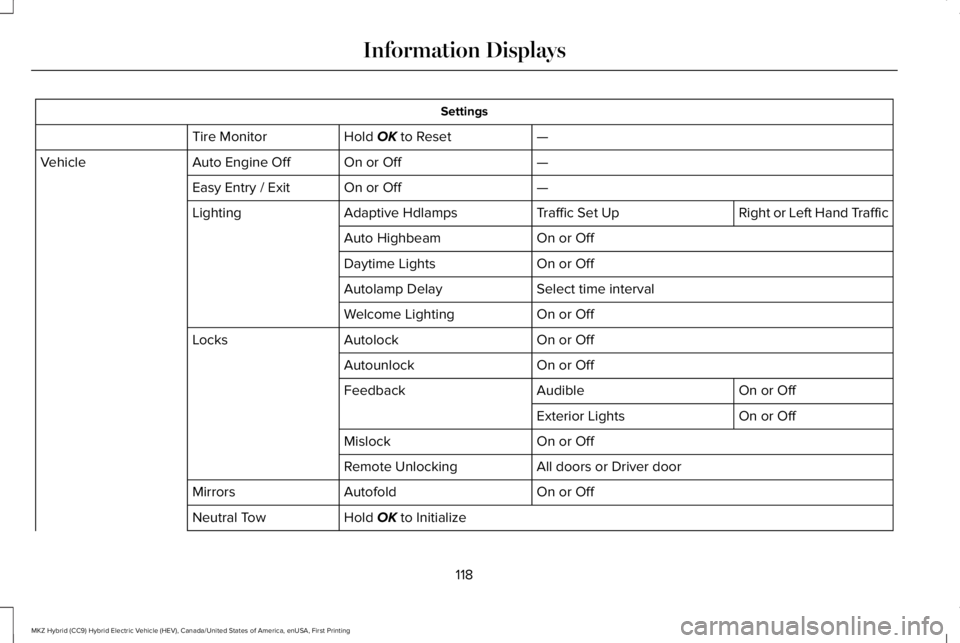
Settings
—Hold OK to ResetTire Monitor
—On or OffAuto Engine OffVehicle
—On or OffEasy Entry / Exit
Right or Left Hand TrafficTraffic Set UpAdaptive HdlampsLighting
On or OffAuto Highbeam
On or OffDaytime Lights
Select time intervalAutolamp Delay
On or OffWelcome Lighting
On or OffAutolockLocks
On or OffAutounlock
On or OffAudibleFeedback
On or OffExterior Lights
On or OffMislock
All doors or Driver doorRemote Unlocking
On or OffAutofoldMirrors
Hold OK to InitializeNeutral Tow
118
MKZ Hybrid (CC9) Hybrid Electric Vehicle (HEV), Canada/United States of America, enUSA, First Printing
Information Displays
Page 124 of 572
Settings
On or OffBattery Display
On or OffRegen Display
Hold OK to ResetDriving History
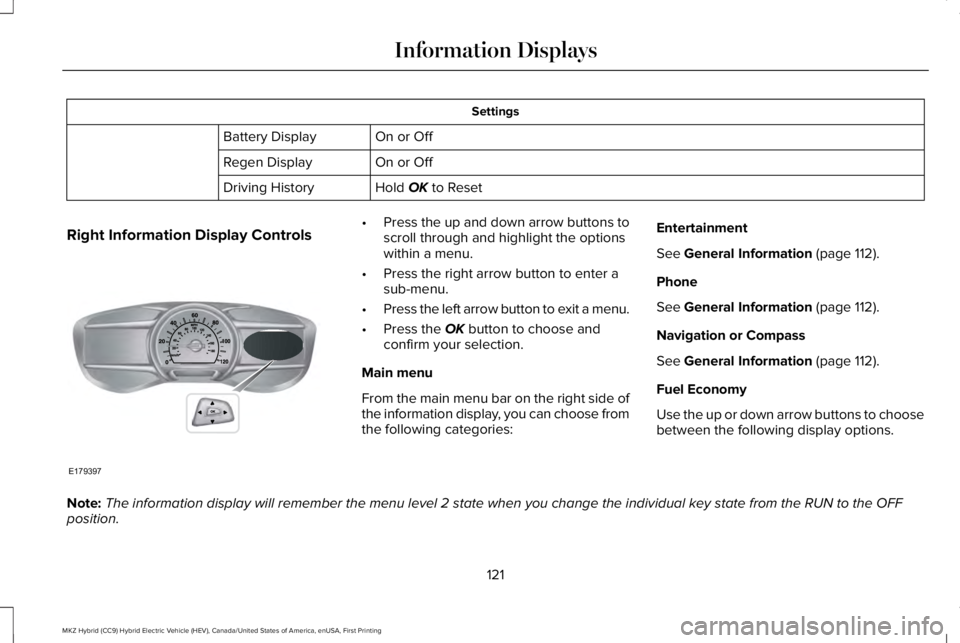
Right Information Display Controls•Press the up and down arrow buttons toscroll through and highlight the optionswithin a menu.
•Press the right arrow button to enter asub-menu.
•Press the left arrow button to exit a menu.
•Press the OK button to choose andconfirm your selection.
Main menu
From the main menu bar on the right side ofthe information display, you can choose fromthe following categories:
Entertainment
See General Information (page 112).
Phone
See General Information (page 112).
Navigation or Compass
See General Information (page 112).
Fuel Economy
Use the up or down arrow buttons to choosebetween the following display options.
Note:The information display will remember the menu level 2 state when you change the individual key state from the RUN to the OFFposition.
121
MKZ Hybrid (CC9) Hybrid Electric Vehicle (HEV), Canada/United States of America, enUSA, First Printing
Information DisplaysE179397