warning LINCOLN MKZ HYBRID 2019 Workshop Manual
[x] Cancel search | Manufacturer: LINCOLN, Model Year: 2019, Model line: MKZ HYBRID, Model: LINCOLN MKZ HYBRID 2019Pages: 575, PDF Size: 4.77 MB
Page 101 of 575
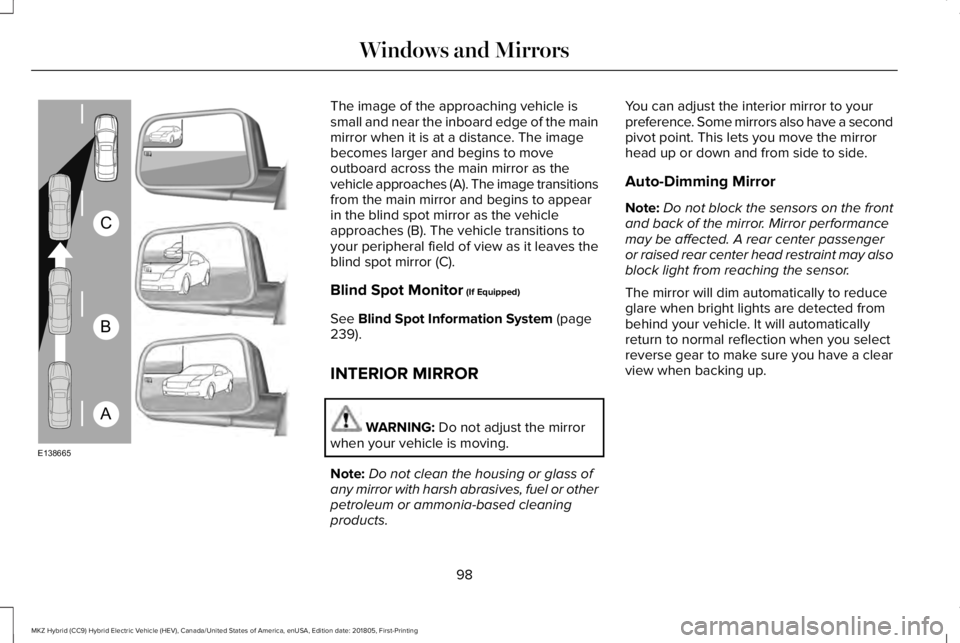
The image of the approaching vehicle issmall and near the inboard edge of the mainmirror when it is at a distance. The imagebecomes larger and begins to moveoutboard across the main mirror as thevehicle approaches (A). The image transitionsfrom the main mirror and begins to appearin the blind spot mirror as the vehicleapproaches (B). The vehicle transitions toyour peripheral field of view as it leaves theblind spot mirror (C).
Blind Spot Monitor (If Equipped)
See Blind Spot Information System (page239).
INTERIOR MIRROR
WARNING: Do not adjust the mirrorwhen your vehicle is moving.
Note:Do not clean the housing or glass ofany mirror with harsh abrasives, fuel or otherpetroleum or ammonia-based cleaningproducts.
You can adjust the interior mirror to yourpreference. Some mirrors also have a secondpivot point. This lets you move the mirrorhead up or down and from side to side.
Auto-Dimming Mirror
Note:Do not block the sensors on the frontand back of the mirror. Mirror performancemay be affected. A rear center passengeror raised rear center head restraint may alsoblock light from reaching the sensor.
The mirror will dim automatically to reduceglare when bright lights are detected frombehind your vehicle. It will automaticallyreturn to normal reflection when you selectreverse gear to make sure you have a clearview when backing up.
98
MKZ Hybrid (CC9) Hybrid Electric Vehicle (HEV), Canada/United States of America, enUSA, Edition date: 201805, First-Printing
Windows and MirrorsA
B
C
E138665
Page 102 of 575
SUN VISORS
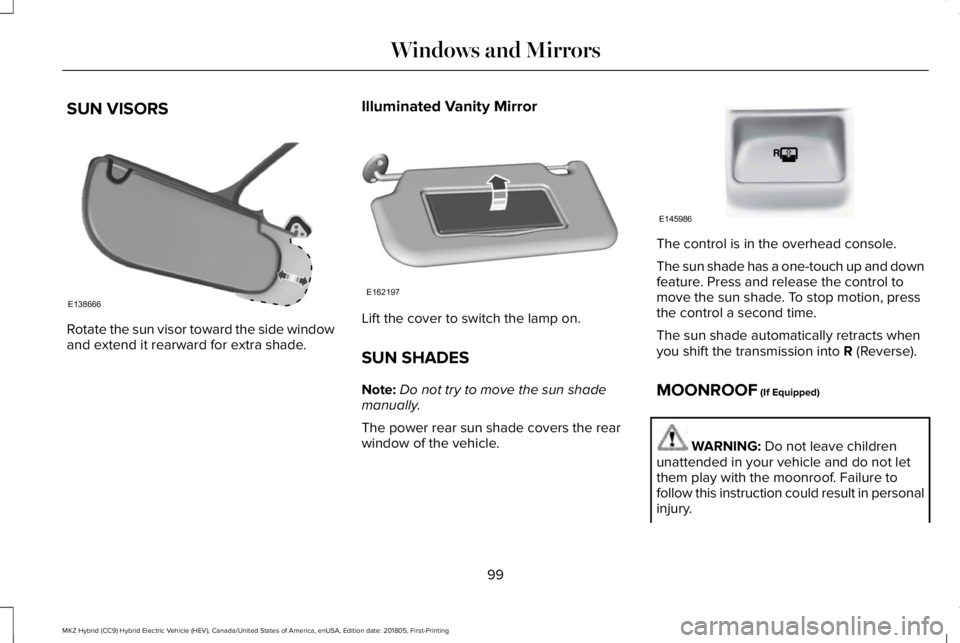
Rotate the sun visor toward the side windowand extend it rearward for extra shade.
Illuminated Vanity Mirror
Lift the cover to switch the lamp on.
SUN SHADES
Note:Do not try to move the sun shademanually.
The power rear sun shade covers the rearwindow of the vehicle.
The control is in the overhead console.
The sun shade has a one-touch up and downfeature. Press and release the control tomove the sun shade. To stop motion, pressthe control a second time.
The sun shade automatically retracts whenyou shift the transmission into R (Reverse).
MOONROOF (If Equipped)
WARNING: Do not leave childrenunattended in your vehicle and do not letthem play with the moonroof. Failure tofollow this instruction could result in personalinjury.
99
MKZ Hybrid (CC9) Hybrid Electric Vehicle (HEV), Canada/United States of America, enUSA, Edition date: 201805, First-Printing
Windows and MirrorsE138666 E162197 E145986
Page 103 of 575
WARNING: When closing themoonroof, verify that it is free of obstructionand make sure that children and pets are notin the proximity of the roof opening.
Type 1
The sliding shade can be manually openedor closed when the moonroof is closed. Pullthe shade toward the front of the vehicle toclose it.
The moonroof controls are on the overheadconsole and have a one-touch open andclose feature. To stop it during one-touchoperation, touch the control a second time.
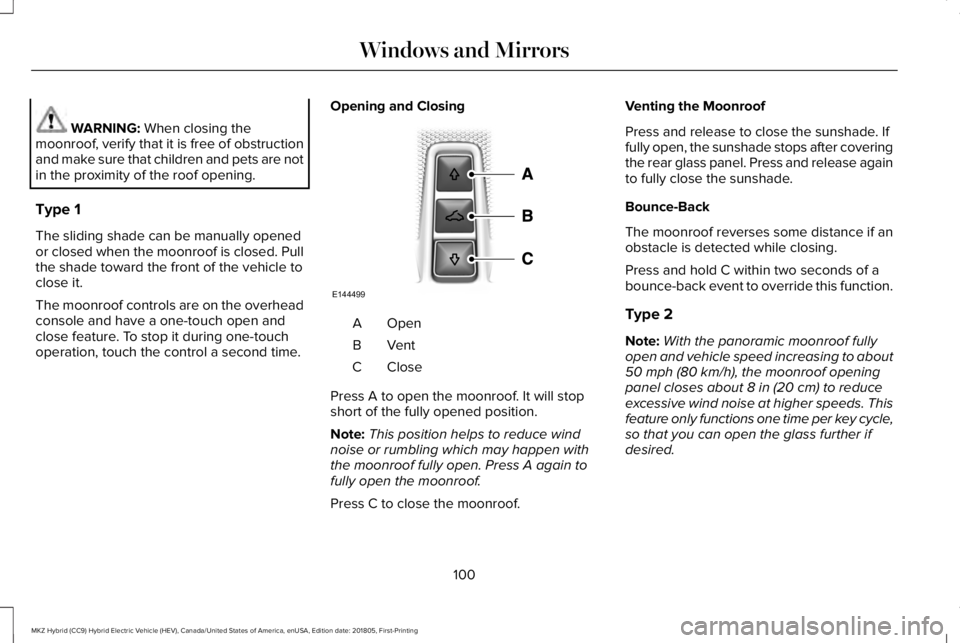
Opening and Closing
OpenA
VentB
CloseC
Press A to open the moonroof. It will stopshort of the fully opened position.
Note:This position helps to reduce windnoise or rumbling which may happen withthe moonroof fully open. Press A again tofully open the moonroof.
Press C to close the moonroof.
Venting the Moonroof
Press and release to close the sunshade. Iffully open, the sunshade stops after coveringthe rear glass panel. Press and release againto fully close the sunshade.
Bounce-Back
The moonroof reverses some distance if anobstacle is detected while closing.
Press and hold C within two seconds of abounce-back event to override this function.
Type 2
Note:With the panoramic moonroof fullyopen and vehicle speed increasing to about50 mph (80 km/h), the moonroof openingpanel closes about 8 in (20 cm) to reduceexcessive wind noise at higher speeds. Thisfeature only functions one time per key cycle,so that you can open the glass further ifdesired.
100
MKZ Hybrid (CC9) Hybrid Electric Vehicle (HEV), Canada/United States of America, enUSA, Edition date: 201805, First-Printing
Windows and MirrorsE144499
Page 107 of 575
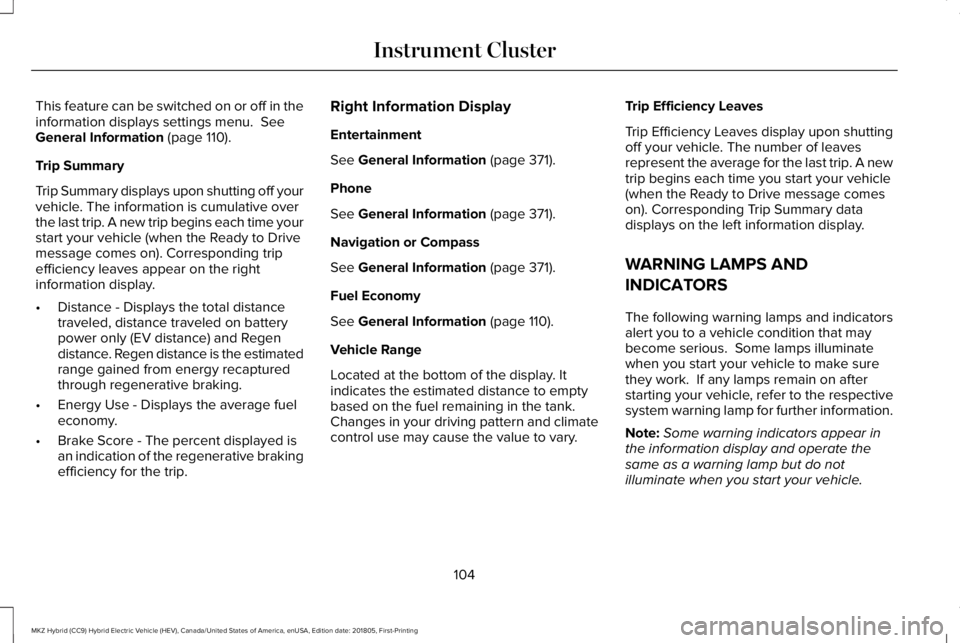
This feature can be switched on or off in theinformation displays settings menu. SeeGeneral Information (page 110).
Trip Summary
Trip Summary displays upon shutting off yourvehicle. The information is cumulative overthe last trip. A new trip begins each time yourstart your vehicle (when the Ready to Drivemessage comes on). Corresponding tripefficiency leaves appear on the rightinformation display.
•Distance - Displays the total distancetraveled, distance traveled on batterypower only (EV distance) and Regendistance. Regen distance is the estimatedrange gained from energy recapturedthrough regenerative braking.
•Energy Use - Displays the average fueleconomy.
•Brake Score - The percent displayed isan indication of the regenerative brakingefficiency for the trip.
Right Information Display
Entertainment
See General Information (page 371).
Phone
See General Information (page 371).
Navigation or Compass
See General Information (page 371).
Fuel Economy
See General Information (page 110).
Vehicle Range
Located at the bottom of the display. Itindicates the estimated distance to emptybased on the fuel remaining in the tank.Changes in your driving pattern and climatecontrol use may cause the value to vary.
Trip Efficiency Leaves
Trip Efficiency Leaves display upon shuttingoff your vehicle. The number of leavesrepresent the average for the last trip. A newtrip begins each time you start your vehicle(when the Ready to Drive message comeson). Corresponding Trip Summary datadisplays on the left information display.
WARNING LAMPS AND
INDICATORS
The following warning lamps and indicatorsalert you to a vehicle condition that maybecome serious. Some lamps illuminatewhen you start your vehicle to make surethey work. If any lamps remain on afterstarting your vehicle, refer to the respectivesystem warning lamp for further information.
Note:Some warning indicators appear inthe information display and operate thesame as a warning lamp but do notilluminate when you start your vehicle.
104
MKZ Hybrid (CC9) Hybrid Electric Vehicle (HEV), Canada/United States of America, enUSA, Edition date: 201805, First-Printing
Instrument Cluster
Page 108 of 575
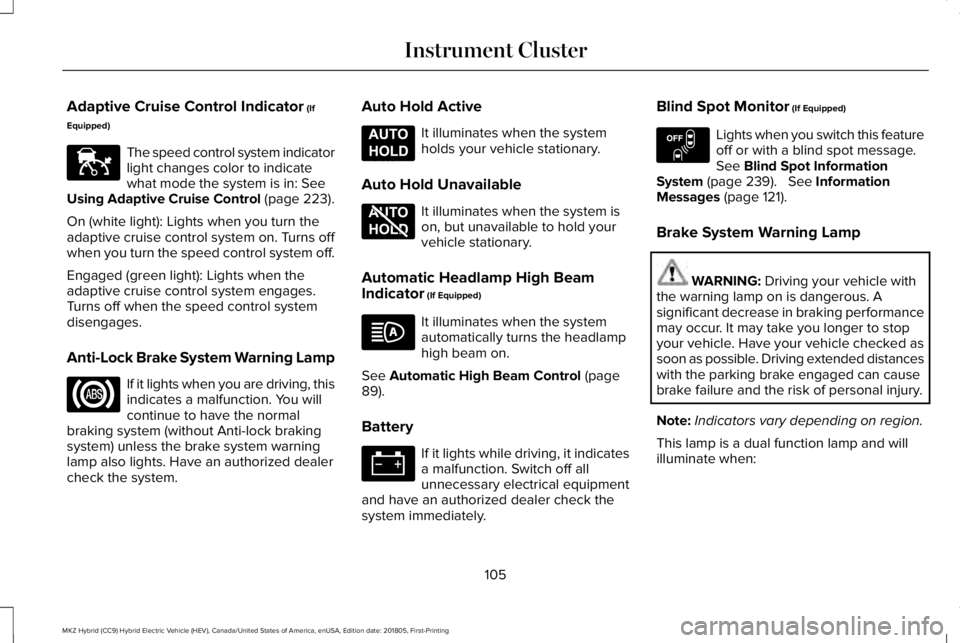
Adaptive Cruise Control Indicator (If
Equipped)
The speed control system indicatorlight changes color to indicatewhat mode the system is in: SeeUsing Adaptive Cruise Control (page 223).
On (white light): Lights when you turn theadaptive cruise control system on. Turns offwhen you turn the speed control system off.
Engaged (green light): Lights when theadaptive cruise control system engages.Turns off when the speed control systemdisengages.
Anti-Lock Brake System Warning Lamp
If it lights when you are driving, thisindicates a malfunction. You willcontinue to have the normalbraking system (without Anti-lock brakingsystem) unless the brake system warninglamp also lights. Have an authorized dealercheck the system.
Auto Hold Active
It illuminates when the systemholds your vehicle stationary.
Auto Hold Unavailable
It illuminates when the system ison, but unavailable to hold yourvehicle stationary.
Automatic Headlamp High BeamIndicator (If Equipped)
It illuminates when the systemautomatically turns the headlamphigh beam on.
See Automatic High Beam Control (page89).
Battery
If it lights while driving, it indicatesa malfunction. Switch off allunnecessary electrical equipmentand have an authorized dealer check thesystem immediately.
Blind Spot Monitor (If Equipped)
Lights when you switch this featureoff or with a blind spot message.See Blind Spot InformationSystem (page 239). See InformationMessages (page 121).
Brake System Warning Lamp
WARNING: Driving your vehicle withthe warning lamp on is dangerous. Asignificant decrease in braking performancemay occur. It may take you longer to stopyour vehicle. Have your vehicle checked assoon as possible. Driving extended distanceswith the parking brake engaged can causebrake failure and the risk of personal injury.
Note:Indicators vary depending on region.
This lamp is a dual function lamp and willilluminate when:
105
MKZ Hybrid (CC9) Hybrid Electric Vehicle (HEV), Canada/United States of America, enUSA, Edition date: 201805, First-Printing
Instrument ClusterE144524 E197933 E197934 E151262
Page 109 of 575
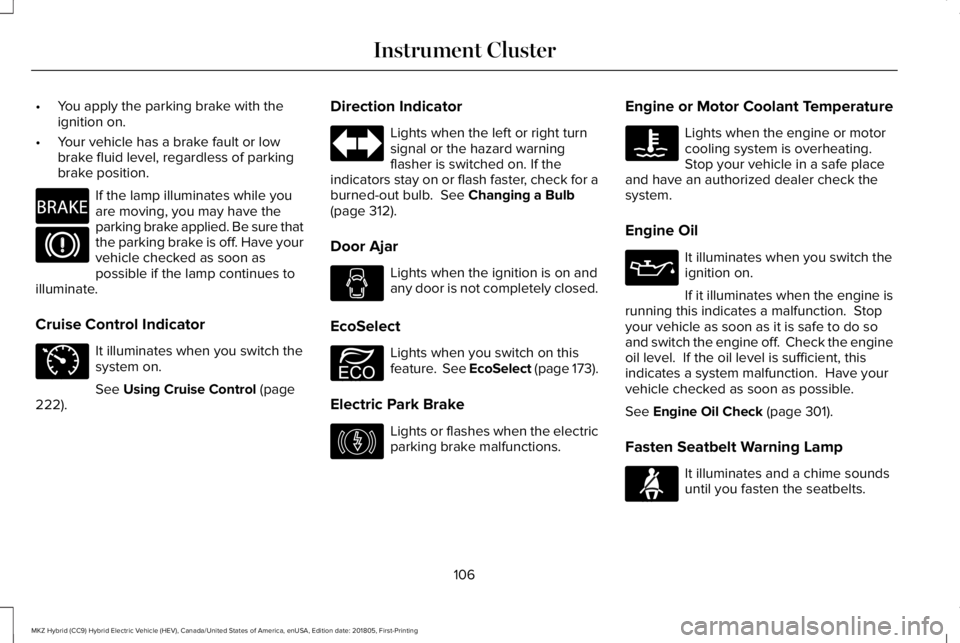
•You apply the parking brake with theignition on.
•Your vehicle has a brake fault or lowbrake fluid level, regardless of parkingbrake position.
If the lamp illuminates while youare moving, you may have theparking brake applied. Be sure thatthe parking brake is off. Have yourvehicle checked as soon aspossible if the lamp continues toilluminate.
Cruise Control Indicator
It illuminates when you switch thesystem on.
See Using Cruise Control (page222).
Direction Indicator
Lights when the left or right turnsignal or the hazard warningflasher is switched on. If theindicators stay on or flash faster, check for aburned-out bulb. See Changing a Bulb(page 312).
Door Ajar
Lights when the ignition is on andany door is not completely closed.
EcoSelect
Lights when you switch on thisfeature. See EcoSelect (page 173).
Electric Park Brake
Lights or flashes when the electricparking brake malfunctions.
Engine or Motor Coolant Temperature
Lights when the engine or motorcooling system is overheating.Stop your vehicle in a safe placeand have an authorized dealer check thesystem.
Engine Oil
It illuminates when you switch theignition on.
If it illuminates when the engine isrunning this indicates a malfunction. Stopyour vehicle as soon as it is safe to do soand switch the engine off. Check the engineoil level. If the oil level is sufficient, thisindicates a system malfunction. Have yourvehicle checked as soon as possible.
See Engine Oil Check (page 301).
Fasten Seatbelt Warning Lamp
It illuminates and a chime soundsuntil you fasten the seatbelts.
106
MKZ Hybrid (CC9) Hybrid Electric Vehicle (HEV), Canada/United States of America, enUSA, Edition date: 201805, First-Printing
Instrument ClusterE270480 E71340 E194390 E146190 E71880
Page 110 of 575
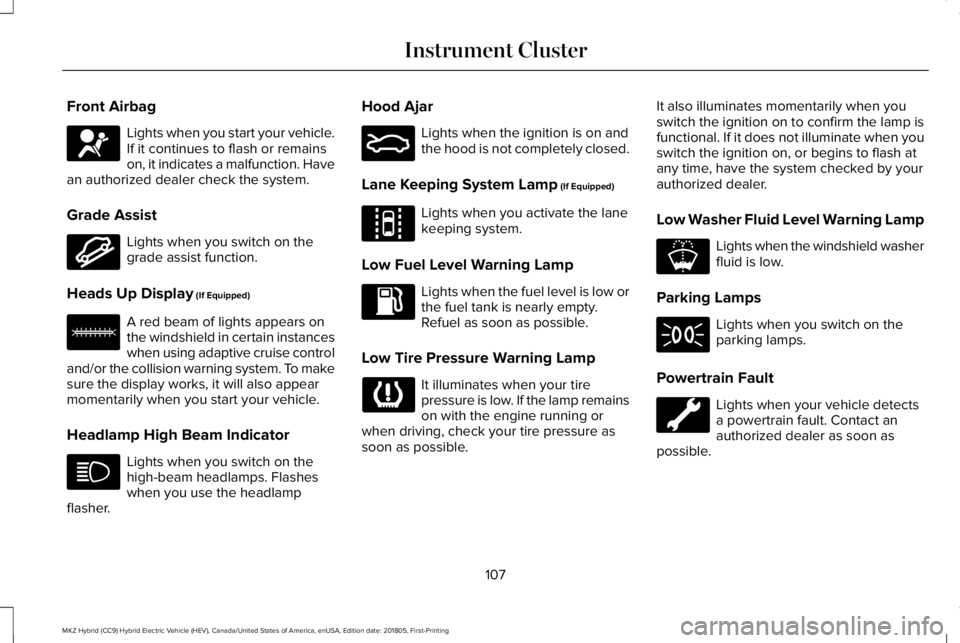
Front Airbag
Lights when you start your vehicle.If it continues to flash or remainson, it indicates a malfunction. Havean authorized dealer check the system.
Grade Assist
Lights when you switch on thegrade assist function.
Heads Up Display (If Equipped)
A red beam of lights appears onthe windshield in certain instanceswhen using adaptive cruise controland/or the collision warning system. To makesure the display works, it will also appearmomentarily when you start your vehicle.
Headlamp High Beam Indicator
Lights when you switch on thehigh-beam headlamps. Flasheswhen you use the headlampflasher.
Hood Ajar
Lights when the ignition is on andthe hood is not completely closed.
Lane Keeping System Lamp (If Equipped)
Lights when you activate the lanekeeping system.
Low Fuel Level Warning Lamp
Lights when the fuel level is low orthe fuel tank is nearly empty. Refuel as soon as possible.
Low Tire Pressure Warning Lamp
It illuminates when your tirepressure is low. If the lamp remainson with the engine running orwhen driving, check your tire pressure assoon as possible.
It also illuminates momentarily when youswitch the ignition on to confirm the lamp isfunctional. If it does not illuminate when youswitch the ignition on, or begins to flash atany time, have the system checked by yourauthorized dealer.
Low Washer Fluid Level Warning Lamp
Lights when the windshield washerfluid is low.
Parking Lamps
Lights when you switch on theparking lamps.
Powertrain Fault
Lights when your vehicle detectsa powertrain fault. Contact anauthorized dealer as soon aspossible.
107
MKZ Hybrid (CC9) Hybrid Electric Vehicle (HEV), Canada/United States of America, enUSA, Edition date: 201805, First-Printing
Instrument ClusterE67017 E144523 E156133 E159324 E144813 E178202
Page 112 of 575
AUDIBLE WARNINGS AND
INDICATORS
Keyless Warning Alert
The horn will sound twice when you exit yourvehicle with the intelligent access key andyour vehicle is in RUN, indicating your vehicleis still on.
Headlamps On Warning Chime
Sounds when you remove the key from theignition and open the driver's door and youhave left the headlamps or parking lampson.
Parking Brake On Warning Chime
Sounds when you have left the parking brakeon and drive your vehicle. If the warningchime remains on after you have releasedthe parking brake, have the system checkedby your authorized dealer immediately.
109
MKZ Hybrid (CC9) Hybrid Electric Vehicle (HEV), Canada/United States of America, enUSA, Edition date: 201805, First-Printing
Instrument Cluster
Page 113 of 575
GENERAL INFORMATION
WARNING: Driving while distractedcan result in loss of vehicle control, crashand injury. We strongly recommend that youuse extreme caution when using any devicethat may take your focus off the road. Yourprimary responsibility is the safe operationof your vehicle. We recommend against theuse of any hand-held device while drivingand encourage the use of voice-operatedsystems when possible. Make sure you areaware of all applicable local laws that mayaffect the use of electronic devices whiledriving.
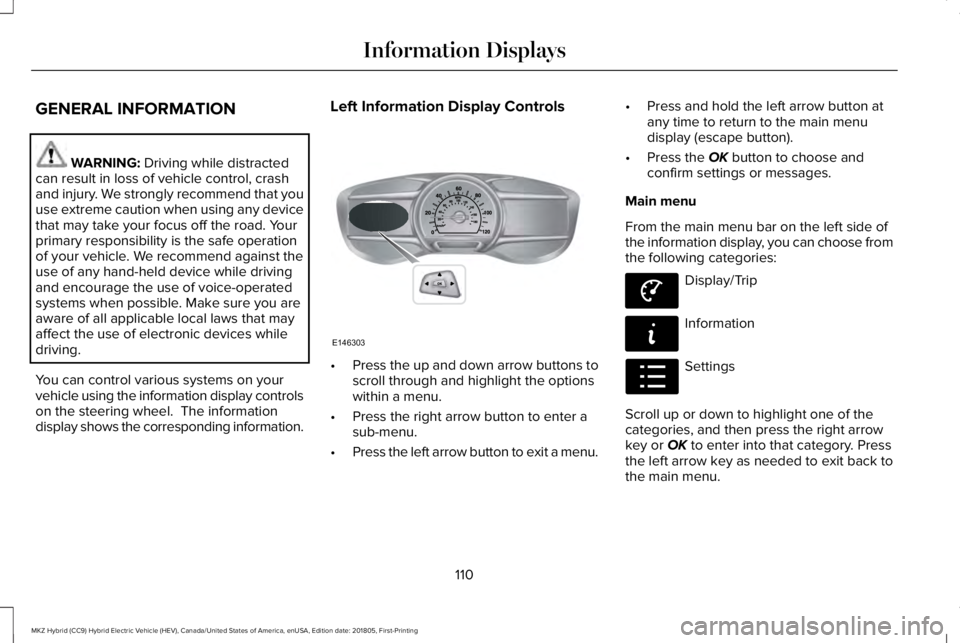
You can control various systems on yourvehicle using the information display controlson the steering wheel. The informationdisplay shows the corresponding information.
Left Information Display Controls
•Press the up and down arrow buttons toscroll through and highlight the optionswithin a menu.
•Press the right arrow button to enter asub-menu.
•Press the left arrow button to exit a menu.
•Press and hold the left arrow button atany time to return to the main menudisplay (escape button).
•Press the OK button to choose andconfirm settings or messages.
Main menu
From the main menu bar on the left side ofthe information display, you can choose fromthe following categories:
Display/Trip
Information
Settings
Scroll up or down to highlight one of thecategories, and then press the right arrowkey or OK to enter into that category. Pressthe left arrow key as needed to exit back tothe main menu.
110
MKZ Hybrid (CC9) Hybrid Electric Vehicle (HEV), Canada/United States of America, enUSA, Edition date: 201805, First-Printing
Information DisplaysE146303 E144639 E144642 E100023
Page 117 of 575
•Tach rpm x 1000 — When the gasolineengine is running, the tachometer gaugedisplays the engine speed in revolutionsper minute (RPM). When your vehicle isoperating on battery power only with theengine off, EV displays and thetachometer is greyed out.
Note:The trip data, and average fueleconomy cannot be reset in MyView.
Trip 1 & 2
Provides trip odometer, trip average fueleconomy and trip timer.
Distance traveled on battery power only withthe engine off is shown in blue next to totaltrip distance.
Information
In this mode, you can viewdifferent vehicle systeminformation and perform a systemcheck.
Information
Displays a number of different system tutorials. Use the up or down arrows to scrollthrough the tutorials. Then press OK to view.TutorialWarnings
Displays the associated driver alert graphic.Driver Alert
MyKeys (Number of MyKeys programmed)MyKey
MyKey Miles (km) (Distance traveled using a programmed MyKey)
Admin Keys (Number of admin keys)
Settings
In this mode, you can configuredifferent driver setting choices.
Note:Some items are optional and may notappear.
Note:Some MyKey items will only appear ifa MyKey is set.
114
MKZ Hybrid (CC9) Hybrid Electric Vehicle (HEV), Canada/United States of America, enUSA, Edition date: 201805, First-Printing
Information DisplaysE144642 E100023