lock LINCOLN MKZ HYBRID 2020 Owners Manual
[x] Cancel search | Manufacturer: LINCOLN, Model Year: 2020, Model line: MKZ HYBRID, Model: LINCOLN MKZ HYBRID 2020Pages: 544, PDF Size: 5.26 MB
Page 449 of 544
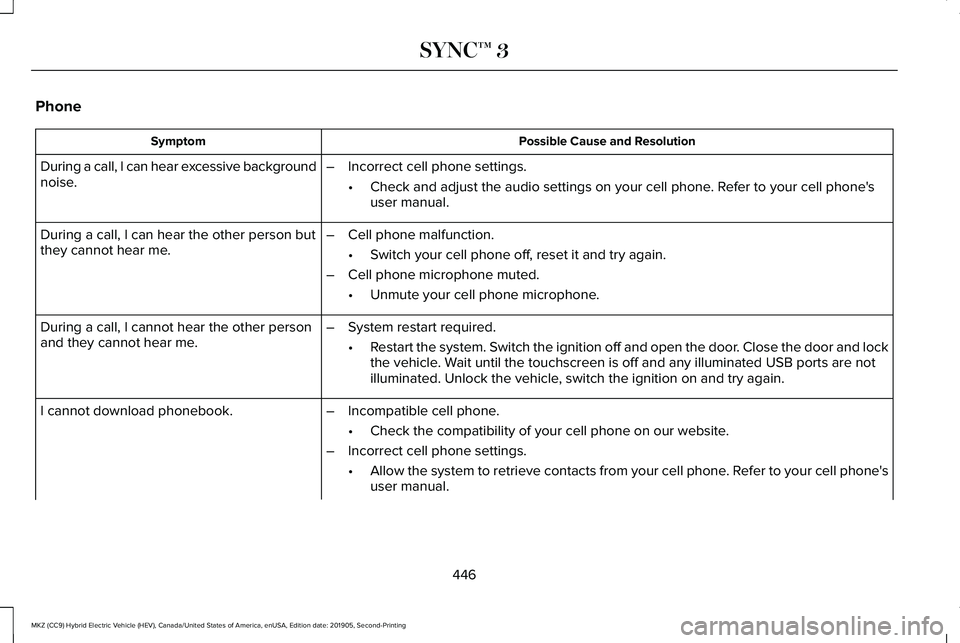
Phone
Possible Cause and Resolution
Symptom
During a call, I can hear excessive background
noise. –
Incorrect cell phone settings.
•Check and adjust the audio settings on your cell phone. Refer to your cell phone's
user manual.
– Cell phone malfunction.
•Switch your cell phone off, reset it and try again.
– Cell phone microphone muted.
•Unmute your cell phone microphone.
During a call, I can hear the other person but
they cannot hear me.
During a call, I cannot hear the other person
and they cannot hear me.
–
System restart required.
•Restart the system. Switch the ignition off and open the door. Close the door and lock
the vehicle. Wait until the touchscreen is off and any illuminated USB ports are not
illuminated. Unlock the vehicle, switch the ignition on and try again.
I cannot download phonebook. –Incompatible cell phone.
•Check the compatibility of your cell phone on our website.
– Incorrect cell phone settings.
•Allow the system to retrieve contacts from your cell phone. Refer to your cell phone's
user manual.
446
MKZ (CC9) Hybrid Electric Vehicle (HEV), Canada/United States of America, enUSA, Edition date: 201905, Second-Printing SYNC™ 3
Page 457 of 544
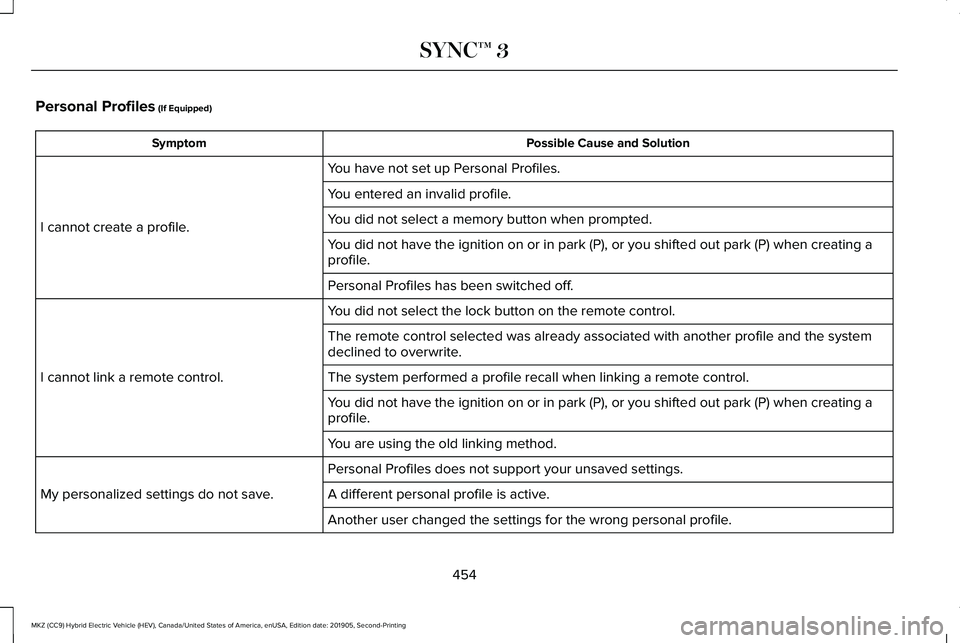
Personal Profiles (If Equipped)
Possible Cause and Solution
Symptom
You have not set up Personal Profiles.
I cannot create a profile. You entered an invalid profile.
You did not select a memory button when prompted.
You did not have the ignition on or in park (P), or you shifted out par\
k (P) when creating a
profile.
Personal Profiles has been switched off.
You did not select the lock button on the remote control.
I cannot link a remote control. The remote control selected was already associated with another profile \
and the system
declined to overwrite.
The system performed a profile recall when linking a remote control.
You did not have the ignition on or in park (P), or you shifted out par\
k (P) when creating a
profile.
You are using the old linking method.
Personal Profiles does not support your unsaved settings.
My personalized settings do not save. A different personal profile is active. Another user changed the settings for the wrong personal profile.
454
MKZ (CC9) Hybrid Electric Vehicle (HEV), Canada/United States of America, enUSA, Edition date: 201905, Second-Printing SYNC™ 3
Page 458 of 544
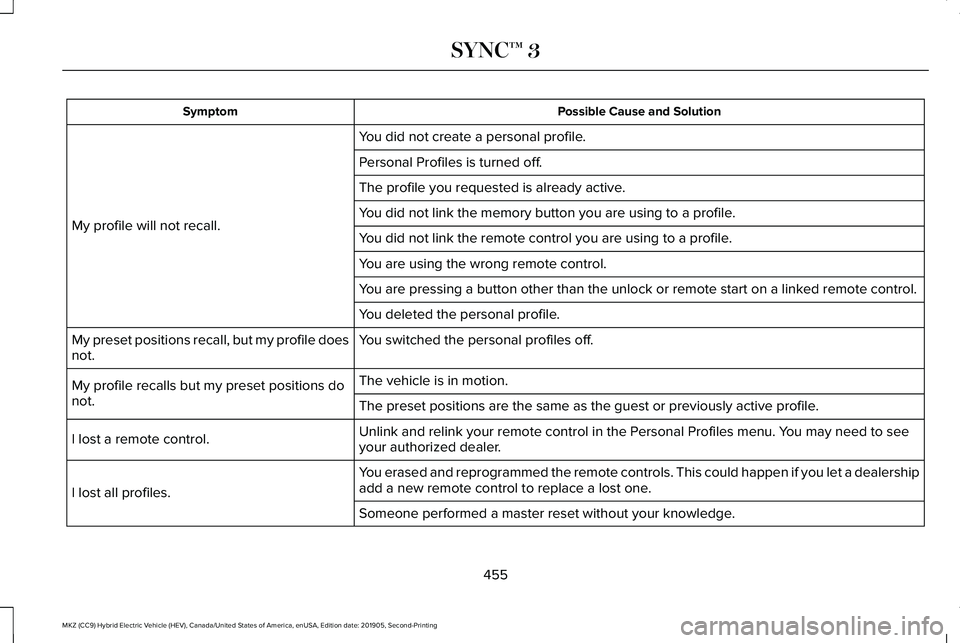
Possible Cause and Solution
Symptom
You did not create a personal profile.
My profile will not recall. Personal Profiles is turned off.
The profile you requested is already active.
You did not link the memory button you are using to a profile.
You did not link the remote control you are using to a profile.
You are using the wrong remote control.
You are pressing a button other than the unlock or remote start on a link\
ed remote control.
You deleted the personal profile.
You switched the personal profiles off.
My preset positions recall, but my profile does
not.
The vehicle is in motion.
My profile recalls but my preset positions do
not. The preset positions are the same as the guest or previously active prof\
ile.
Unlink and relink your remote control in the Personal Profiles menu. You may need to see
your authorized dealer.
I lost a remote control.
You erased and reprogrammed the remote controls. This could happen if you\
let a dealership
add a new remote control to replace a lost one.
I lost all profiles.
Someone performed a master reset without your knowledge.
455
MKZ (CC9) Hybrid Electric Vehicle (HEV), Canada/United States of America, enUSA, Edition date: 201905, Second-Printing SYNC™ 3
Page 462 of 544
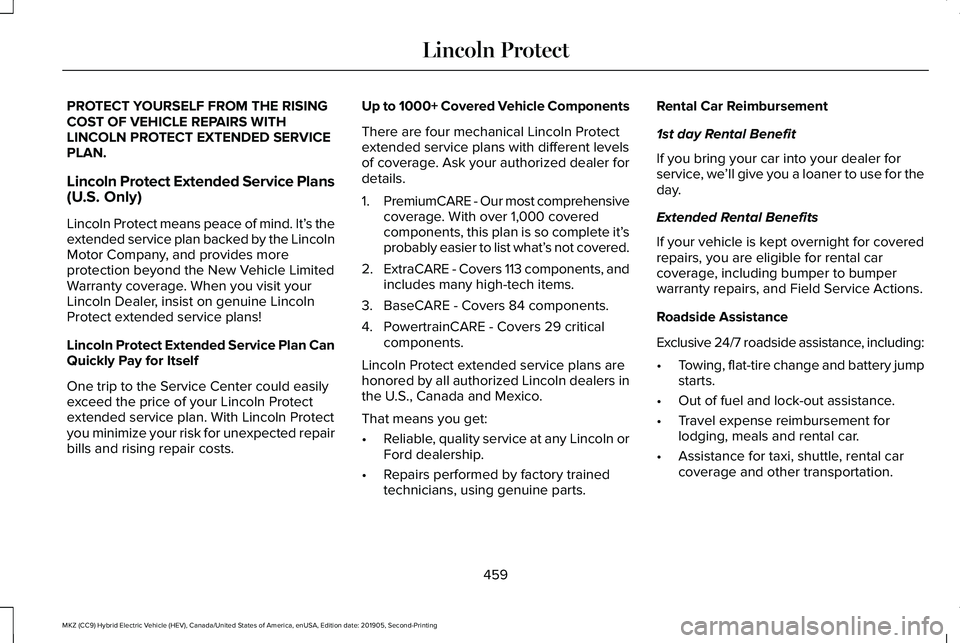
PROTECT YOURSELF FROM THE RISING
COST OF VEHICLE REPAIRS WITH
LINCOLN PROTECT EXTENDED SERVICE
PLAN.
Lincoln Protect Extended Service Plans
(U.S. Only)
Lincoln Protect means peace of mind. It’
s the
extended service plan backed by the Lincoln
Motor Company, and provides more
protection beyond the New Vehicle Limited
Warranty coverage. When you visit your
Lincoln Dealer, insist on genuine Lincoln
Protect extended service plans!
Lincoln Protect Extended Service Plan Can
Quickly Pay for Itself
One trip to the Service Center could easily
exceed the price of your Lincoln Protect
extended service plan. With Lincoln Protect
you minimize your risk for unexpected repair
bills and rising repair costs. Up to 1000+ Covered Vehicle Components
There are four mechanical Lincoln Protect
extended service plans with different levels
of coverage. Ask your authorized dealer for
details.
1.
PremiumCARE - Our most comprehensive
coverage. With over 1,000 covered
components, this plan is so complete it’ s
probably easier to list what’ s not covered.
2. ExtraCARE - Covers 113 components, and
includes many high-tech items.
3. BaseCARE - Covers 84 components.
4. PowertrainCARE - Covers 29 critical components.
Lincoln Protect extended service plans are
honored by all authorized Lincoln dealers in
the U.S., Canada and Mexico.
That means you get:
• Reliable, quality service at any Lincoln or
Ford dealership.
• Repairs performed by factory trained
technicians, using genuine parts. Rental Car Reimbursement
1st day Rental Benefit
If you bring your car into your dealer for
service, we
’ll give you a loaner to use for the
day.
Extended Rental Benefits
If your vehicle is kept overnight for covered
repairs, you are eligible for rental car
coverage, including bumper to bumper
warranty repairs, and Field Service Actions.
Roadside Assistance
Exclusive 24/7 roadside assistance, including:
• Towing, flat-tire change and battery jump
starts.
• Out of fuel and lock-out assistance.
• Travel expense reimbursement for
lodging, meals and rental car.
• Assistance for taxi, shuttle, rental car
coverage and other transportation.
459
MKZ (CC9) Hybrid Electric Vehicle (HEV), Canada/United States of America, enUSA, Edition date: 201905, Second-Printing Lincoln Protect
Page 467 of 544
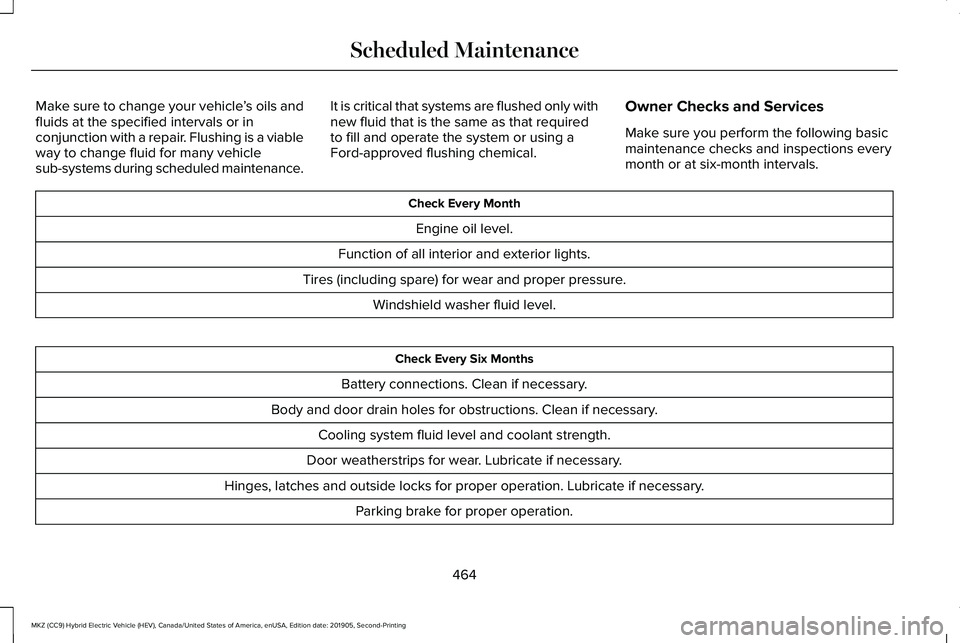
Make sure to change your vehicle
’s oils and
fluids at the specified intervals or in
conjunction with a repair. Flushing is a viable
way to change fluid for many vehicle
sub-systems during scheduled maintenance. It is critical that systems are flushed only with
new fluid that is the same as that required
to fill and operate the system or using a
Ford-approved flushing chemical.
Owner Checks and Services
Make sure you perform the following basic
maintenance checks and inspections every
month or at six-month intervals. Check Every Month
Engine oil level.
Function of all interior and exterior lights.
Tires (including spare) for wear and proper pressure. Windshield washer fluid level. Check Every Six Months
Battery connections. Clean if necessary.
Body and door drain holes for obstructions. Clean if necessary. Cooling system fluid level and coolant strength.
Door weatherstrips for wear. Lubricate if necessary.
Hinges, latches and outside locks for proper operation. Lubricate if necessary. Parking brake for proper operation.
464
MKZ (CC9) Hybrid Electric Vehicle (HEV), Canada/United States of America, enUSA, Edition date: 201905, Second-Printing Scheduled Maintenance
Page 532 of 544
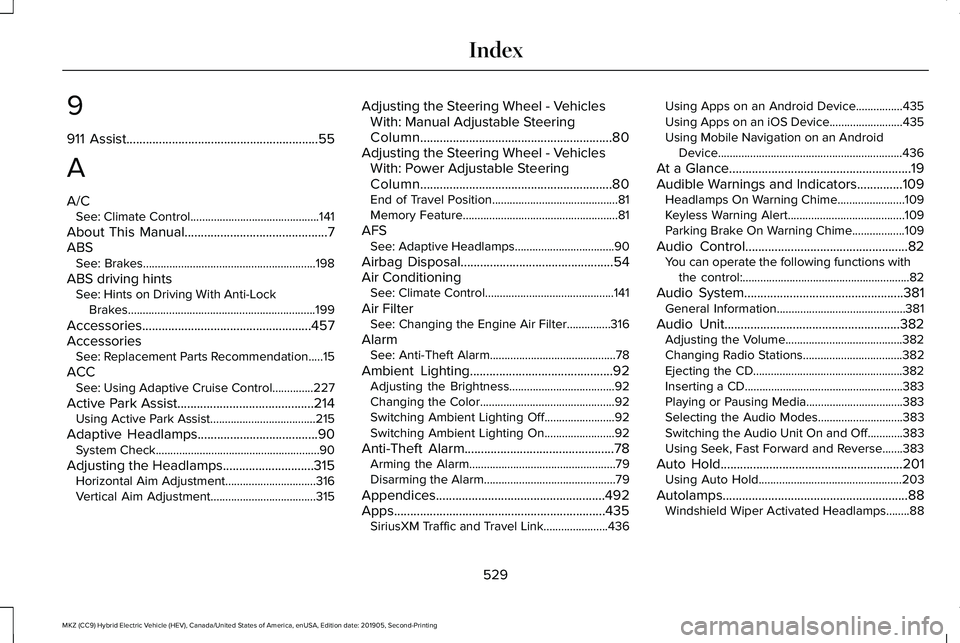
9
911 Assist...........................................................55
A
A/C See: Climate Control............................................141
About This Manual
............................................7
ABS See: Brakes...........................................................198
ABS driving hints See: Hints on Driving With Anti-Lock
Brakes................................................................199
Accessories....................................................457
Accessories See: Replacement Parts Recommendation.....15
ACC See: Using Adaptive Cruise Control..............227
Active Park Assist
..........................................214
Using Active Park Assist....................................215
Adaptive Headlamps
.....................................90
System Check........................................................90
Adjusting the Headlamps............................315 Horizontal Aim Adjustment...............................316
Vertical Aim Adjustment....................................315 Adjusting the Steering Wheel - Vehicles
With: Manual Adjustable Steering
Column...........................................................80
Adjusting the Steering Wheel - Vehicles With: Power Adjustable Steering
Column...........................................................80
End of Travel Position...........................................81
Memory Feature.....................................................81
AFS See: Adaptive Headlamps..................................90
Airbag Disposal
...............................................54
Air Conditioning See: Climate Control............................................141
Air Filter See: Changing the Engine Air Filter...............316
Alarm See: Anti-Theft Alarm...........................................78
Ambient Lighting
............................................92
Adjusting the Brightness....................................92
Changing the Color..............................................92
Switching Ambient Lighting Off........................92
Switching Ambient Lighting On........................92
Anti-Theft Alarm..............................................78 Arming the Alarm..................................................79
Disarming the Alarm.............................................79
Appendices
....................................................492
Apps.................................................................435 SiriusXM Traffic and Travel Link......................436 Using Apps on an Android Device................435
Using Apps on an iOS Device.........................
435
Using Mobile Navigation on an Android Device...............................................................436
At a Glance
........................................................19
Audible Warnings and Indicators..............109
Headlamps On Warning Chime.......................109
Keyless Warning Alert........................................109
Parking Brake On Warning Chime..................
109
Audio Control..................................................82 You can operate the following functions with
the control:.........................................................82
Audio System
.................................................381
General Information............................................381
Audio Unit......................................................382 Adjusting the Volume........................................382
Changing Radio Stations..................................
382
Ejecting the CD...................................................382
Inserting a CD......................................................383
Playing or Pausing Media.................................383
Selecting the Audio Modes.............................
383
Switching the Audio Unit On and Off............383
Using Seek, Fast Forward and Reverse.......383
Auto Hold........................................................201 Using Auto Hold.................................................203
Autolamps.........................................................88 Windshield Wiper Activated Headlamps........88
529
MKZ (CC9) Hybrid Electric Vehicle (HEV), Canada/United States of America, enUSA, Edition date: 201905, Second-Printing Index
Page 533 of 544
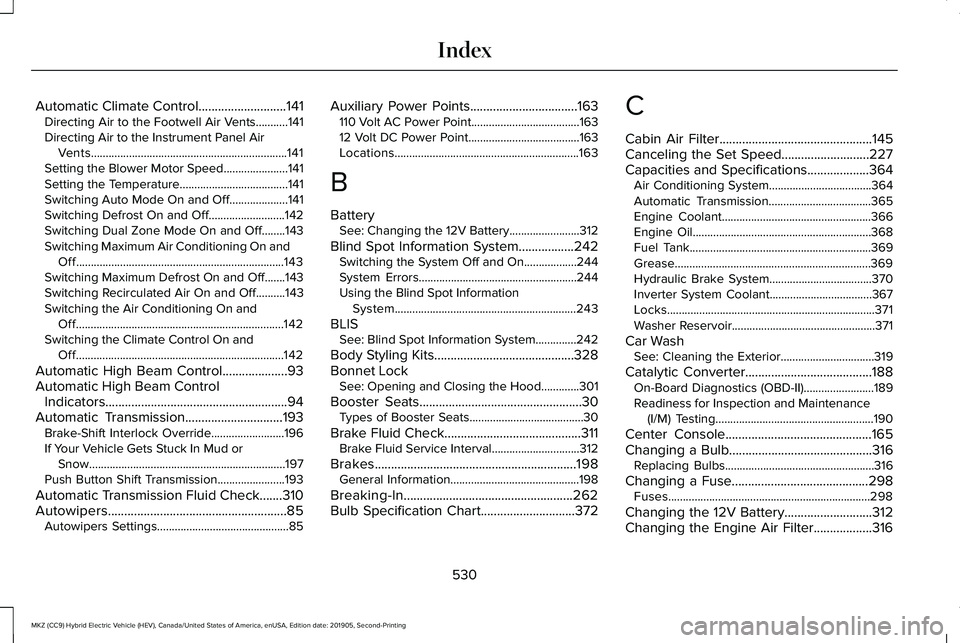
Automatic Climate Control...........................141
Directing Air to the Footwell Air Vents...........141
Directing Air to the Instrument Panel Air
Vents...................................................................141
Setting the Blower Motor Speed......................141
Setting the Temperature.....................................141
Switching Auto Mode On and Off....................141
Switching Defrost On and Off..........................142
Switching Dual Zone Mode On and Off........143
Switching Maximum Air Conditioning On and Off.......................................................................143
Switching Maximum Defrost On and Off.......143
Switching Recirculated Air On and Off..........143
Switching the Air Conditioning On and Off.......................................................................142
Switching the Climate Control On and Off.......................................................................142
Automatic High Beam Control....................93
Automatic High Beam Control Indicators........................................................94
Automatic Transmission..............................193 Brake-Shift Interlock Override.........................196
If Your Vehicle Gets Stuck In Mud or
Snow...................................................................197
Push Button Shift Transmission.......................193
Automatic Transmission Fluid Check.......310
Autowipers.......................................................85 Autowipers Settings.............................................85 Auxiliary Power Points.................................163
110 Volt AC Power Point.....................................163
12 Volt DC Power Point......................................163
Locations...............................................................163
B
Battery See: Changing the 12V Battery........................312
Blind Spot Information System.................242 Switching the System Off and On..................244
System Errors......................................................244
Using the Blind Spot Information
System..............................................................243
BLIS See: Blind Spot Information System..............242
Body Styling Kits...........................................328
Bonnet Lock See: Opening and Closing the Hood.............301
Booster Seats
..................................................30
Types of Booster Seats.......................................30
Brake Fluid Check..........................................311 Brake Fluid Service Interval..............................312
Brakes..............................................................198 General Information............................................198
Breaking-In....................................................262
Bulb Specification Chart.............................372 C
Cabin Air Filter
...............................................145
Canceling the Set Speed...........................227
Capacities and Specifications...................364 Air Conditioning System...................................
364
Automatic Transmission...................................365
Engine Coolant...................................................366
Engine Oil.............................................................368
Fuel Tank..............................................................369
Grease...................................................................369
Hydraulic Brake System...................................370
Inverter System Coolant...................................367
Locks.......................................................................371
Washer Reservoir.................................................371
Car Wash See: Cleaning the Exterior................................319
Catalytic Converter
.......................................188
On-Board Diagnostics (OBD-II)........................189
Readiness for Inspection and Maintenance
(I/M) Testing......................................................190
Center Console
.............................................165
Changing a Bulb............................................316
Replacing Bulbs...................................................316
Changing a Fuse..........................................298 Fuses.....................................................................298
Changing the 12V Battery...........................312
Changing the Engine Air Filter..................316
530
MKZ (CC9) Hybrid Electric Vehicle (HEV), Canada/United States of America, enUSA, Edition date: 201905, Second-Printing Index
Page 534 of 544
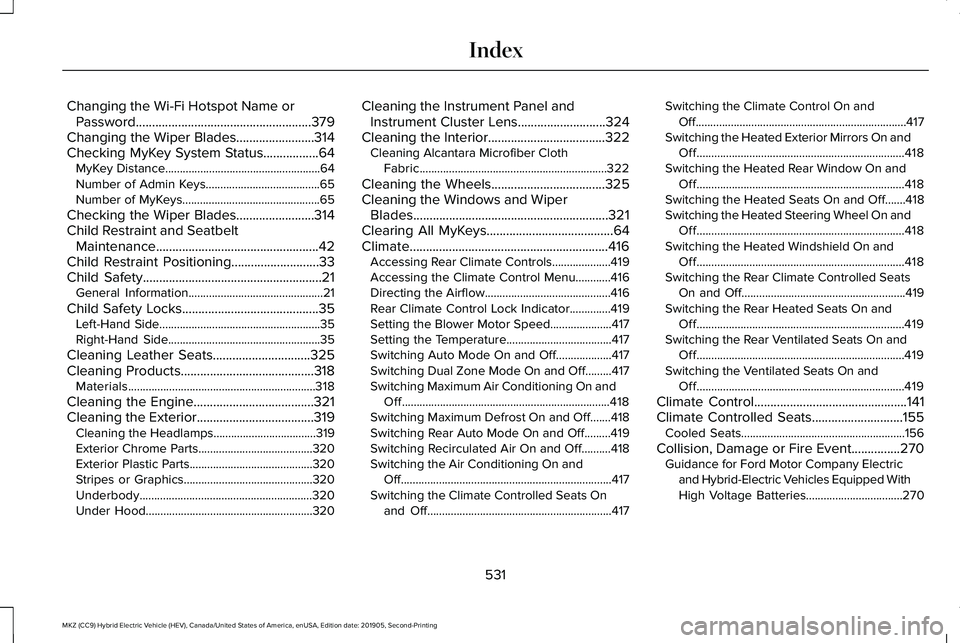
Changing the Wi-Fi Hotspot Name or
Password......................................................379
Changing the Wiper Blades........................314
Checking MyKey System Status.................64 MyKey Distance.....................................................64
Number of Admin Keys.......................................65
Number of MyKeys...............................................65
Checking the Wiper Blades........................314
Child Restraint and Seatbelt Maintenance..................................................42
Child Restraint Positioning...........................33
Child Safety.......................................................21
General Information..............................................21
Child Safety Locks..........................................35 Left-Hand Side.......................................................35
Right-Hand Side....................................................35
Cleaning Leather Seats..............................325
Cleaning Products.........................................318 Materials................................................................318
Cleaning the Engine.....................................321
Cleaning the Exterior ....................................
319
Cleaning the Headlamps...................................319
Exterior Chrome Parts.......................................320
Exterior Plastic Parts..........................................320
Stripes or Graphics............................................320
Underbody...........................................................320
Under Hood.........................................................320 Cleaning the Instrument Panel and
Instrument Cluster Lens...........................324
Cleaning the Interior....................................322 Cleaning Alcantara Microfiber Cloth
Fabric................................................................322
Cleaning the Wheels...................................325
Cleaning the Windows and Wiper Blades............................................................321
Clearing All MyKeys.......................................64
Climate.............................................................416 Accessing Rear Climate Controls....................419
Accessing the Climate Control Menu............416
Directing the Airflow...........................................416
Rear Climate Control Lock Indicator..............419
Setting the Blower Motor Speed.....................417
Setting the Temperature....................................417
Switching Auto Mode On and Off...................417
Switching Dual Zone Mode On and Off.........417
Switching Maximum Air Conditioning On and
Off.......................................................................418
Switching Maximum Defrost On and Off.......418
Switching Rear Auto Mode On and Off.........419
Switching Recirculated Air On and Off..........418
Switching the Air Conditioning On and Off........................................................................\
417
Switching the Climate Controlled Seats On and Off...............................................................417 Switching the Climate Control On and
Off........................................................................\
417
Switching the Heated Exterior Mirrors On and Off.......................................................................418
Switching the Heated Rear Window On and Off.......................................................................418
Switching the Heated Seats On and Off.......418
Switching the Heated Steering Wheel On and Off.......................................................................418
Switching the Heated Windshield On and Off.......................................................................418
Switching the Rear Climate Controlled Seats On and Off........................................................419
Switching the Rear Heated Seats On and Off.......................................................................419
Switching the Rear Ventilated Seats On and Off.......................................................................419
Switching the Ventilated Seats On and Off.......................................................................419
Climate Control...............................................141
Climate Controlled Seats............................155
Cooled Seats........................................................156
Collision, Damage or Fire Event...............270 Guidance for Ford Motor Company Electric
and Hybrid-Electric Vehicles Equipped With
High Voltage Batteries.................................270
531
MKZ (CC9) Hybrid Electric Vehicle (HEV), Canada/United States of America, enUSA, Edition date: 201905, Second-Printing Index
Page 535 of 544
Connecting the Vehicle to a Mobile
Network........................................................375
Enabling the Modem Using The Lincoln Way....................................................................375
Enabling the Modem Using the Touchscreen....................................................375
What Is the Modem............................................375
Coolant Check See: Engine Coolant Check............................305
Crash Sensors and Airbag Indicator..........53
Creating a MyKey...........................................63 Programming and Changing Configurable
Settings...............................................................64
Creating a Wi-Fi Hotspot
............................379
Connecting a Device to the Wi-Fi
Hotspot.............................................................379
Finding the Wi-Fi Hotspot Name and Password..........................................................379
Cross Traffic Alert.........................................244 Cross Traffic Alert Behavior When Trailer is
Attached...........................................................247
Cross Traffic Alert Indicator.............................248
Cross Traffic Alert Information Messages.........................................................248
Cross Traffic Alert System Limitations...........247
Cross Traffic Alert System Sensors................247
Switching the System On and Off..................247
Using Cross Traffic Alert...................................
244 Cruise Control
...............................................226
Cruise Control Indicators............................227
Cruise Control - Vehicles With: Adaptive Cruise Control With Stop and Go
............82
Cruise Control - Vehicles With: Cruise Control............................................................83
Customer Assistance
...................................273
D
Data Recording
................................................10
Comfort, Convenience and Entertainment
Data.......................................................................12
Event Data................................................................11
Service Data............................................................10
Services That Third Parties Provide..................12
Services That We Provide...................................12
Vehicles With a Modem.......................................13
Vehicles With an Emergency Call System.......14
Vehicles With SYNC..............................................13
Daytime Running Lamps - Vehicles With: Configurable Daytime Running
Lamps..............................................................89
Daytime Running Lamps - Vehicles With: Daytime Running Lamps (DRL).................89
Declaration of Conformity..........................527 Declaration of Conformity - Vehicles With:
SYNC 3.........................................................528
Radio Frequency Statement............................528
Digital Radio
...................................................383
HD Radio Reception and Station
Troubleshooting.............................................384
Direction Indicators
........................................90
Indicating a Lane Change....................................91
Doors and Locks.............................................67
Drive Control
.................................................254
LINCOLN DRIVE CONTROL............................254
Driver Alert.....................................................236 Principle of Operation.......................................236
Using Driver Alert...............................................236
Driver and Passenger Airbags....................46 Children and Airbags...........................................47
Proper Driver and Front Passenger Seating
Adjustment.........................................................47
Driver and Passenger Knee Airbags..........51
Driving Aids
...................................................236
Driving Hints..................................................262
Driving Through Water...............................263
DRL See: Daytime Running Lamps - Vehicles With:
Configurable Daytime Running Lamps.......
89
See: Daytime Running Lamps - Vehicles With: Daytime Running Lamps (DRL).....................
89
532
MKZ (CC9) Hybrid Electric Vehicle (HEV), Canada/United States of America, enUSA, Edition date: 201905, Second-Printing Index
Page 536 of 544
E
Economical Driving......................................262
EcoSelect.........................................................175
Electric Parking Brake..................................199 Applying the Electric Parking Brake.............
200
Automatically Releasing the Electric Parking Brake..................................................................201
Manually Releasing the Electric Parking Brake................................................................200
Releasing the Electric Parking Brake if the Vehicle Battery is Running Out of
Charge...............................................................201
Electric Vehicle Information.......................429 Power Flow..........................................................429
Electromagnetic Compatibility
..................492
Emergency Call Limitations.........................56
Emergency Call Requirements....................55
Emission Law..................................................187 Noise Emissions Warranty, Prohibited
Tampering Acts and Maintenance.............188
Tampering With a Noise Control System......187
End User License Agreement...................497 VEHICLE SOFTWARE END USER LICENSE
AGREEMENT (EULA) ....................................497
Engine Block Heater
......................................171
Using the Engine Block Heater.......................172 Engine Coolant Check................................305
Adding Coolant...................................................306
Coolant Change.................................................308
Engine Coolant Temperature
Management....................................................310
Fail-Safe Cooling................................................308
Recycled Coolant...............................................308
Severe Climates.................................................308
Engine Emission Control.............................187
Engine Immobilizer See: Passive Anti-Theft System.........................77
Engine Oil Check..........................................304 Adding Engine Oil..............................................304
Engine Oil Dipstick.......................................304
Engine Specifications
..................................359
Entertainment................................................404 AM/FM Radio.......................................................405
Apps........................................................................\
416
Bluetooth Stereo or USB...................................414
CD (If equipped)...................................................413
HD Radio ™ Information (If Available)..............409
SiriusXM® Satellite Radio (If Activated).........
405
Sources.................................................................404
Supported Media Players, Formats and Metadata Information....................................416
USB Ports..............................................................416
Environment......................................................18 EPB
See: Electric Parking Brake..............................199
Event Data Recording See: Data Recording.............................................10
Export Unique Options...................................17
Exterior Mirrors
................................................96
Auto-dimming Feature........................................98
Auto-Folding Mirrors............................................97
Blind Spot Information System..........................98
Fold-Away Exterior Mirrors.................................97
Heated Exterior Mirrors ......................................98
Lincoln Welcome Mat..........................................98
Memory Mirrors ....................................................98
Power Exterior Mirrors.........................................96
Signal Indicator Mirrors ......................................98
F
Fastening the Seatbelts................................37 Seatbelt Locking Modes.....................................38
Using Seatbelts During Pregnancy..................37
Flat Tire Inflation See: Tire Sealant and Inflator Kit....................
329
Floor Mats
......................................................264
Front Parking Aid..........................................210
Object Distance Indicator.................................212
Front Passenger Sensing System..............48
Fuel and Refueling
........................................179
533
MKZ (CC9) Hybrid Electric Vehicle (HEV), Canada/United States of America, enUSA, Edition date: 201905, Second-Printing Index