key LINCOLN MKZ HYBRID 2020 Owner's Manual
[x] Cancel search | Manufacturer: LINCOLN, Model Year: 2020, Model line: MKZ HYBRID, Model: LINCOLN MKZ HYBRID 2020Pages: 544, PDF Size: 5.26 MB
Page 78 of 544
To Unlock All Doors
Enter the factory-set code or your personal
code, then press 3·4 within five seconds.
To Lock All Doors
Press and hold 7·8 and 9·0 at the same time
with the driver door closed. You do not need
to enter the keypad code first.
To Release the Trunk
Enter the factory-set code or your personal
code, then press
5·6 within five seconds.
Note: The keypad does not operate a power
decklid.
Displaying the Factory Set Code
Note: You need to have two programmed
intelligent access keys for this procedure.
To display the factory-set code in the
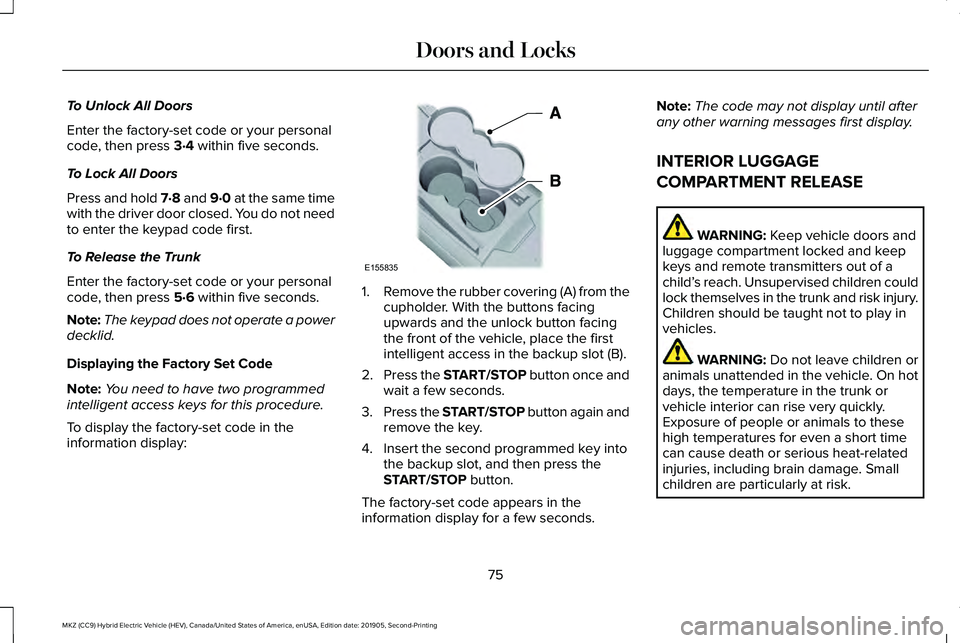
information display: 1.
Remove the rubber covering (A) from the
cupholder. With the buttons facing
upwards and the unlock button facing
the front of the vehicle, place the first
intelligent access in the backup slot (B).
2. Press the START/STOP button once and
wait a few seconds.
3. Press the START/STOP button again and
remove the key.
4. Insert the second programmed key into the backup slot, and then press the
START/STOP
button.
The factory-set code appears in the
information display for a few seconds. Note:
The code may not display until after
any other warning messages first display.
INTERIOR LUGGAGE
COMPARTMENT RELEASE WARNING:
Keep vehicle doors and
luggage compartment locked and keep
keys and remote transmitters out of a
child’ s reach. Unsupervised children could
lock themselves in the trunk and risk injury.
Children should be taught not to play in
vehicles. WARNING:
Do not leave children or
animals unattended in the vehicle. On hot
days, the temperature in the trunk or
vehicle interior can rise very quickly.
Exposure of people or animals to these
high temperatures for even a short time
can cause death or serious heat-related
injuries, including brain damage. Small
children are particularly at risk.
75
MKZ (CC9) Hybrid Electric Vehicle (HEV), Canada/United States of America, enUSA, Edition date: 201905, Second-Printing Doors and LocksE155835
Page 80 of 544
PASSIVE ANTI-THEFT SYSTEM
Note:
The system is not compatible with
non-Ford aftermarket remote start systems.
Use of these systems may result in vehicle
starting problems and a loss of security
protection.
Note: Metallic objects, electronic devices
or a second coded key on the same key
chain may cause vehicle starting problems
if they are too close to the key when starting
your vehicle. Prevent these objects from
touching the coded key while starting your
vehicle. Switch the ignition off, move all
objects on the key chain away from the
coded key and restart your vehicle if a
problem occurs.
Note: Do not leave a duplicate coded key
in your vehicle. Always take your keys and
lock all doors when leaving your vehicle. SecuriLock
The system helps prevent your vehicle from
starting unless you use a coded key
programmed to your vehicle. Using the
wrong key may prevent your vehicle from
starting. A message may appear in the
information display.
If you are unable to start your vehicle with a
correctly coded key, it is not operating
properly. A message may appear in the
information display.
Automatic Arming
Your vehicle arms immediately after
switching the ignition off.
Automatic Disarming
Switching the ignition on with a coded key
disarms your vehicle.
Replacement Keys
Note:
Your vehicle comes equipped with two
intelligent access keys. The intelligent access key functions as a
programmed key that operates the driver
door lock and activates the intelligent access
with push button start system, as well as a
remote control.
If your programmed transmitters are lost or
stolen and you do not have an extra coded
key, have your vehicle towed to an
authorized dealer. You need to erase the
key codes from your vehicle and program
new coded keys.
Store an extra programmed key away from
your vehicle in a safe place to help prevent
any inconveniences. See your authorized
dealer to purchase additional spare or
replacement keys.
Programming a Spare Intelligent Access
Key
Note:
You can program a maximum of four
intelligent access keys to your vehicle.
77
MKZ (CC9) Hybrid Electric Vehicle (HEV), Canada/United States of America, enUSA, Edition date: 201905, Second-Printing Security
Page 81 of 544
You must have two previously programmed
intelligent access keys inside your vehicle
and the new unprogrammed intelligent
access keys readily accessible. See an
authorized dealer to have the spare key
programmed if two previously programmed
keys are not available.
Make sure that your vehicle is off before
beginning this procedure. Make sure that
you close all the doors before beginning and
that they remain closed throughout the
procedure. Perform all steps within 30
seconds of starting the sequence. Stop and
wait for at least one minute before starting
again if you perform any steps out of
sequence.
Read and understand the entire procedure
before you begin.
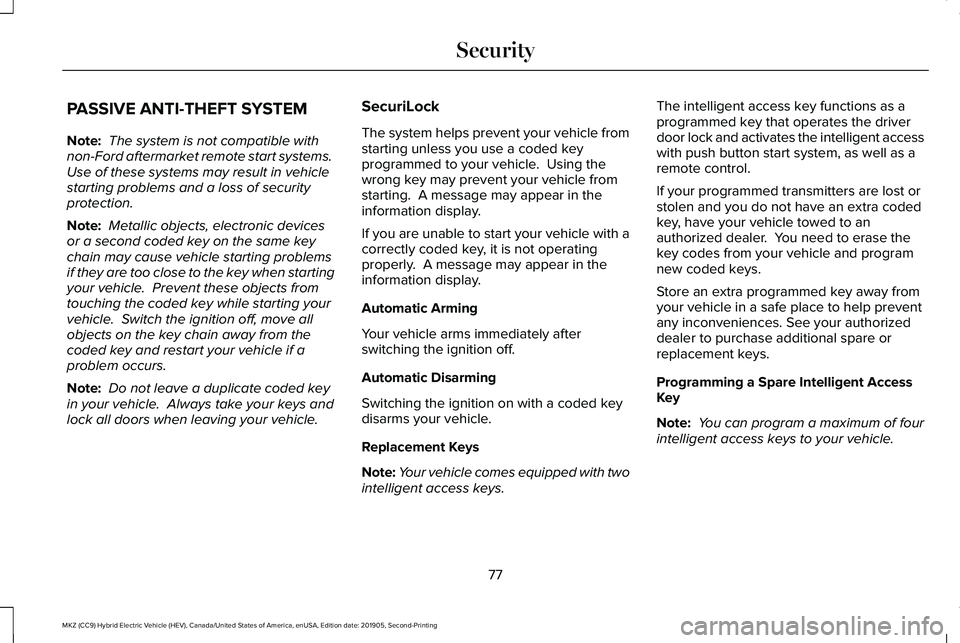
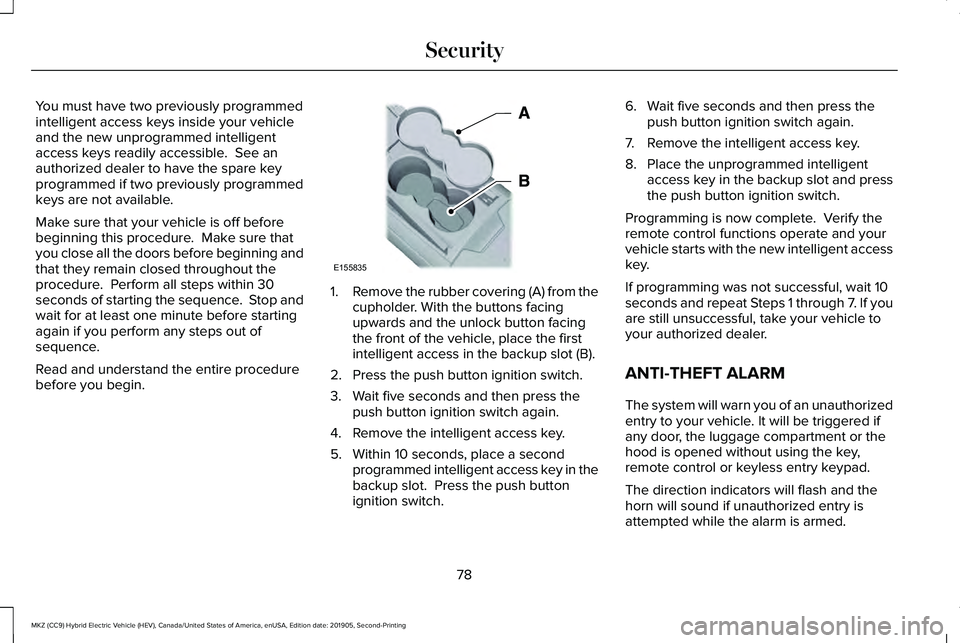
1.
Remove the rubber covering (A) from the
cupholder. With the buttons facing
upwards and the unlock button facing
the front of the vehicle, place the first
intelligent access in the backup slot (B).
2. Press the push button ignition switch.
3. Wait five seconds and then press the push button ignition switch again.
4. Remove the intelligent access key.
5. Within 10 seconds, place a second programmed intelligent access key in the
backup slot. Press the push button
ignition switch. 6. Wait five seconds and then press the
push button ignition switch again.
7. Remove the intelligent access key.
8. Place the unprogrammed intelligent access key in the backup slot and press
the push button ignition switch.
Programming is now complete. Verify the
remote control functions operate and your
vehicle starts with the new intelligent access
key.
If programming was not successful, wait 10
seconds and repeat Steps 1 through 7. If you
are still unsuccessful, take your vehicle to
your authorized dealer.
ANTI-THEFT ALARM
The system will warn you of an unauthorized
entry to your vehicle. It will be triggered if
any door, the luggage compartment or the
hood is opened without using the key,
remote control or keyless entry keypad.
The direction indicators will flash and the
horn will sound if unauthorized entry is
attempted while the alarm is armed.
78
MKZ (CC9) Hybrid Electric Vehicle (HEV), Canada/United States of America, enUSA, Edition date: 201905, Second-Printing SecurityE155835
Page 82 of 544
Take all remote controls to an authorized
dealer if there is any potential alarm problem
with your vehicle.
Arming the Alarm
The alarm is ready to arm when there is not
a key in your vehicle. Electronically lock your
vehicle to arm the alarm.
Disarming the Alarm
Disarm the alarm by any of the following
actions:
•
Unlock the doors or luggage
compartment with the remote control or
keyless entry keypad.
• Switch your vehicle on or start your
vehicle.
• Use a key in the driver door to unlock
your vehicle, then switch your vehicle on
within 12 seconds.
Note: Pressing the panic button on the
remote control will stop the horn and signal
indicators, but will not disarm the system.
79
MKZ (CC9) Hybrid Electric Vehicle (HEV), Canada/United States of America, enUSA, Edition date: 201905, Second-Printing Security
Page 103 of 544
WARNING: When closing the
moonroof, verify that it is free of
obstruction and make sure that children
and pets are not in the proximity of the roof
opening.
Type 1
The sliding shade can be manually opened
or closed when the moonroof is closed. Pull
the shade toward the front of the vehicle to
close it.
The moonroof controls are on the overhead
console and have a one-touch open and
close feature. To stop it during one-touch
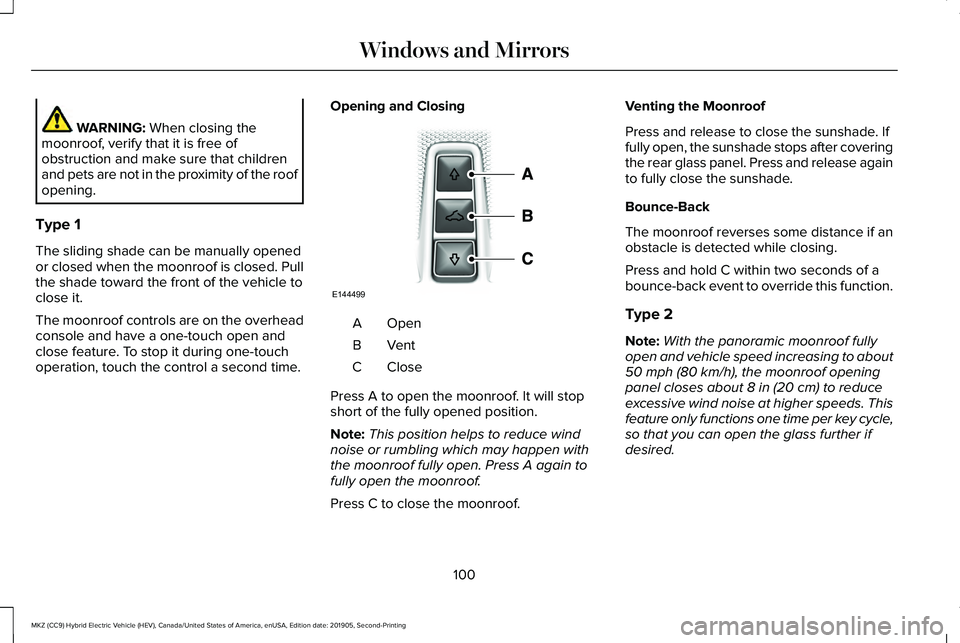
operation, touch the control a second time. Opening and Closing OpenA
VentB
CloseC
Press A to open the moonroof. It will stop
short of the fully opened position.
Note: This position helps to reduce wind
noise or rumbling which may happen with
the moonroof fully open. Press A again to
fully open the moonroof.
Press C to close the moonroof. Venting the Moonroof
Press and release to close the sunshade. If
fully open, the sunshade stops after covering
the rear glass panel. Press and release again
to fully close the sunshade.
Bounce-Back
The moonroof reverses some distance if an
obstacle is detected while closing.
Press and hold C within two seconds of a
bounce-back event to override this function.
Type 2
Note:
With the panoramic moonroof fully
open and vehicle speed increasing to about
50 mph (80 km/h)
, the moonroof opening
panel closes about 8 in (20 cm) to reduce
excessive wind noise at higher speeds. This
feature only functions one time per key cycle,
so that you can open the glass further if
desired.
100
MKZ (CC9) Hybrid Electric Vehicle (HEV), Canada/United States of America, enUSA, Edition date: 201905, Second-Printing Windows and MirrorsE144499
Page 106 of 544
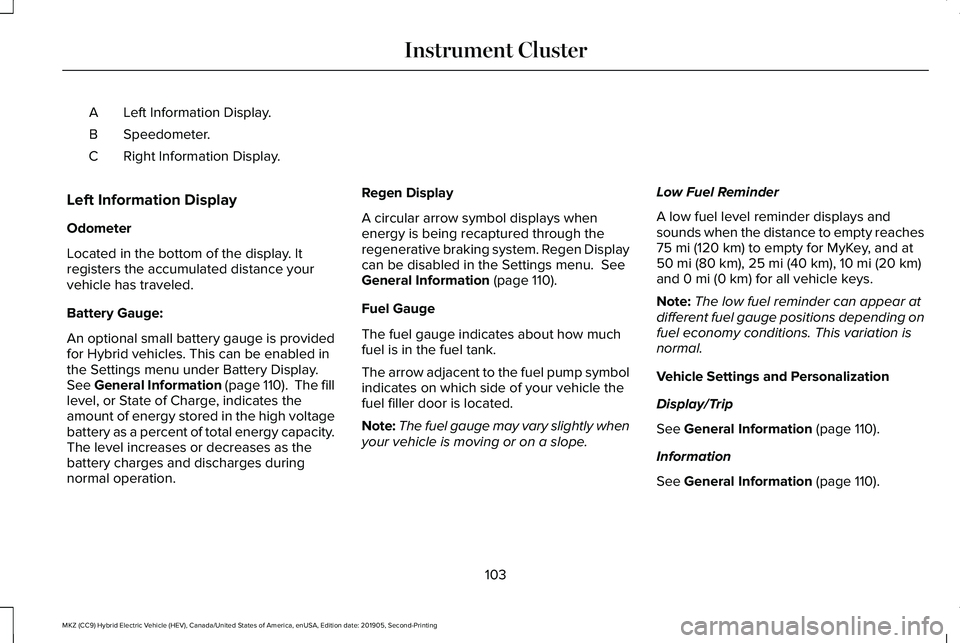
Left Information Display.
A
Speedometer.
B
Right Information Display.
C
Left Information Display
Odometer
Located in the bottom of the display. It
registers the accumulated distance your
vehicle has traveled.
Battery Gauge:
An optional small battery gauge is provided
for Hybrid vehicles. This can be enabled in
the Settings menu under Battery Display.
See General Information (page 110). The fill
level, or State of Charge, indicates the
amount of energy stored in the high voltage
battery as a percent of total energy capacity.
The level increases or decreases as the
battery charges and discharges during
normal operation. Regen Display
A circular arrow symbol displays when
energy is being recaptured through the
regenerative braking system. Regen Display
can be disabled in the Settings menu. See
General Information (page 110).
Fuel Gauge
The fuel gauge indicates about how much
fuel is in the fuel tank.
The arrow adjacent to the fuel pump symbol
indicates on which side of your vehicle the
fuel filler door is located.
Note: The fuel gauge may vary slightly when
your vehicle is moving or on a slope. Low Fuel Reminder
A low fuel level reminder displays and
sounds when the distance to empty reaches
75 mi (120 km)
to empty for MyKey, and at
50 mi (80 km), 25 mi (40 km), 10 mi (20 km)
and 0 mi (0 km) for all vehicle keys.
Note: The low fuel reminder can appear at
different fuel gauge positions depending on
fuel economy conditions. This variation is
normal.
Vehicle Settings and Personalization
Display/Trip
See
General Information (page 110).
Information
See
General Information (page 110).
103
MKZ (CC9) Hybrid Electric Vehicle (HEV), Canada/United States of America, enUSA, Edition date: 201905, Second-Printing Instrument Cluster
Page 112 of 544
Stop Safely
Lights if your vehicle has an
electrical component fault or failure
that will cause your vehicle to
shutdown or enter into a limited operating
mode. You may also see a message.
Trunk Ajar Lights when the ignition is on and
the trunk is not completely closed.
AUDIBLE WARNINGS AND
INDICATORS
Keyless Warning Alert
The horn will sound twice when you exit your
vehicle with the intelligent access key and
your vehicle is in RUN, indicating your vehicle
is still on. Headlamps On Warning Chime
Sounds when you have left the headlamps
or parking lamps on and open the driver door
with the vehicle off.
Parking Brake On Warning Chime
Sounds when you have left the parking brake
on and drive your vehicle. If the warning
chime remains on after you have released
the parking brake, have the system checked
by your authorized dealer immediately.
109
MKZ (CC9) Hybrid Electric Vehicle (HEV), Canada/United States of America, enUSA, Edition date: 201905, Second-Printing Instrument ClusterE144693 E159323
Page 113 of 544
GENERAL INFORMATION
WARNING: Driving while distracted
can result in loss of vehicle control, crash
and injury. We strongly recommend that
you use extreme caution when using any
device that may take your focus off the
road. Your primary responsibility is the safe
operation of your vehicle. We recommend
against the use of any hand-held device
while driving and encourage the use of
voice-operated systems when possible.
Make sure you are aware of all applicable
local laws that may affect the use of
electronic devices while driving.
You can control various systems on your
vehicle using the information display controls
on the steering wheel. The information
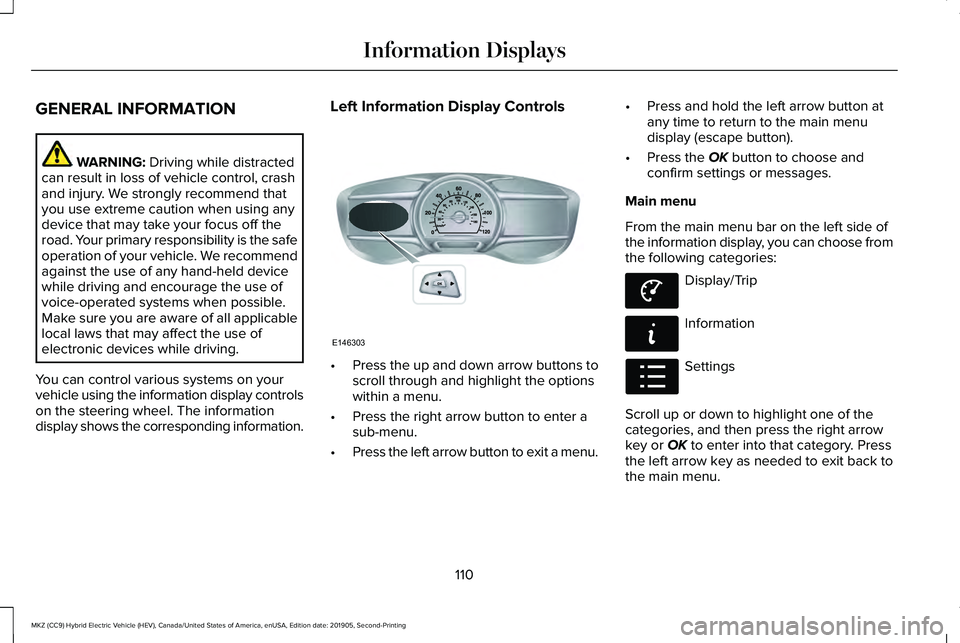
display shows the corresponding information. Left Information Display Controls
•
Press the up and down arrow buttons to
scroll through and highlight the options
within a menu.
• Press the right arrow button to enter a
sub-menu.
• Press the left arrow button to exit a menu. •
Press and hold the left arrow button at
any time to return to the main menu
display (escape button).
• Press the OK button to choose and
confirm settings or messages.
Main menu
From the main menu bar on the left side of
the information display, you can choose from
the following categories: Display/Trip
Information
Settings
Scroll up or down to highlight one of the
categories, and then press the right arrow
key or
OK to enter into that category. Press
the left arrow key as needed to exit back to
the main menu.
110
MKZ (CC9) Hybrid Electric Vehicle (HEV), Canada/United States of America, enUSA, Edition date: 201905, Second-Printing Information DisplaysE146303 E144639 E144642 E100023
Page 114 of 544
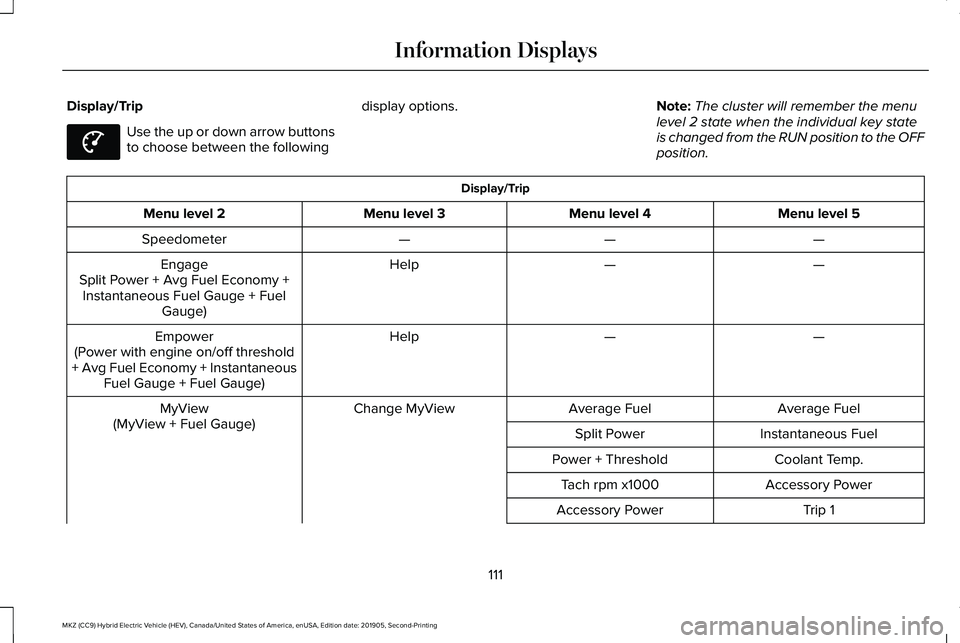
Display/Trip
Use the up or down arrow buttons
to choose between the following
display options.
Note:The cluster will remember the menu
level 2 state when the individual key state
is changed from the RUN position to the OFF
position. Display/Trip
Menu level 5
Menu level 4
Menu level 3
Menu level 2
—
—
—
Speedometer
—
—
Help
Engage
Split Power + Avg Fuel Economy + Instantaneous Fuel Gauge + Fuel Gauge)
—
—
Help
Empower
(Power with engine on/off threshold
+ Avg Fuel Economy + Instantaneous Fuel Gauge + Fuel Gauge)
Average Fuel
Average Fuel
Change MyView
MyView
(MyView + Fuel Gauge) Instantaneous Fuel
Split Power
Coolant Temp.
Power + Threshold
Accessory Power
Tach rpm x1000
Trip 1
Accessory Power
111
MKZ (CC9) Hybrid Electric Vehicle (HEV), Canada/United States of America, enUSA, Edition date: 201905, Second-Printing Information DisplaysE144639
Page 117 of 544
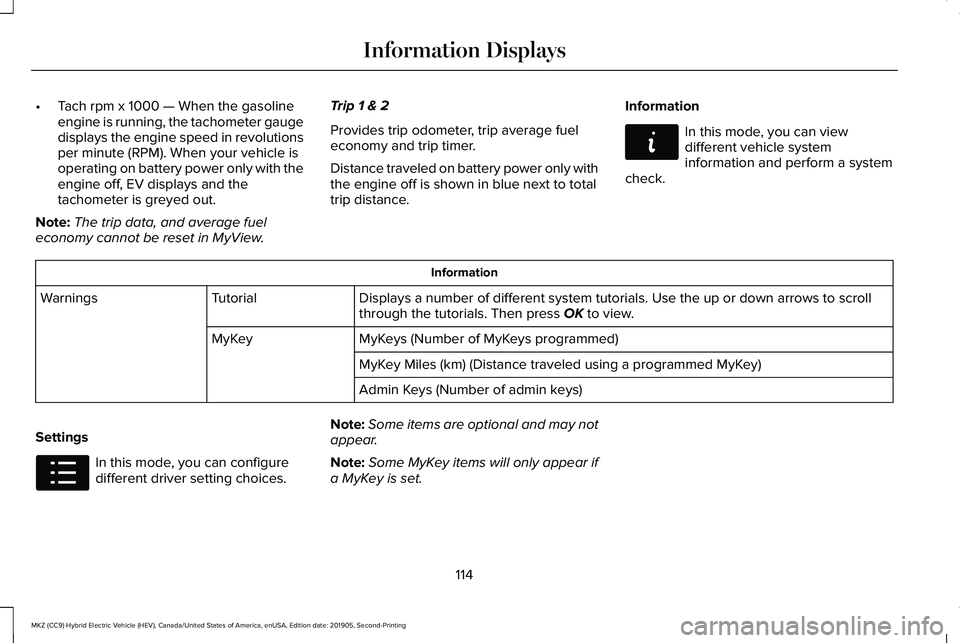
•
Tach rpm x 1000 — When the gasoline
engine is running, the tachometer gauge
displays the engine speed in revolutions
per minute (RPM). When your vehicle is
operating on battery power only with the
engine off, EV displays and the
tachometer is greyed out.
Note: The trip data, and average fuel
economy cannot be reset in MyView. Trip 1 & 2
Provides trip odometer, trip average fuel
economy and trip timer.
Distance traveled on battery power only with
the engine off is shown in blue next to total
trip distance.
Information In this mode, you can view
different vehicle system
information and perform a system
check. Information
Displays a number of different system tutorials. Use the up or down arro\
ws to scroll
through the tutorials. Then press OK to view.
Tutorial
Warnings
MyKeys (Number of MyKeys programmed)
MyKey
MyKey Miles (km) (Distance traveled using a programmed MyKey)
Admin Keys (Number of admin keys)
Settings In this mode, you can configure
different driver setting choices.
Note:
Some items are optional and may not
appear.
Note: Some MyKey items will only appear if
a MyKey is set.
114
MKZ (CC9) Hybrid Electric Vehicle (HEV), Canada/United States of America, enUSA, Edition date: 201905, Second-Printing Information DisplaysE144642 E100023