service LINCOLN NAUTILUS 2020 User Guide
[x] Cancel search | Manufacturer: LINCOLN, Model Year: 2020, Model line: NAUTILUS, Model: LINCOLN NAUTILUS 2020Pages: 596, PDF Size: 5.88 MB
Page 19 of 596
WARNING: NEVER use a rearward
facing child restraint on a seat protected
by an ACTIVE AIRBAG in front of it, DEATH
or SERIOUS INJURY to the CHILD can
occur.
On Board Diagnostics Data Link
Connector WARNING:
Do not connect wireless
plug-in devices to the data link connector.
Unauthorized third parties could gain
access to vehicle data and impair the
performance of safety related systems.
Only allow repair facilities that follow our
service and repair instructions to connect
their equipment to the data link connector.
Your vehicle has an OBD Data Link
Connector (DLC) that is used in conjunction
with a diagnostic scan tool for vehicle
diagnostics, repairs and reprogramming
services. Installing an aftermarket device that
uses the DLC during normal driving for
purposes such as remote insurance company monitoring, transmission of vehicle data to
other devices or entities, or altering the
performance of the vehicle, may cause
interference with or even damage to vehicle
systems. We do not recommend or endorse
the use of unapproved aftermarket plug-in
devices. The vehicle Warranty will not cover
damage caused by an aftermarket plug-in
device.
Notice to Owners of Pickup Trucks and
Utility Type Vehicles
WARNING:
Utility vehicles have a
significantly higher rollover rate than other
types of vehicles.
Before you drive your vehicle, please read
this Owner’ s Guide carefully. Your vehicle is
not a passenger car. As with other vehicles
of this type, failure to operate this vehicle
correctly may result in loss of vehicle control,
vehicle rollover, personal injury or death.
Using Your Vehicle With a Snowplow
Do not use this vehicle for snowplowing. Your vehicle does not have a snowplowing
package.
Using Your Vehicle as an Ambulance
Do not use this vehicle as an ambulance.
Your vehicle does not have the Ambulance
Preparation Package.
MOBILE COMMUNICATIONS
EQUIPMENT
WARNING: Driving while distracted
can result in loss of vehicle control, crash
and injury. We strongly recommend that
you use extreme caution when using any
device that may take your focus off the
road. Your primary responsibility is the safe
operation of your vehicle. We recommend
against the use of any hand-held device
while driving and encourage the use of
voice-operated systems when possible.
Make sure you are aware of all applicable
local laws that may affect the use of
electronic devices while driving.
16
Nautilus (CD9) Canada/United States of America, enUSA, Edition date: 201907, First-Printing Introduction
Page 48 of 596
PRINCIPLE OF OPERATION
WARNING: Airbags do not inflate
slowly or gently, and the risk of injury from
a deploying airbag is the greatest close to
the trim covering the airbag module. WARNING:
All occupants of your
vehicle, including the driver, should always
properly wear their seatbelts, even when
an airbag supplemental restraint system is
provided. Failure to properly wear your
seatbelt could seriously increase the risk
of injury or death. WARNING:
Even with advanced
restraints systems, properly restrain
children 12 and under in a rear seating
position. Failure to follow this could
seriously increase the risk of injury or
death. WARNING:
Do not place your arms
on the airbag cover or through the steering
wheel. Failure to follow this instruction
could result in personal injury. WARNING:
Keep the areas in front
of the airbags free from obstruction. Do
not affix anything to or over the airbag
covers. Objects could become projectiles
during airbag deployment or in a sudden
stop. Failure to follow this instruction could
result in personal injury or death. WARNING: Airbags can kill or injure
a child in a child restraint. Never place a
rear-facing child restraint in front of an
active airbag. If you must use a
forward-facing child restraint in the front
seat, move the seat upon which the child
restraint is installed all the way back. WARNING: Do not attempt to service,
repair, or modify the supplementary
restraint system or associated components.
Failure to follow this instruction could result
in personal injury or death. WARNING:
Several airbag system
components get hot after inflation. To
reduce the risk of injury, do not touch them
after inflation. WARNING:
If a supplementary
restraint system component has deployed,
it will not function again. Have the system
and associated components inspected as
soon as possible. Failure to follow this
instruction could result in personal injury
or death.
The airbags are a supplemental restraint
system and are designed to work with the
seatbelts to help protect the driver and right
front passenger from certain upper body
injuries. Airbags do not inflate slowly; there
is a risk of injury from a deploying airbag.
Note: You will hear a loud bang and see a
cloud of harmless powdery residue if an
airbag deploys. This is normal.
45
Nautilus (CD9) Canada/United States of America, enUSA, Edition date: 201907, First-Printing Supplementary Restraints System
Page 53 of 596
After all occupants have adjusted their seats
and put on seatbelts, it is very important that
they continue to sit properly. A properly
seated occupant sits upright, leaning against
the seat backrest, and centered on the seat
cushion, with their feet comfortably extended
on the floor. Sitting improperly can increase
the chance of injury in a crash event. For
example, if an occupant slouches, lies down,
turns sideways, sits forward, leans forward
or sideways, or puts one or both feet up, the
chance of injury during a crash greatly
increases.
If you think that the status of the passenger
airbag off indicator lamp is incorrect, check
for the following:
•
Objects lodged underneath the seat.
• Objects between the seat cushion and
the center console.
• Objects hanging off the seat backrest.
• Objects stowed in the seat backrest map
pocket.
• Objects placed on the occupant's lap.
• Cargo interference with the seat. •
Other passengers pushing or pulling on
the seat.
• Rear passenger feet and knees resting
or pushing on the seat.
The conditions listed above may cause the
weight of a properly seated occupant to be
incorrectly interpreted by the front passenger
sensing system. The person in the front
passenger seat may appear heavier or lighter
due to the conditions described in the list
above. Make sure the front passenger
sensing system is operating
properly. See Crash Sensors and
Airbag Indicator (page 54).
If the airbag readiness light is lit, do the
following:
The driver and adult passengers should
check for objects lodged underneath the
front passenger seat, or cargo interfering
with the seat. If there are lodged objects, or cargo is
interfering with the seat, take the following
steps to remove the obstruction:
•
Pull the vehicle over.
• Switch the vehicle off.
• Driver and adult passengers should
check for any objects lodged underneath
the front passenger seat or cargo
interfering with the seat.
• Remove the obstruction(s) (if found).
• Restart the vehicle.
• Wait at least two minutes and verify that
the airbag readiness light is no longer
illuminated.
• If the airbag readiness light remains
illuminated, this may or may not be a
problem due to the front passenger
sensing system.
Do not attempt to repair or service the
system. Take your vehicle immediately to an
authorized dealer.
50
Nautilus (CD9) Canada/United States of America, enUSA, Edition date: 201907, First-Printing Supplementary Restraints SystemE67017
Page 54 of 596
If it is necessary to modify an advanced front
airbag system to accommodate a person
with disabilities, contact the Ford Customer
Relationship Center. See Getting Assistance
Outside the U.S. and Canada (page 298).
SIDE AIRBAGS WARNING:
Do not place objects or
mount equipment on or near the airbag
cover, on the side of the front or rear
seatbacks, or in areas that may come into
contact with a deploying airbag. Failure to
follow these instructions may increase the
risk of personal injury in the event of a
crash. WARNING:
Do not use accessory
seat covers. The use of accessory seat
covers may prevent the deployment of the
side airbags and increase the risk of injury
in an accident. WARNING:
Do not lean your head
on the door. The side airbag could injure
you as it deploys from the side of the
seatback. WARNING: Do not attempt to service,
repair, or modify the supplementary
restraint system or associated components.
Failure to follow this instruction could result
in personal injury or death. WARNING:
If a supplementary
restraint system component has deployed,
it will not function again. Have the system
and associated components inspected as
soon as possible. Failure to follow this
instruction could result in personal injury
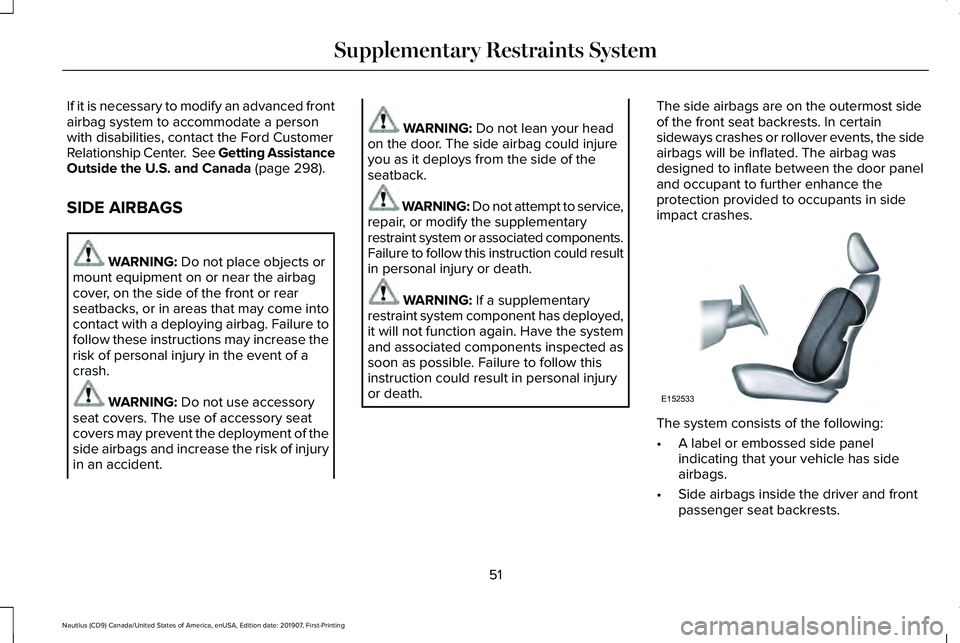
or death. The side airbags are on the outermost side
of the front seat backrests. In certain
sideways crashes or rollover events, the side
airbags will be inflated. The airbag was
designed to inflate between the door panel
and occupant to further enhance the
protection provided to occupants in side
impact crashes.
The system consists of the following:
•
A label or embossed side panel
indicating that your vehicle has side
airbags.
• Side airbags inside the driver and front
passenger seat backrests.
51
Nautilus (CD9) Canada/United States of America, enUSA, Edition date: 201907, First-Printing Supplementary Restraints SystemE152533
Page 55 of 596
Crash sensors and monitoring
system with readiness indicator.
See Crash Sensors and Airbag
Indicator (page 54).
The design and development of the side
airbag system included recommended
testing procedures that were developed by
a group of automotive safety experts known
as the Side Airbag Technical Working Group.
These recommended testing procedures
help reduce the risk of injuries related to the
deployment of side airbags.
DRIVER AND PASSENGER KNEE
AIRBAGS WARNING:
To reduce risk of injury,
do not obstruct or place objects in the
deployment path of the airbag. WARNING: Close the glove box door
when your vehicle is moving. Failure to
follow this instruction could reduce the
effectiveness of the passenger knee airbag
and increase the risk of injury in a crash.
A driver knee airbag is located under or
within the instrument panel. A passenger
knee airbag is located within or under the
glove box door. During a crash, the restraints
control module may activate the driver and
passenger knee airbags based on crash
severity and occupant conditions. Under
certain crash and occupant conditions, the
driver and passenger knee airbag may
deploy but the driver front airbag may not
activate. As with front and side airbags, it is
important to be properly seated and
restrained to reduce the risk of death or
serious injury. Make sure the knee airbags are
operating properly.
See Crash
Sensors and Airbag Indicator
(page
54). SAFETY CANOPY™ WARNING:
Do not place objects or
mount equipment on or near the headliner
at the siderail that may come into contact
with a deploying curtain airbag. Failure to
follow these instructions may increase the
risk of personal injury in the event of a
crash. WARNING:
Do not lean your head
on the door. The curtain airbag could injure
you as it deploys from the headliner. WARNING: Do not attempt to service,
repair, or modify the supplementary
restraint system or associated components.
Failure to follow this instruction could result
in personal injury or death.
52
Nautilus (CD9) Canada/United States of America, enUSA, Edition date: 201907, First-Printing Supplementary Restraints SystemE67017 E67017
Page 57 of 596
The design and development of the Safety
Canopy included recommended testing
procedures that were developed by a group
of automotive safety experts known as the
Side Airbag Technical Working Group. These
recommended testing procedures help
reduce the risk of injuries related to the
deployment of side airbags (including the
Safety Canopy).
CRASH SENSORS AND AIRBAG
INDICATOR
WARNING: Modifying or adding
equipment to the front end of your vehicle
(including hood, bumper system, frame,
front end body structure, tow hooks and
hood pins) may affect the performance of
the airbag system, increasing the risk of
injury. Do not modify or add equipment to
the front end of your vehicle. Your vehicle has a collection of crash and
occupant sensors which provide information
to the restraints control module. The
restraints control module deploys (activates)
the seatbelt pretensioners, driver airbag,
passenger airbag, knee airbag(s), seat
mounted side airbags and the Safety
Canopy. Based on the type of crash, the
restraints control module deploys the
appropriate safety devices.
The restraints control module also monitors
the readiness of the above safety devices
plus the crash and occupant sensors. The
readiness of the safety system is indicated
by a warning indicator light in the instrument
cluster or by a backup tone if the warning
light is not working. Routine maintenance of
the airbag is not required.
A difficulty with the system is indicated by
one or more of the following: •
The readiness light will not illuminate
immediately after you switch the ignition
on.
• The readiness light either flashes or stays
lit.
• A series of five beeps is heard. The tone
pattern repeats periodically until the
problem, the light or both are repaired.
If any of these things happen, even
intermittently, have the supplemental
restraint system serviced at an authorized
dealer immediately. Unless serviced, the
system may not function properly in the
event of a crash.
The restraint system is designed to activate
when the vehicle sustains conditions
sufficient to cause the restraint control
module to deploy a safety device.
54
Nautilus (CD9) Canada/United States of America, enUSA, Edition date: 201907, First-Printing Supplementary Restraints SystemE67017
Page 59 of 596
WHAT IS 911 ASSIST
911 Assist is a SYNC system feature that can
call for help if you are in an accident. If a
crash deploys an airbag, excluding knee
airbags and rear inflatable seatbelts [if
equipped], or activates the fuel pump
shut-off, your SYNC-equipped vehicle may
be able to contact emergency services by
dialing 911 through a paired and connected
Bluetooth enabled phone. You can learn
more about the 911 Assist feature, by visiting:
Website
www.owner.lincoln.com
www.syncmyride.ca
www.syncmaroute.ca
Not all crashes will deploy an airbag or
activate the fuel pump shut-off, the triggers
for 911 Assist. If a connected cell phone
sustains damage or loses its connection to
SYNC during a crash, SYNC will search for
and try to connect to a previously paired cell
phone. SYNC will then attempt to call the
emergency services. Before making the call:
•
SYNC provides a short window of time,
about 10 seconds, to cancel the call. If
you fail to cancel the call, SYNC attempts
to dial 911.
• SYNC says the following, or a similar
message: SYNC will attempt to call 911,
to cancel the call, press Cancel on your
screen or press and hold the phone
button on your steering wheel.
If you do not cancel the call, and SYNC
makes a successful call, a pre-recorded
message plays for the 911 operator, and then
the occupant(s) in your vehicle is able to talk
with the operator. Be prepared to
immediately provide your name, phone
number and location, because not all 911
systems are capable of receiving this
information electronically.
During an emergency call, the system
transmits vehicle data to the emergency
service. See Data Recording (page 10). EMERGENCY CALL
REQUIREMENTS WARNING:
Do not wait for 911 Assist
to make an emergency call if you can do
it yourself. Dial emergency services
immediately to avoid delayed response
time which could increase the risk of
serious injury or death after a crash. If you
do not hear 911 Assist within five seconds
of the crash, the system or phone may be
damaged or non-functional. WARNING: Always place your phone
in a secure location in your vehicle so it
does not become a projectile or get
damaged in a crash. Failure to do so may
cause serious injury to someone or
damage the phone which could prevent
911 Assist from working properly.
56
Nautilus (CD9) Canada/United States of America, enUSA, Edition date: 201907, First-Printing 911 Assist
Page 65 of 596
The remote start system does not work if:
•
The ignition is on.
• The alarm system is triggered.
• You switch off the feature in the
information display. See General
Information (page 116).
• The hood is open.
• The transmission is not in park (P).
• The vehicle battery voltage is too low.
• The service engine soon light is on.
Remote Starting Your Vehicle
Note: You must press each button within
three seconds of each other. If you do not
follow this sequence, your vehicle does not
start remotely, the direction indicators do
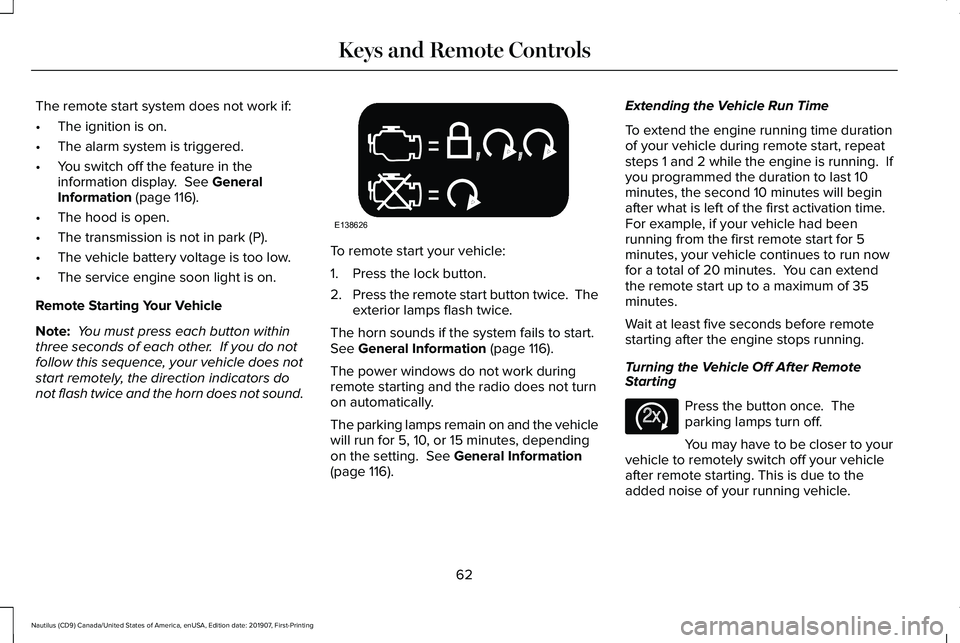
not flash twice and the horn does not sound. To remote start your vehicle:
1. Press the lock button.
2.
Press the remote start button twice. The
exterior lamps flash twice.
The horn sounds if the system fails to start.
See
General Information (page 116).
The power windows do not work during
remote starting and the radio does not turn
on automatically.
The parking lamps remain on and the vehicle
will run for 5, 10, or 15 minutes, depending
on the setting.
See General Information
(page 116). Extending the Vehicle Run Time
To extend the engine running time duration
of your vehicle during remote start, repeat
steps 1 and 2 while the engine is running. If
you programmed the duration to last 10
minutes, the second 10 minutes will begin
after what is left of the first activation time.
For example, if your vehicle had been
running from the first remote start for 5
minutes, your vehicle continues to run now
for a total of 20 minutes. You can extend
the remote start up to a maximum of 35
minutes.
Wait at least five seconds before remote
starting after the engine stops running.
Turning the Vehicle Off After Remote
Starting
Press the button once. The
parking lamps turn off.
You may have to be closer to your
vehicle to remotely switch off your vehicle
after remote starting. This is due to the
added noise of your running vehicle.
62
Nautilus (CD9) Canada/United States of America, enUSA, Edition date: 201907, First-Printing Keys and Remote ControlsE138626 E138625
Page 117 of 596
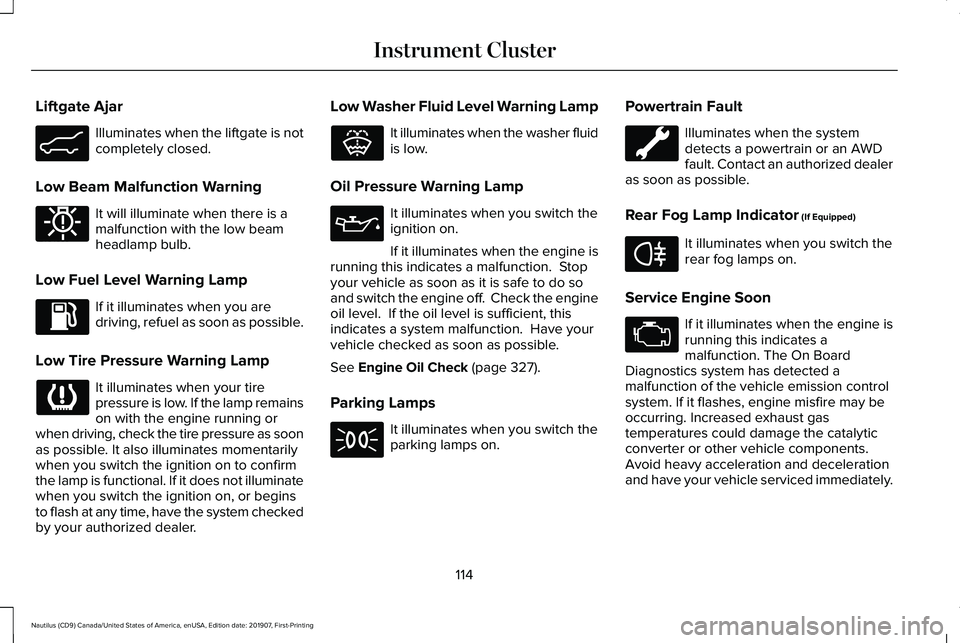
Liftgate Ajar
Illuminates when the liftgate is not
completely closed.
Low Beam Malfunction Warning It will illuminate when there is a
malfunction with the low beam
headlamp bulb.
Low Fuel Level Warning Lamp If it illuminates when you are
driving, refuel as soon as possible.
Low Tire Pressure Warning Lamp It illuminates when your tire
pressure is low. If the lamp remains
on with the engine running or
when driving, check the tire pressure as soon
as possible. It also illuminates momentarily
when you switch the ignition on to confirm
the lamp is functional. If it does not illuminate
when you switch the ignition on, or begins
to flash at any time, have the system checked
by your authorized dealer. Low Washer Fluid Level Warning Lamp It illuminates when the washer fluid
is low.
Oil Pressure Warning Lamp It illuminates when you switch the
ignition on.
If it illuminates when the engine is
running this indicates a malfunction. Stop
your vehicle as soon as it is safe to do so
and switch the engine off. Check the engine
oil level. If the oil level is sufficient, this
indicates a system malfunction. Have your
vehicle checked as soon as possible.
See Engine Oil Check (page 327).
Parking Lamps It illuminates when you switch the
parking lamps on.Powertrain Fault Illuminates when the system
detects a powertrain or an AWD
fault. Contact an authorized dealer
as soon as possible.
Rear Fog Lamp Indicator
(If Equipped) It illuminates when you switch the
rear fog lamps on.
Service Engine Soon If it illuminates when the engine is
running this indicates a
malfunction. The On Board
Diagnostics system has detected a
malfunction of the vehicle emission control
system. If it flashes, engine misfire may be
occurring. Increased exhaust gas
temperatures could damage the catalytic
converter or other vehicle components.
Avoid heavy acceleration and deceleration
and have your vehicle serviced immediately.
114
Nautilus (CD9) Canada/United States of America, enUSA, Edition date: 201907, First-Printing Instrument ClusterE162453 E181350 E132353 E67040
Page 126 of 596
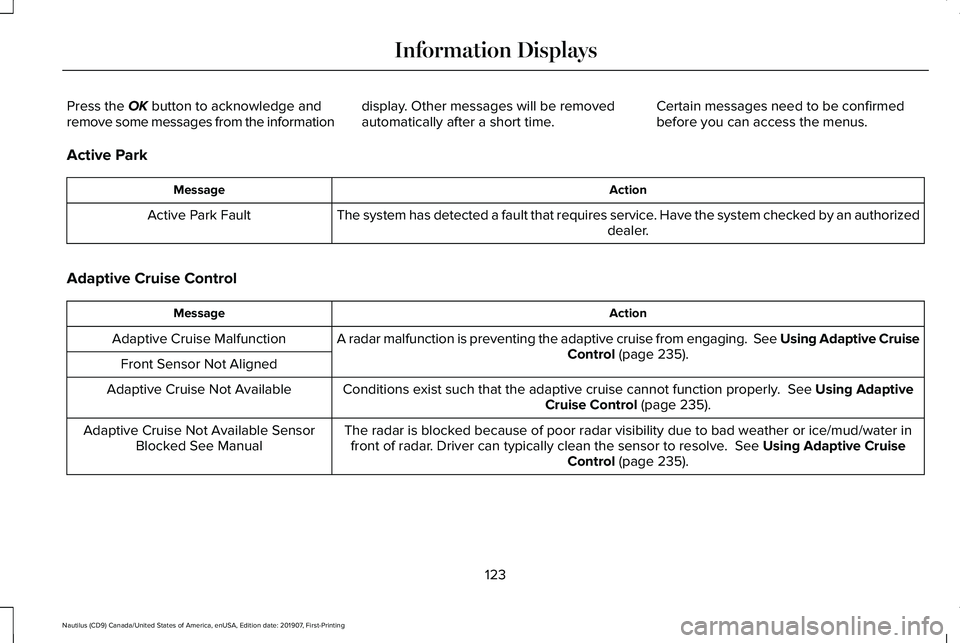
Press the OK button to acknowledge and
remove some messages from the information display. Other messages will be removed
automatically after a short time.Certain messages need to be confirmed
before you can access the menus.
Active Park Action
Message
The system has detected a fault that requires service. Have the system checked by an authorized dealer.
Active Park Fault
Adaptive Cruise Control Action
Message
A radar malfunction is preventing the adaptive cruise from engaging. Se\
e Using Adaptive Cruise Control
(page 235).
Adaptive Cruise Malfunction
Front Sensor Not Aligned Conditions exist such that the adaptive cruise cannot function properly.
See Using Adaptive
Cruise Control (page 235).
Adaptive Cruise Not Available
The radar is blocked because of poor radar visibility due to bad weather or ice/mud/water \
infront of radar. Driver can typically clean the sensor to resolve.
See Using Adaptive Cruise
Control (page 235).
Adaptive Cruise Not Available Sensor
Blocked See Manual
123
Nautilus (CD9) Canada/United States of America, enUSA, Edition date: 201907, First-Printing Information Displays