brake light LINCOLN NAUTILUS 2020 Owner's Manual
[x] Cancel search | Manufacturer: LINCOLN, Model Year: 2020, Model line: NAUTILUS, Model: LINCOLN NAUTILUS 2020Pages: 596, PDF Size: 5.88 MB
Page 281 of 596
TOWING A TRAILER
WARNING: Do not exceed the
GVWR or the GAWR specified on the
certification label. WARNING:
Towing trailers
beyond the maximum recommended
gross trailer weight exceeds the limit
of your vehicle and could result in
engine damage, transmission damage,
structural damage, loss of vehicle
control, vehicle rollover and personal
injury.
Note: Your vehicle may have electrical
items, such as fuses or relays, related
to towing.
See Fuses (page 303).
Your vehicle's load capacity designation
is by weight, not by volume, so you
cannot necessarily use all available
space when loading a vehicle or trailer. Towing a trailer places an extra load on
your vehicle's engine, transmission, axle,
brakes, tires and suspension. Inspect
these components periodically during,
and after, any towing operation.
Load Placement
To help minimize how trailer movement
affects your vehicle when driving:
•
Load the heaviest items closest to
the trailer floor.
• Load the heaviest items centered
between the left and right side trailer
tires. •
Load the heaviest items above the
trailer axles or just slightly forward
toward the trailer tongue. Do not
allow the final trailer tongue weight
to go above or below 10-15% of the
loaded trailer weight.
• Select a ball mount with the correct
rise or drop. When both the loaded
vehicle and trailer are connected, the
trailer frame should be level, or
slightly angled down toward your
vehicle, when viewed from the side.
When driving with a trailer or payload, a
slight takeoff vibration or shudder may
be present due to the increased payload
weight. Additional information regarding
proper trailer loading and setting your
vehicle up for towing is located in the
Load Carrying chapter. See Load Limit
(page 273).
You can also find information in the
RV
& Trailer Towing Guide available at your
authorized dealer, or online.
278
Nautilus (CD9) Canada/United States of America, enUSA, Edition date: 201907, First-Printing Towing
Page 282 of 596
RV & Trailer Towing Guide Online
http://www.fleet.ford.com/towing-guides/
Website
TRAILER SWAY CONTROL WARNING: Turning off trailer sway
control increases the risk of loss of vehicle
control, serious injury or death. Ford does
not recommend disabling this feature
except in situations where speed reduction
may be detrimental (such as hill climbing),
the driver has significant trailer towing
experience, and can control trailer sway
and maintain safe operation.
Note: This feature does not prevent trailer
sway, but reduces it once it begins.
Note: This feature cannot stop all trailers
from swaying.
Note: In some cases, if vehicle speed is too
high, the system may activate multiple times,
gradually reducing vehicle speed. This feature applies your vehicle brakes at
individual wheels and, if necessary, reduces
engine power. If the trailer begins to sway,
the stability control light flashes and the
message TRAILER SWAY REDUCE SPEED
appears in the information display. The first
thing to do is slow your vehicle down, then
pull safely to the side of the road and check
for proper tongue load and trailer load
distribution.
See Load Carrying (page 270).
RECOMMENDED TOWING
WEIGHTS
Note: Do not exceed the trailer weight
for your vehicle configuration listed in
the chart below. Note:
Make sure to take into
consideration trailer frontal area. Do not
exceed 20 ft² (1.86 m²) for vehicles
without towing package, or 30 ft² (2.79
m²) for vehicles with towing package.
Note: For high altitude operation,
reduce the gross combined weight by
2% per
1,000 ft (300 m) starting at the
1,000 ft (300 m) elevation point.
Note: Certain states require electric
trailer brakes for trailers over a specified
weight. Be sure to check state
regulations for this specified weight. The
maximum trailer weights listed may be
limited to this specified weight, as the
vehicle ’s electrical system may not
include the wiring connector needed to
activate electric trailer brakes.
279
Nautilus (CD9) Canada/United States of America, enUSA, Edition date: 201907, First-Printing Towing
Page 285 of 596
Trailer lamps are required on most towed
vehicles. Make sure all running lights, brake
lights, turn signals and hazard lights are
working.
Before Towing a Trailer
Practice turning, stopping and backing up to
get the feel of your vehicle-trailer
combination before starting on a trip. When
turning, make wider turns so the trailer
wheels clear curbs and other obstacles.
When Towing a Trailer
•
Do not drive faster than 70 mph
(113 km/h) during the first 500 mi
(800 km).
• Do not make full-throttle starts.
• Check your hitch, electrical connections
and trailer wheel lug nuts thoroughly after
you have traveled
50 mi (80 km).
• When stopped in congested or heavy
traffic during hot weather, place the
transmission in park (P) to aid engine and
transmission cooling and to help A/C
performance. •
Turn off the speed control with heavy
loads or in hilly terrain. The speed control
may turn off automatically when you are
towing on long, steep grades.
• Shift to a lower gear when driving down
a long or steep hill. Do not apply the
brakes continuously, as they may
overheat and become less effective.
• If your transmission is equipped with a
Grade Assist or Tow/Haul feature, use
this feature when towing. This provides
engine braking and helps eliminate
excessive transmission shifting for
optimum fuel economy and transmission
cooling.
• Allow more distance for stopping with a
trailer attached. Anticipate stops and
brake gradually.
• Avoid parking on a grade. However, if
you must park on a grade:
1. Turn the steering wheel to point your vehicle tires away from traffic flow.
2. Set your vehicle parking brake.
3. Place the transmission in park (P). 4. Place wheel chocks in front and back of
the trailer wheels. Chocks are not
included with your vehicle.
Launching or Retrieving a Boat or
Personal Watercraft (PWC)
Note: Disconnect the wiring to the trailer
before
backing the trailer into the water.
Note: Reconnect the wiring to the trailer
after
removing the trailer from the water.
When backing down a ramp during boat
launching or retrieval:
• Do not allow the static water level to rise
above the bottom edge of the rear
bumper.
• Do not allow waves to break higher than
6 in (15 cm)
above the bottom edge of
the rear bumper.
Exceeding these limits may allow water to
enter vehicle components:
• Causing internal damage to the
components.
• Affecting driveability, emissions, and
reliability.
282
Nautilus (CD9) Canada/United States of America, enUSA, Edition date: 201907, First-Printing Towing
Page 289 of 596

There are also some things you may want to
avoid doing because they reduce your fuel
economy:
•
Avoid sudden or hard accelerations.
• Avoid revving the engine before turning
off the car.
• Avoid long idle periods.
• Do not warm up your vehicle on cold
mornings.
• Reduce the use of air conditioning and
heat.
• Avoid using speed control in hilly terrain.
• Do not rest your foot on the brake pedal
while driving.
• Avoid carrying unnecessary weight.
• Avoid adding particular accessories to
your vehicle (e.g. bug deflectors,
rollbars/light bars, running boards, ski
racks).
• Avoid driving with the wheels out of
alignment. COLD WEATHER PRECAUTIONS
The functional operation of some
components and systems can be affected at
temperatures below -13°F (-25°C).
DRIVING THROUGH WATER WARNING:
Do not drive through
flowing or deep water as you may lose
control of your vehicle.
Note: Driving through standing water can
cause vehicle damage.
Note: Engine damage can occur if water
enters the air filter.
Before driving through standing water, check
the depth. Never drive through water that is
higher than the bottom of the front rocker
area of your vehicle. When driving through standing water, drive
very slowly and do not stop your vehicle.
Your brake performance and traction may
be limited. After driving through water and
as soon as it is safe to do so:
•
Lightly press the brake pedal to dry the
brakes and to check that they work.
• Check that the horn works.
• Check that the exterior lights work.
• Turn the steering wheel to check that the
steering power assist works.
286
Nautilus (CD9) Canada/United States of America, enUSA, Edition date: 201907, First-Printing Driving HintsE259345
Page 293 of 596
The fuel pump shutoff stops the flow of fuel
to the engine in the event of a moderate to
severe crash. Not every impact causes a
shutoff.
Should your vehicle shut off after a crash,
you may restart your vehicle.
1. Press START/STOP to switch off your
vehicle.
2. Press the brake pedal and
START/STOP
to switch on your vehicle.
3. Remove your foot from the brake pedal and press
START/STOP to switch off
your vehicle.
4. You can attempt to start the vehicle by pressing the brake pedal and
START/STOP
, or press START/STOP
without pressing the brake pedal.
5. If the vehicle does not start, repeat steps
1 through 4. JUMP STARTING THE VEHICLE WARNING:
Batteries normally
produce explosive gases which can cause
personal injury. Therefore, do not allow
flames, sparks or lighted substances to
come near the battery. When working near
the battery, always shield your face and
protect your eyes. Always provide correct
ventilation. WARNING:
Keep batteries out of
reach of children. Batteries contain sulfuric
acid. Avoid contact with skin, eyes or
clothing. Shield your eyes when working
near the battery to protect against possible
splashing of acid solution. In case of acid
contact with skin or eyes, flush immediately
with water for a minimum of 15 minutes and
get prompt medical attention. If acid is
swallowed, call a physician immediately. WARNING:
Use only adequately
sized cables with insulated clamps. Preparing Your Vehicle
Do not attempt to push-start your automatic
transmission vehicle.
Note:
Attempting to push-start a vehicle with
an automatic transmission may cause
transmission damage.
Note: Use only a 12-volt supply to start your
vehicle.
Note: Do not disconnect the battery of the
disabled vehicle as this could damage the
vehicle electrical system.
Park the booster vehicle close to the hood
of the disabled vehicle, making sure the two
vehicles do not touch.
290
Nautilus (CD9) Canada/United States of America, enUSA, Edition date: 201907, First-Printing Roadside Emergencies
Page 338 of 596
Note:
If the brake fluid level is below the MIN
mark or above the MAX mark, have your
vehicle checked as soon as possible.
Note: To avoid fluid contamination, the
reservoir cap must remain in place and fully
tight, unless you are adding fluid.
Only use fluid that meets our specifications.
See
Capacities and Specifications (page
385).
Brake Fluid Service Interval
Brake fluid absorbs water over time which
degrades the effectiveness of the brake fluid.
Change the brake fluid at the specified
intervals to prevent degraded braking
performance.
For detailed interval information, see
Scheduled Maintenance in your Owner's
Manual or your local maintenance guide. WASHER FLUID CHECK WARNING:
If you operate your
vehicle in temperatures below 41.0°F (5°C),
use washer fluid with antifreeze protection.
Failure to use washer fluid with antifreeze
protection in cold weather could result in
impaired windshield vision and increase
the risk of injury or accident.
Note: The front and rear washer systems
are supplied from the same reservoir.
Add fluid to fill the reservoir if the level is low.
Only use a washer fluid that meets our
specifications.
See Capacities and
Specifications (page 385).
State or local regulations on volatile organic
compounds may restrict the use of methanol,
a common windshield washer antifreeze
additive. Washer fluids containing
non-methanol antifreeze agents should be
used only if they provide cold weather
protection without damaging the vehicle ’s
paint finish, wiper blades or washer system. FUEL FILTER
Your vehicle is equipped with a lifetime fuel
filter that is integrated with the fuel tank.
Regular maintenance or replacement is not
needed.
CHANGING THE 12V BATTERY
WARNING:
Batteries normally
produce explosive gases which can cause
personal injury. Therefore, do not allow
flames, sparks or lighted substances to
come near the battery. When working near
the battery, always shield your face and
protect your eyes. Always provide correct
ventilation. WARNING:
When lifting a
plastic-cased battery, excessive pressure
on the end walls could cause acid to flow
through the vent caps, resulting in personal
injury and damage to the vehicle or battery.
Lift the battery with a battery carrier or with
your hands on opposite corners.
335
Nautilus (CD9) Canada/United States of America, enUSA, Edition date: 201907, First-Printing Maintenance
Page 343 of 596
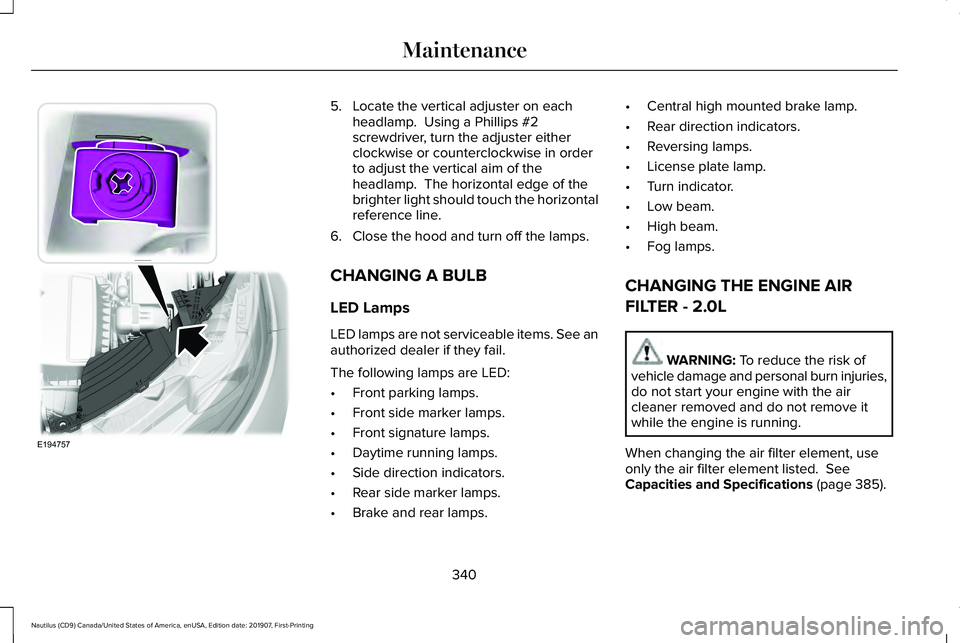
5. Locate the vertical adjuster on each
headlamp. Using a Phillips #2
screwdriver, turn the adjuster either
clockwise or counterclockwise in order
to adjust the vertical aim of the
headlamp. The horizontal edge of the
brighter light should touch the horizontal
reference line.
6. Close the hood and turn off the lamps.
CHANGING A BULB
LED Lamps
LED lamps are not serviceable items. See an
authorized dealer if they fail.
The following lamps are LED:
• Front parking lamps.
• Front side marker lamps.
• Front signature lamps.
• Daytime running lamps.
• Side direction indicators.
• Rear side marker lamps.
• Brake and rear lamps. •
Central high mounted brake lamp.
• Rear direction indicators.
• Reversing lamps.
• License plate lamp.
• Turn indicator.
• Low beam.
• High beam.
• Fog lamps.
CHANGING THE ENGINE AIR
FILTER - 2.0L WARNING: To reduce the risk of
vehicle damage and personal burn injuries,
do not start your engine with the air
cleaner removed and do not remove it
while the engine is running.
When changing the air filter element, use
only the air filter element listed.
See
Capacities and Specifications (page 385).
340
Nautilus (CD9) Canada/United States of America, enUSA, Edition date: 201907, First-Printing MaintenanceE194757
Page 354 of 596
Alloy wheels and wheel covers are coated
with a clear coat paint finish. To maintain
their condition we recommend that you:
•
Clean them weekly with the
recommended wheel and tire cleaner.
• Use a sponge to remove heavy deposits
of dirt and brake dust accumulation.
• Rinse them thoroughly with a pressurized
stream of water when you complete the
cleaning process.
We recommend that you use our surface
wheel cleaner. Make sure that you read and
follow the manufacturer’ s instructions.
Using other non-recommended cleaning
products can result in severe and permanent
damage.
VEHICLE STORAGE
If you plan on storing your vehicle for 30
days or more, read the following
maintenance recommendations to make sure
your vehicle stays in good operating
condition. We engineer and test all motor vehicles and
their components for reliable, regular driving.
Under various conditions, long-term storage
may lead to degraded engine performance
or failure unless you use specific precautions
to preserve engine components.
General
•
Store all vehicles in a dry, ventilated
place.
• Protect from sunlight, if possible.
• If vehicles are stored outside, they
require regular maintenance to protect
against rust and damage.
Body
• Wash your vehicle thoroughly to remove
dirt, grease, oil, tar or mud from exterior
surfaces, rear-wheel housing and the
underside of front fenders.
• Periodically wash your vehicle if it is
stored in exposed locations.
• Touch-up exposed or primed metal to
prevent rust. •
Cover chrome and stainless steel parts
with a thick coat of auto wax to prevent
discoloration. Re-wax as necessary when
you wash your vehicle.
• Lubricate all hood, door and luggage
compartment hinges and latches with a
light grade oil.
• Cover interior trim to prevent fading.
• Keep all rubber parts free from oil and
solvents.
Engine
• Change the engine oil and filter prior to
storage because used engine oil contains
contaminates which may cause engine
damage.
• Start the engine every 15 days for a
minimum of 15 minutes. Run at fast idle
with the climate controls set to defrost
until the engine reaches normal
operating temperature.
• With your foot on the brake, shift through
all the gears while the engine is running.
• We recommend that you change the
engine oil before you use your vehicle
again.
351
Nautilus (CD9) Canada/United States of America, enUSA, Edition date: 201907, First-Printing Vehicle Care
Page 379 of 596
When Inflating Your Tires
WARNING: Do not use the tire
pressure displayed in the information
display as a tire pressure gauge. Failure to
follow this instruction could result in
personal injury or death.
When putting air into your tires (such as at a
gas station or in your garage), the tire
pressure monitoring system may not respond
immediately to the air added to your tires.
It may take up to two minutes of driving over
20 mph (32 km/h) for the light to turn off after
you have filled your tires to the
recommended inflation pressure.
How Temperature Affects Your Tire
Pressure
The tire pressure monitoring system monitors
tire pressure in each pneumatic tire. While
driving in a normal manner, a typical
passenger tire inflation pressure may
increase about
2–4 psi (14–28 kPa) from a
cold start situation. If the vehicle is stationary
overnight with the outside temperature significantly lower than the daytime
temperature, the tire pressure may decrease
about
3 psi (21 kPa) for a drop of 30°F (17°C)
in ambient temperature. This lower pressure
value may be detected by the tire pressure
monitoring system as being significantly
lower than the recommended inflation
pressure and activate the system warning
light for low tire pressure. If the low tire
pressure warning light is on, visually check
each tire to verify that no tire is flat. If one or
more tires are flat, repair as necessary.
Check the air pressure in the road tires. If
any tire is under-inflated, carefully drive the
vehicle to the nearest location where air can
be added to the tires. Inflate all the tires to
the recommended inflation pressure.
CHANGING A ROAD WHEEL WARNING:
If the tire pressure
monitor sensor becomes damaged it may
not function. Note:
The use of tire sealant may damage
your tire pressure monitoring system and
should only be used in roadside
emergencies. If you must use a sealant, use
the Tire Mobility Kit sealant. Replace the tire
pressure monitoring system sensor and
valve stem on the wheel by an authorized
dealer after use of the sealant.
Note: The tire pressure monitoring system
indicator light will illuminate when the spare
tire is in use. To restore the full function of
the monitoring system, all road wheels
equipped with tire pressure monitoring
sensors must be mounted on the vehicle.
If you get a flat tire while driving, do not apply
the brake heavily. Instead, gradually
decrease your speed. Hold the steering
wheel firmly and slowly move to a safe place
on the side of the road.
376
Nautilus (CD9) Canada/United States of America, enUSA, Edition date: 201907, First-Printing Wheels and Tires
Page 582 of 596
3
360 Degree Camera....................................231
Camera Views.....................................................232
Front Camera.......................................................233
Side Camera........................................................233
9
911 Assist...........................................................56
A
A/C See: Climate Control..........................................142
About This Manual
............................................7
ABS See: Brakes..........................................................204
ABS driving hints See: Hints on Driving With Anti-Lock
Brakes...............................................................205
Accessories...................................................490
Accessories See: Replacement Parts Recommendation.....15
ACC See: Using Adaptive Cruise Control - Vehicles
With: Adaptive Cruise Control With Lane
Centering.........................................................235 Active Park Assist........................................220
Using Active Park Assist....................................221
Adaptive Headlamps
.....................................97
Speed Dependent Lamps...................................97
Static Bending Lamps..........................................97
Adjusting the Headlamps...........................338 Vertical Aim Adjustment...................................338
Adjusting the Steering Wheel - Vehicles With: Manual Adjustable Steering
Column...........................................................85
Adjusting the Steering Wheel - Vehicles With: Power Adjustable Steering
Column...........................................................85
End of Travel Position..........................................86
Memory Feature....................................................86
AFS See: Adaptive Headlamps..................................97
Airbag Disposal
...............................................55
Air Conditioning See: Climate Control..........................................142
Air Filter See: Changing the Engine Air Filter - 2.0L...340
See: Changing the Engine Air Filter - 2.7L.....341
Alarm See: Anti-Theft Alarm...........................................84
All-Wheel Drive
..............................................199
Ambient Lighting............................................99 Adjusting the Brightness...................................100 Changing the Color..............................................99
Switching Ambient Lighting Off......................100
Switching Ambient Lighting On........................99
Anti-Theft Alarm
..............................................84
Arming the Alarm..................................................84
Disarming the Alarm............................................84
Appendices...................................................528
Apps .................................................................
468
SiriusXM Traffic and Travel Link.....................469
Using Apps on an Android Device................469
Using Apps on an iOS Device........................
468
Using Mobile Navigation on an Android Device...............................................................469
At a Glance
........................................................19
Audible Warnings and Indicators...............115 Headlamps On Warning Chime........................115
Keyless Warning Alert.........................................115
Parking Brake On Warning Chime...................115
Audio Control
..................................................86
You can operate the following functions with
the control:.........................................................87
Audio System
.................................................418
General Information............................................418
Audio Unit
.......................................................419
Adjusting the Volume.........................................419
Changing Radio Stations..................................420
Ejecting the CD...................................................420
Inserting a CD.....................................................420
579
Nautilus (CD9) Canada/United States of America, enUSA, Edition date: 201907, First-Printing Index