ECO mode LINCOLN NAUTILUS 2021 User Guide
[x] Cancel search | Manufacturer: LINCOLN, Model Year: 2021, Model line: NAUTILUS, Model: LINCOLN NAUTILUS 2021Pages: 579, PDF Size: 6.9 MB
Page 98 of 579
With your passive key within 3 ft (1 m) of your
vehicle, touch the outer door handle lock
sensor for approximately one second to lock,
being careful not to touch the unlock sensor
on the back of the door handle at the same
time. After locking, you can immediately pull
on the door handle to confirm locking
occurred without inadvertently unlocking.
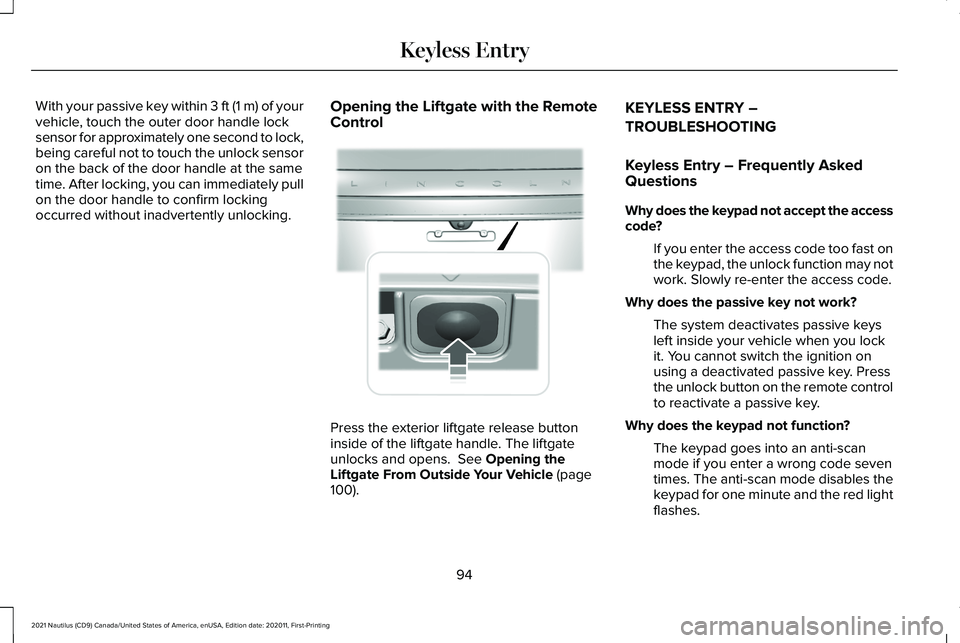
Opening the Liftgate with the Remote
Control Press the exterior liftgate release button
inside of the liftgate handle. The liftgate
unlocks and opens. See Opening the
Liftgate From Outside Your Vehicle (page
100). KEYLESS ENTRY –
TROUBLESHOOTING
Keyless Entry – Frequently Asked
Questions
Why does the keypad not accept the access
code?
If you enter the access code too fast on
the keypad, the unlock function may not
work. Slowly re-enter the access code.
Why does the passive key not work? The system deactivates passive keys
left inside your vehicle when you lock
it. You cannot switch the ignition on
using a deactivated passive key. Press
the unlock button on the remote control
to reactivate a passive key.
Why does the keypad not function? The keypad goes into an anti-scan
mode if you enter a wrong code seven
times. The anti-scan mode disables the
keypad for one minute and the red light
flashes.
94
2021 Nautilus (CD9) Canada/United States of America, enUSA, Edition date: 202011, First-Printing Keyless Entry E291416
Page 100 of 579
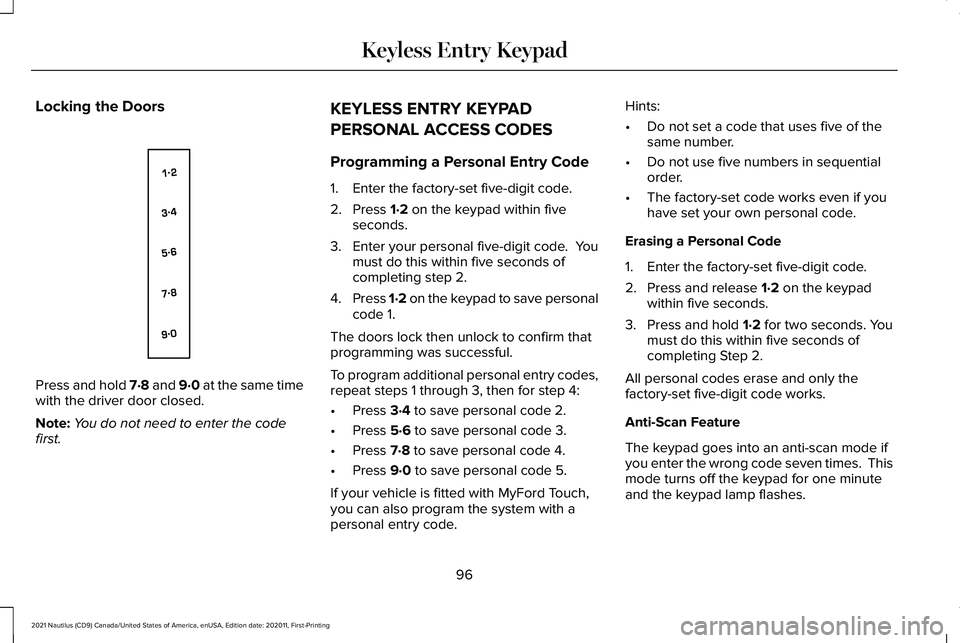
Locking the Doors
Press and hold 7·8 and 9·0 at the same time
with the driver door closed.
Note:
You do not need to enter the code
first. KEYLESS ENTRY KEYPAD
PERSONAL ACCESS CODES
Programming a Personal Entry Code
1. Enter the factory-set five-digit code.
2. Press 1·2 on the keypad within five
seconds.
3. Enter your personal five-digit code. You
must do this within five seconds of
completing step 2.
4. Press 1·2 on the keypad to save personal
code 1.
The doors lock then unlock to confirm that
programming was successful.
To program additional personal entry codes,
repeat steps 1 through 3, then for step 4:
• Press
3·4 to save personal code 2.
• Press
5·6 to save personal code 3.
• Press
7·8 to save personal code 4.
• Press
9·0 to save personal code 5.
If your vehicle is fitted with MyFord Touch,
you can also program the system with a
personal entry code. Hints:
•
Do not set a code that uses five of the
same number.
• Do not use five numbers in sequential
order.
• The factory-set code works even if you
have set your own personal code.
Erasing a Personal Code
1. Enter the factory-set five-digit code.
2. Press and release
1·2 on the keypad
within five seconds.
3. Press and hold
1·2 for two seconds. You
must do this within five seconds of
completing Step 2.
All personal codes erase and only the
factory-set five-digit code works.
Anti-Scan Feature
The keypad goes into an anti-scan mode if
you enter the wrong code seven times. This
mode turns off the keypad for one minute
and the keypad lamp flashes.
96
2021 Nautilus (CD9) Canada/United States of America, enUSA, Edition date: 202011, First-Printing Keyless Entry KeypadE138637
Page 155 of 579
WHAT IS REMOTE START
The system allows you to remotely start your
vehicle and to adjust the interior temperature
according to the settings that you chose.
REMOTE START PRECAUTIONS
WARNING: Do not start the engine
in a closed garage or in other enclosed
areas. Exhaust fumes are toxic. Always
open the garage door before you start the
engine. Failure to follow this instruction
could result in personal injury or death.
REMOTE START LIMITATIONS
Remote start does not work under the
following conditions:
• The alarm horn is sounding.
• The hood is open.
• The transmission is not in park (P). •
The ignition is on.
• The battery voltage is below the
minimum operating voltage.
Note: Do not use remote start if your fuel
level is low.
Note: To use remote start with Lincoln Way
or Phone as a Key, enable the modem.
See
Connecting the Vehicle to a Wi-Fi Network
(page
417).
ENABLING REMOTE START
1. Using the instrument cluster display controls on the steering wheel, select
Settings
.
2. Select
Vehicle.
3. Select
Remote Start.
4. Switch
System on.
Note: To use remote start, make sure that
the modem is enabled.
See Enabling and
Disabling the Modem (page 417). REMOTELY STARTING AND
STOPPING THE VEHICLE
Remotely Starting the Vehicle Press the button on the remote
control.
Within three seconds, press the
button on the remote control.
Within three seconds, press the
button again.
Note: You can also use the Lincoln Way App
to start the vehicle.
Note: The direction indicators flash twice.
Note: The parking lamps turn on when the
vehicle is running.
Note: The horn sounds if the system fails to
start.
Note: All other vehicle systems remain off
when you have remotely started the vehicle.
Note: The vehicle remains secured when
you have remotely started the vehicle. A
valid key must be inside your vehicle to
switch the ignition on and drive your vehicle.
151
2021 Nautilus (CD9) Canada/United States of America, enUSA, Edition date: 202011, First-Printing Remote StartE138623 E138625
Page 160 of 579
Directing Air to the Footwell Air Vents
Press the button to activate the
selection screen.
Press the button on the
touchscreen.
AUTO MODE
Switching Auto Mode On and Off Press the button to switch auto
mode on. Repeatedly press the
button to adjust auto mode.
The system adjusts the blower motor speed,
air distribution, air conditioning operation,
and outside or recirculated air to reach and
maintain the temperature you have set. Adjust the blower motor control to switch
auto mode off.
Note:
The system starts at the previous
setting when you switch on auto mode.
Note: You can also switch off the dual zone
mode by pressing and holding the button for
more than two seconds.
Auto Mode Indicators
The indicators are on the Auto Mode button. Description
Auto Mode Indicator Status
The blower motor speed is reduced. Use this setting to minimize the amou\
nt of noise from the
blower motor. This setting increases the time taken to cool the interior.
One indicator illuminated.
The blower motor speed is moderate.
Two indicators illuminated.
The blower motor speed is increased. Use this setting to reduce the time\
taken to cool the interior.
This setting increases the amount of noise from the blower motor.
Three indicators illuminated.
156
2021 Nautilus (CD9) Canada/United States of America, enUSA, Edition date: 202011, First-Printing Climate ControlE265283
Page 161 of 579
CLIMATE CONTROL –
TROUBLESHOOTING
Climate Control – Frequently Asked
Questions
Why is the volume of air to the rear
passenger compartment limited ?
Objects may obstruct the air direction
to the rear passenger compartment.
Make sure objects have not been
placed under the front seats.
Why is the volume of air from the air vents
reduced? The air intake area at the base of the
windshield could be obstructed. Make
sure the air intake area is free from any
snow, ice or leaves.
What are the recommended settings for
heating the interior? Auto mode on and instrument panel and
side air vents fully open. How can I quickly heat the interior?
Select the highest blower motor speed,
highest temperature and direct the air
to the footwell air vents.
What are the recommended settings for
cooling the interior? Auto mode on.
How can I quickly cool the interior? Switch maximum cooling on, switch
recirculated air on and drive with the
windows open until you feel cold air
through the air vents.
How can I reduce the humidity build-up
inside my vehicle? Do not drive with the system off or with
recirculated air on.
How can I defog the side windows? Switch maximum defrost on.
How can I defog or clear the windshield of
thin ice? Switch maximum defrost on. Why do I feel air from the footwell air vents
regardless of the air distribution?
This is normal operation. You may feel
a small amount of air from the footwell
air vents regardless of the air
distribution.
What happens if I switch auto mode on
when the outside temperature and
in-vehicle temperature is high? The system temporarily selects
recirculated air to maximize cooling.
What happens if I switch auto mode on
when the outside temperature is low and
the engine is cold? Air is directed to the windshield and the
outer instrument panel air vents.
157
2021 Nautilus (CD9) Canada/United States of America, enUSA, Edition date: 202011, First-Printing Climate Control
Page 167 of 579
MASSAGE SEATS
Massage Seat Limitations
The engine must be running or the vehicle
must be in accessory mode to activate the
seats.
Allow a few seconds for any selection to
activate. When the seat backrest and cushion
are both active, the massage alternates
between zones.
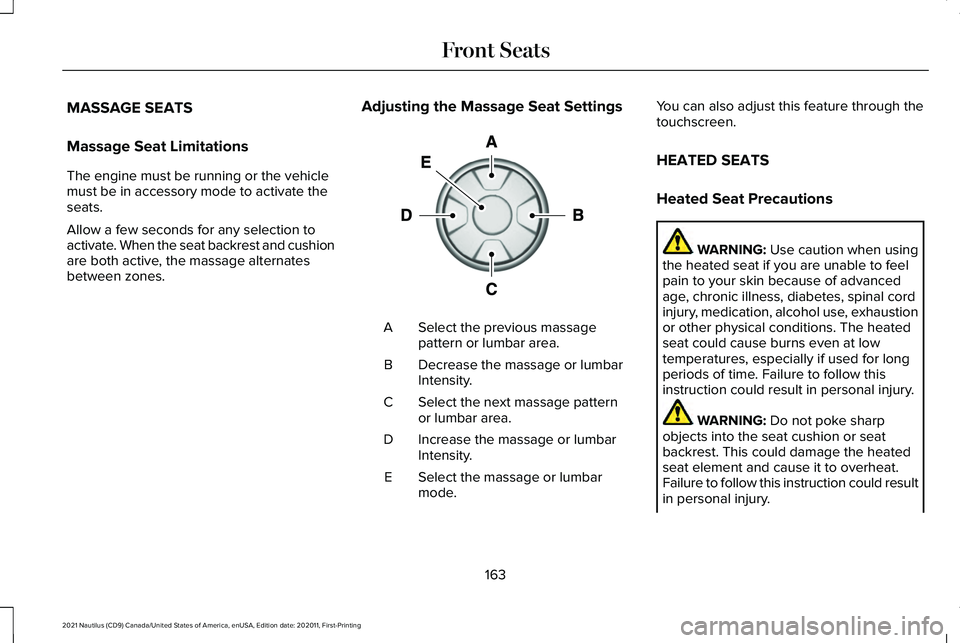
Adjusting the Massage Seat Settings Select the previous massage
pattern or lumbar area.
A
Decrease the massage or lumbar
Intensity.
B
Select the next massage pattern
or lumbar area.
C
Increase the massage or lumbar
Intensity.
D
Select the massage or lumbar
mode.
E You can also adjust this feature through the
touchscreen.
HEATED SEATS
Heated Seat Precautions
WARNING: Use caution when using
the heated seat if you are unable to feel
pain to your skin because of advanced
age, chronic illness, diabetes, spinal cord
injury, medication, alcohol use, exhaustion
or other physical conditions. The heated
seat could cause burns even at low
temperatures, especially if used for long
periods of time. Failure to follow this
instruction could result in personal injury. WARNING:
Do not poke sharp
objects into the seat cushion or seat
backrest. This could damage the heated
seat element and cause it to overheat.
Failure to follow this instruction could result
in personal injury.
163
2021 Nautilus (CD9) Canada/United States of America, enUSA, Edition date: 202011, First-Printing Front SeatsE156301
Page 190 of 579
STARTING AND STOPPING THE
ENGINE – PRECAUTIONS
WARNING: Extended idling at high
engine speeds can produce very high
temperatures in the engine and exhaust
system, creating the risk of fire or other
damage. WARNING:
Do not park, idle or drive
your vehicle on dry grass or other dry
ground cover. The emission system heats
up the engine compartment and exhaust
system, creating the risk of fire. WARNING:
Do not start the engine
in a closed garage or in other enclosed
areas. Exhaust fumes are toxic. Always
open the garage door before you start the
engine. Failure to follow this instruction
could result in personal injury or death. WARNING:
Do not use starting fluid,
for example ether, in the air intake system.
Such fluid could cause immediate
explosive damage to the engine and
possible personal injury. WARNING: Exhaust leaks may result
in entry of harmful and potentially lethal
fumes into the passenger compartment. If
you smell exhaust fumes inside your
vehicle, have your vehicle inspected
immediately. Do not drive if you smell
exhaust fumes.
The powertrain control system meets all
Canadian interference-causing equipment
standard requirements regulating the
impulse electrical field or radio noise.
If you stop your vehicle and leave the engine
idling for long periods, we recommend that
you do one of the following:
• Open the windows at least
1 in (2.5 cm).
• Set your climate control to outside air. PUSH BUTTON IGNITION SWITCH
Switching the Ignition Off
When the ignition is on or in accessory mode,
press the push button ignition switch once
without your foot on the brake pedal.
Switching the Ignition to Accessory
Mode
When the ignition is off, press the push
button ignition switch once without your foot
on the brake pedal.
All electrical circuits and accessories are
operational and the warning lamps and
indicators illuminate.
186
2021 Nautilus (CD9) Canada/United States of America, enUSA, Edition date: 202011, First-Printing Starting and Stopping the EngineE321258
Page 191 of 579
Note:
Your vehicle has a battery saver
feature that shuts your vehicle off when it
detects a certain amount of battery drain, or
after approximately 30 minutes of inactivity
in accessory mode.
Starting the Engine
With the transmission in park (P), press the
brake pedal and press the push button
ignition switch. An indicator light on the
button illuminates when the ignition is on
and when the engine starts.
Note: The system may not function if the
passive key is close to metal objects or
electronic devices, for example keys or a
cell phone.
Note: A valid key must be inside your vehicle
to switch the ignition on and start the engine. STARTING THE ENGINE
Starting a Gasoline Engine
Before starting your vehicle, check the
following:
•
Make sure that the headlamps and
electrical accessories are off.
• Make sure that the parking brake is on.
• Make sure that the transmission is in park
(P).
1. Fully press the brake pedal.
Note: Do not touch the accelerator pedal. 2. Press the push button ignition switch.
Note:
The engine may continue cranking for
up to 15 seconds or until it starts.
Note: The engine takes longer to start at
lower temperatures. It may crank for several
seconds when very cold. Restarting the Engine After Stopping
it
The system allows you to start the engine
within 10 seconds of switching it off, even if
it does not detect a valid passive key.
Within 10 seconds of switching the engine
off, fully press the brake pedal and press the
push button ignition switch. After 10 seconds,
you can no longer start the engine if the
system does not detect a valid passive key.
When you start the engine, it remains running
until you press the push button ignition
switch, even if your vehicle does not detect
a valid passive key. If you open and close a
door when the engine is running, the system
searches for a valid passive key.
187
2021 Nautilus (CD9) Canada/United States of America, enUSA, Edition date: 202011, First-Printing Starting and Stopping the EngineE321258
Page 215 of 579
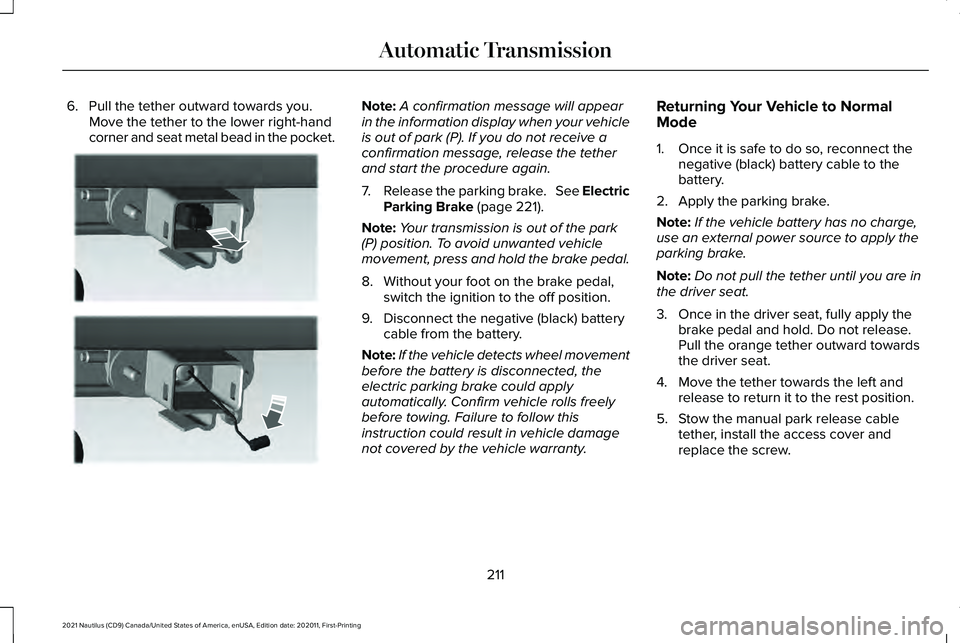
6. Pull the tether outward towards you.
Move the tether to the lower right-hand
corner and seat metal bead in the pocket. Note:
A confirmation message will appear
in the information display when your vehicle
is out of park (P). If you do not receive a
confirmation message, release the tether
and start the procedure again.
7. Release the parking brake. See Electric
Parking Brake (page 221).
Note: Your transmission is out of the park
(P) position. To avoid unwanted vehicle
movement, press and hold the brake pedal.
8. Without your foot on the brake pedal, switch the ignition to the off position.
9. Disconnect the negative (black) battery cable from the battery.
Note: If the vehicle detects wheel movement
before the battery is disconnected, the
electric parking brake could apply
automatically. Confirm vehicle rolls freely
before towing. Failure to follow this
instruction could result in vehicle damage
not covered by the vehicle warranty. Returning Your Vehicle to Normal
Mode
1. Once it is safe to do so, reconnect the
negative (black) battery cable to the
battery.
2. Apply the parking brake.
Note: If the vehicle battery has no charge,
use an external power source to apply the
parking brake.
Note: Do not pull the tether until you are in
the driver seat.
3. Once in the driver seat, fully apply the brake pedal and hold. Do not release.
Pull the orange tether outward towards
the driver seat.
4. Move the tether towards the left and release to return it to the rest position.
5. Stow the manual park release cable tether, install the access cover and
replace the screw.
211
2021 Nautilus (CD9) Canada/United States of America, enUSA, Edition date: 202011, First-Printing Automatic TransmissionE272553
Page 216 of 579
6.
With your foot fully applied on the brake
pedal, start your vehicle. Confirm that
your vehicle is in the park (P) position and
that the instrument cluster indicates park
(P).
7. If the instrument cluster is not displaying
the park (P) position or there is a
message stating Park Not Available,
Transmission Not In Park or Shift System
Fault, apply the parking brake before
exiting your vehicle. Have the system
checked.
AUTOMATIC TRANSMISSION
AUDIBLE WARNINGS
Transmission Not In Park (P) Audible
Warning
Sounds if you open the driver door before
shifting into park (P).
Park (P) Selection Audible Warning
Sounds when you shift into park (P). AUTOMATIC TRANSMISSION –
TROUBLESHOOTING
Automatic Transmission – Information
Messages You switched the
engine off and shift
select lever is in any position other than park (P).
Shift to Park
Transmission is toocold. Wait for it to
warm up before you drive.
Transmission
Warming Up Please Wait
The transmission isoverheating and
needs to cool. Stop in a safe place as
soon as it’ s possible.
Transmission Over
Temperature Stop Safely
Have system
checked as soon as possible.
Transmission
Service Required The transmission is
overheating and
needs to cool. Stop in a safe place as
soon as it’ s possible.
Transmission Too
Hot Press Brake
The transmission has
limited functionality. Have system
checked as soon as possible.
Transmission Limited
Function See Manual
A reminder to shift
into park. In addition, this message is
typical after recon- necting or rechar-
ging the battery until you cycle the igni-
tion to the on mode. See Changing the
12V Battery (page
345).
Transmission Not in
Park
212
2021 Nautilus (CD9) Canada/United States of America, enUSA, Edition date: 202011, First-Printing Automatic Transmission