ECO mode LINCOLN NAUTILUS 2021 Owner's Manual
[x] Cancel search | Manufacturer: LINCOLN, Model Year: 2021, Model line: NAUTILUS, Model: LINCOLN NAUTILUS 2021Pages: 579, PDF Size: 6.9 MB
Page 268 of 579
WHAT IS DRIVE MODE CONTROL
Your vehicle has various drive modes that
you can select for different driving
conditions. Depending on the drive mode
that you select, the system adjusts various
vehicle settings.
HOW DOES DRIVE MODE
CONTROL WORK
Drive mode control adjusts your vehicle
configuration for each mode you select.
Changing the drive mode changes the
functionality of the steering system to adjust
the steering effort and feel.
Active noise control utilizes your vehicle
electronics to enhance the acoustic
experience.
The stability and traction control assist your
vehicle control in adverse conditions or
high-performance driving.
Throttle control enhances the powertrain
response, transmission controls become
optimized with shift schedules, and
four-wheel drive settings are optimized and
tuned to each mode.
Note:
The system has diagnostic checks that
continuously monitor the system for proper
operation. If a mode is unavailable due to a
system fault, the mode defaults to normal.
SELECTING A DRIVE MODE
You can configure which of the drive control
modes are active when your vehicle is in
drive (D) or in sport (S). The configuration
remains active until modified from the main
menu on the instrument cluster display. See
Instrument Cluster Display Main Menu
(page 144).
Note: Not all settings may be available.
Note: Drive mode changes may not be
available when the ignition is off. DRIVE MODES
Comfort
Provides a more relaxed driving experience,
maximizing comfort. Your steering effort
decreases and the suspension movement is
more fluid. Comfort mode is ideal when you
desire enhanced traveling comfort.
Normal
Delivers a balanced combination of a
comfortable, controlled ride and confident
handling. This mode provides an engaging
driving experience and a direct connection
to the road without sacrificing any of the
composure demanded from a luxury vehicle.
Sport
Provides a sportier driving experience. The
suspension stiffens, with an emphasis on
handling and control. The engine responds
more directly to your inputs and takes on a
more powerful tone. This mode is ideal for
use during more spirited driving.
264
2021 Nautilus (CD9) Canada/United States of America, enUSA, Edition date: 202011, First-Printing Drive Mode Control
Page 307 of 579
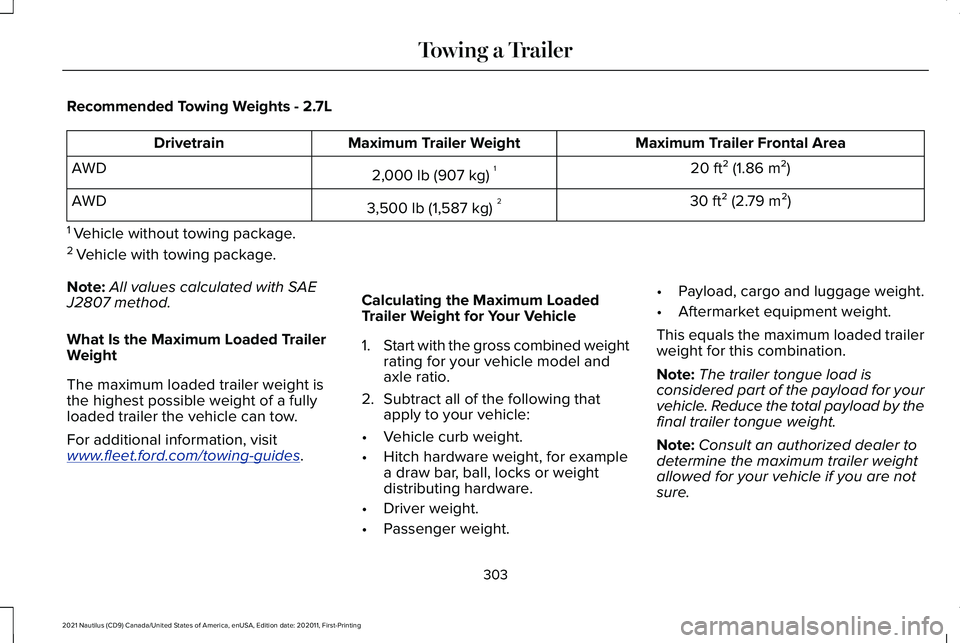
Recommended Towing Weights - 2.7L
Maximum Trailer Frontal Area
Maximum Trailer Weight
Drivetrain
20 ft² (1.86 m²)
2,000 lb (907 kg) 1
AWD
30 ft² (2.79 m²)
3,500 lb (1,587 kg) 2
AWD
1 Vehicle without towing package.
2 Vehicle with towing package.
Note: All values calculated with SAE
J2807 method.
What Is the Maximum Loaded Trailer
Weight
The maximum loaded trailer weight is
the highest possible weight of a fully
loaded trailer the vehicle can tow.
For additional information, visit
www . fleet. ford. com/towing-guides .Calculating the Maximum Loaded
Trailer Weight for Your Vehicle
1.
Start with the gross combined weight
rating for your vehicle model and
axle ratio.
2. Subtract all of the following that
apply to your vehicle:
• Vehicle curb weight.
• Hitch hardware weight, for example
a draw bar, ball, locks or weight
distributing hardware.
• Driver weight.
• Passenger weight. •
Payload, cargo and luggage weight.
• Aftermarket equipment weight.
This equals the maximum loaded trailer
weight for this combination.
Note: The trailer tongue load is
considered part of the payload for your
vehicle. Reduce the total payload by the
final trailer tongue weight.
Note: Consult an authorized dealer to
determine the maximum trailer weight
allowed for your vehicle if you are not
sure.
303
2021 Nautilus (CD9) Canada/United States of America, enUSA, Edition date: 202011, First-Printing Towing a Trailer
Page 346 of 579
Fail-Safe Cooling
Fail-safe cooling allows you to temporarily
drive your vehicle before any incremental
component damage occurs. The fail-safe
distance depends on ambient temperature,
vehicle load and terrain.
How Fail-Safe Cooling Works
If the engine begins to overheat,
the coolant temperature gauge
moves toward the red zone:
A warning lamp illuminates and a
message may appear in the
information display.
If the engine reaches a preset
over-temperature condition, the engine
automatically switches to alternating cylinder
operation. Each disabled cylinder acts as an
air pump and cools the engine.
When this occurs, your vehicle still operates,
however:
• Engine power is limited.
• The air conditioning system turns off. Continued operation increases the engine
temperature, causing the engine to
completely shut down. Your steering and
braking effort increases in this situation.
When the engine temperature cools, you can
re-start the engine. Have your vehicle
checked as soon as possible to minimize
engine damage.
When Fail-Safe Mode Is Activated
WARNING: Fail-safe mode is for use
during emergencies only. Operate your
vehicle in fail-safe mode only as long as
necessary to bring your vehicle to rest in
a safe location and seek immediate repairs.
When in fail-safe mode, your vehicle will
have limited power, will not be able to
maintain high-speed operation, and may
completely shut down without warning,
potentially losing engine power, power
steering assist, and power brake assist,
which may increase the possibility of a
crash resulting in serious injury. WARNING: Do not remove the
coolant reservoir cap when the engine is
on or the cooling system is hot. Wait 10
minutes for the cooling system to cool
down. Cover the coolant reservoir cap with
a thick cloth to prevent the possibility of
scalding and slowly remove the cap.
Failure to follow this instruction could result
in personal injury.
Your vehicle has limited engine power when
in the fail-safe mode, drive your vehicle with
caution. Your vehicle does not maintain
high-speed operation and the engine could
operate poorly.
Remember that the engine is capable of
automatically shutting down to prevent
engine damage. In this situation:
1. Pull off the road as soon as safely possible and switch the engine off.
2. If you are a member of a roadside assistance program, we recommend that
you contact your roadside assistance
service provider.
342
2021 Nautilus (CD9) Canada/United States of America, enUSA, Edition date: 202011, First-Printing Maintenance
Page 548 of 579
Gracenote uses a unique identifier to track
queries for statistical purposes. The purpose
of a randomly assigned numeric identifier is
to allow Gracenote to count queries without
knowing anything about who you are. For
more information, see the web page at
www.gracenote.com for the Gracenote
Privacy Policy.
THE GRACENOTE SOFTWARE, EACH ITEM
OF GRACENOTE DATA AND THE
GRACENOTE CONTENT ARE LICENSED TO
YOU "AS IS". NEITHER GRACENOTE MAKES
ANY REPRESENTATIONS OR WARRANTIES,
EXPRESS OR IMPLIED, REGARDING THE
ACCURACY OF ANY GRACENOTE DATA
FROM THE GRACENOTE SERVERS OR
GRACENOTE CONTENT. GRACENOTE
COLLECTIVELY AND SEPARATELY RESERVE
THE RIGHT TO DELETE DATA AND/OR
CONTENT FROM THE COMPANIES'
RESPECTIVE SERVERS OR, IN THE CASE OF
GRACENOTE, CHANGE DATA CATEGORIES
FOR ANY CAUSE THAT GRACENOTE
DEEMS SUFFICIENT. NO WARRANTY IS
MADE THAT EITHER GRACENOTE
CONTENT OR THE GRACENOTE SOFTWARE
OR GRACENOTE SERVERS ARE
ERROR-FREE OR THAT THE FUNCTIONING
OF THE GRACENOTE SOFTWARE OR
GRACENOTE SERVERS WILL BE
UNINTERRUPTED. GRACENOTE IS NOT
OBLIGATED TO PROVIDE YOU WITH ANY
ENHANCED OR ADDITIONAL DATA TYPES
THAT GRACENOTE MAY CHOOSE TO
PROVIDE IN THE FUTURE AND IS FREE TO
DISCONTINUE ITS ONLINE SERVICES AT
ANY TIME. GRACENOTE DISCLAIM ALL
WARRANTIES EXPRESS OR IMPLIED,
INCLUDING, BUT NOT LIMITED TO, IMPLIED
WARRANTIES OF MERCHANTABILITY,
FITNESS FOR A PARTICULAR PURPOSE,
TITLE, AND NON-INFRINGEMENT. NEITHER
GRACENOTE WARRANTS THE RESULTS
THAT WILL BE OBTAINED BY YOUR USE
OF THE GRACENOTE SOFTWARE OR ANY
GRACENOTE SERVER. IN NO CASE WILL
GRACENOTE BE LIABLE FOR ANY
CONSEQUENTIAL OR INCIDENTAL
DAMAGES OR FOR ANY LOST PROFITS OR
LOST REVENUES FOR ANY REASON
WHATSOEVER. © Gracenote 2007.
Taiwan Territory
Note: In accordance with the management
approach of low-power radio wave radiation
motors:
Article 12: For approved and certified
low-power radiation motor models,
companies, firms or users must not alter the
frequency, increase the power or change the
characteristics and functions of the original
design without authorization.
Article 14: The usage of low-power
radio-frequency motors must not affect
aviation safety and interfere with legal
telecommunications. Should interference be
detected, immediately stop using the device
and only resume usage after ensuring that
there is no longer any interference. For the
legal telecommunication and wireless
telecommunication of the telco, the
low-power radio frequency motor must be
able to tolerate legal limits of interference
from telecommunication, industrial, scientific
and radio wave equipment.
544
2021 Nautilus (CD9) Canada/United States of America, enUSA, Edition date: 202011, First-Printing Customer Information
Page 561 of 579
Catalytic Converter –
Troubleshooting.........................................204
Catalytic Converter – Warning Lamps..........204
Center Console................................................31
Changing a Flat Tire.....................................391 ........................................................................\
........396
Dissimilar Spare Wheel and Tire Assembly
Information.......................................................391
Stowing the flat tire ...........................................396
Tire Change Procedure....................................392
Changing a Road Wheel.............................391
Changing the 12V Battery..........................345 Remove and Reinstall the Battery..................347
Changing the Engine Air Filter..................344
Changing the Fuel Filter.............................344
Changing the Remote Control Battery.............................................................76
Changing the Vehicle Wi-Fi Hotspot Name or Password.................................................421
Changing the Wi-Fi Hotspot Frequency.......422
Charging a Device .........................................178
Charging a Wireless Device.......................183
Checking MyKey System Status.................87 MyKey Distance.....................................................87
Number of Admin Keys.......................................87
Number of MyKeys...............................................87
Checking the Brake Fluid
...........................218 Checking the Coolant.................................340
Adding Coolant...................................................340
Coolant Change...................................................341
Engine Coolant Temperature
Management...................................................343
Fail-Safe Cooling................................................342
Severe Climates...................................................341
Checking the Seatbelts................................60
Checking the Tire Pressures.....................374
Checking the Wiper Blades.........................116
Children and Airbags.....................................67
Child Restraint Anchor Points
......................40
Locating the Child Restraint Lower Anchor
Points....................................................................41
Locating the Child Restraint Top Tether Anchor Points.....................................................41
What Are the Child Restraint Anchor Points...................................................................40
Child Restraints
................................................41
Child Restraint Position Information..................41
Child Restraints Recommendation...................43
Child Safety
......................................................39
Child Restraint Anchor Points............................40
Child Restraints.......................................................41
Installing Child Restraints....................................44
Child Safety Locks..........................................52 Left-Hand Side.......................................................52
Right-Hand Side....................................................52 Child Safety Precautions
...............................39
Cleaning Products........................................354
Materials...............................................................354
Cleaning the Exterior
..................................355
Cleaning Camera Lenses and Sensors........356
Cleaning Chrome, Aluminium or Stainless
Steel..................................................................355
Cleaning Headlamps and Rear Lamps.........355
Cleaning Stripes or Graphics..........................356
Cleaning the Engine Compartment...............356
Cleaning Wheels................................................356
Cleaning Windows and Wiper Blades
..........355
Cleaning the Interior....................................357 Cleaning Carpets and Floor Mats..................358
Cleaning Displays and Screens......................357
Cleaning Fabric Seats and Headliners.........358
Cleaning Leather and Vinyl ............................357
Cleaning Moonroof Tracks...............................359
Cleaning Plastic...................................................357
Cleaning Seatbelts.............................................358
Cleaning Storage Compartments..................358
Cleaning the Instrument Panel........................357
Clearing All MyKeys.......................................86
Clearing the Garage Door Opener...........176
Climate Control..............................................154 Auto Mode............................................................156
Climate Control – Troubleshooting................157
557
2021 Nautilus (CD9) Canada/United States of America, enUSA, Edition date: 202011, First-Printing Index
Page 563 of 579
Cruise Control Indicators...........................252
Cup Holders....................................................184
Cup Holder Precautions....................................184
Customer Information..................................472
Radio Frequency Certification Labels...........476
Customizing the Instrument Cluster Display
...........................................................147
D
Data Privacy
.....................................................22
Services That Third Parties Provide.................23
Services That We Provide..................................22
Declaration of Conformity
..........................476
Radio Frequency Statement............................476
Department of Transportation Uniform Tire Quality Grades
...........................................363
Temperature A B C.............................................364
Traction AA A B C...............................................363
Treadwear............................................................363
Digital Radio
..................................................426
Digital Radio Indicators.....................................427
Digital Radio Limitations...................................427
How Does Digital Radio Work.........................426
Switching Digital Radio Reception On and
Off......................................................................427
What Is Digital Radio.........................................426 Directing the Flow of Air.............................155
Directing Air to the Footwell Air Vents..........156
Directing Air to the Instrument Panel Air
Vents..................................................................155
Directing Air to the Windshield Air Vents..................................................................155
Disposing of Airbags......................................72
Distance Alert................................................283 Adjusting the Sensitivity of Distance
Alert...................................................................283
What Is Distance Alert.......................................283
Distance Indication......................................282 Distance Indication Indicator...........................
283
Switching Distance Indication On and Off......................................................................283
What Is Distance Indication.............................282
Doors and Locks Audible Warnings
...........91
Door Ajar Audible Warning.................................91
Doors and Locks.............................................89 Autolock...................................................................91
Autounlock.............................................................90
Doors and Locks – Troubleshooting................91
Mislock......................................................................91
Operating the Doors From Inside Your
Vehicle................................................................90
Operating the Doors From Outside Your Vehicle................................................................89 Doors and Locks – Troubleshooting..........91
Doors and Locks – Information
Messages...........................................................92
Doors and Locks – Warning Lamps..................91
Drive Belt Routing Overview - 2.0L.........345
Drive Belt Routing Overview - 2.7L..........345
Drive Mode Control.....................................264 Drive Modes........................................................264
Drive Modes
..................................................264
Comfort.................................................................264
Normal...................................................................264
Sport......................................................................264
Driver Alert.....................................................287 Driver Alert – Troubleshooting.......................288
Driver Alert Limitations...............................288
Driver Alert Precautions.............................287
Driver Alert – Troubleshooting.................288 Driver Alert – Information Messages............288
Driving Economically
...................................306
Driving Hints..................................................305
Driving Through Water...............................305
E
Easy Entry and Exit.........................................99
Electric Parking Brake Audible Warning........................................................222
559
2021 Nautilus (CD9) Canada/United States of America, enUSA, Edition date: 202011, First-Printing Index
Page 578 of 579
Unlocking the Doors............................................97
Using the Remote Control............................75 Liftgate.....................................................................75
Lock........................................................................\
..75
Panic Alarm.............................................................75
Remote Start...........................................................75
Unlock......................................................................75
Using the Tire Sealant and Inflator Kit...................................................................379
First Stage: Reinflating the Tire with sealing compound and air.........................................380
Second Stage: Checking the tire pressure with the inflator kit.........................................382
Tips for use of the kit.........................................379
What to do after the tire has been sealed...............................................................382
What to do when a tire is punctured.............379
Using the Valet Mode.....................................81
Using This Publication....................................18
V
Vehicle Care..................................................354
Cleaning the Exterior.........................................355
Cleaning the Interior..........................................
357
Vehicle Identification Number...................416 Locating the Vehicle Identification
Number..............................................................416 Vehicle Identification Number Overview......416
Vehicle Identification
....................................416
Vehicle Identification Number ..........................416
Vehicle Interior
................................................33
Vehicle System Updates............................452
Vehicle Wi-Fi Hotspot...................................421
Ventilated Seats
.............................................164
Switching the Ventilated Seats On and
Off.......................................................................164
Ventilation See: Climate Control..........................................154
Venting the Moonroof..................................136
Viewing the Tire Pressures........................387
Visual Search...................................................27
Voice Interaction Examples.......................435
Voice Interaction
...........................................435
W
Washer Fluid Specification.........................413
Washers............................................................117 Adding Washer Fluid...........................................118
Switching the Courtesy Wipe On and Off......117
Using the Rear Window Washer.......................117
Using the Windshield Washer...........................117
Washer Fluid Specification................................118
Washer Precautions.............................................117 Washers
See: Wipers and Washers..................................114
Waxing.............................................................357
Waypoints.......................................................450 Adding a Waypoint............................................450
Editing Waypoints..............................................450
What Are the Instrument Cluster Indicators.......................................................141
What Are the Instrument Cluster Warning Lamps............................................................139
What Is a Connected Vehicle.....................417
What Is Active Park Assist..........................246
What Is Auto-Start-Stop...............................194
What Is Blind Spot Information System..........................................................273
What Is Cross Traffic Alert..........................276
What Is Cruise Control.................................251 Requirements.......................................................251
What Is Drive Mode Control......................264
What Is Driver Alert......................................287
What Is Hill Start Assist...............................225
What Is Lincoln Protect
...............................456
Lincoln Protect (Canada Only).........................457
Lincoln Protect Extended Service Plans
(United States Only)......................................456
What Is Phone As a Key................................80
What Is Pre-Collision Assist.......................279
What Is Remote Start.....................................151
574
2021 Nautilus (CD9) Canada/United States of America, enUSA, Edition date: 202011, First-Printing Index