traction control LINCOLN NAUTILUS 2021 User Guide
[x] Cancel search | Manufacturer: LINCOLN, Model Year: 2021, Model line: NAUTILUS, Model: LINCOLN NAUTILUS 2021Pages: 579, PDF Size: 6.9 MB
Page 241 of 579
Note:
If the detected object is 12 in (30 cm)
or less from your vehicle, visual indication
remains on.
SIDE PARKING AID
What is the Side Parking Aid
The front and rear outermost parking aid
sensors map objects that are near to the
sides of your vehicle.
Side Parking Aid Limitations
The sensor coverage is up to
24 in (60 cm)
from the sides of your vehicle.
The side parking aid may not function if:
• You switch your vehicle on, off and back
on within a few seconds.
• Your vehicle remains stationary for over
two minutes.
• The anti-lock brake system activates.
• The traction control system activates. •
Your vehicle is in park (P).
• The steering wheel angle information is
not available. You must drive at least
492 ft (150 m) above 19 mph (30 km/h) to
reset the steering wheel angle
information.
Note: If you switch traction control off, the
side sensing system also turns off.
To reinitialize the system, drive the length of
your vehicle.
The side parking aid does not detect an
object that is moving toward the side of your
vehicle, for example another vehicle moving
at a low speed, if it does not pass a front or
rear parking aid sensor.
If the transmission is in reverse (R), the side
sensing system provides audible warnings.
When your vehicle is moving slowly,
obstacles are detected within
24 in (60 cm)
and are inside the driving path of your
vehicle. Once your vehicle reaches a
standstill condition, the audible warning
stops after a few seconds. Visual indication
is always present in reverse (R). If your vehicle is in neutral (N), the side
sensing system provides visual indication
only when your vehicle is moving slowly and
there is a front or rear park aid obstacle
detected, and the side obstacle is within
24 in (60 cm)
from the side of your vehicle.
Once your vehicle reaches a stop, the visual
indication stops after a few seconds.
If the transmission is in drive (D) or any other
forward gear, the side sensing system
provides audible and visual warnings. When
your vehicle is moving slowly, obstacles are
detected within
24 in (60 cm) and are inside
the driving path of your vehicle. Once your
vehicle reaches a standstill condition, the
audible warning and visual indication stops
after a few seconds.
237
2021 Nautilus (CD9) Canada/United States of America, enUSA, Edition date: 202011, First-Printing Parking Aids
Page 252 of 579
Note:
Active park assist aligns the front-end
of your vehicle with the lane side of the
object next to it.
Note: When only one object is detected, the
system allows enough distance to open the
door on either side.
Note: You can slow down your vehicle at
any time by pressing the brake pedal.
EXITING A PARKING SPACE
Active park assist only assists leaving parallel
parking spaces.
1. Press the active park assist button.
2. Select parallel park exit.
3. Use the turn signal to choose the direction to exit the parking space.
4. Press and hold the brake pedal.
5. Release the steering wheel and shift into
the instructed gear.
6. Release the parking brake. 7.
Use the accelerator and brake to control
your vehicle's speed when exiting the
parking space. You are responsible for
stopping your vehicle.
8. Active park assist is multi-step process and requires you to shift the transmission
multiple times. Follow the onscreen
instructions until operation is complete.
Note: After active park assist drives your
vehicle to a position where you can exit the
parking space in a forward movement, a
message appears instructing you to take full
control of your vehicle.
9. Take control of your vehicle.
Note: You can slow down your vehicle at
any time by pressing the brake pedal. ACTIVE PARK ASSIST –
TROUBLESHOOTING
Active Park Assist – Information
Messages Action
Message
The system requiresservice. Have your
vehicle checked as soon as possible.
Active Park Fault
Active Park Assist – Frequently Asked
Questions
Why does active park assist not operate
correctly? The system is unable to detect a vehicle,
curb or object to park next to or in
between. The system needs boundary
objects to operate correctly.
Why does active park assist not search for
a parking space? You have switched traction control off.
248
2021 Nautilus (CD9) Canada/United States of America, enUSA, Edition date: 202011, First-Printing Active Park Assist (If Equipped)
Page 261 of 579
ADAPTIVE CRUISE CONTROL
AUTOMATIC CANCELLATION
The system may cancel if:
•
The tires lose traction.
• You apply the parking brake.
The system may cancel and set the parking
brake if:
• You unbuckle the seatbelt and open the
driver door after you stop your vehicle.
• Your vehicle is at a stop continuously for
more than three minutes.
The system may deactivate or prevent
activating when requested if:
• The vehicle has a blocked sensor.
• The brake temperature is too high.
• There is a failure in the system or a
related system.
SETTING THE ADAPTIVE CRUISE
CONTROL SPEED
Drive to the speed you prefer. Press either button to set the
current speed.
Take your foot off the accelerator pedal.
The indicator, current gap setting and set
speed appear in the information display. A vehicle image illuminates if there is a
vehicle detected in front of you.
Note:
When adaptive cruise control is active,
the speedometer may vary slightly from the
set speed displayed in the information
display. Setting the Adaptive Cruise Speed
from a Complete Stop Press and release either button
while keeping the brake pedal fully
pressed.
The set speed adjusts to 20 mph (30 km/h).
The indicator, current gap setting and set
speed appear in the information display.
Manually Changing the Set Speed Press and release to increase the
set speed in small increments.
Press and hold to increase the set speed in
large increments. Release the button when
you reach the speed you prefer. Press and release to decrease the
set speed in small increments.
Press and hold to decrease the set speed in
large increments. Release the button when
you reach the speed you prefer.
257
2021 Nautilus (CD9) Canada/United States of America, enUSA, Edition date: 202011, First-Printing Adaptive Cruise Control (If Equipped)E265299 E255686 E265299 E265299
Page 268 of 579
WHAT IS DRIVE MODE CONTROL
Your vehicle has various drive modes that
you can select for different driving
conditions. Depending on the drive mode
that you select, the system adjusts various
vehicle settings.
HOW DOES DRIVE MODE
CONTROL WORK
Drive mode control adjusts your vehicle
configuration for each mode you select.
Changing the drive mode changes the
functionality of the steering system to adjust
the steering effort and feel.
Active noise control utilizes your vehicle
electronics to enhance the acoustic
experience.
The stability and traction control assist your
vehicle control in adverse conditions or
high-performance driving.
Throttle control enhances the powertrain
response, transmission controls become
optimized with shift schedules, and
four-wheel drive settings are optimized and
tuned to each mode.
Note:
The system has diagnostic checks that
continuously monitor the system for proper
operation. If a mode is unavailable due to a
system fault, the mode defaults to normal.
SELECTING A DRIVE MODE
You can configure which of the drive control
modes are active when your vehicle is in
drive (D) or in sport (S). The configuration
remains active until modified from the main
menu on the instrument cluster display. See
Instrument Cluster Display Main Menu
(page 144).
Note: Not all settings may be available.
Note: Drive mode changes may not be
available when the ignition is off. DRIVE MODES
Comfort
Provides a more relaxed driving experience,
maximizing comfort. Your steering effort
decreases and the suspension movement is
more fluid. Comfort mode is ideal when you
desire enhanced traveling comfort.
Normal
Delivers a balanced combination of a
comfortable, controlled ride and confident
handling. This mode provides an engaging
driving experience and a direct connection
to the road without sacrificing any of the
composure demanded from a luxury vehicle.
Sport
Provides a sportier driving experience. The
suspension stiffens, with an emphasis on
handling and control. The engine responds
more directly to your inputs and takes on a
more powerful tone. This mode is ideal for
use during more spirited driving.
264
2021 Nautilus (CD9) Canada/United States of America, enUSA, Edition date: 202011, First-Printing Drive Mode Control
Page 270 of 579
LANE KEEPING SYSTEM
LIMITATIONS
The lane keeping system only operates when
the vehicle speed is greater than 40 mph
(64 km/h).
The system works when the camera can
detect at least one lane marking.
The lane keeping system may not correctly
operate in any of the following conditions:
• The lane keeping system does not detect
at least one lane marking.
• You switch the turn signal on.
• You apply direct steering, accelerate fast
or brake hard.
• The vehicle speed is less than
40 mph
(64 km/h).
• The anti-lock brake, stability control or
traction control system activates.
• The lane is too narrow.
• Something is obscuring the camera or it
is unable to detect the lane markings due
to environment, traffic or vehicle
conditions. The lane keeping system may not correct
lane positioning in any of the following
conditions:
•
High winds.
• Uneven road surfaces.
• Heavy or uneven loads.
• Incorrect tire pressure.
SWITCHING THE LANE KEEPING
SYSTEM ON AND OFF To activate the lane keeping
system, press the button on the
turn signal lever.
Note: The system stores the on or off setting
until manually changed, unless it detects a
MyKey™. If the system detects a MyKey™, it
defaults to on and the mode is set to alert.
Note: If the system detects a MyKey™,
pressing the button does not affect the on
or off status of the system. You can only
change the mode and intensity settings. SWITCHING THE LANE KEEPING
SYSTEM MODE
The lane keeping system has different
settings that you can view or adjust using
the information display.
The system stores the last known selection
for each of these settings. You do not need
to readjust your settings each time you
switch on the system.
To change the lane keeping system mode,
use the instrument cluster display:
1. Using the instrument cluster display
controls on the steering wheel, select
SETTINGS
.
2. Select
Driver assistance.
3. Select
Lane keeping system.
4. Select
Mode.
5. Select a mode.
Note: The system remembers the last setting
when you start your vehicle. If the system
detects a MyKey™, it defaults to the last
setting for that MyKey™.
266
2021 Nautilus (CD9) Canada/United States of America, enUSA, Edition date: 202011, First-Printing Lane Keeping SystemE308131
Page 310 of 579
When driving through standing water, drive
very slowly and do not stop your vehicle.
Your brake performance and traction may
be limited. After driving through water and
as soon as it is safe to do so:
•
Lightly press the brake pedal to dry the
brakes and to check that they work.
• Check that the horn works.
• Check that the exterior lights work.
• Turn the steering wheel to check that the
steering power assist works. DRIVING ECONOMICALLY
The following helps to improve fuel
consumption:
•
Drive smoothly, accelerate gently and
anticipate the road ahead to avoid heavy
braking.
• Regularly check your tire pressures and
make sure that they are inflated to the
correct pressure.
• Follow the recommended maintenance
schedule and carry out the
recommended checks.
• Plan your journey and check the traffic
before you set off. It is more efficient to
combine errands into a single trip
whenever possible.
• Avoid idling the engine in cold weather
or for extended periods. Start the engine
only when you are ready to set off.
• Do not carry unnecessary weight in your
vehicle as extra weight wastes fuel. •
Do not add unnecessary accessories to
the exterior of your vehicle, for example
running boards. If you use a roof rack,
remember to fold it down or remove it
when not in use.
• Do not shift into neutral when you are
braking or when your vehicle is slowing
down.
• Shut all windows when driving at high
speeds.
• Switch off all electric systems when not
in use, for example air conditioning. Make
sure that you unplug any accessories
from the auxiliary power points when not
in use.
FLOOR MATS WARNING: Use a floor mat designed
to fit the footwell of your vehicle that does
not obstruct the pedal area. Failure to
follow this instruction could result in the
loss of control of your vehicle, personal
injury or death.
306
2021 Nautilus (CD9) Canada/United States of America, enUSA, Edition date: 202011, First-Printing Driving HintsE259345
Page 367 of 579
LOCATING THE TIRE LABEL
You will find a Tire Label containing tire
inflation pressure by tire size and other
important information located on the
B-Pillar or the edge of the driver's door.
See Locating the Safety Compliance
Certification Labels (page 290).
DEPARTMENT OF
TRANSPORTATION UNIFORM TIRE
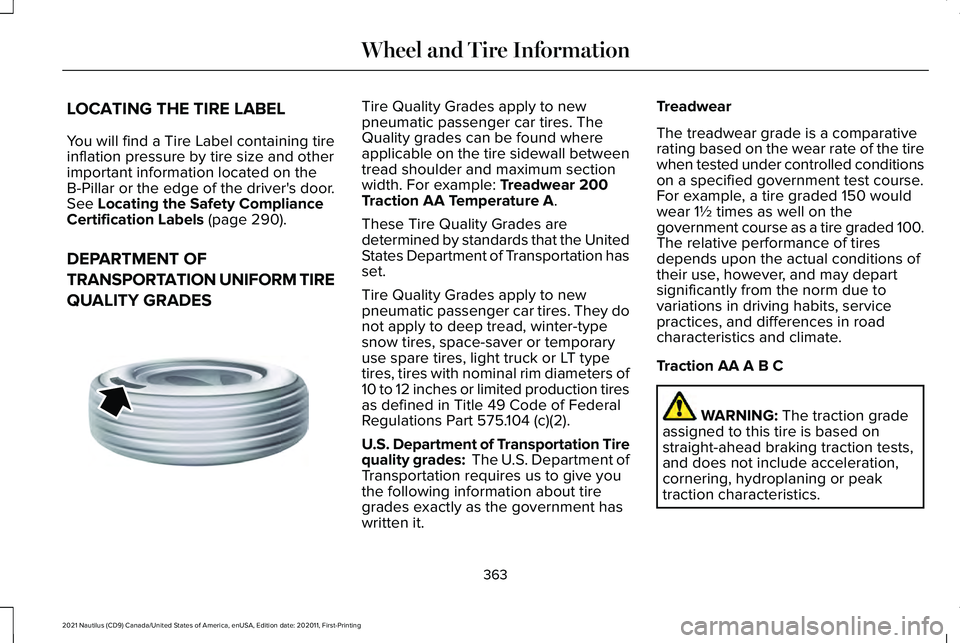
QUALITY GRADES Tire Quality Grades apply to new
pneumatic passenger car tires. The
Quality grades can be found where
applicable on the tire sidewall between
tread shoulder and maximum section
width. For example:
Treadwear 200
Traction AA Temperature A.
These Tire Quality Grades are
determined by standards that the United
States Department of Transportation has
set.
Tire Quality Grades apply to new
pneumatic passenger car tires. They do
not apply to deep tread, winter-type
snow tires, space-saver or temporary
use spare tires, light truck or LT type
tires, tires with nominal rim diameters of
10 to 12 inches or limited production tires
as defined in Title 49 Code of Federal
Regulations Part 575.104 (c)(2).
U.S. Department of Transportation Tire
quality grades: The U.S. Department of
Transportation requires us to give you
the following information about tire
grades exactly as the government has
written it. Treadwear
The treadwear grade is a comparative
rating based on the wear rate of the tire
when tested under controlled conditions
on a specified government test course.
For example, a tire graded 150 would
wear 1½ times as well on the
government course as a tire graded 100.
The relative performance of tires
depends upon the actual conditions of
their use, however, and may depart
significantly from the norm due to
variations in driving habits, service
practices, and differences in road
characteristics and climate.
Traction AA A B C
WARNING:
The traction grade
assigned to this tire is based on
straight-ahead braking traction tests,
and does not include acceleration,
cornering, hydroplaning or peak
traction characteristics.
363
2021 Nautilus (CD9) Canada/United States of America, enUSA, Edition date: 202011, First-Printing Wheel and Tire InformationE142542
Page 368 of 579
The traction grades, from highest to
lowest are AA, A, B, and C. The grades
represent the tire
’s ability to stop on wet
pavement as measured under controlled
conditions on specified government test
surfaces of asphalt and concrete. A tire
marked C may have poor traction
performance.
Temperature A B C WARNING: The temperature
grade for this tire is established for a
tire that is properly inflated and not
overloaded. Excessive speed,
underinflation, or excessive loading,
either separately or in combination,
can cause heat buildup and possible
tire failure.
The temperature grades are A (the
highest), B and C, representing the tire ’s
resistance to the generation of heat and
its ability to dissipate heat when tested
under controlled conditions on a
specified indoor laboratory test wheel.
Sustained high temperature can cause the material of the tire to degenerate
and reduce tire life, and excessive
temperature can lead to sudden tire
failure. The grade C corresponds to a
level of performance which all
passenger car tires must meet under the
Federal Motor Vehicle Safety Standard
No. 139. Grades B and A represent
higher levels of performance on the
laboratory test wheel than the minimum
required by law.
INFORMATION ON THE TIRE
SIDEWALL
Both United States and Canada Federal
regulations require tire manufacturers
to place standardized information on the
sidewall of all tires. This information
identifies and describes the fundamental
characteristics of the tire and also
provides a U.S. DOT Tire Identification
Number for safety standard certification
and in case of a recall.
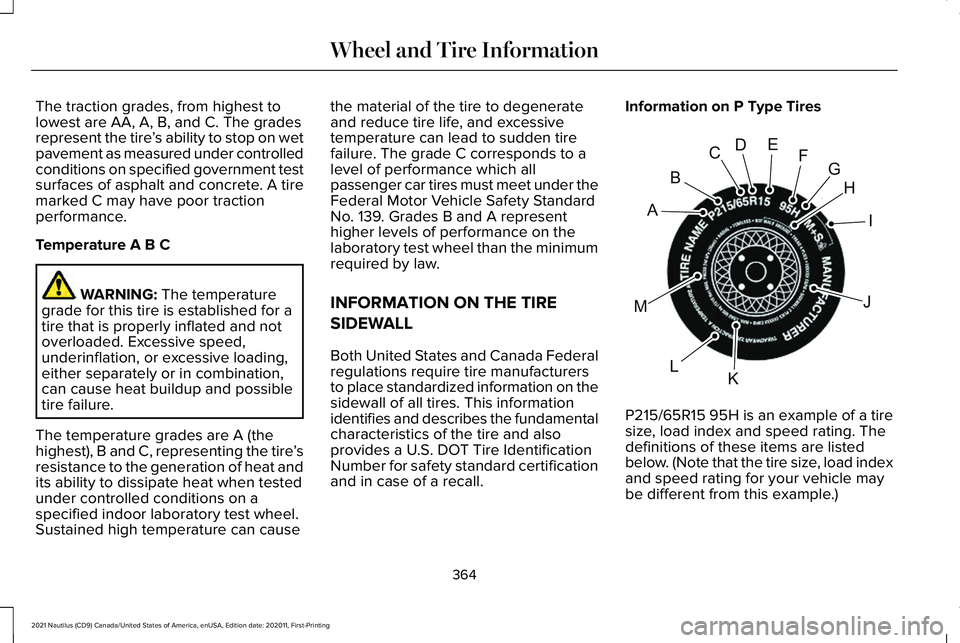
Information on P Type Tires
P215/65R15 95H is an example of a tire
size, load index and speed rating. The
definitions of these items are listed
below. (Note that the tire size, load index
and speed rating for your vehicle may
be different from this example.)
364
2021 Nautilus (CD9) Canada/United States of America, enUSA, Edition date: 202011, First-Printing Wheel and Tire InformationH
I
J
KL
M
A
B
CDEFGE142543
Page 370 of 579
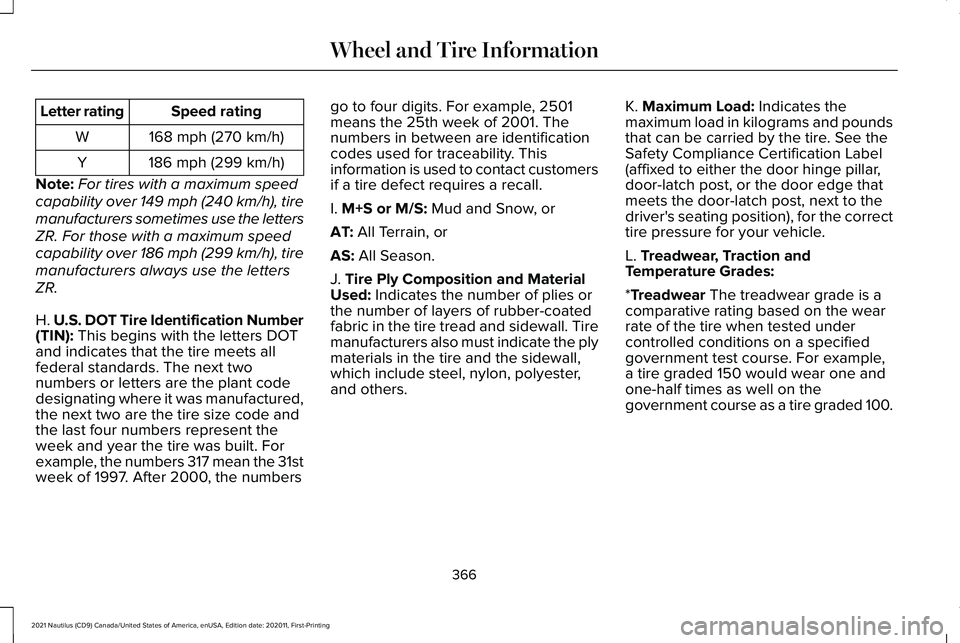
Speed rating
Letter rating
168 mph (270 km/h)
W
186 mph (299 km/h)
Y
Note: For tires with a maximum speed
capability over 149 mph (240 km/h), tire
manufacturers sometimes use the letters
ZR. For those with a maximum speed
capability over 186 mph (299 km/h), tire
manufacturers always use the letters
ZR.
H. U.S. DOT Tire Identification Number
(TIN): This begins with the letters DOT
and indicates that the tire meets all
federal standards. The next two
numbers or letters are the plant code
designating where it was manufactured,
the next two are the tire size code and
the last four numbers represent the
week and year the tire was built. For
example, the numbers 317 mean the 31st
week of 1997. After 2000, the numbers go to four digits. For example, 2501
means the 25th week of 2001. The
numbers in between are identification
codes used for traceability. This
information is used to contact customers
if a tire defect requires a recall.
I.
M+S or M/S: Mud and Snow, or
AT:
All Terrain, or
AS:
All Season.
J.
Tire Ply Composition and Material
Used: Indicates the number of plies or
the number of layers of rubber-coated
fabric in the tire tread and sidewall. Tire
manufacturers also must indicate the ply
materials in the tire and the sidewall,
which include steel, nylon, polyester,
and others. K.
Maximum Load: Indicates the
maximum load in kilograms and pounds
that can be carried by the tire. See the
Safety Compliance Certification Label
(affixed to either the door hinge pillar,
door-latch post, or the door edge that
meets the door-latch post, next to the
driver's seating position), for the correct
tire pressure for your vehicle.
L.
Treadwear, Traction and
Temperature Grades:
*
Treadwear The treadwear grade is a
comparative rating based on the wear
rate of the tire when tested under
controlled conditions on a specified
government test course. For example,
a tire graded 150 would wear one and
one-half times as well on the
government course as a tire graded 100.
366
2021 Nautilus (CD9) Canada/United States of America, enUSA, Edition date: 202011, First-Printing Wheel and Tire Information
Page 371 of 579
*Traction: The traction grades, from
highest to lowest are AA, A, B, and C.
The grades represent the tire's ability to
stop on wet pavement as measured
under controlled conditions on specified
government test surfaces of asphalt and
concrete. A tire marked C may have
poor traction performance.
*
Temperature: The temperature grades
are A (the highest), B and C,
representing the tire's resistance to the
generation of heat and its ability to
dissipate heat when tested under
controlled conditions on a specified
indoor laboratory test wheel.
M.
Maximum Inflation Pressure:
Indicates the tire manufacturers'
maximum permissible pressure or the
pressure at which the maximum load
can be carried by the tire. This pressure
is normally higher than the vehicle
manufacturer's recommended cold
inflation pressure which can be found
on the Safety Compliance Certification
Label (affixed to either the door hinge
pillar, door-latch post, or the door edge
that meets the door-latch post, next to the driver's seating position), or Tire
Label which is located on the B-Pillar or
the edge of the driver’
s door. The cold
inflation pressure should never be set
lower than the recommended pressure
on the vehicle label.
The tire suppliers may have additional
markings, notes or warnings such as
standard load or radial tubeless.
Additional Information Contained on
the Tire Sidewall for LT Type Tires
Note: Tire Quality Grades do not apply
to this type of tire. LT type tires have some additional
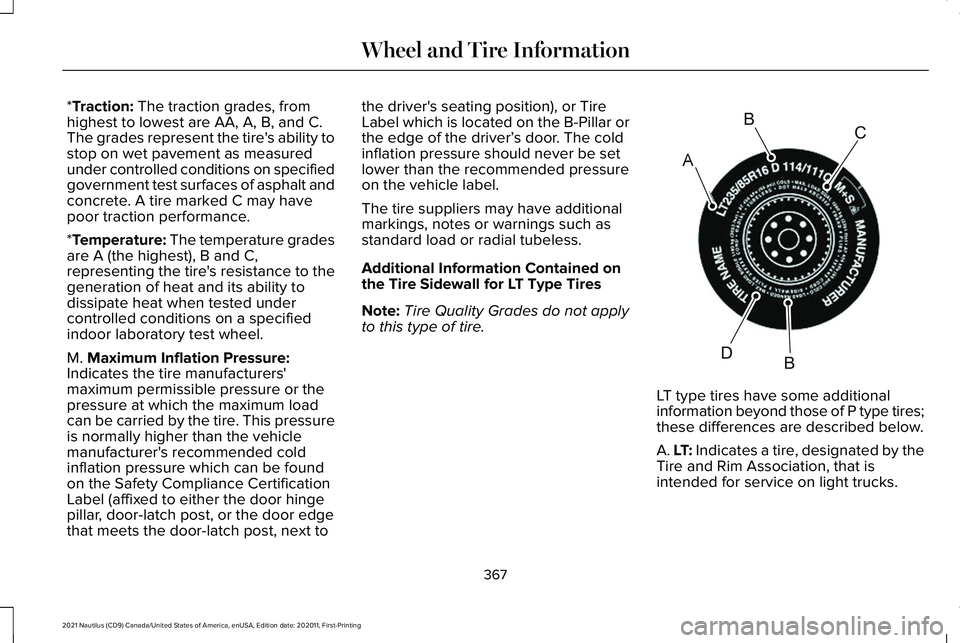
information beyond those of P type tires;
these differences are described below.
A. LT: Indicates a tire, designated by the
Tire and Rim Association, that is
intended for service on light trucks.
367
2021 Nautilus (CD9) Canada/United States of America, enUSA, Edition date: 202011, First-Printing Wheel and Tire InformationA
BC
BDE142544